
TMM1250 - Drill Tryton - Free user manual and instructions
Find the device manual for free TMM1250 Tryton in PDF.


| Product Type | Drill |
| Brand | Tryton |
| Model | TMM1250 |
| Power Source | Corded electric |
| Power Consumption | 500 W |
| No-Load Speed | 0 – 2800 rpm |
| Variable Speed | Yes, with trigger |
| Chuck Type | Keyless |
| Chuck Capacity | 1.5 – 10 mm |
| Drilling Capacity (Steel) | 10 mm |
| Drilling Capacity (Wood) | 25 mm |
| Dimensions (L x W x H) | 250 x 200 x 70 mm |
| Weight | 1.2 kg |
| Cable Length | 2.0 m |
| Insulation Class | Double insulated (Class II) |
| Safety Lock | Lock-on button for continuous use |
| Soft Grip | Yes, ergonomic handle |
| Maintenance | Regular cleaning, carbon brush replacement when worn |
| Spare Parts Available | Chuck, carbon brushes, power cord, switch |
| Accessories Included | Drill bit set, depth stop, carrying case |
Frequently Asked Questions - TMM1250 Tryton
User questions about TMM1250 Tryton
0 question about this device. Answer the ones you know or ask your own.
Ask a new question about this device
Download the instructions for your Drill in PDF format for free! Find your manual TMM1250 - Tryton and take your electronic device back in hand. On this page are published all the documents necessary for the use of your device. TMM1250 by Tryton.
USER MANUAL TMM1250 Tryton
E E K T R O N A R Z I

natural_image
Illustration of a Tryton Rotor drill press with handle and control panel (no text or symbols)TMM1250
EN
Operating instruction
ROTARY HAMMER 4
PL



BEFORE YOU START USING THE MACHINE READ THOROUGHLY THIS MANUAL.
Keep this document for future reference.
WARNING! Read all safety warnings marked with a symbol ⚠️ and all operating safety instructions.
To limit the risk of fire, electric shock and injury while using the device, follow all operating safety instructions and tips provided below.
Keep all work safety instructions and tips for future reference.
In warnings provided herein the expression "power tool" means a power tool powered from the mains (with a power cord) or a battery powered power tool (cordless).

WARNING! General work safety warnings for use of the tool.
Workplace safety:
a) Keep your workplace tidy and well lit. Untidiness and bad lighting result in higher accident rate.
b) Do not use the power tool in explosive environments, created by flammable liquids, gases or dusts. The power tool generates sparks that can ignite dust or vapors.
c) Keep children and unauthorized persons away from the place where the power tools are used. Inattention may result in losing control over your power tool.

WARNING! General warnings regarding the use of power tools.
Electric safety:
a) Plugs used in power tools must match wall outlets. Never modify the plug of your power tool. Do not use any extension cables when operating a power tool with a grounding/earthing conductor (PE). Any modifications of plugs and outlets increase the risk of electric shock.
b) Avoid touching earthed surfaces or grounded items like pipes, heaters, central heating radiators and refrigerators. Touching earthed or grounded surfaces increases the risk of electric shock.
c) Do not expose your power tool to rain or damp environments. Water penetrating the tool increases the risk of electric shock.
d) Do not damage the power cord. Never use the power cord to carry, pull the power tool and do not pull by its power cord to disconnect plug from the outlet. Keep the power cord away from sources of heat, oils, sharp edges and moving parts. Damaged or entangled power cords increase the risk of electric shock.
e) When your power tool is operated outdoors use extension cords intended for outdoor use only. Using an extension cable intended for outdoor use decreases the risk of electric shock.
f) It is recommended to connect the device to a mains supply equipped with a residual current device (RCD) with a rated current of 30 mA or less.
g) When it is unavoidable to use your power tool in a damp environment use an RCD (Residual Current Device) for protection. The use of RCDs decreases the risk of electric shock.

WARNING! General warnings regarding the use of power tools.
Personal safety:
a) This equipment is not intended for use by persons (including children) disabled physically, mentally, sensorial or persons with no experience and knowledge in operating the equipment unless they operate the equipment under supervision or follow user's instructions provided by persons responsible for their safety.
b) It is necessary to predict steps, watch and keep common sense when using power tools. Do not operate power tools when you are tired, under influence of drugs, medicine or alcohol. A moment of inattention while operating a power tool may result in serious personal injury.
c) Use personal protective equipment (PPE). Always wear safety goggles. Wearing personal protective equipment (PPE) including a dust mask, anti-slippery footwear, a helmet and ear protection reduces personal injury.
d) Avoid unexpected start up. Before connecting your power tool to the mains and/or inserting a battery make sure its power switch is in off position. Carrying your power tool with a finger on its power switch or without disconnecting it from the mains (switched on) may result in an accident.
e) Before starting your power tool remove any keys/wrenches. Leaving a key/wrench in the rotating part of your power tool may result in personal injury.
f) Do not lean forward too far. Always remain stable and maintain balance. It will allow you to have a better control over your power tool in unpredictable situations.
g) Wear appropriate clothing. Do not wear loose clothes or jewelry. Keep your hair tied. Keep your clothes away from moving parts. Loose clothes, jewelry or long hair may be caught by moving parts.
h) If your power tool allows for using an external dust extraction or collection system, make sure it is connected and used properly. Using dust collectors may reduce dust affected risks.
i) Do not let your skills gained through the frequent use of the power tool make you overconfident and disregard safety rules. Carelessness may cause injury in a fraction of a second.

WARNING! General warnings regarding the use of power tools.
Use and taking care of your power tool:
a) Do not overload your power tool. Use a power tool with power adjusted to work being done. An appropriately chosen power tool will allow you to work better and safer under load it has been designed for.
b) Do not use a power tool when its powerswitch is out of order (it does not switch it on or off). Any power tool with its power switch out of order is dangerous and must be repaired.
c) Always disconnect the plug from the power source and/or disconnect its battery before changing any settings, performing replacement or storage. Such preventive measures reduce the risk of accidental power tool start up.
d) Keep your power tool out of reach of children and do not allow unauthorized persons to use the power tool. Power tools in hands of untrained persons can be dangerous.
e) Power tools require maintenance. Check power tools for concentricity or jamming of moving parts, any cracks and all
other factors affecting the power tool work safety. If any damage to the power tool is detected, it should be repaired before use. Improper power tool maintenance is a reason for many accidents.
f) Cutting tools should be sharp and clean. Keeping sharp cutting edges in good condition reduces the risk of jamming and facilitates operation.
g) Power tools, equipment, working tools etc. should be used according to this user's manual taking into account operating conditions and the work to be done. Misusing a power tool can result in dangerous situations.
h) At low temperatures and after a long brakes in operation it is recommended to turn the power tool to operate it with no load for a few minutes to provide proper grease distribution inside its driving mechanism.
i) Use soft, damp (cannot be wet) cloth and soap to clean power tools. Do not use petrol, solvents and other agents that may damage your equipment.
j) Power tools can be stored/carried after making sure that all moving components are locked and protected against release with original devices intended for this purpose.
k) Store power tools in a dry, dust and water-protected place.
1) Carry your power tool in its original packaging to provide protection against mechanical damage.
m) Keep handles and grip surfaces clean and free from oil and grease. Secure grip and control over the tool in unexpected circumstances are impossible if handles and grip surfaces are slippery.

WARNING! General warnings regarding the use of power tools.
Repair:
a) Warranty and post-warranty repairs of its power tools are carried out by PROFIX Service, which guarantees the best quality or repair and use of genuine spare parts.

WARNING! ROTARY HAMMER, Additional Safety Warnings –
Personal Safety:
a) Wear ear protectors with rotary hammer. Long-term effect of noise may lead to damage of hearing or deafness.
b) Hold power tool by insulated gripping surfaces, when performing an operation where the cutting accessory may contact hidden wiring or its own cord. Cutting accessory contacting a "live" wire may make exposed metal parts of the power tool "live" and could give the operator an electric shock.
c) Use appropriate detectors to determine if utility lines are hidden in the work area or call the local utility company for assistance. Contact with electric lines can lead to fire and electric shock. Damaging a gas line can lead to explosion. Penetrating a water line causes property damage or may cause an electric shock.
d) Do not work materials containing asbestos. Asbestos is considered carcinogenic.
e) Keep your workplace clean and tidy. Material mixtures are extremely dangerous. Light metal dusts can ignite or explode.
f) Protect the object machined. Make sure all clamps are closed and check for excessive clearance. It is safer to fix the object machined in a fixing device or a vice than holding it in your hand.
g) Use auxiliary handles supplied with the tool. Loss of control can cause personal injury.
h) Prepare the tool before use. This tool produces high torque. Ensure adequate support during operation. Otherwise, you may lose control of the
tool leading to injury.
i) Always hold firmly the power tool with your both hands using both the main and auxiliary handle keeping a stable position. It is safer to control your power tool with both hands.
j) Turn the power tool immediately when the bit jams. Expect intense vibrations that can result in a kickoff. The bit jams when the power tool is overloaded or is bent inside the object.
k) Always unplug the tool from the mains socket during breaks, prior to changing bits, during repairs, cleaning or making adjustments. Before you put the power tool aside make sure it is completely stopped. The bit can jam resulting in losing control over the power tool.
1) Do not use a power tool with its power cord damaged. Do not touch the power cord when damaged; in case of damaging the power cord during operation unplug it from the mains. Damaged power cords increase the risk of electric shock.
m) If the power cord is damaged, it must be replaced with a special cord available from an authorized service center.
Safety instructions when using long drill bits
a) Never use a speed higher than the maximum drill bit speed. At higher speeds, the drill bit may bend if not in contact with the workpiece, resulting in injury.
b) Always start drilling at a low speed and after touching the workpiece to the drill bit. At higher speeds, the drill bit may bend if not in contact with the workpiece, resulting in injury.
c) Push the drill bit against the workpiece in line with the drill bit. Do not use excessive force. Drill bits may bend, causing damage and loss of control, which may result in injury.
APPLICATION AREA AND DESIGN OF THE HAMMER DRILL:
The rotary hammer is designed for impact drilling of boreholes in concrete, bricks and stone, as well as for light chiselling work. It can be also used for drilling in wood, metals, ceramic items or plastics when the impact functionality if switched off.
It is absolutely prohibited to use the tool in other applications.
The rotary hammer is driven by a vertical single-phase brushed motor.
The tool is not suitable for long-term heavy duty applications. It cannot be used for jobs requiring professional tools.
Each application of the tool not in line with the intended use as specified below is strictly forbidden and makes the warranty terms null and void. The manufacturer shall not be held responsible for possible consequential damage that may arise due to or in connection with such application.
Any modifications of the tool by the user relieve the manufacturer from responsibility for any damage and injuries to the user and the surroundings. Application of the tool in accordance with the intended use also refers to its maintenance, storage, transportation and repairs.
Defective electric tools can be handed over for repairs exclusively to service workshops appointed by the tool manufacturer. The tools supplied from electric grid shall be repaired exclusively by authorized electricians.
Despite using the tool according to its intended application it is impossible to eliminate certain residual risk factors. Considering the tool construction the following risks may occur when operating the tool:
- Contact of a rotating working tool during drilling with the operator's hand or clothes or contact with the power cord.
- Scalding at replacement of a working tool (During drilling the working tool gets very hot; to avoid scalding operators must wear protecting gloves when they replace working tools).
- Outburst of treated material or chips from treated material.
- Bending /breaking of a working tool.
■ :Delivery kit
- Rotary hammer - 1 pc.
- Auxiliary handle – 1 pc.
- Drilling depth limiter - 1 pc.
- Flat chisel - 1 pc.
- Point chisel - 1 pc.
• SDS-plus drilling tools—3 pcs. (8,10,12 mm)
• Rubberring fordust collection – 1 pc. - Carbon brushes – 2 pcs.
- Transportation case – 1 pc.
- User's manual – 1 pc.
- Warranty card – 1 pc.
■ Device components
The numbers of tool components refer to the image presented on pages 2-3 of the user manual:
Fig.A 1. SDS-plus tool holder
- Dust protection hood
- Locking sleeve
- Drilling depth limiter
- Fixing screw to fit the drilling depth limiter
- Button to release locking of the operation mode selector switch
- Operation mode selector switch
- Main handle with a slip resistant pad
-
On/Off trigger
-
Power voltage LED indicator
- Power cord
- Auxiliary handle
Fig.C 13. Securing bolt for the drilling chuck with a toothed ring*
- Drilling chuck with a toothed ring*
- Adapter stud to fix the drilling chuck to the SDS-plus socket*
Fig. F 16. Key for the drilling chuck with a toothed ring*
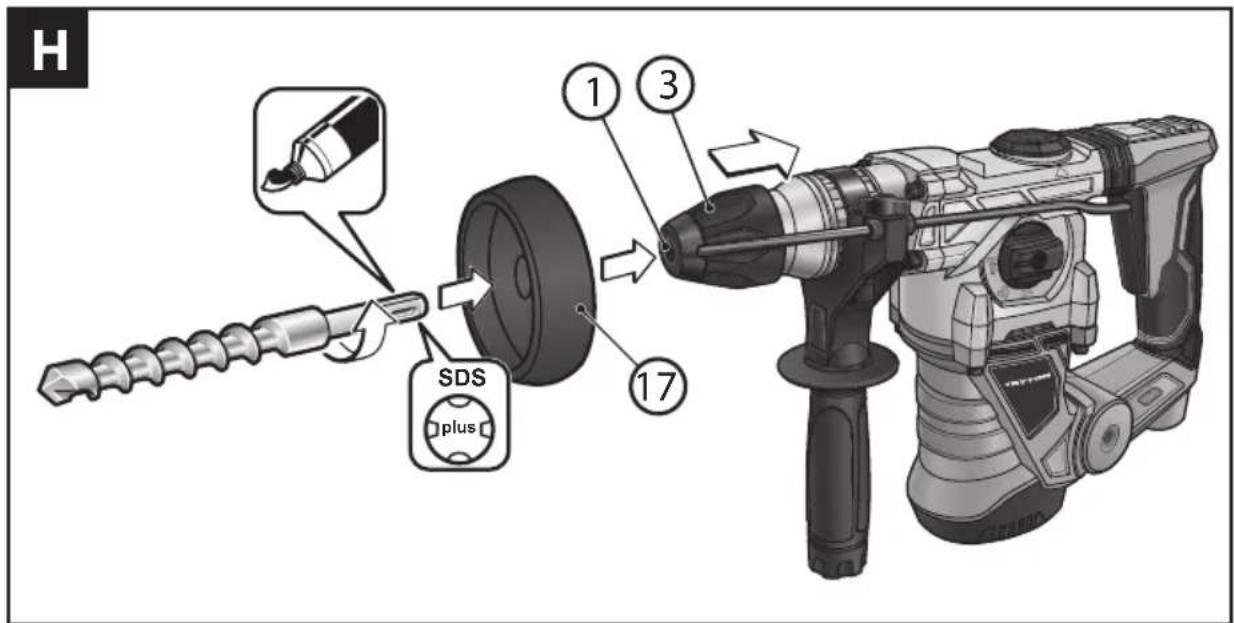
Fig. H 17. Rubber ring for dust collection
* Not all accessories presented or described herein are provided as standard with the power tool.
SPECIFICATIONS:
| Voltage | 220 V-240 V |
| Frequency | 50 Hz |
| Power consumption | 1250 W |
| No load speed _n | 0-850 rpm |
| Impact rate (bpm) /Impact energy | 0-4500 rpm/ 5 J |
| Drill chuck | SDS-plus |
| Maximum hole diameter | steel - 13 mm |
| concrete - 30 mm | |
| wood - 40 mm | |
| Weight (with no accessories) | 5,0 kg |
| Equipment Class | ☐/II |
| Ingress protection | IPX0 |
| Sound pressure level (LpA) ( ± 3dB(A)) | 90,9 dB(A) |
| Sound power level (LwA) ( ± 3dB(A)) | 101,9 dB(A) |
| Vibration level according to valid standard: | EN 60745-2-6 | |
| - hammer drilling in concrete a_hHD | main handle | 13,59 m/s ^2 |
| auxiliary handle | 11,265 m/s ^2 | |
| - chiseling a_hCheq | main handle | 14,30 m/s ^2 |
| auxiliary handle | 14,510 m/s ^2 | |
| - tolerance of measurements | 1,5 m/s ^2 | |
The vibration level value given refers to basic application of the tool. If the tool is used for other applications or with other tools, or if it is not maintained properly, the vibration level may differ from the values given. The above-mentioned causes may lead to higher exposure to vibrations during the whole work time.
One must implement additional safety measures to protect the operators from exposure to vibrations, such as maintenance of the electric tool and work tools, assurance of proper hand temperature, or determination of the sequence of work operations.
The declared total vibrations and declared noise emissions were measured in accordance with a standard test method and may be used for tool comparison.
The declared total vibrations and noise emissions can be used in preliminary exposure assessment.
Warnings:
The vibrations and noise emissions during the actual use of the power tool may differ from the declared values depending on how the tool is used and on the type of the workpiece in particular.
Determine safeguards to protect the operator. They should be based on the estimated exposure under actual operational conditions (taking into account all parts of the operating cycle such as when the tool is switched off or idle except the start time).
BEFORE YOU START:
- Make sure that the power source parameters match the tool parameters on the data plate.
- Make sure that the on/off switch (9) of the tool is in the off position.
- Always work with use of the auxiliary handle (12). Risk of accidents at work can be avoided or mitigated if the machine is reliably held in both hands. The auxiliary handle is to be attached by encompassing the tool holder with the handle clamp and then the clamp is locked by rotating the handle clockwise.
The auxiliary handle can be swiveled to whichever direction to enable the operator to work in a convenient position of the body and to avoid excessive fatigue. After rotating the handle clockwise swivel it to the anti desired position and the retighten the clamp by rotating the handle clockwise for final fixation (Fig. B).
- While using an extension cord make sure that its parameters and wire cross-sections match the tool parameters. Extension cords should be as short as possible. When in use extension cords must be fully uncoiled.
ADJUSTMENT DURING WORKING WITH THE TOOL:
■ Selection of drilling tools (bits)
For impact drilling in concrete, bricks or stone as well as for chiseling one has to use SDS-plus tools that are to be inserted into the SDS-plus holder (1) of the machine.

To drill boreholes in steel or wood the tools without the SDS-plus functionality are used (e.g. drilling bits with cylindrical shanks). For such tools quick locking drilling chucks or chucks with a toothed ring are necessary.
CAUTION: Do never use tools without the SDS-plus functionality for impact drilling or chiseling! The non-SDS-plus tools and corresponding drilling chucks shall definitely get damaged during impact drilling or chiseling.
■ Installation of the drilling chuck with a toothed ring (Fig. C)
- Screw the SDS-plus adapter stud (15) into the drilling chunk with a toothed ring (14).
- Lock the drilling chunk with a toothed ring (14) with use of the securing bolt (13).
NOTE: Please remember that the securing bolt has the left-hand thread.
- Clean the rear end of the tool to be installed and lithium grease it slightly.
- Move the locking sleeve (3) back as far as possible and hold it in this position.
- Slide the adapter stud into the SDS-plus tool holder (1) with simultaneous rotation of the drilling chuck.
- Release the lock sleeve.
- Check reliability of locking by pulling the drilling chuck with a toothed ring outwards.
■ Removing of the drilling chuck with a toothed ring (Fig. D)
- Pull the locking sleeve (3) backwards and slide the drilling chuck with a toothed ring (14) out of the tool holder.
- After removing the replaceable drilling chuck with a toothed ring (14) must be protected from dirt. When necessary, slightly grease the toothed dog.
■ Tool replacement
The SDS-plus tool holder makes it possible to replace a working tool easily and conveniently with no need to use additional tools.
Due to the system feature, working tools of the SDS-plus type move in the holder with a little play. It is why axial run-out occurs when the machine runs with the idle speed. It has no influence onto dimension accuracy of the borehole to be drilled as the drilling bit is self-centered during drilling.
The dust protection hood (2) substantially prevents from penetration of dust into the tool holder during the machine operation. Take care to avoid damaging the dust hood (2) while inserting a tool into the tool holder.
Damaged dust protection hood must be immediately replaced. It is recommended to have the dust hood replaced at a service workshop.
■ Installation of the SDS-plus working tool (Fig. E)
- Clean the rear end of the tool to be installed and grease it slightly.
- Move the locking sleeve (3) back as far as possible and hold it in this position.
- Insert the tool into the tool holder by rotating it until resistance is felt.
- Release the lock sleeve.
- Check reliability of locking by pulling the tool outwards.
■ RemovingSDS-plus workingtool (Fig. E)

CAUTION: Right after completion of working the tool may be really hot. Avoid direct contact with a tool and wear appropriate protecting gloves.
- Push back the locking sleeve (3) and remove the tool.
- Clean the working tool carefully after removing it from the chuck.
■ Installation of working tools without SDS-plus functionalities (Fig.F)
• Install the drilling chuck with a toothed ring (14).
- Open the drilling chuck with a toothed ring by rotating the sleeve so
much as to enable sliding the working tool shank into the chuck. Insert the working tool.
- Insert the key (16) into appropriate holes of the drilling chuck with a toothed ring and uniformly fix the working tool.
- Reposition the switch (7) into the symbol 'No-impact drilling' -
■ Removing working tools without SDS-plus functionalities (Fig.F)

CAUTION: Right after completion of working the tool may be really hot. Avoid direct contact with a tool and wear appropriate protecting gloves.
- Use the key (16) designed for the drilling chuck to rotate the sleeve of the drilling chuck with a toothed ring (14) clockwise until the working tool is released.
- Clean the working tool carefully after removing it from the chuck.
■ Selection of the operation mode (Fig. G)
NOTE: The operation mode of the machine can be switched over only when the machine is off! Otherwise the electric device may be damaged.
Operation mode of the machine can be selected with use of the operation mode selector switch (7).
To change the operation mode it is necessary to depress the button (6) that releases locking of the operation mode selector switch and reposition the switch to the desired position until engagement of the locking pawl is heard.
No-impact drilling :
Set the switch (7) to the symbol-
Impact drilling:
Set the switch (7) to the symbol -T
Chiseling (rotation disabled):
Set the switch (7) to the symbol - ↗.
When the switch is set to the position 'Chiseling', the impact rate is automatically increased, which enables the tool to perform chiseling with the higher performance.
Repositioning of the chisel :
Insert a chisel into the tool holder.
Rotate the operation mode switch (7) to the position -∅.
Rotate the tool holder to set the chisel to the desired working position.
Set the operation mode selector switch (7) to the position 'Chiseling'. Thus, the tool holder is locked in its position.
While chiseling the operation mode selector switch (7) must always remain in the position 'Chiseling'.
■ Adjustment of the drilling depth (Fig. B)
The drilling depth limiter (4) is designed to set the desired depth of the drilling bit immersion X into the material. For that purpose do the following:
- insert the shank of the SDS-plus working tool into the holder (1) and drive it home. Otherwise, excessive play of the SDS-plus tool may lead to incorrect setting of the drilling depth;
- release the fixing screw (5) for the drilling depth limiter and slide the limiter (4) so much as to make the distance between the tip of the drilling bit and the tip of the limiter correspond to the desired drilling depth X ,
- lock the depth limiter by tightening the fixing screw.
■ Turning on/off
- To turn the power tool on press its On/Off trigger (9) and keep it pressed.
- To turn the power tool off just release the On/Off trigger (9).
■ Setting of the rotation speed/impact rate
By adjustment of the force the On/Off trigger (9) is depressed with one can control the rotation speed/impact rate in the infinitely continuous
manner.
Slight depressing the On/Off trigger (9) moves the machine with the low rotation speed/impact rate.
The stronger the On/Off trigger (9) is depressed the faster the machine rotates.
■ Overload safety coupling
When the running tool is seized or jammed, the driving torque is no longer transmitted to the spindle of the rotary hammer. Due to excessive forces and torques occurring when the machine is running operators should always reliably held the machine with two hands and take a steady position of the body.
When the running tool is seized, it is necessary to switch the machine off and release the tool. Be careful as switching the seized machine on leads to strong and rapid reaction torques.
■ LED indicator
The green LED indicator for the power voltage (10) goes on when the machine is connected to the electric power grid. When the indicator is on and the machine fails to start it may be the case that carbon brushes are worn out or the electric circuit of the machine motor is damaged.
When the LED indicator for the power voltage (10) is off and the machine fails to start it may be the case that the On/Off trigger or the power cord is defective.
■ Fully vibration-dampened main handle
The dampers in the main handle (8) absorb the vibrations transmitted to the user. This improves user comfort during the operation.
TIPS REGARDING OPERATION:
- To drill holes in ceramic tiles set the operation mode switch (7) to position 'No-impact drilling'. Once the hole in the ceramic tile is ready, set the operation mode switch to position 'drill' and continue impact drilling in this mode.
- When drilling in concrete, stone or walls hard alloy drill bits should be used.
- While drilling holes in a ceiling use a rubber dust collection ring (17), which should be installed on the drill bit (see Fig. H) to protect the tool against the falling dust.
- When drilling in metal use sharp metal drill bits only.
STORAGE AND MAINTENANCE:
Store the machine in a place away from children, keep it clean and protect from humidity and dust. Storage conditions should exclude any mechanical damage and weathering.
External plastic parts of the machine can be cleaned with use of a wet cloth and a mild cleaning agent. NOTE: NEVER use any solvent-based cleaning agents.
After drilling in concrete, in an intensely dusty environment, it is recommended to remove dust from ventilation holes and the chuck with compressed air (at a pressure of up to 0.3 MPa). It will prevent damage to the bearings and will remove the dust obstructing air flow to cool the motor.
Maintenance includes a periodic gearbox grease replacement. Replace the grease every 40-50 hours of operation.
Grease replacement should be carried out only by a specialized service centre or a qualified person to avoid any damage to the tool.
TRANSPORTATION:
The rotary hammer should be transported and stored in its transportation case that protects the tool from moisture, penetration of dust and fine particles. In particular it is necessary to protect the ventilation openings. Small objects that get into the device can damage the motor.
TROUBLESHOOTING GUIDE (TYPICAL PROBLEMS):
The tool does not work:
- check if the power cord is connected properly and check fuses,
- check and replace carbon brushes.
The rotary hammer works with jerksor sparks are visible:
NOTE! Carbon brushes can be replaced only by competent electricians.
- if the power tool does not work despite being supplied from a proper power source, have the tool repaired sending it to the service center address specified in warranty card.
MANUFACTURER:
PROFIX Ltd., 34 Marywilska Street, 03-228 Warsaw, POLAND.
PROTECTION OF THE ENVIRONMENT:

NOTE: The symbol nearby denotes that old equipment must never be thrown away together with other waste (with the penalty of a fine). Hazardous components of electronic equip-adversely affect the natural environment and human health.
Each household may contribute to the recovery and reuse (recycling) of old machinery and equipment. Both in Poland and Europe a system for recovery of used equipment either exists or is being created. The system obliges all organizations that sell such equipment to collect the used machinery and appliances. Moreover, general purpose collecting points for such equipment are available.
PICTOGRAMS:
Explanation of the icons located on the nominal plate and the information tags:

- «Read this instruction before switching on the power supply and starting the work»

- «Always wear safety goggles»

- «Wear hearing protection»

- «Wear a dust mask»

The policy of the PROFIX company consists in permanent improvements of the offered products and therefore the company reserves the right to make amendments to the product specification without a prior notice. The images included into the operation manual are only of the exemplary nature and may slightly differ from actual appearance of the device purchased.
This instruction manual is protected by copyright. Copying it without the written consent of PROFIX Co. Ltd. is prohibited.

PRZED PRZYSTĄPIENIEM DO UŻYTKOWANIA NALEŻY ZAPOZNAĆ SIĘ Z NINIEJSZĄ INSTRUKCJĄ.
(EN) EC/EU DECLARATION OF CONFORMITY (PL) DEKLARACJA ZGODNOŚCI WE/UE (RO) DECLARAȚIE DE CONFORMITATE CE/UE
(LV)EK/ES ATBILSTIBAS DEKLARACIJA (LT) EB/ES ATITIKTIES DEKLARACIJA (CS) ES/EU PROHLÁŠENÍ O SHODĚ
(HU) EK/EU-MEGFELELŐSÉGI NYILATKOZATA
(EN) MANUFACTURER
(PL) PRODUCENT
(RO) PRODUCĂTOR
(LV) RAŽOTĀJS
(LT) GAMINTOJAS
(CS) VÝROBCE
(HU) GYÁRTÓ
PROFIX Sp. z o.o. ul. Marywilska 34, 03-228 Warszawa
(EN) Person who was authorized to develop technical documentation:
(PL) Osoba upoważniona do przygotowania dokumentacji technicznej:
(RO) Persoana împuternicită pentru pregătirea documentației tehnice:
(LV) Persona atbildīga par tehniskās dokumentācijas sagatavošanu:
Representative of the Board for Certification

- E E K T R O N A R Z I
- TMM1250
- EN
- PL
- Workplace safety:
- Electric safety:
- APPLICATION AREA AND DESIGN OF THE HAMMER DRILL:
- The tool is not suitable for long-term heavy duty applications. It cannot be used for jobs requiring professional tools.
- ■ :Delivery kit
- ■ Device components
- Warnings:
- BEFORE YOU START:
- ADJUSTMENT DURING WORKING WITH THE TOOL:
- ■ Selection of drilling tools (bits)
- ■ Installation of the drilling chuck with a toothed ring (Fig. C)
- ■ Removing of the drilling chuck with a toothed ring (Fig. D)
- ■ Tool replacement
- ■ Installation of the SDS-plus working tool (Fig. E)
- ■ RemovingSDS-plus workingtool (Fig. E)
- ■ Installation of working tools without SDS-plus functionalities (Fig.F)
- ■ Removing working tools without SDS-plus functionalities (Fig.F)
- ■ Selection of the operation mode (Fig. G)
- No-impact drilling :
- Impact drilling:
- Chiseling (rotation disabled):
- Repositioning of the chisel :
- ■ Adjustment of the drilling depth (Fig. B)
- ■ Turning on/off
- ■ Setting of the rotation speed/impact rate
- ■ Overload safety coupling
- ■ LED indicator
- ■ Fully vibration-dampened main handle
- TIPS REGARDING OPERATION:
- STORAGE AND MAINTENANCE:
- TRANSPORTATION:
- TROUBLESHOOTING GUIDE (TYPICAL PROBLEMS):
- The tool does not work:
- The rotary hammer works with jerksor sparks are visible:
- MANUFACTURER:
- PROTECTION OF THE ENVIRONMENT:
- PICTOGRAMS:
- PROFIX Sp. z o.o. ul. Marywilska 34, 03-228 Warszawa
Brand : Tryton
Model : TMM1250
Category : Drill