
TSA8020 - Ventilateur domestique Teesa - Free user manual and instructions
Find the device manual for free TSA8020 Teesa in PDF.


| Product Type | Standing fan |
| Model | TSA8020 |
| Brand | Teesa |
| Power Consumption | 55 W |
| Power Supply | 220-240 V, 50/60 Hz |
| Grill Diameter | 42.5 cm |
| Blade Diameter | 38 cm |
| Height Adjustment Range | 115-135 cm |
| Number of Speed Settings | 8 |
| Operating Modes | Normal, Natural, Sleep |
| Timer Range | 0.5 to 7.5 hours (0.5 h intervals) |
| Oscillation Angle | 75° |
| Tilt Adjustment | Yes, adjustable tilt angle |
| Remote Control | Included (AAA batteries required, not included) |
| Safety Features | Overheat protection, guard prevents finger insertion |
| Cleaning | Wipe with soft, slightly damp cloth; do not use chemical agents |
| Included Accessories | Remote control, cross base, height pipe, guards, blade, screws |
| Power Cable Length | 1.5 m |
| Weight | Not specified |
Frequently Asked Questions - TSA8020 Teesa
User questions about TSA8020 Teesa
0 question about this device. Answer the ones you know or ask your own.
Ask a new question about this device
Download the instructions for your Ventilateur domestique in PDF format for free! Find your manual TSA8020 - Teesa and take your electronic device back in hand. On this page are published all the documents necessary for the use of your device. TSA8020 by Teesa.
USER MANUAL TSA8020 Teesa
Standing fan with remote control
TSA8020
Bedienungsanleitung
DE
Owner's manual
EN
Instrukcja obsługi
PL
Manual de utilizare
RO
Návod na použitie
SK
Thank you for purchasing TEESA appliance. Please read this operation instruction carefully before use, and keep it for future use.
Distributor does not take responsibility for damages caused by inappropriate handling and use of the product.
SAFETY INSTRUCTIONS
In order to reduce the injuries or damages, follow basic safety precautions applied when using any electrical device, including the following:
- Read this instruction manual carefully, even if you are familiar with the appliance. Keep the manual for future reference.
- Before connecting the device to power supply socket, make sure the voltage indicated on the appliance corresponds to the voltage in the power supply socket.
- Place the device on flat, stable surface.
- Protect this device from shock and being dropped.
- Clean this device in accordance to instructions listed in "Cleaning and Maintenance" section.
-
ALWAYS turn off the device and disconnect it from the mains supply:
-
if it's not operating correctly,
- if there's an uncommon voice when using,
• before disassembling the device, - before cleaning,
-
when not in use.
-
When you disconnect the power cord of the device, grasp and pull the plug, not the cord/cable.
- This appliance may be used by children who are above 8 years old and by persons with reduced physical, sensory or mental capabilities, or lack of experience and knowledge, if they are supervised and guided by a person who is responsible for their safety in a cautious manner, and all the safety precautions are understood and followed. Children should not play with this device. Children should not perform cleaning and servicing of the device unsupervised.
- Fixed power cable may only be replaced in an authorized service point.
- Keep the device and its cord/cable away from heat, water, moisture, sharp edges and any other factor which may damage the appliance or its cord.
- Do not place the appliance in water or any liquid; nor handle/use it with wet or moist hands.
- Do not use the product for purposes different from displayed in this operating manual.
-
Do not use unauthorized accessories.
-
Appliance for home use; do not use it for commercial or industrial purposes. Device for indoor use only.
- DO NOT use this device if the cord or the plug is damaged, or the appliance is broken.
- Do not attempt to repair this appliance yourself. Only authorized and qualified personnel may repair this device. Never disassemble this device.
- Never place the fan near any gas appliances, fire or flammable liquids.
- Do not turn on the device if the guard is not mounted properly.
- Do not plug the device to power mains before completing the installation.
- Never insert fingers, pencils, or any other object through the guard when the fan is running.
- Never cover or obstruct the air inlet or outlet to prevent overheating.
- Improper installation may result in the risk of fire, electric shock, or injury to persons.
MOUNTING
- Assemble and connect the base with the pipe.
- Remove the Height adjustment knob from the Height adjustment pipe.
- Slide out the height adjustment pipe to the set the desired length and secure it in place using height adjustment knob.
- Loosen the fastening screw from the bottom of the motor unit holder then place the unit on the inner pipe and tighten the screw to secure the holder to the pipe.
- Fix the rear guard on the motor housing with rear guard screw.
- Screw down the blade onto the fan axle with blade screw.
- Fasten the front guard and rear guard with the clamping ring.
OPERATION
Note: Make sure the product is fully assembled before plugging it into power supply socket.
- Place the fan on a flat stable surface.
- Plug the fan into power mains.
- If you want to adjust the height of the fan you can loosen the height adjustment knob and adjust the pipe to the desired height and then fasten it.
- Setting the speed and turning off the fan
Press Power button on the control panel of the fan or On button on the remote control to turn on the device. Press Speed +/- buttons to adjust the speed of the fan. Press Power button on the control panel of the fan again or Off button on the remote to turn off the fan.
- Activating and deactivating oscillation
When the fan is on, press Swing button on the control panel of the fan or on the remote control to turn on the oscillation. Press this button again to turn off the function.
- Mode selection
Press Mode button on the control panel of the fan or on the remote control to switch between 3 available modes: NORMAL, NATURAL and SLEEP.
- Normal: normal mode of fan operation.
- Natural: simulation of air flow under natural conditions.
- Sleep: in this mode, fan gradually decreases and increases speed. Too strong wind during sleep could lead to colds.
PRODUCT DESCRIPTION
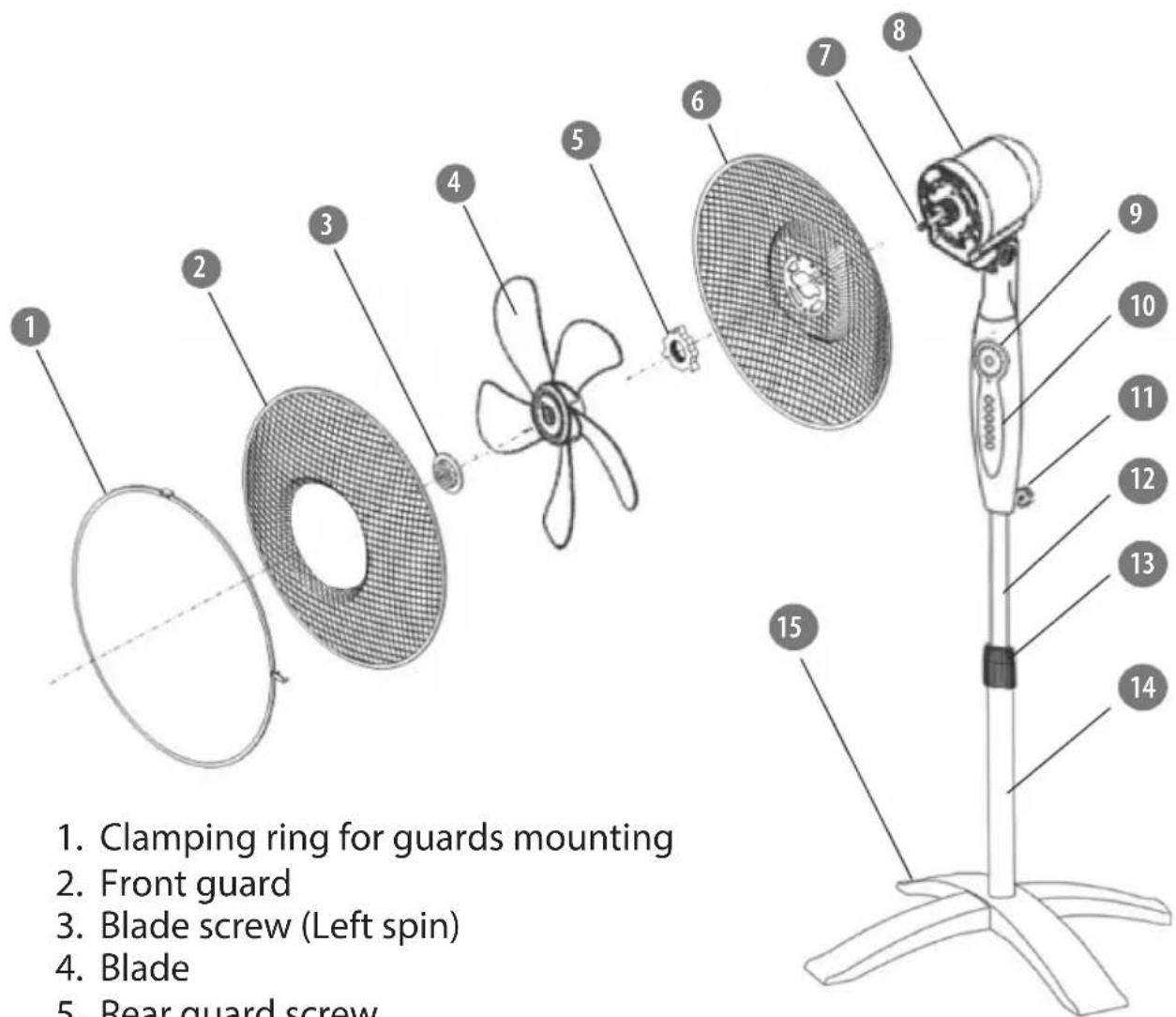
- Clamping ring for guards mounting
- Front guard
- Blade screw (Left spin)
- Blade
- Rear guard screw
- Rear guard
- Fan axle
- Motor unit
- Motor unit holder
- Control panel
- Fastening screw
- Height adjustment pipe
- Height adjustment screw
- Stand
- Cross base
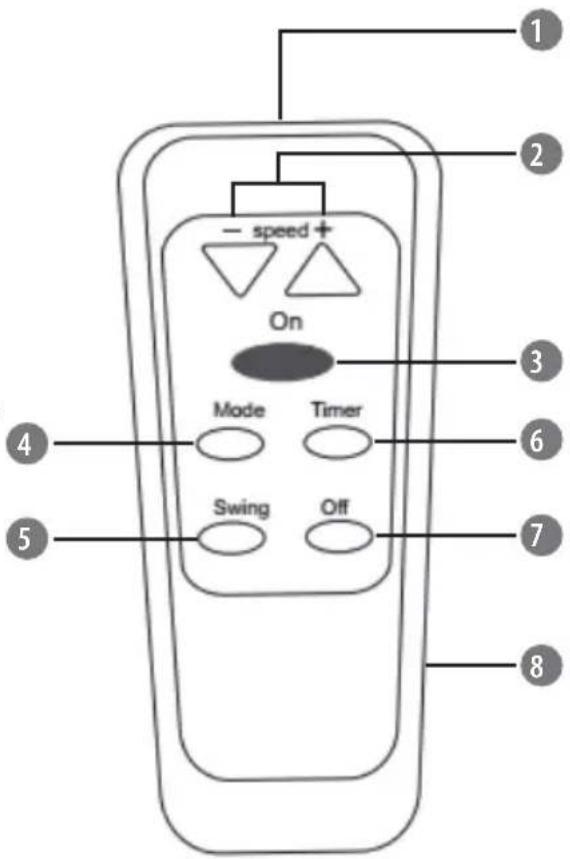
Remote control
- IR sensor
- Speed + / - : press these buttons to increase/decrease fan speed
- On button: press this button to turn on the fan
- Mode button: press this button to switch between modes: normal, sleep, natural
- Timer button: press this button to set the time of device turn off
- Swing button: press this button to turn on/off oscillation
- Off button: press this button to turn off the fan
- Battery cover
Battery installation
- Open the battery cover.
- Insert two 1,5 V AAA batteries with correct polarization (+/-).
- Close the battery cover.
Notes:
- Do not mix old and new batteries or batteries of different type.
• Always point the IR sensor of the remote control towards control panel of the fan.
- Setting the timer
Press Timer button on the control panel of the fan or on the remote control to set the time of device turn off from 0,5 to 7,5 h in half-hour interval.
- To adjust the tilt angle, grab and tilt the motor housing up or down to the desired angle.
CLEANING AND MAINTENANCE
- Prior to cleaning, disconnect the device from power mains.
- Clean this device with soft, slightly damp cloth. Do not use any chemical agents to clean the fan.
- Dry the fan with a dry cloth after cleaning.
TROUBLESHOOTING
When the fan is on and the blades do not work, please check the connection to power supply socket. When there are noises while operating the fan, please check if:
• the blade was installed properly,
- all of the parts have been properly and tightly connected,
• the fan parts have been damaged,
- the guards are touching the blade.
SPECIFICATION
FUNCTIONS
8 speed modes
3 working modes: normal, natural, sleep
Timer: 0,5-7,5 h
Automatic oscillation: 75°
Adjustable height: 115-135 cm
Adjustable tilt angle
Metal blade guard
TECHNICAL DATA
Power: 55 W
Grill diameter: 42,5 cm
Blade diameter: 38 cm
Power cable length: 1,5 m
Power supply: 220 \~ 240 V, 50/60 Hz
In set: remote control
English
Correct Disposal of This Product
(Waste Electrical & Electronic Equipment)

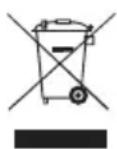
(Applicable in the European Union and other European countries with separate collection systems) This marking shown on the product or Its literature, indicates that It should not be disposed with other household wastes at the end of its working life. To prevent possible harm to the environment or human health from uncontrolled waste disposal, please separate this from other types of wastes and recycle it responsibly to promote the sustainable reuse of material resources. Household users should contact either the retailer where they purchased this product, or their local government office, for details of where and how they can take this item for environmentally safe recycling. Business users should contact their supplier and check the terms and conditions of the purchase contract This product should not be mixed with other commercial wastes for disposal.
Made in China for LECHPOL ELECTRONICS Sp. z o.o. Sp.k., ul. Garwolińska 1, 08-400 Miętne.

- Standing fan with remote control
- SAFETY INSTRUCTIONS
- MOUNTING
- OPERATION
- PRODUCT DESCRIPTION
- Remote control
- Battery installation
- Notes:
- - Setting the timer
- CLEANING AND MAINTENANCE
- TROUBLESHOOTING
- SPECIFICATION
- FUNCTIONS
- TECHNICAL DATA
- English
- Correct Disposal of This Product
- (Waste Electrical & Electronic Equipment)
Brand : Teesa
Model : TSA8020
Category : Ventilateur domestique