
PartyBoomBox700 - Loudspeaker Lamax - Free user manual and instructions
Find the device manual for free PartyBoomBox700 Lamax in PDF.


| Product Type | Wireless Party Speaker |
| Brand | Lamax |
| Model | PartyBoomBox700 |
| Dimensions (approx.) | 45 x 35 x 55 cm |
| Weight (approx.) | 9 kg |
| Peak Power | 700 W |
| RMS Power | 50 W |
| Subwoofer Diameter | 2 x 21 cm |
| Tweeter Diameter | 3 cm |
| Frequency Range | 18 – 20000 Hz |
| Sensitivity | 96 dB |
| Number of Bands | 2 |
| Battery | 12 V / 7 Ah (rechargeable) |
| Power Supply | AC 100-240 V, 50/60 Hz (DC 12V input) |
| Bluetooth Version | Not specified (works up to 10m) |
| Audio Inputs | Bluetooth, SD card, USB, AUX, FM radio |
| Microphone Inputs | 2 x 6.35mm (1/4") with independent volume, treble, bass, echo controls |
| Controls | Play/Pause, Previous/Next, Mode, Repeat, LED Mode, Mic Switch, Remote control |
| Display | LCD showing mode and status |
| LED Lighting | Multiple selectable modes |
| Cable Length (approx.) | 1.5 m |
| Included Accessories | Remote control, microphone |
Frequently Asked Questions - PartyBoomBox700 Lamax
User questions about PartyBoomBox700 Lamax
0 question about this device. Answer the ones you know or ask your own.
Ask a new question about this device
Download the instructions for your Loudspeaker in PDF format for free! Find your manual PartyBoomBox700 - Lamax and take your electronic device back in hand. On this page are published all the documents necessary for the use of your device. PartyBoomBox700 by Lamax.
USER MANUAL PartyBoomBox700 Lamax
Charging and LED Indicators
Fully charge the speaker battery before using it for the first time.
Indicators:
- LED glows red – the speaker battery is charging
- LED glows green – the speaker battery is fully charged
Note: A low battery may result in a gradual decrease in performance and possible audio or
lighting outages. In this case, immediately plug the speaker into the mains or turn it off.
Power
Switch the speaker on/off by pressing the POWER button. The display will light up.
Bluetooth pairing
-
Switch on the speaker and make sure Bluetooth mode is selected on the display. If it is not, select it by repeatedly pressing the MODE button on the rear panel near the display. The speaker is then ready for pairing.
-
Activate Bluetooth connectivity on your smartphone or another device. Select „LAMAX PartyBoomBox700" from the list of available devices. The speaker beeps when pairing is successful.
-
Playback can be controlled either with a paired device, directly on the speaker or by remote control.
Note: Bluetooth connection works best within 10 metres and in an open area.
TV
To pair two speakers with each other, turn on both speakers and make sure they are not paired with a multimedia device. Use the MODE button to put both devices into Bluetooth mode, "no 8" will appear on the LCD screens. Hold down the PLAY/PAUSE button for 5 seconds on one of them and it will become the main speaker. A beep will sound and the main speaker will act as the right channel. The other speaker will audibly announce the left channel.
To unpair the speakers, press the REPEAT button on the main speaker or turn it off.
Player Controls

| 1 | SD CARD | Input for inserting an SD card. Select this source using the MODE button. |
| 2 | PLAY/PAUSE | Press to pause or start playing music. |
| 3 | PREVIOUS | Press to skip to the previous track. |
| 4 | NEXT | Press to skip to the next track. |
| 5 | REPEAT | Press to toggle between the modes. ONE* (plays the current track). ALL* |
3 REPEAT Press to toggle between the modes, ONLY (plays the current track), ALL (plays all) and „rAn“ (play songs randomly).
6 MODE Press to switch between music sources: Bluetooth, SD card, USB, AUX, FM radio. The icon on the left of the display will show you which source is currently selected.
| 7 USB | Input for a USB device (e.g. flash drive). Select this source using the MODE button. This input is for music playback only. Connecting a device (mobile phone) to the USB input for charging may result in permanent damage to the speaker. We do not recommend using USB extension cables. Do not disconnect the USB drive from the unit while data is being played or loaded from the USB device. |
8 LED MODE Press to select between light modes
-
Using an external AUX source
-
Use the MODE button on the rear panel of the device to select AUX mode.
-
Connect your audio device to the external AUX IN jacks on the rear panel, and then control playback on the external audio device or the speaker itself.
Using the microphone
- Connect the supplied microphone to the MIC IN input on the rear panel of the unit and turn
it on with the switch on the microphone.
- Turn the MIC VOL dial on the rear panel of the unit to increase or decrease the microphone volume
volume. 3. Turn the MIC TREBLE dial on the rear panel of the unit to increase or decrease the micro-
phone treble level.
-
Turn the MIC BASS dial on the rear panel of the unit to increase or decrease the bass level of the microphone.
-
Turn the ECHO dial on the rear panel of the device to increase the echo effect on the micro-
Phone.
- Press the MICROPHONE SWITCH button to automatically mute the track being played when speaking into the microphone.
When speaking into the microphone. Note: If you place the microphone next to the speaker, turn off the microphone. Otherwise, the speaker may make an unpleasant and loud sound.
Location
The speaker has been designed to be placed on the ground, on any solid and stable base.
The speaker has been designed to be placed on the ground, on any solid and stable base. Note: If you will not be using the speaker for a long time, make sure it is turned off and unplug
it from the mains.
Remote control
| 1 | Standby ON/OFF | |
| 2 | Select input | |
| 3 | Sound modes | |
| 4 | Increase volume | |
| 5 | Play/Pause | |
| 6 | Music playback: Next track, Next FM channel (press) / Auto-tune to a higher frequency (hold) | |
| 7 | Repeat mode | |
| 8 | Select track from USB/SD card or select radio frequency/FM channel | |
| 9 | Scan FM channels | |
| 10 | Decrease volume | |
| 11 | Music playback: Previous track, Previous FM channel (press) / Auto-tune to a lower frequency (hold) | |
| 12 | Mute |
Parameters
| Total Peak Power | 700 W |
| RMS | 50 W |
| Subwoofer Diameter | 2x21 cm |
| Tweeter Diameter | 3 cm |
| Frequency Range | 18-20000 Hz |
| Sensitivity | 96 dB |
| Number of Bands | 2 |
| Battery | 12 V / 7 Ah |
| Input (DC jack) | AC 100-240 V, 50/60 Hz |
Printing errors reserved.
Download the current version of the user manual here:
https://lamax-electronics.com/partyboombox700/manual


CE
Ro
The Ground Truth image displays a single, solid horizontal line. According to Rule 2 (UNDERSCORE & LINE RULES), if the GT contains lines used for stylistic emphasis or as background elements (like ruled paper), the OCR result must ignore them. The provided OCR content is "____", which consists of four underscores. This is incorrect because underscores are not equivalent to a solid line and are not permitted under the “Stylistic/Background Lines (Ignore)” rule. Outputting underscores for a stylistic line violates the rule and constitutes an error. Therefore, the OCR result is inconsistent with the Ground Truth.
[Non-Text]
https://lamax-electronics.com/partyboombox700/manual
![Lamax PartyBoomBox700 - [Non-Text] - 1](/content/2026/05/851413/images/8d16b6b23aa5192c971d53ba599278db771eb09ee1ab67d0f5253a3999376e9a.jpg)
![Lamax PartyBoomBox700 - [Non-Text] - 2](/content/2026/05/851413/images/dbb6c59761ca199ba6e9702556cb337ed5bdca9cfe2914d0471cb2b5cb1f8f52.jpg)
![Lamax PartyBoomBox700 - [Non-Text] - 3](/content/2026/05/851413/images/065871437d75ecf832e4de7458b9bc1c0532effdc775eee77af58b70833797c3.jpg)
LAMAX PARTYBOOMBOX700

Ovládání
https://lamax-electronics.com/partyboombox700/manual


LAMAX PARTYBOOMBOX700

Ovládanie
Nabhijanie a LED sign
https://lamax-electronics.com/partyboombox700/manual


LAMAX PARTYBOOMBOX700

Obstuga
https://lamax-electronics.com/partyboombox700/manual


LAMAX PARTYBOOMBOX700

Vezérlés
Reserving, the first class is a non-class alternative for implementation.
Távvezérlés

The Ground Truth image displays a single, solid horizontal line. According to Rule 2 (UNDERSCORE & LINE RULES), this is a stylistic or background line, not a placeholder underscore. Therefore, the OCR result must ignore it and output nothing or only meaningful text. The provided OCR content is "____", which consists of four underscores. This is an incorrect interpretation of the line as a fill-in-the-blank placeholder, violating the rule that stylistic lines must be ignored. The OCR has hallucinated underscores where none should exist based on the GT's visual context. Hence, the OCR result is inconsistent with the Ground Truth.
Paraméterek
https://lamax-electronics.com/partyboombox700/manual


LAMAX PARTYBOOMBOX700
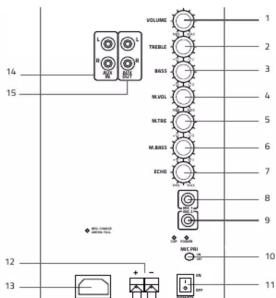
Upravljanje
| 1 | Upravljanje nivoja glasu | 9 | Vhod na mikrofon 2 |
| 2 | Upravljanje nivoja višin | 10 | Pretikalo mikrofona |
| 3 | Upravljanje nivoja basov | 11 | Viklop / Izklop |
| 4 | Upravljanje nivoja glasnosti mikrofona | 12 | 12V vhod |
| 5 | Upravljanje glasnosti višin mikrofona | 13 | Vhod za električni kabel |
| 6 | Upravljanje nivoja basov mikrofona | 14 | Vhod AUX |
| 7 | Upravljanje mere odmeva iz mikrofona | 15 | Izhod AUX |
| 8 | Vhod na mikrofon 1 |
| 1 | SD CARD | Vhod za SD kartiko. Nato izberite ta vir s pomokočke tipke MODE |
| 2 | PLAY/PAUSE | S pritiskom zaustavite ali pa začitne s predvajenem glasbe. |
| 3 | PREVIOUS | S pritiskom preskočte na prejtnio skladbo. |
| 4 | NEXT | S pritiskom preskočte na nasledno skladbo. |
| 5 | REPEAT | S pritiskom izberite med načini „ONE” – predvaje trenutno skladbo non -stop „ALL“ – predraja vise non-stop in „AN“ – predraja skladbe najklučno |
| 6 | MODE | S pritiskom preklapjate med vir glasbe. Bluetooth, SD kartica, USB, AUX, FM, FM, FM, FM, FM, FM, FM, FM, FM, FM, FM, FM, FM, FM, FM, FM, FM, FM, FM, FM, FM, FM, FM, FM, FM, FM, FM, FM, FM, FM, FM, FM, FM, FM, FM, FM, FM, FM, FM, FM, FM, FM, FM, FM, FM, FM, FM, FM, FM, FM,FM, FM, FM, FM, FM, FM, FM, FM, FM, FM, FM, FM, FM, FM, FM, FM, FM, FM, FM, FM, FM, FM, FM, FM, FM, FM, FM, FM, FM, FM, FM, FM, FM, FM, FM, FM, FM, FM, FM, FM, FM, FM, FM, FM, FM, FM, FM, FM, FM, FM, CM, FM, FM, FM, FM, FM, FM, FM, FM, FM, FM, FM, FM, FM, FM, FM, FM, FM, FM, FM, FM, FM, FM, FM, FM, FM, FM, FM, FM, FM, FM, FM, FM, FM, FM, FM, FM, FM, FM, FM, FM, FM, FM, FM, FM, FM, FM, FM, FM, FM, FAM, FM, FM, FM, FM, FM, FM, FM, FM, FM, FM, FM, FM, FM, FM, FM, FM, FM, FM, FM, FM, FM, FM, FM, FM, FM, FM, FM, FM, FM, FM, FM, FM, FM, FM, FM, FM, FM, FM, FM, FM, FM, FM, FM, FM, FM, FM, FM, FM, FM, FR, FM, FM, FM, FM, FM, FM, FM, FM, FM, FM, FM, FM, FM, FM, FM, FM, FM, FM, FM, FM, FM, FM, FM, FM, FM, FM, FM, FM, FM, FM, FM, FM, FM, FM, FM, FM, FM, FM, FM, FM, FM, FM, FM, FM, FM, FM, FM, FM, FM, FB, FM, FM, FM, FM, FM, FM, FM, FM, FM, FM, FM, FM, FM, FM, FM, FM, FM, FM, FM, FM, FM, FM, FM, FM, FM, FM, FM, FM, FM, FM, FM, FM, FM, FM, FM, FM, FM, FM, FM, FM, FM, FM, FM, FM, FM, FM, FM, FM, FM, BM, FM, FM, FM, FM, FM, FM, FM, FM, FM, FM, FM, FM, FM, FM, FM, FM, FM, FM, FM, FM, FM, FM, FM, FM, FM, FM, FM, FM, FM, FM, FM, FM, FM, FM, FM, FM, FM, FM, FM, FM, FM, FM, FM, FM, FM, FM, FM, FM, FM, FA, FM, FM, FM, FM, FM, FM, FM, FM, FM, FM, FM, FM, FM, FM, FM, FM, FM, FM, FM, FM, FM, FM, FM, FM, FM, FM, FM, FM, FM, FM, FM, FM, FM, FM, FM, FM, FM, FM, FM, FM, FM, FM, FM, FM, FM, FM, FM, FM, FM, FI, FM, FM, FM, FM, FM, FM, FM, FM, FM, FM, FM, FM, FM, FM, FM, FM, FM, FM, FM, FM, FM, FM, FM, FM, FM, FM, FM, FM, FM, FM, FM, FM, FM, FM, FM, FM, FM, FM, FM, FM, FM, FM, FM, FM, FM, FM, FM, FM, FM, FF, FM, FM, FM, FM, FM, FM, FM, FM, FM, FM, FM, FM, FM, FM, FM, FM, FM, FM, FM, FM, FM, FM, FM, FM, FM, FM, FM, FM, FM, FM, FM, FM, FM, FM, FM, FM, FM, FM, FM, FM, FM, FM, FM, FM, FM, FM, FM, FM, FM, FS, FM, FM, FM, FM, FM, FM, FM, FM, FM, FM, FM, FM, FM, FM, FM, FM, FM, FM, FM, FM, FM, FM, FM, FM, FM, FM, FM, FM, FM, FM, FM, FM, FM, FM, FM, FM, FM, FM, FM, FM, FM, FM, FM, FM, FM, FM, FM, FM, FM, SM, FM, FM, FM, FM, FM, FM, FM, FM, FM, FM, FM, FM, FM, FM, FM, FM, FM, FM, FM, FM, FM, FM, FM, FM, FM, FM, FM, FM, FM, FM, FM, FM, FM, FM, FM, FM, FM, FM, FM, FM, FM, FM, FM, FM, FM, FM, FM, FM, FM, TM, FM, FM, FM, FM, FM, FM, FM, FM, FM, FM, FM, FM, FM, FM, FM, FM, FM, FM, FM, FM, FM, FM, FM, FM, FM, FM, FM, FM, FM, FM, FM, FM, FM, FM, FM, FM, FM, FM, FM, FM, FM, FM, FM, FM, FM, FM, FM, FM, FM, FTM, FM, FM, FM, FM, FM, FM, FM, FM, FM, FM, FM, FM, FM, FM, FM, FM, FM, FM, FM, FM, FM, FM, FM, FM, FM, FM, FM, FM, FM, FM, FM, FM, FM, FM, FM, FM, FM, FM, FM, FM, FM, FM, FM, FM, FM, FM, FM, FM, FM, FDM, FM, FM, FM, FM, FM, FM, FM, FM, FM, FM, FM, FM, FM, FM, FM, FM, FM, FM, FM, FM, FM, FM, FM, FM, FM, FM, FM, FM, FM, FM, FM, FM, FM, FM, FM, FM, FM, FM, FM, FM, FM, FM, FM, FM, FM, FM, FM, FM, FM |
https://lamax-electronics.com/partyboombox700/manual


LAMAX PARTYBOOMBOX700
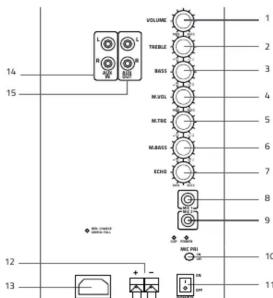
Upravljanje
| 1 | Podešavanje razine glasnoće | 9 | Ulaz za mikrofon 2 |
| 2 | Podešavanje razine visokih tonova | 10 | Prekidač mikrofona |
| 3 | Podešavanje razine basova | 11 | Uključenje / isključenje |
| 4 | Podešavanje razine glasnoće mikrofona | 12 | 12V ulaz |
| 5 | Podešavanje razine visokih tonova mikrofona | 13 | Ulaz za adapter za punjenje |
| 6 | Podešavanje razine basova mikrofona | 14 | Ulaz AUX |
| 7 | Podešavanje razine efekta odjeka mikrofona | 15 | Izlaz AUX |
| 8 | Ulaz za mikrofon 1 |
Punjenje i LED signalizacija
Potpuno napunite bateriju zvučnika prije prve upotrebe.
Signalizacija:
The Ground Truth image displays a single, continuous horizontal line, which is a stylistic or background element (like a ruled paper line). According to Rule 2, such lines must be ignored by the OCR result. The provided OCR content is "____", which consists of underscores. Underscores are not equivalent to a solid line and are not permitted under the “Stylistic/Background Lines (Ignore)” rule. Outputting underscores for a stylistic line is incorrect because it misinterprets the line as a fill-in-the-blank placeholder. Since the OCR output incorrectly rendered a stylistic line as underscores (which should be ignored), this violates the rule. Therefore, the OCR result is inconsistent with the Ground Truth.
https://lamax-electronics.com/partyboombox700/manual




Brand : Lamax
Model : PartyBoomBox700
Category : Loudspeaker