
HIVE Prodigy 4 - Headphones Niceboy - Free user manual and instructions
Find the device manual for free HIVE Prodigy 4 Niceboy in PDF.


| Product Type | Wireless Headphones |
| Brand | Niceboy |
| Model | HIVE Prodigy 4 |
| Bluetooth Version | 5.3 |
| Frequency Band | 2.4 GHz |
| RF Power | ≤ 2.5 mW |
| Supported Profiles | A2DP, AVRCP, HFP |
| Supported Codecs | SBC, AAC |
| Frequency Response | 20 Hz – 20 kHz |
| Sensitivity | 97 ± 3 dB |
| Playback Time | Up to 50 hours |
| Talk Time | Up to 35 hours |
| Range | Up to 10 m |
| Battery Capacity | 380 mAh |
| Charging Time | 2 hours |
| Charging Port | USB-C (5V/1A) |
| Driver Size | 40 mm |
| Microphone | Built-in |
| Voice Assistant | Siri / Google Assistant (double press) |
| Auto Power-Off | After 5 minutes when not connected |
| Controls | Multifunction button, Volume +/-, Track control |
| Package Contents | Headphones, USB-C cable, User manual |
Frequently Asked Questions - HIVE Prodigy 4 Niceboy
User questions about HIVE Prodigy 4 Niceboy
0 question about this device. Answer the ones you know or ask your own.
Ask a new question about this device
Download the instructions for your Headphones in PDF format for free! Find your manual HIVE Prodigy 4 - Niceboy and take your electronic device back in hand. On this page are published all the documents necessary for the use of your device. HIVE Prodigy 4 by Niceboy.
USER MANUAL HIVE Prodigy 4 Niceboy
User Manual / Wireless Headphones
CZ
OBSAH BALENÍ
NABÍJENÍ
https://niceboy.eu/cs/declaration/hive-prodigy-4
INFORMACE PRO UŽIVATELE K LIKVIDACI ELEKTRICKÝCH A ELEKTRONICKÝCH ZAŘÍZENÍ (DOMÁCNOSTI)
NABÍJANIE
Charging USB-C cable
Directions for use
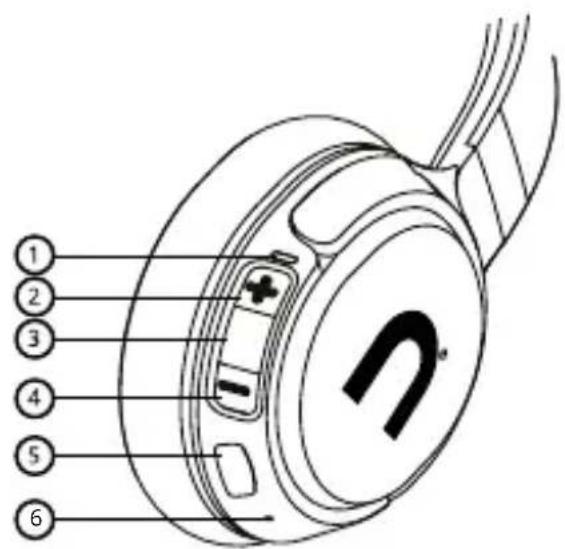
PRODUCT DESCRIPTION
- LED indicator
- Increase volume/Next track
- Multifunctional button
- Decrease volume/Last track
- Charging USB-C port
- Microphone
CHARGING
We recommend to fully charge the battery before first use of the earphones. Use the supplied USB-C cable to charge the earphones. Maximum charging voltage and current are 5V / 1A. Charge the earphones when the LED indicator (1) flashes red. An acoustic signal warns you about the last several minutes of operation. It takes approximately 2 hours to fully charge the battery. During charging, the LED indicator remains red (1) and turns off once the charging is fully completed.
POWERING ON THE HEADPHONES AND CONNECTING TO BLUETOOTH
- Press and hold the multifunctional button until the LED indicator starts to flash blue-red and the audio signal has sounded. The headphones can now in their pairing mode.
- Activate Bluetooth on your device and select "Niceboy HIVE Prodigy 4" from the list of available devices. Your device will connect to the headphones. Once the pairing is successful, it will be announced by an audible queue and the LED indicator will begin to slowly flash blue.
Note: The headphones automatically connect to the device they were last connected to. For the purpose of saving the battery, the headphones automatically power off after 5 minutes after having last connection to your device or if they are not connected to any device.
POWERING OFF THE HEADPHONES
To power off the headphones, press and hold the multifunctional button (3) until the audio signal sounds, and the LED indicator begins to shine red.
MUSIC CONTROLS
Playback/pause: short press the multifunctional button. (3)
Next track: long press the "+" button. (2)
Last track: long press the "-" button. (4)
Decrease volume: short press the "+" button. (2)
Increase volume: short press the "-" button. (4)
TELEPHONE CONVERSATIONS
To accept or end phone calls, short press the multifunctional button (3). Press the multifunctional button for about 3 seconds to reject an incoming call.
Note: Some phones have calls preferentially set to their own microphone and headphones. In such a case, change the selection according to the instructions on your mobile phone.
SIRI AND GOOGLE ASSISTANT
Activate in the emergency mode or when playing music by pressing the multifunctional button twice.
FACTORY SETTINGS
In case of technical problems, reset the earphones to the factory settings as follows.
- Switch off the earphones, remove them from the paired devices list and turn off BT.
- Switch on the earphones so that they are in pairing mode. The LED flashes alternately blue and red.
- Press and hold buttons „+“ and „-“ simultaneously for a period of 10 seconds. The LED indicator flashes red 3 times, then it lights up red for one second, and the earphones will switch off.
SPECIFICATIONS
BT version: 5.3
Frequency band: 2.4GHz
Radio frequency power: ≤ 2,5mW
Supported BT profiles: A2DP, AVRCP,HFP
Supported codecs: SBC, AAC
Frequency: 20Hz - 20kHz
Sensitivity: 97+/-3dB
Playback period: up to 50 hours
Conversation period: up to 35 hours
Range: up to 10 m
Battery: 380mAh
Speaker: 40mm
Charging period: 2 hours
SAFETY INFORMATION
Listening to music at excessive volume can damage your hearing. Do not subject the equipment to fluids and moisture. Do not expose the device to excessively high/low temperatures, and do not attempt to disassemble it. Protect the device from sharp objects and falls from height. Batteries - Improper handling (prolonged charging, short circuit, breakage by other objects, etc.) may result in fire, overheating or battery leakage. The battery or accumulator that may be included with the product has a life of six months because it is a consumable item.
Information on all frequency bands in which the radio equipment operates and intentionally transmits radio waves as well as the maximum radio frequency power transmitted in the frequency band in which the radio equipment is operated is included in the instructions and safety information.
The manual may be downloaded in its electronic form at www.niceboy.eu under the support section. NICEBOY s.r.o. hereby declares that the type of radio equipment Niceboy HIVE Prodigy 4 complies with Directives 2014/53 / EU, 2014/30 / EU, 2014/35 / EU, and 2011/65 / EU. The full content of EU Declaration of Conformity is available on the following websites: https://niceboy.eu/en/declaration/hive-prodigy-4
USER INFORMATION FOR DISPOSING ELECTRICAL AND ELECTRONIC DEVICES (HOME USE)
This symbol located on a product or in the product's original documentation means that the used electrical or electronic products may not be disposed together with the communal waste. In order to dispose of these products correctly, take them to a designated collection site, where they will be accepted for free. By disposing of a product in this way, you are helping to protect precious natural resources and helping to prevent any potential negative impacts on the environment and human health, which could be the result of incorrect waste disposal. You may receive more detailed information from your local authority or nearest collection site. According to national regulations, fines may also be given out to anyone who disposes of this type of waste incorrectly.
User information for disposing electrical and electronic devices. (Business and corporate use) In order to correctly dispose of electrical and electronic devices for business and corporate use, refer to the product's manufacturer or importer. They will provide you with information regarding all disposal methods and, according to the date stated on the electrical or electronic device on the market, they will tell you who is responsible for financing the disposal of this electrical or electronic device. Information regarding disposal processes in other countries outside the EU. The symbol displayed above is only valid for countries within the European Union. For the correct disposal of electrical and electronic devices, request the relevant information from your local authorities or the device seller.
DE
LIEFERUMFANG
EINSCHALTEN DER KOPFHÖRER UND VERBINDEN MIT BLUETOOTH
TÖLTÉS
PUNJENJE
Preporučujemo da u potpunosti napunite bateriju prije prve upotrebe slušalica. Koristite isporučeni USB-C kabel za punjenje slušalica. Maksimalni napon i struja punjenja su 5V/1A. Napunite slušalice kada LED indikator (3) treperi crvenom bojom. Zvučni signal upozorava vas na posljednjih nekoliko minuta rada. Za potpuno punjenje baterije potrebno je otprilike 2 sata. Za vrijeme punjenja LED indikator ostaje crvene boje (3) i isključuje se kada je punjenje potpuno završeno.
UKLJUČIVANJE SLUŠALICA I UPARIVANJE S BLUETOOTH
- Pritisnite i zadržite multifunkcijski gumb (3) pritisnutim dok LED indikator ne počne treperiti plavo-crvenom bojom i dok se ne uključi zvučni signal. Slušalice se sada nalaze u režimu uparivanja.
- Na svom uređaju aktivirajte Bluetooth i u popisu dostupnih uređaja izaberite „Niceboy HIVE Prodigy 4“. Uređaj će se priključiti na slušalice. Uspješno uparivanje najavi akustično upozorenje i LED indikator počinje polako treperiti plavom bojom.
ŁADOWANIE
POLNJENJE
ÎNCĂRCAREA
Codecuri acceptate: SBC, AAC
Frecventa: 20Hz - 20kHz
Sensibilitate: 97+/-3dB
Timp de functionare: pana la 50 ore
Perioada de convorbire: pana la 35 ore
Distanta de transmisie: pana la 10 m.
Bateria: 380mAh
Difuzor: 40mm
Perioada de alimentare: 2 ore
INFORMATII PRIVIND SIGURANTA
LADDNING
Praha 4, Czech Republic, ID: 294 16 876.
Made in China.
RoHS CE 📧 ✉
- User Manual / Wireless Headphones
- CZ
- OBSAH BALENÍ
- NABÍJENÍ
- INFORMACE PRO UŽIVATELE K LIKVIDACI ELEKTRICKÝCH A ELEKTRONICKÝCH ZAŘÍZENÍ (DOMÁCNOSTI)
- NABÍJANIE
- PRODUCT DESCRIPTION
- CHARGING
- POWERING ON THE HEADPHONES AND CONNECTING TO BLUETOOTH
- POWERING OFF THE HEADPHONES
- MUSIC CONTROLS
- TELEPHONE CONVERSATIONS
- SIRI AND GOOGLE ASSISTANT
- FACTORY SETTINGS
- SPECIFICATIONS
- SAFETY INFORMATION
- USER INFORMATION FOR DISPOSING ELECTRICAL AND ELECTRONIC DEVICES (HOME USE)
- DE
- LIEFERUMFANG
- EINSCHALTEN DER KOPFHÖRER UND VERBINDEN MIT BLUETOOTH
- TÖLTÉS
- PUNJENJE
- UKLJUČIVANJE SLUŠALICA I UPARIVANJE S BLUETOOTH
- ŁADOWANIE
- POLNJENJE
- ÎNCĂRCAREA
- INFORMATII PRIVIND SIGURANTA
- LADDNING
Brand : Niceboy
Model : HIVE Prodigy 4
Category : Headphones