
HBO7213A1 - Oven Hanseatic - Free user manual and instructions
Find the device manual for free HBO7213A1 Hanseatic in PDF.


| Type of Product | Built-in Oven |
| Brand | Hanseatic |
| Model | HBO7213A1 |
| Energy Efficiency Class | A+ |
| Energy Consumption (Conventional) | 1.06 kWh/cycle |
| Energy Consumption (Fan-Forced) | 0.69 kWh/cycle |
| Oven Volume | 72 L |
| Number of Cavities | 1 |
| Heat Source | Electricity |
| Rated Voltage | 220-240 V ~ |
| Frequency | 50-60 Hz |
| Rated Power Input | 2900 W |
| Maximum Temperature | 250 °C |
| Oven Dimensions (H x W x D) | 596 mm x 595 mm x 566 mm |
| Recess Dimensions (H x W x D) | 600 mm x 560 mm x 550 mm |
| Mass | 31.8 kg |
| Interior Lighting | 230 V, 25 W, G9, T300 °C, Energy Class G |
| Heating Functions | Top/Bottom Heat, Convection (Ring), Energy-Saving, Top/Bottom with Convection, Infrared Grill, Intensive Grill with Fan, Intensive Grill with Top Heat, Pizza Mode, Bottom Heat, Defrosting |
| Special Features | Quick Pre-heating, Safety Lock/Child Safety Lock, Sabbath Mode, Demo Mode, Steam Cleaning, Signal Tones |
| Cleaning | Steam Cleaning (Hydrolysis), Removable Oven Door, Removable Glass Panels |
| Safety Features | Child Safety Lock, Automatic Safety Lock, Overheat Protection |
| Accessories Included | Oven Rack (1x), Baking Tray (1x), Dripping Pan (1x), Screw Rack (2x), Screws (2x), Blind Plugs (2x), User Manual, Brochure |
| Installation Type | Built-in under Worktop or in Upright Cabinet |
Frequently Asked Questions - HBO7213A1 Hanseatic
User questions about HBO7213A1 Hanseatic
0 question about this device. Answer the ones you know or ask your own.
Ask a new question about this device
Download the instructions for your Oven in PDF format for free! Find your manual HBO7213A1 - Hanseatic and take your electronic device back in hand. On this page are published all the documents necessary for the use of your device. HBO7213A1 by Hanseatic.
USER MANUAL HBO7213A1 Hanseatic
natural_image
Line drawing of an open oven with control panel and tray (no text or symbols)Gebrauchsanleitung
Anleitung/Version:
2201-00097/20230316
natural_image
Interior view of a refrigerator showing the rack and storage area (no text or symbols visible)natural_image
Diagram of a kitchen appliance with a rack and oven, showing internal components (no text or symbols)natural_image
Interior view of a microwave oven with insulation rack and oven (no text or symbols visible)natural_image
Diagram showing a 3D panel with directional arrows and a schematic of layered structure (no text or symbols)natural_image
Illustration of a hand pressing down on a door panel, with an inset showing the right-hand rule for lifting a wall-mounted device (no text or symbols present)natural_image
Diagram showing a door with a scroll and an inset view of a mechanical device (no text or symbols)natural_image
Simple line drawing of a door with a door lock and an arrow pointing to the lock (no text or symbols)natural_image
Technical line drawing of a mechanical assembly with a magnified inset showing a component (no text or symbols present)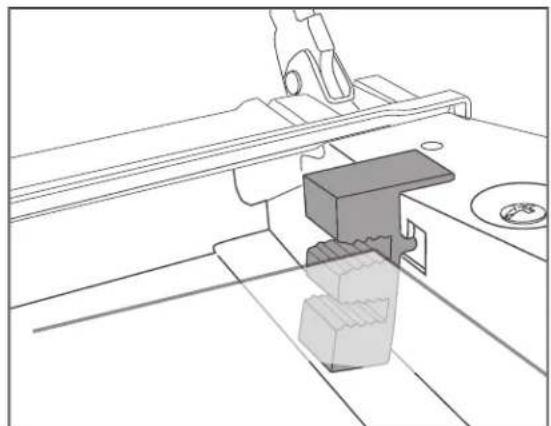
natural_image
Technical line drawing of a mechanical assembly with no visible text or symbolsnatural_image
Line drawing of a rectangular frame with grid pattern and mounting bracket (no text or symbols)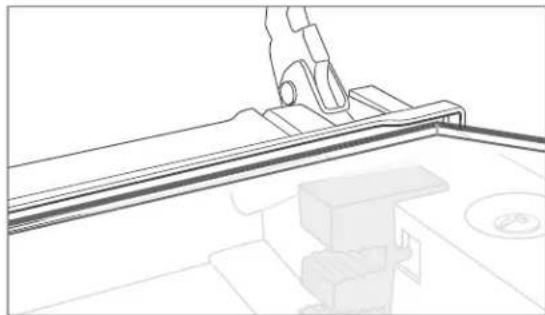
natural_image
Technical line drawing of a mechanical assembly with a hand operating a workpiece (no text or symbols)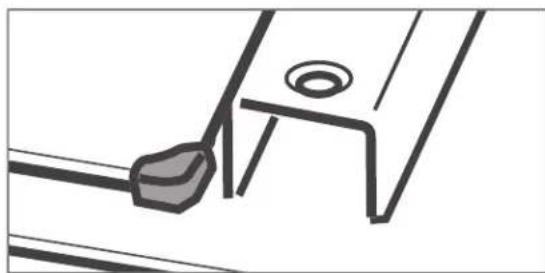
natural_image
Pure technical line drawing of a mechanical component or bracket (no text or symbols)natural_image
Diagram showing a mechanical component with rotational motion and a separate view of a circular component (no text or symbols)natural_image
Illustration of an open oven with internal shelves and control panel, accompanied by three mechanical components (screw, washer, and nut) shown below.natural_image
Line drawing of a kitchen cabinet with an oven and oven on the counter (no text or symbols)natural_image
Line drawing of a modern kitchen cabinet with oven and cabinets (no text or symbols)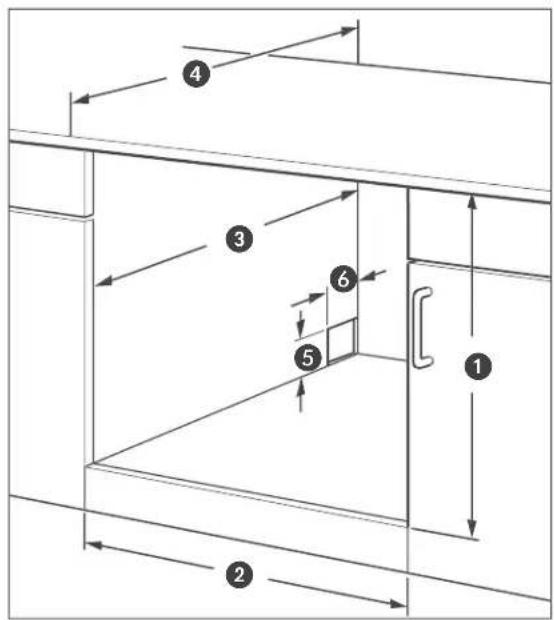
natural_image
Technical diagram showing a mechanical assembly with a magnified inset of a component detail (no text or symbols)natural_image
Line drawing of an open oven with digital gauges and a rack inside (no text or symbols)User manual
Manual/version:
2201-00097/20230316
Order no.: 44625345
Reproduction, even of
excerpts, is not permitted!
Built-in oven
Table of contents
Explanation of signal terms and symbols.... EN-3
Intended use ...... EN-4
Safety notices.... EN-5
Risks to children and certain groups of individuals ..... EN-5
Safety when handling heat-
generating appliances ..... EN-6
Protecting food ..... EN-6
Using the oven safely .....EN-7
Specific risks when grilling ..... EN-9
Specific risks for units with a cooling fan .... EN-9
Appliance parts and control elements .EN-10
Operating the oven .....EN -11
Requirements for safe use .....EN-11
Handling the oven correctly .....EN-11
The right oven cookware .....EN-11
Tips for saving energy .....EN-11
Oven rack, baking tray and dripping pan....EN-12
External cooling fan and extraction hood ....EN-12
Signal tones .....EN-12
Setting the time .....EN-13
Switching the oven on/off .....EN-13
Selecting a function .....EN-13
Setting the temperature and cooking time....EN-13
Quick pre-heating .....EN-14
Starting, interrupting and ending the oven's operation ....EN-14
Safety lock/child safety lock .....EN-16
Sabbath mode .....EN-16
Cooking compartment light .....EN-17
Demo mode .....EN-17
Special features for some heating methods .....EN-17
Preparing yeast dough .....EN-18
Cleaning and servicing the oven . . . . .EN-19
Cleaning the housing surface .....EN-19
Cleaning the cooking compartment .EN-19
Steam cleaning (hydrolysis) .....EN-19
Cleaning the baking tray guides . . . EN-20
Cleaning the oven door ..... EN-20
Changing the cooking
compartment light ..... EN-22
Moving and checking package contents. EN-24
Moving and unpacking. . . . . . . . . EN-24
Checking the delivery ..... EN-24
Installing, connecting and start-up... EN-25
Installation requirements ..... EN-25
Electrical connections ..... EN-25
Installation under a worktop ..... EN-26
Installation in an upright cabinet . . . EN-26
Inserting the oven ..... EN-27
Basic cleaning ..... EN-27
Troubleshooting ..... EN-28
Service EN-30
Waste prevention, free return and disposal.... EN-31
Waste prevention ..... EN-31
Free return of old electrical appliances ...... EN-31
Disposal EN-31
Packaging EN-32
Product table and technical specifications ..... EN-33
Test dishes EN-33
Product fiche concerning
Regulation (EU) No 65/2014 ..... EN-34
Product fiche concerning EU
Directive No. 66/2014 ..... EN-35
Technical specifications ..... EN-36
Explanation of signal terms and symbols

Please read through the safety instructions and user manual carefully before using the appliance. This is the only way you can use all the functions safely and reliably.
Be absolutely sure to also observe the national regulations in your country, which are also valid in addition to the regulations specified in this user manual.
Keep all safety notices and instructions for future reference. Pass all safety notices and instructions on to the subsequent user of the product.
The following signal terms can be found in this user manual.

WARNING
This term indicates a hazard with a medium level of risk which, if not avoided, could result in death or serious injury.

CAUTION
This term indicates a hazard with a low level of risk which, if not avoided, could result in minor or moderate injury.

NOTICE
This term warns against possible damage to property.

This symbol refers to useful additional information.

Hot surface
Intended use
Use the appliance exclusively as described in this user manual.
Any other use will be deemed to be improper and may lead to damage to property or even injury to persons. The manufacturer accepts no liability for damage caused by improper use.
This appliance is designed for roasting, baking, grilling and defrosting food.
The oven should not be used to defrost raw meat, poultry or fish.
Prior to use, the appliance must be properly installed in a kitchen unit. Veneers or plastic coverings on the built-in furniture require heat-resistant adhesive (100 °C). If the adhesive and surfaces are not heat-resistant, the covering may warp and come loose.
This appliance must not be operated in non-stationary locations (e.g. ships).
The appliance is designed for use in private households and is not designed for commercial use or multiple use (e.g.: use by several parties in a block of flats).
The appliance is not to be operated with an external timer or an external remote control system.
The oven is not suitable for heating a room. The oven door must not be used as a support prop, seat or step.
The oven light is exclusively used for lighting the cooking compartment and not for lighting a room.
Persons who are unable to operate the appliance safely due to their physical, sensory or mental abilities or lack of knowledge must be supervised during use.
Do not make any technical changes to the appliance.
Safety notices
In this chapter you will find general safety instructions which you must always observe for your own protection and that of third parties. Please also observe the warning notices in the following chapters.
Risks to children and certain groups of individuals

WARNING
Risk of suffocation for children!
Children can become entangled in the packaging fi lm or swallow small parts and suffocate.
■ Do not allow children to play with the packaging fi lm.
■ Prevent children from taking small parts out of the accessory bag and putting them in their mouths.
Risk of burns for children!
The appliance and its accessible parts become hot during use. Care should be taken to avoid touching heating elements.
■ Children less than 8 years of age shall be kept away unless continuously supervised.

CAUTION
Risk of injury!
Children and certain groups of people have a higher risk of being injured when handling the appliance.
This appliance can be used by children aged from 8 years and above and persons with reduced physical, sensory or mental capabilities or lack of experience and knowledge if they have been given supervision or instruction concerning use of the appliance in a safe way and understand the hazards involved.
■ Do not allow unsupervised children to play with the appliance or have access to the appliance.
■ Cleaning and user maintenance must not be performed by children without supervision.
Safety when handling heat-generating appliances

CAUTION
Risk of burns!
The appliance and its accessible parts become hot during use.
■ Avoid touching the heating elements.
■ Children less than 8 years of age shall be kept away unless continuously supervised.
■ Do not touch hot parts. Always protect hands with oven gloves or pot holders when working on the hot appliance. Only use dry oven gloves or potholders. Wet textiles are better heat conductors and can cause steam burns.
Fire hazard!
Improper handling when operating the appliance can lead to fire.
■ Do not connect to a multi-socket extension cable or a multi-socket plug.
■ If you are preparing food with alcohol, do not leave the cooker unattended! The food may spontaneously ignite.
■ Do not cover the appliance with blankets, cloths or similar, as these objects may become hot and catch fire.
If a fi re starts, immediately turn all dial-s/switches buttons/sensors to “off” or “0” and switch off the automatic circuit breakers and/or unscrew the fuses. To extinguish the fi re, use a suitable fi re extinguisher with the designation “F” or a fi re blanket.
■ Once the fire has been extinguished, have the appliance checked by our Service.
Protecting food

CAUTION
Health hazard!
Improper use of this appliance can lead to damage to health.
■ Clean the appliance regularly and remove any traces of food leftovers immediately.
■ Particularly with poultry and dishes containing fresh egg, and when warming up meals, ensure that the food is fully cooked through to kill off all pathogens (e.g. salmonella).
Acrylamide may be carcinogenic. Acrylamide is produced when starch is exposed to excessive heat, e.g. in biscuits, toast, bread, potatoes (French fries, crisps/chips).
- Keep cooking times as short as possible.
■ Only brown the food slightly, do not allow it to brown too much.
■ Cut larger-sized fries and then bake at maximum of 180 °C.
■ When frying potatoes using raw potato discs or frying potato fritters in a frying pan, it is better to use margarine (with a minimum fat content of 80 %) or oil with a little margarine instead of pure oil.
■ Brushing baked goods with egg whites or egg yolks helps to reduce the formation of acrylamide.
Using the oven safely

WARNING
Risk of electric shock!
Touching live parts may result in severe injury or death.
■ Do not remove the covers from the interior light.
■ Do not attempt to replace the interior light.

CAUTION
Health hazard!
The water that melts during defrosting can contain harmful bacteria, especially with meat and poultry.
■ Do not defrost meat, poultry and fish in oven mode.
■ Pour defrost water away. Do not use it for any other purpose.
■ Thoroughly clean the crockery you have used.
Risk of burns!
The oven becomes hot during use. You can burn yourself on heating elements, the cooking compartment, the cooked food and accessories.
■ Particular care should be taken to avoid touching heating elements inside the oven.
■ Never operate the oven with the oven door open. Make sure that the door seal is tight and that the oven door closes tightly.
■ When opening the oven door, stand to the side of the oven and as far away as possible.
■ Allow the oven to cool down completely before cleaning.
■ Never pour water directly into the hot oven. The steam can cause scalding and damage the enamel.
■ Allow hot water from the oven to cool before pouring it out.
Fire hazard!
Insuffi cient air circulation can lead to overheating.
■ Do not install the oven behind a decorative door or a cabinet door.
■ Never cover or obstruct fan openings.
Objects in and near the oven when it is switched on could start to burn due to the high temperatures.
■ Do not cover cakes or roasts being cooked in the oven with baking parchment.
■ If you are preparing foods in oil, fat or using alcohol, do not leave the oven unattended. The food may spontaneously ignite.
■ Do not allow food, baking parchment and aluminium foil to come into contact with the heating elements.
■ Do not store temperature-sensitive, combustible or fl ammable objects in the oven. If the appliance is switched on unintentionally they may deform or ignite.
■ Do not use the oven for storage purposes.
■ Never use the oven to heat rooms.
If a fi re breaks out in the oven, keep the oven door closed and switch off the oven. Once the fi re has been extinguished, have the oven checked by our Service.

NOTICE
Risk of damage!
Improper use may damage the oven or cooking utensils.
- Do not place trays or aluminium foil directly on the base of the cooking compartment. It may cause heat to build up inside and damage the oven's enamel. If you wish to place dishes directly on the bottom of the cooking compartment, the oven temperature must not exceed 50 °C. Be careful when handling cookware – the enamel can be easily scratched.
■ When preserving, place only so many preserving jars in the dripping pan that none of them touch. Otherwise, the jars can crack and burst.
If a trolley is used to move the oven, it must be lifted as shown on the packaging. - Do not lift the entire oven by the oven door handle. The handle is not designed to carry the whole weight of the oven.
■ The oven door is heavy and has a glass front. Do not allow the door to fall open when taking it off its hinges.
■ Take particular care to ensure that the door seals are clean. If the seal is very dirty, the appliance door will no longer close properly. Neighbouring furniture fronts may be damaged. - The door seals are sensitive to oil and grease – making the rubber porous and brittle.
■ Do not remove the door seals.
■ Do not use any harsh, abrasive cleaners or sharp metal scrapers to clean the glass on the oven door, as they can scratch the surface and destroy the glass.
■ When cleaning the cooking compartment, do not use steel wool, oven sprays, steam cleaners or high-pressure cleaners. They can damage the surface. High-pressure cleaners can cause a short circuit.
■ Do not clean baking tray guides and telescopic rails in the dishwasher.
Specific risks when grilling

CAUTION
Risk of burns!
The oven becomes hot during grilling. You can burn yourself on heating elements, the cooking compartment, the cooked food and accessories.
■ Never leave the oven unattended while grilling. Keep children away.
Fire hazard!
Fatty foods can catch fire when they come to close to the heating elements.
■ Do not place food to be grilled too far back near the end of the heating element.
Specific risks for units with a cooling fan

CAUTION
Fire hazard!
A defective cooling fan can cause fl am- mable objects in the vicinity to catch fire.
■ If this happens, switch off the appliance immediately, open the oven door and do not use the oven again until it has been repaired.
Appliance parts and control elements

LIGHT Switching the interior light on/off Switching the safety lock/child safety lock on/off
ON/OFF Switching the oven on or to stand-by
Left dial Selecting the function (heating methods)
Right dial Setting the temperature/cooking time
PREHEAT Quick pre-heating
TEMP/TIME Selecting the temperature/cooking time setting
OK /START Starting the cooking process/confirming settings
PAUSE/CANCEL Pausing or cancelling the cooking process
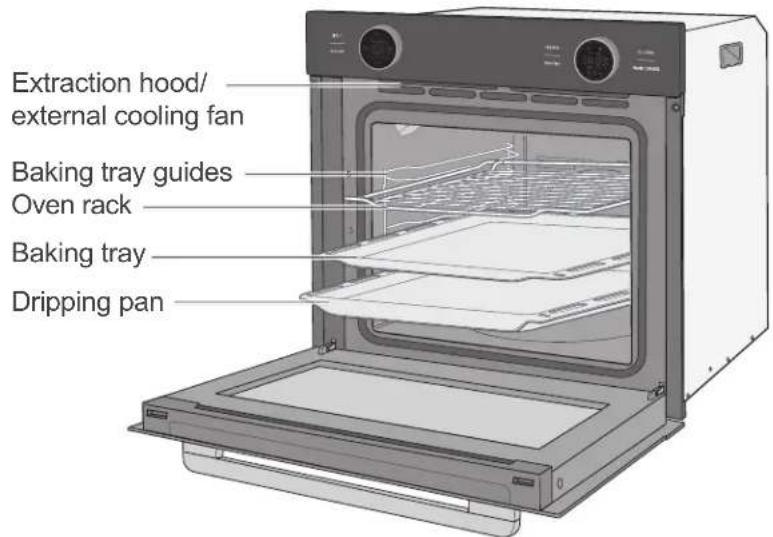
Operating the oven
Requirements for safe use
- You have read the chapter "Safety notices" at the beginning of this user manual.
- The appliance is installed and connected as described in the relevant chapters in this user manual.
If you wish to place dishes directly on the bottom of the cooking compartment, the oven temperature must not exceed 50 °C. Be careful when handling cookware, as the enamel can be easily scratched.
Handling the oven correctly

CAUTION
Fire hazard!
Improper handling when operating the appliance can lead to fire.
■ Never operate the oven with the oven door open.
■ In case of an oven fire:
- Switch off the circuit breakers/unscrew fuses
- Do not open the oven door until the fire is extinguished
■ Never extinguish burning oil or fat with water. To extinguish the fi re, use a suitable fi re extinguisher with the designation "F" or a fi re blanket.
■ Once the fire has been extinguished, have the appliance checked by our Service.

NOTICE
Risk of damage!
Pent-up heat can damage the oven's enamel.
■ Do not place baking trays or aluminium foil directly on the bottom of the cooking compartment.
The right oven cookware
- Pots with heat-resistant handles can be recognised by the label indicating "heat resistant up to 280^ ".
– Fire-proof dishes made of glass, porcelain, ceramic and clay or cast iron. - In particular, ovens with top and bottom heat require dishes and trays with good heat transfer, preferably metals which have been painted black, as these allow cakes to brown nicely.
- Good results can also be achieved with coated or non-coated aluminium trays.
Tips for saving energy
- Preheat the oven only if it is called for in the recipe or stipulated in the cooking tables provided.
- Use the darkest possible bakeware, as it absorbs heat very well.
- Avoid frequently opening the oven door during cooking, baking or roasting.
- Bake several cakes one after the other while the oven is still warm in order to shorten the baking time for subsequent cakes. If you use loaf tins, place both of them side by side in the oven.
- In the case of longer cooking times, switch the oven off 10 minutes before the end of the cooking time. The residual heat is sufficient enough to complete the cooking.
Oven rack, baking tray and dripping pan
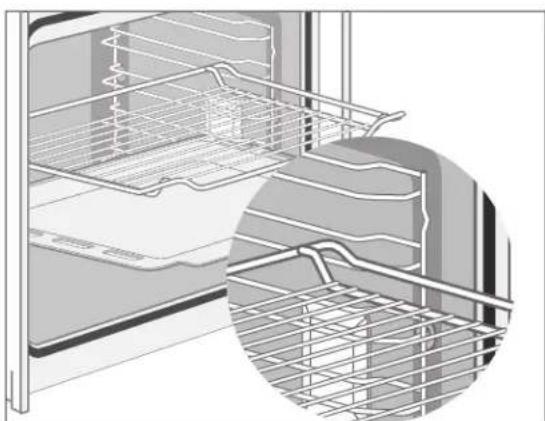
natural_image
Interior view of a refrigerator showing the rack and storage panel (no text or symbols visible)The oven rack must be pushed onto the baking tray guides as depicted in the illustration. This prevents food from getting on the oven wall.
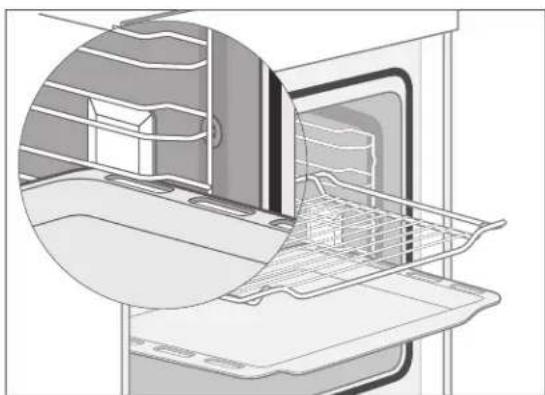
natural_image
Diagram of a kitchen appliance showing internal components and a wire mesh structure (no text or symbols)The supplied baking tray and the lower dripping pan both have an angled edge. Please ensure that this edge is facing forward on being placed in the oven. The oven rack and dripping pan must be pushed onto the baking tray guides as shown in the illustration. This ensures a firm grip and prevents the oven door from being struck.
External cooling fan and extraction hood
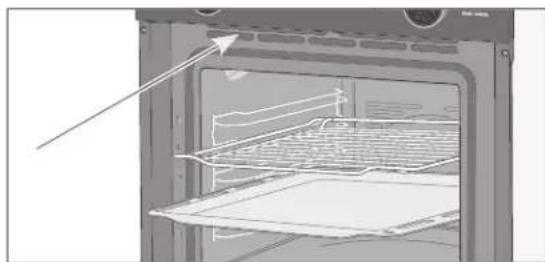
natural_image
Interior view of a microwave oven with insulation rack and oven (no text or symbols visible)The external cooling fan cools down the steam and vapour that exit the oven through the extraction hood and prevents adjacent units from becoming too hot.
Signal tones
A signal tone plays when a dial is operated. This tells you that the oven has understood your action.
Setting the time
You must set the time when using the oven for the first time or after a power cut. The display shows 0:00:0.
The time is displayed in 24-hour format.
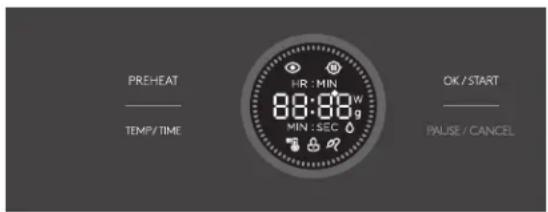
- Tap the TEMP/TIME sensor to access the setting mode.
HR:MIN 00:00 flashes in the display on the right dial. - Turn the right dial until the display on the dial shows the current hour (0-23).
- To save the setting, tap the TEMP/TIME sensor again.
- Turn the right dial until the display shows the current minute (0-59).
- To save the setting, tap the TEMP/TIME sensor.
The display will now show the set time. The colon between the hour and minute flashes continuously to show that the appliance is in stand-by.
Switching the oven on/off
As soon as a power supply has been connected, the oven will be in stand-by mode.
In order to switch
- to the energy-saving mode "Off", tap the ON/OFF sensor.
- back to stand-by mode "ON", tap the ON/OFF sensor again.
The display on the right dial shows the time; the colon flashes continuously.
- off the power supply, you must pull the mains plug out of the socket or switch off the applicable electric circuit.
Opening the oven door has no impact on the oven's operation. The oven will continue to heat.
Selecting a function
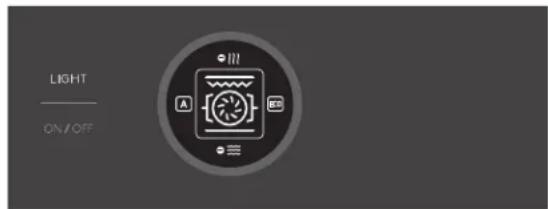
“Function” describes the method of heating. Your appliance’s functions can be found in the table on Seite EN-15. Further information on the individual settings can be found in the
– section „Special features for some heating methods“ auf Seite EN-17,
- enclosed brochure "Baking, roasting and cooking".
You can select the function before and during cooking:
- Turn the left dial until the display on the dial shows the corresponding symbol. The display will now show the default temperature for the selected function.
Setting the temperature and cooking time
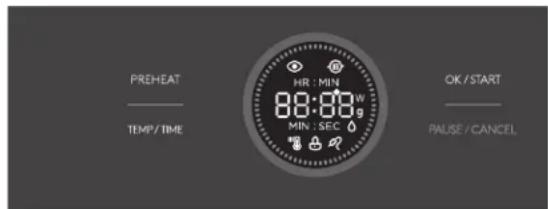
You can change the temperature and cooking time before and during cooking:
- If you want to adjust the setting during cooking, tap the TEMP/TIME sensor.
-
Turn the right dial until the display on the dial shows the required temperature.
-
Tap the TEMP/TIME sensor.
The display on the right dial shows the current setting:
- Turn the right dial until the display on the dial shows the required cooking time (1 minute up to 9 hours).
Please note: While setting, the display changes from PIN:SEC to HR:MIN.
- Tap the OK/START sensor to save the setting.
Quick pre-heating
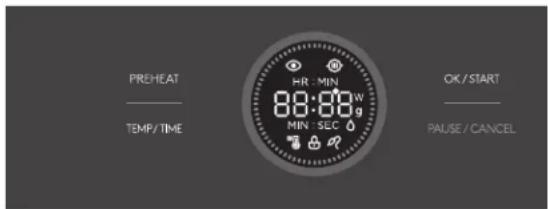
The oven offers this additional function in order to speed up the pre-heating process (exceptions: functions
- Select a function and set the temperature and cooking time, as described above.
- Tap the PREHEAT sensor.
- The pre-heating symbol 📷 will also appear in the display. The oven will begin to heat. Once the pre-set temperature has been reached, you will hear a signal tone.
- To stop pre-heating, tap the ON/OFF sensor.
Starting, interrupting and ending the oven's operation
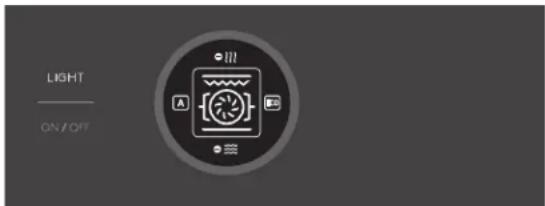
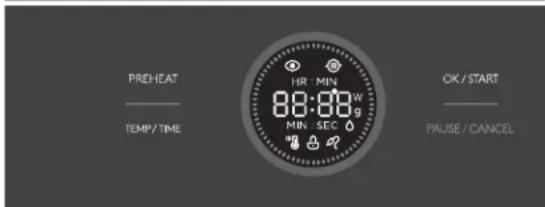
You have selected the function and set the temperature and cooking time. In order to
- start/continue the operation, tap the OK/START sensor.
The lighting will switch on; the oven will heat up. During the heating process, the temperature display illuminates. The red LEDs on the outer edge of the dial show the heating progress.
- pause operation, tap the PAUSE/CANCEL sensor.
The indicator flashes to show that the oven is no longer heating (up).
- To stop cooking, tap the PAUSE/CANCEL sensor twice.
The oven is now in stand-by mode.
The function and temperature can be changed at any point during the cooking process. The change will take effect approx. 6 seconds after the last sensor operation.
Opening the oven door has no impact on the oven's operation. The oven will continue to heat.
| Functions (heating methods) | ||
| Symbol | Meaning | Standard range |
 | Top and bottom heat: Conventional heating without fan. The heat is more intense from the top or bottom, depending on the shelf height. Baking and roasting is only possible on one shelf level. See also „Special features for some heating methods“ auf Seite EN-17. | 180 °C30-250 °C |
 | Convection (with ring element): The heat is generated by the ring heater, which is positioned around the fan on the rear wall of the cooking compartment. The fan distributes the heat evenly in the oven.The choice of ovenware for baking with convection is not too important. Cakes will work in both light and dark bakeware. You can also use this function to dehydrate food. | 160 °C50-250 °C |
 | Energy-saving mode: This optimised heating method saves energy when preparing food. The oven lighting remains switched off. | 140 °C140-240 °C |
 | Top and bottom heat with convection: Heat is generated both at the top and bottom. The fan evenly distributes heat. Well suited for baking and for preparing flash-roast dishes. | 160 °C50-250 °C |
 | Infrared grill: When grilling, meat, poultry and fish brown quickly, become crispy and do not dry out. The crust is easy to digest and is also suitable for bland diets. Flat pieces of meat and fish, skewers, sausages and watery vegetables (such as tomatoes and onions) are particularly good for grilling. | 180 °C150-250 °C |
 | Intensive grill with fan: Grilling with the fan does not have such an intense effect as infrared grilling. However, you can grill larger pieces of meat and fish. The food being grilled does not need to be turned.At 50 °C, this function can be used to warm up dishware. | 180 °C50-250 °C |
 | Intensive grill (infrared grill with top heat): In contrast to the infrared grill, you can fully load the oven rack during intensive grilling. The higher temperature in the upper part of the oven will lead to more intense browning, suitable for larger portions. | 180 °C150-250 °C |
 | Pizza mode (convection and bottom heat): In this mode, the heat in the oven is very intense. It is particularly suitable for gratinated dishes, roasts, bakes and pizza. The function is also suitable for baking moist or heavy cakes, fruit pies made from yeast dough or short crust pastry, as well as cheesecakes. See also „Special features for some heating methods“ auf Seite EN-17 | 180 °C50-250 °C |
 | Bottom heat: Heat is only generated below. The fan is switched off. This setting is suited for achieving dark and crispy bases. | 170 °C30-220 °C |
 | Defrosting: Defrosting merely circulates unheated air within the cooking compartment. See also „Special features for some heating methods“ auf Seite EN-17. | - |
Safety lock/child safety lock
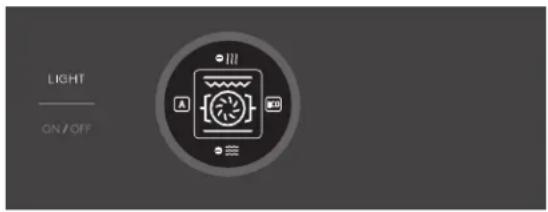
Your oven is equipped with a safety lock which protects the oven from being used without permission or unintentionally switched on or off or the settings being changed.
In order to switch
- on the safety lock, tap on the LIGHT sensor for 3 seconds.
The 🔒 symbol will appear on the display. All of the sensors will be locked. - off the safety lock, tap on the LIGHT sensor for 3 seconds again.
The 🔒 symbol will disappear from the display.
Sabbathmode
CAUTION
Risk of burns!
Power failures do not end Sabbath mode. Once power is restored to the oven, the oven will resume cooking. Elements, sides, baking trays, etc. get hot during operation.
- Keep small children away.
■ Avoid direct contact.
■ Only touch the oven door by the handle.
This function allows you to keep food warm for 24–80 hours without needing to press any buttons. The oven uses “top and bottom heat” for this at 85 °C.
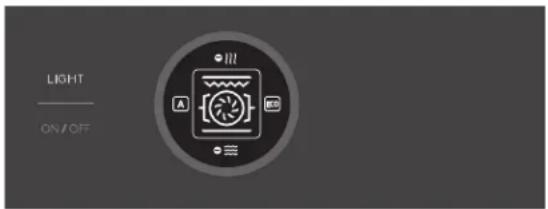
- Switch the oven to stand-by by briefly tapping the ON/OFF sensor. The display on the right dial shows the time and the colon flashes continuously.
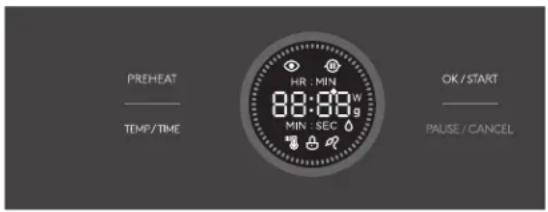
-
To switch to Sabbath mode, press the PREHEAT sensor for 3 seconds. The display on the right dial shows SAB8, short for 'Sabbath'.
-
Tap the TEMP/TIME sensor.
-
Turn the right dial until the display on the dial shows the required running time.
-
Start Sabbath mode by pressing the OK/START sensor.
- To stop Sabbath mode, tap the ON/OFF sensor.
i While in Sabbath mode
- All functions are blocked. You can only end Sabbath mode early. To do so, press the PAUSE/CANCEL or ON/OFF sensor. The oven switches to stand-by mode.
– All signal tones are deactivated.
– The oven light no longer lights up.
- The cooling fan does not switch on when the oven door is opened.
Cooking compartment light
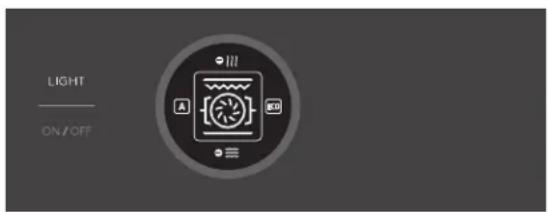
The lighting can be switched on or off at any time: Press the LIGHT sensor.
Demo mode
Demo mode is used to demonstrate the appliance. It is therefore also called Retailer or Exhibition mode.
In Demo mode, you can set the different heating modes, the temperature and other settings, but the appliance does not heat up.
Switch on Demo mode
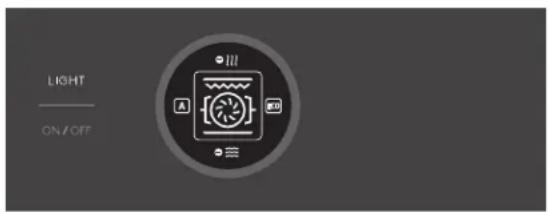
- Switch the oven to stand-by by briefly tapping the ON/OFF sensor. The display on the right dial shows the time; the colon flashes continuously.
- Press the ON/OFF sensor for 5 seconds. The display on the right dial shows the current setting: OFF.
- Use the right dial to select the ☐☐ setting. The Demo symbol 📄 appears.
- Wait 3 seconds; the appliance saves the setting and returns to standby.
Switch off Demo mode
- Switch the oven to stand-by by briefly tapping the ON/OFF sensor.
- Press the ON/OFF sensor for 5 seconds. The display on the right dial shows the current setting: ☐☐.
- Use the right dial to select the OFF setting. The Demo symbol 📷 goes out.
- Wait 3 seconds; the appliance saves the setting and returns to standby.
Special features for some heating methods
Pizzamode
For searing a roast, choose a high temperature, then switch to a lower temperature. If the cooking time takes longer than an hour according to the recipe or based on your experience, keep cooking at 160 °C. You will hear the fan working while it is in operation.
Top and bottom heat
- Fill the cake mixture only 23 of the way up the baking tin; otherwise, it will overflow and drip into the oven when baking.
– The best results for cakes are achieved with dark ovenware. - When roasting, place the meat on the highest shelf in the oven. Very fatty meat is best cooked on the oven rack with the dripping pan inserted underneath. Lean meat is best cooked directly in the dripping pan.
Defrosting

CAUTION
Risk of poisoning!
Defrosting meat, poultry or fish in the oven can cause dangerous microorganisms (e.g. salmonella) to multiply rapidly.
■ Do not defrost meat, poultry and fish in the oven.
■ Only use the defrosting function to defrost vegetables, pre-cooked food, etc.
■ Take the frozen food out of the freezer ahead of time and let it defrost in the refrigerator. The fluid from the frozen food must be able to properly drain, otherwise harmful microorganisms can form.
Defrosting merely circulates unheated air within the cooking compartment. No heat is applied during defrosting. This accelerates the defrosting process.

In order to make more room in the cooking compartment when defrosting food,
you can remove the oven rack guides and place the food container directly on the bottom of the oven.
Preparing yeast dough

NOTICE
Risk of damage!
Pent-up heat can damage the oven's enamel.
If you wish to place dishes directly on the bottom of the cooking compartment, the oven temperature must not exceed 50 °C. Be careful when handling cookware, as the enamel can be easily scratched.
- Pre-heat the oven to 50^ C.
- Switch the oven off when the temperature has been reached.
- Place the baking dish with the yeast dough in the cooking compartment. You can place the dish directly on the bottom of the cooking compartment.
- Close the oven door and leave the yeast dough in the oven for the desired time without further heating.

If the baking dish does not fit in the cooking compartment, the oven rack guides
can be removed to increase the cooking compartment volume.
Cleaning and servicing the oven

CAUTION
Risk of burns!
The oven becomes hot during use. You can burn yourself on heating elements, the cooking compartment, the cooked food and accessories.
- Allow the oven to cool completely before cleaning.
■ Never pour water directly onto the hot oven. The steam produced can cause scalding and damage to the enamel. - Allow hot water from the oven to cool before pouring it out.

NOTICE
Risk of damage!
Improper cleaning can damage the surface and destroy the glass.
■ For cleaning purposes, do not use any harsh, abrasive cleaning agents or scouring agents, steel wool, metal scrapers, oven sprays, steam cleaners or high-pressure cleaners.
Cleaning the housing surface
• After cooling, thoroughly clean the surfaces with warm rinsing water or all-purpose cleaner.
- For stainless steel surfaces, you can also use special care products made just for stainless steel surfaces.
Cleaning the cooking compartment
- For cleaning, switch on only the oven light.
- Clean the cooking compartment and baking tray guides after every use, if possible, and rinse with warm clean water.
- Clean the door seal in the same way. Be very careful, as it is attached only in certain places and is otherwise loose.
Steam cleaning (hydrolysis)
Steam cleaning is a wet cleaning process that uses steam to remove light stains and dirt. That's how you clean the cooking compartment in an energy-efficient manner while conserving materials.
- Remove the oven rack and the baking tray.
- Slide the dripping pan into the lowest rack level and pour about 0.5 litres of water into it.
- Select top and bottom heat and set the temperature to 100^ C.
- After 30 minutes of operation, switch the oven off again and allow everything to cool down so that the oven walls are only lukewarm.
- Use oven gloves or something similar to remove the dripping pan from the oven and pour away the remaining water.
- Wipe the cooking compartment off with a damp cloth or sponge.
Cleaning the baking tray guides
NOTICE
Risk of damage!
The baking tray supports are not dish-washer-safe. They can be damaged if they are cleaned in the dishwasher.
■ Do not clean the baking tray guides in the dishwasher.
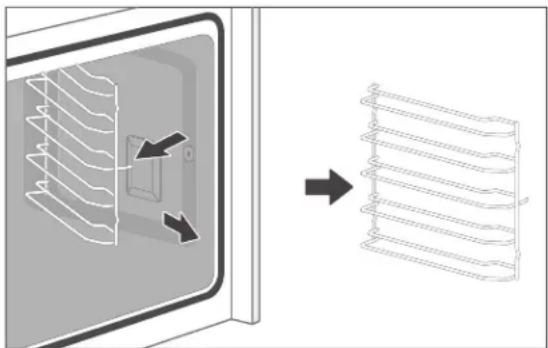
You can remove the baking tray guides to clean the cooking compartment thoroughly.
Removing and cleaning baking tray guides
- Remove the oven rack, the baking tray and the dripping pan.
natural_image
Diagram showing a 3D box with internal structure and a 2D grid of parallel ribbons, no text or symbols present.- To remove the baking tray guides, first pull out the front holder on the front side, where the two hooks with the welded plates are located.
- Then pull out the rear mount of the baking tray guides.
- Clean the baking tray guides using warm water and mild dish soap or all-purpose cleaner. Then dry everything off.
Inserting the baking tray guides
- Position the baking tray guides so that both hooks with the welded plates are at the front.
- First, push the rear hooks into the holes provided in the side walls.
- Then push the front hooks into the holes provided in the side walls.
Cleaning the oven door
CAUTION
Risk of injury!
Glass shards are sharp and can cause injury.
■ If a glass pane breaks, keep children away from it and carefully collect all the pieces of glass.
■ Do not use the oven when the glass is damaged because the oven is no longer safe. Instead contact our Service.
NOTICE
Risk of breakage and injury!
The oven door is equipped with heavy glass panels that can break if handled improperly.
■ Do not let the oven door or individual glass panels fall.
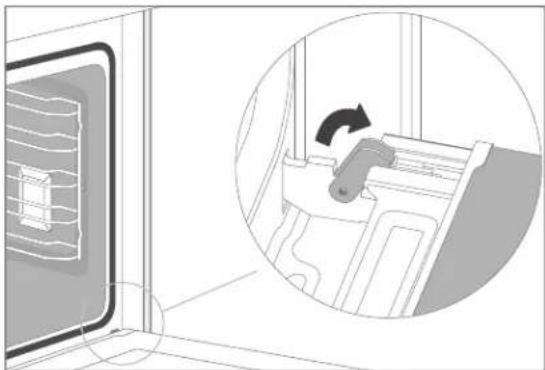
Removing the oven door from its hinges The oven door can be removed from its hinges to enable easy cleaning of all areas of the oven:
- Open the oven door completely.
natural_image
Diagram showing a door with a window and a circular inset view of a device being turned, no text or symbols present.-
Fold the clips on both sides all the way forward. Use a screwdriver if necessary.
-
Close the oven door only as far as the clips allow easily.
-
Lightly lift and guide the door forward out of its hinges.
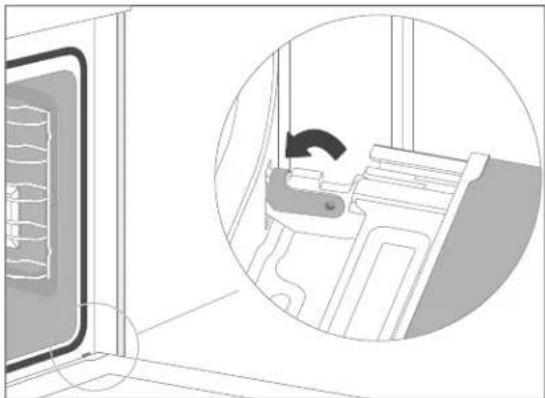
Replacing the oven door on its hinges
- Hold the oven door at an angle using both hands.
- Hook the hinges into the holes in the side panels.
- Open the oven door completely.
natural_image
Interior view of a room with a door and a circular inset showing a person seated at a desk (no text or symbols visible)- Fold the clips on both sides all the way back again.
-
Close the door carefully. The door must sit flush when closed. If the door does not sit flush when closed or if there is a cracking sound when closing it, the oven door is not hung properly.
-
Correct the position of the hinges and clips, if necessary, until the door opens and closes smoothly again.
Cleaning the glass panes
The oven door contains three glass panels that should occasionally be cleaned on both sides.
- Take the oven door off its hinges (see above „Removing the oven door from its hinges“).
natural_image
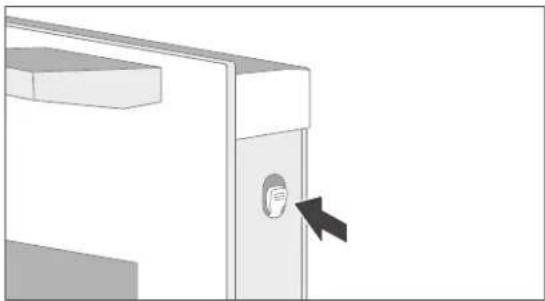
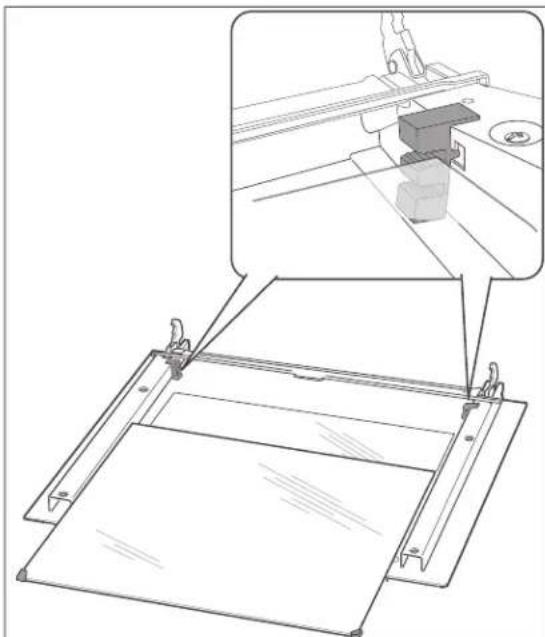
Diagram of a computer monitor with a button and arrow pointing to the screen (no text or symbols present)- To remove the cover from the top of the oven door, push the bolts in lightly on both sides.
- Remove the panes of glass with care and retain the rubber holders with care.
- Clean all the panes with warm soapy water and dry them thoroughly.
natural_image
Technical line drawing of a mechanical assembly with an inset showing a 3D printer mounted on a base plate (no text or symbols present)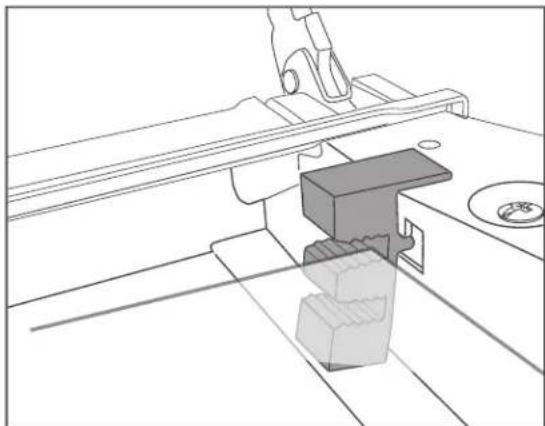
natural_image
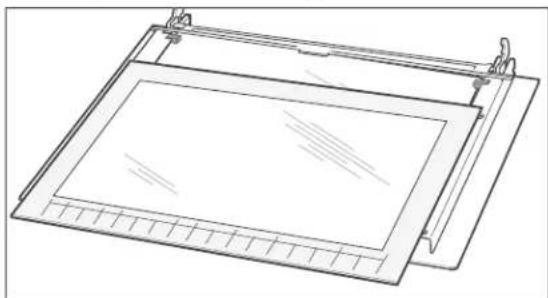
Technical line drawing of a mechanical assembly with no visible text or symbols- Slide the middle pane back into the holder. Make sure that the side rubber seals are positioned correctly.
natural_image
Line drawing of a rectangular frame with grid pattern and mounting brackets (no text or symbols)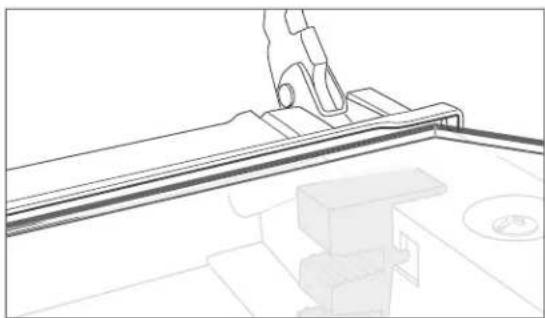
natural_image
Line drawing of a mechanical assembly with a hand holding a tool, no text or symbols present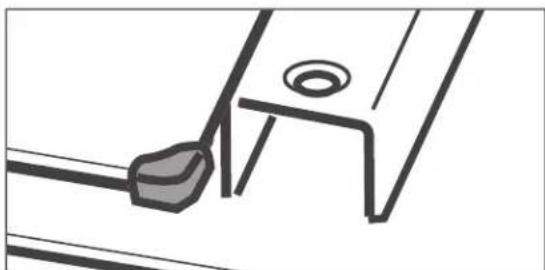
natural_image
Pure technical line drawing of a mechanical component or bracket (no text or symbols)-
Now reinsert the inner pane. Make sure that the side rubber seals are positioned correctly.
-
Lift the cover up again and allow it to click into place.
- Replace the oven door (siehe „Replacing the oven door on its hinges“ auf Seite EN-21).
Changing the cooking compartment light

WARNING
Risk of electric shock!
Improper replacement of the light bulbs can result in fatal electric shock or burn injuries.
■ Before changing the light bulbs, disconnect the mains plug or switch off the fuses for the socket to which the oven is connected.
■ Replace the light bulbs only when the oven is no longer hot and there is no risk of being burned.
The cooking compartment has two light bulbs, in the top left corner and on the right-hand side.
Light bulb in the corner
For the light bulb in the top left corner, you need a heat-resistant halogen bulb with the following specifications: type 230 V, 25 W, G9, T300 °C.
- Switch off and/or unscrew the mains fuse.
- Place a soft cloth in the cooled oven in case the glass cover or halogen bulb should fall.
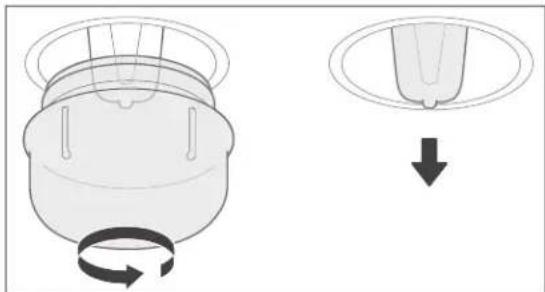
- Unscrew the glass cover anticlockwise and remove it.
natural_image
Diagram showing a mechanical component with rotating and curved arrows, and a separate view of a circular component with a downward arrow (no text or symbols)- Carefully pull the defective halogen bulb out of the socket. Do not try to twist the bulb out of the socket.
- Replace the halogen bulb with a new one of the same type.
- Insert the glass cover back into the opening and screw it back on clockwise.
- Switch on/screw the fuse back in.
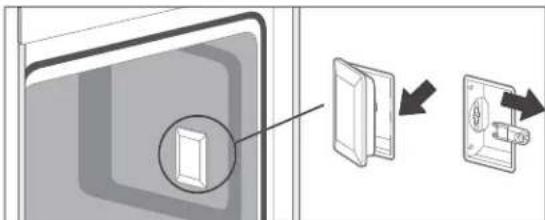
Light bulb on the side

WARNING
Risk of electric shock!
Improper replacement of the light bulbs can result in fatal electric shock or burn injuries.
■ If the glass cover is defective, do not operate the appliance until it has been replaced by a professional.
We recommend that the halogen bulb be replaced by a service technician.
Note for the service technician:
This oven requires one halogen bulb with the following specifications: type 230 V, 25 W, G9, T300 °C.
Moving and checking package contents
natural_image
Illustration of an open oven with internal shelves and a separate screw assembly (no text or symbols)Moving and unpacking

CAUTION
Risk of injury!
The appliance is heavy and bulky.
■ Get another person to help with moving and installation.

NOTICE
Risk of damage!
Improper handling of the appliance may result in damage.
■ Do not use sharp objects to unpack the appliance.
■ Do not use the oven door and door handle as a step or for lifting.
- Move the appliance using a trolley or with the help of a second person.
- Carefully unpack the appliance and remove all packaging, plastic moulding, adhesive strips and foam padding from the inside, outside and back of the appliance.
- If you have sufficient space, we recommend retaining the packaging, at least during the warranty period.
Checking the delivery
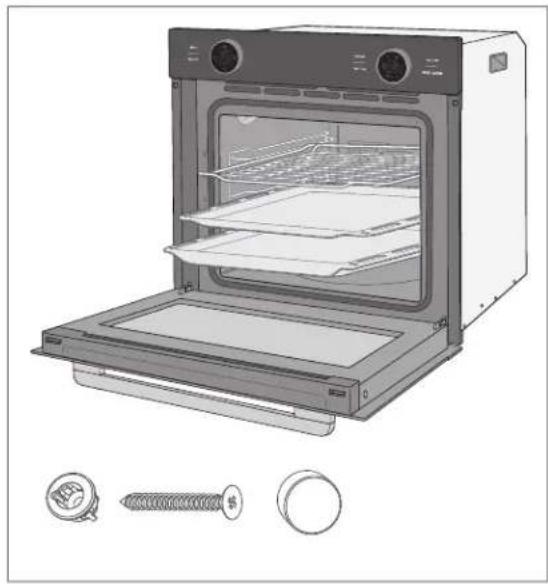
The package contents consist of a built-in oven with
- Oven rack, 1×
- Baking tray, 1×
- Dripping pan, 1×
- Screw rack, 2×
- Screw, 2×
- Blind plug, 2×
- User manual, 1×
- "Baking, roasting and cooking" brochure, 1×
- Check that the delivery is complete.
- Check whether the appliance was damaged during transit.
- If the delivery is incomplete or the appliance shows signs of damage in transit, please contact our Service.

WARNING
Risk of electric shock!
Touching live parts may result in severe injury or death.
■ Never use a damaged appliance.
Installing, connecting and start-up

CAUTION
Fire hazard!
Heat trapped in the cooking compartment may shorten the appliance's service life.
- Observe the specified minimum dimensions when installing to ensure adequate ventilation.
Installationrequirements
Suitable location:
- The best place is next to the sink. You have an additional work surface and dirty dishes can be washed immediately.
– In respect of fire protection, the oven conforms to Type Y (EC 335-2-6). This type of appliance may only be installed on one side of taller kitchen cabinets, appliances or walls. - Do not install the oven directly next to a refrigerator or freezer. This will increase its energy consumption unnecessarily due to heat emission.
Requirements for the electrical connection:
- an earthed power socket with a separate fuse with sufficient protection installed by a professional (see the section "Technical specifications").
- The socket must be installed in way that does not affect the depth of the installation recess when the oven is plugged in.
- Do not use multi-plugs and any extension cables.
Suitable fitted units:
- The fitted units' veneers or plastic coatings must be processed with heat-resistant adhesive (100 °C). If the adhesive and surfaces are not heat-resistant, the covering may warp and come loose.
- Your built-in fittings may have to be reworked accordingly. If you do not have the manual skills to do this, you should hire a professional.
- The installation recess may not have a rear panel, at the most it may have an add-on edge measuring no more than 50~mm .
- An intermediate shelf is required if a drawer is to be installed below the oven.
- The built-in cabinet can be equipped with either ledges/rails or an intermediate shelf with ventilation cut-out.
Electrical connections

WARNING
Risk of electric shock!
Incorrect installation/dismantling can cause electric shock.
■ Before installing/dismantling the appliance, check that the socket to which the appliance is connected is switched off.
Depending on the installation recess, the electrical connection must be set up before or after the oven is inserted.
- Switch off the socket for the oven before installation. To do this, unscrew and/or switch off the fuse for the socket.
- Insert the mains plug into the socket.
Installation under a worktop
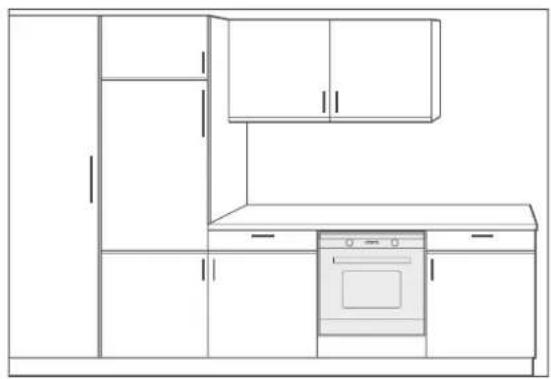
natural_image
Line drawing of a kitchen cabinet with an oven and oven (no text or symbols)Installation in an upright
cabinet
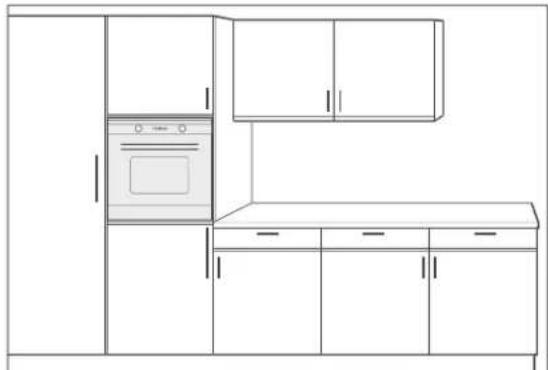
natural_image
Line drawing of a kitchen interior with oven, cabinet, and cabinet (no text or symbols)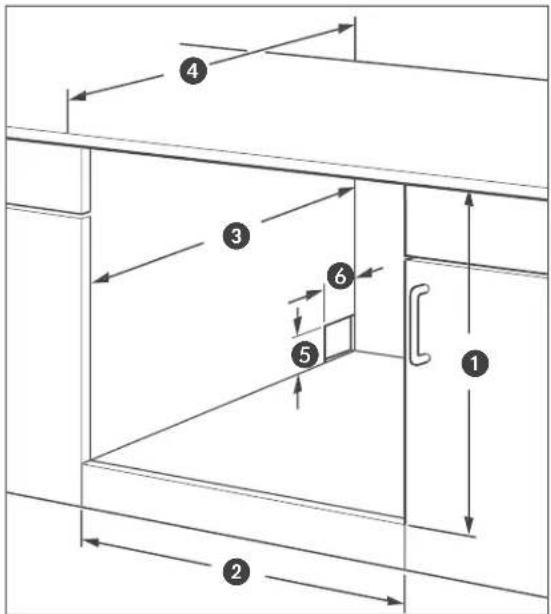
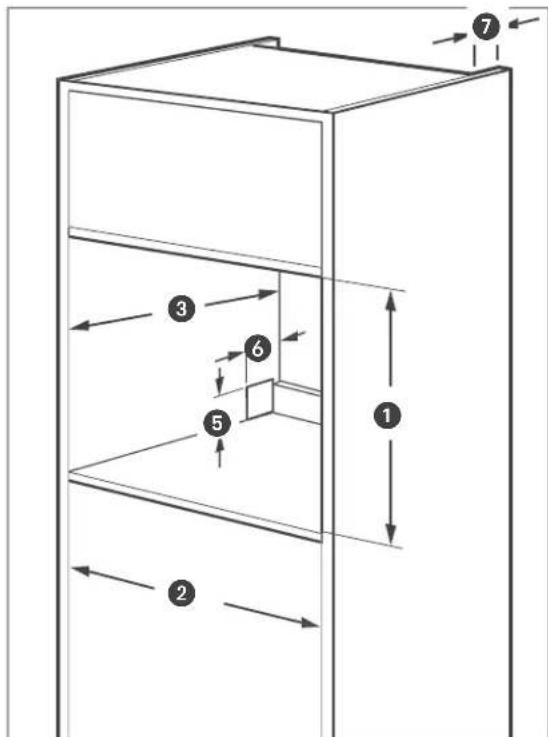
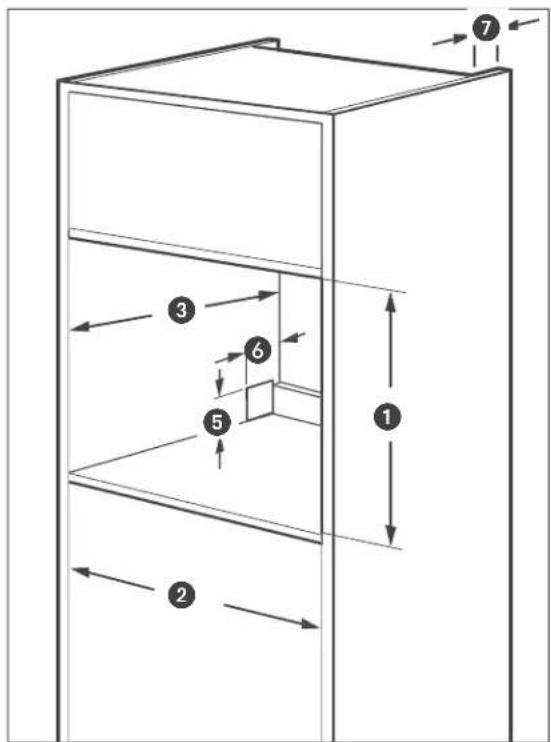
Minimum dimensions for the installation recess
① min. 600 mm
2 560+8 mm
③ min. 550 mm
4 min. 580 mm
⑤ max. 50 mm
6 max. 50 mm
Minimum dimensions for the installation recess
1 585–595 mm
2 560+8 mm
③ min. 550 mm (incl. ⑦)
5 max. 50 mm
6 max. 50 mm
7 min. 35 mm
Inserting the oven

NOTICE
Risk of damage!
Improper handling of the appliance can result in damage.
■ Do not set the oven down on the edge or corner of the oven door! The glass panes can be damaged.
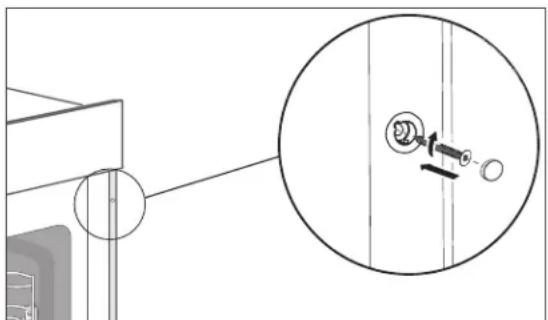
- Push the oven into the recess until the front fascia is flush with the installation unit. The mains connection must not be kinked, pinched or otherwise damaged.
- Ensure an even gap between the oven and the unit walls on both sides.
- Do not seal the gap above the oven fascia.
natural_image
Technical diagram showing a mechanical assembly with a magnified inset of a component detail (no text or symbols)- If the oven is correctly set up, open the oven door and screw it to the built-in cupboard using the included assembly material. Use the screws and screw inserts.
- Switch the socket fuse back on.
Basiccleaning
The oven must be pre-cleaned to remove all grease and oil residues from the manufacturing process, as well as tough dust deposits left over from storage and transportation. This not only helps protect your health but also ensures delicious cakes and roasts.
- Operate the oven with dripping pan, oven rack and baking tray for 60 minutes at 250°C.
Refer to the chapter "Operating the oven" for the oven's operating instructions. - Allow the oven to fully cool down.
- Clean the cooking compartment of the oven, as well as the dripping pan, oven rack and baking tray with a little soapy water and then wipe everything dry.
Troubleshooting
Malfunctions can occur in all electrical appliances. This does not necessarily mean there is a defect in the appliance. For this reason, please check the tables to see if you can correct the malfunction.

WARNING
Risk of electric shock in case of improper repair!
- Never try to repair a defective or suspected defective appliance yourself. You can put your own and future users' lives in danger. Only authorised specialists are allowed to carry out this repair work.
| Problem Possible causes | solutions and tips |
| The fan does not run permanently. | This is not a malfunction. If you have selected a heating method with fan operation (convection/hot air), this will ensure the heat is evenly spread around the cooking chamber and switches on and off automatically. |
| Oven window steams up when it gets hot, condensation builds up in the oven. | This is caused by temperature differences when heating, baking cakes with a very moist layer (e.g. fruit) or when roasting larger pieces of meat. |
| Oven light(s) defective. | Replace the defective bulb for the oven light. See chapter “Cleaning and servicing the oven”.Notice: Defective bulbs do not fall under our warranty. |
| The time 0:00 is shown on the display. | There was a brief power failure or the power supply was temporarily cut off.• Set the time. |
| The display shows SAB | The oven is now in Sabbath mode. For more information, refer to the chapter “Operating the oven, Sabbath mode”. |
| The oven door cannot be closed properly. | There are foreign objects on the door seal surfaces.• Clean the door seal faces thoroughly. |
| The oven door is warped or the door seals/latch is defective.• Do not use the appliance! Please contact our Service regarding this. | |
| The external cooling fan does not run permanently. | This is not a malfunction. The fan will switch on and off during the cooking process as required. |
| The external cooling fan is not working; no air released from the air locks and Cover is very hot. | • Switch on the cooking compartment light. If the ventilation system does not make a sound and no air is emitted, the ventilation system is defective.⚠️ CAUTION!Risk of burns!■ In such an event, immediately open the oven door, switch off the appliance, stop using the cooker! Contact our Service. |
| Problem Possible causes, solutions and tips | |
| External cooling fan keeps running. | No error. The external cooling will run for a while and then shut off automatically. |
Service
Please note!
You are responsible for the condition of the appliance and its proper use in the household.
If you call out for customer service due to an operating error, you will incur charges, even during the guarantee/warranty period.
Damage resulting from non-compliance with this user manual unfortunately cannot be recognised.
In order for us to help you quickly, please tell us:
| Name of appliance | Colour | Model | Order number |
| hanseatic Built-in oven | black | HBO7213A1 | 44625345 |
Advice, complaints and orders
Please contact your mail order company's customer service centre if
– the delivery is incomplete,
– the appliance is damaged during transport,
– you have questions about your appliance,
- a malfunction cannot be rectified using the troubleshooting table,
– you would like to order further accessories.
You can find the contact details of your product advisor online on the service pages of your mail order company. The various sections of product advice are listed here.
Please have your appliance invoice ready.
For more information, visit www.hanseatic.de
Repairs and spare parts
You can prevent waste by having your defective appliances repaired. Please contact our Customer Service department.
Please have your appliance invoice ready (date of purchase and item no.).
Spare parts are available for a minimum period of seven years after the final version of the model has been placed on the market. Door seals are available for a period of ten years.
Customers in Germany
Place an order at
by E-mail: otto@operatec.de
Phone +49 (0) 40 36 03 31 50
Customers in Austria
Please contact your mail order company's customer service centre or product advice centre.
Waste prevention, free return and disposal
Waste prevention
According to the provisions of Directive 2008/98/EC, waste prevention measures always take priority over waste management.
For electrical and electronic devices, waste prevention measures include extending the lifespan of defective devices through repair and reselling used working appliances instead of disposing of them.
Please help us reduce waste and contact our customer service if your product is faulty.
More information can be found in the brochure "Waste Prevention Programme – of the German Government with the Involvement of the Federal Länder".
Free return of old electrical appliances
Upon purchasing a new electrical appliance of the same type with essentially the same function, consumers may return an old electrical appliance to a distributor obliged to take back old appliances, at no extra cost for the consumers. This option also exists for deliveries made to a private household. For distance selling, the option of having old electrical equipment collected for free applies only in the case of purchase of new electrical equipment with heat exchangers (e.g. refrigerators, dehumidifiers), screens and display devices with a screen surface > 100 cm ^2 , and large devices with at least one of its external dimensions measuring more than 50 cm.
In addition, consumers may return up to three old electrical appliances of the same type to a distributor's collection point for free, without having to purchase a new electrical appliance. In this case, however, the old appliances' external dimensions may not exceed 25 cm.
Disposal
Disposing of old electrical devices in an environmentally friendly manner
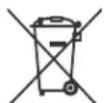
Electrical appliances contain harmful substances as well as valuable resources.

Every consumer is therefore required by law to dispose of old elec-
trical appliances at an authorised collection or return point. They will thus be made available for environmentally-sound, resource-saving recycling.
You can dispose of old electrical appliances free of charge at your local recycling centre.
Please contact your dealer directly for more information about this topic.
Don't forget to erase data!
If necessary, each consumer is responsible for erasing personal data from electrical and electronic equipment.
Batteries and rechargeable batteries, lamps and bulbs
If necessary, old single-use and rechargeable batteries that are not encased by an old electrical appliance, as well as lamps/bulbs that can be removed from an old electrical appliance without being destroyed, must be removed and disposed of separately before you return the appliance.
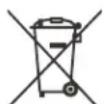
This symbol means that batteries and rechargeable batteries must not be disposed of with other household waste.
Consumers are required by law to bring all batteries and rechargeable batteries, regardless of whether they contain harmful substances*) or not, to a collection point operated by their communal authority or borough or
to a retailer, so that they can be disposed of in an environmentally friendly manner and so that valuable resources (e.g. cobalt, nickel or copper) can be recovered.
Batteries and rechargeable batteries can be returned free of charge.
Some of the possible contents (e.g. mercury, cadmium and lead) are toxic and, if improperly disposed of, can have adverse effects on the environment. Heavy metals, for instance, can have detrimental health effects on humans, animals and plants and accumulate in the environment and food chain, and then enter the body indirectly through the consumption of food.
There is a high risk of fire with old lithium batteries. Special care must therefore be taken to properly dispose of old lithium batteries and rechargeable batteries. Improper disposal can also lead to internal and external short circuits due to thermal effects (heat) or mechanical damage. A short circuit can lead to a fire or an explosion and have serious consequences for people and the environment. It is therefore important to tape off the poles of lithium batteries and rechargeable batteries before disposing of them to prevent an external short circuit.
Before disposing of the appliance, batteries and rechargeable batteries which are not permanently built into the appliance must be removed and disposed of separately.
Please only dispose of batteries and rechargeable batteries in a discharged state!
If possible, use rechargeable batteries in place of disposable batteries.
Packaging

Our packaging is made of environmentally friendly, recyclable materials:
– Outer packaging made of cardboard
– Moulded parts made of foamed, CFC-free polystyrene (PS)
– Films and bags made of polyethylene (PE)
– Tension bands made of polypropylene (PP)
- Saving energy also protects against excessive global warming. Your new appliance uses little energy due to its environmentally friendly insulation and technology.

If you have sufficient space, we recommend keeping the packaging, at least during the warranty period. If
the appliance needs to be sent out for repairs, only the original packaging will provide sufficient protection.
If you would like to dispose of the packaging, please dispose of it in an environmentally friendly way.
Product table and technical specifications
Test dishes
These dishes were prepared in accordance with DIN 44547 and EN 60350 standards.
| Dish | Number of trays | Rack height1) | Heating method | Temperature in °C | Cooking time in min. |
| Shortbread biscuits | 1 3 Top/bottom heat2) | 180–200 10–20 | |||
| 1 | 3 | Convection with top and bottom heat2) | 170–180 10–20 | ||
| Water sponge cake | 1 2 Top/bottom heat2) | 170–180 25–35 | |||
| 1 | 2 | Convection with top and bottom heat2) | 150–160 30–40 | ||
| Leavened apple cake | 1 3 Top/bottom heat2) | 180–200 25–35 | |||
| 1 | 3 | Convection with top and bottom heat | 170–180 30–40 | ||
| 20 muffins | 1 | 3 | Top/bottom heat | 180–190 | 15–25 |
| 1 | 3 | Convection with top and bottom heat | 160–170 20–30 | ||
| Toast 1 4 Grill with fan | 3) | 250 0.5–1 | |||
| 12 patties | 1 | 4 | Grill with fan3) | 250 | 10–12 + 8–124) |
| Chicken*) | 1 | 2 | Top/bottom heat | 210–230 | 50–70 |
| 1 | 2 | Convection with top and bottom heat | 170–180 60–80 | ||
| Roast pork*) | 1 | 2 | Convection with top and bottom heat | 160–1806) | 140–170 |
| 1 2 Grill with fan | 170–190 | 6) | 90–120 | ||
| Goose | 1 2 | Convection with top and bottom heat | 160–180 | 150–180 | |
| Pizza7) | 1 2 Bottom heat with fan*) | 190–210 20–25 | |||
| 1 3 Top/bottom heat2) | 200–220 | 10–20 | |||
1) Rack height calculated from below
2) Pre-heated
3) Pre-heat for five minutes
4) Page 1 and 2
5) Universal pan above
6) Depending on the height of the roast
7) Follow the manufacturer's instructions on the packaging
*) No pre-heating required
The dripping pan should be placed beneath the oven rack for dishes that produce meat juices, fat or other dripping liquids.
Product fiche concerning Regulation (EU) No 65/2014
| Trade mark | hanseatic |
| Model identifier | HBO7213A1 |
| Energy efficiency index | 81,2 |
| energy efficiency class class on a scale from A+++ (most efficient) to D (least efficient) | A+ |
| Energy consumption in conventional mode | 1,06 kWh/cycle |
| Energy consumption in fan-forced mode | 0,69 kWh/cycle |
| Number of cavities | 1 |
| Heat source | electricity |
| Volume | 72 l |
The values indicated above have been measured under standardised laboratory conditions pursuant to EN 60350-1.
Product fiche concerning EU Directive No. 66/2014
| Model identification | HBO7213A1 |
| Type of oven | built-in |
| Mass of the appliance | 31,8 kg |
| Number of cavities | 1 |
| Heat source | electricity |
| Volume | 72 l |
| Energy consumption in conventional mode | 1,06 kWh/cycle |
| Energy consumption in fan-forced mode | 0,69 kWh/cycle |
| Energy Efficiency Index | 81,2 |
The values indicated above have been measured under standardised laboratory conditions pursuant to EN 60350-1.
Technicalspecifications
| Item number | 44625345 |
| Name of appliance | Built in oven |
| Modell | HBO7213A1 |
| Rated voltage | 220 - 240 V ~ |
| Frequency | 50 Hz - 60 Hz |
| Rated power input oven | 2900 W |
| Oven measurements (H x W x D) | 596 mm x 595 mm x 566 mm |
| Oven recess dimensions (H x W x D) | 600 mm x 560 mm x 550 mm |
| Maximum temperature | 250 °C |
| Lighting | 230 V, 25 W, G 9, T 300 °C |
This product contains a light source of energy efficiency class G.
- Table of contents
- Explanation of signal terms and symbols
- WARNING
- CAUTION
- NOTICE
- Intended use
- Safety notices
- Risks to children and certain groups of individuals
- Safety when handling heat-generating appliances
- Risk of burns!
- Fire hazard!
- Protecting food
- Health hazard!
- Using the oven safely
- Risk of damage!
- Specific risks when grilling
- Specific risks for units with a cooling fan
- Appliance parts and control elements
- Operating the oven
- Requirements for safe use
- Handling the oven correctly
- The right oven cookware
- Tips for saving energy
- Oven rack, baking tray and dripping pan
- External cooling fan and extraction hood
- Signal tones
- Setting the time
- Switching the oven on/off
- Selecting a function
- Setting the temperature and cooking time
- Quick pre-heating
- Starting, interrupting and ending the oven's operation
- Safety lock/child safety lock
- Sabbathmode
- i While in Sabbath mode
- Cooking compartment light
- Demo mode
- Switch on Demo mode
- Switch off Demo mode
- Special features for some heating methods
- Pizzamode
- Top and bottom heat
- Defrosting
- Preparing yeast dough
- Cleaning and servicing the oven
- Cleaning the housing surface
- Cleaning the cooking compartment
- Steam cleaning (hydrolysis)
- Cleaning the baking tray guides
- Removing and cleaning baking tray guides
- Inserting the baking tray guides
- Cleaning the oven door
- Replacing the oven door on its hinges
- Cleaning the glass panes
- Changing the cooking compartment light
- Light bulb in the corner
- Light bulb on the side
- Moving and checking package contents
- Moving and unpacking
- Checking the delivery
- Installing, connecting and start-up
- Installationrequirements
- Electrical connections
- Inserting the oven
- Basiccleaning
- Troubleshooting
- Service
- Advice, complaints and orders
- Repairs and spare parts
- Customers in Germany
- Customers in Austria
- Waste prevention, free return and disposal
- Waste prevention
- Free return of old electrical appliances
- Disposal
- Disposing of old electrical devices in an environmentally friendly manner
- Don't forget to erase data!
- Batteries and rechargeable batteries, lamps and bulbs
- Packaging
- Product table and technical specifications
- Test dishes
Brand : Hanseatic
Model : HBO7213A1
Category : Oven