
RoboStar W700 WiFi - Robot vacuum TESLA - Free user manual and instructions
Find the device manual for free RoboStar W700 WiFi TESLA in PDF.


| Product Type | Robot Vacuum Cleaner |
| Brand | Tesla |
| Model | RoboStar W700 WiFi |
| Dimensions | 340 x 340 x 90 mm |
| Weight | 3.5 kg |
| Power Supply | DC 14.4V, 2600mAh Li-ion battery |
| Charging Time | 4-5 hours |
| Runtime | Up to 120 minutes |
| Dustbin Capacity | 0.4 L |
| Connectivity | WiFi 2.4GHz, compatible with Tesla Home app |
| Cleaning Modes | Auto, Edge, Spot, Scheduled |
| Sensors | Anti-drop, bumper, cliff, dust sensor |
| Filter | High-efficiency HEPA filter |
| Brush Type | Main roller brush + side brushes |
| Noise Level | ≤ 65 dB |
| Included Accessories | Charging dock, remote control, extra filters |
| Maintenance | Clean dustbin, replace filters every 3 months |
| Safety Features | Automatic return to dock, low battery auto-recharge |
| Spare Parts Availability | Available from Tesla service centers |
| Warranty | 2 years |
Frequently Asked Questions - RoboStar W700 WiFi TESLA
User questions about RoboStar W700 WiFi TESLA
0 question about this device. Answer the ones you know or ask your own.
Ask a new question about this device
Download the instructions for your Robot vacuum in PDF format for free! Find your manual RoboStar W700 WiFi - TESLA and take your electronic device back in hand. On this page are published all the documents necessary for the use of your device. RoboStar W700 WiFi by TESLA.
USER MANUAL RoboStar W700 WiFi TESLA
natural_image
Two identical diagrams showing hands cleaning a device with a circular vent and a spray bottle (no text or symbols)ANDROID
APPLE
Thank you for choosing the TESLA RoboStar W700 WiFi.
Before using this device, please carefully read the rules for safe use and follow all common safety rules.
IMPORTANT SAFETY NOTICE
This device is a complex electromechanical device, please pay attention to the following instructions:
- Do not use the device in extremely hot or cold environments (below 0°C or above 40°C).
- Only pour pure distilled water into the water tank.
- It can be used to clean outside windows if it is properly secured, it is not windy, raining or snowing.
- Avoid splashing the vacuum cleaner or its internal parts with liquid that could damage it.
- Make sure the device is connected to power as the device has a backup battery that charges while in use.
- Do not use the device on broken glass, on wet or greasy windows, on a window with glass thinner than 5 mm.
- Do not use on horizontally mounted glass, the device will not work properly.
- Do not use the device if it is not firmly attached to the glass or has visible signs of damage, and do not immerse the device in water or any other liquid. The device is not waterproof.
- Be careful not to damage the power cord. Do not pull or carry the device by the power cord, use it as a handle, hang the power cord through a window, or place heavy weights on the power cord. Keep the power cord away from hot surfaces.
- Do not use the device with a damaged power cord.
- Do not use the device if it malfunctions, has been dropped, damaged, or has come into contact with water.
- If the battery needs to be replaced, contact TESLA Service.
- Use only original accessories intended for this model.
- Only use accessories supplied by the device manufacturer for charging. The use of non-original accessories can lead to damage to the device, electric shock or even fire.
• Do not touch the parts that are connected to the mains when your hands are wet.
- Do not leave the device unattended in the presence of children.
• Do not open or repair the device, risking electric shock and voiding the warranty.
- Keep the device away from flammable and volatile substances.
- The manufacturer and importer to the European Union is not responsible for damages caused by the operation of the device, such as injuries, scalds, fire, injuries, impairment of other things, etc.
PACKAGE CONTENTS
Check carefully that you have unpacked all supplied accessories, we recommend that you keep the original paper box, user manual and packing material during the warranty period.
DESCRIPTION
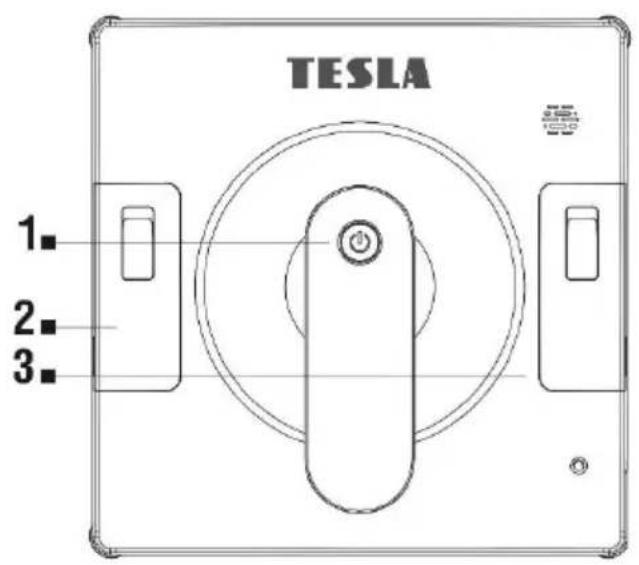
1 START/PAUSE/STOP control button
2 Water tank
3 Water tank
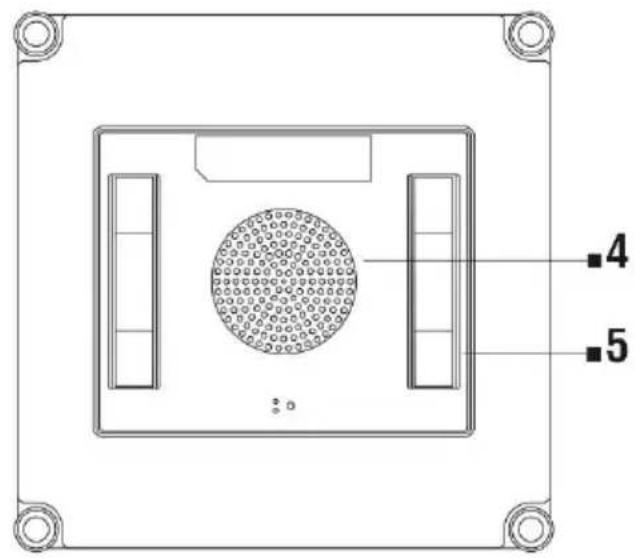
4 Ventilator
5 Driving belt
REMOTE CONTROL
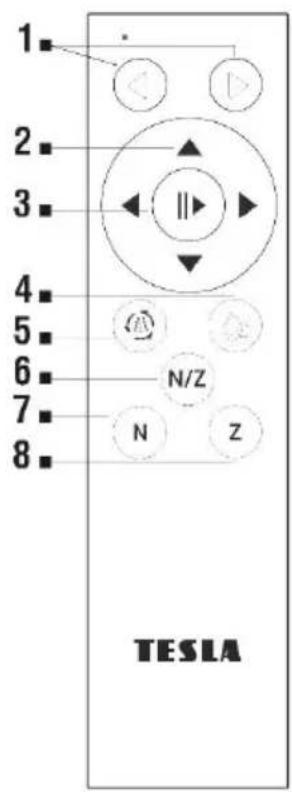
1 Automatic cleaning on the left/Auto cleaning on the right
2 Manual mode - directional movement buttons
3 Start/Stop cleaning/Auto mode
4 Manual water spraying, Cleaning driving belts
5 Automatic water spraying
6 Cleaning in "N/Z" mode (automatic cleaning)
7 Cleaning in "N" mode (up/down)
8 Cleaning in "Z" mode (right/left)
IMPORTANT WARNING!
Always charge the internal backup battery first before using the device. If the battery is not charged, the device may not work for safety reasons. During charging, the red and blue LED flashes alternately. When the battery is fully charged, the LED will be permanently blue.
BEFORE FIRST USE
- ATTENTION! The device can clean glass mounted at an angle from both sides, but may not work properly; in that case, there should be a person nearby to help in case of a problem.
- Do not use the device on a window with glass thinner than 5 mm.
- The device can be used on both framed and frameless windows that are larger than 50 x 70 cm.
- If the window is too dirty, clean a small area first and place the device on it before starting cleaning.
- Make sure there is a gap of at least 11 cm between the glass and obstacles in the room (curtains or furniture).
- Please read the manufacturer's cleaning instructions before using on glass with an uneven surface (matte, textured, glued, patterned or coated glass, tiles and tiles). The device manufacturer is not responsible for damage caused by improper use on this surface, the device may not work properly.
-
Use the device only with pure distilled water to avoid limescale and clogging of the water jets. Do not add any cleaning agents that can cause foaming, smearing or clogging of the water jets. If the soiling condition of the window requires it, you can use a small amount of a good quality, non-foaming, low-alcohol window cleaner to dampen the cleaning cloth or window surface.
-
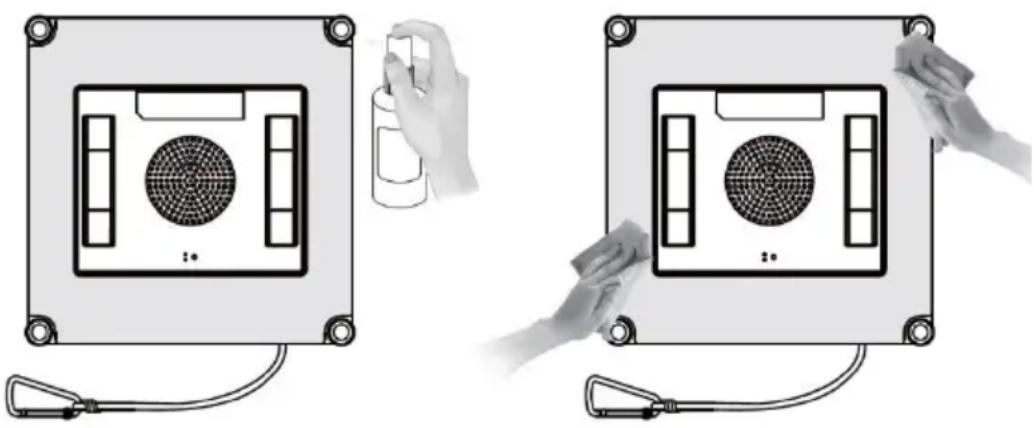
Gently dampen the cleaning cloth with clean water. Turn the device upside down and attach the cleaning cloth to it, white side down and gray cleaning side up. If you wet the cleaning cloth too much, the device may slide, fall or not function properly when moving.
Make sure the cleaning cloth is not covering any sensor.
natural_image
Two identical diagrams of a device with circular components and connected cables, one being cleaned by a spray bottle (no text or symbols)- Connect the cable from the appliance to the power adapter, which then connect to the mains.
- Install a safety wire in a suitable place, you can use a buckle to secure it, and adjust its length to secure the device against falling. Make sure that the length of the cable or rope does not restrict the movement of the device on the window.
FIRST LAUNCH
Connect the device to the mains and do not disconnect it from the power supply during cleaning. Place the device on the glass in the middle of the window, at least 11 cm from its frame. Press the
button on the device ⏻ a few seconds. If the LED starts to glow permanently blue, the device is correctly installed on the window. Select the cleaning mode.
AUTOMATIC MODE
Press the button ⏻ on the device or press the button on the remote control ▶ || and the "N/Z" mode will start.
MOTION MODES
- "Z" shaped cleaning mode is suitable for wide windows. In this mode, the automatic water spray will be functional.
- "N" shaped cleaning mode is suitable for tall windows. In this mode, the automatic water spray will be functional.
- "N/Z" shaped cleaning mode is a combined mode suitable for all windows. "N/Z" cleaning mode, it will start in "N" mode first and then continue in "Z" mode. The water spray will work the same as in the individual modes.
- You can also control the device manually with the direction arrows on the remote control "Right - Left - Up - Down".
PAUSE CLEANING
Press the button on the device or press the button on the remote control. In the event of a power failure, the device's operation indicator will flash red, the device will stop and enter emergency mode. Turn off the device or restore power.
SWITCHING OFF
The device will return to the starting point after cleaning.
Press and hold the button for a while device stops creating negative pressure and it is possible to remove it from the window.
Remove the safety cable >> Switch off the device from the mains >> Pour the remaining water out of the device.
CONTROLLING THE ROBOTIC WINDOW CLEANER USING YOUR PHONE
- Turn on Bluetooth and Wi-Fi on your phone.
- Install the app on your phone to control the robotic window cleaner and follow the wizard to connect.
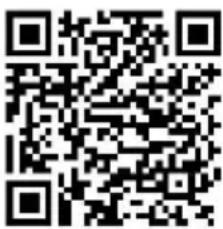
ANDROID
Search "Smart Life" app on Google Play
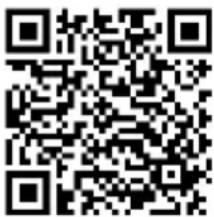
APPLE
search for "Smart Life" app in the Apple Store
- Create your account in the "Smart Life" application and log in.
- Enable all the permissions that the app asks for:
ANDROID - enable the "Location" and "Nearby devices" app permissions.
APPLE - enable "Location", "Bluetooth" and "Local Area Network" application permissions.
- Connect the power adapter to the TESLA robotic window cleaner, control button light will be steady blue.
- After logging into the "Smart Life" app, click the "+" icon on the top right >> click "Add Device" in case the TESLA robot window cleaner is not automatically detected by the app.
- "Discovering devices" will be displayed >> click "Add", the Wi-Fi network will be displayed, enter the password of the Wi-Fi network (if it is not already found automatically) >> click "Next". The TESLA robotic window cleaner will start pairing with the app.
- After successful pairing, a green icon will appear next to the name and your TESLA robotic window cleaner is successfully added to the app.
- Click "Done".
- It is now possible to control selected functions of the TESLA robotic window cleaner with the help of the application.
As part of the software complexity of the operating system and the requirements of Google/Apple for application security, it is necessary to adapt the application functions regularly. Keep your phone's operating system updated to the latest version. The application requires the operating system Android 10 and higher, otherwise its functionality cannot be guaranteed.
SOLVING PROBLEMS WITH THE APPLICATION
- Make sure the Wi-Fi signal coverage for your phone and the robotic window cleaner is strong enough. First set up the robotic window cleaner near your Wi-Fi router.
- Make sure that "Location" (GPS) is enabled on your smartphone and that a third-party application (VPN, antivirus, firewall, etc.) is not blocking access to your smartphone.
- Try connecting to another Wi-Fi router or Wi-Fi Hotspot on another phone to rule out an error on
the part of your Internet connection.
☐ You have too many devices connected to your Wi-Fi router, or the ability to connect a new device to it is blocked.
☐ Reset your Wi-Fi router.
Note: Make sure the robotic window cleaner is within range of a good quality and strong Wi-Fi signal so it can connect to a Wi-Fi network while charging. A Wi-Fi network operating at a frequency of 2.4 GHz and WPA1 or WPA2 security is supported.
MAINTENANCE
ATTENTION! We recommend regular maintenance for the most effective cleaning. INSUFFICIENT MAINTENANCE MAY RESULT IN DEVICE DAMAGE AND VOID WARRANTY.
Before carrying out cleaning and maintenance, switch off the device by holding down the button and then also disconnect it from the mains.

- Turn the device over and remove the cleaning cloth. Soak it in warm water for 2 minutes, then wash it by hand with a mild detergent and let it dry completely before reconnecting.
- Regular washing of the cleaning cloth will extend its life. If the cleaning cloth becomes worn or no longer fits properly in the Velcro area, replace it with a new one to achieve the best cleaning effect.
- Wipe the top cover of the device with a soft, dry cloth. Wipe the bottom of the device, the fan cover, and the edge detection sensors.
CLEANING THE DRIVING BELTS
If the driving belts are dirty or wet, the device on the window will not work properly and the driving belts may slip.
Turn the device over, connect the power supply and press button 4 on the remote control or the Driving belts button in the app. The driving belts will start to move, you can stop them by pressing button 3. Clean both belts from dust with a damp cloth. After cleaning the driving belts, dry them thoroughly before using them again.
TECHNICAL SUPPORT
Do you need advice on setting up and operating the TESLA RoboStar W700 WiFi appliance?
Contact us: www.tesla-electronics.eu.
CONSUMABLES
Consumables can be purchased in the official TESLA eshop eshop.tesla-electronics.eu.
WARRANTY REPAIR
For warranty repair, contact the dealer where you purchased the TESLA product.
THE WARRANTY DOES NOT COVER:
• using the device for other purposes
• normal wear and tear of equipment
- failure to follow the "IMPORTANT SAFETY WARNINGS" and operating instructions in this user manual
• electromechanical or mechanical damage to the device caused by improper use
- damage caused by natural elements such as water, fire, static electricity, overvoltage, etc.
• damage caused by unauthorized repair
- device serial number
- battery if it does not retain its original capacity after more than 6 months of use (battery capacity warranty is 6 months)
DECLARATION OF CONFORMITY
We, TESLA Electronics LTD, declare that this equipment is in compliance with the essential requirements and other relevant provisions of the standards and regulations relevant to the type of equipment.

This product meets the requirements of the European Union.
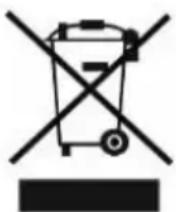
If this symbol is attached to the product, please inquire about your local separate collection system for electrical and electronic products. Please follow local regulations and do not dispose of old products in normal household waste. Proper disposal of the old product helps prevent potential negative consequences for the environment and human health.
As the product is being developed and improved, we reserve the right to modify the user manual. You can always find the current version of this user manual at www.tesla-electronics.eu.
Design and specifications are subject to change without notice, printing errors reserved.
GE
natural_image
Two identical diagrams showing hands holding a cylindrical container and a fan device, with no visible text or symbols.ANDROID
APPLE
natural_image
Two identical electronic device setups with hands adjusting a circular component and a spray bottle (no text or symbols visible)ANDROID
APPLE
natural_image
Two identical diagrams showing hands holding a spray bottle and a fan device, with no visible text or symbols.ANDROID
APPLE
ROZWIĄZYWANIE PROBLEMÓW Z APLIKACJĄ
GWARANCJA NIE OBEJMUJE KIEDY:
natural_image
Symbol of a trash bin crossed with no text or numbers, representing waste sorting or disposal (no text present)natural_image
Two identical diagrams showing hands holding a spray bottle and a device with a grid-patterned panel, connected by wires (no text or symbols)ANDROID
APPLE
natural_image
Two identical electronic device setups with hands holding a spray bottle and connected cables (no text or symbols visible)ANDROID
APPLE

- IMPORTANT SAFETY NOTICE
- PACKAGE CONTENTS
- IMPORTANT WARNING!
- BEFORE FIRST USE
- FIRST LAUNCH
- AUTOMATIC MODE
- MOTION MODES
- PAUSE CLEANING
- SWITCHING OFF
- CONTROLLING THE ROBOTIC WINDOW CLEANER USING YOUR PHONE
- SOLVING PROBLEMS WITH THE APPLICATION
- MAINTENANCE
- CLEANING THE DRIVING BELTS
- TECHNICAL SUPPORT
- CONSUMABLES
- WARRANTY REPAIR
- THE WARRANTY DOES NOT COVER:
- DECLARATION OF CONFORMITY
- GE
- ROZWIĄZYWANIE PROBLEMÓW Z APLIKACJĄ
- GWARANCJA NIE OBEJMUJE KIEDY:
Brand : TESLA
Model : RoboStar W700 WiFi
Category : Robot vacuum