
XG500 - Media player TESLA - Free user manual and instructions
Find the device manual for free XG500 TESLA in PDF.


| Product Type | Media Player |
| Brand | Tesla |
| Model | XG500 |
| Dimensions (approx.) | 100 x 60 x 20 mm |
| Weight (approx.) | 150 g |
| Power Supply | USB 5V DC |
| Display | 2.4-inch TFT color screen |
| Audio Formats Supported | MP3, WMA, WAV, FLAC |
| Video Formats Supported | AVI, MP4, RMVB |
| Storage Media | Micro SD card (up to 32GB), USB flash drive |
| Connectivity | USB 2.0, 3.5mm headphone jack |
| Battery | Built-in rechargeable lithium battery, 1000 mAh |
| Playback Time | Up to 8 hours music, 4 hours video |
| Main Functions | Music playback, video playback, photo viewer, FM radio, voice recording |
| Remote Control | Not included |
| Languages Supported | English, Chinese, Spanish, French, German |
| Operating Temperature | 0°C to 40°C |
| Care & Cleaning | Wipe with a soft dry cloth; avoid liquids and abrasives |
| Safety Precautions | Keep away from water and heat; do not disassemble; use approved charger |
| Spare Parts & Repairability | Contact manufacturer; battery replacement possible by professional |
| Package Contents | XG500 player, USB cable, earphones, user manual |
Frequently Asked Questions - XG500 TESLA
User questions about XG500 TESLA
0 question about this device. Answer the ones you know or ask your own.
Ask a new question about this device
Download the instructions for your Media player in PDF format for free! Find your manual XG500 - TESLA and take your electronic device back in hand. On this page are published all the documents necessary for the use of your device. XG500 by TESLA.
USER MANUAL XG500 TESLA


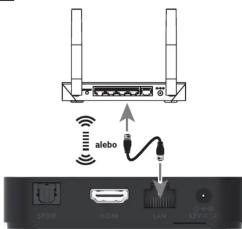
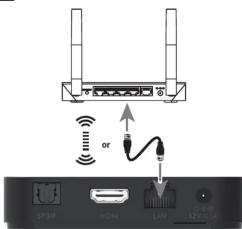
Pripojte box do siete bud' pomocou LAN konektora alebo cez WiFi pripojenie (802.11 b/g/n/ac; 2.4/5 GHz).

https://www.tesla-electronics.eu/
https://www.tesla-electronics.eu/
EN
TESLA
Google TV
XG500

ation Guide Installation Guide

HDMI


Dear customer,
Thank you for purchasing a product
from the proven TESLA brand.
Please read this manual carefully before first use. It will be a good guide when getting to know
your new device.
We hope that the TESLA multimedia box will
be a pleasant companion for you. The data and advice used in this guide may be subject to future changes and improvement and is valid as of the release of its first version, as of February 2023.
Thank you for your understanding.

Please read this manual carefully before use. Technical specifications and operating procedures in this manual are subject to change without notice. In case of any questions regarding the period of use, please contact the manufacturer.
TESLA Electronics LTD, as the manufacturer of this equipment, declares that the device type XG500 is in compliance with Directive 2014/53/EU. The full text of the EU declaration of conformity is available on the website https://www.tesla-electronics.eu/

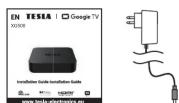
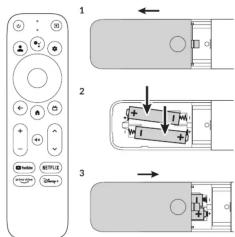
Apparatus Remote control Battery Power adapter HDMI cable Installation wiza
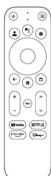
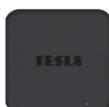
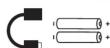

Slide the controller cover and insert the batteries
Slide the cover back.

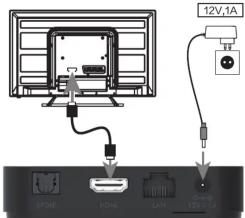
Connect the power adapter. Connect to the TV using the included HDMI cable.

Connect the box to the network either using the LAN connector or via a WiFi connection (802.11 b/g/n/ac; 2.4/5 GHz).

Now pair the controller with the device. The procedure is very simple. Press the "Back" and "Home" buttons on the remote at the same time and hold them for about 5 seconds. Successful pairing will be confirmed on your TV screen.
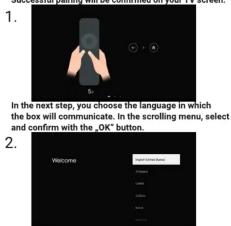

In the next step, you can set up the box using your mobile phone and transfer most important settings (WiFi, etc.) as well as compatible applications automatically. Of course, it is possible to skip this step and make the settings manually.
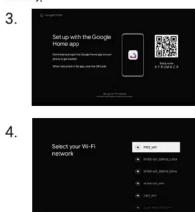

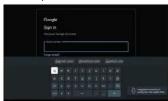
In the next step, sign in to your Google Account. If you don't have an account, create one.
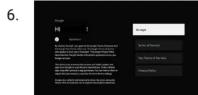
In this step, you can choose whether you want to share your location and share diagnostic data to improve Google services.

You'll now be greeted with the Google TV™ home screen.
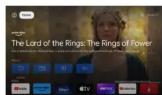
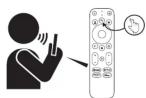
Find new favorites - faster - with your voice using voice search. Press the voice button on your remote to get started.
serial number
date of sale
seller's stamp and signature
Warranty conditions
The manufacturer provides a warranty for this product for a period of 24 months from the date of purchase by the consumer. The warranty period is extended by the time during which the product was under warranty repair, or could not be used during the warranty period, if the nature of the defect prevented its use. The warranty only applies to defects caused by manufacturing errors or material defects!
2. Warranty card
Free warranty service is provided only if proof of product purchase (receipt) and a correctly completed warranty card is presented - it must contain the serial number, date of sale and stamp of the store (assembly company). Copies and incorrectly completed warranty forms will not be considered!
- Repairs during the warranty and post-warranty period The warranty service must be claimed at the organization where the product was purchased or at the assembly company that performed the installation.
4. Scope of warranty
The warranty is invalid if the defect is caused by mechanical damage (except for damage during transport), improper use, carelessness, unavoidable event (natural disaster), if the product was connected to a different supply voltage as stated in the technical specification, and also in case of modifications or repairs carried out outside the distributor's service. The guarantee cannot also be applied in the event that the consumer requires modification or adaptation to extend the functions of the product (or a system made up of several components) compared to the standard design.
Record of warranty repairs
Date of notification
Execution date
No. mont. sheet/comment
Signature
https://www.tesla-electronics.eu/


Brand : TESLA
Model : XG500
Category : Media player