
DIMENSION G 5505 SCI - INSTALLATION SHEET FOR I-MODELS (PRINT ON 11X17 PAPER FOR BETTER READABILITY) - Home Appliance MIELE - Free user manual and instructions
Find the device manual for free DIMENSION G 5505 SCI - INSTALLATION SHEET FOR I-MODELS (PRINT ON 11X17 PAPER FOR BETTER READABILITY) MIELE in PDF.


| Product Type | Built-in Dishwasher |
| Brand | MIELE |
| Model | DIMENSION G 5505 SCI |
| Dimensions (H x W x D) | 81.5 x 59.6 x 57 cm (standard model) |
| Net Weight | Approx. 50 kg |
| Power Supply | 120 V, 60 Hz, 15 A |
| Wash Programs | Pots & Pans, Normal, China & Crystal, SaniWash, Express, Rinse & Hold |
| Additional Options | Intensive lower basket, Turbo, Delay Start, Soak, Pre-rinse, Extended drying |
| Place Setting Capacity | 10 or 16 typical place settings |
| Integrated Water Softener | Yes, adjustable based on water hardness |
| Salt Reservoir | Capacity approx. 2 kg |
| Rinse Aid Reservoir | Capacity approx. 110 ml, adjustable dosage (0-6 ml) |
| Compatible Detergent Type | Powder, gel or tablets |
| Wash Arms | Three arms (upper, middle, lower) |
| Three-Stage Filter | Yes, with cleaning indicator |
| Drain Pump with Check Valve | Yes |
| Safety Features | Child lock, Waterproof system (leak protection) |
| Display | Display with brightness and contrast settings |
| Tub Material | Stainless steel (self-cleaning) |
| Electrical Connection | Grounded plug, 1.2 m cord with molded plug |
| Water Connection | Cold or hot water (max. 60 °C), pressure 0.3-10 bar |
| Drain Connection | Flexible hose 1.5 m, max. drain height 1 m |
| Noise Level | Varies by program |
| Regular Maintenance | Cleaning filters, wash arms and drain pump |
| Spare Parts | Available from Miele or at mieleusa.com |
| Warranty | Consult dealer or MieleCare (extended service contract) |
Frequently Asked Questions - DIMENSION G 5505 SCI - INSTALLATION SHEET FOR I-MODELS (PRINT ON 11X17 PAPER FOR BETTER READABILITY) MIELE
User questions about DIMENSION G 5505 SCI - INSTALLATION SHEET FOR I-MODELS (PRINT ON 11X17 PAPER FOR BETTER READABILITY) MIELE
0 question about this device. Answer the ones you know or ask your own.
Ask a new question about this device
Download the instructions for your Home Appliance in PDF format for free! Find your manual DIMENSION G 5505 SCI - INSTALLATION SHEET FOR I-MODELS (PRINT ON 11X17 PAPER FOR BETTER READABILITY) - MIELE and take your electronic device back in hand. On this page are published all the documents necessary for the use of your device. DIMENSION G 5505 SCI - INSTALLATION SHEET FOR I-MODELS (PRINT ON 11X17 PAPER FOR BETTER READABILITY) by MIELE.
USER MANUAL DIMENSION G 5505 SCI - INSTALLATION SHEET FOR I-MODELS (PRINT ON 11X17 PAPER FOR BETTER READABILITY) MIELE
Operating Instructions
Dishwasher
G 5500
G 5505
G 5510
G 5515
To prevent accidents
and appliance damage
read these instructions
before
installation or use.
en - US, CA
M.-Nr.09 016 330
IMPORTANT SAFETY INSTRUCTIONS 4
Guide to the dishwasher 7
Control panel 8
Caring for the environment 9
Before using for the first time. 10
To open the door 10
Child safety lock 10
Display Functions 11
Filling the salt container 13
Refill salt message. 14
Rinse aid 15
Adding rinse aid 15
Rinse aid indicator 16
Loading the dishwasher 17
Items not recommended for dishwashing 18
Typical load for 10 place settings 19
Typical load for 16 place settings 20
Upper basket. 21
Lower basket 25
Cutlery 28
Optional accessories 30
Use 31
Adding detergent. 32
Turning on 33
Selecting a program 33
Starting a program. 33
Program Guide 34
Use 35
Time display. 35
Standby 35
At the end of a program. 36
Preparing your appliance for an extended vacation 36
Interrupting a program 37
Changing a program 37
Additional options 38
Intensive lower basket 38
38
Delay start 39
Settings menu 40
Opening the "Settings" menu 40
Language 40
Water hardness 41
Rinse aid 42
Optimize standby. 42
Refill indicators 43
Soak 43
Pre-rinse. 43
Extended drying 43
Brightness 43
Contrast 44
Filter check 44
Showroom program 44
Factory default. 44
Leaving the Settings menu 44
Frequently Asked Questions 45
Technical faults 45
Faults in the water intake/water drain 46
General problems with the dishwasher 47
Sounds 48
Poor cleaning results 49
After sales service 52
Transport 53
User Maintenance Instructions 55
Cleaning and Care 56
Triple filter system 57
Cleaning the drain pump and non-return valve. 60
Installation instructions 61
Help to protect the environment 62
Electrical connection 63
Plumbing 65
Connection to the water supply 65
Drainage 66
IMPORTANT SAFETY INSTRUCTIONS
WARNING -
When using your dishwasher, follow basic precautions, including the following:
Read all instructions before installation or use of the dishwasher to prevent injury and machine damage.
Use the dishwasher only for its intended purpose. This appliance is intended for residential use only.
Keep these operating instructions in a safe place and pass them on to any future user.
Correct usage
The dishwasher is not designed for commercial use. It is intended for use in domestic households and in similar working and residential environments such as, shops, offices and showrooms or guest houses.
The dishwasher is not intended for outdoor use.
It must only be used as a domestic appliance as specified in these operating instructions, for cleaning domestic crockery and cutlery. Any other usage is not supported by the manufacturer and could be dangerous.
- Persons who lack physical, sensory or mental abilities, or experience with the appliance should not use the dishwasher without supervision or instruction by a responsible person.
Electrical Safety
Before installation, make sure that the voltage and frequency listed on the data plate correspond with the household electrical supply. This data must correspond to prevent injury and machine damage. Consult a qualified electrician if in doubt.
Before installation or service, disconnect the power supply to the work area by unplugging the unit, "tripping" the circuit breaker or removing the fuse.
Do not use an extension cord to connect this appliance to electricity. Extension cords do not guarantee the required safety of the appliance (e.g. danger of overheating).
Be certain your appliance is properly installed and grounded by a qualified technician. To guarantee the electrical safety of this appliance continuity must exist between the appliance and an effective grounding system. It is imperative that this basic safety requirement be met. If there is any doubt, have the electrical system of the house checked by a qualified electrician.
If the supplied power cord is damaged it must only be replaced by a Miele Service technician with a genuine Miele power cord.
The outlet must be accessible at all times after installation to disconnect the dishwasher.
IMPORTANT SAFETY INSTRUCTIONS
Installation
The dishwasher must be installed and connected in accordance with the installation instructions.
Installation and repair work should be performed by a Miele authorized service technician. Work by unqualified persons could be dangerous and may void the warranty.
Do not install or use a damaged dishwasher. A damaged appliance is dangerous. Unplug the machine and contact Miele Technical Service Department.
Ensure that any plastic wrappings, bags, etc. are disposed of safely and kept out of the reach of children. Danger of suffocation!
This appliance must not be used in a non-stationary location (e.g. on a boat).
WARNING - Fire hazard! Do not cover or crush the plug of the appliance. Ensure that the cabinet opening for the dishwasher provides ample space for the plug and cord. Installing the dishwasher in a tight space may crimp the power cord or put pressure on the plug which could cause overheating.
This dishwasher should only be installed under a continuous counter top secured to adjacent cabinetry.
Do not install this dishwasher beneath a cooking surface, oven or any appliance that radiates heat. High temperatures from these units may damage the dishwasher.
A toe-kick must be used with the dishwasher. If the supplied toe-kick is not used, a cabinet matching toe-kick must be installed.
Do not install the dishwasher in an area where it will be exposed to temperatures below freezing.
Do not cut the intake hose or submerge it in liquid. This hose contains electrical components that could cause injury or property damage if cut or submerged.
Only power up the dishwasher when all installation and plumbing work is complete.
IMPORTANT SAFETY INSTRUCTIONS
Use
To reduce the risk of injury, do not allow children to play in, on or near the dishwasher. It is possible for small fingers may be pinched in the door.
Only use the dishwasher if all panels are properly in place.
Do not tamper with the controls.
Do not sit or stand on the door or baskets of the dishwasher. Close the door when not in use.
Under certain conditions, hydrogen gas may be produced in a hot water system that has not been used for two weeks or more. HYDROGEN GAS IS EXPLOSIVE. If the hot water system has not been used for such a period, turn on all hot water faucets and let water flow from each for several minutes before using the dishwasher. This will release any accumulated hydrogen gas. Do not smoke or use an open flame during this time.
Be sure that all items placed in the dishwasher are "dishwasher safe". For items not labeled, check the manufacturer's recommendations.
- When loading tableware, place sharp items away from the door to prevent damage to the seal. Load sharp items pointing downwards to prevent injuries.
Only use detergents and rinse aids recommended for residential dishwashers. Keep all detergents and rinse aids out of the reach of children.
Do not inhale or swallow detergents. Dishwasher detergents contain irritant and corrosive ingredients. They can cause burning in the mouth and throat if swallowed, or inhibit breathing. Consult a doctor immediately if detergent has been swallowed or inhaled.
Do not drink water from the dishwasher! Harmful residues could be present.
Do not fill the rinse aid reservoir or salt container with detergent. It will destroy the rinse aid compartment and water softener.
Dishes can be very hot at the end of a program. Allow the dishes to cool until they are cool enough to handle before unloading them.
The water supply must be turned off when the appliance is not used for a longer period of time (e.g. during vacations).
Disposal of an appliance
If the appliance is removed from its installation site and will not be used, remove the doorlock to the wash cabinet to prevent children from locking themselves in the machine.
SAVE THESE INSTRUCTIONS
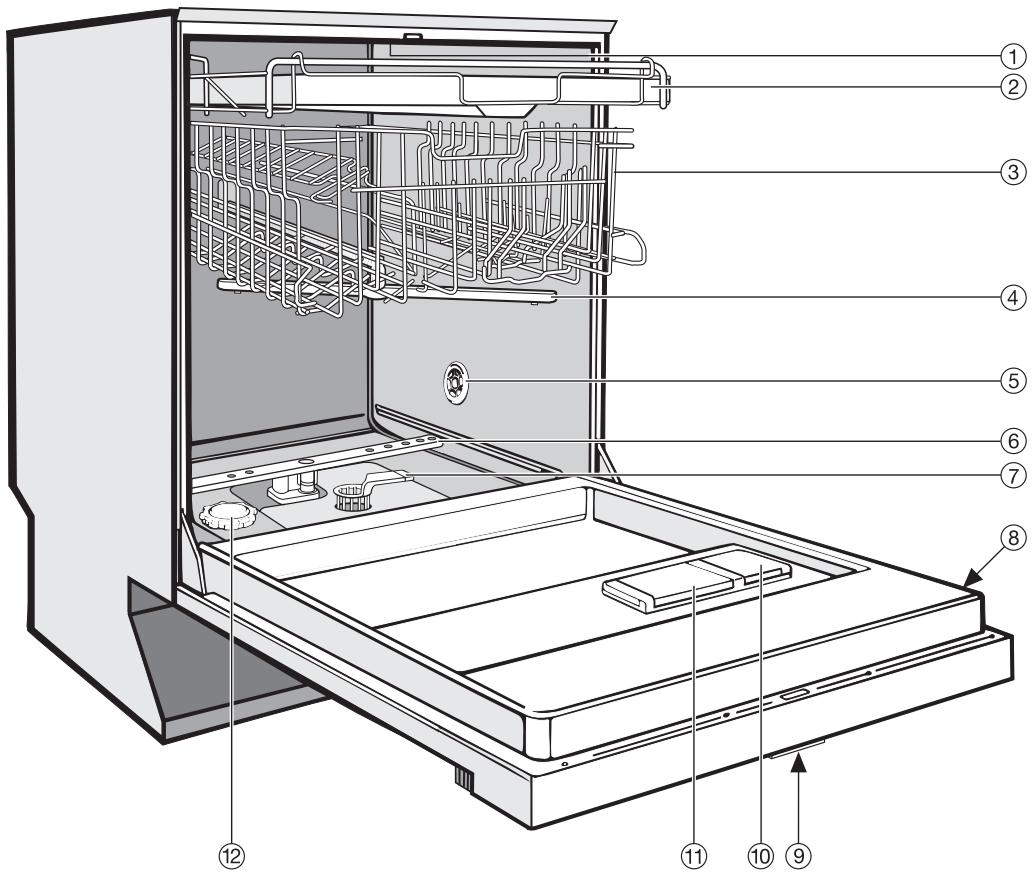
① Upper spray arm (not visible)
② Cutlery tray
③ Upper basket
④ Middle spray arm
⑤ Air inlet for drying (depending on model)
(6) Lower spray arm
⑦ Triple filter system
Data plate
⑨ Child Safety Lock in the door handle (not visible)
⑩ Rinse aid reservoir
① Dual compartment detergent dispenser
⑫ Salt container
Control panel
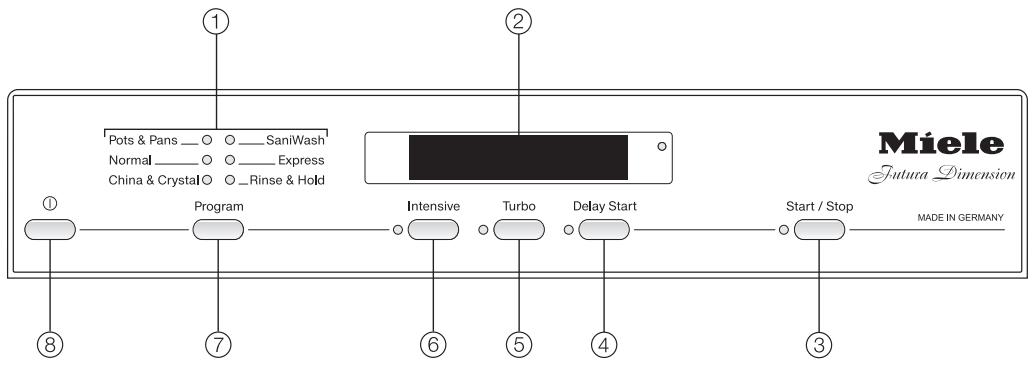
① Program selection
② Display
③ Start / Stop button with indicator light
④ Delay Start button with indicator light
⑤ Turbo button with indicator light
(6) Intensive lower basket button with indicator light
⑦ Program selector button
⑧On/Off ① button
This operating instruction manual describes several dishwasher models with different indicated settings.
The different dishwasher models are named :
Standard = 32 1 / 16 (81.5 cm) high dishwashers
XXL = 3311 / 16 (85.5cm) high dishwashers.
Energy saving washing
This dishwasher is exceptionally economical in the use of water and electricity. For best results follow these tips:
For lowest energy consumption you may connect the dishwasher to a cold water source.
- For fastest possible wash times, with slightly higher energy consumption, connect the dishwasher to a hot water source.
Make full use of the baskets without overloading for the most economical washing.
Use the correct amount of detergent and rinse aid. Detergent dosage is dependent upon the amount of soiling and type of dishware being washed. See the "Program Guide" for more information.
- When using powder or gel detergent, reduce the amount to 2 / 3 of the normal amount when washing a small load.
Choose a program that best suits the degree of soiling and the type of dishes being washed.
To open the door
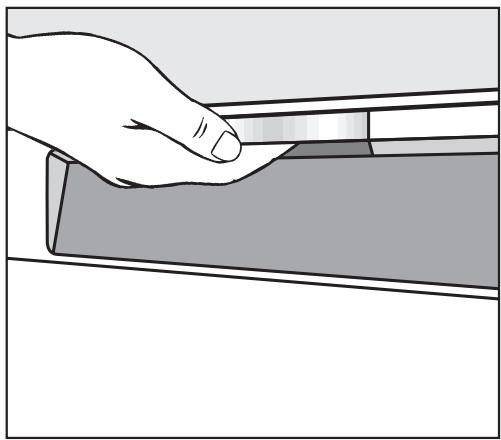
Reach under the handle and pull the door open.
If the door is opened during operation the dishwasher will stop running. Once the door is closed the program will restart.
To close the door
Push the baskets in.
- Lift the door and push until it clicks into place.
Child safety lock
Te child Safety Lock is designed to prevent children from opening the dishwasher.
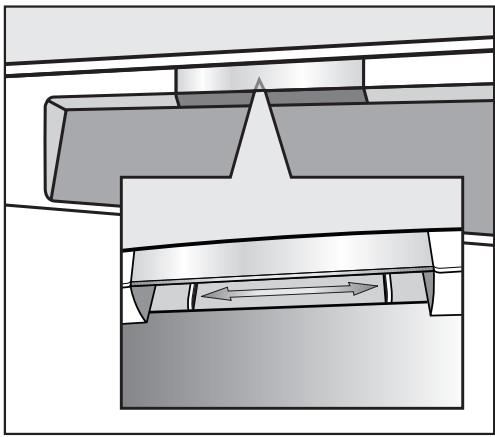
To lock the door, push the slider below the door grip to the right.
To unlock the door, push the slider to the left.
Display Functions
The following functions can be selected or set on the display:
- wash program
- options
- delay start
- settings
While a program is running, the display shows:
- the program segment
- the approximate remaining time
- any faults or messages
To save energy, if a button is not pressed within a few minutes the display will turn off. To show the display again, press any button.
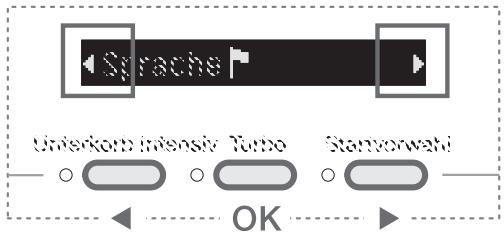
Settings menu
You can adjust the dishwasher's electronics to suit various requirements in the Settings menu.
See the"Settings" section of this manual for more information.
The function of the buttons below the display is turned off in the Settings menu, allowing you to select and confirm menu items using these buttons.
The left and right arrows in the display indicate that additional selections are available. You can choose these selections using the left or right button below the display.
Use the center button below the display to confirm messages or settings and change to the next menu or submenu.

A check will appear beside the currently selected setting.
Before using for the first time
Press the ① button to turn the dishwasher on.
A Welcome screen shows when the dishwasher is turned on for the first time.
Language
The display changes automatically to the language setting.
- Select the desired language and confirm with the center button.
The selected language set is marked with a heckmark check.
Water hardness
The display changes to the water hardness setting.
To achieve good cleaning results, the dishwasher needs soft water. Hard water results in calcium deposits on dishware and in the dishwasher. If your tap water hardness is above 4ircd (4 gr/gal [US]), the water should be softened.
- Your local water authority will be able to advise you of the water hardness level in your area.
- The dishwasher must be programmed to correspond to the water hardness in your area.
- In areas where the water hardness fluctuates (e.g. 37 - 50 °d [39 -52 gr/gal]) always program the machine to the higher value (in this example 50 °d [52 gr/gal]).
If there is a fault, it will help the servicetechnician to know the hardness of yourlocal water supply.
Please note your water hardness below:
d gr/gal
The water hardness was programmed at 1irc d (1 gr/gal) by factory default.
- Select the hardness of your water supply and confirm with the center button.
See "Settings - Water hardness" for more information.
Two notes appear in the display.
After confirming these notes, I Add rinse aid and/or I Add salt may appear in the display.
Confirm these notes. The display changes to the Main menu.
These basic settings are saved after the first full program cycle is completed.
Every dishwasher is tested before leaving the factory. Any water remaining in the machine is from the final factory test and does not indicate that the machine has been used.
Filling the salt container
To achieve good cleaning results, the dishwasher needs soft water (water that is low in minerals). Hard water results in calcium deposits on dishware and in the dishwasher.
Therefore, if your tap water hardness is above 4ircd (4 gr/gal) the water should be softened. The built-in water softener is designed for this purpose. The water softener is suitable for a water hardness up to 70ircd (73 gr/gal).
Inadvertently filling the salt container with dishwashing detergent (including liquid detergent) will damage the water softener.
Only use water softener salt specially formulated for dishwashers. Other salts may contain insoluble additives which can impair the water softener.
If using "Tab" products which include salt, still add salt to the machine to achieve optimal cleaning results and ensure long-term functioning of the water softener.
- Remove the lower basket from the wash cabinet and unscrew the salt container lid.
When opening the salt container, water will run out. Open the container only to refill salt.
Important: The salt container must be filled with 2 quarts (2 l) of water before adding salt for the first time so the salt can dissolve properly. Water does not have to be added with subsequent refills.
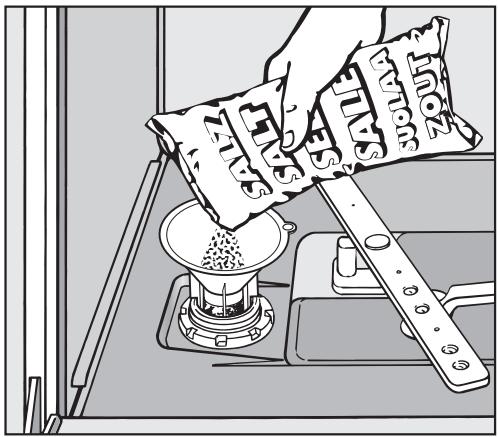
- Place the provided funnel over the salt container and carefully fill it with salt. The salt container holds approx. 4.4 lbs (2 kg) of salt, depending on the type of salt.
Clean any excess salt from the threads of the container opening. Screw the lid on firmly. - Immediately after each refill, run the "Express" program without a load (no "Turbo" function). This will remove any traces of salt from inside the wash cabinet.
Refill salt message
As soon as the Insufficient salt message is displayed, refill the salt container
Confirm with the center button.
The "Insufficient salt" message goes out.
If a sufficiently high concentration of salt has not yet formed, the Insufficient salt message may continue to be displayed after adding the salt. In this case, confirm again with the center button.
The Insufficient salt message is turned off if you have programmed the dishwasher to a water hardness below 4ircd (4 gr/gal).
If using"Tab" detergent products in your dishwasher, the messages can be turned off if desired (see "Settings - Deactivate indicators").
If you switch to using detergent that does not contain salt or rinse aid, it is important to remember to replenish the salt and rinse aid and to turn the indicators back on.
Rinse aid
Rinse aid helps to prevent spotting on dishes and glassware.
The rinse aid is filled in the reservoir and the set amount will be automatically dosed.
Filling the rinse aid reservoir with detergent (liquid or powder) will damage the reservoir. Only pour rinse aid formulated for residential dishwashers into the reservoir.
When using "Tab" detergents rinse aid is not needed.
Adding rinse aid
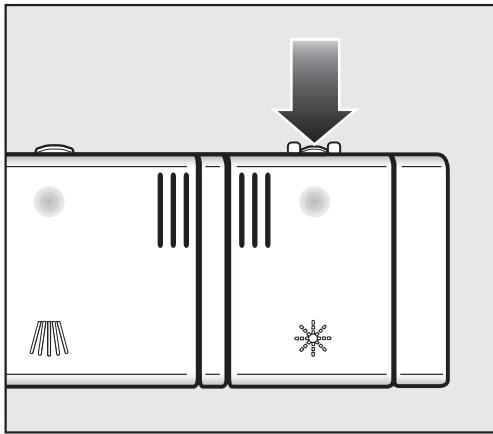
Press the button on the rinse aid reservoir in the direction of the arrow until the flap springs open.
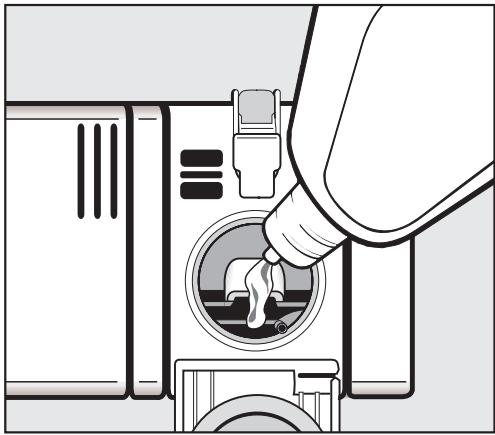
Pour liquid rinse aid into the reservoir until it is visible on the surface of the screen.
The rinse aid reservoir holds approximately 3.7 fl. oz. (110 ml).
Press on the flap until you hear it click shut. Failure to close it all the way allows water to enter the reservoir during the wash program.
Clean any spilled rinse aid. This prevents over-foaming occurring during the next program.
You can adjust the rinse aid dosage for best results (see "Settings - Rinse aid").
Rinse aid indicator
When the Refill rinse aid message appears, the reservoir contains sufficient rinse aid for 2 - 3 programs only.
- Add rinse aid once the program has finished.
Confirm with the center button.
The "Refill rinse aid" message will go out.
If using "Tab" detergent products in your dishwasher, the messages can be turned off if desired (see "Settings - Deactivate indicators").
If you switch to using detergent that does not contain salt or rinse aid, it is important to remember to replenish the salt and rinse aid and to turn the indicators back on.
Do not wash items soiled with ash, sand, wax, grease or paint in the dishwasher. Ash and sand do not dissolve and will be distributed throughout the inside of the dishwasher. Wax, grease and paint will cause permanent discoloration and damage to the dishwasher.
- Scrape food from dishes before placing them in the dishwasher, rinsing is not necessary.
Some foods contain natural dyes, e.g. carrots or tomatoes. Plastic items may discolor permanently if they come in contact with food dyes.
All items can be placed anywhere in the baskets. - Load dishes so that water can reach all surfaces. Do not place dishes or cutlery inside other pieces.
Make sure that all items are securely positioned. - Hollow items such as cups and glasses should be placed upside down in the baskets.
To ensure good water coverage, tall, narrow and hollow items, i.e. vases or champagne glasses, should be placed in the center of the basket rather than in the corners. -
Concave based items such as mugs or bowls, should be placed at an angle so that water does not pool.
-
The spray arms must not be blocked by items that are too tall or hang through the baskets. Check clearance by manually rotating the spray arms.
Place very small items in the cutlery tray or basket so they do not fall to the bottom of the wash cabinet. - Food residue and spilled liquids should be cleaned from the sides of the dishwasher door. These are outside of the wash cabinet and are not cleaned by water from the spray arms.
Items not recommended for dishwashing
- Cutlery with wooden handles
- Wooden cutting boards
- Glued items such as old knives with handles glued together around the shank of the blade
- Handmade craft items, antique, metal trimmed or decorative glassware
- Plastic items that are not heat resistant
Copper, brass, tin or aluminum - Dishes with color painted over the glaze. These dishes may fade over time
- Fine glassware and crystal items should only be washed using the "China & Crystal" program*. Otherwise clouding or etching may occur after frequent washing.
-
Cast iron pots and pans
-
depending on model
If unsure whether your china and crystal are dishwasher safe, please check with the manufacturer. The China & Crystal program*, although extremely gentle and thorough can cause the china and crystal to "wear" if they are not dishwasher safe.
Glassware:
- There are no standard guidelines for washing glassware, when in doubt wash by hand.
- When purchasing new dishes, glasses and cutlery, make sure they are dishwasher safe. Only wash items marked "dishwasher safe" in the dishwasher.
- If fine glassware is washed in the dishwasher select the "China & Crystal" program*. This will reduce the risk of clouding.
Silver and aluminum:
Silver or aluminum items may tarnish.
Silverware previously cleaned with a silver polish may be damp or spotted at the end of a program where water has adhered to the polish. This can be rubbed off with a soft, dry cloth. Silver that has been cleaned in an immersion dip is usually dry at the end of a program, but may tarnish.
- If left to dry, foods containing sulfur can discolor silver. These include egg yolk, onions, mayonnaise, mustard, fish and marinades.
Silverware may tarnish or pit if washed next to stainless steel. Leave space between these metals.
- Clean aluminum items, e.g. grease filters, with domestic dishwasher detergent only.
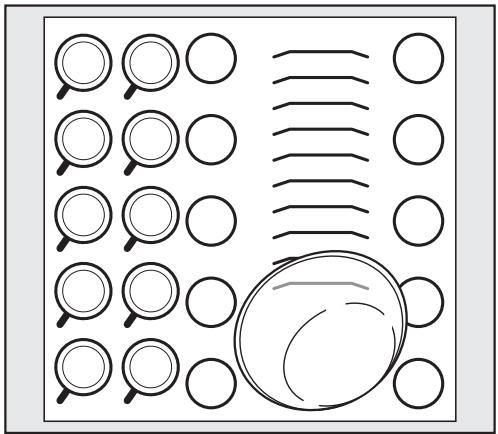
Typical load for 10 place settings
Upper basket
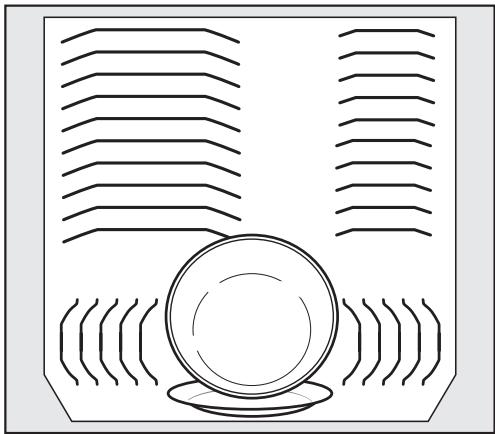
Lower basket
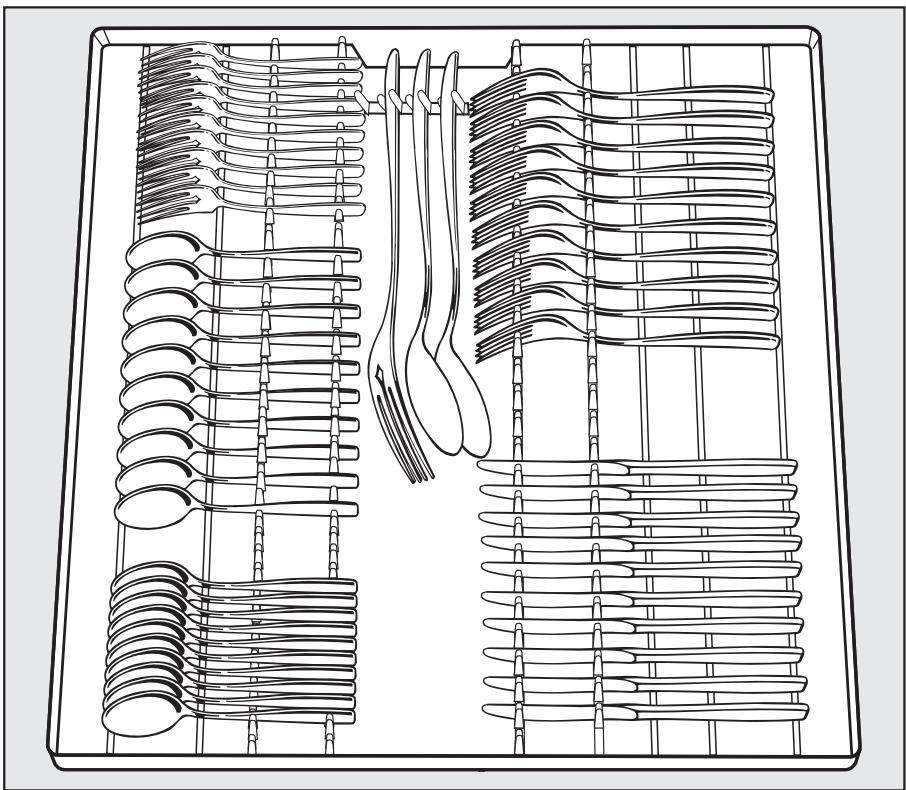
Cutlery tray
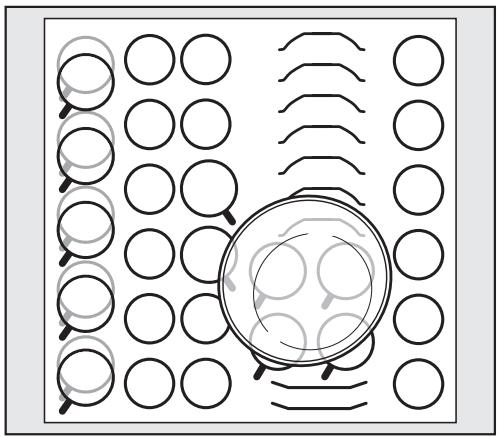
Typical load for 16 place settings
Upper basket
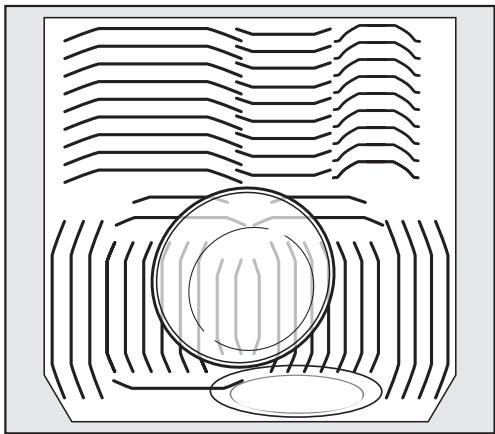
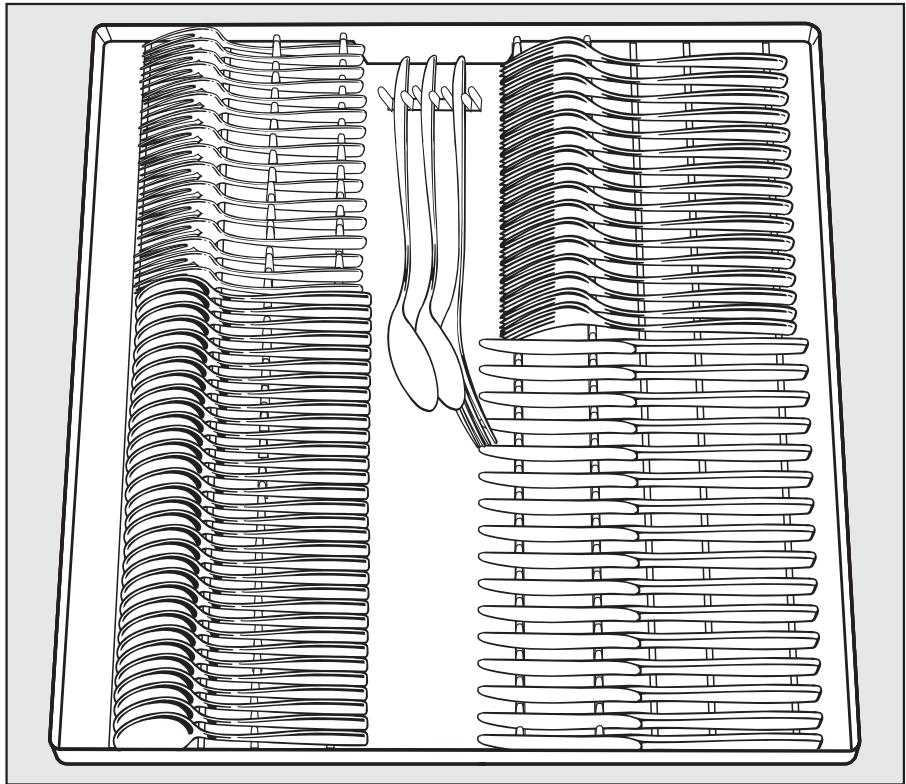
Lower basket
Upper basket
Always use the dishwasher with the upper and lower basket inserted (except during the Tall items program, if available).
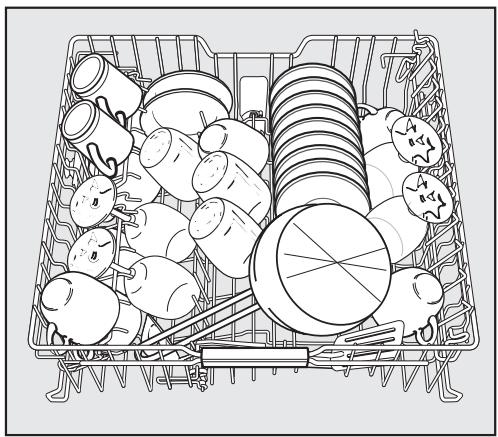
- Load the upper basket with small, lightweight, or delicate items such as cups, saucers, glasses, dessert bowls, etc.
Shallow pans can also be placed in the upper basket.
- Long items such as soup ladles, mixing spoons and long knives should be placed lying down across the front of the upper basket.
Foldable spikes
The rows of spikes can be lowered to make more room for larger items, such as casserole dishes.
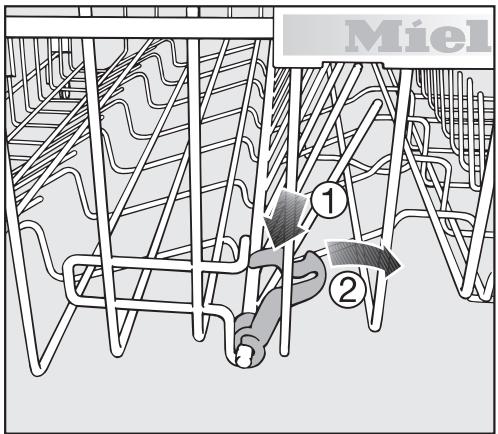
Press the yellow lever down ① and fold down the spikes ②.
Hinged cup rack
To make room for tall items, raise the rack upwards.
Glasses can be arranged along the cup rack to give them some support during the program.
Lower the cup rack and lean the glasses against it.
Jumbo cup rack
(depend on model):
The cup rack can be set at two different widths so that it can also accommodate large cups.
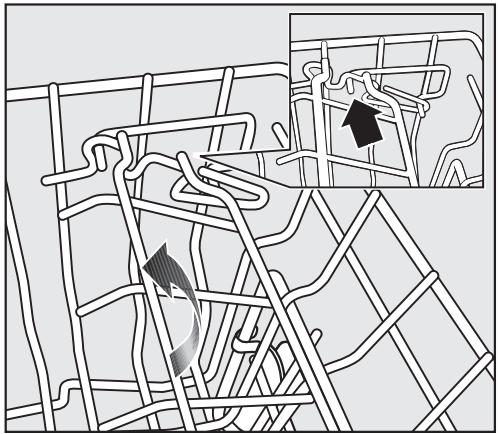
Pull the cup rack upwards and click it back into position at the required width.
Universal support bar
The support bar will hold tall glasses and stem ware securely.
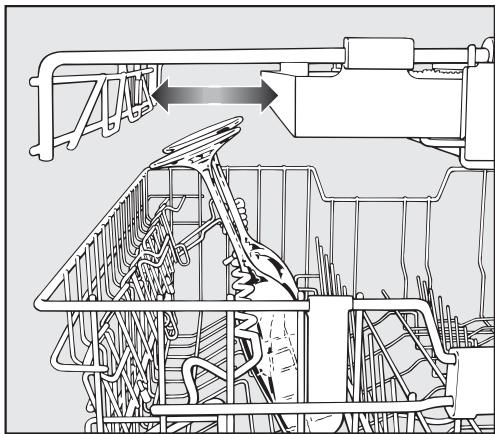
- Fold the bar down and lean the desired glasses against it.
If desired, a section of the cutlery tray can be removed to allow for even taller glasses.
Adjusting the height:
You can set the support bar at two different heights.
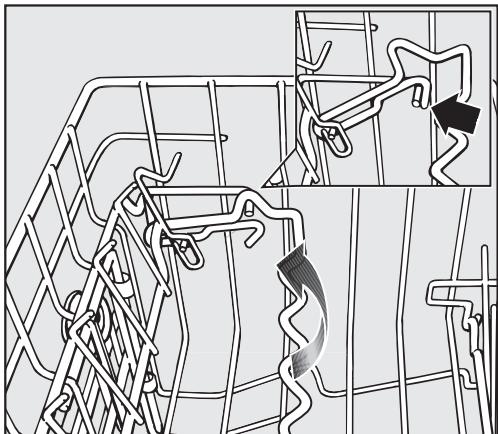
Pull the support bar upwards and click it back into position at the required height.
Use the low setting for small glasses and tumblers.
Use the high setting for tall glasses and stem ware.
Adjusting the upper basket
In order to gain more space for taller items the upper basket can be adjusted on three levels with 2 cm between each level.
The upper basket can also be set at an angle with one side high and the other side low. Make sure, however, that the basket can slide smoothly in and out of the cabinet.
Slide out the upper basket.
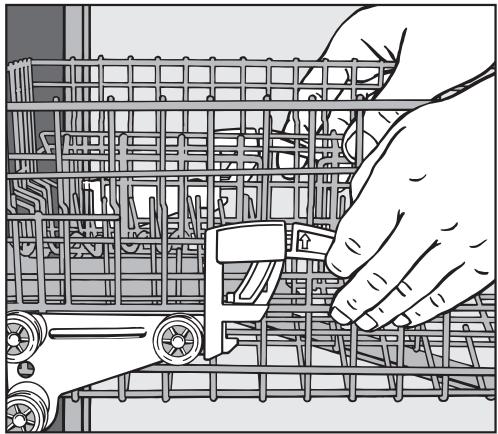
To adjust the upper basket upwards:
- Lift the basket up until it clicks into place.
To adjust the upper basket downwards:
Pull up on the levers at the sides of the upper basket.
- Adjust the basket to the desired height and then release the levers to lock the basket in place.
Depending on the setting of the upper basket, the following plate dimensions can be accommodated.
Depending on the setting of the upper basket, a variety of plate dimensions can be accommodated.
Lower basket
For larger and heavier items such as plates, serving platters, saucepans, bowls, etc.
Glasses, cups, small plates and saucers can also be arranged in the lower basket.
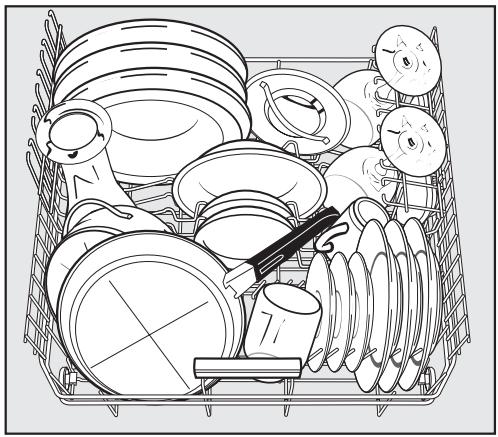
Dishwasher with cutlery tray
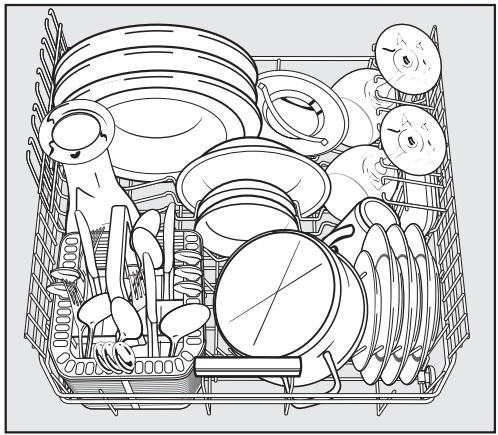
Dishwasher with cutlery basket
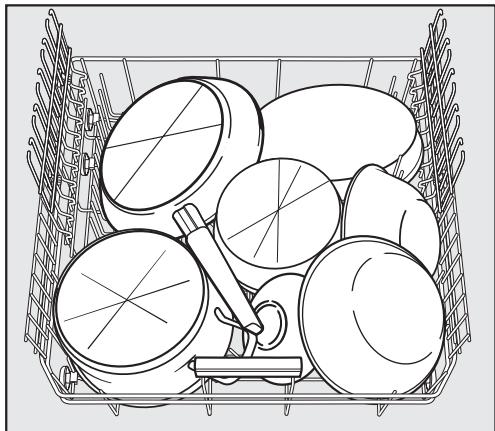
Heavily soiled items
- Place large platters and dishes in the center of the lower basket.
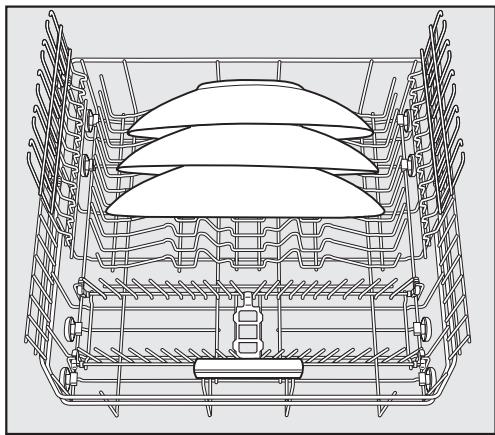
When tilted, plates up to 13 3/4'' (35 cm) in diameter can be accommodated.
Removable MultiComfort insert
The rear section of the lower basket is used for cups, glasses, plates, pots and pans.
You can remove the MultiComfort insert to provide more space for larger items such as pots and pans.
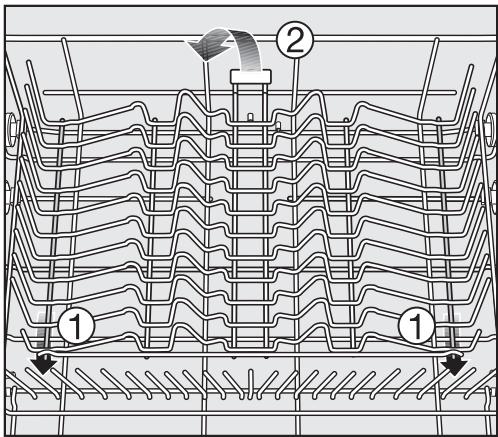
To remove the insert ①
Press the yellow handle forwards and remove the insert.
To replace the insert ②
- Slide the hooks of the insert under the struts of the lower basket.
Push down on the insert to snap it into position.
Glass rack
The glass rack can be raised to make more room for tall items.
- Stem glassware, e. g. wine glasses, champagne flutes or beer glasses, can be leaned against the glass rack or suspended from it.
The height of the glass rack is adjustable.
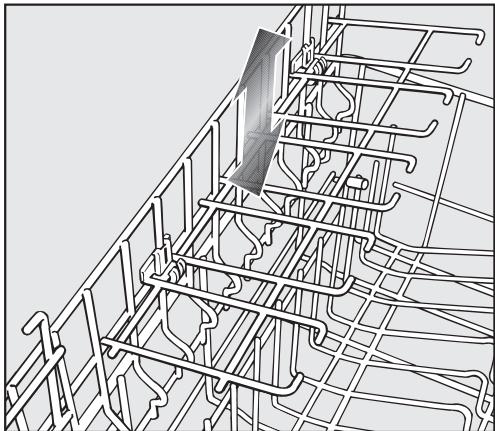
- Slide the glass rack to the desired height until the catches click into place at the top.
Foldable spikes
(dependently on model)
The spikes at the front are used for plates, soup bowls, platters, desert bowls, and saucers.
Both rows of spikes can be folded down to create more room for larger dishware, e. g. pots, pans and bowls.
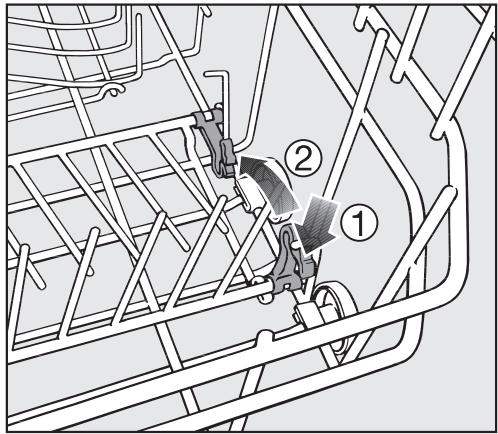
Press the yellow lever down ① and fold down the spikes ②.
Cutlery
Split cutlery tray
(dependently on model)
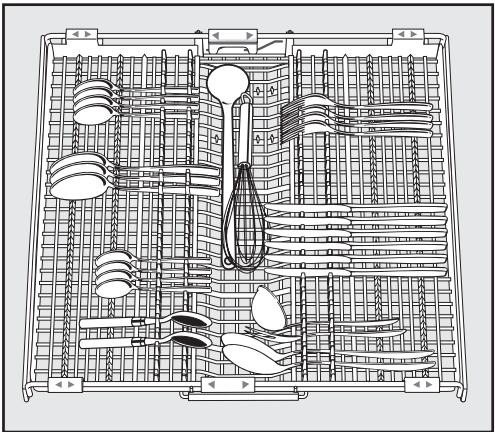
- Arrange the cutlery as shown in the cutlery tray.
For easier unloading cutlery should be grouped in zones, one for knives, one for forks, one for spoons, etc.
Spoon heads should be placed in contact with at least one of the serrated retainers on the base of the cutlery tray to ensure that water runs off them freely.
The upper spray arm must not be blocked by tall cutlery items (e.g. cake servers).
The side sections of the tray can be moved into the middle to accommodate tall dishware items in the upper basket.
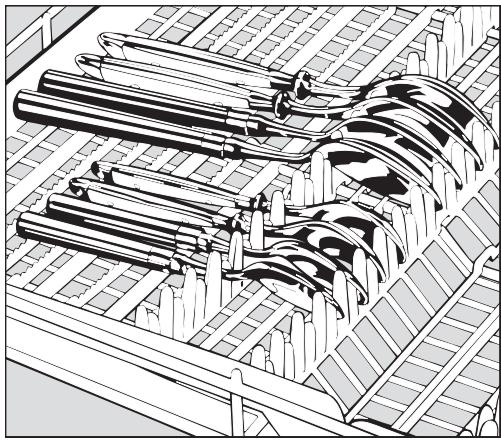
Spoons with thick handles may have to be placed as knives and forks with their heads in the holders.
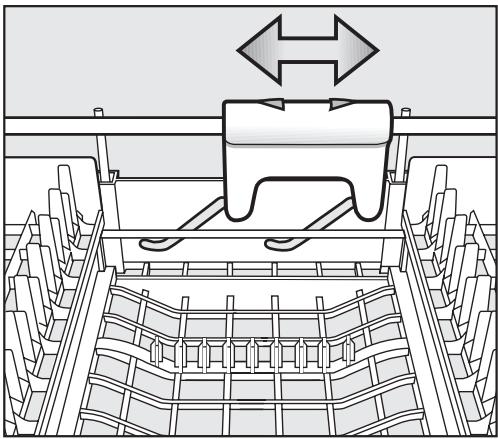
- You can use the yellow slide to adjust the height of the middle section of the cutlery tray to make more room for large items of cutlery.
Cutlery basket
(dependently on model)
The cutlery basket can be placed anywhere on the front rows of spikes in the lower basket.
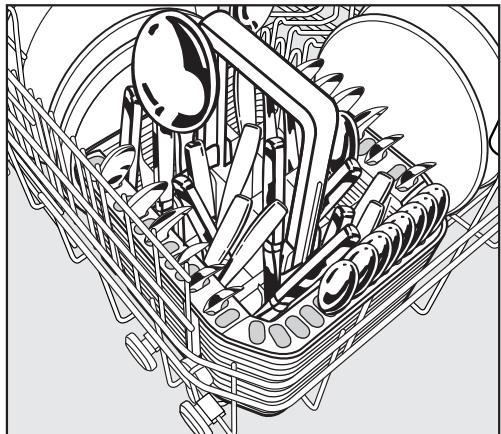
- To avoid risk of injury, knives and forks should be placed with the handles upwards in the basket. However, cutlery placed handle down in the basket will come out cleaner and drier.
- Place small items of cutlery in the individual slots on three sides of the cutlery basket.
Cutlery insert for the cutlery basket
Use the insert supplied for heavily soiled items of cutlery.
The insert separates the items so that they can be reached better by the spray jets.
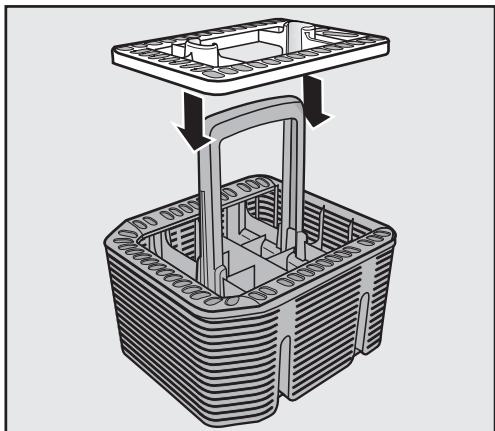
Fit it onto the cutlery basket if required.
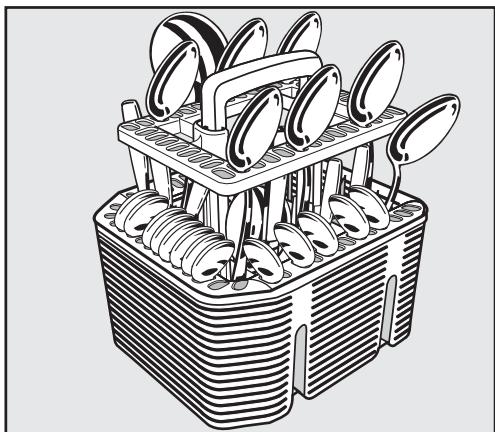
Insert cutlery with the handles facing downwards, and distribute them evenly along the insert.
Optional accessories
Optional dishwasher accessories are available from your Miele dealer, Miele or Mieleusa.com (depending on your model some may already be supplied with your machine as standard).
If you would like to...
the following accessory will need to be ordered...
...wash additional items of cutlery
... a cutlery basket for the lower basket.
...wash long-stemmed glassware
... a glassware rack for the lower basket.
MieleCare Collection
Miele branded cleaning and care products, including dishwasher salt, detergent and rinse aid, are available to order from your Miele dealer, Miele or the on-line Miele store www.mieleusa.com
Detergent
Dishwasher detergents contain irritant and corrosive ingredients.
Avoid inhaling or swallowing dishwasher detergent.
Keep children away from detergent. Keep detergent out of the reach of children. Keep children away from the dishwasher when the door is open. There could still be detergent residues in the dishwasher. Only add detergent just before starting the program and lock the door with the child safety lock (depending on model).
Only use detergents formulated for domestic dishwashers.
Use only the recommended amount of detergent. Continued use of too much detergent may cause machine damage.
When using the "China & Crystal" program (depending on model) reduce the amount of detergent used to at least 12 of the normal dosage. Also make certain your china and crystal are dishwasher safe.
You can use powder, gel or tab detergents. Follow the dosage information on the detergent packaging.
If using a Tab detergent see "Settings - Deactivate indicators".
Detergent tabs are not recommended for use with the program "Express" (depending on model). The tabs may not dissolve completely.
Dishwasher cleaning products are available from Miele.
Adding detergent
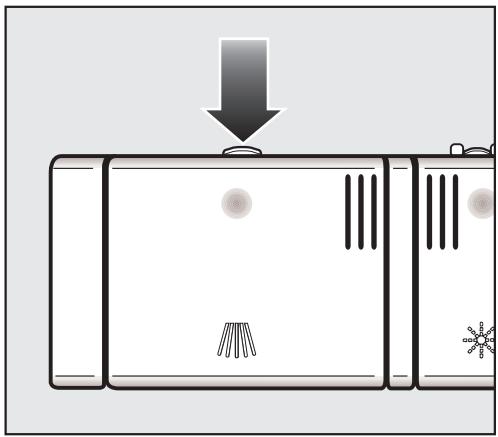
Press the latch on the detergent dispenser. The flap will spring open.
The flap is always open at the end of a program.
- Add detergent to the compartments and close the container flap.
Use one tab or add powder or gel detergent to compartment II and close the flap.
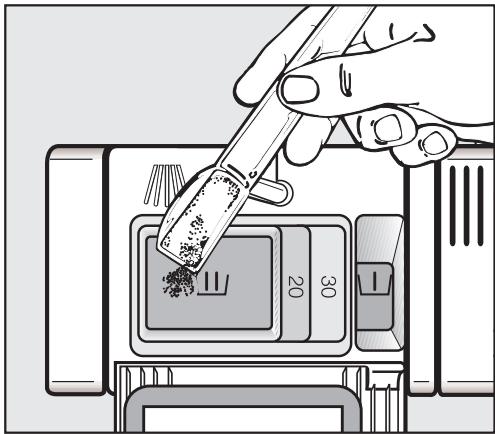
If a Pre-rinse is desired, and available for your chosen program, add 1 teaspoon (5 ml) of detergent to compartment I.
Compartment I holds a maximum of 2 teaspoons (10 ml),
compartment II holds a maximum of 3.5 tablespoons (50 ml) of detergent.
The horizontal marks in compartment II indicate the levels of approximately 114 and 2 tablespoons (20 and 30ml ) respectively. The marks indicate the approximate fill level in ml when the door is open in a horizontal position.
Turning on
Make sure the spray arms can rotate freely.
Close the door.
- Open the water supply, if it is closed.
Press the ① button to turn the dishwasher on.
The last program selected will appear in the display and the appropriate indicator light will come on. After a short while, the estimated program duration for the program selected will appear in the display.
Selecting a program
Choose your program according to the type of load and soiling.
See the "Program Guide" for more information.
- Select the desired program with the Program selection button.
The indicator light for the selected program will come on.
Additional options can now be selected, if desired (see "Additional Options").
Starting a program
Press the "Start / Stop" button.
The program starts.
If additional options are selected, the corresponding indicators will also light up.
Cancel a program only in the first few minutes. Otherwise important program steps (e.g. the water softening) may be interrupted.
| Program | When to use | Program sequence | ||||||
| Pre-rinse | Main wash | Interim rinse | Final rinse | Drying | ||||
| 1 | 2 | 1 | 2 | |||||
| Pots & Pans | For normally soiled pots & pans with dried on food, and heavily soiled dishware, use 120% detergent recommended. | X | X | X | X | X | ||
| Normal | Program for completely washing a full load of normally soiled dishware with the ability to adjust energy and water consumption based on the soil load of the dishware. | as required | X | X | X | X | ||
| China & Crystal | For temperature sensitive glassware and lightly soiled dishware, use 50% detergent recommended. | as required | X | as required | X | X | ||
| SaniWash | To sanitize dishware, e.g. baby bottles, cutting boards and preparation dishware. | X | X | X | X | |||
| Express | "Quick program" for lightly soiled dishware, e.g. party dishware or to remove salt traces from the wash cabinet after refilling salt, not suitable for detergent tabs. | X | X | X | X | |||
| Rinse & Hold | To rinse dishes when a complete program is not needed. | X | ||||||
Usage:
Electrical - 0.01 - 1.23 kWh
Water - 1.1 - 5 gal (4 - 19 l)
Time display
Before the program starts, the time display shows the running time of the selected program in hours and minutes. During the running program the remaining time is shown in the time display.
Symbols will appear to indicate the current stage of the program:

Pre-wash
Main wash
Interim rinse
Final rinse
Drying
Finished
The time displayed may vary with the same program. This can be due, among other factors, to the water temperature at each intake, the reactivation process, the type of detergent, the load size and soiling.
When a program is selected for the first time, the display shows an average time for a cold water intake.
Each time a program is run, the electronic unit adjusts the program running time according to the intake water temperature and the load size.
Standby
A few minutes after the last key is pressed or at the end of the program the dishwasher will switch into Standby mode to save energy. The display and the indicators are turned off and only the Start/Stop indicator light flashes slowly.
To turn the dishwasher back on press ①
If the dishwasher is not turned off after the program ends, it will turn completely off after a few minutes in standby mode (see "Settings - Optimize standby").
If refill salt and/or rinse aid or a fault are present in the display, the dishwasher will not turn off.
The refill messages can be turned off when you use a tab detergent (see "Settings-Refill display").
Fault messages cannot be turned off.
At the end of a program
At the end of a program the display shows End.
In the "Express" program, the drying fan will run for a few minutes after the program is completed.
Dishes tends to chip if removed still hot from the dishwasher.
Let the dishware cool.
To avoid steam damage to the counter top, open the door after the end of the program either fully or keep it closed until you are removing all the dishes.
■ Unload the dishwasher.
Dishes tend to break and chip more easily when they are hot.
Allow the dishes to cool until they are comfortable enough to handle before unloading them.
If you open the door fully after switching off, the dishes will cool much faster.
Unloading the lower basket first will prevent water drops from the upper basket and cutlery tray (depending on model) from dropping onto dishes in the lower basket.
Press the ① button to turn the dishwasher off.
The dishwasher continues to use electricity until turned off with the ① button.
Preparing your appliance for an extended vacation
If you elect to turn off the water to your home for an extended period of time, please note that this may not be enough to reduce the risk of a leak.
To be completely safe, you must turn off the water supply to each individual appliance. This means under the sink for a dishwasher, at the laundry bib for your washer, etc.
Interrupting a program
A program is interrupted as soon as the door is opened.
If the door is closed again, the program will continue from where it was interrupted.
Water in the dishwasher is hot. Danger of scalding.
Only open the door if absolutely necessary and exercise extreme caution when doing so. Before closing the door again, leave it ajar for approx. 20 seconds. This will enable the temperature in the wash cabinet to settle. Close the door firmly until it clicks into place.
Changing a program
If the detergent dispenser flap is already open, do not change the program.
If a program has already started and you wish to change it:
Press the "Start / Stop" button for at least one second.
The program is canceled.
Select and start the desired program.
Intensive lower basket
The "Intensive lower basket" option allows you to wash heavily soiled items in the lower basket while washing more delicate items in the upper basket.
Cleaning performance in the lower basket is intensified in programs where this function is available.
Depending on the program, this can mean that the running time varies slightly.
Press the ① button to turn the dishwasher on.
The "Start / Stop" indicator light flashes.
Select a program.
Press the "Intensive lower basket" button.
The Intensive lower basket indicator light will come on if the function is available for the program which has been selected.
Start the program with the "Start / Stop" button.
Once set, the function will remain active for the program selected until the setting is changed.
Turbo
The "Turbo" function can be used to reduce the program run-times, in programs in which the option is available.
In order to achieve optimum cleaning results, energy consumption rates are increased when Turbo has been selected.
Press the ① button to turn the dishwasher on.
The "Start / Stop" indicator light flashes.
Select a program.
Press the Turbo button.
The Turbo indicator light will come on if the function is available for the program which has been selected.
Start the program with the "Start / Stop" button.
Once selected, the function will remain active for all programs until the setting is changed.
Delay start
The start time of a program can be delayed from 30 minutes to 24 hours. The delay is set in 30 minute increments.
When using the "Delay Start" function, make sure that the detergent compartment is dry before adding detergent. Wipe dry with a cloth if necessary. Otherwise the detergent could stick together and not completely rinse out. Do not use liquid detergent. The detergent could leak out of the compartment.
Press the ① button to turn the dishwasher on.
The "Start / Stop" indicator light flashes.
- Select the desired program with the "Program" button.
Press the "Delay start" button.
The last delay start time will show in the time display. The "Delay start" indicator light comes on.
Set the desired delay start time with the "Delay start" button.
If you press and hold the "Delay start" button, the time will automatically count up to 24:00 h. To start again at 30 minutes, press the "Delay start" button twice.
Press the "Start / Stop" button.
The "Start / Stop" indicator light comes on.
If, after you have set the delay start time, you do not press the Start / Stop button within a few seconds, the display will revert to showing the program duration. You will have to enter the delay start time again.
The time will count down to the program start in 1-minute steps.
Once the delay start time has elapsed, the selected program starts. The display shows the remaining time, the indicator "Delay start" goes out and the "Start / Stop" indicator light comes on.
To prevent children from coming into contact with the detergent: Only add detergent just before starting the program, i. e. before you press the Start / Stop button, and lock the door with the child safety lock.
Starting a program before the Delay start has elapsed:
A program can be started before the Delay start time has elapsed.
Press the "Start / Stop" button for at least one second.
The "Delay start" indicator light goes out and the "Start / Stop" indicator light flashes.
Press the "Start / Stop" button again.
The program starts. The "Start / Stop" indicator light comes on.
The "Settings" menu allows you to change standard settings
Opening the "Settings" menu
Press the ① button to turn the dishwasher off.
Press and hold the "Start / Stop" button.
Turn the dishwasher on with the ① button and hold the "Start / Stop" button down for a few seconds.
The first option of the Settings menu will appear in the display and all the indicator lights will come on.
See the "Display Functions" section for details.
- Select the menu option you wish to change.
The selected options are marked with a check.
Language
The display contents can be shown in different languages.
The displayed language can be changed in the Language.
- Select the desired language and confirm with the center button.
The flag after the word Language serves as a guide when an unfamiliar language has been selected.
Select the menu option with a flag until the Language .submenu is displayed.
Water hardness
Your dishwasher is fitted with a water softener that needs to be programmed to the water hardness level in your area.
- The dishwasher must be correctly programmed to match the hardness of your water.
- Your local water authority will be able to advise you of the exact water hardness level in your area.
- In areas where the water hardness fluctuates (e.g. 37 - 50 °d [39 - 52 gr/gal]) always program the machine to the higher value (in this example 50 °d [52 gr/gal]).
A check will appear beside the water hardness which has been set.
- Select the hardness of your water supply and confirm with the center button.
| °d | gr/gal | Value to set in the display |
| 1 | 1 | 1 |
| 2 | 2 | 2 |
| 3 | 3 | 3 |
| 4 | 4 | 4 |
| 5 | 5 | 5 |
| 6 | 6 | 6 |
| 7 | 7 | 7 |
| 8 | 8 | 8 |
| 9 | 9 | 9 |
| 10 | 10 | 10 |
| 11 | 11 | 11 |
| 12 | 13 | 12 |
| 13 | 14 | 13 |
| 14 | 15 | 14 |
| 15 | 16 | 15 |
| 16 | 17 | 16 |
| 17 | 18 | 17 |
| 18 | 19 | 18 |
| 19 | 20 | 19 |
| 20 | 21 | 20 |
| 21 | 22 | 21 |
| 22 | 23 | 22 |
| 23 | 24 | 23 |
| 24 | 25 | 24 |
| 25 | 26 | 25 |
| 26 | 27 | 26 |
| 27 | 28 | 27 |
| 28 | 29 | 28 |
| 29 | 30 | 29 |
| 30 | 31 | 30 |
| 31 | 32 | 31 |
| 32 | 33 | 32 |
| 33 | 34 | 33 |
| 34 | 35 | 34 |
| 35 | 36 | 35 |
| 36 | 38 | 36 |
| 37-50 | 39-52 | 37-50 |
| 51-60 | 53-63 | 51-60 |
| 61-70 | 64-73 | 61-70 |
Rinse aid
For best results the rinse aid dosage can be adjusted.
The dosage can be set between 0-6 ml.
The factory default dosage setting is 3 ml rinse aid.
The amount of rinse aid dispensed may be more than the value set due to the automatic adjustment of the "Sensor Wash" program.
If spots appear on the dishes:
- Use a higher setting for rinse aid.
If smearing or streaking show:
- Use a lower setting for rinse aid.
- Select the desired rinse aid amount and confirm with the center button.
Optimize standby
A few minutes after the last key is pressed or at the end of the program the dishwasher will switch into Standby mode to save energy. The display and the indicators are turned off and only the Start/Stop indicator light flashes slowly.
If the dishwasher is not turned off after the program ends, it will turn completely off after a few minutes in Standby mode.
This function can also be turned off. The display and the indicators stay on and the dishwasher will turn off after approx. 6 hours.
- Select the desired setting and press the center button.
If refill salt and/or rinse aid or a fault are present in the display, the dishwasher will not turn off.
The refill messages can be turned off when you use a tab detergent (see "Settings-Refill indicators"). Fault messages cannot be turned off.
Refill indicators
If you consistently use "Tab" detergent products in your dishwasher, you can switch the Salt and Rinse Aid indicators off if desired.
Select the desired setting and confirm with the center button.
If you switch to using a detergent that does not contain salt or rinse aid, remember to replenish the salt and rinse aid and turn the indicators back on.
Soak
You can use the Soak function in the program selected for loosening very stubborn food residues. It is not available for every program. If you are using powder dishwasher detergent, add approx. 1 teaspoon (5 g) to compartment I.
Select the desired setting and confirm with the center button.
Once set, the function will remain active for the programs for which it is available, until the setting is changed.
Pre-rinse
You can use this function in the selected program to remove easily loosened food residues. It is not available for every program.
Select the desired setting and confirm with the center button.
Once set, the function will remain active for the programs for which it is available, until the setting is changed.
Extended drying
The fan runs longer at the end of a program to improve the drying result. This function is not available for every program.
Select the desired setting and confirm with the center button.
Once set, the function will remain active for the programs for which it is available, until the setting is changed.
Brightness
There are seven different display brightness settings.
- Select the desired brightness and confirm with the center button.
Contrast
There are seven different display contrast settings.
- Select the desired contrast and confirm with the center button.
Filter check
This selection allows you to set the number of cycles run before the filter check message shows.
You can select between 30 and 60 cycles.
The "Filter check" message is set by default to 50 cycles.
- Select the desired interval and confirm with the center button.
Showroom program
Only for showrooms.
The dishwasher has a demo program for dealer's showrooms.
- Demo with wash sound:
The program activates the pumps to demonstrate the wash sound.
Turning the demo mode on
Select the desired option.
- Select the option On and confirm with the center button.
- Close the Settings menu.
Press the Start / Stop button.
Demo mode will begin.
Turning the demo mode off
Demo mode will turn off automatically when it reaches the end of the cycle.
Factory default
If you have altered any settings from the factory default, you can reset them to the factory default settings.
- Select Reset and confirm with the center button.
Leaving the Settings menu
Use Close to leave the Settings menu.
- Select Close and confirm with the center button.
The display will then show the last program selected and the indicator light for the program selected will come on.
Repairs should only be carried out by a qualified and trained person in accordance with local and national safety regulations. Unauthorized repairs could cause personal injury or machine damage.
Technical faults
| Problem | Possible fault | Solution |
| After the dishwasher was turned on with the ① button, the display stays off and the "Start / Stop" indicator does not flash. | The machine is not plugged in. | Insert the plug. |
| The circuit breaker has tripped. | Reset the circuit breaker. See the data plate for minimum amperage. | |
| The dishwasher stops during a program. | The circuit breaker has tripped. | - Reset the circuit breaker. See the data plate for minimum amperage. - If the circuit breaker trips again, Contact Miele. |
| One of the following faults appears on the display: | Before fixing the fault: - Press the ① button to turn the dishwasher off. | |
| Fault FXX | There may be a technical fault. | After a few seconds: - Turn the dishwasher on. - Select the desired program. - Press the Start / Stop button. If the fault is indicated again, a technical fault has occurred. - Contact Miele. |
| Waterproof | The waterproof system has activated. | - Turn off the water supply. - Contact Miele. |
Frequently Asked Questions
| Faults in the water intake/water drain | ||
| Problem | Possible fault | Solution |
| One of the following faults appears on the display: | Before fixing the fault:- Press the ① button to turn the dishwasher off. | |
| Open water supply | The water supply valve is closed. | Open the water supply valve all the way. |
| Water intake | Before fixing the fault:- Press the ① button to turn the dishwasher off. | |
| Fault in the water intake. | - Open the water supply all the way and restart the program.- Clean the water intake filter (see "Cleaning and Care").- The water pressure at the water connection is less than 30kPa (0.3 bar/4.35 psi).Consult a plumber. | |
| Drain | Fault in the water drain. There might be water in the wash cabinet. | - Clean the triple filter (see "Cleaning and care").- Clean the drain pump (see "Cleaning and Care").- Clean the non-return valve (see "Cleaning and Care").- Remove any kinks in the drain hose. |
| General problems with the dishwasher | ||
| Problem | Possible fault | Solution |
| The indicators and the display is dark. Only the "Start/Stop" indicator flashes slowly. | The indicators and the display turn off automatically to save energy (Standby). | Press the ① button to come out of Standby mode. |
| Detergent residue is left in the dispenser at the end of a program. | The dispenser was damp when detergent was added. | Dry the dispenser before adding detergent. |
| The detergent dispenser lid cannot be closed properly. | Detergent residue is blocking the catch. | Remove the residue. |
| The door and the interior walls are still wet after a program has finished. | This is not a fault. It is the normal operating mode of the drying system. | The moisture will evaporate after a short time. |
| Water remains in the wash cabinet at the end of a program. | Before fixing the fault: - Press the ① button to turn the dishwasher off. | |
| The triple filter in the wash cabinet is clogged. | Clean the triple filter (see "Cleaning and care"). | |
| The drain pump or the non-return valve may be blocked. | Clean the drain pump and the non-return valve (see "Cleaning and care"). | |
| The drain hose is kinked. | Remove any kinks from the drain hose. | |
Frequently Asked Questions
| Sounds | ||
| Problem | Possible fault | Solution |
| There is a knocking noise in the wash cabinet | The spray arm is hitting an item in the basket. | Interrupt the program, rearrange items blocking the spray arms. |
| There is a rattling noise in the wash cabinet | Items are not secure in the wash cabinet. | Interrupt the program, and rearrange loose pieces. |
| A foreign object has become lodged in the drain pump. | Remove the foreign object from the drain pump (see "Cleaning the drain pump and non-return valve") | |
| There is a knocking noise in the water line | This may be caused by the installation or the diameter of the pipe. | This has no effect on the dishwasher. If in doubt, contact a plumber. |
| Poor cleaning results | ||
| Problem | Possible fault | Solution |
| The dishes are not clean. | The dishes were not loaded correctly. | See "Loading the dishwasher". |
| The program was not powerful enough. | Select a more intensive program (see "Program Guide"). | |
| Stubborn but normal soiling (e.g. coffee, tea). | Use the function "Adjust Sensor Wash" (depending on model, see "Settings"). | |
| Not enough detergent was dispensed. | Use more detergent, or change the detergent. | |
| The spray arms are blocked. | Turn the spray arms and rearrange the dishes if necessary. | |
| The triple filter in the wash cabinet is clogged or not correctly inserted. The spray arm jets might be clogged as a result. | Clean the filter and insert it correctly. Clean the spray arm jets, if required (see "Cleaning and care"). | |
| The non-return valve is stuck open and blocked. Wash water will run back into the wash cabinet. | Clean the drain pump and the non-return valve (see "Cleaning and care"). | |
| Glasses and cutlery show streaks. The glasses take on a bluish shimmer; the deposits can be wiped off. | The rinse aid dosage is set too high. | Reduce the dosage (see "Settings - Rinse aid"). |
Frequently Asked Questions
| Problem | Possible fault | Solution |
| Dishes are not dry, glasses and cutlery are spotted. | The rinse aid setting may be too low, or the rinse aid reservoir is empty. | Increase the dosage, refill the reservoir or switch the rinse aid product when refilling (see "Rinse aid"). |
| Dishes were taken out too soon. | Leave dishes in longer (see "Use"). | |
| A "Tab" product was used. These products have a low drying effect. | Change the detergent, or refill the rinse aid (see "Rinse aid"). | |
| White residue is visible on cutlery and dishes. Clouding occurs on glassware and cutlery; film can be wiped off. | Not enough rinse aid was used. | Increase the dosage (see "Setting the rinse aid dosage"). |
| The salt container is empty. | Refill the salt container (see "Filling the salt container"). | |
| The salt container lid was not screwed on properly. | Reseat it making sure it screws back on correctly. | |
| Unsuitable "Tab" products were used. | Use a different detergent. Use normal (powder or gel) detergent. | |
| The water softener is programmed on too low a setting. | Program a higher water softener setting (see "Water softener"). | |
| Glasses have a brown or blue discoloration; film cannot be wiped off. | Detergent deposits. | Change detergent right away. |
| Glasses are dull and discolored; film cannot be wiped off. | Glasses are not dishwasher safe. The surface is affected. | There is no remedy. Only use dishwasher safe glasses. |
| Tea or lipstick stains have not been completely removed. | The wash temperature of the selected program was too low. | Select a program with a higher wash temperature. |
| The detergent has a low bleaching effect. | Use a different detergent. | |
| Plastics are discolored. | Natural dyes e.g. from carrots, tomatoes or ketchup may be the cause. Not enough detergent was used to break down natural dyes. | Use more detergent (see "Detergent"). Discoloration is permanent. |
| There are rust stains on cutlery. | The affected items are not corrosion resistant. | There is no remedy. Use only dishwasher safe cutlery. |
| No program was run after refilling salt. Salt residuals got in the wash cycle. | Start the "Express" program without a load after refilling salt (without the "Turbo" option). | |
| The salt container lid was not screwed on properly. | Reseat it making sure it screws back on correctly. |
Repairs
In the event of a fault which you cannot correct yourself please contact the Miele Service Department at the phone number on the back of this booklet.
Please quote the model type and number of your appliance.
These can be found on the data plate along the right edge of the door.
PC Update
The Program Correction (PC) allows a technician to update the dishwasher to make use of new technology.
When, for example, technological developments offer advanced modifications to your existing program cycles a service technician will be able to input these into your machine controls via the indicator light marked PC. Miele will provide information when such possibilities become available.
MieleCare
(USA only)
MieleCare, our Extended Service Contract program, gives you the assurance of knowing that your appliance investment is covered by 5 years of worry free ownership.
MieleCare is the only Extended Service Contract in the industry that guarantees repairs by a Miele Authorized Service Provider using genuine Miele parts. Only genuine Miele parts installed by factory trained professionals can guarantee the safety, reliability, and longevity of your Miele appliance.
Please note that unless expressly approved in writing by Miele's Service department, Extended Service Contracts offered by other providers for Miele products will not be recognized by Miele. Our goal is to prevent unauthorized (and untrained) service personnel from working on your Miele products, possibly doing further damage to them, you and/or your home.
To learn more about MieleCare Extended Service Contracts, please contact your appliance dealer or visit us online at:
http://mieleusa.com/mielecare
To transport the dishwasher, e.g. when moving to a new home, note the following:
Empty the dishwasher.
- Secure any loose parts, e.g. hoses, cables, cutlery baskets.
- Transport the dishwasher in the upright position. If unavoidable it may be transported on its back. Do not transport it on its side or on the door. Residual water in the machine could leak and cause electrical damage.
User Maintenance Instructions
To prevent accidents –
and appliance damage,
read these instructions
before
installation or use.
Check and clean your dishwasher regularly. This will help avoid problems and faults.
Abrasive cleaning agents, all-purpose cleaners, thinner or ammonia based cleaners should not be used on the dishwasher. They will damage the surface.
Wash cabinet
Generally, the wash cabinet is self cleaning if the correct amount of detergent is used.
The wash cabinet can be cleaned with a dishwasher cleaner such as "Dis Cleaner" available from your Miele dealer or online at www.mieleusa.com.
Door and the door seal
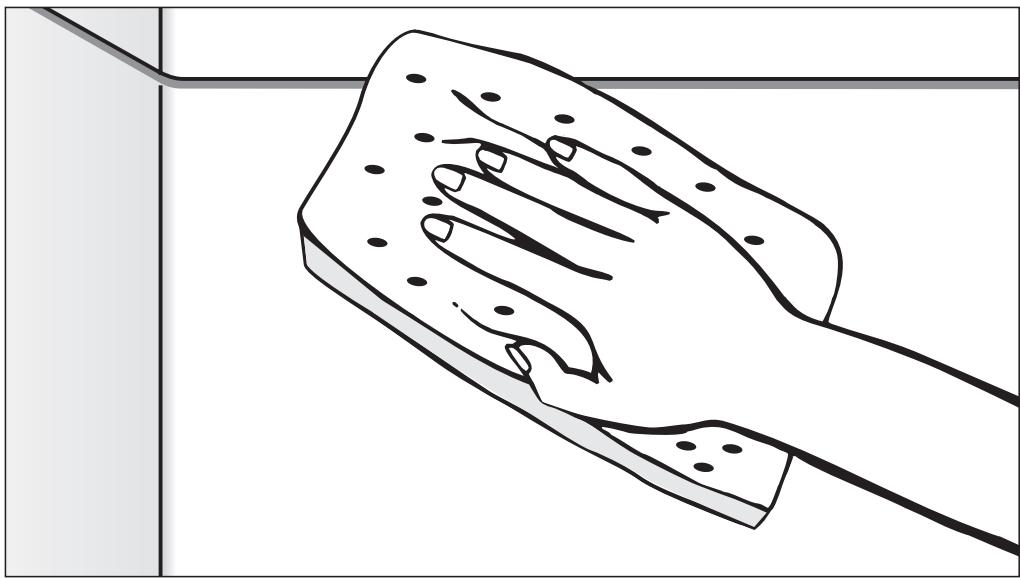
Wipe the door seals regularly with a damp cloth to remove food deposits.
- Food residue and spilled liquids should be wiped from the sides of the dishwasher door. These are outside of the wash cabinet and are not cleaned by water from the spray arms.
Control panel
- The plastic control panel should only be wiped with a damp cloth or suitable cleaning agent designed for use on plastic.
The appliance front and controls are not scratch proof. Remove spills immediately.
Exterior
- Only use a conditioner suitable for your kitchen cabinetry.
Clean wood only with a damp cloth and wipe dry.
Clean the exterior with a solution of warm water and liquid soap applied with a soft sponge. Dry with a soft cloth.
Glass cleaners may be used to clean the exterior. However do not allow them to sit or "puddle", this can cause damage to the surface.
Remove the cleaner promptly.
To better maintain your appliance avoid the following:
- cleaners containing soda, ammonia, thinners, or chlorides
- cleaners containing descending agents or lime removers,
- abrasive cleaners,
- stainless steel cleaners,
-dishwasher soap (powder), - caustic (oven) cleaners,
scouring pads, steel wool, hard brushes,
metal scrapers, - steam cleaning products.
Triple filter system
The triple filter system in the base of the wash cabinet retains coarse dirt from the suds solution, preventing it from reaching the circulation system and re-entering the cabinet through the spray arms.
The dishwasher must not be used without all the filters in place.
Collection of coarse dirt may cause the filters to clog. The level of soiling and time it takes before the filters need cleaning will vary depending on your household use.
The message Check filters will appear in the display after every 50 program cycles (factory default setting).
The filter check frequency can be set from 30 and 60 program cycles (see "Settings, filter check").
Check the triple filter system.
Clean the triple filter, if necessary.
- Confirm the message with the center button.
The display changes to the Main menu.
Cleaning the triple filter
Turn the dishwasher off.
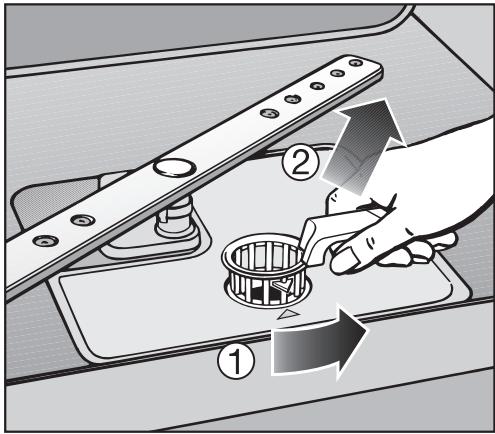
Turn the handle counter-clockwise to release the triple filter system ①.
- Remove the triple filter system from the machine ② . Clean any solid particles and rinse the filter well under running water. Scrub with a nylon brush if necessary.
Make sure that when cleaning the filters, no coarse dirt falls into the circulation system, causing a blockage.
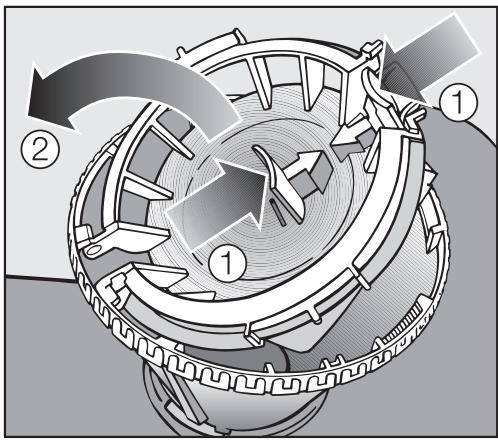
To clean the inside of the filter, the flap must be opened:
Push the clips together in the direction of the arrows as shown, ① and open the flap ②.
Rinse all parts under running water.
- Close the flap so that the clip engages.
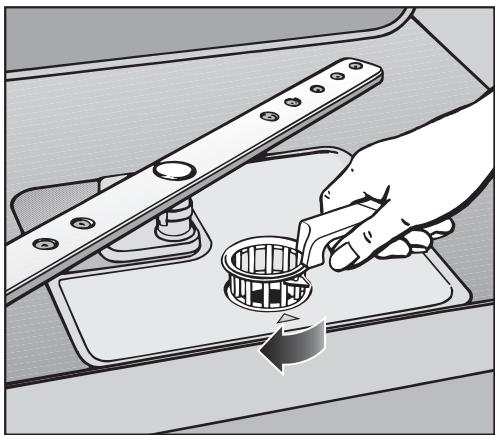
- Replace the triple filter so it lies flat in the base of the wash cabinet.
Lock the filter by turning the handle clockwise, until the arrows point to each other.
The triple filter system must be inserted correctly and locked. Otherwise large particles could get into the circulation system and cause a blockage.
Cleaning the spray arms
Sometimes particles of food get stuck in the spray arm jets. The spray arms should be inspected and cleaned every 4 - 6 months.
Turn off the dishwasher before cleaning.
Removing the spray arms
Remove the cutlery tray (if present).
Push the upper spray arm up to engage the inner ratchet and unscrew the spray arm.
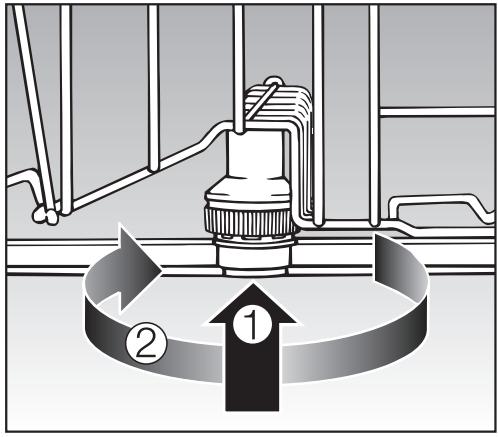
- Lift up the middle spray arm, ①, to engage the ratchet and unscrew the spray arm, ②.
Remove the lower basket.
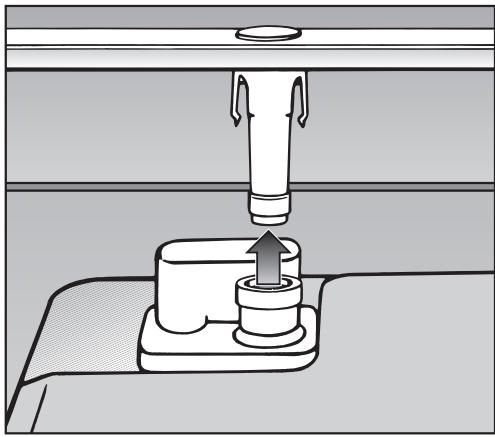
Pull the lower spray arm firmly upwards to remove.
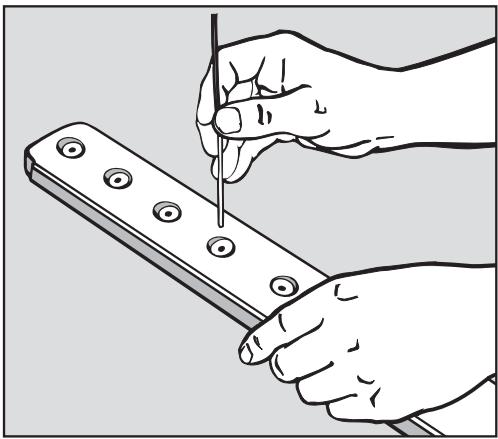
Use a pointed object such as a toothpick to push food particles into the spray arm jets.
- Rinse thoroughly under running water.
- Return the spray arms and check that they rotate freely.
Cleaning the drain pump and non-return valve
If the dishwasher is not completely drained at the end of a program, the drain pump or non-return valve may be blocked.
Turn off the dishwasher and pull the plug.
Remove the triple filter (see "Triple filter system").
Use a cup or bowl to scoop water out of the wash cabinet.
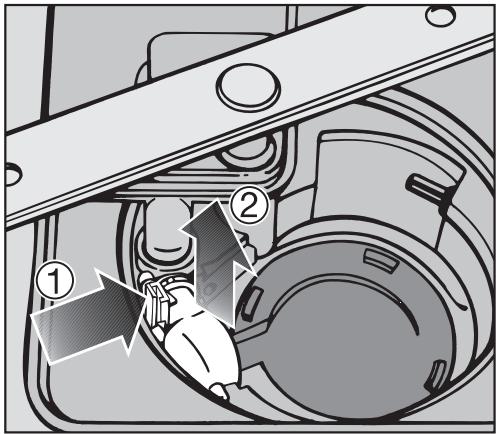
Tilt the locking clamp to the side ①.
Pull out the non-return valve ② and rinse it under running water.
Remove all foreign objects from the non-return valve.
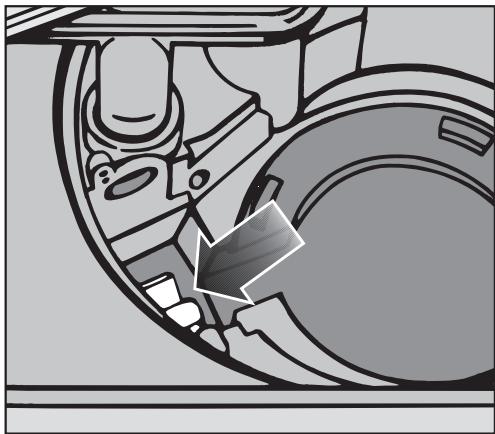
The drain pump is beneath the non-return valve (see arrow).
- Remove all foreign objects from the drain pump (glass or bone splinters).
Before returning the non-return valve, check that the drain pump is not blocked. Spin the propeller several times in both directions to check for obstructions.
Carefully reinsert the non-return valve and secure it with the locking clamp.
Make sure the locking clamp clicks into place!
Installation Instructions
Please refer to the Installation Diagram supplied with these instructions.
To comply with IEC sound testing protocols, please contact Miele for additional instructions.
Information is subject to change. Please refer to our website to obtain the most current product specification, technical & warranty information.
Disposal of the packing material
The cardboard box and packaging protect the appliance during shipping. These materials are biodegradable and recyclable. Please recycle.
Ensure that any plastic wrappings, bags etc. are disposed of safely and kept out of the reach of children. Danger of suffocation!
Disposal of an old machine
Old appliances may contain materials that can be recycled. Please contact your local recycling authority about the possibility of recycling these materials.
Ensure that the appliance presents no danger to children while being stored for disposal. Before discarding an old appliance, unplug it from the outlet, cut off its power cord and remove any doors to prevent hazards.
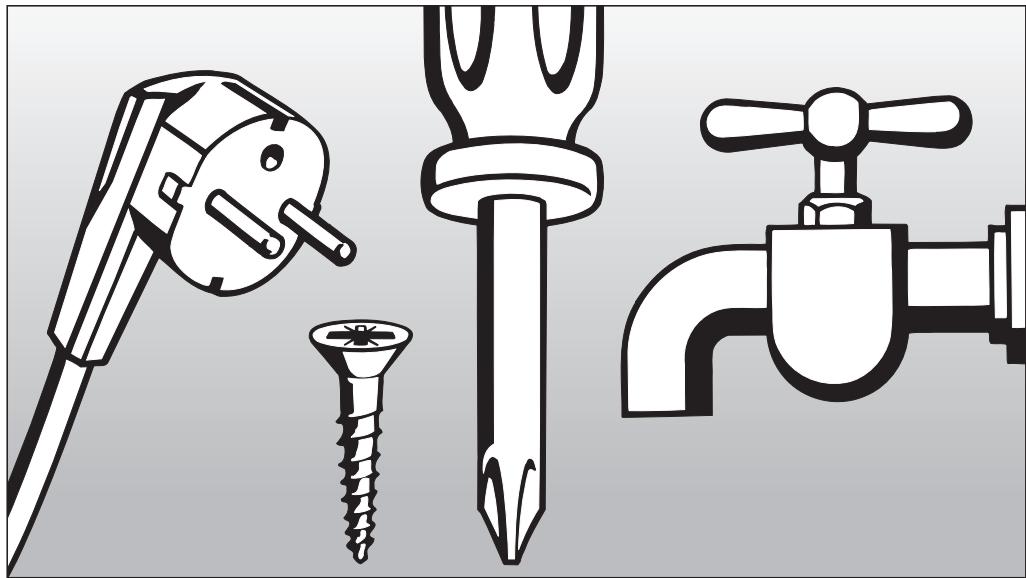
Installation, repairs and other work by unqualified persons could be dangerous.
Check that the voltage, frequency and fuse rating shown on the data plate match the household mains supply.
The power outlet must be accessible after installation. Do not use an extension cord to connect the dishwasher to the mains. Danger of overheating! See data plate on the right side of the door.
A damaged power cord must only be replaced with a genuine Miele cord by a Miele service technician.
GROUNDING INSTRUCTIONS
THIS APPLIANCE MUST BE GROUNDED.
In the event of a malfunction or breakdown, grounding will reduce the risk of electric shock by providing a path of least resistance for the electrical current. This appliance is equipped with a cord having an equipment grounding conductor and a grounding plug. The plug must be plugged into an appropriate outlet that is installed and grounded in accordance with all local codes and ordinances.
Improper connection of the equipment grounding conductor can result in electric shock. Do not modify the plug provided with the appliance; if it will not fit the outlet, have a proper outlet installed by a qualified electrician. If there is any question concerning the proper electrical connection or grounding of this appliance to the power supply, please consult a licensed electrician or call Miele's Technical Service Department:
USA 1-800-999-1360
CDN 1-800-565-6435
Specifications
The dishwasher comes equipped with a 4 ft (1.2 m) power cord with a molded plug for connection to 120 V, 60 Hz, 15 A grounded receptacle.
Hardwired electrical connection
It is possible to hardwire this appliance to an existing power cable.
CAUTION: Before servicing, disconnect the power supply by either removing the fuse, shutting off the power main or manually "tripping" the circuit breaker.
Installation work and repairs should only be performed by a qualified technician in accordance with all applicable codes and standards. Repairs and service by unqualified persons could be dangerous and the manufacturer cannot be held responsible.
Before connecting the appliance to the power supply, make sure that the voltage and frequency listed on the data plate correspond with the household electrical supply. This data must correspond to prevent machine damage. Consult an electrician if in doubt.
GROUNDING INSTRUCTIONS
THIS APPLIANCE MUST BE GROUNDED.
This appliance must be connected to a grounded metal, permanent wiring system, or an equipment-grounding conductor must be run with the circuit conductors and connected to the equipment-grounding terminal or lead on the appliance.
Prior to making a hardwire connection to the terminal, remove the power cord. Otherwise there will be a risk of electric shock from the attached plug.
An existing flexible supply cord or cable shall have a minimum thickness of AWG 14.
120 V, 60 Hz, 15 A fuse rating
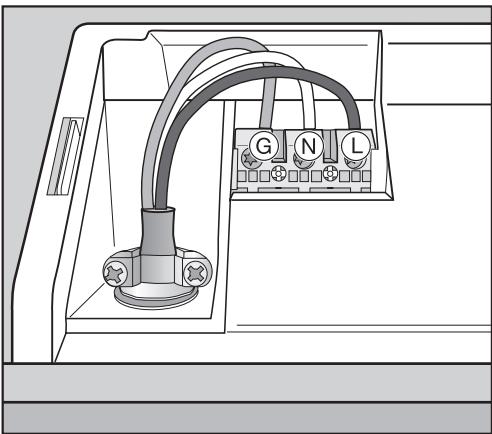
Black wire (live): connect to L
White wire (neutral): connect to N
Green wire (ground): connect to
After attaching the permanent power supply cord, check that all screws on the terminal block and the strain relief are tightened.
Connection to the water supply
Installation, repairs and other work by unqualified persons could be dangerous.
Do not drink water from the dishwasher!
- The dishwasher can heat its own water to the temperature required by the wash program. This allows for connection of the machine to either a hot (max. 140ircF / 60ircC ) or cold water source.
For lowest energy consumption and for fastest possible wash times connect the dishwasher to a hot water source. All programs use hot water in the rinse cycles.
- To use the "Energy Saver" program, a hot water connection of minimum 115irc F / 45irc C and maximum 140irc F / 60irc C (water intake temperature) is necessary.
The higher the water intake temperature, the better the cleaning and drying results. - The inlet hose is approximately 5 ft. (1.5 m) long.
- The water inlet hose comes equipped with an inlet hose ending with a 3/8" female compression fitting. This can be directly connected to a water supply valve or to an appropriate coupling.
If not connected directly to a water supply valve, an appropriate adapter (not included) is required.
- Water pressure: Must be between 4.5 - 145 psi (0.3 - 10 bar).
- If the water pressure is lower, a "Water Intake" notification will be shown. See "Frequently Asked Questions" for more information.
- If the water pressure is higher than shown, a pressure reducing valve must be used.
Ensure that the water connection is secure after the first use.
To prevent damage to the dishwasher, it must only be connected to a fully vented drainage system.
Do not cut the intake hose. If the hose is cut, the dishwasher will not work. There will be a water leak. If the hose is too long, coil it neatly and place it behind or under the machine.
Drainage
- The machine comes equipped with a built-in non-return valve on the discharge side to prevent waste water from flowing back into the dishwasher.
- The dishwasher is equipped with a 5 ft (1.5 m) flexible drain hose with an internal diameter of 7 / 8'' (22 mm).
- Drain hose extensions and adapters can be ordered from Miele. The maximum drain hose length is 13 ft. (4 m), max. drain height: 39" (1 m).
- Use the clamp provided to attach the hose to the dishwashers P trap or disposal connection (see the "Installation Diagram").
The hose must always be attached on the sink side of the P trap.
When attaching the hose to a garbage disposal fitting, make sure the plug which is normally blocking the fitting is knocked out or removed.
- The hose can be angled to the left or right side at the rear of the machine.
-
The existing nipple that the drain hose is connected to may be designed for various hose diameters. If the nipple diameter is to large or to small it should be replaced or an adapter may be used. If the nipple extends more than 2'' (50 mm) into the drain hose it should be shortened, or the hose could clog.
-
The drain hose must not be shortened.
Make sure the hose is not kinked or cut when pushing the machine under the countertop.
Venting the drainage system
If the dishwasher drain hose is connected to a floor drain or to a drain pipe that is less than 8'' (20 cm) above the floor, the drain must be vented. Otherwise the water inside the dishwasher may siphon out during the wash program.
- Open the dishwasher door and remove the lower basket.
Pull the lower spray arm firmly upwards to remove.
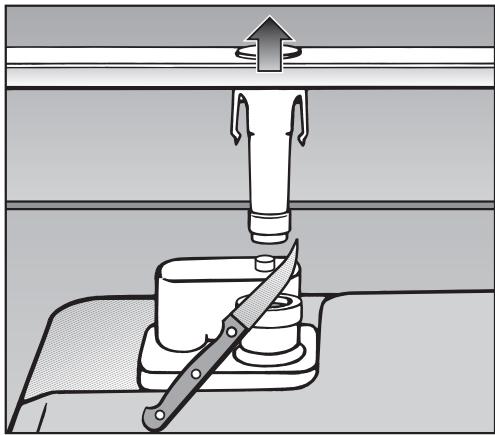
Cut off the vent cap located at the right rear of the triple filter system, as illustrated.
U.S.A. Miele, Inc.
National Headquarters
9 Independence Way
Princeton, NJ 08540
Phone: 800-843-7231
609-419-9898
Fax: 609-419-4298
www.mieleusa.com
Technical Service & Support Nationwide
Phone: 800-999-1360
Fax: 888-586-8056
TechnicalService@mieleusa.com
Canada Miele Limited
Headquarters and Showroom
161 Four Valley Drive
Vaughan, ON L4K 4V8
Phone: 800-643-5381
905-660-9936
Fax: 905-532-2290
www.miele.ca
professional@miele.ca
(commercial enquiries)
MieleCare National Service
Phone: 800-565-6435
905-532-2272
Fax: 905-532-2292
customercare@miele.ca
(general and technical enquiries)
Germany
Miele & Cie. KG
Alteration rights reserved / 4711
G5500/G5505/G5510/G5515 /
C E
INFORMATION IS SUBJECT TO CHANGE. PLEASE REFER TO OUR WEBSITE TO OBTAIN THE MOST CURRENT PRODUCT SPECIFICATIONS, TECHNICAL & WARRANTY INFORMATION.
- Operating Instructions
- Dishwasher
- IMPORTANT SAFETY INSTRUCTIONS 4
- Guide to the dishwasher 7
- Caring for the environment 9
- Before using for the first time. 10
- Loading the dishwasher 17
- Optional accessories 30
- Program Guide 34
- Additional options 38
- Settings menu 40
- Frequently Asked Questions 45
- After sales service 52
- User Maintenance Instructions 55
- Installation instructions 61
- Help to protect the environment 62
- Electrical connection 63
- Plumbing 65
- IMPORTANT SAFETY INSTRUCTIONS
- WARNING -
- Correct usage
- Electrical Safety
- Installation
- Use
- Disposal of an appliance
- SAVE THESE INSTRUCTIONS
- Control panel
- Energy saving washing
- To open the door
- To close the door
- Child safety lock
- Display Functions
- Settings menu
- Before using for the first time
- Language
- Water hardness
- Filling the salt container
- Refill salt message
- Rinse aid
- Adding rinse aid
- Rinse aid indicator
- Items not recommended for dishwashing
- Glassware:
- Silver and aluminum:
- Upper basket
- Foldable spikes
- Hinged cup rack
- Jumbo cup rack
- Universal support bar
- Adjusting the height:
- Adjusting the upper basket
- Lower basket
- Removable MultiComfort insert
- To remove the insert ①
- To replace the insert ②
- Glass rack
- Cutlery
- Split cutlery tray
- Cutlery basket
- Cutlery insert for the cutlery basket
- Optional accessories
- If you would like to...
- the following accessory will need to be ordered...
- MieleCare Collection
- Detergent
- Adding detergent
- Turning on
- Selecting a program
- Starting a program
- Time display
- Standby
- At the end of a program
- Preparing your appliance for an extended vacation
- Interrupting a program
- Changing a program
- Intensive lower basket
- Turbo
- Delay start
- Starting a program before the Delay start has elapsed:
- The "Settings" menu allows you to change standard settings
- Opening the "Settings" menu
- Optimize standby
- Refill indicators
- Soak
- Pre-rinse
- Extended drying
- Brightness
- Contrast
- Filter check
- Showroom program
- Turning the demo mode on
- Turning the demo mode off
- Factory default
- Leaving the Settings menu
- Frequently Asked Questions
- Repairs
- PC Update
- MieleCare
- User Maintenance Instructions
- Wash cabinet
- Door and the door seal
- Exterior
- To better maintain your appliance avoid the following:
- Triple filter system
- Cleaning the triple filter
- Cleaning the spray arms
- Removing the spray arms
- Cleaning the drain pump and non-return valve
- Installation Instructions
- Disposal of the packing material
- Disposal of an old machine
- GROUNDING INSTRUCTIONS
- Specifications
- Hardwired electrical connection
- THIS APPLIANCE MUST BE GROUNDED.
- Connection to the water supply
- Drainage
- Venting the drainage system
- National Headquarters
- Technical Service & Support Nationwide
- Headquarters and Showroom
- MieleCare National Service
- Germany
- C E
Brand : MIELE
Model : DIMENSION G 5505 SCI - INSTALLATION SHEET FOR I-MODELS (PRINT ON 11X17 PAPER FOR BETTER READABILITY)
Category : Home Appliance