
SCR 4600MR - Dash cam SENCOR - Free user manual and instructions
Find the device manual for free SCR 4600MR SENCOR in PDF.


Pick your language and provide your email: we'll send you a specifically translated version.
| Product Type | Dash Camera |
| Brand | Sencor |
| Model | SCR 4600MR |
| Dimensions | Approx. 7.0 x 5.0 x 3.0 cm |
| Weight | Approx. 80 g |
| Power Supply | 5V DC via USB (car cigarette lighter adapter) |
| Video Resolution | Full HD 1920x1080p @ 30fps |
| Display | 2.7-inch TFT LCD |
| Lens | 140° wide angle |
| Storage Media | MicroSD card (up to 32GB, Class 10) |
| Loop Recording | Supported (1/3/5 min segments) |
| G-Sensor | Built-in impact detection for emergency recording |
| Night Vision | Infrared LED support |
| Motion Detection | Parking mode with motion activation |
| Battery | Built-in rechargeable lithium battery (approx. 200 mAh) |
| Mounting | Suction cup or adhesive mount (windshield) |
| Languages | Multi-language support including English |
| Certifications | CE, RoHS |
| Maintenance | Clean lens with soft cloth; format SD card regularly |
| Safety Notices | Do not install in area blocking driver's view; operate within legal recording limits |
| Spare Parts | Mounting bracket, USB cable, car charger (compatible) |
| Reparability | Professional servicing recommended for internal repairs |
| General Info | Designed for reliable continuous recording while driving |
Frequently Asked Questions - SCR 4600MR SENCOR
How do I install the SCR 4600MR dash cam?
Mount the camera on the windshield using the included suction cup or adhesive mount. Route the cable along the windshield edge and connect to the car's 12V socket via the supplied charger.
What type of memory card does it support?
It supports MicroSD cards up to 32GB, Class 10 or higher. Format the card in the camera before first use.
How does loop recording work?
The camera automatically overwrites the oldest recorded files when the card is full. You can set loop segments to 1, 3, or 5 minutes in the menu.
Does the SCR 4600MR have night vision?
Yes, it features infrared LEDs to capture clear footage in low light conditions. Night vision is activated automatically when ambient light is insufficient.
Can I use the camera while parked?
Yes, it has a parking mode with motion detection. When triggered, it will record a short clip. Requires hardwiring or constant power from the cigarette lighter.
How do I playback recordings?
You can view recordings directly on the camera's screen, or remove the SD card and play on a computer with a card reader. Videos are in .MOV format.
What is the G-sensor and how does it work?
The G-sensor detects sudden impacts or collisions. When triggered, it locks the current recording, preventing it from being overwritten. Sensitivity can be adjusted in settings.
Does the camera have audio recording?
Yes, it has a built-in microphone to record sound. You can enable or disable audio recording in the menu.
What is the battery life?
The built-in battery lasts about 10-20 minutes for temporary use. For continuous operation, the camera must be connected to a power source.
How do I clean and maintain the dash cam?
Use a soft, dry cloth to clean the lens and body. Avoid abrasive solvents. Regularly format the SD card in the camera to ensure reliable performance.
User questions about SCR 4600MR SENCOR
0 question about this device. Answer the ones you know or ask your own.
Ask a new question about this device
No questions yet. Be the first to ask one.
Download the instructions for your Dash cam in PDF format for free! Find your manual SCR 4600MR - SENCOR and take your electronic device back in hand. On this page are published all the documents necessary for the use of your device. SCR 4600MR by SENCOR.
USER MANUAL SCR 4600MR SENCOR
natural_image
Front view of a digital camera with lens and screen (no visible text or symbols)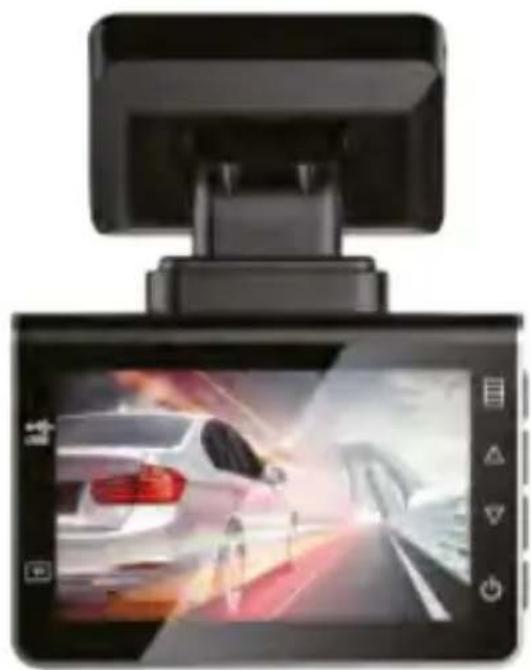
natural_image
Digital car rearview display showing a white car on a road with motion blur effect (no text or symbols visible)EN ■ User Manual
natural_image
Line drawing of a car dashboard with steering wheel, dashboard, and control panel (no text or symbols)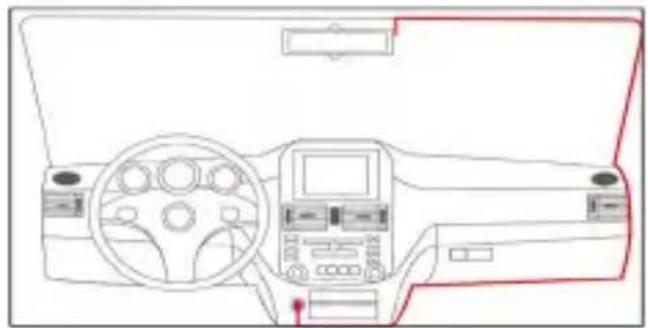
natural_image
Line drawing of a car dashboard with steering wheel, dashboard, and control panel (no text or symbols)



Manual assistant
Powered by Anthropic
Waiting for your message
Product information
Brand : SENCOR
Model : SCR 4600MR
Category : Dash cam