
FDLM 1050 - Rangefinder Fieldmann - Free user manual and instructions
Find the device manual for free FDLM 1050 Fieldmann in PDF.


| Product Type | Laser Distance Meter (Rangefinder) |
| Model | FDLM 1050 |
| Brand | Fieldmann |
| Measurement Range | 0.05 m to 50 m |
| Accuracy | ±1.5 mm |
| Measurement Speed | 0.3 - 1 second |
| Measurement Units | m, ft, in |
| Measuring Reference | Front and back benchmark (selectable) |
| Laser Class | Class II (do not stare into beam) |
| Power Supply | 1 x 1.5V AAA battery (alkaline or rechargeable) |
| Battery Life | Up to 5000 measurements |
| Functions | Single distance, area, volume, Pythagorean theorem, continuous measurement, addition/subtraction, historical data (20 groups) |
| Display | LCD screen with main display line, min/max values, measurement units, battery indicator |
| Operating Temperature | -5°C to 40°C |
| Storage Temperature | -20°C to 60°C |
| Dimensions | 113 x 50 x 27 mm |
| Included in Package | Device, battery (1x AAA), user manual |
| Safety Features | Laser class 2, automatic power off after inactivity, warning stickers |
| Disposal | Recycle according to local regulations for electronic waste |
Frequently Asked Questions - FDLM 1050 Fieldmann
User questions about FDLM 1050 Fieldmann
0 question about this device. Answer the ones you know or ask your own.
Ask a new question about this device
Download the instructions for your Rangefinder in PDF format for free! Find your manual FDLM 1050 - Fieldmann and take your electronic device back in hand. On this page are published all the documents necessary for the use of your device. FDLM 1050 by Fieldmann.
USER MANUAL FDLM 1050 Fieldmann
Home & Garden Performance
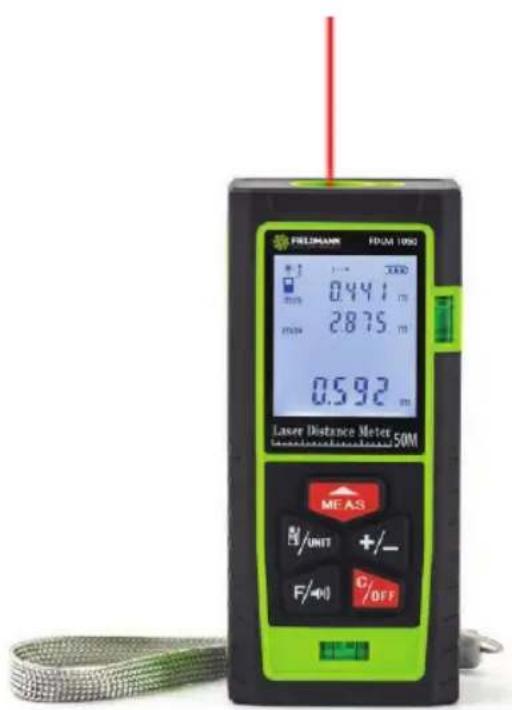
FDLM 1050
English 3-9
Čeština....10–16
Slovenčina 17-23
Magyarul 24-30
Polski 31-37
Laser Distance Meter USER'S MANUAL
Thank you for purchasing this Laser Distance Meter FIELDMANN. Before you start using it, please carefully read this user's manual and save it for possible future use.
TABLE OF CONTENTS
- SAFETY INSTRUCTIONS......4
- SYMBOLS....5
- GENERAL DESCRIPTION ....6
- BASIC SETTING....7
- TECHNICAL PARAMETERS....8
- DISPOSAL....9
1. SAFETY INSTRUCTIONS
WARNING!
Carefully read the instruction manual before use.
Important safety warnings
* Unpack the product carefully and be sure not to throw away any part of the package before having found all components of the product.
Keep the product in a dry place out of reach of children.
Read all cautions and instructions. The failure to adhere to warning cautions and instructions may result in an accident, fire and/or a serious injury.
Packaging
The product is placed in a package preventing damage during transport. This package is a raw material therefore it can be handed-over for recycling.
Instructions for use
Before beginning to work with the machine, read the following safety rules and instructions for use. Familiarize with operating elements and the proper use of the device. Keep the manual in a safe place for future reference. We recommend keeping the original package including the inner packaging materials, cash voucher and guarantee card for a period of warranty at minimum. For a case of transportation, pack the machine into the original box from the manufacturer, thus ensuring a maximum protection of the product during a possible transport (e.g. moving or sending into a service station).

Note: If you hand the machine over to next persons, hand it over together with the manual. Adherence to the attached instructions for use is a precondition for the proper use of the machine. The operation manual includes also instructions for operation, maintenance and repairs.
The manufacturer does not take any responsibility for accidents or damages resulting from the failure to adhere to this manual.
Carefully read, remember and keep these safety instructions
WARNING!
Never stare at the laser beam directly and never point it at another person or animal. Normally persons protect eyes by blinking reflex or instinctively turn head to another side.
Also never use any other optical equipments to stare directly into the laser beam! Otherwise you may face serious healthy problem with your eyes.
Device Usage
Device is designed for measure the distance and helps in making manual calculation of areas and volumes.
Device cannot be used defined scope of usage It is prohibited to remove any sticker out of the device which contents safety warning or correct usage of thew device.
Is strictly prohibited to repair the device by unauthorized service.
Device cannot be resized or somehow adjusted.
Device cannot be pointed to the sun directly otherwise can be damaged.
During measuring the distance is necessary to be very careful while operating in the surroundings.
Laser Classification
Distance meter uses for measurement the laser beam which streams from the front part of the device.
2. SYMBOLS


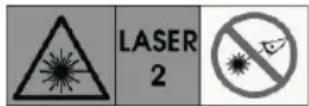

The product complies with the applicable standards and regulations.
Read the Instruction Manual attentively prior to use.
Laser Class 2
Never beem laser into person's or pet's eyes, never stare into the laser beem!
Subjected to recycling
3. GENERAL DESCRIPTION
Installation and Replacement of Battery
- Open the battery cover on the back of the instrument, place the battery correctly according to the polarity instructions, and close the battery box cover.
- The instrument uses 1.5V AAA alkaline battery/No.7 rechargeable battery.
- When the instrument is not used for a long time, please take out the battery.
Display screen
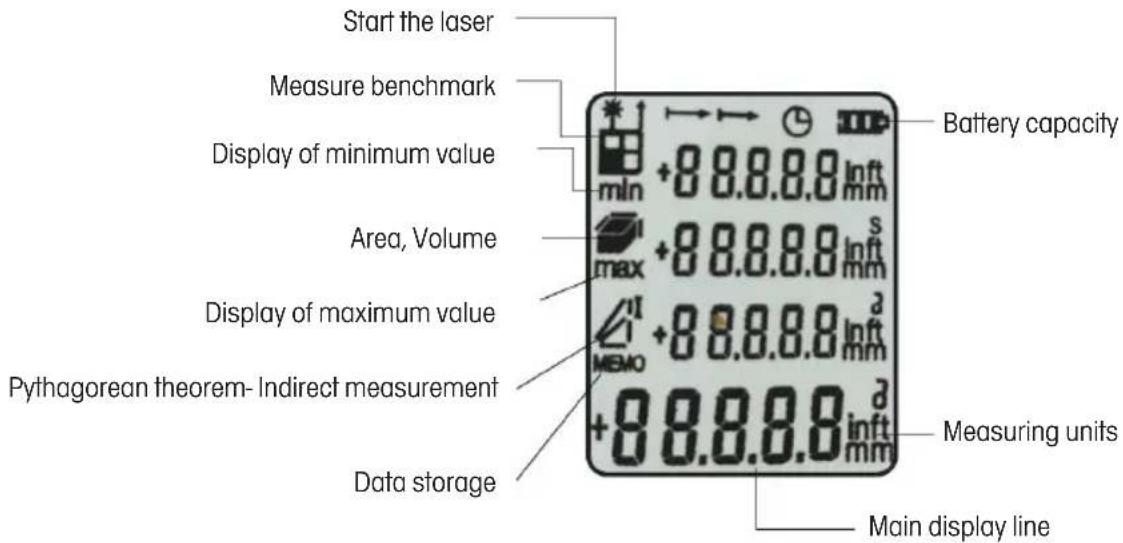
This manual is a general manual, the ordinary version does not have voice function, other functions are the same.
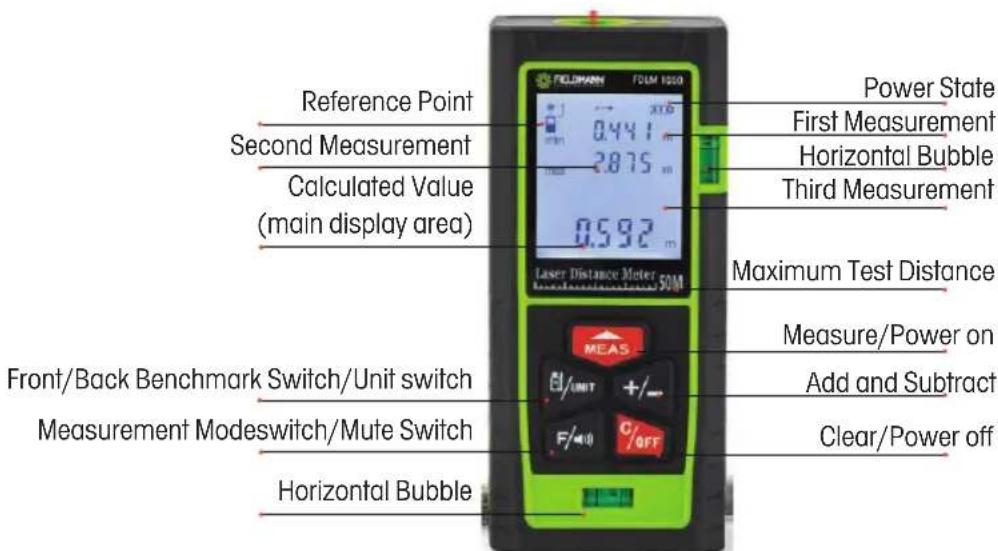
4. BASIC SETTING
- Shortly Press the key 📄 to open the machine, the laser will start at the same time, and the instrument will enter to test mode.
- Shortly press the key _/intN to switch the front/back measurement reference, and long press to switch the measurement unit.
- Shortly press the key +/- to switch plus / minus measurement
- Shortly press the key pitch area / volume measurement. For voice type, long press to turn off the voice function.
- Shortly press the key C_OFF to clear data, long press it to turn off the instrument.
- 'Short press' means to release the button once, while long press' refers to holding down the key for 2 seconds.
Measurement function
- Shortly press the key 📄 to turn on the machine and start the laser, after the laser is projected to the measuring position, the distance between the instrument and the laser point can be obtained by short pressing the measurement key 📄
The measurement result is displayed in the main measurement display area. Please pay attention to the front / back reference when measuring. The instrument calculates the distance from the bottom by default.
- Long press the key to enter the continuous measurement mode, and the screen will display the maximum and minimum values tracked. Short press the key to exit the continuous measurement mode.
* In the process of area, volume and Pythagorean measurement, continuous measurement is helpful for users to obtain the longest and shortest edge accurately.
Addition and subtraction measurement function
Single segment distance measurement can be accumulated adding/ subtracting. Press the key (+, „+“ appears in the display area of screen, it's enter into cumulative additive measurement mode, press the measurement key again, it will add the measurement results of this time and last time, so that it can be carried out successively. Press the key (-,-" appears in the display area of screen, it's enter into cumulative subtraction measurement mode, press the measurement key again, it will subtract the measurement results of this time and last time, so that it can be carried out successively.
Area/Volume Measurement Method
-
Press the key ☑ once and the screen will display the icon ☑ At this time, the first edge flickers, press the measurement key to obtain the first edge distance; and then the second edge flashes press the measurement key to obtain the second edge distance. The area value will be automatically calculated in the main display area.
-
Press the key once and the screen will display the icon. At this time, the first edge flickers, press the measurement key to obtain the first edge distance; and then the second edge flashes, press the measurement key to obtain the second edge distance; and then the third edge flashes, press the measurement key to obtain the third edge distance, the volume value will be automatically calculated in the main display area.
Indirect Measurement of Pythagorean Theorem
-
Press the key Ⓕ for 3 times, the screen will display the icon ⚠ At this time, a right angle edge flashes, press the measurement key to obtain the first edge distance, and then The hypotenuse flashes, press the measurement key to obtain the hypotenuse distance, the other right angle edge will be automatically calculated in the main display area.
-
Press the key Ⓕ four times, the screen will display the icon ⚠ measure the flash edges one by one, the instrument will calculate the distance (1).
Measurement function
Press the key F 5 times to enter the storage function, and then press the key + / - to view the previous 20 measurement data;
5. TECHNICAL PARAMETERS
| 1 | Scope of log 50m | |
| 2 | Minimum measuring range 0.05m | |
| 3 | Accuracy of measurement ±1.5mm | |
| 4 | Measurement speed 0.3-1s | |
| 5 | Measurement datum selection Front/back benchmark | |
| 6 | Measurement unit selection m /ft /in | |
| 7 | speech | Yes |
| 8 | Area calculation method | Yes |
| 9 | Volumetric calculation method Yes | |
| 10 | Hook stock calculation method | Yes |
| 11 | Height difference | Yes |
| 12 | Add and subtract functions | Yes |
| 13 | Continuous measurement | Yes |
| 14 | Historical data storage | 20 Group |
| 15 | The battery type | AAA |
| 16 | Battery life | 5000 / time |
| 17 | Laser level | Class II |
| 18 | Working temperature | -5~40°C |
| 19 | Storage temperature -20~60°C | |
| 20 | Product size | 113*50*27 |
6. DISPOSAL
INSTRUCTIONS AND INFORMATION ON DISPOSING OF USED PACKAGING MATERIALS
Put any used package material to the place determined by the municipality for waste disposal.
DISPOSAL OF USED ELECTRIC AND ELECTRONIC EQUIPMENT
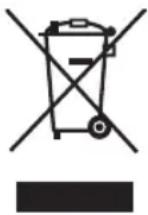
This symbol on products or accompanying documents means that used electric or electronic products must not be put to ordinary municipal waste. Hand over such products to determined collection points for proper disposal, restoration and recycling. Alternatively, in some countries of the European Union or other European countries you can return your products to your local dealer when you buy an equivalent new product. By dutiful disposal of this product you can preserve precious natural resources and you help prevent any potential adverse effects on the environment and human health which could be the results of wrong waste disposal. Ask your local authority or the nearest collection point for additional details. In case of improper disposal of this waste kind penalties can be imposed in accordance with national regulations.
For companies in the European Union countries
Should you want to dispose of electric and electronic devices, ask your dealer or vendor for necessary information. Disposal in other countries outside the European Union. Should you want to dispose of this product, ask your local authorities or your dealer for necessary information about disposal method.

This product fulfils all basic requirements of the EU directives that apply to it.
Text, design and technical specifications can change without prior notice and we reserve the right for their change.

- Laser Distance Meter USER'S MANUAL
- TABLE OF CONTENTS
- SAFETY INSTRUCTIONS
- WARNING!
- Important safety warnings
- Packaging
- Instructions for use
- Device Usage
- Laser Classification
- SYMBOLS
- GENERAL DESCRIPTION
- Installation and Replacement of Battery
- BASIC SETTING
- Measurement function
- Addition and subtraction measurement function
- Area/Volume Measurement Method
- Indirect Measurement of Pythagorean Theorem
- TECHNICAL PARAMETERS
- DISPOSAL
- INSTRUCTIONS AND INFORMATION ON DISPOSING OF USED PACKAGING MATERIALS
- DISPOSAL OF USED ELECTRIC AND ELECTRONIC EQUIPMENT
- For companies in the European Union countries
Brand : Fieldmann
Model : FDLM 1050
Category : Rangefinder