
Sounder2 Play - Loudspeaker Lamax - Free user manual and instructions
Find the device manual for free Sounder2 Play Lamax in PDF.


| Brand | Lamax |
| Model | Sounder2 Play |
| Product Type | Portable Bluetooth Speaker |
| Dimensions | 186 × 74 × 74 mm |
| Weight | 518 g |
| Speaker Parameters | 2 × 12 W, Φ 48 mm, 115 Hz - 20 KHz |
| Battery Type | Li-Ion 3600 mAh |
| Playback Time | Up to 24 hours at 50% volume (backlight off) |
| Charging Time | 4 hours |
| Power Input | 5 V / 2 A (via USB-C) |
| Wireless Technology | Bluetooth 5.3 |
| Range | Up to 18 m |
| Supported Codecs | SBC |
| Playback Options | Bluetooth, microSD card, AUX |
| Memory Card Formats | WAV, MP3, FLAC, APE |
| Memory Card Capacity | Up to 64 GB |
| Water Resistance | IP67 |
| LED Indicators | Flashing blue (pairing), solid blue (paired), flashing blue-white (TWS), red (charging/battery low) |
| Controls | Power, Volume+/-, Play/Pause, Mode, TWS, Virtual Assistant |
| Special Features | TWS pairing, virtual assistant support, call answering/rejecting |
| Included Accessories | USB charging cable, 3.5mm audio cable (possibly) |
Frequently Asked Questions - Sounder2 Play Lamax
User questions about Sounder2 Play Lamax
0 question about this device. Answer the ones you know or ask your own.
Ask a new question about this device
Download the instructions for your Loudspeaker in PDF format for free! Find your manual Sounder2 Play - Lamax and take your electronic device back in hand. On this page are published all the documents necessary for the use of your device. Sounder2 Play by Lamax.
USER MANUAL Sounder2 Play Lamax
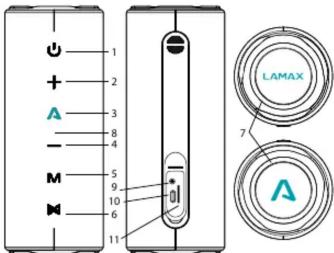
| 1 POWER | Power on/off (hold)Switch backlight modes (press) |
| 2 VOL + | Increase volume (press)Next track (hold) |
| 3 LAMAX PLAY | Play / Stop (press)Activate virtual assistant (hold)Answer / End call (press)Reject call (hold)Power speaker off (long hold) |
| 4 VOL - | Decrease volume (press)Previous track (hold) |
| 5 MODE | Toggle music sources (Bluetooth, microSD card and AUX), (press)Factory settings (long hold) |
| 6 TWS | TWS mode on/off (press)Disconnect from paired device (hold) |
Others
| 7 | LED |
| 8 | Microphone |
| 9 | AUX |
| 10 | Power supply input |
| 11 | MicroSD card slot |
LED indicators when pairing
Flashing blue – speaker is ready for pairing
Glows blue – speaker is paired Flashes blue-white – speaker is ready for TWS pairing
On/Off
To turn on the speaker, hold down the POWER button. The LED will light up and an audible signal will sound. Hold the same button to turn the speaker off.
Pairing
-
Turn on the speaker by holding down the POWER button. The LED will flash blue indicating the speaker is ready to pair.
-
Activate the Bluetooth connection on your phone or other device. Select "LAMAX Sounder2 Play" from the list of available devices. When pairing is successful, the speaker will beep and the LED will turn blue.
If there are pairing problems, reset the speaker by holding the MODE button for 6 seconds. Then proceed as described in step 1. of the Pairing section.
TWS
To pair two speakers with each other, turn on both speakers and make sure they are not paired with a multimedia device. Press the TWS button on the speaker you select as the main speaker. An audio signal will sound and the LED will flash blue and white. After a short time, the other speaker will beep, the LED will turn blue and automatically connect to the main speaker. Then pair the main speaker with your multimedia device as described in step 1 in the Pairing section. The main speaker will function as the left channel and is used to control the call functions.
To unpair the speakers, press the TWS button on the main speaker. Pairing this speaker with other LAMAX models using LAMAX Beat-Share® is only possible if the Sounder2 Play is the main speaker.
Switching between music sources
Press the MODE button to switch between Bluetooth, microSD card and AUX sources. By connecting a microSD card or the included 3.5mm audio cable, the speaker automatically switches to the appropriate mode. When playing via the audio input, you cannot control the songs directly on the speaker.
Charging
Flashing red – speaker battery has almost run out
Glows red – speaker is charging
LED on – speaker is charged
The speaker can be charged using the included USB cable from a suitable USB device – adapter, PC, or power bank. Do not charge the speaker with an input voltage and current higher than 5 V/2 A as this may damage the speaker.
Specifications
| Speaker parameters | 2 × 12 W, 48 mm,115 Hz - 20KHz |
| Batteries | Li-ion 3600 mAh |
| Playback time | Volume 50 % – 24 h (with backlight off) Volume 80 % – 15 h (with backlight off) |
| Charging time | 4 hours |
| Wireless technology | Bluetooth 5.3, range up to 18 m |
| Supported codecs | SBC |
| Playback options | Bluetooth, AUX, microSD card |
| Memory card – supported formats | WAV/MP3/FLAC/APE |
| Memory card – supported capacity | up to 64 GB |
| Water resistance | IP67 |
| Dimensions | 186 × 74 × 74 mm |
| Weight | 518 g |
The latest version of the manual can be downloaded here:
lamax.cz/sounder2-play/manual



LAMAX Sounder2 Play
Bedienung




Brand : Lamax
Model : Sounder2 Play
Category : Loudspeaker