
GC500 - Remote control Mad Dog - Free user manual and instructions
Find the device manual for free GC500 Mad Dog in PDF.


| Brand | Mad Dog |
| Model | GC500 |
| Product Type | Remote Control |
| Dimensions (approx.) | 19 x 5 x 2.5 cm |
| Weight (approx.) | 120 g |
| Power Supply | 2 AAA batteries (not included) |
| Battery Life (approx.) | 6 months with normal use |
| Control Range | Up to 10 meters |
| Supported Devices | TV, DVD, Satellite, Cable, Audio systems |
| Number of Keys | 40+ |
| Key Features | Universal compatibility, backlight, learning function |
| Material | ABS plastic |
| Color | Black |
| Frequency | IR (infrared) |
| Cleaning | Wipe with a soft, dry cloth |
| Storage Temperature | -10°C to 50°C |
| Operating Temperature | 0°C to 40°C |
| Safety Warnings | Keep away from water and extreme heat |
| Spare Parts Availability | No user-serviceable parts; contact support for repairs |
| Warranty | 1 year limited warranty |
Frequently Asked Questions - GC500 Mad Dog
User questions about GC500 Mad Dog
0 question about this device. Answer the ones you know or ask your own.
Ask a new question about this device
Download the instructions for your Remote control in PDF format for free! Find your manual GC500 - Mad Dog and take your electronic device back in hand. On this page are published all the documents necessary for the use of your device. GC500 by Mad Dog.
USER MANUAL GC500 Mad Dog
Operating Manual & Warranty Terms
WARUNKI BEZPIECZEŃSTWA I ZAGROŻENIA
PROBLEMY I ROZWIAZANIA
SAFETY AND HAZARD CONDITIONS
- Avoid prolonged use of the product. Take a 15-minute break after every hour of gameplay.
- Stop using this product immediately if you experience discomfort or arm or shoulder pain.
- The product is designed to be operated with hands only. Do not close the device to your mouth or face.
- Do not use the device with the vibration function in the event of bone, muscle or joint injuries or ailments in your hands or arms.
-
This device may be used by children of at least 8 years of age with reduced physical and mental capabilities and persons lacking experience and knowledge of the device, if supervision or instruction regarding the safe use of the device is provided, so as to make the related threats understandable.
-
Do not attempt to modify the device.
- Do not start the device if it is damaged. The device must be repaired by authorized service or persons authorized to do so.
- Repair of the device by unqualified or unauthorized service may damage the device and void the warranty.
- Do not expose the device to harmful weather conditions.
- It is necessary to protect the device against falls and shocks.
- The device is intended to be used at home, not for commercial purposes.
- Do not immerse the device in water or other substances.
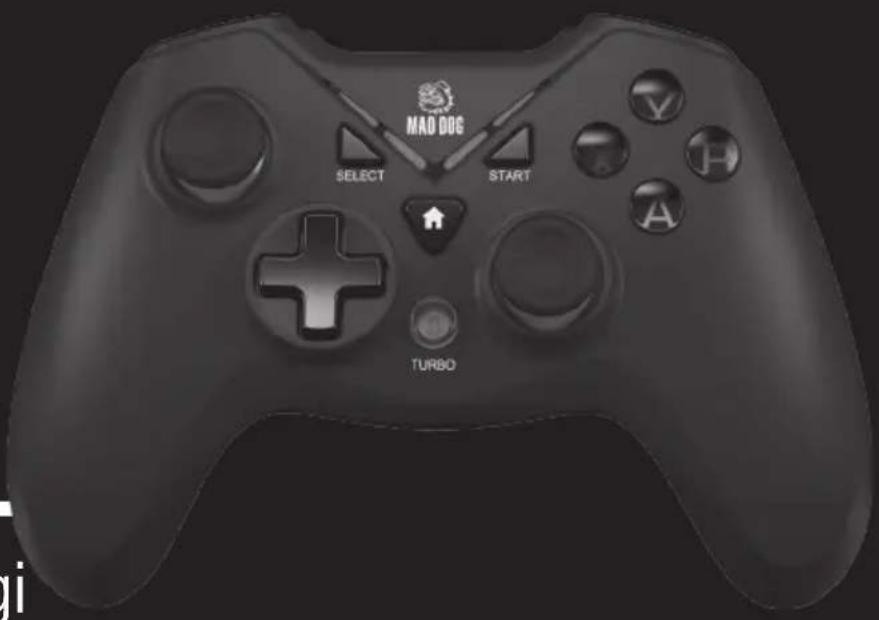
PRODUCT DESCRIPTION
- LED1/LED2/LED3/LED4
- SELECT button
- START button
- HOME button
- Y button
- X button
- B Button
- A Button
- Left joystick
- 0-Pad (Directional)
- TURBO button
-
Right joystick
-
R1 button
- R2 button
- L1 button
- L2 button
- USB cable

SPECIFICATION
| Model: GC500 | |
| Number of buttons: 12 | |
| Analogue joysticks: 2 | |
| Modes: | X-Input/D-Input |
| Connector: | USB 2.0 |
| Connection: | Wired |
MAIN FEATURES
- Switching between X-Input/0-Input modes
- Vibrations
- Analog Triggers and Joysticks
- Rubberized surface
INSTALLATION
- Connect the device to a USB port of the console or computer.
- In the case of a computer, wait for the system to automatically install the driver.
- After proper connecting, the LEDs on the gamepad should light up.
SWITCHING BETWEEN X-INPUT/D-INPUT MODES
- The function of changing the mode is available exclusively on the PC.
- Connect gamepad to computer using the USB cable and wait for driver installation.
- Press and hold the HOME button for 8 seconds.
- If the gamepad is detected in the control panel as a USB Gamepad, it operates in 0-Input mode.
- If the gamepad is detected in the control panel as Controller (XBOX 360 For Windows), it operates in X-Input mode.
- On the PS3 console, the gamepad is automatically detected in D-Input mode.
WYMAGANIA
- PC with USB port and Windows OS: Vista, 7, 8, 10
- PS3 console
TROUBLESHOOTING
| PROBLEM POSSIBLE CAUSE SOLUTION | ||
| The device does not work. | Faulty USB port. | Connect the device to another USB port. |
| Wrong control option set in the game. | Select the connected gamepad as the main control device in the game settings. | |
| The vibrations do not work. | Vibrations switched off in the game settings. | Switch the vibrations on in the game settings. |
CLEANING
- Disconnect the USB cable from the computer or console port.
- Gently wipe the housings and buttons with slightly damp cloth.
ECOFRIENDLY AND ENVIRONMENTALLY
This device is marked, in accordance with Directive 2012/19/EU of the European Parliament and of the Council of 4 July 2012 on waste electrical and electronic equipment (WEEE), with the symbol of a crossed-out waste container:
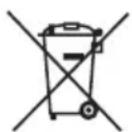
Do not dispose of the device marked with this symbol together with household waste.14
For disposal return the device to your local waste treatment and disposal facility or contact your local authorities.
YOU CAN HELP PROTECT THE ENVIRONMENT!
Proper handling of waste electrical and electronic equipment contributes to avoiding harmful consequences for human health and the environment resulting from the presence of hazardous components and improper storage and processing of such equipment.
WARRANTY CONDITIONS FOR GAMEPAD
- ART-DOM Sp. z o.o. with its registered office in Łódź (92-402) at ul. Zakładowa 90/92 National Court Register Number 0000354059 (Guarantor) guarantees that the purchased device is free from physical defects. The warranty covers only defects resulting from the causes inherent in the item sold (manufacturing defects).
- A disclosed defect will be removed at the Guarantor's expense within 14 days from the date of reporting the damage to the authorized service or point of sale.
- In exceptional cases, e.g. the need to import spare parts from their manufacturer, the repair period may be extended up to 30 days.
- The warranty period for the user is 24 months from the date of delivery of the goods.
- The goods are intended for use only in the conditions of an individual household.
- The present warranty does not cover:
a. damage caused by using the device in a manner inconsistent with the user manual,
b. mechanical, chemical or thermal damage,
c. repairs and modifications made by companies or persons that were not authorized to do so by the manufacturer,
d. parts that are easily worn or consumables such as: batteries, bulbs, fuses, filters, knobs, shelves, accessories,
e. installation, maintenance, inspection, cleaning, unlocking, removal of contaminants and instruction.
- The Guarantor will select the mode of defect removal at its own discretion. Removal of a confirmed defect of the device will take place through warranty repair or replacement of the device. The Guarantor may perform repairs when the buyer requests replacement or the Guarantor may perform replacements when the buyer requests repair, if bringing the goods (device) into conformity in accordance with the granted warranty in the manner selected by the buyer is impossible or would require excessive costs at the part of Guarantor. In particularly justified cases, if both repair and replacement are impossible or would require excessive costs for the Guarantor, the Guarantor may refuse to bring the goods into compliance with the granted warranty and propose another way to settle the warranty claim.
- The exchange of goods is made at the point of sale at which the goods were purchased (replacement or refund) or an authorized service point, if it offers such service (replacement). The returned device must be complete, without mechanical damage. Failure to comply with these conditions may result in failure to accept the warranty claim.
- In the event of non-compliance of the goods with the sales contract, the buyer is entitled by law to legal protection measures on the part and at the expense of the seller, and the warranty does not affect these legal protection measures.
- The warranty is valid in Poland.
- The condition for the warranty repair or replacement of the device is the presentation of proof of purchase and the use of the goods in accordance with the information contained in the user manual.
CAUTION!
Damage or removal of the rating plate from the device may result in warranty being deemed void.

Brand : Mad Dog
Model : GC500
Category : Remote control