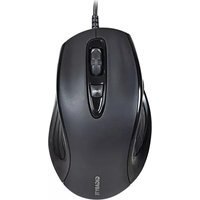
GM-M6880X - Mouse GIGABYTE - Free user manual and instructions
Find the device manual for free GM-M6880X GIGABYTE in PDF.


Pick your language and provide your email: we'll send you a specifically translated version.
| Product Type | Wired Optical Gaming Mouse |
| Model | GM-M6880X |
| Brand | GIGABYTE |
| Interface | USB 2.0 |
| Tracking Method | Optical |
| Resolution | Up to 4000 DPI (adjustable) |
| Buttons | 6 programmable buttons |
| Scroll Wheel | 4-way scrolling with tilt |
| Polling Rate | 1000 Hz |
| Dimensions (L x W x H) | 125 x 68 x 40 mm |
| Weight | 98 g (without cable) |
| Cable Length | 1.8 m braided cable |
| Power Supply | USB bus-powered (5V DC) |
| Lighting | RGB LED with multiple effects |
| Onboard Memory | Yes, for profile storage |
| Operating System Support | Windows 10/11, macOS, Linux |
| Maintenance and Cleaning | Clean with a soft, dry cloth. Avoid liquids. |
| Safety Precautions | Do not disassemble. Keep away from heat and moisture. |
| Spare Parts / Repairability | Feet and cable replaceable by authorized service. |
| General Information | Designed for gaming with ergonomic right-handed shape. |
Frequently Asked Questions - GM-M6880X GIGABYTE
How do I adjust the DPI settings?
Press the DPI cycle button located near the scroll wheel to switch between preset levels. You can also customize DPI values via the GIGABYTE software.
Does the mouse work on a Mac?
Yes, the GM-M6880X is compatible with macOS. Basic functions work without drivers, but advanced features require the GIGABYTE software.
How do I clean the mouse?
Use a soft, lint-free cloth slightly dampened with water or mild alcohol. Avoid getting moisture inside the mouse. Do not use abrasive cleaners.
Can I program the buttons?
Yes, all six buttons are programmable via the GIGABYTE software for macros, key assignments, and multimedia shortcuts.
What is the polling rate and how to change it?
The default polling rate is 1000 Hz. You can adjust it in the GIGABYTE software to 125, 250, 500, or 1000 Hz.
Is the mouse left-handed friendly?
The ergonomic shape is designed for right-handed users. Left-handed users may find it less comfortable.
Does it have onboard memory?
Yes, the mouse stores your profiles and settings internally, so you can use your custom configuration on any PC without software.
How do I enable the RGB lighting?
The RGB lighting is enabled by default. Customize colors and effects using the GIGABYTE software. You can also turn it off if desired.
What should I do if the cursor jumps?
Ensure the mouse sensor is clean and the surface is suitable (non-reflective). Try a different mouse pad. If the issue persists, reset the mouse or update firmware.
Is the cable detachable?
No, the cable is fixed and non-detachable. However, it is braided for durability and has a low drag design.
User questions about GM-M6880X GIGABYTE
0 question about this device. Answer the ones you know or ask your own.
Ask a new question about this device
No questions yet. Be the first to ask one.
Download the instructions for your Mouse in PDF format for free! Find your manual GM-M6880X - GIGABYTE and take your electronic device back in hand. On this page are published all the documents necessary for the use of your device. GM-M6880X by GIGABYTE.
USER MANUAL GM-M6880X GIGABYTE
| 設備名稱:遊戲滑鼠型號(型式):GM-M6880XEquipment nameType designaon (Type) | ||||||
| 單元Unit | 限用物質及其化學符號Restricted substances and its chemical symbols | |||||
| 鉛Lead(Pb) | 汞Mercury(Hg) | 鎘Cadmium(Cd) | 六價鉻Hexavalent chromium( Cr^+6 ) | 多溴聯苯Polybrominated biphenyls(PBB) | 多溴二苯醚Polybrominated diphenyl ethers(PBDE) | |
| 電路板 | ○ | ○ | ○ | ○ | ○ | ○ |
| 電子元件 | ○ | ○ | ○ | ○ | ○ | ○ |
| 金屬機構件 | ○ | ○ | ○ | ○ | ○ | ○ |
| 塑膠機構件 | ○ | ○ | ○ | ○ | ○ | ○ |
| 備考1.“超出0.1 wt %”及“超出0.01 wt %”係指限用物質之百分比含量超出百分比含量基準值。Note 1:“Exceeding 0.1 wt %” and “exceeding 0.01 wt %” indicate that the percentage content of the restricted substance exceeds the reference percentage value of presence condion.備考2.“○”係指該項限用物質之百分比含量未超出百分比含量基準值。Note 2:“○” indicates that the percentage content of the restricted substance does not exceed the percentage of reference value of presence.備考3.“—”係指該項限用物質為排除項目。Note 3:The “-” indicates that the restricted substance corresponds to the exempon. | ||||||



Manual assistant
Powered by Anthropic
Waiting for your message
Product information
Brand : GIGABYTE
Model : GM-M6880X
Category : Mouse