
MWR-WW10KN - Heat pump SAMSUNG - Free user manual and instructions
Find the device manual for free MWR-WW10KN SAMSUNG in PDF.


| Product Type | Air to Water Heat Pump with Wired Remote Controller |
| Model | MWR-WW10KN |
| Power Supply | 230 V, 50 Hz (typical) |
| Operating Modes | Auto, Cool, Heat, Domestic Hot Water (Economic, Standard, Power, Forced) |
| Temperature Setting | Adjustable in 0.1°C, 0.5°C, or 1°C increments |
| Quiet Mode | Reduces operational noise |
| Outing Mode | Low-temperature heating while away; cancels on any button press |
| Scheduling | Daily (up to 8), Weekly, Yearly, and Holiday schedules |
| Energy Monitoring | Display energy usage and set target consumption or operation time |
| Field Setting Values (FSV) | Extensive configuration for temperature limits, water law, DHW, backup heater, etc. |
| Domestic Hot Water | Supports tank heating with heat pump and optional booster heater |
| Solar PV Interlock | Compatible with solar panel systems for energy saving |
| Smart Grid Ready | Supports demand response control for peak power management |
| Safety Features | Overheat protection, anti-freeze, error code display, thermistor sensors |
| Installation | Must be performed by qualified technician; rated power connection required |
| Maintenance | Clean with soft damp cloth; do not use water, benzene, thinner, alcohol, or acetone |
| Display | LED screen with adjustable brightness (10-100%) and screen saver |
| Communication | Error codes displayed; supports SD card for FSV upload/download |
| Zone Control | Supports up to 2 zones (Zone 1 and Zone 2) with individual temperature control |
| Thermostat Compatibility | External room thermostat can be used for on/off or water law control |
| Dimensions (Remote Controller) | 120 x 80 x 20 mm (approx.) |
| Weight (Remote Controller) | 200 g (approx.) |
Frequently Asked Questions - MWR-WW10KN SAMSUNG
User questions about MWR-WW10KN SAMSUNG
0 question about this device. Answer the ones you know or ask your own.
Ask a new question about this device
Download the instructions for your Heat pump in PDF format for free! Find your manual MWR-WW10KN - SAMSUNG and take your electronic device back in hand. On this page are published all the documents necessary for the use of your device. MWR-WW10KN by SAMSUNG.
USER MANUAL MWR-WW10KN SAMSUNG
Air to Water Heat Pump User manual
Wired remote controller
• Thank you for purchasing this Samsung Product. - Before operating this unit, please read this manual carefully and retain it for future reference.
Safety Information 4
Safety Information 4
Power Smart Features 6
Remote Controller Operation 6
Operating basic mode 6
Domestic Hot Water (DHW) mode 7
Adjusting desired temperature • Setting the set temperature 8
Power Smart Features 9
Operation status • Quiet mode • Outing mode 9
Energy-Saving Operation 10
Energy-Saving Operation 10
Setting schedule 10
Energy 11
TDM (Time-Division Multi) Variables (TDM product Only) 12
Setting Options 13
Setting Options 13
How to set the Options 13
Current Time Setting (Example) 15
Installation/Service mode 16
Installation/Service mode 16
Additional functions of the Wired Remote Controller 16
Installation/Service mode 17
How to upload or download field settings (example) 23
Set the FSV value by referring to the FSV label provided with the manual of the product, and then attach it on the control box's cover. (Air to Water Heat Pump: Only AE*** Model)
Field Setting Mode 24
Field setting mode 24
Air to Water Heat Pump: Only AE*** Model 24
DVM Hydro unit: Only AM****NBD*** Model 46
DVM Hydro unit HT: Only AM***TNBF** Model 48
Appendix
54
Maintaining the Unit 54
Maintenance activities • Emergency heating / Emergency hot water supply 54
Troubleshooting tips 56
Communication
57
Water pump & Flow Sensor 58
Error codes 59

Correct Disposal of This Product (Waste Electrical & Electronic Equipment)
(Applicable in countries with separate collection systems)
This marking on the product, accessories or literature indicates that the product and its electronic accessories (e.g. charger, headset, USB cable) should not be disposed of with other household waste at the end of their working life. To prevent possible harm to the environment or human health from uncontrolled waste disposal, please separate these items from other types of waste and recycle them responsibly to promote the sustainable reuse of material resources.
Household users should contact either the retailer where they purchased this product, or their local government office, for details of where and how they can take these items for environmentally safe recycling. Business users should contact their supplier and check the terms and conditions of the purchase contract. This product and its electronic accessories should not be mixed with other commercial wastes for disposal.
For information on Samsung's environmental commitments and product regulatory obligations, e.g. REACH, visit our sustainability page available via www.samsung.com
Safety Information
This content is intended to protect the user's safety and prevent property damage. Please read it carefully for correct use of the product.

WARNING
Hazards or unsafe practices that may result in severe personal injury or death.

CAUTION
Hazards or unsafe practices that may result in minor personal injury or property damage.

Follow directions. Do NOT attempt.


Make sure the machine is grounded to prevent electric shock.

Unplug the appliance. Do NOT disassemble.

FOR INSTALLATION

WARNING

The installation of this appliance must be performed by a qualified technician or service company.
- Failing to do so may result in electric shock, fire, explosion, problems with the product, or injury. You must connect the product with rated power upon installation.
- Failing to do so may result in problems with the product, electric shock, or fire.

Do not install this appliance near a heater or inflammable material. Do not install this appliance in a humid, oily, or dusty location, or in a location exposed to direct sunlight and water (rain drops). Do not install this appliance in a location where gas may leak.
- Failing to do so may result in electric shock or fire.

CAUTION

Install the product on a hard and even place that can support its weight.
- If the place cannot support its weight, the product may fall down and it may cause product damage.
FOR POWER SUPPLY

WARNING

Do not bend or pull the power cord excessively. Do not twist or tie up the power cord.
- Failing to do so may result in electric shock or fire.
FOR OPERATION

WARNING
If the appliance generates a strange noise, a burning smell, or smoke, unplug the product immediately and contact your nearest service centre.
- Failing to do so may result in electric shock or fire.
To reinstall the product, please contact your nearest service centre.
- Failing to do so may result in problems with the product, water leakage, electric shock, or fire.
- A delivery service for the product is not provided. If you reinstall the product in another location, additional construction expenses and an installation fee will be charged.
If the malfunction diagnosis indicator appears or malfunctions, then stop operation immediately.
- If you detect any burning smells from the product or it malfunctions, then immediately turn off the product and power, and then contact the service centre. Continuing to use the device in this state can cause electrical shock, fire, or damage to the product.

Do not attempt to repair, disassemble, or modify the product yourself.
- Failing to do so may result in electric shock, fire, product malfunction, or injury.

CAUTION

Do not allow water to enter the product.
- Failing to do so may result in fire or explosion.

Do not operate the product with wet hands.
- Failing to do so may result in electric shock.
Do not spray volatile material such as insecticide onto the surface of the product.
• As well as being harmful to humans, it may also result in electric shock, fire, or product malfunction.
Do not give a strong impact to the product and do not disassemble the product.
Do not use this product for other purposes.
Do not press the buttons with any sharp objects.
- Failing to do so may result in electric shock or part damage.
FOR CLEANING

WARNING

Do not clean the product by spraying water directly onto it. Do not use benzene, thinner, alcohol or acetone to clean the product.
- Failing to do so may result in discoloration, deformation, damage, electric shock, or fire.
Remote Controller Operation
Operate the product by using the remote controller.
Operating basic mode
Press the OK button to enter the Setting screen from the Home screen with the Zone 1 or Zone 2 activated. On each screen, press the OK and then press the ∧ or ∨ button to select any of Auto, Cool, and Heat modes.
Auto mode
Hydro unit will automatically adjust the temperature of discharge water with the Auto mode for indoor heating.

NOTE
- When Water Law is active, the target supply water temperature will be determined automatically depending on the outdoor temperature: For the Heat mode, colder outdoor temperatures will result in warmer water.
Cool mode
You can adjust cooling temperature as you like with the Cool mode to cool indoor place.
- When selecting the Heat mode during the Cool mode, the Cool mode will be canceled.
Heat mode
Floor heating is available with the Heat mode by providing hot water in the spring, autumn and winter.
- You can check the Defrost Operation on the operation status menu under Option.
- When selecting the Cool mode during the Heat mode, the Heat mode will be canceled.

NOTE
- When setting standard cooling & heating temperature as indoor temperature, the Auto mode cannot be selected.
Domestic Hot Water (DHW) mode
Press the OK button to enter the Setting screen from the Home screen with the DHW activated. On each screen, press the OK and then press the ∧ or ∨ button to select and use any of Economic, Standard, Power, and Forced modes.

NOTE
- When the DHW mode is not supported, "Not Supported" appears.
- To operate hot water mode, you need to set the hot water function 'Yes' in the field specification setting mode (#3011) of wired remote controller and connect the temperature sensor of hot water tank.
- When the Cool/Heat mode and the DHW mode are selected at the same time, the Cool/Heat mode and the DHW mode will operate alternately.
- (power) for the DHW mode cannot be used when the Booster heater is not in use.
- If you want to enjoy a leisurely bath or need a lot of warm water urgently, select the Forced mode. When this mode is enabled, it is assured that the full capacity of the heat pump is only delivered for domestic water heating.

CAUTION
- By default, this function will not be turned off automatically.
- If you want a forced mode for a certain duration, change the field setting value of the remote controller.
Adjusting desired temperature
On each screen, press the ∧ or ∪ button to adjust the temperature.

NOTE
• You can adjust the desired temperature by 0.1, 0.5, or 1 °C. (Default 0.5°C)
Setting the set temperature
On each screen, press the < or > button to select a desired menu and then press the OK button. You can adjust the set temperature by pressing the < or > button.

NOTE
- When the reference temperature to control is Water Outlet, you can set the temperature only for Water Outlet.
- When the reference temperature to control is Indoor, you can set the temperatures for Indoor and Water Outlet.
- In case of the model that can support both, you can set only the temperature for Indoor, but the temperature for Water Outlet is also affected together.
- Depending on the reference temperature set for cooling and heating, the controllable temperatures are restricted for each mode.
| Auto Cool & Heat | ||
| Water Outlet Water Law Water Outlet | ||
| Indoor Temp - Indoor Temp | ||
There is a variety of useful functionality provided by the Samsung product.
Operation status
Use this to display the operation status:
COMP operation, Back up heater, Booster heater, Solar, Back up boiler, Water pump, Water tank, Defrost operation, Freezing control, Water Tank Sterilization Operation, Indoor Thermostat Installation, Air to air operation, Solar PV, Smart grid, Eco Level, Demand Response.
Quiet mode
Noise from operation can be reduced with the Quiet mode.

NOTE
- When setting the Quiet mode through a contact from the outdoor unit or setting the Quiet Mode Automatic Time in the service mode using the wired remote controller, the mode cannot be controlled by user entry.
Outing mode
Heating can operate at low temperature while you are out with the Outing mode.

NOTE
• To cancel this mode, press any button on the remote controller. - When the Outing mode is On, the Home screen appears before entering the Setting. - When you press any key, the Outing mode is canceled. However, pressing the keys for switching between the Home and Main screen does not cancel this mode.
- HOME: Directional button, OK button
- Main Screen: Back button
The product provides functions that allow you to reduce electricity consumption.
Setting schedule
Press the ⚙ button, press the ∥, ∪ or ⟨,⟩ button to select Schedule, and then press the OK button. When you select Add a schedule, you can configure settings for Daily schedule, Weekly schedule, Yearly Schedule, and Holiday.
| Type Description | |
| Daily schedule | Can set the Quiet mode or hot water status in the preset time.Can set up to 8 schedules. |
| Weekly schedule | Can set the operation for the desired units in the scheduled day and time.- The scheduling is possible on the weekly basis. You can set the values for day, time, operation On/Off, scheduled units, operation state (operation mode, desired temperature). |
| Yearly Schedule | Can create a group for the month to schedule and assign scheduling to the group on the weekly basis.- Yearly scheduling is possible and the scheduling can be assigned to up to 8 groups. |
| Holiday | Can set not to run the weekly and yearly schedules on holidays. |

NOTE
• Weekly and Yearly Schedule can cover settings up to 49.
Energy
Press the ⚙ button, press the ∧, ∨ or ⟨,⟩ button to select Energy, and then press the OK button. You can see and set any of Energy Usage and Energy Setting.
| Classification Type Description | |
| Energy Usage - | |
| Energy Setting | Target Energy Consumption |
| Target Operation Time | |
| Alarm Popup | |
| Usage Data Initialization |
TDM (Time-Division Multi) Variables (TDM product Only)
Press the ⚙ button, press the ∧, ∨ or ⟨,⟩ button to select Priority A2A, and then press the OK button. Setting FSV #5033 to '0' becomes 'Priority A2A', and setting to '1' becomes 'Priority DHW'.
- Under the installation of both A2A (Air-To-Air type air conditioner) and A2W (Air-To-Water type hydro unit) at the same time, our outdoor machine can supply its full capacity to the operating indoor machines (including A2A or A2W). If there are simultaneous operating demands from many A2A machines with A2W, the priority of controlling the outdoor machine (ex: compressor frequency) will be given to A2A, because of their fast response for use's comfort. Only the remaining capacity of outdoor machine will be given to A2W during A2A's normal operation. In this case, it might take very long time for A2W heating, so the outdoor machine will alternate the controlling priorities between A2A and A2W with time basis.
- Priority maximum operation time (at FSV #5033=0): FSV #5031 (Default 30 min., Range 10 \~ 90 min.), After elapsing A2A maximum time, the outdoor machine will operate only for A2W to speed up the A2W's heating/cooling performance, even though there are A2A's continuous operation demands.
- Non priority minimum operation time (at FSV #5033=0): FSV #5032(Default 5 min., Range 3 \~ 60 min.), in this minimum time, the outdoor machine will operate only for A2W, even though there are no more A2W's continuous operation demands.
| FSV setting | A2A Cooling + A2W Cooling | A2A Cooling + A2W Heating | A2A Heating + A2W Cooling | A2A Heating + A2W Heating |
| A2A Priority(#5033=0) | A2A CoolingA2W CoolingSame cooling ModeTDS Control | A2A CoolingA2W Cycle Off(The heater justoperates withoutheating.)Cooling Operation | A2A HeatingA2W x (Not operation)Heating Operation | A2A HeatingA2W HeatingSame heating ModeTDS Control |
| DHW Priority(#5033=1) | Same with A2APriority setting | A2W HeatingA2A Cooling(Heating + Cooling)TDS Control | Same with A2APriority setting | Same with A2APriority setting |
※ A2A : Air to Air, A2W : Air to Water - When DHW Priority is enabled, hot water (heating) operation is given priority only if the A2A & A2W simultaneous operation is on. Other operations are the same as when A2A Priority is enabled.

CAUTION
- While A2W is in operation, A2A does not operate. This is a normal operation.
- While A2A or A2W is not in simultaneous operation, you can use any mode without operation mode restriction.
How to set the Options
1 Press the button. 2 Press the ∧ ∨ or ( ) button to select Option, and then press the OK button. 3 See the following pages to select the desired menu.
| Step 1 Step 2 Step 3 Step | 4 Step 5 Description Default | |||||
| Button Lock | ON/OFF OFF | |||||
| Error List - | - | |||||
| Indoor Unit Information | - | - | ||||
| Connections | Wi-Fi | ON/OFF | - | |||
| Easy Connection | Connected/- | - | ||||
| Wi-Fi Reset | ||||||
| User Mode | Language | Differs depending on the language | First value for the language pack | |||
| Daylight Saving Time | Daylight Saving Time | ON/OFF OFF | ||||
| Unit | Day/Week | Week | ||||
| Month | January to December | Mar | ||||
| Week | 1st to 4th, F (final week) | F (final week) | ||||
| Day | 1 to 31 | 22 | ||||
| Lock | All Lock | ON/OFF | OFF | |||
| Lock of partial function | Operation Lock | ON/OFF OFF | ||||
| Operation Mode Lock | All Mode Lock | ON/OFF OFF | ||||
| Auto Mode Lock | ON/OFF OFF | |||||
| Cool Mode Lock | ON/OFF OFF | |||||
| Heat Mode Lock | ON/OFF OFF | |||||
| Temperature Lock | ON/OFF OFF | |||||
| Schedule Lock | ON/OFF OFF | |||||
| Step 1 Step 2 Step 3 Step | 4 Step 5 Description Default | ||||
| User Mode | Wired remote controller | LED ON/OFF ON | |||
| Button Mute ON/OFF OFF | |||||
| Current Time | Date | Date Format | YYYY/MM/DD, DD/MM/YYYY, MM/DD/YYYY | ||
| Year/Month/ Day | 2000 to 2099/1 to 12/1 to 31 | ||||
| Time | Time Format | 12-Hour/24-hour 12-Hour | |||
| Hour/ Minute/ AM/PM | 0 to 12/0 to 60/AM.PM | ||||
| Reset Remote Controller | - | ||||
| Display Setting | Brightness 10 to 100% 100% | ||||
| Screen Saver | Timer | 10 to 60 seconds | |||
| Brightness | 0,10,30,50,70% | ||||
| Smart Reset | -- | ||||
| Reset All User modes | - | ||||
| Service Time Check | Service Call Number | Service call number entered for Service mode | |||
| Last Inspection | Final control date entered for Service mode | ||||

NOTE
- When two wired remote controllers are connected, the brightness can be set within 10 to 50%.
- If the screen is on standby for an hour, in order to protect the screen it converts to screen protection mode for a minute before returning to the normal screen. If the buttons are pressed after the screen protection is displayed, it converts to the standby screen right away.
Current Time Setting (Example)
1 Press the button. 2 Press the ∧ ∨ or ( ) button to select Option, and then press the OK button. 3 Press the ∧ ∨ or ( ) button to select User mode, and then press the OK button. 4 Press the ∧ ∨ or ( ) button to select Wired remote controller, and then press the OK button. 5 Press the ∧ ∨ or ( ) button to select Current time, and then press the OK button. 6 Press the ∧ ∨ or ( ) button to select Time, and then press the OK button. 7 Press the ∧ ∨ or ( ) button to select Time format, Hour, Minute, and AM/PM, and then press the OK button.
Additional functions of the Wired Remote Controller
1 If you want to use the various additional functions for your Wired Remote Controller, press the ∧ and ∨ buttons at the same time for more than 3 seconds.
• The password entry screen appears.
2 Enter the password, 0202, and then press the OK button.
- The settings screen for installation/service mode appears.
3 See the list of additional functions for the Wired Remote Controller on the next page, and then select the desired menu.
- Once you have entered the setting screen, the current setting appears.
• Refer to the chart for data setting.
- Using the / buttons, change the settings and press the button to move to the next setting.
- Press the OK button to save the new setting.
- Press the button to move to the Home screen.

NOTE
- While setting the data, you can press the ⏰ button to move to the Home screen after checking the saving status at a pop-up screen.

NOTE
- Unavailable functions are marked inactive and they cannot be set.
- If communication initialization is needed after the setting, the system will reset automatically and communication will be initialized.
| Step 1 Step 2 | Step 3 Description | Default | ||
| Service Timer | Service Call Number | 16-digit phone numberInput: Blank, -, 0-9 | - | |
| Last Inspection Year, Month, Day - | ||||
| Installation Date Year, Month, Day - | ||||
| Quiet Mode Automatic Time | Enable/Disable Disable | |||
| Entry time to Exit time PM 10:00 ~ AM 06:00 | ||||
| Indoor Zone Option | Cool/Heat Selection | Cool & Heat/Heat only Cool & Heat | ||
| Main/Sub wired remote | Main/Sub Main | |||
| Zone Selection Zone 1/Zone 2 Zone 1 | ||||
| Standard Temperature | Water Outlet/Indoor | Water Outlet | ||
| Temperature Unit | Celsius (°C):1°C/0.5°C/0.1°CFahrenheit (°F): 1°F | Celsius (°C): 0.5°C | ||
| Temperature Sensor Selection | Wired Remote Controller/External Temperature Sensor | Wired Remote Controller | ||
| Room Temperature Calibration | Reference Temperature | -9 to 40°C | - | |
| Calibration Value | -9 to 40°C | 0°C | ||
| Indoor Zone Option | Indoor Zone Status Information | Central : ON/OFF - | ||
| Normal Power : ON/OFF - | ||||
| Mode : Heat/Cool/Auto - | ||||
| DHW Power : ON/OFF - | ||||
| DHW Mode : | Economic/Standard/Power/Forced | - | ||
| Water Pump : ON/OFF - | ||||
| BUH : ON/OFF - | ||||
| BSH : ON/OFF - | ||||
| Flow sensor : lpm - | ||||
| Inverter Pump : | 0% ~ 100% | - | ||
| EEV Step : | 0~2000Step | - | ||
| Thermostat 1 : | ON/OFF - | |||
| Thermostat 2 : | ON/OFF - | |||
| DHW Thermostat : | ON/OFF - | |||
| Water pressure : | 0 ~ 00.0 bar | - | ||
| Connection Information | Number of Connection | 0 to 16 | - | |
| View Master Indoor Unit | Address - | |||
| Master Indoor Zone Information | Serial No.: | - | - | |
| Indoor Unit Eva In Temp.(Teva_in) : | Temperature | - | ||
| Indoor Unit Eva Out Temp.(Teva_out) : | Temperature | - | ||
| Indoor Unit PHE IN(Tw1) : | Temperature | - | ||
| Indoor Unit PHE OUT(Tw2) : | Temperature | - | ||
| DHW Tank Temp. (Tt) : | Temperature | - | ||
| DHW Mode : | Economic/Standard/Power/Forced | - | ||
| Device Information | Micom Code : Micom code - | |||
| Program Version : Modified date - | ||||
| Touch Code : Touch IC code - | ||||
| Program Version : Modified date - | ||||
| Graphic Image : Graphic image code - | ||||
| Program Version : Modified date - | ||||
| Reset All Service Modes | Erase All Service mode data | - | - | |
| Initialize a remote controller | - | - | ||
| Initialize Unit Information | ---- | |||
| Power Master Reset 1)* | - | - | ||
| ODU K3 Reset - | ||||
| Field Setting Value | 10** | -- | ||
| 20** | -- | |||
| 30** | -- | |||
| 40** | -- | |||
| 50** | -- | |||
| Simple Setting | -- | |||
| FSV Upload/Download | - | - | ||
| Self-Test Mode | Self-Test Mode Display | Water Inlet Temp.: | Temperature - | |
| Water Outlet Temp.: | Temperature - | |||
| Backup Heater Outlet Temp.: | Temperature - | |||
| Mixing Valve Outlet Temp.: | Temperature - | |||
| Tank Temp.: Temperature - | ||||
| Indoor Ambient Temp.: | Temperature - | |||
| Indoor Ambient Temp.(Zone 2) : | Temperature - | |||
| Water Outlet Temp.(Zone 1) : | Temperature - | |||
| Water Outlet Temp.(Zone 2) : | Temperature - | |||
| Thermostat #1(Zone 1) : | Heat/Cool - | |||
| Thermostat #2(Zone 2) : | Heat/Cool - | |||
| Solar Panel ON/OFF - | ||||
| Water Pump ON/OFF OFF | ||||
| Booster Heater ON/OFF OFF | ||||
| DHW Valve(3Way Valve) | ON/OFF OFF | |||
| Zone 1 Valve ON/OFF OFF | ||||
| Backup Heater 1 + Water Pump | ON/OFF OFF | |||
| Backup Heater 2 + Water Pump | ON/OFF OFF | |||
| Backup Boiler ON/OFF OFF | ||||
| Zone 2 Valve | ON/OFF OFF | |||
| Mixing Valve | ON/OFF OFF | |||
| Indoor Unit Option | Address | Main address 00 | to 4F - | |
| RMC address 00 | to FE - | |||
| Product Option 21* | Refer to the installation manual of the connected indoor unit. | - | ||
| Installation Option 1 21* | - | |||
| Installation Option 2 21* | - | |||
| MCU Port | MCU address 00 | to 15 - | ||
| MCU Port A to F - | ||||
1)* Power Master Reset is a setting needed to supply optimized power to wired remote controller when multiple indoor units are connected to wired remote controller in a group. 2)* The total option codes are 24 digits. You can set six digits at a time and it is distinguished by page number. Press the OK button to move to the next page.

NOTE
- Address is displayed in hexadecimal. Please refer to the following table.
| Hexadecimal Decimal Hexadecimal Decimal Decimal Decimal | |||||
| 00 0 10 16 20 32 | |||||
| 01 1 11 17 21 33 | |||||
| 02 | 2 | 12 | 18 | 22 | 34 |
| 03 | 3 13 19 | 23 35 | |||
| 04 | 4 | 14 | 20 | 24 | 36 |
| 05 | 5 15 | 21 | 25 37 | ||
| 06 | 6 | 16 | 22 | 26 | 38 |
| 07 | 7 | 17 | 23 | 27 | 39 |
| 08 | 8 | 18 | 24 | 28 | 40 |
| 09 | 9 19 25 29 41 | ||||
| 0A | 10 | 1A | 26 | 2A | 42 |
| 0B | 11 | 1B | 27 | 2B | 43 |
| 0C | 12 | 1C | 28 | 2C | 44 |
| 0D | 13 | 1D | 29 | 2D | 45 |
| 0E 14 | 1E | 30 | 2E 46 | ||
| 0F | 15 | 1F | 31 | 2F | 47 |
| Hexadecimal Decimal Hexadecimal Decimal | |||
| 30 | 48 | 40 | 64 |
| 31 | 49 | 41 | 65 |
| 32 50 | 42 | 66 | |
| 33 | 51 | 43 | 67 |
| 34 52 44 | 68 | ||
| 35 53 45 | 69 | ||
| 36 54 | 46 | 70 | |
| 37 | 55 | 47 | 71 |
| 38 56 | 48 | 72 | |
| 39 | 57 | 49 | 73 |
| 3A 58 | 4A | 74 | |
| 3B | 59 | 4B | 75 |
| 3C | 60 | 4C | 76 |
| 3D 61 4D | 77 | ||
| 3E 62 | 4E | 78 | |
| 3F 63 4F | 79 | ||
How to upload or download field settings (example)
1 Insert an SD card into the Sub PBA SD Card slot on the Hydro unit. 2 Select Field Setting Value in the Service mode. 3 Press the or button to select FSV Upload/Download.

NOTE
- Upload: Uploads the FSV data of the Hydro unit to the SD card.
- Download: Downloads the FSV data of the SD card to the Hydro unit.
- The upper-level controllers excluding Wi-Fi kit (2.0) and MWR-WW10** wired remote controller cannot use the 2-zone control and energy monitoring.
- When connecting between the MWR-WW10** wired remote controller and an upper-level controller, the settings for FSV (4061) must be changed not to use the 2-zone control.
Air to Water Heat Pump: Only AE*** Model

CAUTION
- Set the FSV value of the product other than the specified models by referring to the FSV label provided with the manual of the product, and then attach it on the control box's cover. The FSV values in the table are applied to the specified models.

NOTE
- Be sure to reset the power when changing the FSV (#3041 to 3046) of disinfection operation and the FSV (#5011 to 5019) of setting the outing mode.
Field Setting Value (FSV) 10**
Code 10** : Upper and lower temperature limits of each operation mode of wired remote controller Heating(Water Out, Room), Cooling(Water Out, Room), DHW(Tank)
- The values in the following table are just examples for your understanding.
| Main Menu & Code | Menu | Function | Sub Code | MODEL CODE : AE200(260)*NW*** | |||||
| Setting Standard | |||||||||
| Item Step Unit Default Min. Max. | |||||||||
| Remote Controller Setting Range Code 10** | Cooling | Water Out Temperature for Cooling | Max 1 °C 1011 25 18 | 25 | |||||
| Min | 1 | °C | 1012 | 16 | 5 | 18 | |||
| Room Temperature for Cooling | Max | 1 | °C | 1021 | 30 | 28 | 30 | ||
| Min | 1 | °C | 1022 | 18 | 18 | 28 | |||
| Heating | Water Out Temperature for Heating | Max | 1 | °C | 1031 | 65/70/75 1)* | 37 | 65/70/75 1)* | |
| Min | 1 | °C | 1032 | 25 | 15 | 37 | |||
| Room Temperature for Heating | Max | 1 | °C | 1041 | 30 | 18 | 30 | ||
| Min | 1 | °C | 1042 | 16 | 16 | 18 | |||
| DHW | DHW tank Temperature | Max | 1 | °C | 1051 | 55/63/70 1)* | 50 | 70 | |
| Min | 1 | °C | 1052 | 40 | 30 | 40 | |||
| Hysteresis for Thermo ON | Water Out Hysteresis for Heat | 0.5 | °C | 1061 | 0 | 0 | 7 | ||
| Water Out Hysteresis for Cool | 0.5 | °C | 1062 | 1 | 1 | 7 | |||
| Room Hysteresis for Heat | 0.5 | °C | 1063 | 0 | 0 | 7 | |||
| Room Hysteresis for Cool | 0.5 | °C | 1064 | 1 | 1 | 7 | |||

NOTE
- The FSV #3011 in the wired remote controller should be set to 1 or 2 to use the DHW mode.
- 1)× The value is determined according to the type of outdoor unit.
Space Cooling
- Target water outlet temperature : Upper limit(#1011, Default 25°C, Range : 18 \~ 25°C), Lower limit(#1012, Default 16°C, Range : 5 \~ 18°C)
- With this default FSV settings, user can change the target water outlet temperature within the range of 16 ~ 25°C for cooling.
- Target room temperature: Upper limit(#1021, Default 30°C), Lower limit(#1022, Default 18°C)
- With this default FSV settings, user can change the target room temperature within the range of 18 ~ 30°C for cooling.
Space Heating
- Target water outlet temperature : Upper limit(#1031, Default 65/70/75°C, Range : 37 ~ 65/70/75°C), Lower limit(#1032, Default 25°C, Range : 15 ~ 37°C)
- With this default FSV settings, user can change the target water outlet temperature within the range of 25 ~ 65/70/75°C for heating.
- Target room temperature : Upper limit(#1041, Default 30°C), Lower limit(#1042, Default: 16°C)
- With this default FSV settings, user can change the target room temperature within the range of 16 ~ 30°C for heating.
DHW Heating
- Target DHW tank temperature : Upper limit(#1051, Default 55/63/70°C, Range : 50 ~ 70°C), Lower limit(#1052, Default 40°C, Range : 30 ~ 40°C)
- With this default FSV settings, user can change the target tank temperature within the range of 40 ~ 55/63/70°C for DHW heating.
Hysteresis
If the value of the FSV is large, it takes longer to thermo on
• Water outlet temperature control by hysteresis (heating) Ex) When target water outlet temperature is 55°C, thermo off temperature is 57°C and thermo on temperature is 55°C - FSV#1061 (Default 0°C, Range 0~7°C) • Water outlet temperature control by hysteresis (cooling) Ex) When target water outlet temperature is 7°C, thermo off temperature is 7°C and thermo on temperature is 7°C + FSV#1062 (Default 1°C, Range 1~7°C) • Room temperature control by hysteresis (heating) Ex) When target room temperature is 30°C, thermo off temperature is 32°C and thermo on temperature is 30°C - FSV#1063 (Default 0°C, Range 0~7°C) • Room temperature control by hysteresis (cooling) Ex) When target room temperature is 18°C, thermo off temperature is 18°C and thermo on temperature is 18°C + FSV#1064 (Default 1°C, Range 1~7°C)
Field Setting Value (FSV) 20**
Code 20**: Water law design and external room thermostat. Heating (2 WLs for floor & FCU), Cooling (2 WLs for floor & FCU), WL & Thermostat types.
- The values in the following table are just examples for your understanding.
| Main Menu & Code | Menu | Function | Sub Code | MODEL CODE : AE200(260)*NW*** | |||||
| Setting Standard | |||||||||
| Item Step Unit Default Min. Max. | |||||||||
| Water Law Code 20** | Heating | Outdoor Temperature for Heating Water Law | Max (Point 1) | 1 °C | 2011 -10 -20 5 | ||||
| Min (Point 2) | 1 | °C | 2012 | 15 | 10 | 20 | |||
| Water out Temperature for WL1 Heating (UFHs) | Max (Point 1) | 1 | °C | 2021 | 40 | 17 | 65/70/751,* | ||
| Min (Point 2) | 1 | °C | 2022 | 25 | 17 | 65/70/751,* | |||
| Water out Temperature for WL2 Heating (FCUs) | Max (Point 1) | 1 | °C | 2031 | 50 | 17 | 65/70/751,* | ||
| Min (Point 2) | 1 | °C | 2032 | 35 | 17 | 65/70/751,* | |||
| Heating Water Law Selection | WL Type | - | - | 2041 | 1(WL1) | 1 | 2 | ||
| Cooling | Outdoor Temperature for Cooling Water Law | Max (Point 1) | 1 | °C | 2051 | 30 | 25 | 35 | |
| Min (Point 2) | 1 | °C | 2052 | 40 | 35 | 45 | |||
| Water out Temperature for WL1 Cooling (UFHs) | Max (Point 1) | 1 | °C | 2061 | 25 | 5 | 25 | ||
| Min (Point 2) | 1 | °C | 2062 | 18 | 5 | 25 | |||
| Water out Temperature for WL2 Cooling (FCUs) | Max (Point 1) | 1 | °C | 2071 | 18 | 5 | 25 | ||
| Min (Point 2) | 1 | °C | 2072 | 5 | 5 | 25 | |||
| Cooling Water Law Selection | WL Type | - | - | 2081 | 1(WL1) | 1 | 2 | ||
| External Control | External Room Thermostat | #1 (UFHs) | 1 | - | 2091 | 0(No) | 0 | 4 | |
| #2 (FCUs) | 1 | - | 2092 | 0(No) | 0 | 4 | |||
| Remote Controller | Remote Controller Room Temp. Control | 1 | - | 2093 | 4 | 1 | 4 | ||

NOTE
- 11* The value is determined according to the type of outdoor unit.

Water Law for Heating
- Outdoor air temperature range: Lower limit 1 (#2011, Default -10°C, Range: -20 \~ 5°C), Upper limit 2 (#2012, Default 15°C, Range: 10 \~ 20°C)
- With these default settings, the water outlet temperature by heating water law can be changed within the outdoor temperature range of -10 \~ 15°C.
- Water outlet temperature range for floor/FCU applications respectively: Upper limit 1 (#2021/2031, Default 40/50°C, Range: 17 \~ 65/70/75°C), Lower limit 2 (#2022/2032, Default 25/35°C, Range: 17 \~ 65/70/75°C)
- With these default settings, the water outlet temperature by heating water law can be changed within the range of 25/35 \~ 40/50°C.
- In case that 2 zone control is not used (FSV# 4061 = 0) and the external room thermostat is not used (FSV#2091 = 0, #2092 = 0). Type of water law according to heating devices (floor/FCU): #2041 (Default 1 (WL1 for floor), 2 (WL2 for FCU or radiator))
Water Law for Cooling
- Outdoor air temperature range: Lower limit 1 (#2051, Default 30°C, Range: 25 \~ 35°C), Upper limit 2 (#2052, Default 40°C, Range: 35 \~ 45°C)
- With these default settings, the water outlet temperature by cooling water law can be changed within the outdoor temperature range of 30 \~ 40°C.
- Water outlet temperature range for floor/FCU applications respectively: Upper limit 1 (#2061/2071, Default 25/18°C), Lower limit 2 (#2062/2072, Default 18/5°C) - With these default settings, the water outlet temperature by cooling water law can be changed within the range of 5/18 \~ 18/25°C.
- In case that 2 zone control is not used (FSV# 4061 = 0) and the external room thermostat is not used (FSV#2091 = 0, #2092 = 0). Type of water law according to cooling devices (floor/FCU): #2081 (Default 1 (WL1 for floor), 2 (WL2 for FCU or radiator))
- Do not set WL1 below 16 degrees to prevent floor condensation when using underfloor cooling.
External Room Thermostat (Field Option)
• Terminal #1 (#2091, Default 0 for no usage), #2 (#2092, Default 0 for no usage)
- To use wired remote controller for heating/cooling operation, both of the above settings should be set to 0 simultaneously. If not, thermostat controls system.
- To use the External Room Thermostat option, set the 2-zone control option (FSV #4061) to "0" for disabling it.
- If set to #2091/#2092 1, the compressor can be turned on or off only by the thermostat.
- If set to #2091/#2092 2~4, the compressor can be turned on or off by the thermostat or according to the WL discharged water temperature. (#2092 2, WL Thermo off → Water pump off, #2092 3, WL Thermo off → Water pump on, #2092 4, WL Thermo off → Water pump 7min off → 3min on →......).


- During the thermostat operation, the user has the possibility to shift up or down the target water temperature within the range of -5 to +5°C.
- When the Room thermostat is used, floor valve should be connected to 2 way valve #1 and the FCU valve should be separately connected to 2 way valve #2 of the Hydro Unit PBA.
- When only floor cooling/heating is installed and if the Water Law or outlet water temperature is too low, 2way valve may closed and E911 error may occur.
- When the floor and FCU units are installed together and operating in cooling mode, floor valve may close and E911 may occur to prevent floor condensation when the outlet water temperature is below 16°C. Therefore FCU should secure minimum value for the flow rate.
- Thermostat #2 which controls FCU has the priority for operation modes and the discharge water temperature.
- Samsung is not responsible for the accidents such as floor condensations which can occur by not connecting the valve to the zone #1 port of the Hydro Unit PBA.
Remote controller room temperature control
• Control by room temperature sensor (Service mode)
- If set to #2093 1, the compressor can be turned on or off only by Room temp sensor.
- If set to #2093 2\~4, the compressor can be turned on or off by Room Temp. sensor or according to the WL discharged water temperature. (#2093 2, WL Thermo off → Water pump off, #2093 3, WL Thermo off → Water pump on, #2093 4, WL Thermo off → Water pump 7min off → 3min on →......).
Field Setting Value (FSV) 30**
Code 30** : User's options for Domestic Hot Water(DHW) tank heating
• The values in the following table are just examples for your understanding.
| Main Menu & Code | Menu | Function | Sub Code | MODEL CODE: AE200(260)*NW*** | |||||
| Setting Standard | |||||||||
| Item Step Unit Default Min. Max. | |||||||||
| Domestic Hot Water Tank Code 30** | DHW | DHW mode activate | DHW mode | - | - | 3011 | 1 | 0 | 2 |
| Heat Pump | Max. Temp. | 1 | °C | 3021 | 55/63/70 1* | 45 | 55/63/70 1* | ||
| Stop | 1 | °C | 3022 | 0 | 0 | 10 | |||
| Start | 1 | °C | 3023 | 5 | 5 | 30 | |||
| Min. Operating Time | 1 | min | 3024 | 5 | 1 | 20 | |||
| Max. Operating Time | 5 | min | 3025 | 30 | 5 | 95 | |||
| Operation Interval | 0.5 | hour | 3026 | 3 | 0.5 | 10 | |||
| Booster Heater | On/Off | - | - | 3031 | 1 (On) | 0 (Off) | 1 | ||
| Delay Time | 5 | min | 3032 | 20 | 20 | 95 | |||
| Overshoot | 1 | °C | 3033 | 0 | 0 | 4 | |||
| Disinfection | On/Off | - | - | 3041 | 1 (On) | 0 (Off) | 1 | ||
| Interval | 1 | day | 3042 | Fri (5) | Sun (0) | All (7) | |||
| Start Time | 1 | o'clock | 3043 | 23 (AE***RNW*** ) | 0 | 23 | |||
| 14 (AE***CNW*** ) | |||||||||
| Target Temp. | 5 | °C | 3044 | 70 | 40 | 70 | |||
| Duration | 5 | min | 3045 | 10 | 5 | 60 | |||
| Max time | 1 | hour | 3046 | 8 | 1 | 24 | |||
| Forced DHW Operation | Timer OFF Function | - | - | 3051 | 0 (No) | 0 | 1 (Yes) | ||
| Time Duration | 1 | (x10)min | 3052 | 6 | 3 | 30 | |||
| Solar Panel/ DHW Thermostat | H/P Combination | 1 | - | 3061 | 0 (No) | 0 | 2 | ||
| 3-way Valve | Defalut Direction | - | - | 3071 | 0 (Room) | 0 | 1 (Tank) | ||
| Domestic Hot Water Tank Code 30** | Addition Function | Energy metering | Backup Heater 1step capacity | 1 kW | 3081 2 1 | 6 | |||
| Backup Heater 2step capacity | 1 kW | 3082 2 0 | 6 | ||||||
| Booster Heater capacity | 1 kW | 3083 3 1 | 6 | ||||||

NOTE
• 1)* The value is determined according to the type of outdoor unit.
The FSV #3011 in the wired remote controller should be set to 1 or 2 to use DHW function.
If FSV #3011 is set to 1, the DHW operation starts based on the thermo on temperature. If FSV #3011 is set to 2, the DHW operation starts based on the thermo off temperature.
(For example, when the current temperature becomes 45° C under the conditions that the thermo on temperature is 43° C and the thermo off temperature is 48° C, the DHW turns off if FSV #3011 is set to 1 and DHW turns on if FSV #3011 is set to 2.)
Heat Pump Variables for Controlling DHW Tank
- Maximum DHW tank temperature with heat pump operation : FSV #3021, Default 55/63/70°C, Range : 45 \~ 55/63/70°C.
- Temperature difference determining the heat pump OFF temperature : FSV #3022, Range : 0 \~ 10°C.
- Temperature difference determining the heat pump ON temperature : FSV #3023, Default 5°C, Range : 5 \~ 30°C.
[ DHW Tank water temperature thermo on/off control]

Tu: User set temp. T(C): Temp. (Celsius)
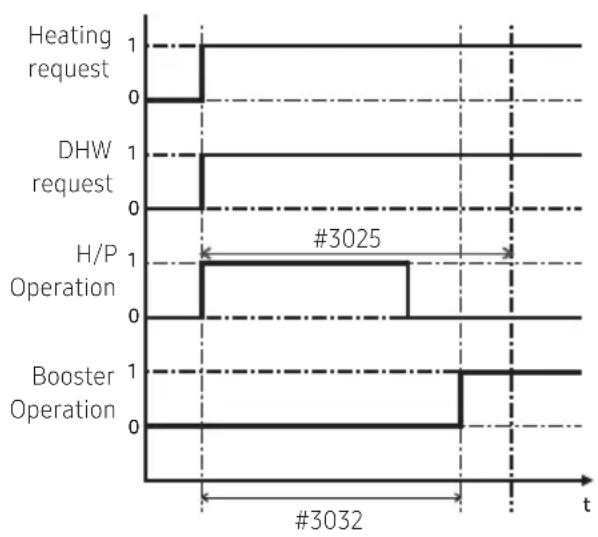
- DHW heating mode timer: Mode timer manages the operation terms when there are simultaneous requests of space heating/cooling and DHW.
- FSV #3024 (minimum Space heating operating time, Default 5 min., Range 1 ~ 20 min.), #3025 (maximum DHW time, Default 30 min., Range 5 ~ 95 min.), #3026 (maximum space heating operation time, Default 3 hour, Range 0.5 ~ 10 hour)
- Maximum operation time is applied only when both DHW and Space heating request operation. DHW or Space heating operates continuously until reaching target temperature without time limitation in the single operation.
[Time variation control of DHW and space heating mode]
[Time variation control of Heat pump and booster heater of DHW]
![SAMSUNG MWR-WW10KN - [Time variation control of Heat pump and booster heater of DHW] - 2](/content/2026/05/849541/images/e99784794d9621c7cfd212891758452f6b2ac5b40c0a2b3cbae9498c0c29021d.jpg)
NOTE
- The FSV #4022 for booster heater priority should be set to "0 (both)" or "2" (booster) to use booster heater.
- If not (backup heater priority), the booster heater can be operated in case of no backup heater demand.
Booster Heater Variables for Controlling DHW Tank
- The FSV #3031 should be set to "1(On)" (Default) to use booster heater as an additional heat source for DHW tank.
- Booster heater startup delay timer: In case of DHW request, this timer will delay the operation of booster heater compared to heat pump.
- FSV #3032 (Default 20 min., Range 20 ~ 95 min.), In "Power/Forced" DHW mode, the delay timer will be neglected, and the booster starts immediately.
- In "Economic" DHW mode, the DHW heating will be conducted only with heat pump.
- 3032 should be smaller than the maximum H/P time (#3025). If the delay time is set too high, it might take very long time for DHW heating.
- Temperature difference determining the booster heater OFF temperature (T_BH OFF = Tu + #3033): FSV #3033, Default 0°C, Range: 0 \~ 4°C.
- Temperature difference determining the booster heater ON temperature (T_BH ON = T_BH OFF - 2)
Case 1) When set temperature is 70° C
BSH is ON at less than 68 degrees, OFF at more than 70°C.
Case 2) When setting temperature is 50° C (FSV 3022 = 0 condition)
Heat pump and BHS are ON at less than 45 degrees, OFF at more than 50°C
(Thermo off / on operation temperature is used together)
[Thermo on/off control of Heat pump and Booster Heater]
Case 1: When set temperature(Tu) > ThpMAX (FSV #3021) *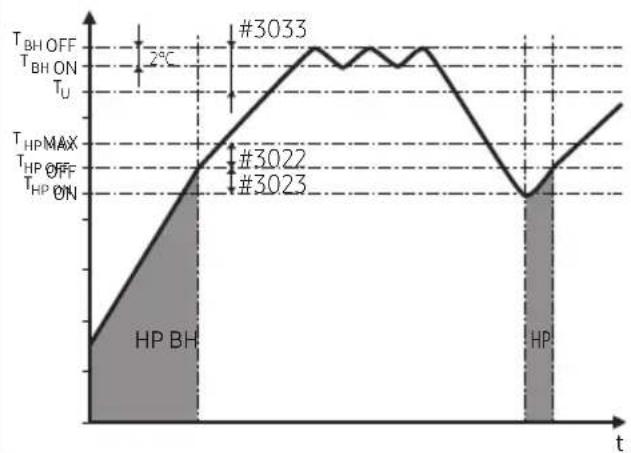
Case 2: When set temperature(Tu) ≤ ThpMAX(FSV #3021)*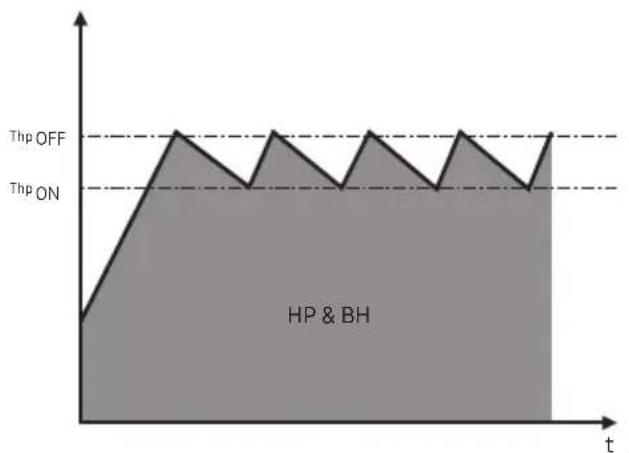
![SAMSUNG MWR-WW10KN - [Thermo on/off control of Heat pump and Booster Heater] - 3](/content/2026/05/849541/images/90ce70c885c10fe51392fbf9f082a39b665d4371998dc2b5c367c4d31e201f72.jpg)
NOTE
• 1)*The value is determined according to the type of outdoor unit. - "Power/Forced/Standard" DHW mode operation without booster heater installed, DHW mode operates as a heat pump only.
Disinfection Function
1) "Booster Heater" Disinfection
- The FSV #3041 should be set to "1 (On)" (Default) to use disinfection function.
- Scheduling: Day (#3042, Default "Friday"), starting time [#3043, Default "23:00" (AE***RNW***)], target tank temp. (#3044, Default "70°C"), duration (#3045, Default 10 min.)
[Time variation control of Heat pump and booster heater of DHW]
2) "R290 Heat Pump" Disinfection
- The FSV #3041 should be set to "1 (On)" (Default) to use disinfection function.
- When FSV#3031 is set to "O(Off)", the disinfection function is only performed by the heat pump to reach a target tank temp.
- Scheduling: Day (#3042, Default "Friday"), starting time (#3043, Default "14:00"), target tank temp. 60°C, duration 60 min.
[Time variation control of Heat pump of DHW]
3) "R290 Heat Pump+Booster Heater" Disinfection
- The FSV #3041 should be set to "1 (On)" (Default) to use disinfection function.
- When FSV#3031 is set to "1(On)", the disinfection function is performed by the heat pump to reach a target tank temp. of 60°C. After that, the booster heater is activated and the disinfection function continues until it reaches the target tank temp. (#3044, default 70°C), for a duration specified by (#3045, default 10 min).
- Scheduling: Day (#3042, Default "Friday"), starting time (#3043, Default "14:00"), target tank temp. (Default "70°C"), duration (Default 10 min.)
[Time variation control of Heat pump of DHW]

NOTE
- Disinfection function is available only when a booster heater is connected. (However, AE***CXY*** is also capable of Heat Pump Disinfection)
- R290 Mono Outdoor Unit (AE***CXYD*G) and Hydro Unit (AE***CNW**), Control Kit (MIM-E03CN, MIM-E03EN) combination or R290 Mono Outdoor Unit (AE***CXYB*G) standalone model can be operated in disinfection mode without a booster heater.
- Hydro Unit (AE***RNW***) can only be operated for disinfection with a Booster Heater.
- During disinfection operation of heat pumps, regardless of settings, PV/smart grid/solar interlocking/boiler interlocking control do not work.
- Check tank capacity, booster heater capacity, and booster heater for issues if disinfection operation does not work normally over the maximum operation time (E919 error).
Forced DHW by User's Input
- Forced mode can be activated by setting the FSV #3011 to 1/2 (USE).
- Forced mode shall be working depending on Timer setting (#3051, #3052).
Additional Solar panel/DHW thermostat Installation for DHW with Heat Pump (Field Option)
- Solar panel and heat pump are able to operate simultaneously by setting value. (FSV #3061, "1")
- When using DHW thermostat, set the FSV #3061, "2".
- There is one minute delay of 2-way / 3-Way valve closing whereas no delay of valve opening.
- Individual zone control is only available with external thermostat. • FSV 3071 determines a 3-way direction.
Energy metering
- To accurately indicate energy consumption, the capacity of the backup heater and booster heater must be set using FSV #3081 / 3082 / 3083.

NOTE
• Energy metering measurements are made by the product and can differ from actual energy consumption.
Field Setting Value (FSV) 40**
Code 40**: User's options for heating devices including internal backup heater and external boiler
- The values in the following table are just examples for your understanding.
| Main Menu & Code | Menu | Function | Sub Code | MODEL CODE: AE200(260)*NW*** | |||||
| Setting Standard | |||||||||
| Item Step Unit Default | t Min. | Max. | |||||||
| Heating Code 40** | Heating | Heat Pump | Heating / DHW priority | - | - | 4011 | 0 (DHW) | 0 | 1 (Heating) |
| Low Outdoor Temp. for Heating Priority | 1 | °C | 4012 | 0 | -15 | 20 | |||
| Heating Off Temp. | 1 | °C | 4013 | 35/45 1* | 10 | 35/45 1* | |||
| Backup Heater | On/Off | - | - | 4021 | 0 (No) | 0 | 2 | ||
| BUH/BSH Priority | 1 | - | 4022 | 2 (BSH) | 0 (Both) | 2 (BSH) | |||
| Cold weather compensation | - | - | 4023 | 1 (Yes) | 0 (No) | 1 | |||
| Threshold Temp. | 1 | °C | 4024 | 0 | -25 | 35 | |||
| Defrost Backup Temp. | 5 | °C | 4025 | 15 | 10 | 55 | |||
| Backup Boiler | Back-up Boiler On/Off | - | - | 4031 | 0 (No) | 0 | 1 (Yes) | ||
| Boiler Priority | - | - | 4032 | 0 (No) | 0 | 1 (Yes) | |||
| Threshold Condition | 1 | °C | 4033 | -15 | -20 | 5 | |||
| Mixing valve | Application | 1 | - | 4041 | 0 (No) | 0 | 2 | ||
| Target ΔT(Heating) | 1 | °C | 4042 | 10 | 5 | 15 | |||
| Target ΔT(Cooling) | 1 | °C | 4043 | 10 | 5 | 15 | |||
| Control factor | 1 | - | 4044 | 2 | 1 | 5 | |||
| Control interval | 1 | min | 4045 | 2 | 1 | 30 | |||
| Running Time | 3 | (x10) min | 4046 | 9 | 6 | 24 | |||
| Inverter Pump | Application | - | - | 4051 | 1 | 0 | 2 | ||
| Target ΔT | 1 | °C | 4052 | 5 | 2 | 8 | |||
| Control factor | 1 | - | 4053 | 2 | 1 | 3 | |||
| PWM minimum output | 1 | (10)% | 4054 | 0 (25%) | 0 (25%) | 3 (55%) | |||
| Addition Function | Zone control | Application | 1 | - | 4061 | 0 (No) | 0 | 1 (Yes) | |
| T-Off Zone1 pump (2Way V/v) Control | 1 | - | 4062 | 2 | 0 | 2 | |||
| T-Off Zone2 pump (2Way V/v) Control | 1 | - | 4063 | 2 | 0 | 2 | |||

NOTE
- The value is determined according to the type of outdoor unit.
Heat Pump Variables for Space Heating
- FSV #4011 for DHW priority is set to "0(DHW)" (Default) as a default. Space heating gets a priority by setting FSV #4011 "1", but this is only valid when the outdoor temperature is lower than the specified temperature defined by FSV #4012.
- When priority is on DHW, DHW mode (FSV #3025, default 30 mins) and space heating (FSV #3026, default 180 mins) alternately operate, and when priority is on space heating, they operate as space heating mode.
- Space heating off temperature (FSV #4013, Default "35/45°C", Range 10 ~ 35/45°C): At high outdoor temperature above this value, the space heating will be turned off, to avoid overheating.
Backup Heater Variables for Space Heating
- The FSV #4021 should be set to 1(Yes) to use 2-stage electric backup heater in hydro unit as an additional heat source. (If FSV #4021 is 2, a 1-stage electric backup heater is used) • To configure the backup heater's operating conditions by setting FSV #4023 and FSV #4024.
- When FSV #4023 is set to 0, the backup heater operates regardless of the outdoor temperature.
- When FSV #4023 is set to 1(Default), the backup heater operates when the outdoor temperature is below FSV #4024(Default "0") to save energy; its operation is restricted at FSV #4024 or higher.
- The FSV #4022 for backup heater priority should be set to "0 (both)" (Default) or "1" (backup) to use backup heater. If not (booster heater priority), the backup heater can be operated in case of no booster heater demand.
- The threshold temperature for backup heater operation during defrost mode to prevent cold draft because of chilled water can be controlled by adjusting FSV #4025. Under FSV #4025 of water outlet temperature, backup heater will be turned on.

NOTE
- To use both backup heater and booster heater together at the same time as set FSV#4022="0", please check the capacity of the power circuit breaker of your house before use.
External Backup Boiler for Space Heating (Field Option)
- The FSV #4031 should be set to "1 (Yes)" to use a backup boiler as an additional heat source. (default: "0 (No installation)")
- Priority of backup boiler and heat pump is defined by FSV #4032 (default: "O (OFF)")
- To compensate the lowered heat pump heating performance under very cold weather conditions, the backup boiler operates instead of heat pump under the threshold temperature (FSV #4033, Default "-15°C", Range -20 \~ 5°C).
Mixing valve Installation (Field Option)
- The FSV #4041 should be set to "1 or 2" to use mixing valve.
※ 4041 = 1 : Controlled based on the temperature difference (4042, 4043)
※ 4041 =2 : Controlled based on the temperature difference of the WL value
ex) Heating <#4041=1> <#4041=2>


- FSV #4042 / #4043 is for adjusting temperature difference between Tw3 (Tw2) and Tw4.
- FSV #4044 determines the mount of the opening/closing degree of the valve per operation, and the larger the set number, the greater the opening/closing degree per operation. It operates every FSV#4045 set interval.
- When using mixing valve, FSV #4046 should be matched with mixing valve running time characteristic.
Inverter Pump Installation (Field Option)
- FSV #4051=1 (Default): Inverter pump use + Output 100%, FSV #4051=2: Inverter pump use + Output 70%, FSV #4051=0: Inverter pump Not use.
- FSV #4052 is for adjusting temperature difference between Tw2 and Tw1.
- FSV #4053 determines the amount of change in PWM output during pump operation, and the larger the set value, the greater the change in PWM output per operation.
- Pump PWM minimum output is limited to 25% to 55% according to FSV #4054. (Setting "0":25%, "1":35%, "2":45%, "3":55%)

NOTE
- Tw1 (Inlet Water Temp), Tw2 (Discharge Water Temp), Tw3 (Backup Heater outlet Water Temp), Tw4 (Mixing valve Temp.)
Zone Control (Field Option)
- Zone control Using Wired Remote Control (install option) FSV # 4061 should be set to "1 (Yes)" to zone control.
- To use the zone control (FSV #4016=1), set the thermostat control option (FSV #2091 & #2092) to "0" for disabling it.
- This field option controls each zone (Zone 1, Zone 2) with a wired remote controller setting not by using the external room thermostat signal.
- According to FSV #4062/4063 setting, Pump (2way V/v) is operated when Zone1/ Zone2 Thermo Off (Setting "0": Thermo off_ Water pump off, "1": Thermo off _ Water pump on, "2": Thermo off _ Water pump 7min off → 3min on →......).
Field Setting Value (FSV) 50**/60**
Code 50**/60** : User's options for extra functions
- The values in the following table are just examples for your understanding.
| Main Menu & Code | Menu | Function | Sub Code | MODEL CODE: AE200 (260)*NW*** | |||||
| Setting Standard | |||||||||
| Item Step Unit Default Min. Max. | |||||||||
| Others Code 50**/60** | Outing Mode | Water Out Temperature for Cooling | 1 °C | 5011 25 5 25 | |||||
| Room Temperature for Cooling | 1 °C | 5012 30 18 30 | |||||||
| Water Out Temperature for Heating | 1 | °C | 5013 | 15 | 15 | 55 | |||
| Room Temperature for Heating | 1 | °C | 5014 | 16 | 16 | 30 | |||
| Cooling WL1 Temp. | 1 | °C | 5015 | 25 | 5 | 25 | |||
| Cooling WL2 Temp. | 1 | °C | 5016 | 25 | 5 | 25 | |||
| Heating WL1 Temp. | 1 | °C | 5017 | 15 | 15 | 55 | |||
| Heating WL2 Temp. | 1 | °C | 5018 | 15 | 15 | 55 | |||
| DHW tank Temp. | 1 | °C | 5019 | 30 | 30 | 70 | |||
| DHW Saving | DHW Saving Temp | 1 | °C | 5021 | 5 | 0 | 40 | ||
| DHW Saving Mode | 1 | - | 5022 | 0 | 0 | 1 | |||
| DHW Saving Thermo on Temp. | 1 | °C | 5023 | 25 | 0 | 40 | |||
| Power Peak Control | Application | - | - | 5041 | 0 (No) | 0 | 1 (Yes) | ||
| Select forced off parts | 1 | - | 5042 | 0 (All) | 0 | 3 | |||
| Using input voltage | - | - | 5043 | 1 (High) | 0 (Low) | 1 | |||
| Frequency Ratio Control | - | - | 5051 | 0 (No) | 0 | 1 (Yes) | |||
| Additional Function | PV Control | Application | 1 | - | 5081 | 0 (No) | 0 | 1 (Yes) | |
| Setting Temp Shift Value (Cooling) | 1 | °C | 5082 | 2 | 1 | 20 | |||
| Setting Temp Shift Value (Heating) | 1 | °C | 5083 | 2 | 1 | 50 | |||
| Smart Grid Control | Application | 1 | - | 5091 | 0 (No) | 0 | 1 (Yes) | ||
| Setting Temp Shift Value (Heating) | 1 | °C | 5092 | 2 | 1 | 50 | |||
| Setting Temp Shift Value (DHW) | 1 | °C | 5093 | 5 | 1 | 40 | |||
| DHW Mode (Target Tank Temp.) | 1 | - | 5094 | 0 | 0 | 1 | |||
| Others Code 50**/60** | Outdoor Unit | Heating Outdoor Unit Control | Minimum Thermo ON operating time limit | 1 min | 6022 5 | 5 30 | |||
| Optional Thermo On/Off 1 - 60 | 31 1 (Yes) | 0 (No) | 1 (Yes) | ||||||
| Thermostat Control | Type | "0": 2way valve "1": Water pump | 1 - 6 | 041 0 0 | 1 | ||||
Others: Code 50**/60**
Outing Mode
- All target temperatures – space heating and cooling, water law, DHW, room temperature – are set to the values defined in the above table under holiday mode.

NOTE
- With the lowered target temperatures (FSV #5011 \~ #5019), the system operates normally.
- DHW heating only by the heat pump to save energy (operated in Eco mode of wired remote control). Target DHW temperature is lower than the temperature set by the user. The temperature difference is defined by FSV #5021 (default: 5°C). If the user sets the temperature to 45°C, the system sets the target temperature to 40°C with the default setting.
- If the user wants additional energy saving, use a "Saving mode" (#5022, default: 0, OFF) – the user can set the "Thermo On" temperature during "Saving mode" using FSV #5023.
Peak Power Control
- If users make contracts with the local electric power company for limiting the amount of power consumption when there is a surge in power usage, users can set the FSV of "Forced off".
- According to FSV (#5041), default is non-usage. And according to FSV (#5042), if input is "0 (default)", the backup heater (BUH) is unavailable while the external contact is high. If input is "1", only the compressor (heat pump) is available. If input is "2", only the booster heater (BSH) is available. If input is "3", nothing is available.
| [D-00] Compressor Back up heater Booster heater | ||
| 0 (Default) Permitted Forced off Permitted | ||
| 1 Permitted Forced off Forced off | ||
| 2 Forced off Forced off Permitted | ||
| 3 Forced off Forced off Forced off |
- Applying the control when the power voltage of the input contact is high is the default. According to FSV (#5043), it is possible to adopt this logic in low condition exceptionally.
- When peak power control is applied, the system is subject to "Forced OFF" according to the set value. Therefore, appropriate measures such as antifreeze are necessary to prevent freezing at low temperatures.
FR Control (frequency ratio control) - Display "DR" on wired remote control.
- This is to limit the maximum frequency of the outdoor unit compressor (if #5051 = 1 "use").
- Method 1: External DC signal control uses a DC voltage of 0 \~ 10V (0V = 50%, \~ 10V = 150%).
- Method 2: Demand ratio (DR) control through Modbus communication.
Outdoor Unit Control
• Minimum Thermo ON operating time limit (FSV#6022): Minimum operating time after outdoor unit starts. - Heating Optional Thermo On/Off Function (FSV#6031): Function to induce an increase in efficiency during operation by stopping the outdoor unit when the outdoor unit is continuously operated at a low operating frequency during heating operation.
Thermostat Control Type (FSV #6041)
- When external room thermostat setting (FSV #2091, #2092) is set to use, it is applied as follows.
| FSV #6041 Type Output when all thermostat contact is OFF | ||
| 0 2way valve Control | Open | |
| 1 | Secondary Pump Control | OFF |
- When external room thermostat setting (FSV #2091, #2092), 2Zone Control (FSV #4061) are set to unuse, it is applied as follows.
| FSV #6041 | DWH mode | Not DWH mode |
| 0 | Close | Open |
| 1 | Close Open for Thermo ON, Close for Thermo Off | |
PV Control (Photovoltaics control)
This is for energy saving by using the solar energy.
The FSV #5081 should be set to "1(Yes)" for PV control. (However, Peak power control can not be used at the same time.)
| FSV 0 1 | ||
| #5081 Disable (Default) Activation | ||

NOTE
- Except for hot water mode, this function is activated only for the cooling mode.
• Cooling mode (FSV #5082 = 2°C, Default)
- Room sensor setting: Current setting value - FSV #5082 (Min = FSV #1022)
- Water outlet setting: Current setting value - FSV #5082 (Min = FSV #1012)
- Water law setting: Current setting value - FSV #5082 (Min = FSV #2061, #2062, #2071, #2072)
- Heating mode (FSV #5083 = 2°C, Default)
- Room sensor setting: Current setting value + FSV #5083 (Max = FSV #1041)
- Water outlet setting: Current setting value + FSV #5083 (Max = FSV #1031)
- Water law setting: Current setting value + FSV #5083 (Max = FSV #2021, #2022, #2031, #2032)
- Hot water mode
- Thermo on operation regardless of outing mode: Setting temperature = Max temperature of hot water mode (FSV #1051)
Smart Grid Control
The FSV #5091 should be set to "1(Yes)" for Smart Grid control.
| FSV 0 1 | ||
| #5091 Disable (Default) Activation | ||
Operation mode for Smart Grid
| Operation Mode Terminal | 1 Terminal 2 | |
| Mode 1 Short Open | ||
| Mode 2 Open Open | ||
| Mode 3 Open Short | ||
| Mode 4 Short Short |
- Mode 1: Forced thermo off operation of all system
- Mode 2: Normal operation It is equally applied both heating and hot water mode.
- Mode 3: Normal operation (FSV #5092 = 2°C, FSV #5093 = 5°C, Default) The heating and hot water setting temperature are set by the FSV setting value.
- Heating mode (Room sensor setting) : Current setting value + FSV #5092
- Heating mode (Water outlet setting) : Current setting value + FSV #5092
- Heating mode (Water law setting) : Current setting value + FSV #5092
- Hot water mode : Current setting value + FSV #5093
- Mode 4: When operating on, the setting temperature is reflected as follows.
Hot water mode
- 5094=0 : Target setting temperature is 55/63/70°C. FSV#3021 (Maximum DHW tank temperature with the heat pump operation)
- 5094=1 : Target setting temperature is 70°C. [If FSV #3031 is 0 (no use booster heater) or DHW mode is economic mode, it does not activate booster heater.]
Heating mode
- Heating mode (Room sensor setting) : Current setting value + FSV #5092+3°C (Max=FSV #1041)
- Heating mode (Water outlet setting): Current setting value + FSV #5092+5°C (Max=FSV #1031)
- Heating mode (Water law setting): Current setting value + FSV #5092+5°C
( Max = FSV #2021 , # 2 0 2 2, # 2 0 3 1, # 2 0 3 2)
DVM Hydro unit: Only AM****NBD*** Model
- The values in the following table are just examples for your understanding.
| Classification | Function Detail | Code (Main + sub menu) | Basic | Min. Max. | Step Unit | |||
| Remote controller | Temperature of general cooling leaving water | Max. 1011 25 18 | 25 1 °C | |||||
| Min. | 1012 | 16 | 5 | 18 | 1 | °C | ||
| General indoor cooling temperature | Max. | 1021 | 30 | 28 | 30 | 1 | °C | |
| Min. | 1022 | 18 | 18 | 28 | 1 | °C | ||
| Temperature of general heating leaving water | Max. | 1031 | 50 | 37 | 50 | 1 | °C | |
| Min. 1032 | 25 15 | 37 1 °C | ||||||
| General indoor heating temperature | Max. | 1041 | 30 | 18 | 30 | 1 | °C | |
| Min. | 1042 | 16 | 16 | 18 | 1 | °C | ||
| Temperature of hot water tank | Max. | 1051 | 50 | 40 | 75 | 1 | °C | |
| Min. | 1052 | 35 | 30 | 40 | 1 | °C | ||
| Water Law | Auto heating ambient temperature | Max. | 2011 | -10 | -20 | 5 | 1 | °C |
| Min. 2012 | 15 10 20 | 1 °C | ||||||
| Temperature of auto heating leaving water (WL1-Floor) | Max. | 2021 | 45 | 35 | 50 | 1 | °C | |
| Min. | 2022 | 30 | 17 | 37 | 1 | °C | ||
| Temperature of auto heating leaving water (WL2-FCU) | Max. | 2031 | 50 | 35 | 50 | 1 | °C | |
| Min. | 2032 | 35 | 17 | 50 | 1 | °C | ||
| Auto heating of wired remote controller | WL type | 2041 | 1 (WL1) | 1 | 2 | - | - | |
| Use of thermostat | - | 2091 | 0 (No) | 0 | 2 | - | - | |
| DHW | Activating hot water function | DHW application | 3011 | 0 (No) | 0 | 1 (Yes) | - | - |
| Heating mode | Max. | 3021 | 50 | 45 | 50 | 1 | °C | |
| Stop | 3022 | 2 | 0 | 10 | 1 | °C | ||
| Start | 3023 | 5 | 5 | 20 | 1 | °C | ||
| Minimum heating operation time | 3024 | 5 | 1 | 20 | 1 | min. | ||
| DHW operation time | 3025 | 30 | 5 | 95 | 5 | min. | ||
| Heating operation time | 3026 | 3 | 0.5 | 10 | 0.5 | hour | ||
| Booster heater | Operation | 3031 | 1 (On) | 0 (Off) | 1 | - | - | |
| Delayed time | 3032 | 20 | 20 | 95 | 5 | min. | ||
| Overshoot | 3033 | 0 | 0 | 4 | 1 | °C | ||
| DHW | Disinfection | Operation 3041 1 | (Yes) 0 (No) | 1 - - | ||||
| Operation interval 30 | 42 Fri (5) | Sun (0) | AllDay (7) | - day | ||||
| Start time | 3043 | 23 | 0 | 23 | 1 | hour | ||
| Target temp. | 3044 | 70 | 40 | 70 | 5 | °C | ||
| Holding time | 3045 | 10 | 5 | 60 | 5 | min. | ||
| Max. operation time | 3046 | 8 | 1 | 24 | 1 | hour | ||
| Solar heat panel / defrost signal | Solar heat panel H/P interlocking / defrost signal | 3061 0 | 0 3 | -- | ||||
| Heating | Heating mode | Heating/hot water priority | 4011 | 0 (Hot water) | 0 | 1 (Heating) | - | - |
| Heating priority | 4012 | 0 | -15 | 20 | 1 | °C | ||
| Heating Off | 4013 | 35 | 14 | 35 | 1 | °C | ||
| Others | Outing mode | Temperature of cooling water oulet | 5011 | 25 | 5 | 25 | 1 | °C |
| Room Temperature of cooling Mode | 5012 | 30 | 18 | 30 | 1 | °C | ||
| Temperature of heating leaving water | 5013 | 15 | 15 | 50 | 1 | °C | ||
| Indoor heating temperature | 5014 | 16 | 16 | 30 | 1 | °C | ||
| Temperature of auto heating WL1 water | 5017 | 15 | 15 | 50 | 1 | °C | ||
| Temperature of auto heating WL2 water | 5018 | 15 | 15 | 50 | 1 | °C | ||
| Temperature of hot water Tank | 5019 | 30 | 30 | 75 | 1 | °C | ||
| Economic DHW mode | Temperature of hot water Tank | 5021 | 5 | 0 | 40 | 1 | °C | |
| Smart grid (Power peak control) | Operation | 5041 | 0 (No) | 0 | 1 (Yes) | - | - | |
| Heat source for operation limit | 5042 | 0 (All) | 0 | 2 | 1 | - | ||
| Contact Logic | 5043 | 1 (High) | 0 (Low) | 1 - - | ||||
| Others | Ratio of hot water supply compare to heating | A/7 (Ratio is determined based on the value of the A)7 means Heating capacity=Hot water capacity | 50617 | 71- |

NOTE
- The menu not supported by the product will not be displayed.
DVM Hydro unit HT: Only AM***TNBF** Model
- The values in the following table are just examples for your understanding.
| Classification | Function Detail | Code (Main + sub menu) | Basic | Min. Max. Step Unit | ||||
| Remote controller | Temperature of general cooling leaving water | Max. | 1011 | - | - | - | 1 | °C |
| Min. | 1012 | - | - | - | 1 | °C | ||
| General indoor cooling temperature | Max. | 1021 | - | - | - | 1 | °C | |
| Min. | 1022 | - | - | - | 1 | °C | ||
| Temperature of general heating leaving water | Max. | 1031 | 80 | 40 | 80 | 1 | °C | |
| Min. | 1032 | 25 | 25 | 40 | 1 | °C | ||
| General indoor heating temperature | Max. | 1041 | 30 | 18 | 30 | 1 | °C | |
| Min. | 1042 | 16 | 16 | 18 | 1 | °C | ||
| Temperature of hot water tank | Max. | 1051 | 70 | 45 | 75 | 1 | °C | |
| Min. | 1052 | 45 | 35 | 45 | 1 | °C | ||
| Water Law | Auto heating ambient temperature | Max. | 2011 | -10 | -20 | 5 | 1 | °C |
| Min. | 2012 | 15 | 10 | 20 | 1 | °C | ||
| Temperature of auto heating leaving water (WL1-Floor) | Max. | 2021 | 45 | 35 | 80 | 1 | °C | |
| Min. | 2022 | 30 | 25 | 80 | 1 | °C | ||
| Temperature of auto heating leaving water (WL2-FCU) | Max. | 2031 | 50 | 35 | 80 | 1 | °C | |
| Min. | 2032 | 35 | 25 | 80 | 1 | °C | ||
| Classification | Function Detail | Code (Main + sub menu) | Basic | Min. Max. | Step Unit | |||
| Water Law | Auto heating of wired remote controller | WL type 2041 1(WL1) 1 2 - | ||||||
| Use of thermostat | - | 2091 | 0(No) | 0 | 2 | - | - | |
| DHW | Activating hot water function | DHW application | 3011 | 0(No) | 0 | 1(Yes) | - | - |
| Heating mode | Max. | 3021 | 70 | 45 | 75 | 1 | °C | |
| Stop | 3022 | 2 | 0 | 10 | 1 | °C | ||
| Start | 3023 | 5 | 5 | 20 | 1 | °C | ||
| Minimum Heating Operation time | 3024 | 5 | 1 | 20 | 1 | min. | ||
| DHW operation time | 3025 | 30 | 5 | 95 | 5 | min. | ||
| Heating operation time | 3026 | 3 | 0.5 | 10 | 0.5 | hour | ||
| Booster heater | Operation | 3031 | 1 (On) | 0 (Off) | 1 | - | - | |
| Delayed time | 3032 | 20 | 20 | 95 | 5 | min. | ||
| Overshoot | 3033 | 0 | 0 | 4 | 1 | °C | ||
| Disinfection | Operation | 3041 | 1 (Yes) | 0 (No) | 1 | - | - | |
| Operation interval | 3042 | Fri (5) | Sun (0) | AllDay (7) | - | day | ||
| Start time | 3043 | 23 | 0 | 23 | 1 | hour | ||
| Target temp. | 3044 | 70 | 60 | 75 | 5 | °C | ||
| Holding time | 3045 | 10 | 5 | 60 | 5 | min | ||
| Max. operation time | 3046 | 8 | 1 | 24 | 1 | hour | ||
| Solar heat panel / defrost signal | Solar heat panel H/P interlocking / defrost signal | 3061 | 0 | 0 | 3 | - | - | |
| Heating | Heating mode | Heating/hot water priority | 4011 | 0 (Hot water) | 0 | 1 (Heating) | - | - |
| Heating priority | 4012 | 0 | -15 | 20 | 1 | °C | ||
| Heating Off | 4013 | 35 | 14 | 35 | 1 | °C | ||
| Others | Outing mode | Temperature of cooling water oulet | 5011 | - | - | - | 1 | °C |
| Room Temperature of cooling Mode | 5012 | - | - | - | 1 | °C | ||
| Temperature of heating leaving water | 5013 | 25 | 25 | 80 | 1 | °C | ||
| Others | Outing mode | Indoor heating temperature | 5014 16 | 16 30 1 | °C | |||
| Temperature of auto heating WL1 water | 5017 25 | 25 80 | 1 °C | |||||
| Temperature of auto heating WL2 water | 5018 | 25 25 80 | 1 °C | |||||
| Temperature of hot water Tank | 5019 35 | 35 75 1 | °C | |||||
| Economic DHW mode | Temperature of hot water Tank | 5021 | 5 | 0 | 40 | 1 | °C | |
| Smart grid (Power peak control) | Operation | 5041 | 0 (No) | 0 | 1 (Yes) | - | - | |
| Heat source for operation limit | 5042 | 0 (All) | 0 | 2 | 1 | - | ||
| Contact Logic | 5043 | 1 (High) | 0 (Low) | 1 | - | - | ||
| Ratio of hot water supply compare to heating | A/7 (Ratio is determined based on the value of the A)7 means Heating capacity=Hot water capacity | 5061 | 7 | 1 | 7 | 1 | - | |
Functions that require setting according to field specification
- Code: 10**
- Upper and lower temperature limits for Heating (Water out, Room), Cooling (Water out, room), DHW (Tank) mode – 1011: Maximum Value of cooling leaving water temperature setting in wired remote controller
- 1012: Minimum Value of cooling leaving water temperature setting in wired remote controller
- 1021: Maximum Value of cooling indoor's room temperature setting in wired remote controller
- 1022: Minimum Value of cooling indoor's room temperature setting in wired remote controller
- 1031: Maximum Value of heating leaving water temperature setting in wired remote controller
- 1032: Minimum Value of heating leaving water temperature setting in wired remote controller
- 1041: Maximum Value of heating indoor's room temperature setting in wired remote controller
- 1042: Minimum Value of heating indoor's room temperature setting in wired remote controller
- 1051: Maximum Value of hot water tank temperature setting in wired remote controller
- 1052: Minimum Value of hot water tank temperature setting in wired remote controller
- Code: 20**

Ts Target water temperature TA Ambient (outdoor) temperature
1) In case of outdoor temperature (Ta)°C < (Code #2011)°C - Code #2041: 1 (Floor) Setting Ts = #2021 - Code #2041: Setting 2 (Fan Coil Unit) Ts = #2031 2) In case of (Code #2011)°C ≤ outdoor temperature(Ta)°C < (Code #2012)°C - Code #2041: Setting 1(Floor) Ts = #2021 + (#2022 - #2021) / (#2012 - #2011) * (Ta - #2011) - Code #2041: Setting 2(Fan Coil Unit) Ts = #2031 + (#2032 - #2031)/(#2012 - #2011) * (Ta - #2011)
3) In case of (Code #2012)°C ≤ outdoor temperature(Ta) °C
- Code #2041: Setting 1(Floor) Ts = #2022
- Code #2041: Setting 2(Fan Coil Unit) Ts = #2032
2091: Application of External thermostat in user's system
- 0: Disabled
- 1: Turn on or off the device using the thermostat
- 2: Turn on or off the device in connection with the thermostat and discharged water temperature settings
※ Discharged water temperature setting when a thermostat is connected
- Cooling mode: #1012 value (Wired remote controller category field specifications)
- Heating mode: Value set according to water laws
- Code 30**
- User's options for domestic hot water (DHW) tank heating
3011: Application of DHW tank
302*: Heat pump variables for tank temp. control and combination with booster heater
• 3021: Maximum DHW tank temperature with heat pump (H/P) operation - 3022: Offset temperature of forced DHW's thermo off (Only Hydro Unit / Not Hydro Unit HT) Forced DHW's thermo off : Water tank temperature ≥ Code #3021 - Code #3022
- 3023: Offset temperature of DHW's thermo on (Only Hydro Unit / Not Hydro Unit HT) Temperature of Hot Water Tank ≤ Setting temperature of Hot Water Tank + 1 AND Temperature of Hot Water Tank ≤ Code #3021 – Code #3022 + Code #3023
- 3024: When Heating and DHW mode is operating at the same time and heating mode is operating based on leaving water temperature with Thermo off, heating will operate for number of minutes stated in #3024 after every time maximum DHW operation time ends • 3025: DHW operation time when heating and DHW mode is operating at the same time • 3026: Heating operation time when heating and DHW mode is operating at the same time
303*: Booster heater variables for combination with heat pump
• 3031: Application of Booster heater • 3032: Booster heater startup delay timer - 3033: Booster heater overshoot temperature (FSV #3033, Default "0°C", Range 0 \~ 4°C)
304*: Setting hot water tank disinfection period
• 3041: Application of disinfection function • 3042: Scheduling (day)
| Sunday Mon | Monday Tues | day Wednes | day Thursday | Friday Satur | day AllDay | ||
| 0123 | 4567 |
• 3043: Starting time (hour) • 3044: Target tank temp • 3045: Duration time (After reaching the target temperature)
- 3046: Maximum duration of disinfection operation (disinfection operation stops after the specified duration)
※ Disinfection operation can start if a booster heater is connected. ※ Check the booster heater capacity and booster heater failure, if disinfection operation does not work normally over the maximum duration. (E919 error)
• 3061: Interlock between solar pump and hot water
- 0: Hydro unit 's operation regardless of solar pump activation
- 1: Hydro unit's stop when solar pump is operating
- 2: Disabled
- 3: Defrost signal output when entering defrost mode
- Code 401*
– Space/DHW heating priority and control variables
• 4011: Priority setting of simultaneous operation both hot water and heating
- 0: Hot water operation has priority. (The related operation is followed with 302* )
- 1: Heating operation has priority. (If an ambient temperature < 4012, hot water operation is neglected.)
• 4012 : The temperature of forced heating priority (Refer to 4011) • 4013 : If the ambient temperature > 4013, Heating Mode stops in auto mode.
- Code 50**
- User's options for extra functions
501*: New target temperatures of each mode (Heating/Cooling/DHW) when "Outing" function is on
- 5011: Value of cooling leaving water temperature setting when "Outing" function is on
- 5012: Value of cooling indoor's room temperature setting when "Outing" function is on
- 5013: Value of heating leaving water temperature setting when "Outing" function is on
- 5014: Value of heating indoor's room temperature setting when "Outing" function is on
- 5017: Value of Water Law's floor control (#2041=1) leaving water temperature setting when "Outing" function is on
- 5018: Value of Water Law's FCU control (#2041=2) leaving water temperature setting when "Outing" function is on
- 5019: Value of DHW tank's temperature setting
5021: Offset temperature setting when Economic DHW operation is on (During Economic DHW operation, temperature will be automatically set lower by value of #5021(°C) than actual setting)
504*: Smart Grid control
• 5041: Application of Smart Grid control • 5042: Heater application during Smart Grid control - 0: Heater off during Smart Grid control - 1: Heater control during Smart Grid control - 2: Not use
• 5043: Input Voltage from Smart Grid contact port
- 0: If Smart Grid Voltage = 0V, Smart Grid Control is Operated
- 1: If Smart Grid Voltage = 5V, Smart Grid Control is Operated
- 5061: Water supply capacity ratio compared to heating: The load of hot water tank if designed heating (floor or Fan coil unit) load is 7
ex) When required heating load is 14000W, required hot water tank load 10000W, 10000/14000x7= Set 5
Maintenance activities
- In order to ensure optimal availability of the unit, a number of checks and inspections on the unit and the field wiring have to be carried out at regular intervals, preferably yearly. This maintenance should be carried out by SAMSUNG local technician. Besides keeping the remote controller clean by means of a soft damp cloth, no maintenance is required by the operator.

WARNING
- During longer periods of standstill, e.g. during summer with a heating only application, it is very important NOT TO SWITCH OFF THE POWER SUPPLY towards the unit.
- Switching off the power supply stops the automatic repetitive movement of the motor in order to prevent it from getting jammed.
Emergency heating / Emergency hot water supply
- Heating function is performed only by the backup heater if the outdoor unit malfunctions (available only when a backup heater is connected).
- Enabling the function: Turn off the Control kit Dip S/W #1, and then turn the power off and on.
- Disabling the function: Turn on the Control kit Dip S/W #1, and then turn the power off and on.
- Default operation: Automatic heating is performed at a set temperature of 45°C.
• Hot water is supplied only by the booster heater if the outdoor unit malfunctions. - Enabling the function: Turn off the Control kit Dip S/W #2, and then turn the power off and on. - Disabling the function: Turn on the Control kit Dip S/W #2, and then turn the power off and on. - Default operation: Automatic hot water supply is performed at a set temperature of 50°C. • Emergency hot water supply is available only when a booster heater is connected.

Troubleshooting tips
If the unit has some problem to work properly, error codes will be displayed on the wired remote controller. The following table describes the explanation of the error codes.
| Display Explanation | |
| 120 | Short- or open-circuit error of the room temperature sensor of the Zone 2 indoor unit (detected only when the room thermostat is used) |
| 121 | Short- or open-circuit error of the room temperature sensor of the Zone 1 indoor unit (detected only when the room thermostat is used) |
| 653 | Wired remote controller thermistor SHORT or OPEN |
| 899 | Zone1 Water Outlet Themistor SHORT or OPEN |
| 900 | Zone2 Water Outlet Themistor SHORT or OPEN |
| 901 | Water Inlet thermistor SHORT or OPEN |
| 902 | PHE Outlet thermistor SHORT or OPEN |
| 903 | Water Outlet thermistor SHORT or OPEN |
| 904 | Water TANK thermistor SHORT or OPEN |
| 916 | Mixing Valve thermistor SHORT or OPEN |
![graph TD A["Wired remote controller thermistor E653"] --> B["Water tank thermistor E904"] B --> C["Booster heater (3kW)"] C --> D["T Tank"] D --> E["Heat Exchanger"] E --> F["Expansion Vessel(8L)"] F --> G["PWM Pump"] G --> H["Flow sensor"] H --> I["T_w1"] I --> J["T_eva in"] J --> K["T_eva out"] K…](/content/2026/05/849541/images/acc83729eb5f1aeaf3d6316e62fcd4ffcced6a915c6eb77b0ccfef3d44018c68.jpg)
Communication
| Display Explanation | |
| 601 | Communication error between remote controller and the Hydro unit |
| 604 | Tracking error between remote controller and the Hydro unit |
| 654 | Memory(EEPROM) Read/Write Error(Wired remote controller data error) |
E601, E604

E654
- MEMORY(EEPROM) Read/Write Error (Wired controller data error)

Water pump & Flow Sensor
| Display Explanation | |
| 9813 | Low flow rate errorin case of low flow rate in 30 sec during water pump signals is ON(Starting)in case of low flow rate in 15 sec during water pump signals is ON(After starting) |
| 9812 | Normal flow rate errorin case of normal flow rate in 10min during water pump signal is OFF |
E911
• Water pump ON (Low flow rate): NOT enough water flow

E912
• Water pump OFF (Normal flow rate)

| Display Explanation Error Source | ||
| 101 Hydro Unit / Outdoor Unit communication connection error Hydro Unit | ||
| 120 | Short- or open-circuit error of the room temperature sensor of the Zone 2 indoor unit (detected only when the room thermostat is used) | Hydro Unit |
| 121 | Short- or open-circuit error of the room temperature sensor of the Zone 1 indoor unit (detected only when the room thermostat is used) | Hydro Unit |
| 122 EVA Inlet temp sensor SHORT or OPEN Hydro Unit | ||
| 123 EVA Outlet temp sensor SHORT or OPEN Hydro Unit | ||
| 162 EEPROM Error Hydro Unit | ||
| 198 Error of Terminal Block's Thermal Fuse(Open) Hydro Unit | ||
| 201 Hydro Unit / Outdoor Unit communication error(Matching error) | Hydro Unit/Ourdoor Unit | |
| 202 Hydro Unit / Outdoor Unit communication error(3 min) | Hydro Unit/Ourdoor Unit | |
| 203 Communication error between INVERTER and MAIN MICOM (4 min) Outdoor Unit | ||
| 221 Outdoor Unit air temperature sensor error Outdoor Unit | ||
| 231 Condenser temperature sensor error Outdoor Unit | ||
| 251 Discharge temperature sensor error Outdoor Unit | ||
| 320 OLP sensor error Outdoor Unit | ||
| 403 | Detection of freezing (During cooling operation) | Outdoor Unit |
| 404 | Protection of Outdoor Unit when it is overload (during Safety Start, Normal operation state) | Outdoor Unit |
| 407 Comp down due to high pressure Outdoor Unit | ||
| 416 Discharge of a compressor is overheated Outdoor Unit | ||
| 419 OUTDOOR UNIT EEV operation error Outdoor Unit | ||
| 425 | Power source line missing error (only for 3-phase model) | Outdoor Unit |
| 440 | Heating operation blocked (outdoor temperature over 35 °C) | Outdoor Unit |
| 441 | Cooling operation blocked (outdoor temperature under 9 °C) | Outdoor Unit |
| 458 OUTDOOR UNIT fan1 error Outdoor Unit | ||
| 461 [Inverter] Compressor startup error Outdoor Unit | ||
| 462 [Inverter] Total current error/PFC over current error Outdoor Unit | ||
| 463 OLP is overheated Outdoor Unit | ||
| 464 [Inverter] IPM over current error Outdoor Unit | ||
| 465 Compressor overload error Outdoor Unit | ||
| 466 DC LINK over/low voltage error Outdoor Unit | ||
| 467 [Inverter] Compressor rotation error Outdoor Unit | ||
| 468 [Inverter] Current sensor error Outdoor Unit | ||
| 469 [Inverter] DC LINK voltage sensor error Outdoor Unit | ||
| 470 Outdoor unit EEPROM Read/Write Error Outdoor Unit | ||
| 471 Outdoor unit EEPROM Read/Write Error(OTP error) Outdoor Unit | ||
| 474 | IPM(IGBT Module) or PFCM temperature sensor Error | Outdoor Unit |
| 475 | Outdoor Unit Fan2 error | Outdoor Unit |
| 484 PFC Overload Error | Outdoor Unit | |
| 485 Input current sensor error | Outdoor Unit | |
| 500 | IPM is overheated | Outdoor Unit |
| 554 Gas leak error | Outdoor Unit | |
| 590 Inverter EEPROM Checksum error | Outdoor Unit | |
| 601 | Communication error between the Hydro Unit and wired remote controller | Hydro Unit |
| 604 | Communication tracking error between the Hydro Unit and wired remote controller | Hydro Unit |
| 653 Wired remote controller temp sensor SHORT or OPEN | Hydro Unit, Wired Remote Controller | |
| 654 | Memory(EEPROM) Read/Write Error(Wired remote Controller data error) | Hydro Unit, Wired Remote Controller |
| 899 | Short- or open-circuit error of the Zone 1 water-out temperature sensor | Hydro Unit |
| 900 | Short- or open-circuit error of the Zone 2 water-out temperature sensor | Hydro Unit |
| 901 | Water inlet (PHE) temperature sensor error(open/short) | Hydro Unit |
| 902 | Water outlet (PHE) temperature sensor error(open/short) | Hydro Unit |
| 903 | Water outlet (backup heater) temperature sensor error | Hydro Unit |
| 904 | DHW tank temperature sensor error | Hydro Unit |
| 906 | Refrigerant gas inlet (PHE) temperature sensor (open/short) | Outdoor Unit |
| 911 | Low flow rate error• in case of low flow rate in 30 sec during water pump signals is ON(Starting)• in case of low flow rate in 15 sec during water pump signals is ON(After starting) | Hydro Unit |
| 912 | Normal flow rate error• in case of normal flow rate in 10min during water pump signal is OFF | Hydro Unit |
| 916 Mixing valve sensor error Hydro Unit | ||
| 919 | Error that the set temperature for disinfection operation is not reached, or, after reaching, the temperature fails to continue for the requested time | Hydro Unit |
| 920 FSV SD card data error Hydro Unit | ||
QUESTIONS OR COMMENTS?
| COUNTRY CALL OR VISIT US ONLINE AT | ||
| UK 0333 000 0333 | www.samsung.com/uk/support | |
| IRELAND (EIRE) | 0818 717100 | www.samsung.com/ie/support |
| GERMANY 06196 77 555 77 | www.samsung.com/de/support | |
| FRANCE 01 48 63 00 00 | www.samsung.com/fr/support | |
| SPAIN 91175 00 15 | www.samsung.com/es/support | |
| PORTUGAL | 210 608 098Chamada para a rede fixa nacionalDias úteis das 9h às 20h | www.samsung.com/pt/support |
| LUXEMBURG 261 03 710 | www.samsung.com/be_fr/support | |
| NETHERLANDS | 088 90 90 100 | www.samsung.com/nl/support |
| BELGIUM 02-201-24-18 | www.samsung.com/be/support (Dutch)www.samsung.com/be_fr/support (French) | |
| NORWAY 21629099 | www.samsung.com/no/support | |
| DENMARK 707 019 70 | www.samsung.com/dk/support | |
| FINLAND 030-6227 515 | www.samsung.com/fi/support | |
| SWEDEN 0771-400 300 | www.samsung.com/se/support | |
| AUSTRIA | 0800 72 67 864 (0800-SAMSUNG) | www.samsung.com/at/support |
| SWITZERLAND 0800 726 786 | www.samsung.com/ch/support (German)www.samsung.com/ch_fr/support (French) | |
| HUNGARY 0680SAMSUNG (0680-726-7864) | www.samsung.com/hu/support | |
| CZECH | 800 - SAMSUNG (800-726786) | www.samsung.com/cz/support |
| SLOVAKIA | 0800 - SAMSUNG (0800-726 786) | www.samsung.com/sk/support |
| CROATIA | 072 726 786 | www.samsung.com/hr/support |
| COUNTRY CALL OR VISIT US ONLINE AT | ||
| BOSNIA | 055 233 999 | www.samsung.com/ba/support |
| North Macedonia | 023 207 777 | www.samsung.com/mk/support |
| MONTENEGRO | 020 405 888 | www.samsung.com/support |
| SLOVENIA | 080 697 267 (brezplačna številka) | www.samsung.com/si/support |
| SERBIA | 011 321 6899 | www.samsung.com/rs/support |
| KOSOVO 038 | 40 30 90 | www.samsung.com/support |
| ALBANIA 045 | 620 202 | www.samsung.com/al/support |
| BULGARIA | 0800 111 31 - Безпамен за всички оператори *3000 - Цена на един градски разговор или спорег марифата на мобилният оператор 09:00 до 18:00 - Понеделник до Пемък | www.samsung.com/bg/support |
| ROMANIA | 0800872678 - Apel gratuit *8000 - Apel tarifat în rețea Program Call Center Luni - Vineri: 9 AM - 6 PM | www.samsung.com/ro/support |
| ITALIA | 800-SAMSUNG (800.7267864) | www.samsung.com/it/support |
| CYPRUS | 8009 4000 only from landline, toll free | www.samsung.com/gr/support |
| GREECE | 80111-SAMSUNG (80111 726 7864) only from land line (+30) 210 6897691 from mobile and land line | |
| POLAND | 801-172-678* *(opłata według taryfy operatora) | http://www.samsung.com/pl/support/ |
| LITHUANIA | 8-800-77777 | www.samsung.com/lt/support |
| LATVIA 8000-7267 | www.samsung.com/lv/support | |
| ESTONIA 800-7267 | www.samsung.com/ee/support | |
| UKRAINE | 0-800-502-000 | www.samsung.com/ua/support |
| MOLDOVA | +373-22-667-400 | www.samsung.com/ua/support/moldova |
Samsung, PO Box 12987, Blackrock, Co. Dublin. IE or Euro QA Lab. Saxony Way, Yateley, Hampshire GU46 6GG, UK


This appliance is filled with R-32.


- AIR TO WATER HEAT PUMP USER MANUAL
- WIRED REMOTE CONTROLLER
- SAFETY INFORMATION
- POWER SMART FEATURES
- REMOTE CONTROLLER OPERATION
- ENERGY-SAVING OPERATION
- SETTING OPTIONS
- INSTALLATION/SERVICE MODE
- FIELD SETTING MODE
- APPENDIX
- CORRECT DISPOSAL OF THIS PRODUCT (WASTE ELECTRICAL & ELECTRONIC EQUIPMENT)
- (APPLICABLE IN COUNTRIES WITH SEPARATE COLLECTION SYSTEMS)
- WARNING
- CAUTION
- FOR INSTALLATION
- FOR POWER SUPPLY
- FOR OPERATION
- FOR CLEANING
- OPERATING BASIC MODE
- AUTO MODE
- NOTE
- COOL MODE
- HEAT MODE
- DOMESTIC HOT WATER (DHW) MODE
- ADJUSTING DESIRED TEMPERATURE
- SETTING THE SET TEMPERATURE
- OPERATION STATUS
- QUIET MODE
- OUTING MODE
- SETTING SCHEDULE
- ENERGY
- TDM (TIME-DIVISION MULTI) VARIABLES (TDM PRODUCT ONLY)
- HOW TO SET THE OPTIONS
- CURRENT TIME SETTING (EXAMPLE)
- ADDITIONAL FUNCTIONS OF THE WIRED REMOTE CONTROLLER
- HOW TO UPLOAD OR DOWNLOAD FIELD SETTINGS (EXAMPLE)
- AIR TO WATER HEAT PUMP: ONLY AE*** MODEL
- FIELD SETTING VALUE (FSV)
- SPACE COOLING
- SPACE HEATING
- DHW HEATING
- HYSTERESIS
- WATER LAW FOR HEATING
- WATER LAW FOR COOLING
- EXTERNAL ROOM THERMOSTAT (FIELD OPTION)
- REMOTE CONTROLLER ROOM TEMPERATURE CONTROL
- HEAT PUMP VARIABLES FOR CONTROLLING DHW TANK
- [TIME VARIATION CONTROL OF HEAT PUMP AND BOOSTER HEATER OF DHW]
- BOOSTER HEATER VARIABLES FOR CONTROLLING DHW TANK
- [THERMO ON/OFF CONTROL OF HEAT PUMP AND BOOSTER HEATER]
- DISINFECTION FUNCTION
- BOOSTER HEATER" DISINFECTION
- R290 HEAT PUMP" DISINFECTION
- FORCED DHW BY USER'S INPUT
- ADDITIONAL SOLAR PANEL/DHW THERMOSTAT INSTALLATION FOR DHW WITH HEAT PUMP (FIELD OPTION)
- ENERGY METERING
- HEAT PUMP VARIABLES FOR SPACE HEATING
- BACKUP HEATER VARIABLES FOR SPACE HEATING
- EXTERNAL BACKUP BOILER FOR SPACE HEATING (FIELD OPTION)
- MIXING VALVE INSTALLATION (FIELD OPTION)
- INVERTER PUMP INSTALLATION (FIELD OPTION)
- ZONE CONTROL (FIELD OPTION)
- PEAK POWER CONTROL
- FR CONTROL (FREQUENCY RATIO CONTROL) - DISPLAY "DR" ON WIRED REMOTE CONTROL
- OUTDOOR UNIT CONTROL
- THERMOSTAT CONTROL TYPE (FSV #6041)
- PV CONTROL (PHOTOVOLTAICS CONTROL)
- SMART GRID CONTROL
- OPERATION MODE FOR SMART GRID
- HOT WATER MODE
- HEATING MODE
- DVM HYDRO UNIT: ONLY AM****NBD*** MODEL
- DVM HYDRO UNIT HT: ONLY AM***TNBF** MODEL
- FUNCTIONS THAT REQUIRE SETTING ACCORDING TO FIELD SPECIFICATION
- CODE
- MAINTENANCE ACTIVITIES
- EMERGENCY HEATING / EMERGENCY HOT WATER SUPPLY
- TROUBLESHOOTING TIPS
- COMMUNICATION
- E601, E
- E
Brand : SAMSUNG
Model : MWR-WW10KN
Category : Heat pump