
Cool Touch C300 TSA8042 - Air conditioner Teesa - Free user manual and instructions
Find the device manual for free Cool Touch C300 TSA8042 Teesa in PDF.


| Product Type | Personal Air Cooler (evaporative) |
| Brand | Teesa |
| Model | Cool Touch C300 TSA8042 |
| Dimensions | 168 x 168 x 165 mm |
| Weight | 960 g |
| Power Supply | 5 V DC, 1 A via micro USB |
| Power Consumption | 5 W |
| Water Tank Capacity | 400 ml |
| Fan Speeds | Low, Medium, High (3 speeds) |
| Backlight Colors | 7 colors |
| Cooling Function | Evaporative cooling with water |
| Humidifying Function | Yes, adds moisture to air |
| Operation | Button controls (power, fan speed, backlight) |
| Included Accessories | USB cable, user manual |
| Key Features | Portable, compact, anti-slip feet |
| Intended Use | Indoor personal cooling (not for large rooms) |
| Safety Classification | Household use only, kept away from water and children |
| Cleaning Instructions | Wipe with soft dry cloth; empty tank and dry before storage |
| Storage | Empty water tank, run at highest speed for 4 hours to dry filter, then store |
| Warranty Disclaimer | Distributor not responsible for damage from improper use |
| Power Source | USB port (computer or adapter with 5V 1A output) |
Frequently Asked Questions - Cool Touch C300 TSA8042 Teesa
User questions about Cool Touch C300 TSA8042 Teesa
0 question about this device. Answer the ones you know or ask your own.
Ask a new question about this device
Download the instructions for your Air conditioner in PDF format for free! Find your manual Cool Touch C300 TSA8042 - Teesa and take your electronic device back in hand. On this page are published all the documents necessary for the use of your device. Cool Touch C300 TSA8042 by Teesa.
USER MANUAL Cool Touch C300 TSA8042 Teesa
natural_image
Close-up of a white COO air conditioner unit with visible grille and ventilation slots (no text or symbols)Návod k obsluze
Bedienungsanleitung
Owner's manual
Εγχειρίδιο χρήσης
Instrukcja obsługi
Manual de utilizare
Návod na použitie
Thank you for purchasing TEESA appliance. Please read this operation instruction carefully before use, and keep it for future use. Distributor does not take responsibility for damages caused by inappropriate handling and use of the product.
SAFETY INSTRUCTIONS
In order to reduce the risk of fire, electric shock, or any other injury, follow basic safety precautions applied when using any electrical device, including the following:
- Read this instruction manual carefully, even if you are familiar with the appliance. Keep the manual for future reference.
- Before connecting the appliance to power supply socket, make sure the voltage indicated on the appliance corresponds to the voltage in the power supply socket.
- Place the device on flat, stable surface.
- Protect this device from shock and being dropped.
- Clean and store this appliance in accordance to instructions listed in "Cleaning" and "Storage" section.
- ALWAYS turn off the device:
• if it's not operating correctly,
- if there's an uncommon voice when using,
• before disassembling the device,
• before cleaning,
- when not in use.
- When you disconnect the power cord of the appliance, grasp and pull the plug, not the cord/cable.
- This appliance may be used by children who are above 8 years old and by persons with reduced physical, sensory or mental capabilities, or lack of experience and knowledge, if they are supervised and guided by a person who is responsible for their safety in a cautious manner, and all the safety precautions are understood and followed. Children should not play with this device. Children should not perform cleaning and servicing of the device unsupervised.
- Keep the appliance out of the reach of children.
- Keep the device and its cord/cable away from heat, water, moisture, sharp edges and any other factor which may damage the appliance or its cord.
- Do not place the appliance in water or any liquid; nor handle/use it with wet or moist hands.
- Do not use the product for purposes different from displayed in this operating manual.
-
Do not use unauthorized accessories.
-
Appliance for home use; do not use it for commercial or industrial purposes. Device for indoor use only.
- DO NOT use this device if the cord or the plug is damaged, or the appliance is broken.
-
Do not attempt to repair this appliance yourself. Only authorized and qualified personnel may repair this device. Never disassemble this device.
-
Place this device on a flat and stable surface.
• For best results, place the cooler on a raised surface such as a table or work surface.
• Do not use this device near radiators or electrical appliances.
• Do not move, tilt or turn the device when it is filled with water. - Fill the water tank only with clean water (for better cooling effect, use cold water).
• Do not insert your fingers, pencils or other objects into the grids.
• Do not cover or block the air intake and outlet grills.
PRODUCT DESCRIPTION
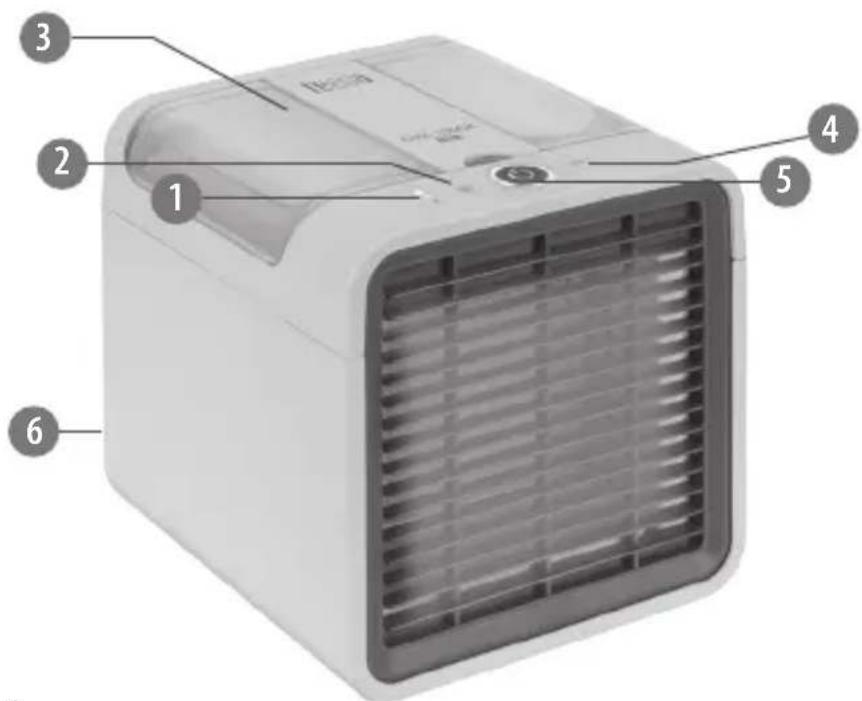
- Indicator
- Fan speed button
- Water tank
- Backlight button
- Power button
- micro USB power socket
OPERATION
For best cooling effects, place this air cooler within a meter away from you with its front grid facing you. It is not design to cool large areas such as a room. Use it rather to cool your personal area.
- Open the water tank and fill it with water.
- Connect the air cooler to the power mains or a compatible PC USB port.
- Press the power button to turn on the device.
- Set the fan speed by pressing the fan speed button. There are three speeds available: low, medium and high. The indicator shows which speed is currently running.
- Set the backlight by pressing the backlight button.
- Press the power button to turn off the device and disconnect it from power supply.
CLEANING AND STORAGE
• Prior to cleaning disconnect the device from power mains.
- Clean the appliance with a soft and dry cloth. Do not use any abrasives or cleaning agents to clean this appliance.
• Make sure to wipe the device dry after cleaning.
If you are not going to use the air cooler for a long period of time, empty the water tank, turn on the unit and set the highest speed for at least 4 hours. This operation dries the filter and the inside of the unit. If the unit remains wet for a long period of time it will be damaged by the appearance of mold.
SPECIFICATION
3 fan speed settings 7 backlight colors Cools and humidifies air Portable and compact Anti-slip feet
Water tank capacity: 400 ml Power: 5 W Power supply: 5 V; 1 A Weight: 960 g Dimensions: 168x168x165 mm In set: USB cable, user's manual
English Correct Disposal of This Product (Waste Electrical & Electronic Equipment)
(Applicable in the European Union and other European countries with separate collection systems) This marking shown on the product or its literature, indicates that it should not be disposed with other household wastes at the end of its working life. To prevent possible harm to the environment or human health from uncontrolled waste disposal, please separate this from other types of wastes and recycle it responsibly to promote the sustainable reuse of material resources. Household users should contact either the retailer where they purchased this product, or their local government office, for details of where and how they can take this item for environmentally safe recycling. Business users should contact their supplier and check the terms and conditions of the purchase contract This product should not be mixed with other commercial wastes for disposal.
Made in China for LECHPOL ELECTRONICS Sp. z o.o. Sp.k., ul. Garwolińska 1, 08-400 Miętne.

Brand : Teesa
Model : Cool Touch C300 TSA8042
Category : Air conditioner