
TR 610 top2 24V - Digital timer THEBEN - Free user manual and instructions
Find the device manual for free TR 610 top2 24V THEBEN in PDF.


| Product Type | Digital timer (time switch) |
| Brand | Theben |
| Model | TR 610 top2 24V |
| Power Supply | 24 V AC/DC (±10%) |
| Number of Channels | 1 |
| Programmable Steps | 42 switching times |
| Minimum Switching Interval | 1 minute |
| Scheduling Options | Daily, weekly, random, pulse |
| Switching Capacity | 16 A (resistive), 10 A (inductive) |
| Display Type | LCD with backlight |
| Operating Temperature | -10 °C to +50 °C |
| Protection Rating | IP20 |
| Dimensions (W x H x D) | 71 x 71 x 58 mm (flush-mount) |
| Weight | Approx. 125 g |
| Mounting | Flush-mount (standard switch box) |
| Memory Backup | Built-in capacitor (10 days at 20 °C) |
| Power Consumption | < 2 W |
| Terminal Type | Screw terminals (up to 2.5 mm²) |
| Switching Contact | Potential-free changeover (CO) |
| Functions | On/Off, impulse, random, astro (optional sensor) |
| Manual Override | Yes, key-operated |
| Cleaning | Wipe with dry cloth, no solvents |
| Safety | For indoor use, protected against overload |
| Standards Compliance | CE, EN 60730 |
| Warranty | 2 years |
Frequently Asked Questions - TR 610 top2 24V THEBEN
User questions about TR 610 top2 24V THEBEN
0 question about this device. Answer the ones you know or ask your own.
Ask a new question about this device
Download the instructions for your Digital timer in PDF format for free! Find your manual TR 610 top2 24V - THEBEN and take your electronic device back in hand. On this page are published all the documents necessary for the use of your device. TR 610 top2 24V by THEBEN.
USER MANUAL TR 610 top2 24V THEBEN
- Installation and connection 4
Mounting the time switch 4
Connecting the cable 6
Disconnecting the cable 7
- Device description 7
Display & buttons 7
Operating instructions 8
Overview of navigation menu 9
Initial operation 10
5. Settings and functions 11
Set switching time 11
Change switching times 13
Delete switching program 14
Activating PIN code 15
Setting manual or permanent switching 15
Hour counter 16
Using the OBELISK top2 memo-ry card 17
Resetting the time switch 18
-
Technical data 19
-
Contact 20

1. Basic safety information


WARNING
Danger of death through electric shock or fire!
➢ Installation should only be carried out by a qualified electrician!
- The device is designed for installation on DIN top hat rails (in accordance with EN 60715)
- The device corresponds to type 1 BSTU in accordance with IEC/EN 60730-2-7
- Power reserve (10 years) is reduced if memory card is inserted (using battery power)
OBELISK top2 memory card: Avoid mechanical overload and contamination during storage/transportation

2. Proper use
- The time switch is used for lighting, ventilation and flushing applications etc.
- Only for use in closed, dry rooms
Do not use on safety devices, e.g. escape route doors, fire safety equipment etc.
Disposal
▶ Dispose of device in environmentally sound manner
3. Installation and connection
Mounting the time switch


WARNING
Danger of death through electric shock or fire!
➢ Installation should only be carried out by a qualified electrician!


Mount on DIN top hat rails (as defined in EN 60715)
▶ Switched voltage-free
▶ Ensure device cannot be switched on
▶ Check absence of voltage
Earth and bypass
▶ Cover or shield any adjacent live components
Connecting the cable
Wiring diagrams 6104100 / 6124100


▶ Strip cable to 8 mm (max. 9)
Insert cable in the open DuoFix® plug-in terminal at 45°
① 2 cables per terminal position possible
To open the DuoFix® plug-in terminal, press screwdriver downwards
TR!612: With these devices the type of low voltage must correspond to low voltage type of the supply voltage (SELV = SELV, PELV = PELV, FELV = FELV).
① If the switch output is 230 V, the time switch can be operated using low function voltage but not SELV as supply voltage.
▶ Lay the control cable separately from the load power.
Disconnecting the cable
▶ Use the screwdriver to push the load line connection opener downwards
4. Device description
Display & buttons
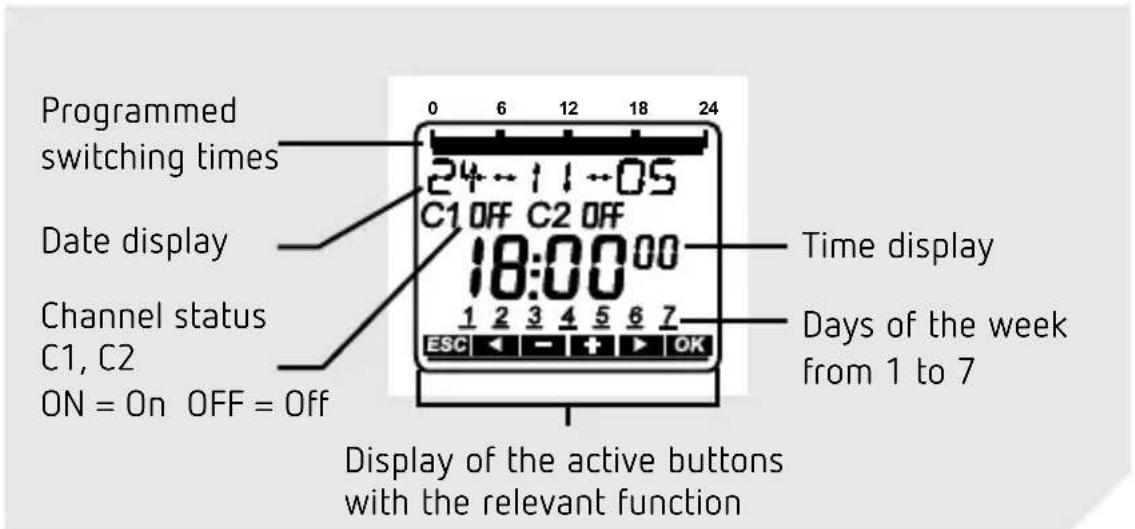

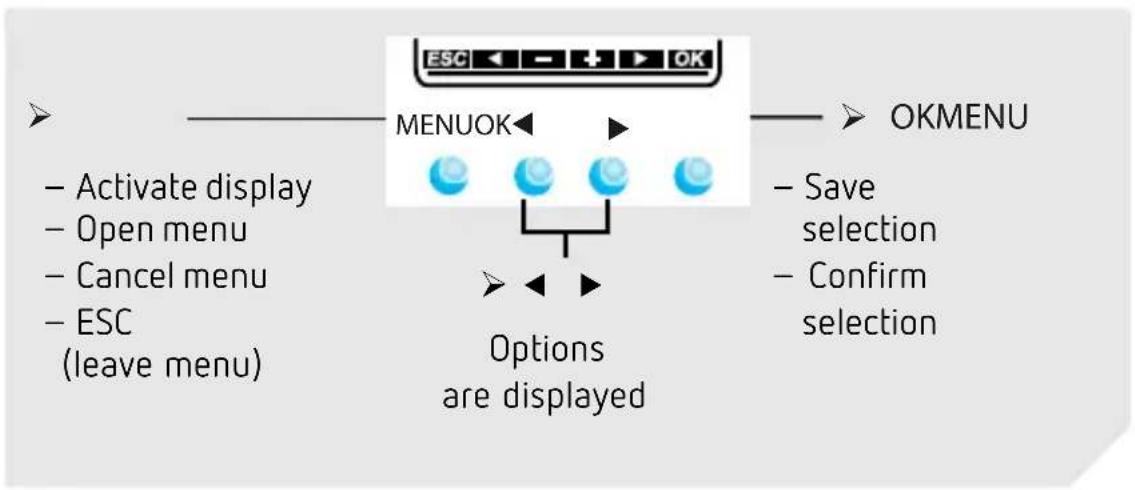
flowchart
graph TD
    A["ESC ← + → OK"] --> B["MENUOK"]
    B --> C["Options are displayed"]
    C --> D["Activate display"]
    C --> E["Open menu"]
    C --> F["Cancel menu"]
    C --> G["ESC (leave menu)"]
    H["OKMENU"] --> I["Save selection"]
    H --> J["Confirm selection"]
Operating instructions
- Read text line text/symbol represents query

- Make a decision

YES
Confirmation
Press OK
NO
Modify/Change
Press


Overview of navigation menu

flowchart
graph TD
    A["MENU"] --> B["PROGRAM"]
    B --> C["NEW"]
    C --> D["CHECK"]
    D --> E["MODIFY"]
    E --> F["DELETE"]
    F --> G["END"]
    B --> H["TIME DATE MANUAL"]
    H --> I["TIME"]
    I --> J["SET DATE"]
    J --> K["SU--WI"]
    K --> L["WEEK DAY"]
    L --> M["FORM DATE"]
    M --> N["END"]
    H --> O["CHANNEL C1"]
    O --> P["PERM ON"]
    P --> Q["PERM OFF"]
    Q --> R["OVERR ON"]
    R --> S["HOLIDAY"]
    S --> T["END"]


flowchart
graph TD
    A["OPTIONS"] --> B["OPERATING HOUR"]
    B --> C["LCD ILLU-MINATION"]
    C --> D["LANGUAGE"]
    D --> E["PIN"]
    E --> F["FACTORY SETTING"]
    F --> G["INFO"]
    G --> H["END"]
    I["END"] --> A
Initial operation

flowchart
graph TD
    A["MENU"] --> B["GERMAN"]
    B --> C["FRENCH"]
    C --> D["ITALIAN"]
    D --> E["DUTCH"]
    B --> F["RETAIN PROGRAM"]
    F --> G["DELETE PROGRAM"]
    G --> H["FORM DATE"]
    H --> I["YEAR"]
    I --> J["MONTH"]
    J --> K["DAY"]
    K --> L["FORM TIME"]
    L --> M["HOUR"]
    M --> N["MINUTE"]
    N --> O["SU-WI EUROPE"]
    O --> P["END"]

Set language, country, town/city, date, time as well as summer/winter time (SU-WI)
▶ Press any button and display follows on screen (see figure)
5. Settings and functions
Set switching time
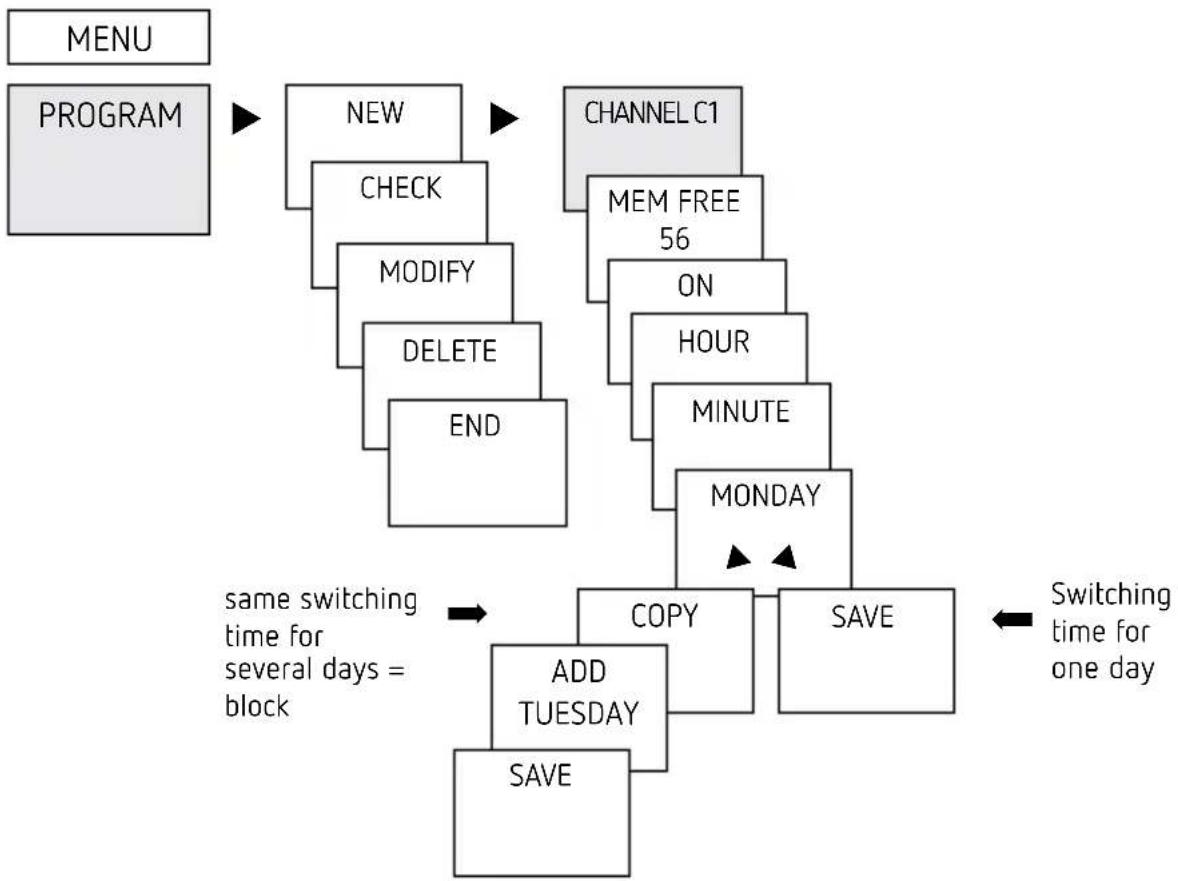
flowchart
graph TD
    A["MENU"] --> B["PROGRAM"]
    B --> C["NEW"]
    C --> D["CHECK"]
    D --> E["MODIFY"]
    E --> F["DELETE"]
    F --> G["END"]
    H["CHANNEL C1"] --> I["MEM FREE 56"]
    I --> J["ON"]
    J --> K["HOUR"]
    K --> L["MINUTE"]
    L --> M["MONDAY"]
    M --> N["COPY"]
    N --> O["ADD TUESDAY"]
    O --> P["SAVE"]
    Q["same switching time for several days = block"] --> N
    R["Switching time for one day"] --> S["SAVE"]

i A switching time always consists of a start time and an end time
① There are 56 memory cells available
Example: Switch on sports hall lighting from Mon–Fri, 7:30 to 12:00 hrs
▶ Press MENU
▶ Select PROGRAM and press OK to confirm
▶ Select NEW and press OK to confirm
▶ Select CHANNEL C1 or C2, confirm with OK
▶ Select ON (for turn-on times), confirm with OK
▶ Set required turn-on time (Mo–Fr, 7:30), confirm with OK
▶ Select COPY, confirm with OK
▶ ADD TUESDAY is displayed, confirm by pressing OK and also confirm the days We, Th, Fr by pressing OK.
▶ Continue with ▶ until SAVE is displayed.
▶ Confirm by pressing OK.
Repeat all steps for the turn-off time, however instead of selecting ON with ▶ select OFF and enter 12:00 for hour and minute.

Change switching times
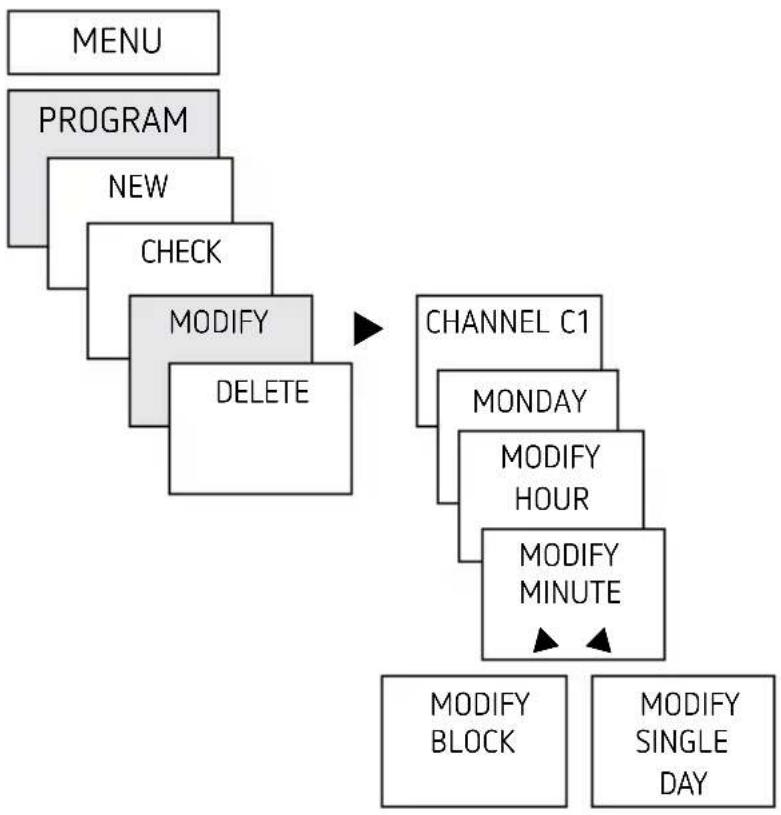
flowchart
graph TD
    A["MENU"] --> B["PROGRAM"]
    B --> C["NEW"]
    C --> D["CHECK"]
    D --> E["MODIFY DELETE"]
    E --> F["CHANNEL C1"]
    F --> G["MONDAY"]
    G --> H["MODIFY HOUR"]
    H --> I["MODIFY MINUTE"]
    I --> J["MODIFY BLOCK"]
    I --> K["MODIFY SINGLE DAY"]

① You can either change or delete a block, i.e. a switching time copied for several days (e.g. Mon-Fri) or a single switching time
Change individual switching times
▶ Press MENU
▶ Select PROGRAM and press OK to confirm
▶ Select MODIFY, confirm by pressing OK
▶ Select CHANNEL C1 or C2, confirm with OK
▶ Select day, confirm with OK
MODIFY HOUR, use the + or - buttons to change hour and minute and confirm with OK.
To change several switching times, select MODIFY BLOCK, confirm with OK
Delete switching program

flowchart
graph TD
    A["MENU"] --> B["PROGRAM"]
    B --> C["NEW"]
    C --> D["CHECK"]
    D --> E["MODIFY"]
    E --> F["DELETE"]
    F --> G["CHANNEL C1"]
    G --> H["MONDAY"]
    H --> I["DELETE BLOCK"]
    H --> J["DELETE SINGLE DAY"]

① You can either delete a block, i.e. a switching time copied for several days (e.g. Mon-Fri) or a single switching time
▶ Press MENU.
▶ Select PROGRAM and confirm with OK
▶ Select DELETE, confirm with OK
▶ MONDAY is displayed, confirm with OK
▶ Select DELETE BLOCK, confirm with OK
▶ With ▶ DELETE MONDAY etc. individual days can also be cleared.
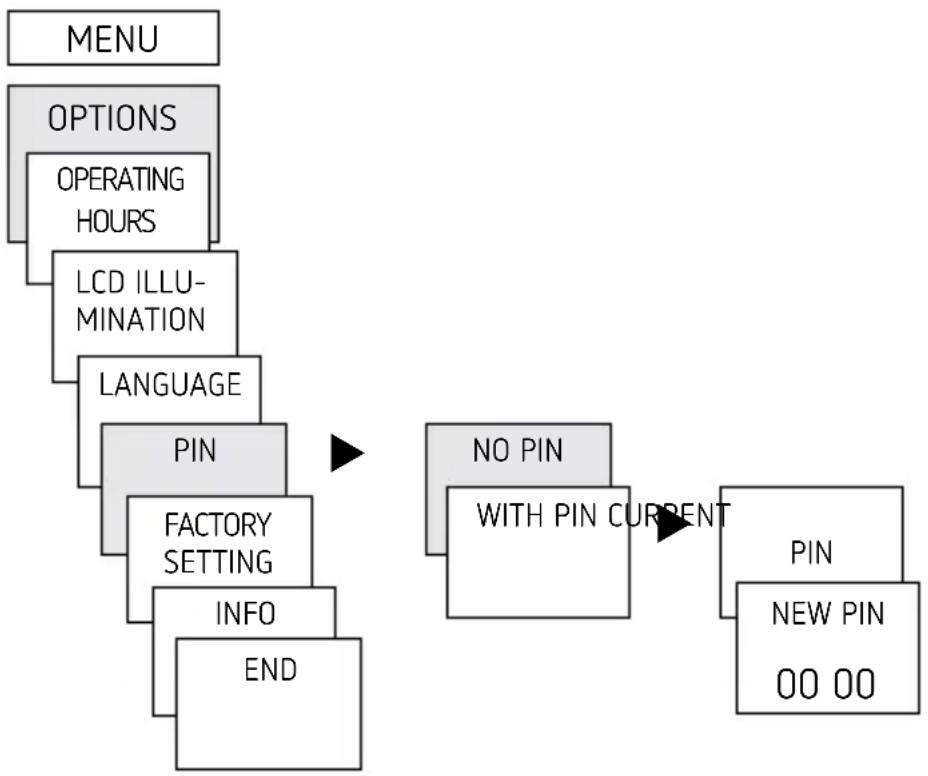
Activating PIN code
The PIN code is set in OPTIONS via the menu.
① If you have forgotten your PIN, call the Theben Hotline.
i Have the serial number ready.
flowchart
graph TD
    A["MENU"] --> B["OPTIONS"]
    B --> C["OPERATING HOURS"]
    C --> D["LCD ILLU-MINATION"]
    D --> E["LANGUAGE"]
    E --> F["PIN"]
    F --> G["FACTORY SETTING"]
    G --> H["INFO"]
    H --> I["END"]
    J["NO PIN"] --> K["WITH PIN CURRENT"]
    K --> L["PIN"]
    L --> M["NEW PIN"]
    M --> N["00 00"]

Setting manual or permanent switching
Manual or permanent switching can be set via the menu in MANUAL or (in the automatic screen) by button combination (see picture).
- Manual control:
Reversing the channel status to the next automatic or programmed switching. - Permanent switching:
As long as a permanent switching (on or off) is activated, the programmed switching times are ineffective

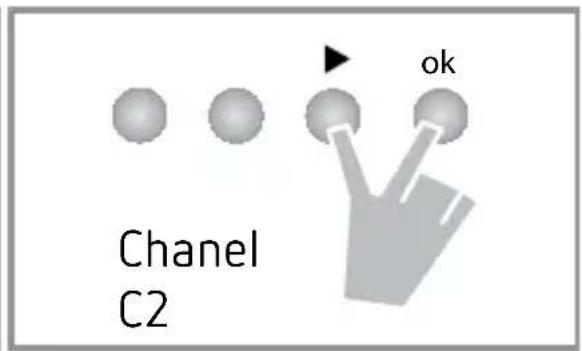
Activating manual control
▶ Briefly press both buttons simultaneously
Activating permanent switching
▶ Press both buttons simultaneously for 2 seconds
Cancelling manual/permanent switching
▶ Press both buttons simultaneously
Hour counter
The operating hours of the channel (relay) are displayed and deleted in the OPTIONS menu. If the number of operating hours exceeds the value set in the Service menu, SERVICE will appear in the display.
Example: Replace a lamp after after 5,000 h.
▶ Delete operating hours or set a higher value in Service (e.g. to 10,000 h)

Using the OBELISK top2 memory card
All functions can also be set on the PC using the OBELISK software and transferred to the device via the memory card.
▶ Insert memory card in the time switch
Read in/out saved switching times and device setups in the time switch or start Obelisk program
Remove memory card after copying etc.
Avid mechanical overload and contamination during storage/transport
i PC software OBELISK top2 available at www.theben.de

natural_image
Technical line drawing of an electronic device with internal components and a directional arrow (no text or symbols)
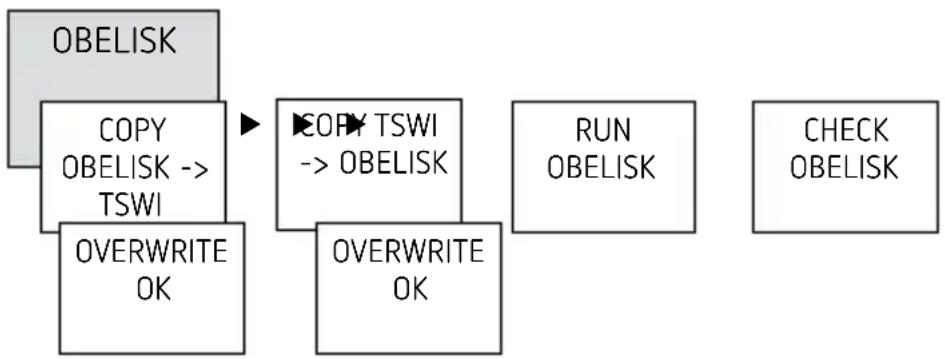
Copying OBELISK → TIME
This copies the switching program and optionally all time switch settings (e.g. time format etc.) from the memory card in the time switch.
Copying TIME → OBELISK
This copies all switch programmes and settings from the time switch to the memory card.
Starting OBELISK program
Takes on the switching times that are programmed on the memory card.
As soon as the memory card is removed, the switching times of the time switch are re-activated.
flowchart
graph TD
    A["OBELISK"] --> B["COPY OBELISK --> TSWI"]
    B --> C["OVERWRITE OK"]
    C --> D["TSWI COPY"]
    D --> E["OBELISK → OBELISK"]
    E --> F["OVERWRITE OK"]
    F --> G["RUN OBELISK"]
    G --> H["CHECK OBELISK"]

Resetting the time switch
➢ Press the 4 buttons simultaneously → You can choose between KEEP PROGRAM and DELETE PROGRAM
6. Technical data
| Operating voltage: 12 - 24 V, +10 | % / -15 %12 - 24 V DC, +10 % / -15 % |
| Frequency: 50–60 Hz | |
| Power consumption TR 610/612: | max. 0,2 W - 0,6 W /0,2 W - 0,9 W |
| Max switching capacity: 16 A (at 250 V, cos φ = 1) | |
| switching capacity: 2 A (at 250 V, cos φ = 0,6) | |
| Min. switching capacity: 10 mA/230 V AC100 mA/ 24 V AC/DC | |
| Switching output: switching of choice of phase is permitted | |
| TR 610 top2: approved for switchingSELV and mains voltage. | |
| Shortest switching time: 1 min | |
| Protection rating: IP 20 in accordance withEN 60529 | |
| Protection class: II in accordance withEN 60730-1 subject to designated installation for supply with FELV and/or mains switching | |
| Protection class: | III for supply with SELV and switching of SELV |
| Operating temperature: | -30 °C ... +55 °C |
| Power reserve: | 10 years at +20 °C |
| Time accuracy: | ±0,25 s/day (25 °C) |
| Rated impulse withstand voltage: | 4 kV |
| Pollution degree: | 2 |

| Contact: wo way switch | |
| Glow lamp load (230 V): 1000 W | |
| Halogen lamp load (230 V): 1000 W | |
| Fluorescent lamp load: uncor-rected:Series corrected:parallel-corrected 230 V: | 1000 VA80 W (max. 12 μF) |
| Compact fluorescent tubes (EVG)230 V: | 30 W |
| LED lamps (<2 W): 6 W | |
| LED lamps (>2 W < 8 W): 20 W | |
| LED lamps (< 8 W): 20 W |

7. Contact
Theben AG
Hohenbergstr. 32
72401 Haigerloch
GERMANY
Tel. +49 7474 692-0
Fax +49 7474 692-150
Hotline
Tel. +49 7474 692-369
hotline@theben.de
Addresses, telephone numbers etc.
www.theben.de


- Settings and functions 11
- Basic safety information
- WARNING
- Danger of death through electric shock or fire!
- Proper use
- Disposal
- Installation and connection
- Mounting the time switch
- Connecting the cable
- Wiring diagrams 6104100 / 6124100
- Disconnecting the cable
- Device description
- Display & buttons
- Operating instructions
- YES
- NO
- Overview of navigation menu
- Initial operation
- Settings and functions
- Change switching times
- Change individual switching times
- Delete switching program
- Activating PIN code
- Setting manual or permanent switching
- Activating manual control
- Activating permanent switching
- Cancelling manual/permanent switching
- Hour counter
- Using the OBELISK top2 memory card
- Copying OBELISK → TIME
- Copying TIME → OBELISK
- Starting OBELISK program
- Resetting the time switch
- Technical data
- Contact
Brand : THEBEN
Model : TR 610 top2 24V
Category : Digital timer