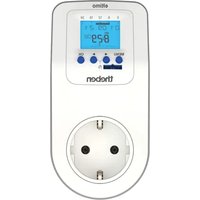
eltimo 020 top3 - Switch THEBEN - Free user manual and instructions
Find the device manual for free eltimo 020 top3 THEBEN in PDF.


Pick your language and provide your email: we'll send you a specifically translated version.
| Product Type | Digital Time Switch |
| Brand | Theben |
| Model | eltimo 020 top3 |
| Supply Voltage | 230 V AC, 50–60 Hz |
| Switching Capacity | 20 A (resistive), 10 A (inductive) |
| Number of Channels | 2 |
| Programmable Periods | Weekly (7-day) with up to 20 on/off times per channel |
| Backup Power | Built-in rechargeable battery (NiMH) for time and program retention during power failure |
| Dimensions (H × W × D) | 72 mm × 72 mm × 36 mm (flush mounting) |
| Weight | Approx. 120 g |
| Display | LCD with backlight, showing time, day, and program status |
| Operating Temperature | 0 °C to +40 °C |
| Protection Rating | IP20 (indoor use only) |
| Main Functions | Automatic on/off switching; manual override; holiday mode; random function; pulse mode; timer countdown |
| Maintenance and Cleaning | Wipe with a dry cloth; do not use abrasive cleaners or solvents. No user-serviceable parts inside. |
| Safety Features | Operation only by qualified electrician; disconnection from mains before installation or cleaning; overvoltage protection built-in |
| Spare Parts and Repairability | No user-replaceable parts; contact authorized Theben service centers for repairs |
| General Information | Compliant with EN 60730; suitable for indoor use; power consumption < 0.5 W standby |
Frequently Asked Questions - eltimo 020 top3 THEBEN
How do I reset the eltimo 020 top3 to factory settings?
Press and hold the Menu button for 10 seconds until 'rES' appears on the display. Confirm by pressing OK. This will erase all programs and restore default time.
Why is the display blank?
Check the main power supply. The backup battery may be depleted; if mains power is present, the display should light up. If not, consult a qualified electrician.
How do I set the current time and day?
Press the Menu button, navigate to 'Time' using arrow keys, press OK, then set hours, minutes, and day. Confirm each step with OK.
Can I program different schedules for weekdays and weekends?
Yes, the eltimo 020 top3 supports individual days or day groups (Mon-Fri, Sat-Sun, every day). Choose the desired day grouping while programming.
What is the maximum load I can connect?
For resistive loads (e.g., incandescent bulbs), up to 20 A. For inductive loads (e.g., motors), up to 10 A. Do not exceed these ratings.
How does the random function work?
When activated, the switch will turn on/off during the programmed period with a random delay of ±15 minutes to simulate occupancy.
Why does the switch not follow the program?
Check if the Manual Override is activated (icon showing a hand). If so, press the Manual button to return to automatic mode. Also ensure the program is correctly set and not in 'Pulse' or 'Countdown' mode.
How long does the backup battery last?
The built-in NiMH battery maintains time and programs for approximately 4 years when fully charged. After prolonged power loss, recharge time is about 24 hours.
Can I use this switch for 3-way (multi-location) control?
No, the eltimo 020 top3 is a single-pole switch and cannot be used in a multi-way configuration without additional relays.
Is the switch suitable for outdoor use?
No, it has an IP20 rating and is intended for indoor use only. For outdoor applications, install it in a weatherproof enclosure.
User questions about eltimo 020 top3 THEBEN
0 question about this device. Answer the ones you know or ask your own.
Ask a new question about this device
No questions yet. Be the first to ask one.
Download the instructions for your Switch in PDF format for free! Find your manual eltimo 020 top3 - THEBEN and take your electronic device back in hand. On this page are published all the documents necessary for the use of your device. eltimo 020 top3 by THEBEN.
USER MANUAL eltimo 020 top3 THEBEN



Manual assistant
Powered by Anthropic
Waiting for your message
Product information
Brand : THEBEN
Model : eltimo 020 top3
Category : Switch