
VPR-190 - Gramophone DENVER - Free user manual and instructions
Find the device manual for free VPR-190 DENVER in PDF.


| Product Type | Turntable with FM Radio |
| Model | VPR-190 |
| Brand | Denver |
| Turntable Speeds | 33 1/3 and 45 RPM |
| Radio Frequency Range | 88 – 108 MHz (FM) |
| Max Output Power | 8W |
| Power Supply | AC 100-240V, 50/60Hz (via included power cord) |
| Audio Inputs | 3.5mm AUX |
| Audio Outputs | RCA Line Out (L/R) |
| Built-in Speakers | Yes, stereo (left and right) |
| Auto Stop Function | Yes, with ON/OFF switch |
| Dust Cover | Yes, included |
| 45 RPM Adapter | Included |
| Dimensions (approx) | 350 x 300 x 120 mm (13.8 x 11.8 x 4.7 in) |
| Weight (approx) | 2.5 kg (5.5 lbs) |
| Safety Certifications | CE, RoHS |
| Cleaning Instructions | Clean only with dry cloth |
| Spare Parts Availability | Stylus can be replaced; contact manufacturer |
| Warranty | Standard warranty applies; see manual for details |
Frequently Asked Questions - VPR-190 DENVER
User questions about VPR-190 DENVER
0 question about this device. Answer the ones you know or ask your own.
Ask a new question about this device
Download the instructions for your Gramophone in PDF format for free! Find your manual VPR-190 - DENVER and take your electronic device back in hand. On this page are published all the documents necessary for the use of your device. VPR-190 by DENVER.
USER MANUAL VPR-190 DENVER
natural_image
Vintage portable vinyl record driver with open lid and control knobs (no visible text or symbols)INSTRUCTION MANUAL
ALLE RETTIGHETER FORBEHOLDES, OPPHAVSRETT DENVER ELECTRONICS A/S
CE
www.denver-electronics.com
facebook.com/denverelectronics
WARNING
TO PREVENT FIRE OR SHOCK HAZARD, DO NOT USE THIS PLUG WITH AN EXTENSION CORD, RECEPTACLE OR OTHER OUTLET UNLESS THE BLADES CAN BE FULLY INSERTED TO PREVENT BLADE EXPOSURE. TO PREVENT FIRE OR SHOCK HAZARD, DO NOT EXPOSE THIS APPLIANCE TO RAIN OR MOISTURE.
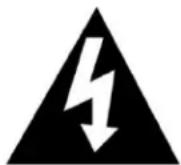
The lightning flash with arrowhead symbol within an equilateral triangle is intended to alert the user to the presence of uninsulated dangerous voltage within the product's enclosure that may be of sufficient magnitude to constitute a risk of electric shock to persons.
CAUTION
RISK OF ELECTRIC SHOCK DO NOT OPEN
CAUTION: TO REDUCE THE RISK OF ELECTRIC SHOCK, DO NOT REMOVE COVER (OR BACK). NO USER - SERVICEABLE PARTS INSIDE. REFER SERVICING TO QUALIFIED SERVICE PERSONEL.

The exclamation point within an equilateral triangle is intended to alert the user to the presence of important operating and maintenance (servicing) instructions in the literature accompanying the appliance.
IMPORTANT SAFETY INSTRUCTIONS
- Read these instructions
- Keep these instructions
- Heed all warnings.
- Follow all instructions.
- Do not use this apparatus near water.
- Clean only with dry cloth.
- Do not block any ventilation openings. Install in accordance with these instructions.
- Do not install near any heat sources such as radiators, heat registers, stoves, or other apparatus (including amplifiers) that produce heat.
- Protect the power cord from being walked on or pinched particularly at plugs, convenience receptacles, and the point where they exit from the apparatus.
- Only use attachments/accessories specified by the manufacturer.
- Unplug this apparatus during lightning storms or when unused for long periods of time.
- Refer all servicing to qualified service personnel. Servicing is required when the apparatus has been damaged in any way, such as power-supply cord or plug is damaged, liquid has been spilled or objects have fallen into the apparatus, the apparatus has been exposed to rain or moisture, does not operate normally, or has been dropped.
- This appliance shall not be exposed to dripping or splashing water and that no object filled with liquids such as vases shall be placed on the apparatus.
- Do not overload wall outlet. Use only power source as indicated.
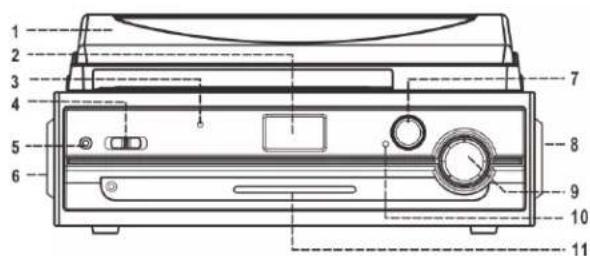
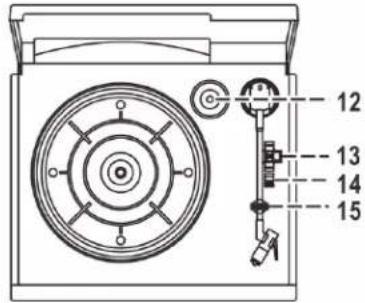
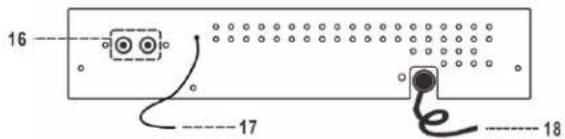
LOCATION OF CONTROLS
1) Dust Cover
2) LCD Display
3) Power LED Indicator
4) Function Switch
5) 3.5mm Aux In Jack
6) Left Speaker
7) Tuning Knob
8) Right Speaker
9) Power ON-OFF/Volume Control Knob
10) FM Stereo indicator
11) FM Frequency Pointer with LED Indicator
12) 45 RPM Record Adaptor
13) Turntable Speed Selector
14) Auto Stop Switch
15) Tone Arm Rest/Holder
16) Line Out Sockets (L/R)
17) FM Wire Antenna
18) AC Power Cord
CONNECTION
- Connect the power cord to an AC outlet.
- Turn on the unit by the POWER/VOL knob (9) and the power LED indicator (3) lights up. Your system is now ready to play your music. Please refer to the Operations section of this Manual for details.
OPERATIONS
LISTENING TO RADIO
MANUAL TUNING
- Turn on the unit by the POWER/VOL knob (9) and slide the Function switch (4) to the TUNER position.
- Turn the TUNING knob (7) to tune to a radio station. The FM frequency pointer (11) indicates the current FM frequency.
- Adjust the POWER/VOL knob (9) to change volume level.
STEREO PHONOGRAPH OPERATION
Before First Use:
- Remove the stylus protector.
- Make sure that the tone arm is unlocked and free to move from the tone arm rest prior to operating. Lock the tone arm again when not in use.
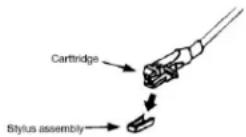
| EN | |
| Cartridge | |
| Stylus |
- Slide the Function switch (4) to the PHONO position.
- Raise the turntable dust cover.
- Place the record on the platter. Use the 45 RPM record adaptor (12) if you are playing 45 RPM records.
- Set the speed selector (13) to the proper position for the record you are playing.
- Lift the tone arm from the rest (15) and slowly move it over the record. The platter begins spinning.
- Place the tone arm down onto the record, in a particular position that you want to play.
- Adjust the POWER/VOL knob (9) to change volume.
- When the tone arm reaches the end of the record, the play automatically stops.
- To stop playing manually, lift the tone arm from the record and return it to the rest.
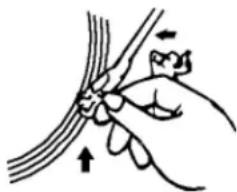
natural_image
Illustration of a hand holding a thin bundle with an arrow indicating direction (no text or symbols)NOTE: Some types of records may have an auto-stop area outside the preset limit, so the turntable may stop before the last track finishes. In this case, set the AUTO-STOP switch to the "OFF" position. This allows the record to play to the end, but please note that it will not stop automatically. You must manually raise the tone arm and place it back in the rest and then turn off the power to stop the turntable from spinning.
AUX-IN CONNECTION
You can listen to an external audio device through this unit.
With a 3.5mm audio cable (not included), connect the AUX-IN jack (5) on this unit to audio output on an external device such as Disc/MP3 player.
- Slide the Function switch (4) to the AUX position.
- Start to play your external audio device.
- Adjust the POWER/VOL knob (9) to change volume.
LINE OUT CONNECTION
You can output audio from this unit to an external audio system.
With a RCA cable (not included), connect the LINE OUT sockets (16) on this unit to audio input on an external device such as Hi-Fi/amplifier system.
Note: Volume control by the POWER/VOL knob (9) is invalid when using the LINE OUT feature.
Please notice - All products are subject to change without any notice. We take reservations for errors and omissions in the manual.
ALL RIGHTS RESERVED, COPYRIGHT DENVER ELECTRONICS A/S
DENVER®
www.denver-electronics.com

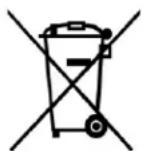

Electric and electronic equipment contains materials, components and substances that can be hazardous to your health and the environment, if the waste material (discarded electric and electronic equipment) is not handled correctly.
Electric and electronic equipment is marked with the crossed out trash can symbol, seen above. This symbol signifies that electric and electronic equipment should not be disposed of with other household waste, but should be disposed of separately.
All cities have established collection points, where electric and electronic equipment can either be submitted free of charge at recycling stations and other collection sites, or be collected from the households. Additional information is available at the technical department of your city.
Hereby, Inter Sales A/S declares that the radio equipment type VPR-190 is in compliance with Directive 2014/53/EU. The full text of the EU declaration of conformity is available at the following internet address: www.denver-electronics.com and then click the search ICON on topline of website. Write modelnumber: VPR-190. Now enter product page, and red directive is found under downloads/other downloads
Operating Frequency Range: 88 – 108 MHz
Max Output Power: 8W
DENVER ELECTRONICS A/S
Omega 5A, Soeften
DK-8382 Hinnerup
Denmark
www.facebook.com/denverelectronics


Brand : DENVER
Model : VPR-190
Category : Gramophone