
DENVER VPL-200 - Gramophone

VPL-200 - Gramophone DENVER - Free user manual and instructions

Find the device manual for free VPL-200 DENVER in PDF.

📄 1 pages English EN Download 💬 AI Question 10 questions ⚙️ Specs
Notice DENVER VPL-200 - page 1
Pick your language and provide your email: we'll send you a specifically translated version.
Product Type Gramophone with turntable and built-in speakers
Brand Denver
Model VPL-200
Dimensions (approx) 12.6 x 10.2 x 4.7 inches (320 x 260 x 120 mm)
Weight (approx) 4.5 lbs (2.0 kg)
Power Supply AC 100-240V, 50/60Hz or 4 x C batteries (not included)
Turntable Speeds 33 1/3 RPM and 45 RPM
Built-in Speakers 2 x 3W stereo speakers
Audio Outputs Headphone jack (3.5mm), RCA line out
Audio Input Auxiliary input (3.5mm) for external devices
Additional Features Automatic stop, dust cover, pitch control
Stylus (Needle) Replaceable diamond stylus, lifespan approx. 500 hours
Drive Belt Replaceable belt drive system
Cleaning & Maintenance Clean exterior with dry cloth; replace stylus after 500 hours; clean stylus with brush
Safety Precautions Do not expose to moisture or extreme temperatures; unplug before cleaning
Spare Parts Availability Replacement stylus and drive belt available from Denver or authorized dealers

Frequently Asked Questions - VPL-200 DENVER

How do I set up the Denver VPL-200 gramophone?
Place the turntable on a flat, stable surface. Connect the power adapter or insert batteries. Remove the dust cover, and place a vinyl record on the platter. Select the speed (33 or 45 RPM) and gently place the tonearm on the record.
How do I change the turntable speed?
Locate the speed selector switch near the platter. Slide it to 33 for standard LPs or 45 for singles. Wait for the platter to reach full speed before playing.
Can I connect external speakers to the VPL-200?
Yes, the VPL-200 has a RCA line out port. Connect it to an amplifier or powered speakers. Note that the built-in speakers will be muted when using the line out.
How do I clean the stylus (needle)?
Use a soft stylus brush or a specialized cleaning kit. Gently brush from back to front to remove dust. Avoid touching the stylus with fingers. Replace the stylus after approximately 500 hours of use.
What should I do if there is no sound?
Check that the turntable is powered on and the volume is turned up. Ensure the stylus is properly placed on the record. If using external speakers, verify the connections. Try connecting headphones to the headphone jack to isolate the issue.
How do I replace the belt drive?
Remove the platter carefully. Note the belt path around the motor pulley and the inner rim of the platter. Gently remove the old belt and loop the new one as shown in the manual. Ensure it is not twisted. Reinstall the platter.
Can I play 78 RPM records on this model?
No, the Denver VPL-200 only supports 33 1/3 and 45 RPM speeds. It is not designed for 78 RPM records.
How do I use the auxiliary input?
Connect your external device (e.g., smartphone) to the Aux In jack using a 3.5mm audio cable. The turntable will play audio from the external device through its speakers. Note that the turntable must be powered on.
Is there a USB recording function?
No, the Denver VPL-200 does not feature USB recording. It is a basic gramophone for playback only.
How should I store the turntable when not in use?
Store the turntable in a cool, dry place away from direct sunlight and moisture. Use the dust cover to protect the platter and stylus. Remove batteries if storing for extended periods.

User questions about VPL-200 DENVER

0 question about this device. Answer the ones you know or ask your own.

Ask a new question about this device

The email remains private: it is only used to notify you if someone responds to your question.

No questions yet. Be the first to ask one.

Download the instructions for your Gramophone in PDF format for free! Find your manual VPL-200 - DENVER and take your electronic device back in hand. On this page are published all the documents necessary for the use of your device. VPL-200 by DENVER.

USER MANUAL VPL-200 DENVER

• USB turntable with PC recording software included
- Works also as normal turntable with built-in speakers & phono connection for
- connecting with music system
• Can play 331/3rpm, 45rpm or 78rpm vinyl records
- Record from LP to PC using USB cable and included PC software
• Tonearm autostop function
- Wooden finish & with dust cover
• Headphone jack on front
• Volume output: 5W
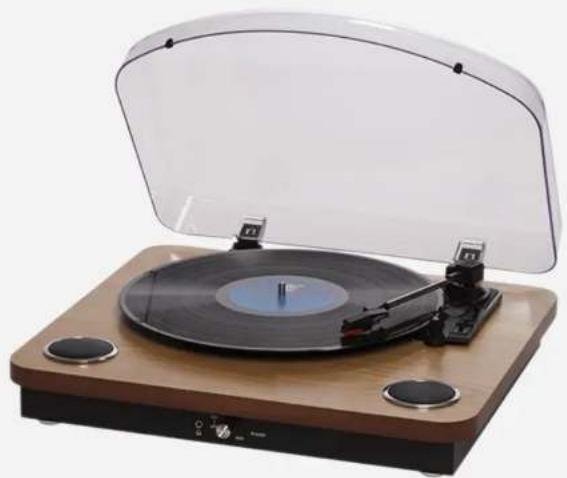
DENVER VPL-200 - 1

natural_image Vintage gramophone with open lid and wooden base (no visible text or symbols)

DENVER VPL-200 - 2

HIGHLIGHTS

USB turntable, built-in speakers, phone output, plays 331/3, 45 & 78RPM vinyls, suitcase design

DENVER VPL-200 - 3

POWER

230V\~50Hz AC/DC adaptor

DENVER VPL-200 - 4

CONNECTIONS

USB output for connection with PC, Phono output for connection with music system

DENVER VPL-200 - 5

VOLUME

5W output

DENVER VPL-200 - 6

SOFTWARE

PC software included

Shipping information

Unit size: 37.50(w) × 42.00(d) × 11.50(h) cm

Unit weight: 4.7

Giftbox size: 17.50(w) x 47.00(d) x 45.00(h) cm

3 pcs/export carton

0 pcs/20' container

1440 pcs/40' IQ container

Barcode: 5706751038013

DENVER®

denver-electronics.com

Table of contents Click a title to access it
Manual assistant
Powered by Anthropic
Waiting for your message
Product information

Brand : DENVER

Model : VPL-200

Category : Gramophone