
3700T - Television TECHWOOD - Free user manual and instructions
Find the device manual for free 3700T TECHWOOD in PDF.


| Product Type | TV with DVD Recorder/Player |
| Brand | Techwood |
| Model | 3700T |
| Display | 23 inch LCD (estimated) |
| Video Output Format | 4:3 LB, 4:3 PS, 16:9 WS |
| Audio | Downmix, S/PDIF output, LPCM output, Dynamic range, Speaker setup |
| Recording Media | DVD+R, DVD-R, (S)VCD, CD-DA, MP3, DivX, MPEG |
| Recording Quality | SP (Standard Play), other modes |
| Playback Speed | 2x, 4x, 8x, 16x, 32x (DVD); 1/2, 1/4, 1/8 (slow) for (S)VCD |
| Connectivity | USB, AV-2, Digital Audio Out (Optical/Coaxial), SCART (likely) |
| Language Support | OSD, Audio, Subtitle, Disc Menu - multiple languages |
| Parental Control | Child lock |
| Power Saving | Standby timer, Energy saving mode |
| Power Supply | AC 100-240V, 50/60Hz (estimated) |
| Dimensions (approx.) | Without stand: 560 x 380 x 70 mm (estimated) |
| Weight (approx.) | 5.5 kg (estimated) |
| Maintenance | Clean with soft dry cloth; avoid liquids. Do not disassemble. |
| Spare Parts | Contact Techwood support; not sold separately. |
| Safety | Do not expose to moisture; use only provided power cord. |
Frequently Asked Questions - 3700T TECHWOOD
User questions about 3700T TECHWOOD
0 question about this device. Answer the ones you know or ask your own.
Ask a new question about this device
Download the instructions for your Television in PDF format for free! Find your manual 3700T - TECHWOOD and take your electronic device back in hand. On this page are published all the documents necessary for the use of your device. 3700T by TECHWOOD.
USER MANUAL 3700T TECHWOOD
2.2.2.2 TV DISPLAY 23
2.2.2.3 SCREENSAVER.... 23
2.2.2.4 VIDEO UITGANGFORMAAT 23
2.2.3 AUDIO 23
2.2.3.1 DOWNMIX 23
2.2.3.2 S-PDIF UITGANG 24
2.2.3.3 LCPM-UITGANG: 24
2.2.3.4 DYNAMIC RANGE.... 24
2.2.3.5 LUIDSPREKER SETUP 24
2.2.4 TAAL....24
2.2.4.1 OSD TAAL 24
2.2.4.2 GELUIDSTAAL 24
2.2.4.3 TAAL VAN DE ONDERTITELING.... 24
2.2.4.4 SCHIJF MENUTAAL 25
2.2.5 DATUM/TIJD 25
2.2.5.1 DATUM-TIJDSINSTELLING 25
2.2.5.2 PROGRAMMA 25
2.2.5.3 DATUM (dd / mm/ jjjj).... 25
2.2.5.4 TIJD (uu : mm) 25
2.2.6 VOORKEUREN 25
2.2.6.1 SCHIJF BEWERKEN 25
2.2.6.2 KINDERSLOT 26
2.2.6.3 STANDAARDINSTELLING....26
2.2.6.4 STAND-BY TIJD 27
2.2.6.5 ENERGIEBESPARING....27
2.2.6.6 AV-2 27
2.2.6.7 DIVX REGISTRATIE.... 27
2.3 MENU'S WEERGEVEN 28
2.4 SCHIJF BEWERKEN MENU 28
2.5 TITEL BEWERKEN MENU 29
2.6 TITEL BEWERKEN....29
- WEERGAVE 30
4.2 Opname set-up 38
natural_image
Illustration of two hands holding circular objects with a cross mark, no text or symbols presentnatural_image
Diagram showing a device with a battery cover and an inset view of its mechanical component (no text or symbols present)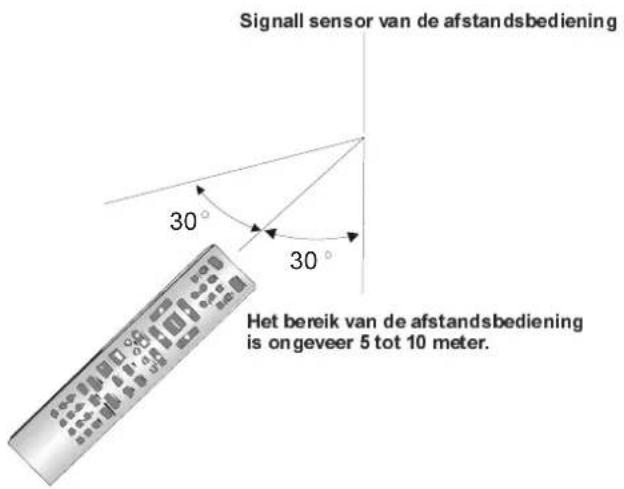
(camcorders, videorecorders, set-top box)
DIGITAL AUDIO OUT (OPTICAL)
DIGITAL AUDIO OUT (COAXIAL)
natural_image
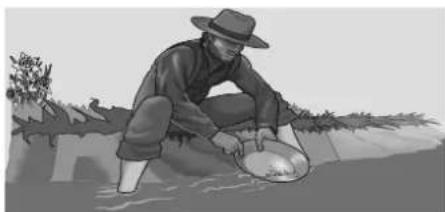
Black-and-white illustration of a person in a hat harvesting water, no text or symbols visible4:3 LB

natural_image
Illustration of a person in a hat crouching in shallow water, holding a large object (no text or symbols visible)4:3 PS
natural_image
Illustration of a person in a hat crouching outdoors near a water body, with trees and hills in the background (no text or symbols)16:9WS
WEERGAVEMEN (OPNAME)

DVD: x2, x4, x8, x16, x32
(S)VCD: x2, x4, x8, x16, x32
DivX: x8, x16, x32
CD-DA: x2, x4, x8, x16
MP3: x2, x4, x8, x16, x32
MPEG: x8, x16, x32
OPMERKING:
(FR x32, FR x16, FR x8, FR x4, FR x2, PLAY, FF x2, FF x4, FF x8, FF x16, FF x32)
(S)VCD: x1/2, x1/4, x1/8
OPMERKING:
Brand : TECHWOOD
Model : 3700T
Category : Television