
HXS 900 NFC - Loudspeaker XORO - Free user manual and instructions
Find the device manual for free HXS 900 NFC XORO in PDF.


| Product Type | Bluetooth Speaker with NFC |
| Model | Xoro HXS 900 NFC |
| Output Power (RMS) | 2.5 + 2.5 + 5 W |
| Battery Type | Integrated Li-Ion, 2 x 2500 mAh / 3.7 V |
| Battery Charging Time (via Power Supply) | Approx. 6 hours |
| Battery Charging Time (via USB) | Approx. 11 hours |
| Power Supply Input | 9.5 V / 1500 mA |
| USB Charging Input (for speaker) | 5 V / 650 mA |
| USB Output (for mobile devices) | 5 V DC, max. 1000 mA |
| Bluetooth Version | CSR Bluetooth v4.0 |
| Bluetooth Profiles | A2DP, AVCRP, HSP, HFP, aptX |
| NFC | Yes, for quick pairing |
| Audio Input | 3.5 mm stereo jack (AUX) |
| Microphone | Built-in for hands-free calls |
| Touch Controls | Previous, Next, Play/Pause, Volume +/- |
| Status LED | Red (charging/low battery), Green (ready/connected) |
| Operating Temperature | 10°C to 30°C (50°F to 86°F) |
| Recommended Storage Temperature | 15°C to 25°C (59°F to 77°F) |
| Safety Distance from Medical Devices | At least 60 cm |
| Warranty (defects in material/workmanship) | Repair or replacement at manufacturer's choice; wearing parts (e.g., battery) limited to 6 months |
| Country of Warranty Validity | Country of purchase only |
Frequently Asked Questions - HXS 900 NFC XORO
User questions about HXS 900 NFC XORO
0 question about this device. Answer the ones you know or ask your own.
Ask a new question about this device
Download the instructions for your Loudspeaker in PDF format for free! Find your manual HXS 900 NFC - XORO and take your electronic device back in hand. On this page are published all the documents necessary for the use of your device. HXS 900 NFC by XORO.
USER MANUAL HXS 900 NFC XORO
Technically unlimited
MAS
Elektronik AG

ENG-1
XORO HX5 900 ΩFC ENGLISH
Overview

OFF | ON: Power Switch
DC: Connector for Power Supply Unit.
5V OUT: USB-Port for charging your mobile devices
USB: Micro USB-Port to charge the speakers internal Battery
AUX: 3,5mm Stereo Jack
MIC: Microphone

- Status LED
- NFC Area
- Previous Title
- Next Title
- Play/Pause. Answer incoming calls.
- Decrease (-) or increase (+) Volume.
Note: The buttons 3-6 are touch-sensitive. You do not need to press the buttons. Just touch it carefully with your fingers. The buttons 3,4 and 5 are only available if Bluetooth connection is in use and your Bluetooth-Device supports those functions.
Volume-Control of the speaker and your Bluetooth-Device are independent.

ENG-3
Status LED
| LED | Condition |
| red | Flashing: Low Battery. Please recharge BatterySolid: Charging in progress |
| green | Flashing: Ready for new Bluetooth ConnectionSolid: Bluetooth Connection established |
Charging the integrated Battery
There are two ways to charge the Battery:
![graph TD A["Device 1"] -->|USB| B["Power Supply Unit"] C["Device 2"] -->|USB| B B --> D["Output"]](/content/2026/05/847456/images/1838336abd692d248602f88a7e4d0b92f1bbbeb38367199134cc13f65df0f3c9.jpg)
Do not use USB and Power Supply Unit to charge Battery at the same time.

ENG - 4
1.) Charging the Battery using the Power Supply Unit Connect the Power Supply Unit to the Speaker (DC). Connect the Power Supply Unit to a Mains Socket. Charging the Battery takes approx. 6 hours. Once the Battery is fully charged, the Status LED turns off (if Power Switch is set to OFF).
2.) Charging the Battery using USB-Connection Connect the Speaker (USB) to a USB-Port (Computer, Laptop etc.) Charging the Battery takes approx. 11 hours. Once the Battery is fully charged, the Status LED turns off.
Because the current supplied by an USB-Port is limited, charging by USB takes more time and the Power Switch must be set to OFF.

ENG - 5
Bluetooth Connection
- Set the Power Switch to ON.
- Wait until the Status LED is flashing green.
- Make sure the device's Bluetooth is activated and search for the speaker. (This is usually found under the "setup", "connect" or "Bluetooth" menu on your device).
- Follow your device's instruction guide on pairing.
- The Bluetooth Speaker will be recognised by the name "XORO HXS900". Accept the pairing by pressing "OK" or "YES" and confirm with the PIN "0000" (if PIN is required).
Your device will confirm pairing once completed. Should pairing be unsuccessful, switch off/on the speaker and try again.
The Bluetooth-Speaker support the following Bluetooth Profiles:
• A2DP
- AVCRP
• HSP
• HFP
- aptX

ENG-6
Using NFC to connect to the Speaker

Please activate the NFC function of your Bluetooth device. Bring your Bluetooth device close to the speakers NFC-Area. Your Bluetooth device will ask you whether you want to pair the speaker, confirm by "Yes" or "OK", then the pairing process is completed. Please read the instruction manual of your Bluetooth-Device.

ENG-7
Make a call
When you make a call from your mobile phone, the call will be (according to your phones settings) automatically transferred to the speaker. Please refer to the manual of your mobile phone.
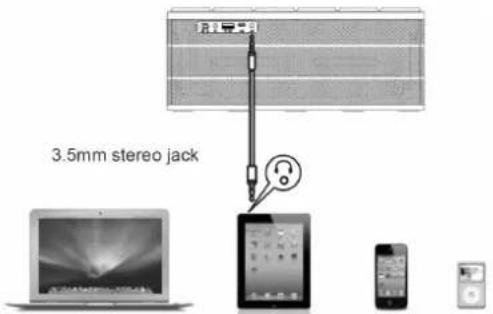
Audio Input
Audio Input can be used for audio input from a device that does not support Bluetooth function (MP3 Player, Notebook etc.)
- connect the speaker and your audio-source via the Audio-Cable.
- Set the Switch of the Bluetooth-Speaker to ON.

ENG - 8
Charging of mobile Devices
You can connect your mobile devices to 5V OUT (USB Port) to charge their batteries.
• Set the Power Switch to ON.
- Connect your mobile device to 5V OUT using an appropriate USB-Cable.
Output: 5V DC, max. 1000mA
Safety Instruction
- The radio wave of this Bluetooth Speaker may impair the operation of other electric or medical devices. Keep this Bluetooth Speaker at least 60cm from pacemakers or other medical devices. Switch off the device in areas where the use is prohibited (For example: Aircraft, medical facilities, refuelling points or close to automatic controlled devices.)
- Keep the Speaker away from hard disc drives, floppy discs, credit cards and other objects that can be damaged by magnetic fields.
- Leaving the Device in hot or cold places, such as in a closed car in summer or winter conditions, will reduce the capacity and lifetime of the integrated battery. Always try to keep the battery between 15°C and 25°C (59°F and 77°F). A device with a hot or cold battery may not work temporarily, even when the battery is fully charged.

ENG - 9
- Keep batteries out of reach of small children. If swallowed, consult a health professional immediately. Should a battery leak, the device may become damaged. Clean the battery compartment immediately, avoiding contact with your skin.
- If the device is not used for a long period of time, the battery may lose its charge. Please recharge the battery.
- Do not attempt to open the Bluetooth Speaker, the rechargeable battery or the battery pack.
- Do not dispose the Speaker in a fire as the internal batteries may explode.
- Do not drop, crush, bend, or apply excessive force to the device.
- Clean the unit with a soft cloth. Never use solvents.
- The unit must only be opened by qualified personnel.
- Keep the Speaker away from water. It is not water proof!
- Speaker and Power Supply unit may get warm during normal operation. Do not cover the device to avoid overheating.
- Check your Mains Voltage before you connect the Power Supply Unit.
- This symbol means that electrical and electronic equipment, at their end-of-life, shall be disposed of separately from your household waste.

Technical Data
Output Power: 2,5+2,5+5W (RMS), Supply: Integrated Li-Ion Battery (2x 2500mAh/3.7V)/USB Cable (5V 650mA)/Power Supply Unit (9.5V/1500mA), CSR Bluetooth v4.0, Operating Temperature: 10°-30°C

ENG-10
Warranty
In case the products delivered are not free from defects in material or workmanship, MAS
Elektronik AG has the right to either repair or replace the defective product at its choice. The warranty for wearing parts (e.g. rechargeable batteries) is limited to 6 months. MAS Elektronik AG is not liable for any accessories not belonging to original package content such as DVDs, hard disc drives,
Flash storage devices, batteries, etc. This limited warranty covers the warranty requirements set by authorities in your country. This limited warranty is valid in the country the product was purchased only. For a correct and frictionless completion of warranty or repairs you need a RMA No. You may obtain a RMA on the internet at www.xoro.de or by telephone.
MAS Elektronik AG
Weidegrund 3
21614 Buxtehude
Germany
Support: support@ersservice.de
Hotline: +49 (0) 4161 800 24 24
Konformität
Declaration of conformity
The following wireless features are delivered with this device: Bluetooth
MAS Elektronik AG hereby declares that this device conforms to the fundamental requirements and the remaining relevant regulations of the 1999/5/EC RTTE directive.
Declaration of conformity are available at www.xoro.de/downloads
CE


Brand : XORO
Model : HXS 900 NFC
Category : Loudspeaker