
CD-PC671H - Hi-Fi System SHARP - Free user manual and instructions
Find the device manual for free CD-PC671H SHARP in PDF.


| Product Type | Hi-Fi System |
| Brand | Sharp |
| Model | CD-PC671H |
| Power Supply | 230 V AC, 50 Hz |
| Standby Power Consumption | 0.6 W |
| CD Player | Yes (compatible with CD, CD-R/RW) |
| Radio Bands | FM, AM |
| Cassette Deck | Yes (double cassette, TAPE 1 and TAPE 2) |
| RDS (Radio Data System) | Yes |
| Subwoofer | Built-in subwoofer with volume control |
| Remote Control | Yes (included) |
| Accessories Included | Remote control, AM loop aerial, FM aerial, AA batteries x2 |
| Dimensions (approx.) | 250 x 350 x 300 mm (main unit) |
| Weight (approx.) | 8 kg (main unit) |
| Laser Class | Class 1 (invisible laser, continuous emission) |
| Safety Features | Auto power-off, laser safety mechanism |
| Audio Inputs | Video/Aux (audio signal) input |
| Audio Outputs | Speaker terminals, subwoofer output |
| Speaker System | Front speakers CP-C671H, centre GBOXS0026AWM1, surround GBOXS0027AWM1 |
| Tuner Presets | Yes (FM and AM station memory) |
| Built-in Timer | Yes (programmable timer) |
Frequently Asked Questions - CD-PC671H SHARP
User questions about CD-PC671H SHARP
0 question about this device. Answer the ones you know or ask your own.
Ask a new question about this device
Download the instructions for your Hi-Fi System in PDF format for free! Find your manual CD-PC671H - SHARP and take your electronic device back in hand. On this page are published all the documents necessary for the use of your device. CD-PC671H by SHARP.
USER MANUAL CD-PC671H SHARP
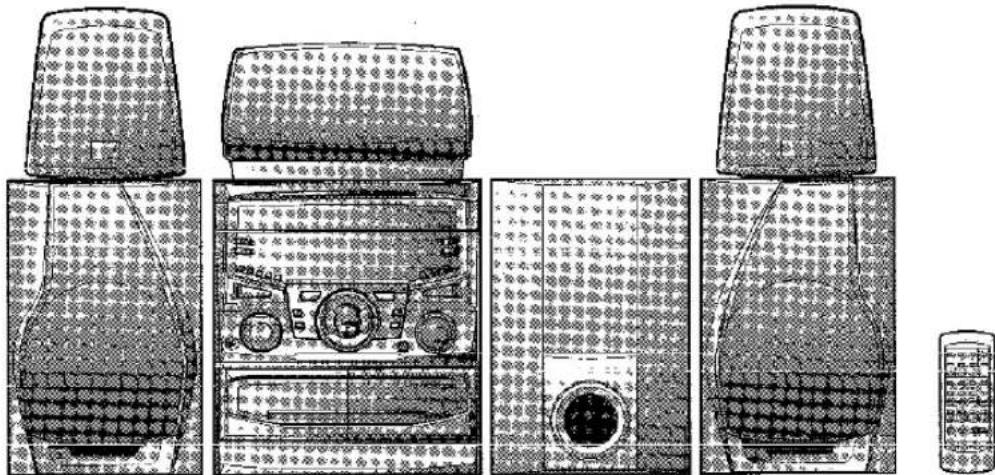
CD-PC671H (main unit), CP-C671H (front speakers), CP-SW671H (sub woofer), GBOXS0026AWM1 (centre speaker) and GBOXS0027AWM1 (surround speakers).


SAVING ENERGY
STAND-BY POWER CONSUMPTION 0.6W
SPECIAL NOTES
● This equipment complies with the requirements of Directives 89/336/EEC and 73/23/EEC as amended by 93/68/EEC.
● Audio-visual material may consist of copyrighted works which must not be recorded without the authority of the owner of the copyright. Please refer to relevant law in your country.
- When the ON/STAND-BY button is set at STAND-BY position, mains voltage is still present inside the unit. When the ON/STAND-BY button is set at STAND-BY position, the unit may be brought into operation by the timer mode or remote control.
Warning:
This unit contains no user serviceable parts. Never remove covers unless qualified to do so. This unit contains dangerous voltages, always remove mains plug from the socket before any service operation and when not in use for a long period.
THIS APPARATUS IS CONNECTED TO 230 V AC WHEN THE PLUG IS INSERTED INTO THE WALL OUTLET. TO COMPLETELY DISCONNECT THE APPARATUS, PLEASE PULL OUT THE PLUG.
● CAUTION
Use of controls, adjustments or performance of procedures other than those specified herein may result in hazardous radiation exposure.
As the laser beam used in this compact disc player is harmful to the eyes, do not attempt to disassemble the cabinet. Refer servicing to qualified personnel only.
WARNING: THIS PRODUCT CONTAINS A LASER. IF THE DEVICE IS HANDLED INCORRECTLY, CONTRARY TO THIS MANUAL, DANGEROUS RADIATION MAY OCCUR. DO NOT OPEN OR REMOVE ANY COVERS AND DO NOT REPAIR THE DEVICE. ENTRUST REPAIR AND SERVICING TO QUALIFIED SERVICE PERSONNEL.
WARNING: THIS PRODUCT CONTAINS A LASER. IF THE DEVICE IS HANDLED INCORRECTLY, CONTRARY TO THIS MANUAL, DANGEROUS RADIATION MAY OCCUR. DO NOT OPEN OR REMOVE ANY COVERS AND DO NOT REPAIR THE DEVICE. ENTRUST REPAIR AND SERVICING TO QUALIFIED SERVICE PERSONNEL.

CLASS 1 LASER PRODUCT APPAREIL À LASER DE CLASSE 1 PRODUCTO LASER DE CLASE 1
LASER KLASSE 1
LUOKAN 1 LASERLAITE
KLASS 1 LASERAPPARAT
LASER TRÍDY 1
LASER TRIEDY 1
Emission Duration: continuous
Laser Output: max. 0.6 mW

WARNING! USING THE DEVICE IN A WAY OTHER THAN THAT
SPECIFIED IN THE USER MANUAL MAY EXPOSE THE USER TO INVISIBLE LASER RADIATION EXCEEDING SAFETY CLASS 1.
WARNING - IF THE APPARATUS IS USED IN A MANNER OTHER THAN THAT SPECIFIED IN THIS USER MANUAL, THE USER MAY BE EXPOSED TO INVISIBLE LASER RADIATION THAT EXCEEDS THE LIMIT FOR LASER CLASS 1.
GERMAN
INTRODUCTION
Remote control × 1
FM antenna × 1
NEE
JA
Juist
Cassette


■ Rear panel
2


Subwoofer volume


Notes:
![graph TD A["FM 沪-0"] --> B["↓"] B --> C["JBL R"] C --> D["↓"] D --> E["JBC R"]](/content/2026/05/847270/images/768800346591aef0f19dc222c4f5c0d70230727135f0a56531883acacd1ccbd1.jpg)
3

4

5


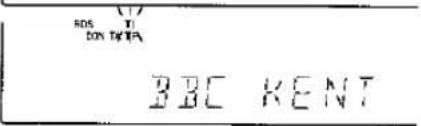
EON-PTY
2

3

4

5

EON-TI
Video/Aux (Audio signal) input
Thank you for purchasing this SHARP product.
To obtain the best performance from this product, please read this manual carefully. It will guide you in operating your SHARP product.
CONTENTS
| Page | Page | |
| ACCESSORIES | 1 | CASSETTE OPERATION 27 |
| PRECAUTIONS | 2 | RECORDING 28 |
| NAMES OF CONTROLS AND INDICATORS | 3-5 | HOW TO USE THE BUILT-IN TIMER 29 |
| PREPARATION FOR USE | 6-10 | USING EXTERNAL UNITS 30 |
| SETTING THE CLOCK | 11 | TRANSPORTING THE UNIT 31 |
| SOUND CONTROL | 12-13 | RESETTING THE MICROCOMPUTER 31 |
| COMPACT DISC OPERATION | 14-16 | MAINTENANCE 31 |
| RADIO OPERATION | 17-18 | SPECIFICATIONS 32 |
| RDS (Radio Data System) OPERATION | 19-27 |
ACCESSORIES
Parts and accessories mentioned in this operation manual other than those in the drawing are not included.

Remote control × 1
AM loop aerial × 1

FM aerial × 1
"AA" size battery (UM/SUM-3, R6, HP-7 or similar) × 2
MEMORANDUM/MÉMORANDUM/MEMORÁNDUM/ANTECKNINGAR /ANNOTAZIONI/MEMORANDUM/MEMO
SHARP
SHARP CORPORATION
Brand : SHARP
Model : CD-PC671H
Category : Hi-Fi System