
CD-C401H - Hi-Fi System SHARP - Free user manual and instructions
Find the device manual for free CD-C401H SHARP in PDF.
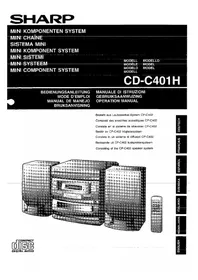


| Product Type | Hi-Fi System (Mini System) |
| Brand | Sharp |
| Model | CD-C401H |
| Speaker System | CP-C402 (included) |
| Power Supply | AC 230 V, 50 Hz |
| CD Playback | Yes, plays standard audio CDs; Laser Class 1, max. output 0.6 mW |
| Cassette Tape Player | Yes (Tape 2 function) |
| Tuner | FM/AM radio with preset memory |
| Amplifier Output Power | Approx. 20 W per channel (estimated) |
| Sound Enhancement | X-Bass function for deeper bass |
| Timer Functions | Programmable timer (play/sleep/recording) |
| Clock Display | Yes, with 12/24 hour format |
| Remote Control | Yes, included for all functions |
| Headphone Jack | Yes (3.5 mm stereo) |
| Dimensions (Main Unit, approx.) | 200 mm (W) x 100 mm (H) x 300 mm (D) |
| Weight (Main Unit, approx.) | 4.5 kg |
| Care & Maintenance | Clean with a soft, dry cloth; avoid solvents and moisture |
| Safety Precautions | Class 1 laser product; do not open; refer servicing to qualified personnel |
| Repairability | Contact authorized Sharp service center for any repairs |
Frequently Asked Questions - CD-C401H SHARP
User questions about CD-C401H SHARP
0 question about this device. Answer the ones you know or ask your own.
Ask a new question about this device
Download the instructions for your Hi-Fi System in PDF format for free! Find your manual CD-C401H - SHARP and take your electronic device back in hand. On this page are published all the documents necessary for the use of your device. CD-C401H by SHARP.
USER MANUAL CD-C401H SHARP
Consisting of the CP-C402 speaker system

- Audio-visual material may include copyrighted works that must not be recorded without the permission of the copyright owner. Please refer to the relevant national laws.
- Audio-visual material may include copyrighted works that must not be recorded without the permission of the copyright owner. Please refer to the relevant national laws.
- Audio-visual material may include copyrighted works that must not be recorded without the permission of the copyright owner. Please refer to the relevant national laws.
- Audio-visual material may include copyrighted works that must not be recorded without the permission of the copyright owner. Please refer to the relevant national laws.
- Audio-visual material may include copyrighted works that must not be recorded without the permission of the copyright owner. Please refer to the relevant national laws.
- Audio-visual material may include copyrighted works that must not be recorded without the permission of the copyright owner. Please refer to the relevant national laws.

Use of controls or adjustments or performance of procedures other than those specified herein may result in hazardous radiation exposure.
As the laser beam used in this compact disc player is harmful to the eyes, do not attempt to disassemble the cabinet. Refer servicing to qualified personnel only.
WARNING: THIS PRODUCT CONTAINS A LASER. IMPROPER USE OF THIS DEVICE IN CONTRAVENTION OF THIS MANUAL MAY RESULT IN HAZARDOUS RADIATION EXPOSURE. DO NOT OPEN OR REMOVE ANY COVERS AND DO NOT REPAIR THE DEVICE. REFER SERVICING TO QUALIFIED SERVICE PERSONNEL.
WARNING: THIS PRODUCT CONTAINS A LASER. IMPROPER USE OF THIS DEVICE IN CONTRAVENTION OF THIS MANUAL MAY RESULT IN HAZARDOUS RADIATION EXPOSURE. DO NOT OPEN OR REMOVE ANY COVERS AND DO NOT REPAIR THE DEVICE. REFER SERVICING TO QUALIFIED SERVICE PERSONNEL.
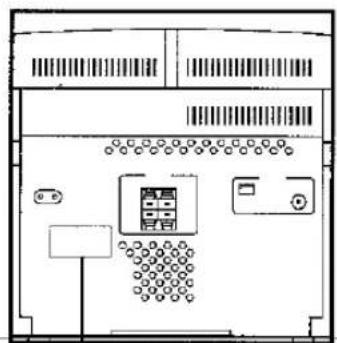
CLASS 1 LASER PRODUCT
CLASS 1 LASER PRODUCT
CLASS 1 LASER PRODUCT
LASER CLASS 1
CLASS 1 LASER PRODUCT
CLASS 1 LASER APPARATUS
LASER CLASS 1
LASER CLASS 1
Emission Duration: continuous
Laser Output: max. 0.6 mW

CAUTION-INVISIBLE LASER RADIATION WHEN OPEN. DO NOT STARE INTO BEAM OR VIEW DIRECTLY WITH OPTICAL INSTRUMENTS.
WARNING - INVISIBLE LASER RADIATION WHEN THIS PART IS OPEN. DO NOT STARE INTO THE BEAM OR VIEW IT WITH OPTICAL INSTRUMENTS.
INVISIBLE LASER RADIATION WHEN OPEN, DO NOT LOOK INTO THE BEAM - NOT EVEN WITH OPTICAL INSTRUMENTS.
WARNING: WHEN OPEN, YOU ARE EXPOSED TO INVISIBLE LASER RADIATION. DO NOT STARE INTO THE BEAM OR VIEW IT WITH OPTICAL INSTRUMENTS.
WARNING - INVISIBLE LASER RADIATION WHEN THIS PART IS OPEN. DO NOT STARE INTO THE BEAM OR VIEW THE BEAM WITH OPTICAL INSTRUMENTS.
ADVERSE LASER RADIATION WHEN COVER IS OPEN. DO NOT STARE INTO THE BEAM OR VIEW DIRECTLY WITH OPTICAL INSTRUMENTS.
WARNING! USE OF THE DEVICE IN A WAY OTHER THAN THAT SPECIFIED IN THIS
MANUAL MAY EXPOSE THE USER TO INVISIBLE LASER RADIATION EXCEEDING SAFETY CLASS 1.
WARNING - IF THE APPARATUS IS USED IN A WAY OTHER THAN SPECIFIED IN THIS INSTRUCTION MANUAL, THE USER MAY BE EXPOSED TO INVISIBLE LASER RADIATION THAT EXCEEDS THE LIMIT FOR LASER CLASS 1.
- When the ON/STAND-BY switch is set at STAND-BY position, mains voltage is still present inside the unit. When the ON/STAND-BY switch is set at STAND-BY position and the clock is displayed, the unit may be brought into operation by use of (timer mode or) remote control.
Warning:
This unit contains no user serviceable parts. Never remove covers unless qualified to do so. This unit contains dangerous voltages, always remove mains plug from the socket before any service operation and when not in use for a long period.
THIS APPARATUS IS CONNECTED TO 230 V AC WHEN THE PLUG IS INSERTED INTO THE WALL OUTLET. TO COMPLETELY DISCONNECT THE APPARATUS, PLEASE PULL OUT THE PLUG.


■ Front panel


■ Caring for your CDs
TAPE 2
Internal maintenance
SHARP
SHARP CORPORATION
Brand : SHARP
Model : CD-C401H
Category : Hi-Fi System