
HGDVK46704 - Security Camera iGET - Free user manual and instructions
Find the device manual for free HGDVK46704 iGET in PDF.


| Product Type | Security Camera System (CCTV Kit) |
| Brand | iGET |
| Model | HGDVK46704 |
| Compression | F.264 Standard Compression |
| Operating System | Linux |
| Smart Device Support | Apple iOS (iPhone/iPad) and Android Phones/Tablets |
| Dual Stream | Yes, set by channel |
| Image Quality | 720p (1280x720) |
| Video Input | 4x BNC (4 channel) or 8x BNC (8 channel) |
| Video Output | 1x VGA, 1x HDMI, 1x BNC |
| Audio Input | 1x RCA |
| Audio Output | 1x RCA, 1x HDMI |
| Network Interface | 10/100M Base-T Ethernet (RJ45) |
| USB Ports | 2x USB 2.0 |
| Storage | 1x SATA HDD interface (up to 6TB) |
| Backup Capability | USB devices (HDD, Flash, DVD/RW) and network via Ethernet |
| Power Supply | DC 12V / 2A |
| Operating Temperature | 0°C to 55°C |
| DVR Dimensions (W x D x H) | 218 x 218 x 44 mm |
| Weight (approx.) | 1.5 kg |
| Camera Resolution | 720p |
| Night Vision | Yes (IR LEDs) |
| User Control | Mouse (included) |
Frequently Asked Questions - HGDVK46704 iGET
User questions about HGDVK46704 iGET
0 question about this device. Answer the ones you know or ask your own.
Ask a new question about this device
Download the instructions for your Security Camera in PDF format for free! Find your manual HGDVK46704 - iGET and take your electronic device back in hand. On this page are published all the documents necessary for the use of your device. HGDVK46704 by iGET.
USER MANUAL HGDVK46704 iGET
natural_image
Black home security camera setup with four cameras mounted on a black base (no visible text or symbols)
natural_image
Exterior view of a silver home security guard system with multiple surveillance cameras (no text or symbols visible on the device itself)SMART/PLATINUM CCTV Kit
- Internet ExplorerTM, Microsoft TM&WindowsTM are registered trademarks of Microsoft Corporation.
- AppleTM, iPhoneTM, iPadTM and iTunesTM are registered trademarks of Apple Computer, Inc.
- AndroidTM and Google PlayTM are registered trademarks of Google Inc
natural_image
Gray rectangular device with a house icon and 'HOME GUARD' branding, no visible text or symbols on the body except a small blue number '10' at top left.
Připojení kamery

Připojeni mikrofonu

Krok 1 Pomocné informace
3.4 Pro iPad


natural_image
Four-panel collage showing outdoor scenes with buildings, a swimming pool, and greenery (no visible text or symbols)| Compression | F.264 Standard Compression |
| Operating System | Linux |
| Smart Device Support | Apple iOS (iPhone / iPad) and Android Phones and Tablets |
| Dual Stream | Yes, Set by Channel |
| Image Quality | 720p (1280x 720) |
| Frame Ratio Recording | 4 Channel: 720p 26FPS per Channel; 8 Channel: 720p 15FPS per Channel |
| Image Playback Quality | 720p 4 Channel DVR: 26FPS (26FPS for 1 Channel) |
| 720p 8 Channel DVR: 80FPS (15FPS for 4 Channels) | |
| Video Mode | Manual, Automatic & Motion Detection |
| Backup Capability | USB Devices (Hard Disk, Flash Drive, DVD/RW etc.). |
| Network Devices via Ethernet RJ/5 | |
| User Control | Mouse |
| Signal Input | CVBS, TVL, AHD, IP (optional), 4 in 1 Hybrid DVR |
| Video Input | 4 Channel: 4x BNC; 8 Channel: 8x BNC |
| Video Output | 1x VGA, 1x HDMI; 1x BNC |
| Audio Input | 1x RCA |
| Audio Output | 1x RCA, 1x HDMI |
| Network Interface | 10W/100M Base-T Ethernet (FU-4S) |
| USB Port | 2x USB 2.0 |
| RS485 | No |
| Alarm Input / Output | No Alarm Input or Output, Not Supported |
| Interface | 1x SATA HDU |
| Maximum Hard Drive Capacity Supported | 61B |
| Power | 12x 72A |
| Operating Temperature | 0°C~55°C |
| DVR Size | 218 x 218 x 44min |
natural_image
Black home security camera with four circular surveillance cameras mounted on a base (no visible text or symbols)
natural_image
Exterior view of a home security guard device with multiple surveillance cameras (no visible text or symbols on the devices themselves)SMART/PLATINUM CCTV Kit
- Internet ExplorerTM, MicrosoftTM&WindowsTM are registered trademarks of Microsoft Corporation.
• AppleTM, iPhoneTM, iPadTM and iTunesTM are registered trademarks of Apple Computer, Inc. - AndroidTM and Google PlayTM are registered trademarks of Google Inc
27 Homeguardview software pre PC
28 Pristup z web. Prehliadača pre Mac a PC
natural_image
Gray rectangular device with a house icon and 'HOME GUARD' branding, no visible text or symbols on the body except a small blue number '10' at top left.
Pripojenie kamery

Pripojenie mikrofönu

Pripojenie reproduktorov

Pripojenie USB myši


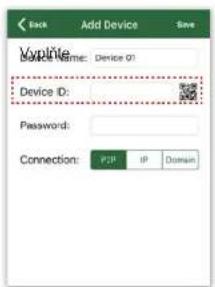
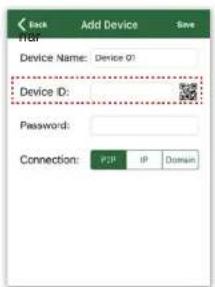
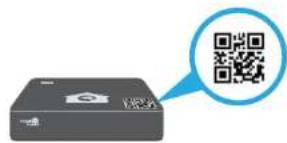
4 Kliknite na QR kód a naskenujte QR kód z DVR rekordéru, pokračujte podľa instrukcií. Namiesto naskenovania QR kódu je možné priamo vypísat ID zariadenia. Vyplňte heslo.


4 Kliknite na QR kód a naskenujte QR kód z D'rekordéru, pokračujte podľa instrukcii. Namiesto naskenovania QR kódu je možné priamo vypísat zariadenia. Vyplňte heslo.


natural_image
Four-panel collage showing outdoor scenes with buildings, a swimming pool, and greenery (no visible text or symbols)4
5 Kliknite na "By Scan/Pomocou skenovania" alebo na "By ID/Dle" ID pre nájdenie zariadenia.

7 Zadajte P2P ID zariadenia a heslo.

| Compression | F.264 Standard Compression |
| Operating System | Linux |
| Smart Device Support | Apple iOS (iPhone / iPad) and Android Phones and Tablets |
| Dual Stream | Yes, Set by Channel |
| Image Quality | 720p (1280x 720) |
| Frame Ratio Recording | 4 Channel: 720p 26FPS per Channel; 8 Channel: 720p 15FPS per Channel |
| Image Playback Quality | 720p 4 Channel DVR: 26FPS (26FPS for 1 Channel) |
| 720p 8 Channel DVR: 80FPS (15FPS for 4 Channels) | |
| Video Mode | Manual, Automatic & Motion Detection |
| Backup Capability | USB Devices (Hard Disk, Flash Drive, DVD/RW etc.) |
| Network Devices via Ethernet RJ/5 | |
| User Control | Mouse |
| Signal Input | CVBS, TVL, AHD, IP (optional), 4 in 1 Hybrid DVR |
| Video Input | 4 Channel: 4x BNC; 8 Channel: 8x BNC |
| Video Output | 1x VGA, 1x HDMI; 1x BNC |
| Audio Input | 1x RCA |
| Audio Output | 1x RCA, 1x HDMI |
| Network Interface | 10W/100M Base-T Ethernet (FU-4S) |
| USB Port | 2x USB 2.0 |
| RS485 | No |
| Alarm Input / Output | No Alarm Input or Output, Not Supported |
| Interface | 1x SATA HDU |
| Maximum Hard Drive Capacity Supported | 61B |
| Power | 12x 72A |
| Operating Temperature | 0°C~55°C |
| DVR Size | 218 x 218 x 44min |
natural_image
Black home security camera with four cameras mounted on a black base (no visible text or symbols)
natural_image
Exterior view of a silver home security guard system with multiple surveillance cameras (no text or symbols visible on the device itself)SMART/PLATINUM CCTV Kit
- Internet ExplorerTM, MicrosoftTM&WindowsTM are registered trademarks of Microsoft Corporation.
- AppleTM, iPhoneTM, iPadTM and iTunesTM are registered trademarks of Apple Computer, Inc.
- AndroidTM and Google PlayTM are registered trademarks of Google Inc
DOMYŚLE KODY DOSTĘPU
natural_image
Gray rectangular device with a house icon and 'HOME GUARD' branding, no visible text or symbols on the body.
Połącz kamere

Podłącz mikrofon

Podłącz głośnik

Podłącz mysz


3.4 Dla iPad
3.5 Dla Android Phone/Tablet



WSPARCIE TECHNICZNE
| Compression | 1:284 Standard Compression |
| Operating System | Linux |
| Smart Device Support | Apple iOS (iPhone / iPad) and Android Phones and Tablets |
| Dual Stream | Yes, Set by Channel |
| Image Quality | 720p (1260x 720) |
| Frame Ratio Recording | 4 Channel: 720p: 2GFPs per Channel; 8 Channel: 720p 15FPS per Channel |
| Image Playback Quality | 720p 4 Channel DVR: 2GFPs (2GFPs for 1 Channel) |
| 720p 8 Channel DVR: 6GFPs (15FPS for 4 Channels) | |
| Video Mode | Manual, Automatic & Motion Detection |
| Backup Capability | USB Devices (Hard Disk, Flash Drive, DVD/RW etc.). |
| Network Devices via Ethernet RJMS | |
| User Control | Mouse |
| Signal Input | CVBS, TVL, AHD, IP (optional), 4 in 1 Hybrid DVR |
| Video Input | 4 Channel: 4x BNC; 8 Channel: 8x BNC |
| Video Output | 1x VGA, 1x HDMI; 1x BNC |
| Audio Input | 1x RCA |
| Audio Output | 1x RCA, 1x HDMI |
| Network Interface | 10W/100M Base-T Ethernet (VJ-4E) |
| USB Port | 2x USB 2.0 |
| RS485 | No |
| Alarm Input / Output | No Alarm Input or Output, Not Supported |
| Interface | 1x SATA HDD |
| Maximum Hard Drive Capacity Supported | 61B |
| Power | 12x / 2A |
| Operating Temperature | 0°C~55°C |
| DVR Size | 218 x 218 x 14 min |


Brand : iGET
Model : HGDVK46704
Category : Security Camera