
SMART Security M3P5 - Security System iGET - Free user manual and instructions
Find the device manual for free SMART Security M3P5 iGET in PDF.


| Brand | iGET |
| Model | SMART Security M3P5 |
| Product Type | Remote Controller for Security System |
| Compatible System | iGET SECURITY M3 series smart alarm system |
| Dimensions (L×W×H) | 58.0mm × 33.1mm × 11.0mm (±0.1mm) |
| Weight (with battery) | 16.0g |
| Power Supply | DC 6V (2 × CR2016 button batteries) |
| Battery Type | CR2016 (3V each) |
| Standby Current | 0mA |
| Working Current | 7.5mA |
| Transmission Frequency | 433.29MHz |
| Transmission Distance (Open Area) | 100m |
| Working Temperature | -20°C to 50°C |
| Humidity | ≤90%RH (non-condensing) |
| Key Functions | Arm, Home Arm, Disarm, SOS |
| Pairing Method | Scan QR code via App (confirmed by SMS) |
| LED Indicator | Yes (lights on button press) |
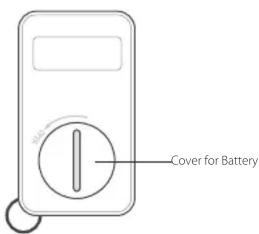
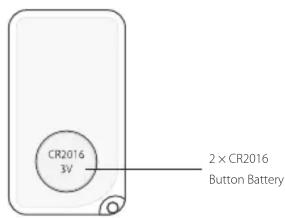
| Battery Replacement | Use coin to turn cover counterclockwise; replace with 2× CR2016 (+ facing up) |
| Maintenance | Wipe with dry cloth; avoid moisture and extreme temperatures |
| Safety | Keep away from water and heat sources; do not disassemble |
Frequently Asked Questions - SMART Security M3P5 iGET
User questions about SMART Security M3P5 iGET
0 question about this device. Answer the ones you know or ask your own.
Ask a new question about this device
Download the instructions for your Security System in PDF format for free! Find your manual SMART Security M3P5 - iGET and take your electronic device back in hand. On this page are published all the documents necessary for the use of your device. SMART Security M3P5 by iGET.
USER MANUAL SMART Security M3P5 iGET
EN Installation manual | Remote Controller
Exclusive importer of products Shenzhen Dinsafe Intelligence Co., Ltd.
for the Czech Republic and Slovak Republic
Copyright © 2015 INTELEK spol. s r.o. All rights reserved.

Features
The M3P5 remote controller is an accessory of iGET SECURITY M3 series smart alarm system. It helps you quickly arm/disarm/home arm/trigger SOS the system.
It's small and exquisite, convenient for carrying out on keychain or in pocket/bag.
Parameters
| ·Working Voltage DC 6V | |
| ·Battery 2 × CR2016 button battery (3V) | |
| ·Working Current 7.5mA | |
| ·Standby Current 0mA | |
| ·Transmission Distance Without obstacle 100m | |
| ·Transmission Frequency 433.29MHz | |
| ·Working Temperature -20 | C ~50 C |
| ·Humidity ≤90%rh (non-condensing) | |
| ·Weight 16.0g (battery included) | |
| ·Dimension 58.0mm*33.1mm*11.0mm | L*W*H(±0.1mm) |
Appearance

PCB Layout
Pairing with main panel by App
① Scan the QR code printed on the controller.
② The pairing result would be confirmed by SMS sent from main panel.
Operating Clarification
- Arm
Press 🔒, the LED indicator lights on, the system enters armed status.
- Home Arm
Press 🖱️, the LED indicator lights on, the system enters home armed status.
- Disarm
Press 🔒, the LED indicator lights on, the system enters disarmed status.
• SOS
Press SOS, the LED indicator lights on, the system immediately enters emergent alarming status to call/text emergency contacts.
Battery replacement instructions

natural_image
Simple line drawing of a coin being placed on a rectangular base with a curved arrow indicating rotation (no text or symbols)① Using a coin, turn the battery cover slightly counterclockwise.

natural_image
Simple line drawing of a device with a circular button and arrow, no text or symbols present.② Remove the used battery and replace with 2× CR2016 battery with the plus (+) symbol facing up.

O produktu
natural_image
Two technical illustrations of a device with a coin and a button, no text or symbols present.natural_image
Two technical illustrations of a device with a circular component and a button, showing no text or symbols.


Brand : iGET
Model : SMART Security M3P5
Category : Security System