
3CAM 5200W - Video camera SENCOR - Free user manual and instructions
Find the device manual for free 3CAM 5200W SENCOR in PDF.


| Brand | Sencor |
| Model | 3CAM 5200W |
| Product Type | Video Camera |
| Recording Resolution | 1080p Full HD |
| Frame Rate | 30 fps |
| Image Sensor | CMOS |
| Optical Zoom | 5x |
| Display | 2.7" LCD |
| Storage | SD/SDHC memory card (up to 32 GB) |
| Battery Type | Rechargeable Lithium-Ion |
| Battery Capacity | 1200 mAh |
| Dimensions (W x H x D) | 120 x 70 x 90 mm |
| Weight | 300 g |
| Connectivity | USB 2.0, HDMI |
| Included Accessories | Battery, charger, USB cable, manual |
| Video Formats | AVI |
| Photo Resolution | 5 MP |
| Microphone | Built-in |
| Speaker | Built-in |
| Tripod Mount | Yes (1/4" thread) |
| Warranty | 2 years |
| Manual Languages | English, Czech, Hungarian, Polish, Slovak |
Frequently Asked Questions - 3CAM 5200W SENCOR
User questions about 3CAM 5200W SENCOR
0 question about this device. Answer the ones you know or ask your own.
Ask a new question about this device
Download the instructions for your Video camera in PDF format for free! Find your manual 3CAM 5200W - SENCOR and take your electronic device back in hand. On this page are published all the documents necessary for the use of your device. 3CAM 5200W by SENCOR.
USER MANUAL 3CAM 5200W SENCOR
natural_image
Two horizontal color swatches: black, gray, white with no text or symbols
SENCOR®
Let's live!
OUTDOOR CAMERA
OUTDOOROVÁ KAMERA
OUTDOOROVÁ KAMERA
SZABADIDŐ-KAMERA
KAMERA OUTDOOROWA
3CAM 5200W
USER'S MANUAL
NÁVOD K OBSLUZE
NÁVOD NA OBSLUHU
HASZNÁLATI ÚTMUTATÓ
INSTRUKCJA OBSŁUGI
EN CZ SK HU PL

1. Warning
This product is made with high precision and designed with respect to its multi-purpose outdoor use for individual entertainment purposes.
Respect valid privacy laws when capturing recordings, in particular in your absence.
Prevent falls and impacts, especially on sharp and angular objects, stones etc.
Do not expose the device to strong magnetic fi elds such as magnets and electric motors. Keep away from strong radio signals. Strong magnetic fi elds can damage data on the memory device (card), distort video and audio or even cause the product to malfunction.
Do not expose products to high temperatures or direct sunlight.
Use brand name and fast microSD cards. Proper functionality and recording features are not guaranteed for non-brand name or slow cards.
Prevent a battery contact short circuit. A short circuit can increase the battery temperature and even ignite surrounding objects.
Immediately unplug the device if it begins to overheat, emit smoke or an unpleasant odour while charging to prevent fire.
The product is not a children's toy. Keep it away from children especially when charging.
Plugging the device into the network incorrectly can result in injury, spontaneous suffocation or electric shock.
Keep the device in cool, dry and dust-free environments.
Storage information
Keep in mind that this product is also designed for outdoor use, which can result in it becoming soiled. Carefully clean your camera, case and accessories and blow dust from soiled areas prior to storing, for example, outside of the season, whether short-term or
EN 1
Revision 05/2015 Copyright © 2015, Fa



natural_image
Color palette bar with grayscale gradient and a crosshair symbol (no text or labels)EN Warning
long-term. Dust can eventually cause the coarsening of contact points and reduce, or even completely prevent the product's resistance against dust. Always check the purity of the device before the start of the season.
Check the case door seal and buttons at season's end, or at least once a year, and have these components replaced if necessary.
Do not use abrasive materials, chemicals or tools to clean the device. Use a soft, dry towel only. Warm water can be used on non-electric accessories.
The battery is exposed to high mechanic load with respect to changing outdoor conditions.
Check the battery on occasion for changes to the shape and colour of the case, status and oxidation of contacts. Battery wear and tear is demonstrated by lower capacity and shorter operating time.
To store the battery for a longer period of time, charge the battery to full and remove it from the device. This extends the battery life and allows you to better utilize its capacity.
Outdoor use
Prior to using the camera outdoors, prepare and put together the device and accessories ahead of time in a calm manner and dry environment. Make sure the camera is capable of recording scenes you are interested in and that your equipment and clothing are not in the way. This prevents the need to make assembly adjustments and open the sealed camera case in dust/sand, rain, gloves etc.
Remember that for outdoor use, the camera must be properly closed inside the outdoor waterproof case.
Avoid battery contact contamination and short circuits when handling the battery. Use small plastic bag when you remove the battery.

2 EN
Revision 05/2015 Copyright © 2015, Fast


natural_image
Color palette bar with grayscale shades and a central crosshair symbol (no text or labels)Introduction
EN
Do not use the camera in water streams or hot thermal springs. After using the camera in salt water, wash the closed case in fresh water and allow the salt to crystallize on the surface. Open the case in a clean and dry environment, remove the camera and check the sealing and buttons. If you find salt residue, wash the case in fresh water again and leave the case at room temperature to fully dry, without the affects of warm air or heating. This preserves the water-resistant functionality of the case for its next use.
The camera does not float. Prevent losing the camera in the water by attaching a suitable strap.
Pay special attention to the cover glass lens and protect it against dust, dirt and scratches. You will be rewarded by clean and sharp images.
Using the camera at lower temperatures
Battery performance is temporarily reduced at lower temperatures and increases again once heated to room temperature. We recommend keeping the device in a warm environment, e.g. inside clothing. Do not charge the battery at lower temperatures. The brightness and display colour can change at zero degree temperatures. Moisture can condense or freeze at lower temperatures, making it diffi cult or impossible to control the camera, especially around the buttons. It can also lead to impaired image quality. Try to prevent condensation and freezing.
2. Introduction
This product is a digital device used to record high definition videos. It provides a range of top-level functions such as digital video recording, camera, audio recording, video playback and features a removable battery, making it the ideal device for recording in your car, taking pictures, outdoor sports, home security, water activities and others, so you can record video any time and anywhere.
EN 3
Revision 05/2015 Copyright © 2015, Fa

natural_image
Color palette bar with grayscale gradient and a crosshair symbol (no text or labels)EN Introduction


Dashcam Outdoor sports Water sports Diving Home security
Based on the activity you plan to use the device for, you can assemble the holder to ensure the entire viewing angle of the lens captures the entire scene. Remember that the camera has a wide angle lens and captures a larger scene than the human eye is capable of. In practice, this effect is caused by straight lines of objects bending, also referred to as the fi sh eye effect. Make a trial recording to see whether the camera captures the desired scene and that there are no obstacles. Try to keep the holder length as short as possible during assembly. The camera will not project outward that much, it will be less prone to damage by spontaneous impact with another obstacle and it will also be exposed to less vibrations, transferred from the mat. The result will be a smoother video recording. If you decide to assemble the holder using adhesives, use the tape included in the package and carefully clean and degrease the areas you plan to apply the tape. Look for position that is smooth and large enough to correctly accommodate the holder. Prior to applying the tape, check to ensure it is clean and intact and that the adhesive is not old (an older adhesive might not have the desired effect). Purchase a new brand name and quality tape, if necessary.
2.1. Function
• Waterproof case for capturing fascinating water scenes; waterproof up to 30 metres
• High definition display for displaying and playing recorded videos
- Removable easy-to-replace battery extends the life of your camera
• Video recording while charging
• Battery-operated video recording
- Wide angle lens with 12 megapixel HD resolution
4 EN
Revision 05/2015 Copyright © 2015, Fast



natural_image
Color palette bar with grayscale shades and a central crosshair symbol (no text or labels)Start-up
EN
- HDMI HD output
- Web camera
• Supports memory cards with a capacity of up to 32 GB
• Several video recording formats: 1080p / 720p
• MOV format recording
• Several camera modes: single frames, snapshots - Thumbnails
3. Start-up
3.1. microSD card installation and removal
A. Slide the microSD card into the camera card slot with the contacts facing towards the camera until the card lock clicks.
B. To remove the card, push the card gently until the card lock clicks and slightly slides the card out from the slot. Use your fingers to remove the card completely from the camera.

Note: use your own brand name microSD card and format the card using a computer before use. Proper functionality is not guaranteed for non-brand name cards. The card can also be formatted using the camera.
3.2. Battery installation and removal
Note: the battery has a thin tongue allowing the user to pull out the battery from the tight battery compartment. Do not remove the tongue.
EN 5
Revision 05/2015 Copyright © 2015, Fa


natural_image
Color palette bar with grayscale gradient and a crosshair symbol (no text or labels)EN Start-up
A. Use your fingernail to gently push the fl exible battery compartment closure and open the cover.
B. Insert the battery completely into the camera battery compartment (with the contacts aligned). Make sure the removal tongue remains accessible.
C. The camera will activate if the battery is charged enough.
D. Place the battery compartment cover back on the camera (in the direction towards the side of the camera) and gently close the cover until the flexible closure clicks.
E. Battery removal: open the cover and pull on the tongue to remove the battery.
Tip: a new battery reaches full capacity after about 3 charging cycles. We recommend fully charging the battery (until the red indicator goes off) and is deplete until the camera switches off. This extends the battery life.


Note: the camera can be operated even without a battery with an external power supply, for example in the car. Unexpected states can occur with a low battery inserted, including spontaneous shutdown. Charge the camera battery at least a little when using the camera for the first time.
3.3. Charging
The inserted battery can be charged either by connecting the camera to a computer or using a power adapter. The adapter must supply an output voltage of 5 V and can either be a network adapter or car adapter. Prior to connecting the power adapter, make sure its voltage is compatible with the network voltage, or voltage supplied by the vehicle.
6 EN
Revision 05/2015 Copyright © 2015, Fast


natural_image
Color palette bar with grayscale gradient and a crosshair symbol (no text or labels)Start-up
EN
The camera can be charged in both on and off states. Recordings can be made during the charging process (e.g. in the car). The charging indicator is on while charging (top, left). The adapter, battery and camera become slightly warm while charging. This is a normal effect of energy conversion.
3.4. Switching the camera on and off
A. Press and hold the switch for 3 to 5 seconds to switch the camera on or off. A blue indicator (bottom, left), or active display (based on the current settings: PowerSave) indicate the camera is on.
B. The camera also switches on and off (based on the current settings, see further) by connecting and disconnecting the power supply, for example in the car, according to the ignition key position.
C. The camera can also be confi gured to automatically start based on its internal motion detectors and shut down after a confi gurable delay.
3.5. Switching between modes
Press the on/off switch shortly to switch between modes: Video Recording / Camera / Playback / Settings.
The mode is indicated by the following symbols in the top left corner of the active display: Video/Camera/Play(triangle)/Tools.
3.6. Recording videos and taking photos
Recording (Video Recording mode) and taking photos (Camera) is possible if a memory card is inserted into the camera and properly formatted. This can easily be achieved by pressing the OK on the top of the camera when the display is on. If the display off (PowerSave), the first press of the button activates the display and the second press performs the desired function. To stop an active recording process, press OK again when the display is on.
EN 7
Revision 05/2015 Copyright © 2015, Fa



natural_image
Color palette bar with grayscale gradient and a crosshair symbol (no text or labels)EN
PC connection
An active recording sequence is indicated by a slow-fl ashing blue indicator and red dot on the active display. Taking a picture is accompanied by the typical shutter sound from the camera speaker.
3.7. Recording playback and viewing photos
Upon switching the mode to play, you can begin viewing files according your File Type settings: Event represents events captured by the G-sensor, Video represents video recordings,
JPEG represents photos. Press Up and Down to navigate between files. You can view entire video files – press OK to play/pause videos, Up to move back and Down to move forward.
Press Mode shortly to stop playback.
3.8. HDMI connection
Camera recordings can be played in full resolution on a monitor (TV) by connecting the proper cable. The camera has a Micro HDMI (Type D) connector. By connecting the HDMI cable, the camera will switch to playback mode, the display will switch off, controls work normally. Once the HDMI cable is disconnected, the camera stays in playback mode and the display switches on.
4. PC connection
Plug the camera into the computer USB port (Windows) using the included cable. Besides charging the device, you can also use the cable for transferring data.
As soon as the computer detects the camera, a dialog will appear prompting the user to select between MSDC and PCCAM mode. Press Up and Down to select a mode and press OK to confirm.
8 EN
Revision 05/2015 Copyright © 2015, Fast



natural_image
Color palette bar with grayscale gradient and a crosshair symbol (no text or labels)PC connection
EN
MSDC mode – connects the memory card inserted in the camera to the computer as an external storage device. This storage device acts as any other computer hard drive and allows copying files to the computer. The card contains 3 folders: EVENT represents recordings that are events "locked" preventing them from being automatically erased when deleting older recordings, VIDEO represents standard camera recordings, JPEG represents photos.
Note: we recommend not making any changes to files or memory cards while the camera is connected to the computer. Some files or the entire card could become inaccessible for the camera or even prohibit further recording to the card. In this case, the card shall be formatted, which results in losing all data stored on the card.
PCCAM mode – can be used for video conferencing applications, e.g. Skype. Based on the way you plan to use the device, the camera can be renamed to Siri, AP9 etc.
The computer searches for compatible drivers after connecting the device to the computer port for the first time. An internet connection will eventually be required to download operating system updates. Wait for the installation process to finish. If the installation fails, try a different port, or replace the cable.
Card reading – you can also remove the microSD card from the camera when switched off and insert it into a compatible PC card reader. You can then read recorded files directly from the Event, Movie, JPEG folders and save them for further processing or archiving.


EN 9
Revision 05/2015 Copyright © 2015, Fa


natural_image
Color palette bar with grayscale shades and a central crosshair symbol (no text or labels)EN Wi-Fi control
5. Wi-Fi control
The camera also allows you to completely control the recording process using your mobile phone (Android/iPhone) via wireless connection. The on-board controls are disabled when remote control is active.
To save energy, the Wi-Fi function is disabled by default. Enabling Wi-Fi activates the integrated transmitter, which awaits the connection from an external controlling application, the operation indicator fl ashes blue, a dialog appears on the display that reads "Waiting for WiFi Connecting". The Wi-Fi function is disabled after one minute if no connection is established.
Enable Wi-Fi controls as follows:
- Install ispocam.APK (Android) / ispocam.IPA (iPhone) on your mobile phone.
- Enable Wi-Fi on your mobile phone.
- Select the wireless network the name of which corresponds to your camera: "A5-A000001".
- The default Wi-Fi connection password is "1234567890". Enter the right password into your mobile phone and the camera will establish the connection. After a connection is successfully established, the indicator remains lit and the camera display is disabled to save energy.
- Run the ispocam application and after a moment, the mobile phone displays the image transmitted by the camera and is capable of controlling the camera, recording and able to download photos and video recordings to the mobile phone memory for further processing.

10 EN
Revision 05/2015 Copyright © 2015, Fast


natural_image
Color palette bar with grayscale gradient and a central crosshair symbol (no text or labels)Camera settings
EN
Note: pairing the camera and mobile phone is a two-way operation; once the mobile phone is connected, you cannot connect to another mobile phone, so you have to unpair the first phone. Phones running Android 2.3 or higher and iOS are supported. The transmitted picture is slightly delayed compared to reality. The Wi-Fi connection range depends on the surrounding environment (interference etc.). A strong signal ensures a reliable data transmission. You can track the signal indicator in the ispocam application. The data transmission can oscillate or controls or transmission can be completely impossible with a weak signal.


NOTICE: the camera still respects the PowerSave settings. If you have an Off interval set, the camera will shutdown when this interval is reached and the connection will be lost. The procedure above (from item 2) shall be repeated to restore the connection.

6. Camera settings
The camera can operate in many modes and its settings are adapted to do so. Before fully using your camera, take the time to properly confi gure and test your camera. This way you can prevent disappointment with the fi nal product not meeting your expectations. You should particularly consider whether or not the camera will be moving during the recording process, how long the recording will be, how the camera will be powered, etc. Also consider possible conflicts in processing impulses (spontaneous activation, motion detection, delay shutdown, connecting the power supply to charge the battery) to avoid missing the events you would like to capture because one impulse was not followed by the second.
EN 11
Revision 05/2015 Copyright © 2015, Fa


natural_image
Color palette bar with grayscale shades and a central crosshair symbol (no text or labels)EN Camera settings
Press Up and Down to switch between items, press OK to enter the menu item. Select the desired value within the menu item and press OK to save this value and close the item. Press Mode to exit Settings by switching to a different mode.
Note: the individual settings have symbols mentioned by their names. The same symbol appears on the status display.
- Movie Size – indicated by a number on the display
Choose between FHD 1080p and HD 720p. Remember that both cases require having a memory card that is fast enough to write the received data. The amount of data and file sizes for 1080p is larger than 720p.
- Seamless – camera symbol with 1/3/5 on the display
Chose a full recording (OFF) or divided into individual 1 min/3 min/5 min fi les. Use the division feature especially in cases where fi le lock is used (auto-delete protection), e.g. the impact G-sensor. Smaller fi les are more suitable to lock.
- HDR - [HDR] symbol on the display
High-dynamic-range imaging is an adaptive shooting technique in a high dynamic brightness range, which is supposed to give a closer sense of human perception. For subjectively better results, select On/Off with respect to the lighting conditions and action speed.
- Motion Detection – the symbol will appear on the display during the recording sequence
The camera evaluates motion in the viewing angle and activates the recording sequence if more significant motion is registered. About a 10 minute recording is created.
12 EN
Revision 05/2015 Copyright © 2015, Fast



natural_image
Color palette bar with grayscale gradient and a crosshair symbol (no text or labels)Camera settings
EN
- Record Audio – enabled or disabled microphone symbol on the display Enable or disable audio recording with picture.
6. Date stamp
Enable or disable including the date and time directly in your recording.
7. Sport Mode - [P] symbol on the display
This mode is automatically activated when the camera experiences a swift movement or impact. Select the motion intensity sensitivity option LOW, MID, HIGH or OFF to disable the mode. As soon as the motion detector of a camera that is switched off registers a swift movement or impact (based on the settings), the camera turns on and records until the battery runs out of power. For example, this mode can also be used in a parked car in your absence – Parking mode.
8. G-Sensor - key symbol on the display throughout the duration of recording the currently locked file
The impact sensor locks fi les to protect them against auto-deletion. The camera records to the memory card until the full capacity of the card is reached. Then it begins to automatically delete the oldest recordings. For example, locking a fi le using the G-sensor prevents deleting a fi le that was recorded immediately before and directly after an accident, even though the camera were to continue recording. Select the proper sensor activation threshold (sensitivity) between OFF, LOW, MID, HIGH, which approximately corresponds to 1G/2G/8G.


EN 13
Revision 05/2015 Copyright © 2015, Fa


natural_image
Color palette bar with grayscale shades and a central crosshair symbol (no text or labels)EN Camera settings
Note: if a locked fi le fi lls the entire memory, further recording will not be possible. We recommend selecting shorter fi les (Seamless), and using the lock option with moderation and thoroughly delete locked fi les manually, to ensure you always have the maximum space available.
Tip: a file can be locked manually by pressing the Down button during the standard recording process.
- Resolution - Mpix on the display in camera mode including the estimated amount of remaining space on the card Choose the photo size between 12M 4000×3000, 10M 3648×2736, 8M 3264×2448, 6M 2816×2112, 3M 2048×1536, 2M 1920×1080, VGA 640×480. Larger sizes generate larger files that fill the card memory faster.
- Exposure - value on the display The video camera and camera exposure can be pre-set from -2 (for lighter environments) to +2 (for darker environments).
- Quality – photo quality 1 to 3 stars on the display in camera mode Choose the rate of capturing fi ne photo details between SuperFine (3 stars, largest fi le size), Fine, and Normal (1 star, smallest fi le size).
- White balance – symbol on the display in camera mode Based on the predominant type of lighting, you can adjust the photo tones between Auto (recommended), Daylight, Cloudy, Tungsten, Fluorescent.
14 EN
Revision 05/2015 Copyright © 2015, Fast



natural_image
Color palette bar with grayscale shades and a central crosshair symbol (no text or labels)Camera settings
EN
- ISO – number on the display in camera mode Choose between Auto (recommended)/100/200/400. A greater number corresponds to a higher material sensitivity, however, it also increases picture noise.
- Anti-shaking – hand symbol on the display in camera mode The shutter speed is quicker when taking snapshots to reduce the effect of a shaking hand or mat. ON / OFF options.
- Burst – series symbol on the display in camera mode Choose between OFF. 3/5/10 snapshots on a single trigger push. Suitable for quick action. A series of snapshots takes longer to write to the card, the operating indicator flashes for the duration of this operation. Wait until the write process completes, indicated by the indicator light permanently turned on. The card speed and number of photos in the series influence the writing period, as well as the photo size (larger photos take longer to write), fi ne setting and sharpness (fi ner and sharper photos take longer to write).
- Sharpness The sharpness of photos after being taken can be affected using the Strong, Normal (recommended) and Soft.
- Date & Time Use the Up and Down arrows to set the date and time, move between items by shortly pressing the Mode button.
EN 15
Revision 05/2015 Copyright © 2015, Fa



natural_image
Color palette bar with grayscale gradient and a crosshair symbol (no text or labels)EN Camera settings
18. Power Save
Set the period after which the display turns off. The available options are OFF (the display is always on), 10 sec, 30 sec, 1 min. The display will turn off after the configured period, the camera continues in executing the previous activity. The display will turn back on by shortly pressing the OK, Up or Down buttons.
19. Rotate
The user interface (information messages on the display) can either be fixed (OFF) and can therefore be upside down when the camera is rotated, or the texts can rotate (ON) when the camera is turned to ensure legibility. The captured image remains intact.
20. Wi-Fi password
The pre-set Wi-Fi connection password is "1234567890" can be changed to a custom password consisting of letters and numbers.
21. BEEP
Pressing buttons can be accompanied by beeps (On) or can be beeps can be disabled (Off).
22. Language
Choose from one of several user interface languages.
23. Light Freq
Camera use under artificial light circumstances can be affected by lights flickering at network frequency, which your eye would not normally register, but your camera will. Choose 50 Hz/60 Hz according to your conditions.
16 EN
Revision 05/2015 Copyright © 2015, Fast



natural_image
Color palette bar with grayscale gradient and a crosshair symbol (no text or labels)Camera settings
EN
24. Delay Shutdown
If this setting is set to On, the camera does not perform any operation for approximately 1 minute, the camera is switched off to save energy.
25. File Type
Determine the files to be played in playback mode. Event represents events captured by the G-sensor, Video represents video recordings, JPEG represents photos.
26. Format
This feature allows you to format the inserted card to be used in the camera. A confirmation request will appear Yes=Enter, or No=Cancel. ATTENTION! Formatting will delete all previous contents of the memory card forever!
27. Delete File
To delete unnecessary fi les, choose between Delete This File?, which deletes the last file, or the next fi le back. Or Delete All Files? The delete process shall be confirmed Yes or No
28. Factory reset
Sets all items to the factory pre-sets. This is useful if you would like to return to the default status for multiple settings. Confirm with Enter or cancel by pressing Cancel.
29. System information
Lists information about the currently used system.


EN 17
Revision 05/2015 Copyright © 2015, Fa


natural_image
Color palette bar with grayscale gradient and a central crosshair symbol (no text or labels)EN
Technical data
7. Technical data
| LCD display 1.5" LTPS | |
| Lens Wide angle A+ lens with a 170° viewing angle | |
| Video/codec formats MOV/H.264 | |
| Recorded video resolution 1080P (1920 × 1080) 30 fps720P (1280 × 720) 30 fps | |
| Photo format JPEG | |
| Photo resolution 12M/10M/8M/6M/3M/2M/VGA | |
| Storage microSD | |
| USB interface USB 2.0 | |
| TV out HDMI type D | |
| Required power supply | 5 V / 1 A |
| Battery capacity 900 mAh | |
| Recording duration | 1080P / about 70 minutes |
| Charging time about 3 hours | |
| Camera dimensions | 59 × 41 × 29 mm |
| Camera weight including battery | 65 g |
Note: The technical data can be updated. The product itself shall be considered as the standard.
18 EN
Revision 05/2015 Copyright © 2015, Fast


INSTRUCTIONS AND INFORMATION REGARDING THE DISPOSAL OF USED PACKAGING MATERIALS
Dispose of packaging material at a public waste disposal site.
DISPOSAL OF USED ELECTRICAL AND ELECTRONIC APPLIANCES
The meaning of the symbol on the product, its accessory or packaging indicates that this product shall not be treated as household waste. Please, dispose of this product at your applicable collection point for the recycling of electrical & electronic equipment waste.
Alternatively in some states of the European Union or other European states you may return your products to your local retailer when buying an equivalent new product.
The correct disposal of this product will help save valuable natural resources and help in preventing the potential negative impact on the environment and human health, which could be caused as a result of improper liquidation of waste. Please ask your local authorities or the nearest waste collection centre for further details. The improper disposal of this type of waste may fall subject to national regulations for fines.
For business entities in the European Union
If you wish to dispose of an electrical or electronic device, request the necessary information from your seller or supplier.
Disposal in other countries outside the European Union
If you wish to dispose of this product, request the necessary information about the correct disposal method from local government departments or from your seller.
This appliance complies with EU rules and regulations regarding electromagnetic and electrical safety.
Changes to the text, design and technical specifications may occur without prior notice and we reserve the right to make these changes.
Manufacturer address: FAST ČR, a.s., Černokostelecká 1621, Ríčany, Czech Republic
EN


EN 19
Revision 05/2015 Copyright © 2015, Fa


SENCOR®
EN Warranty conditions
Warranty card is not a part of the device packaging.
This product is warranted for the period of 24 months from the date of purchase to the end-user. Warranty is limited to the following conditions. Warranty is referred only to the customer goods using for common domestic use. The claim for service can be applied either at dealer's shop where the product was bought, or at below mentioned authorized service shops. The end-user is obligated to set up a claim immediately when the defects appeared but only till the end of warranty period. The end user is obligated to cooperate to certify the claiming defects. Only completed and clean (according to hygienic standards) product will be accepted. In case of eligible warranty claim the warranty period will be prolonged by the period from the date of claim application till the date of taking over the product by end-user, or the date the end-user is obligated to take it over. To obtain the service under this warranty, end-user is obligated to certify his claim with duly completed following documents: receipt, certificate of warranty, certificate of installation.
This warranty is void especially if apply as follows:
• Defects which were put on sale.
- Wear-out or damage caused by common use.
20 EN
Revision 05/2015 Copyright © 2015, Fast



natural_image
Color palette bar with grayscale gradient and a crosshair symbol (no text or labels)EN
- The product was damaged by unprofessional or wrong installation, used in contrary to the applicable instruction manual, used in contrary to legal enactment and common process of use or used for another purpose which has been designed for.
- The product was damaged by uncared-for or insufficient maintenance.
- The product was damaged by dirt, accident of force majeure (natural disaster, fire, and flood).
- Defects on functionality caused by low duality of signal, electromagnetic field interference etc.
• The product was mechanically damaged (e.g. broken button, fall). - Damage caused by use of unsuitable media, fillings, expendable supplies (batteries) or by unsuitable working conditions (e.g. high temperatures, high humidity, quakes).
• Repair, modification or other failure action to the product by unauthorized person.
• End-user did not prove enough his right to claim (time and place of purchase).
• Data on presented documents differs from data on products. - Cases when the claiming product cannot be identified according to the presented documents (e.g. the serial number or the warranty seal has been damaged).

Authorized service centers
Visit www.sencor.eu for detailed information about authorized service centers
EN 21
Revision 05/2015 Copyright © 2015, Fa


Revision 05/2015 Copyright © 2015, Fa


natural_image
Color palette bar with grayscale shades and a central crosshair symbol (no text or labels)CZ
Varování
Revision 05/2015 Copyright © 2015, Fast



natural_image
Color palette bar with grayscale gradient and a crosshair symbol (no text or labels)Úvod
CZ
Revision 05/2015 Copyright © 2015, Fa

natural_image
Color palette bar with grayscale gradient and a crosshair symbol (no text or labels)CZ Úvod

Autokamera Outdoorové sporty


Revision 05/2015 Copyright © 2015, Fast



natural_image
Color palette bar with grayscale shades and a central crosshair symbol (no text or labels)Uvedení do provozu
CZ
Revision 05/2015 Copyright © 2015, Fa


natural_image
Color palette bar with grayscale gradient and a crosshair symbol (no text or labels)CZ
Uvedení do provozu
Revision 05/2015 Copyright © 2015, Fast


natural_image
Color palette bar with grayscale gradient and a crosshair symbol (no text or labels)Uvedení do provozu
CZ
Revision 05/2015 Copyright © 2015, Fa


natural_image
Color palette bar with grayscale shades and a central crosshair symbol (no text or labels)CZ
Revision 05/2015 Copyright © 2015, Fast



natural_image
Color palette bar with grayscale gradient and a crosshair symbol (no text or labels)Revision 05/2015 Copyright © 2015, Fa


natural_image
Color palette bar with grayscale gradient and a crosshair symbol (no text or labels)CZ
Ovládání přes WiFi
Revision 05/2015 Copyright © 2015, Fast



natural_image
Color palette bar with grayscale gradient and a central crosshair symbol (no text or labels)Nastavení kamery
CZ
Revision 05/2015 Copyright © 2015, Fa


natural_image
Color palette bar with grayscale shades and a central crosshair symbol (no text or labels)CZ
Nastavení kamery
Revision 05/2015 Copyright © 2015, Fast


natural_image
Color palette bar with grayscale gradient and a crosshair symbol (no text or labels)Nastavení kamery
CZ
- HDR - symbol [HDR] na displeji
Revision 05/2015 Copyright © 2015, Fa


natural_image
Color palette bar with grayscale gradient and a crosshair symbol (no text or labels)CZ
Nastavení kamery
Revision 05/2015 Copyright © 2015, Fast


natural_image
Color palette bar with grayscale gradient and a crosshair symbol (no text or labels)Nastavení kamery
CZ
Revision 05/2015 Copyright © 2015, Fa


natural_image
Color palette bar with grayscale gradient and a crosshair symbol (no text or labels)CZ
Nastavení kamery
Revision 05/2015 Copyright © 2015, Fast



natural_image
Color palette bar with grayscale gradient and a crosshair symbol (no text or labels)Nastavení kamery
CZ
20. Heslo WiFi (WiFi password)
Revision 05/2015 Copyright © 2015, Fa


natural_image
Color palette bar with grayscale gradient and a crosshair symbol (no text or labels)CZ
Nastavení kamery
Revision 05/2015 Copyright © 2015, Fast


natural_image
Color palette bar with grayscale shades and a central crosshair symbol (no text or labels)Technické údaje
CZ
7. Technické údaje
Revision 05/2015 Copyright © 2015, Fa

natural_image
Color palette bar with grayscale shades and a central crosshair symbol (no text or labels)CZ
Nastavení kamery
POKYNY A INFORMACE O NAKLÁDÁNÍ S POUŽITÝM OBALEM
Revision 05/2015 Copyright © 2015, Fast


natural_image
Color palette bar with grayscale gradient and a crosshair symbol (no text or labels)Nastavení kamery
CZ
SENCOR®
CZ Záruční podmínky
Revision 05/2015 Copyright © 2015, Fa



natural_image
Two horizontal color swatches: black and white with gray, gray, white, and yellow blocks (no text or symbols)
CZ
Nastavení kamery
Revision 05/2015 Copyright © 2015, Fast



natural_image
Color palette bar with grayscale gradient and a crosshair symbol (no text or labels)Varovanie
SK
1. Varovanie
Revision 05/2015 Copyright © 2015, Fa


natural_image
Color palette bar with grayscale shades and a central crosshair symbol (no text or labels)SK
Varovanie
Revision 05/2015 Copyright © 2015, Fast



natural_image
Color palette bar with grayscale shades and a central crosshair symbol (no text or labels)Úvod
SK
Revision 05/2015 Copyright © 2015, Fa



natural_image
Color palette bar with grayscale gradient and a crosshair symbol (no text or labels)SK Úvod

Autokamera Outdoorové športy


Revision 05/2015 Copyright © 2015, Fast


natural_image
Color palette bar with grayscale shades and a central crosshair symbol (no text or labels)Revision 05/2015 Copyright © 2015, Fa


natural_image
Color palette bar with grayscale gradient and a crosshair symbol (no text or labels)SK
Revision 05/2015 Copyright © 2015, Fast


natural_image
Color palette bar with grayscale gradient and a crosshair symbol (no text or labels)Revision 05/2015 Copyright © 2015, Fa


natural_image
Color palette bar with grayscale gradient and a crosshair symbol (no text or labels)Revision 05/2015 Copyright © 2015, Fast



natural_image
Color palette bar with grayscale gradient and a crosshair symbol (no text or labels)Revision 05/2015 Copyright © 2015, Fa


natural_image
Color palette bar with grayscale gradient and a crosshair symbol (no text or labels)SK
Ovládanie cez Wi-Fi
Revision 05/2015 Copyright © 2015, Fast


natural_image
Color palette bar with grayscale shades and a central crosshair symbol (no text or labels)Nastavenie kamery
SK
Revision 05/2015 Copyright © 2015, Fa


natural_image
Color palette bar with grayscale shades and a central crosshair symbol (no text or labels)SK
Nastavenie kamery
Revision 05/2015 Copyright © 2015, Fast


natural_image
Color palette bar with grayscale gradient and a crosshair symbol (no text or labels)Nastavenie kamery
SK
- HDR - symbol [HDR] na displeji
Revision 05/2015 Copyright © 2015, Fa


natural_image
Color palette bar with grayscale shades and a central crosshair symbol (no text or labels)SK
Nastavenie kamery
Revision 05/2015 Copyright © 2015, Fast


natural_image
Color palette bar with grayscale shades and a central crosshair symbol (no text or labels)Nastavenie kamery
SK
Revision 05/2015 Copyright © 2015, Fa



natural_image
Color palette bar with grayscale gradient and a crosshair symbol (no text or labels)SK
Nastavenie kamery
Revision 05/2015 Copyright © 2015, Fast



natural_image
Color palette bar with grayscale gradient and a crosshair symbol (no text or labels)Nastavenie kamery
SK
20. Heslo Wi-Fi (WiFi password)
Revision 05/2015 Copyright © 2015, Fa


natural_image
Color palette bar with grayscale shades and a central crosshair symbol (no text or labels)SK
Nastavenie kamery
26. Formátovanie (Format)
Revision 05/2015 Copyright © 2015, Fast



natural_image
Color palette bar with grayscale gradient and a central crosshair symbol (no text or labels)Technické údaje
SK
- Technické údaje
Revision 05/2015 Copyright © 2015, Fa

natural_image
Color palette bar with grayscale shades and a central crosshair symbol (no text or labels)SK
POKyny A INFORMÁCIE O ZAOBCHÁDZANÍ S POUŽITÝM OBALOM
Revision 05/2015 Copyright © 2015, Fast


SENCOR®
Revision 05/2015 Copyright © 2015, Fa



natural_image
Two horizontal color swatches: black and white with gray, gray, white, and yellow blocks (no text or symbols)
SK
Revision 05/2015 Copyright © 2015, Fast



natural_image
Color palette bar with grayscale shades and a central crosshair symbol (no text or labels)Figyelmeztetés
HU
1. Figyelmeztetés
Revision 05/2015 Copyright © 2015, Fa


natural_image
Color palette bar with grayscale gradient and a crosshair symbol (no text or labels)HU
Figyelmeztetés
Revision 05/2015 Copyright © 2015, Fast



natural_image
Color palette bar with grayscale shades and a central crosshair symbol (no text or labels)Figyelmeztetés
HU
Revision 05/2015 Copyright © 2015, Fa


natural_image
Color palette bar with grayscale gradient and a crosshair symbol (no text or labels)HU
Bevezetés
2. Bevezetés
Revision 05/2015 Copyright © 2015, Fast


natural_image
Color palette bar with grayscale gradient and a central crosshair symbol (no text or labels)Üzembe helyezés
HU
Revision 05/2015 Copyright © 2015, Fa


natural_image
Color palette bar with grayscale gradient and a central crosshair symbol (no text or labels)HU
Üzembe helyezés
Revision 05/2015 Copyright © 2015, Fast



natural_image
Color palette bar with grayscale shades and a central crosshair symbol (no text or labels)Üzembe helyezés
HU
Revision 05/2015 Copyright © 2015, Fa


natural_image
Color palette bar with grayscale gradient and a crosshair symbol (no text or labels)HU
Üzembe helyezés
Revision 05/2015 Copyright © 2015, Fast



natural_image
Color palette bar with grayscale gradient and a crosshair symbol (no text or labels)Revision 05/2015 Copyright © 2015, Fa



natural_image
Color palette bar with grayscale shades and a central crosshair symbol (no text or labels)Revision 05/2015 Copyright © 2015, Fast



natural_image
Color palette bar with grayscale gradient and a crosshair symbol (no text or labels)Revision 05/2015 Copyright © 2015, Fa


natural_image
Color palette bar with grayscale gradient and a crosshair symbol (no text or labels)Revision 05/2015 Copyright © 2015, Fast



natural_image
Color palette bar with grayscale gradient and a crosshair symbol (no text or labels)Kamera beállítása
HU
Revision 05/2015 Copyright © 2015, Fa


natural_image
Color palette bar with grayscale shades and a central crosshair symbol (no text or labels)Revision 05/2015 Copyright © 2015, Fast



natural_image
Color palette bar with grayscale gradient and a crosshair symbol (no text or labels)Kamera beállítása
HU
Revision 05/2015 Copyright © 2015, Fa



natural_image
Color palette bar with grayscale gradient and a crosshair symbol (no text or labels)Revision 05/2015 Copyright © 2015, Fast


natural_image
Color palette bar with grayscale gradient and a crosshair symbol (no text or labels)Kamera beállítása
HU
Revision 05/2015 Copyright © 2015, Fa


natural_image
Color palette bar with grayscale shades and a central crosshair symbol (no text or labels)Revision 05/2015 Copyright © 2015, Fast



natural_image
Color palette bar with grayscale shades and a central crosshair symbol (no text or labels)Müszaki adatok
HU
- Műszaki adatok
Revision 05/2015 Copyright © 2015, Fa

natural_image
Color palette bar with grayscale shades and a central crosshair symbol (no text or labels)HU
Kamera beállítása
UTASÍTÁSOK ÉS TÁJÉKOZTATÓ A HASZNÁLT CSOMAGOLÓANYAGOKRA VONATKOZÓAN
Revision 05/2015 Copyright © 2015, Fast


natural_image
Color palette bar with grayscale gradient and a crosshair symbol (no text or labels)Kamera beállítása
HU
SENCOR®
HU Jótállási jegy
Revision 05/2015 Copyright © 2015, Fa


natural_image
Color palette bar with grayscale gradient and a crosshair symbol (no text or labels)Revision 05/2015 Copyright © 2015, Fast


natural_image
Color palette bar with grayscale gradient and a crosshair symbol (no text or labels)Kamera beállítása
HU
Revision 05/2015 Copyright © 2015, Fa



natural_image
Color palette bar with grayscale shades and a central crosshair symbol (no text or labels)HU
Kamera beállítása
Revision 05/2015 Copyright © 2015, Fast


natural_image
Color palette bar with grayscale shades and a central crosshair symbol (no text or labels)Kamera beállítása
HU
Tisztelt Fogyasztó!
Revision 05/2015 Copyright © 2015, Fa


Revision 05/2015 Copyright © 2015, Fa


natural_image
Color palette bar with grayscale gradient and a crosshair symbol (no text or labels)PL Ostrzeżenie
Revision 05/2015 Copyright © 2015, Fast



natural_image
Color palette bar with grayscale gradient and a crosshair symbol (no text or labels)Ostrzeżenie
PL
Revision 05/2015 Copyright © 2015, Fa



natural_image
Color palette bar with grayscale gradient and a crosshair symbol (no text or labels)PL Wstep
2. Wstep
Revision 05/2015 Copyright © 2015, Fast



natural_image
Color palette bar with grayscale shades and a central crosshair symbol (no text or labels)Uruchomienie
PL
Revision 05/2015 Copyright © 2015, Fa



natural_image
Color palette bar with grayscale gradient and a crosshair symbol (no text or labels)PL Uruchomienie
Revision 05/2015 Copyright © 2015, Fast



natural_image
Color palette bar with grayscale shades and a central crosshair symbol (no text or labels)Uruchomienie
PL
Revision 05/2015 Copyright © 2015, Fa


natural_image
Color palette bar with grayscale shades and a central crosshair symbol (no text or labels)PL Uruchomienie
Revision 05/2015 Copyright © 2015, Fast



natural_image
Color palette bar with grayscale gradient and a crosshair symbol (no text or labels)Revision 05/2015 Copyright © 2015, Fa


natural_image
Color palette bar with grayscale shades and a central crosshair symbol (no text or labels)Revision 05/2015 Copyright © 2015, Fast



natural_image
Color palette bar with grayscale gradient and a crosshair symbol (no text or labels)Revision 05/2015 Copyright © 2015, Fa



natural_image
Color palette bar with grayscale gradient and a crosshair symbol (no text or labels)Revision 05/2015 Copyright © 2015, Fast


natural_image
Color palette bar with grayscale shades and a central crosshair symbol (no text or labels)Ustawienia kamery
PL
Revision 05/2015 Copyright © 2015, Fa



natural_image
Color palette bar with grayscale shades and a central crosshair symbol (no text or labels)Revision 05/2015 Copyright © 2015, Fast



natural_image
Color palette bar with grayscale gradient and a crosshair symbol (no text or labels)Ustawienia kamery
PL
7. Tryb Sportowy (Sport Mode) – symbol [P] na ekranie
Revision 05/2015 Copyright © 2015, Fa
![SENCOR 3CAM 5200W - Tryb Sportowy (Sport Mode) – symbol [P] na ekranie - 1](/content/2026/05/845938/images/92623fb89e3b999f1b6b7459665d759f4853ea6fb698fbe7f02a60deff1dcc5c.jpg)
![SENCOR 3CAM 5200W - Tryb Sportowy (Sport Mode) – symbol [P] na ekranie - 2](/content/2026/05/845938/images/d7715086a0448d0d853746ed175bb4427184c8179ce15386bd4b20f305afca0e.jpg)
natural_image
Color palette bar with grayscale shades and a central crosshair symbol (no text or labels)Revision 05/2015 Copyright © 2015, Fast
![SENCOR 3CAM 5200W - Tryb Sportowy (Sport Mode) – symbol [P] na ekranie - 3](/content/2026/05/845938/images/9a454d80b8e9ba7c2e08971cedebef51dd68fd0b60e0631cc21bab06ab297f1c.jpg)
![SENCOR 3CAM 5200W - Tryb Sportowy (Sport Mode) – symbol [P] na ekranie - 4](/content/2026/05/845938/images/894419ea33a161942843d009f516bcfb2da0c38929edeffb7f1549f4d69dc8cd.jpg)
![SENCOR 3CAM 5200W - Tryb Sportowy (Sport Mode) – symbol [P] na ekranie - 5](/content/2026/05/845938/images/dae1a2b3a115973ca31f66ab756beff43b44c573319e6b9b0f94628456f7cc94.jpg)
natural_image
Color palette bar with grayscale gradient and a crosshair symbol (no text or labels)Ustawienia kamery
PL
Revision 05/2015 Copyright © 2015, Fa



natural_image
Color palette bar with grayscale gradient and a crosshair symbol (no text or labels)Revision 05/2015 Copyright © 2015, Fast



natural_image
Color palette bar with grayscale gradient and a crosshair symbol (no text or labels)Ustawienia kamery
PL
Revision 05/2015 Copyright © 2015, Fa


natural_image
Color palette bar with grayscale gradient and a crosshair symbol (no text or labels)PL Dane techniczne
7. Dane techniczne
Revision 05/2015 Copyright © 2015, Fast


natural_image
Color palette bar with grayscale gradient and a crosshair symbol (no text or labels)PL
WSKAZÓWKI I INFORMACJE DOTYCZĄCE GOSPODARKI ZUŻYTYM OPAKOWANIEM
Revision 05/2015 Copyright © 2015, Fa



SENCOR®
Revision 05/2015 Copyright © 2015, Fast

natural_image
Color palette bar with grayscale gradient and a crosshair symbol (no text or labels)Dane techniczne
PL
Revision 05/2015 Copyright © 2015, Fa


natural_image
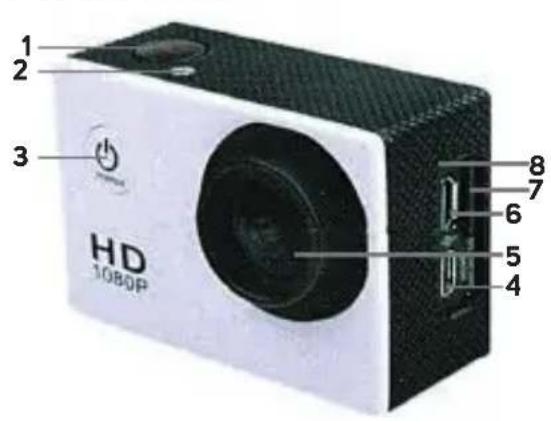
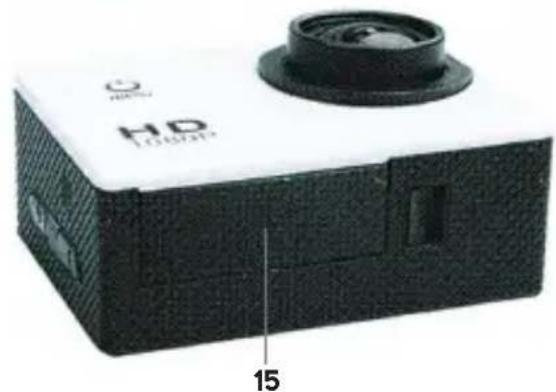
Color palette bar with grayscale shades and a central crosshair symbol (no text or labels)Product image / Obrázek produktu / Obrázok produktu / A kamera részei / Zdjęcie produktu
natural_image
Exterior view of a white and black compact device with a circular lens and textured cover, labeled 'HD LOURER' and number '15' (no other text or symbols visible)Revision 05/2015 Copyright © 2015, Fast

natural_image
Color palette bar with grayscale shades and a central crosshair symbol (no text or labels)
natural_image
Solid black rectangular shape with no visible text, symbols, or features.EN
- OK
- Indicator
- ON/OFF/Menu
- HDMI
- Lens
- USB
- microSD
- Microphone
- Charging indicator
- Operating indicator
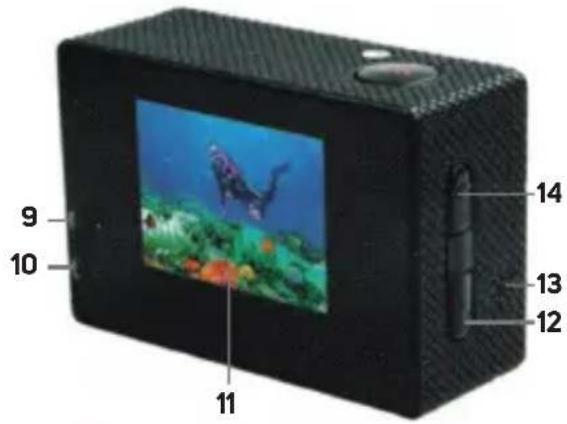
- Display
- Down (Lock)
- Speaker
- Up / (Wi-Fi)
- Battery cover
CZ
Revision 05/2015 Copyright © 2015, Fa



natural_image
Color palette bar with grayscale shades and a central crosshair symbol (no text or labels)
natural_image
Two solid black rectangular blocks on white background, no text or symbols present- OK
- Up
- Down
- Case opening lock
- Lens
- Switch/mode
CZ
natural_image
Color palette bar with grayscale shades and a central crosshair symbol (no text or labels)natural_image
Color palette bar with grayscale shades and a central crosshair symbol (no text or labels)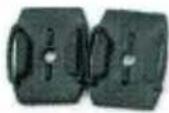 | 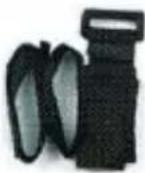 |  |  |  |
| Helmet holderDržák na helmuDržiak na helmuTartó sisakraUchwyl na kask | BellŘemínekRemienokHevederRzemień | StrapPásekPáskaKötdző szalagPas | 3M tapeLepić páska 3MLepiaca páska 3M3M ragasztószalagTaśma klejąca 3M | Steel wireOcelové lankoOcelové lankoDrótkötélLinka stalowa |
 |  |  | 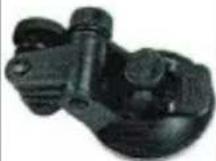 | 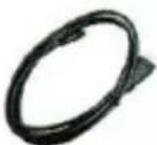 |
| Data cableDatovy kabelDátovy kabelAcél dróthurokKabel do transmisjidanych | ChargerNablječkaNabljačkaAkkumulátortóltőŁadowarka | TowelHadříkHandričkaTörlóruhaSzmatka | Car holderDržák do autaDržiak do autaAutós tartóUchwytsamochodowy | HDMI cableKabel HDMIKábel HDMIHDMI kábelKabel HDMI |

natural_image
Color palette bar with grayscale shades and a central crosshair symbol (no text or labels)
natural_image
Solid black rectangular shape with no visible text, symbols, or features.| Strap Pásek Páska Szalag Pas |


Revision 05/2015 Copyright © 2015, Fa


natural_image
Color swatch bar with grayscale gradient from black to white (no text or symbols)
www.sencor.cz
Designed in Europe by Sencor®, Made in China

- SENCOR®
- Warning
- Storage information
- EN Warning
- Outdoor use
- EN
- Introduction
- EN
- Using the camera at lower temperatures
- Introduction
- EN Introduction
- Function
- EN
- Start-up
- Start-up
- microSD card installation and removal
- Battery installation and removal
- EN Start-up
- Charging
- EN
- Switching the camera on and off
- Switching between modes
- Recording videos and taking photos
- PC connection
- Recording playback and viewing photos
- HDMI connection
- PC connection
- EN
- EN Wi-Fi control
- Wi-Fi control
- Enable Wi-Fi controls as follows:
- Camera settings
- Camera settings
- EN Camera settings
- EN
- Date stamp
- Sport Mode - [P] symbol on the display
- G-Sensor - key symbol on the display throughout the duration of recording the currently locked file
- Power Save
- Rotate
- Wi-Fi password
- BEEP
- Language
- Light Freq
- EN
- Delay Shutdown
- File Type
- Format
- Delete File
- Factory reset
- System information
- Technical data
- Technical data
- EN
- INSTRUCTIONS AND INFORMATION REGARDING THE DISPOSAL OF USED PACKAGING MATERIALS
- DISPOSAL OF USED ELECTRICAL AND ELECTRONIC APPLIANCES
- For business entities in the European Union
- Disposal in other countries outside the European Union
- EN Warranty conditions
- This warranty is void especially if apply as follows:
- Authorized service centers
- CZ
- Varování
- CZ Úvod
- Uvedení do provozu
- Ovládání přes WiFi
- Nastavení kamery
- Heslo WiFi (WiFi password)
- Technické údaje
- POKYNY A INFORMACE O NAKLÁDÁNÍ S POUŽITÝM OBALEM
- CZ Záruční podmínky
- Varovanie
- SK
- Varovanie
- Úvod
- SK Úvod
- Ovládanie cez Wi-Fi
- Nastavenie kamery
- Heslo Wi-Fi (WiFi password)
- Formátovanie (Format)
- Technické údaje
- POKyny A INFORMÁCIE O ZAOBCHÁDZANÍ S POUŽITÝM OBALOM
- Figyelmeztetés
- HU
- Figyelmeztetés
- Bevezetés
- Bevezetés
- Üzembe helyezés
- Kamera beállítása
- UTASÍTÁSOK ÉS TÁJÉKOZTATÓ A HASZNÁLT CSOMAGOLÓANYAGOKRA VONATKOZÓAN
- HU Jótállási jegy
- PL Ostrzeżenie
- Ostrzeżenie
- PL
- PL Wstep
- Wstep
- Uruchomienie
- PL Uruchomienie
- Ustawienia kamery
- Tryb Sportowy (Sport Mode) – symbol [P] na ekranie
- PL Dane techniczne
- Dane techniczne
- WSKAZÓWKI I INFORMACJE DOTYCZĄCE GOSPODARKI ZUŻYTYM OPAKOWANIEM
- Dane techniczne
Brand : SENCOR
Model : 3CAM 5200W
Category : Video camera