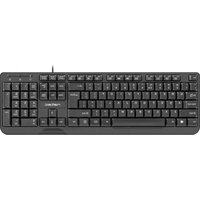
Natec RX39 - Keyboard

RX39 - Keyboard Natec - Free user manual and instructions

Find the device manual for free RX39 Natec in PDF.

📄 6 pages English EN Download 💬 AI Question 10 questions ⚙️ Specs
Notice Natec RX39 - page 1
Pick your language and provide your email: we'll send you a specifically translated version.
Product Type Keyboard
Brand Natec
Model RX39
Connectivity Wired USB
Interface USB Type-A
Cable Length 1.5 m (approx.)
Number of Keys 104 (standard US layout)
Multimedia Keys Via FN combos: Media Player, Volume, Mute, Stop, Previous, Play/Pause, Next, E-mail, Browser, Windows Lock, Calculator, Input Speed, Swap Function, Backlight Mode
LED Backlight Yes, color adjustable
Backlight Modes Multiple modes via FN+Backlight shortcut
Compatibility Windows (likely)
Dimensions (approx.) 440 x 140 x 30 mm
Weight (approx.) 600 g
Power Supply USB bus power (5V, 100 mA)
Certifications CE, RoHS, WEEE
Cleaning Use a soft, dry cloth; avoid liquids
Safety Instructions Do not expose to moisture or extreme temperatures; dispose according to local regulations

Frequently Asked Questions - RX39 Natec

How do I change the LED backlight color?
Press and hold the FN key, then press the Backlight key (likely F12 or a dedicated key) to cycle through available colors and modes.
Can I lock the Windows key?
Yes, press FN+F11 to lock or unlock the Windows key. When locked, the Windows key will not open the Start menu.
How do I use the multimedia keys?
Press and hold the FN key, then press the corresponding function key (F1-F12) as labeled. For example, FN+F1 opens Media Player, FN+F2 decreases volume, etc.
What does the 'Input Speed' function do?
Press FN+Q to adjust the input speed (key repeat rate). This may cycle through preset speeds.
How do I swap the function key behavior?
Press FN+W to swap the function of the FN key. After swapping, you may need to press FN for standard F1-F12 actions.
Is this keyboard compatible with macOS?
The keyboard is designed for Windows, but it may work with macOS via USB. Some multimedia keys (like E-mail, Browser) may not function correctly. You may need to remap keys using third-party software.
How do I clean the keyboard?
Unplug the keyboard, turn it upside down to remove debris, then wipe the surface with a soft, slightly damp cloth (water only). Do not use alcohol or harsh chemicals. Let it dry completely before use.
What should I do if a key stops working?
Try unplugging and reconnecting the keyboard. If the problem persists, check for debris under the keycap. You can gently remove the keycap (using a keycap puller) and clean the switch. If still broken, contact support.
Does the keyboard have full N-key rollover?
The manual does not specify N-key rollover. It likely supports standard 6-key rollover over USB. For gaming, this may be sufficient for most users.
How can I adjust the backlight brightness?
The backlight brightness is typically adjusted by pressing FN + Backlight key repeatedly to cycle through brightness levels or off. Check your specific model for dedicated brightness controls.

User questions about RX39 Natec

0 question about this device. Answer the ones you know or ask your own.

Ask a new question about this device

The email remains private: it is only used to notify you if someone responds to your question.

No questions yet. Be the first to ask one.

Download the instructions for your Keyboard in PDF format for free! Find your manual RX39 - Natec and take your electronic device back in hand. On this page are published all the documents necessary for the use of your device. RX39 by Natec.

USER MANUAL RX39 Natec

EN - GENESIS RX39 - USER'S GUIDE

INSTALLATION:

Natec RX39 - INSTALLATION: - 1

natural_image Simple diagram of a connector or connector with a pin and internal components, no text or symbols present.

Natec RX39 - INSTALLATION: - 2

natural_image Gray circular button with a white checkmark symbol, labeled '2.' above (no additional text or symbols)

MULTIMEDIA KEYS DESCRIPTION

Natec RX39 - MULTIMEDIA KEYS DESCRIPTION - 1

FN+F1 Media Player

Natec RX39 - MULTIMEDIA KEYS DESCRIPTION - 2

FN+F2 Volume Down

Natec RX39 - MULTIMEDIA KEYS DESCRIPTION - 3

FN+F3 Volume Up

Natec RX39 - MULTIMEDIA KEYS DESCRIPTION - 4

FN+F4 Mute

Natec RX39 - MULTIMEDIA KEYS DESCRIPTION - 5

FN+F5 Stop

Natec RX39 - MULTIMEDIA KEYS DESCRIPTION - 6

FN+F6 Previous

Natec RX39 - MULTIMEDIA KEYS DESCRIPTION - 7

FN+F7 Play/Pause

Natec RX39 - MULTIMEDIA KEYS DESCRIPTION - 8

FN+F8 Next

Natec RX39 - MULTIMEDIA KEYS DESCRIPTION - 9

FN+F9 E-mail Client

Natec RX39 - MULTIMEDIA KEYS DESCRIPTION - 10

FN+F10 WWW browser

Natec RX39 - MULTIMEDIA KEYS DESCRIPTION - 11

FN+F11 Windows key lock

Natec RX39 - MULTIMEDIA KEYS DESCRIPTION - 12

FN+F12 Calculator

Natec RX39 - MULTIMEDIA KEYS DESCRIPTION - 13

FN+Q Input Speed

Natec RX39 - MULTIMEDIA KEYS DESCRIPTION - 14

FN+W Swap Function

Natec RX39 - MULTIMEDIA KEYS DESCRIPTION - 15

+FN Backlight Mode

LED BACKLIGHT:

LED backlight color can be controlled with

Natec RX39 - LED BACKLIGHT: - 1

SAFETY

Natec RX39 - SAFETY - 1

Natec RX39 - SAFETY - 2

Natec RX39 - SAFETY - 3

Natec RX39 - SAFETY - 4

GENERAL

  • The safe product, conforming to the EU requirements.
  • The product is made in accordance with RoHS European standard. The standard was issued in order to decrease the amount of the electronic and electrical waste emitted into the atmosphere.
  • The WEEE symbol (the crossed-out wheeled bin) using indicates that this product in not home waste. You protect the environment when you recycle hazardous waste appropriately. In order to get detailed information about recycling this product please contact your retailer or a local authority.
CE RoHS

natural_image Pure electrical circuit lines without any symbols
  1. Natec RX39 - GENERAL - 2
natural_image Gray circular button with a white checkmark symbol (no text or numbers)

MULTIMEDIA KEYS DESCRIPTION

Natec RX39 - MULTIMEDIA KEYS DESCRIPTION - 1

FN+F1 Media Player

Natec RX39 - MULTIMEDIA KEYS DESCRIPTION - 2

natural_image Pure electrical circuit lines without any symbols
  1. Natec RX39 - MULTIMEDIA KEYS DESCRIPTION - 3
natural_image Gray circular button with a white checkmark symbol (no text or numbers)

OPIS PRZYCISKÓW MULTIMEDIALNYCH

Natec RX39 - OPIS PRZYCISKÓW MULTIMEDIALNYCH - 1

FN+F1 Odtwarzacz

Natec RX39 - OPIS PRZYCISKÓW MULTIMEDIALNYCH - 2

FN+F2 Ścisz

Natec RX39 - OPIS PRZYCISKÓW MULTIMEDIALNYCH - 3

FN+F3 Podgłoś

Natec RX39 - OPIS PRZYCISKÓW MULTIMEDIALNYCH - 4

FN+F4 Wycisz

Natec RX39 - OPIS PRZYCISKÓW MULTIMEDIALNYCH - 5

FN+F5 Stop

Natec RX39 - OPIS PRZYCISKÓW MULTIMEDIALNYCH - 6

FN+F6 Poprzedni

Natec RX39 - OPIS PRZYCISKÓW MULTIMEDIALNYCH - 7

FN+F7 Odtwórz/Pauza

Natec RX39 - OPIS PRZYCISKÓW MULTIMEDIALNYCH - 8

FN+F8 Następny

Natec RX39 - OPIS PRZYCISKÓW MULTIMEDIALNYCH - 9

FN+F9 Klient E-mail

Natec RX39 - OPIS PRZYCISKÓW MULTIMEDIALNYCH - 10

FN+F10 Przegładarka

Natec RX39 - OPIS PRZYCISKÓW MULTIMEDIALNYCH - 11

Manual assistant
Powered by Anthropic
Waiting for your message
Product information

Brand : Natec

Model : RX39

Category : Keyboard