
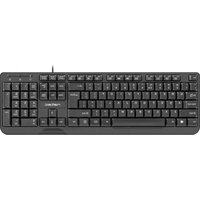
RX22 - Keyboard Natec - Free user manual and instructions
Find the device manual for free RX22 Natec in PDF.


| Product Type | Keyboard |
| Brand | Natec |
| Model | RX22 |
| Dimensions (W x D x H) | 440 x 140 x 25 mm |
| Weight | 500 g |
| Power Supply | USB (5V, 100 mA max) |
| Connectivity | Wired USB 2.0 |
| Cable Length | 1.5 m |
| Key Count | 104 keys |
| Key Switch Type | Membrane |
| Multimedia Keys | Yes (12 shortcut keys) |
| Wrist Rest | No |
| Backlight | No |
| Compatibility | Windows, macOS, Linux |
| Operating Temperature | 5°C to 40°C |
| Storage Temperature | -10°C to 60°C |
| Cleaning Instructions | Wipe with a soft, dry cloth; avoid liquids |
| Safety Precautions | Do not expose to water or excessive heat |
| Spare Parts Availability | Contact Natec support for individual keycaps or cable |
| Warranty | 2 years limited warranty |
Frequently Asked Questions - RX22 Natec
User questions about RX22 Natec
0 question about this device. Answer the ones you know or ask your own.
Ask a new question about this device
Download the instructions for your Keyboard in PDF format for free! Find your manual RX22 - Natec and take your electronic device back in hand. On this page are published all the documents necessary for the use of your device. RX22 by Natec.
USER MANUAL RX22 Natec
EN - NATEC GENESIS RX22 - USER'S GUIDE
KEYBOARD INSTALATION:
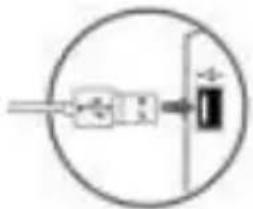

SAFETY

LED BACKLIGHT
LED backlight can be controlled with FN+ SCROLL LOCK
GENERAL
- The safe product, conforming to the EU requirements.
- The product is made in accordance with RoHS European standard. The standard was issued in order to decrease the amount of the electronic and electrical waste emitted into the atmosphere.
- The WEEE symbol (the crossed-out wheeled bin) using indicates that this product in not home waste. You protect the environment when you recycle hazardous waste appropriately. In order to get detailed informaon about recycling this product please contact your retailer or a local authority.





PL - NATEC GENESIS RX22 - INSTRUKCJA OBSŁUGI
PODŁĄCZENIE KŁAWIATURY:


BEZPIECZEŃSTWO

PODŚWIETLENIE KLAWIATURY:

BEZPEČNOSTNÍ INFORMACE:


PODSVÍCENÍ KLÁVESNICE:

BEZPEČNOSTNÉ INFORMÁCIE:



PODSVIETENIE KLÁVESNICE:
Podsvietenie klávesnice je možné nastavit pomocou kláves FN + SCROLL LOCK.
VŠEOBECNÉ INFORMÁCIE:



- EN - NATEC GENESIS RX22 - USER'S GUIDE
- KEYBOARD INSTALATION
- SAFETY
- LED BACKLIGHT
- GENERAL
- PL - NATEC GENESIS RX22 - INSTRUKCJA OBSŁUGI
- PODŁĄCZENIE KŁAWIATURY
- BEZPIECZEŃSTWO
- PODŚWIETLENIE KLAWIATURY
- BEZPEČNOSTNÍ INFORMACE
- PODSVÍCENÍ KLÁVESNICE
- BEZPEČNOSTNÉ INFORMÁCIE
- PODSVIETENIE KLÁVESNICE
- VŠEOBECNÉ INFORMÁCIE
Brand : Natec
Model : RX22
Category : Keyboard