
DVP 9809 - Portable DVD Player ECG - Free user manual and instructions
Find the device manual for free DVP 9809 ECG in PDF.


| Brand | ECG |
| Model | DVP 9809 |
| Product Type | Portable DVD Player |
| Dimensions (approx.) | 250 x 180 x 40 mm (9.8 x 7.1 x 1.6 in) |
| Weight (approx.) | 1.2 kg (2.6 lbs) |
| Power Supply | AC 100-240 V, 50/60 Hz; DC 9-12 V (adapter included) |
| Power Consumption | < 10 W |
| Built-in Battery | Rechargeable Li-ion, 7.4 V |
| Battery Charging Time | 3 to 4 hours |
| Playback Time (approx.) | 2.5 to 3 hours (depending on usage) |
| Screen Size | 7 inch TFT LCD (16:9) |
| Disc Compatibility | DVD, VCD, CD, MP3, JPEG |
| Video Output | 1 Vp-p (75 Ω) via AV out |
| Audio Output | 1.2 Vrms (1 kHz, 0 dB); stereo RCA |
| Built-in Speakers | 2 x 1 W |
| Headphone Jack | Yes, 3.5 mm |
| USB Port | Yes, for media playback (USB 2.0) |
| TV System | NTSC / PAL (auto select) |
| Laser Type | Semiconductor laser, 650 nm |
| Signal-to-Noise Ratio | > 80 dB |
| Dynamic Range | > 85 dB (DVD/CD) |
| Frequency Response | 20 Hz to 20 kHz (±1 dB) |
| Remote Control | Yes, included (with full function buttons) |
| Parental Control | Yes, with password (default: 1369) |
| Cleaning | Use a dry, soft cloth; no liquids or aerosol cleaners |
| Safety Certifications | FCC Part 15 Class B, CE, RoHS |
| Spare Parts | Use only manufacturer-recommended parts |
| Repairability | Service by qualified personnel only; no user-serviceable parts inside |
| Manual Availability | Free PDF download at www.ecg.cz |
| Disposal | Recycle as electronic waste; do not dispose with household waste |
Frequently Asked Questions - DVP 9809 ECG
User questions about DVP 9809 ECG
0 question about this device. Answer the ones you know or ask your own.
Ask a new question about this device
Download the instructions for your Portable DVD Player in PDF format for free! Find your manual DVP 9809 - ECG and take your electronic device back in hand. On this page are published all the documents necessary for the use of your device. DVP 9809 by ECG.
USER MANUAL DVP 9809 ECG
natural_image
Black ECG portable TV with a beach scene featuring a wooden boat on the sand (no visible text or symbols)DVP 9809 BLACK
DVD PŘEHRÁVAČ
NÁVOD K OBSLUZE
CZ
DVD PREHRÁVAČ
NÁVOD NA OBSLUHU
SK
DVD PLAYER
INSTRUCTION MANUAL
EN
natural_image
Two horizontal color swatches: one grayscale with a grid of squares, the other solid-colored with a color palette (no text or symbols)

DVD PŘEHRÁVAČ
BEZPEČNOSTNÍ UPOZORNĚNÍ
natural_image
Line drawing of a laptop with front panel and back panel, showing internal components (no text or symbols)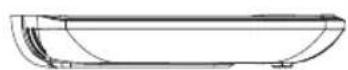
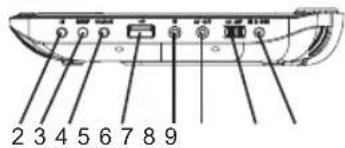
- Nahoru / Předchozí
Read carefully and keep for future use!
ATTENTION: Applying controls, settings or performing procedures, other than those described herein, can lead to dangerous radiation.
Read this manual carefully and keep for future reference. Pay special attention to the following information about installation and use.
- Read and follow the instructions – all instructions with reference to safety and operation shall be read before using the product.
- Keep these instructions – safety and operating instructions shall be kept for future reference.
- Mind all warnings – all warnings on the device and in the manual shall be taken into consideration.
- Proceed according to the instructions – follow all instructions for use and operation.
- Do not expose the device to water that drips or is sprayed or to moistness – and no objects containing liquids (e.g. vases) shall be placed on or near the device.
- Clean only with dry towel – always unplug the device from the socket before cleaning. Do not use liquid or aerosol cleaning agents. Clean only with dry cloth.
- Do not cover ventilation openings. Install according to the manufacturer's recommendations – Openings on the device cover serve as air vents and ensures proper operation and prevents overheating, these vents must not be covered or otherwise closed. The holes should never be covered by placing the device on a blanket, sofa, carpet or similar surface. This product should not be placed in built-in installations, such as libraries or shelves, if there is not proper ventilation provided or the manufacturer's instructions are not respected.
- Do not install close to any heat sources, such as radiators, heat exchangers, heaters and other appliances (including amplifiers), which produce heat.
- Do not interfere with the safety function of the plug with the protective power cord conductor. The plug with the grounding prong has two working prongs and a third, protective prong. This prong is for your safety. If you cannot insert the plug into your outlet, ask an electrician to change the obsolete outlet.
- Do not step on the power cord and protect it from damage, especially close to the plug and at the power jack of the device. Power cords should be lead in such manner to avoid stepping on them or being squeezed by objects lying on them or pushed up against them. This especially applies to cords by plugs, sockets, and in places, where they exit the device.
- Use only accessories recommended by the manufacturer. Do not use accessories which are not recommended by the device manufacturer. Risk of danger.
- Use this product only with carts, stands, tripods, holders or tables recommended by the manufacturer or sold together with this product. When using a cart make sure the cart does not tip over with the product and no injuries or damage is sustained.
- Unplug the device during a storm or if you do not plan to use for a longer period of time. Unplug the device from the socket and disconnect the antenna and other cables. This way you avoid damage being caused to the device by lightening or voltage surges in the electric main.
- Power sources – this product shall only be operated with the type of power source specified on the product plate. If you are not sure about the type of power source inside your household, refer to the product vendor or your local power company. Read through the operating manual for products designed to be powered by battery or other sources.
- If it is necessary to replace the pug, make sure that you replace the fuse with the same type, specified by the manufacturer, carrying out the same safety function.
- Overloading – do not overload electric sockets or extension cords, risk of fire or injury.
- Foreign objects and liquids – do not allow foreign objects to fall or do not push these objects into the holes in the device box; this could lead to a short circuit, injury or fire. Do not pour any liquids into the device.
- Repairs – do not attempt to repair the machine on your own; by opening or removing the cover, you can expose yourself to dangerous voltage or other dangers. All servicing should be done by a qualified service staff. The device requires servicing if damaged any way, for example, the power cord or plug becomes

ECG
damaged, liquid or a foreign object penetrated the device, the device was exposed to rain or moistness, the device operation is not normal, or the device has fallen.
- Spare parts – when replacing parts, make sure to use original spare parts defined by the manufacturer or parts with the same features. Unauthorized spare parts can lead to a fire, injury or other risk.
- Safety inspection – after completing any service work or repairs to this product, ask your service technician to perform a safety inspection, recommended by the manufacturer, in order to make sure the product is in a safe and operable condition.
Safety measures
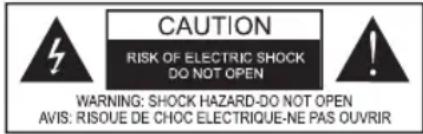

The lightning bolt symbol inside an equilateral triangle warns the user of the presence of non-insulated "dangerous" voltage inside the product, which is high enough to cause injury.

The exclamation point inside an equilateral triangle warns the user of the presence of important instructions for the control and maintenance (service) in the accompanying documentation supplied with the device.
WARNING: Do not expose the product to rain or humidity, there is danger of fire or electric shock. Dangerous voltage inside cover. Do not open the cover.
ATTENTION: Plug the cord correctly and completely into the outlet.
ATTENTION: The disc player contains a laser system. Do not open any covers. Risk of radiation by laser beam. Risk of radiation by visible laser if the covers and safety locks are removed.
Applying controls, settings or performing procedures, other than those described herein, can lead to dangerous radiation. DO NOT LOOK INTO THE LASER BEAM.
FCC NOTE: This product was tested and found to comply with the requirements for class B digital devices. It complies with the FCC rules, Part 15. These values were designed for providing sufficient protection against harmful interference in residential installations.
This product creates, uses and can radiate high-frequency power; if not installed and used according to the instructions, it can cause radio communication interference.

WARNING: High volume
Excessive acoustical pressure from headphones can cause hearing damage. To prevent damage to your hearing, avoid listening at high volumes for longer periods of time.
CONTENTS
SAFETY INFORMATION....21
CONTROLS....23
REMOTE CONTROLLER....23
SYSTEM SETUP....25
TECHNICAL SPECIFICATIONS....29
22
ECG
CONTROLS
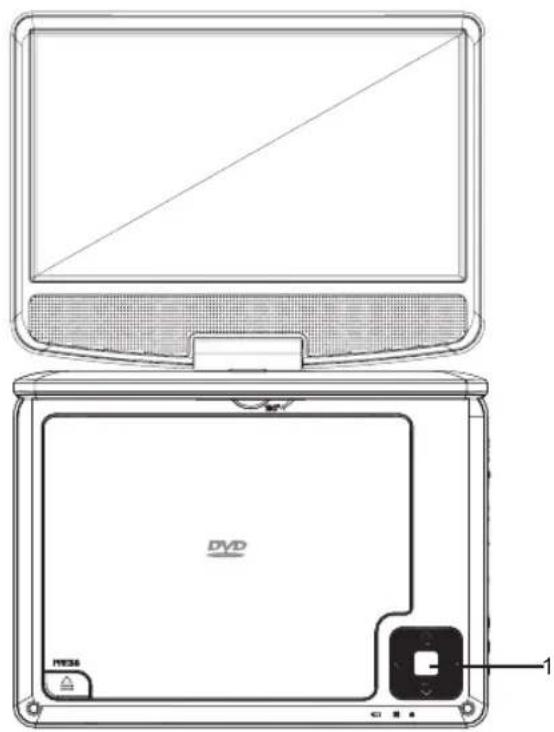
natural_image
Line drawing of a laptop with front panel and back panel, showing DVD cover and control buttons (no text or symbols)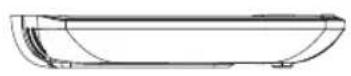
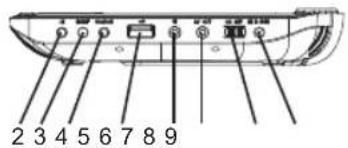
- Up/Previous
▼ ▶▶ Down / Next
◄/vɒl - Left / Volume -
▶/ VOL+ Right / Volume +
-
▶ Play / Pause
-
Settings
- Source
- USB
- Headphones jack
- AV out
- On / Off
- Power DC IN 9-12 V
EN
REMOTE CONTROLLER
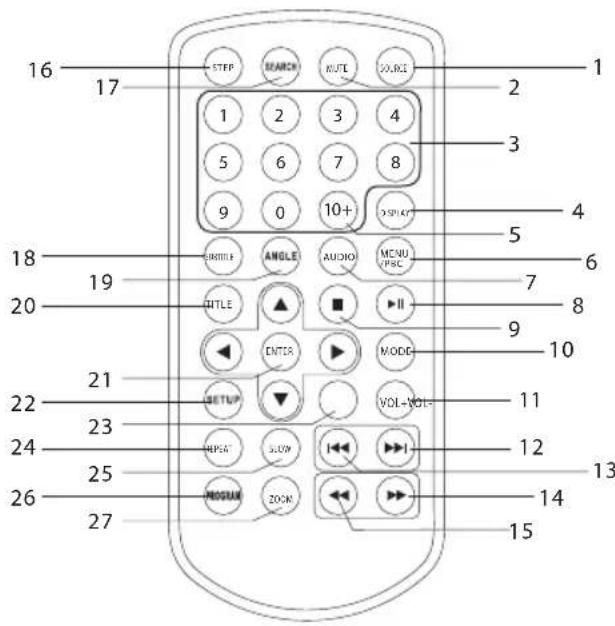
- SOURCE
DVD/USB
- MUTE
Audio out mute.
- Numerical buttons 0–9
Selecting numbered menu items.
- DISPLAY
Displays the runtime and status information.
- Button 10+
To select a track with a number 10 or higher, press 10+ fi rst. For example, to select track number 12, fi rst press 10+ and then numerical button 2.
- MENU/PBC
Return to the DVD main menu. PBC On/Off (VCD discs).
ECG
23
7. AUDIO
DVD: Pressing AUDIO again during playback toggles between audio languages, if available on the disc.
DC/VCD: Pressing AUDIO again during playback toggles between audio channels (Left, Right, Mix, Stereo).
8. PLAY/PAUSE
Press PLAY/PAUSE to pause the playback, press PLAY/PAUSE again to resume playback.
9. STOP
When you press this button once, the system will save the position, where the playback was stopped, and from where it will resume playback after pressing PLAY (▶), to its memory. However, if you press STOP a second time, you will not be able to resume playback.
10. MODE
LCD screen parameter setup (brightness, contrast, saturation).
11. VOL+
Increase volume
12. Skip forward
Move to next chapter/track.
13. Skip back
Move to previous chapter/track.
14. Button ▶▶
Press ▶▶ to fast forward at various speeds (x2 -> x4 -> x8 -> x16 -> x32), press PLAY to resume playback at normal speed.
15. Button
Press ◀◀◀ to rewind at various speeds (x2 -> x4 -> x8 -> x16 -> x32), press PLAY to resume playback at normal speed.
16. STEP
DVD step playback.
17. SEARCH
Transition to the desired time, title or chapter in DVD mode.
18. SUBTITLE
Press the SUBTITLE button again during playback to toggle between subtitle languages.
19. ANGLE
DVD: If the disk supports this feature, you can change the viewing angle by pressing this button.
20. TITLE
Return to the DVD disk title menu
21. ENTER
Confirming the selected menu option
22. SETUP
Enter the setup menu or exiting the menu.
23. VOL-
Decrease volume
24. REPEAT
Press REPEAT during playback to select the desired repeat mode.
DVD: repeat chapter/title/Off
VCD: repeat track/all/Off
CD/MP3: repeat track/folder/Off
25. SLOW
Press the button again to choose the desired speed of delayed playback: 1/2, 1/4, 1/8, 1/16 and normal.
26. PROGRAM
DVD/VCD: You can program your favourite chapters/tracks from a disc. Press PROGRAM, the PROGRAM menu will appear on the display. Use the numerical buttons to enter the numbers for titles, chapters or tracks and select the PLAY option. To resume normal playback, press PROGRAM, select delete program from the menu and press PROGRAM again to exit programming mode.
27. ZOOM
DVD/VCD: You can zoom in or out of the video with the ZOOM button.
-
The zoom function is activated by pressing the ZOOM button during playback or when the track is paused. A square frame will briefly appear in the top right corner.
-
Each press of the ZOOM button changes the picture size as follows: 2x -> 3x -> 4x -> 1/2 -> 1/3 -> 1/4 -> normal size
JPEG: You can zoom in or out of the picture with the ZOOM button.
-
Press ZOOM.
-
Zoom in by pressing "▶▶" and zoom out by pressing "◀◀". Press buttons ▲▼◀▶ to move along the enlarged picture.
SYSTEM SETUP
GENERAL SETUP menu
Press SETUP to enter the setup menu. Use arrow buttons ▲▼◀▶ to select the desired item. Once you have finished with the setup process, press SETUP again to return to the normal display mode. System settings can be changed from the following menus:
GENERAL: general setup page
AUDIO: audio setup page
VIDEO: video setup page
PREFERENCES: preferences page
PASSWORD: password setup page
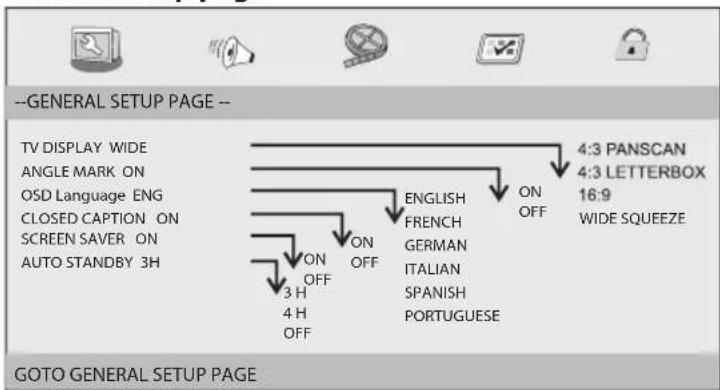
General setup page
EN
TV DISPLAY
Choose the aspect ratio.
4:3 PANSCAN: On normal TV screens, the sides of the picture are cut off to fill the screen.
4:3 LETTERBOX: On normal TV screens, the picture is shown with black strips on the top and bottom part of the TV screen.
16:9: Wide screen display.
WIDE SQUEEZE: 4:3 screen mode.
ANGLE MARK
The current camera angle will be displayed in the top right corner of the TFT display, if available on the disk.
OSD LANGUAGE
You can select the language you want.
CLOSED CAPTIONS
Closed captions are data hidden within the video signal of some disks. Before choosing this feature, make sure the disk contains closed caption information and your TV also supports this feature.
SCREENSAVER
Enables and disables the screensaver.
AUTO STANDBY
The feature allows the user to set the automatic switch to standby mode after 3 to 4 hours.
3H: If the user does not perform any actions for a duration of 3 hours, the system will automatically go into standby mode.
4H: If the user does not perform any actions for a duration of 4 hours, the system will automatically go into standby mode.
OFF: The automatic switch to standby mode is deactivated and the device remains on, regardless of whether or not the user performs any actions.
ECG
25

AUDIO SETUP menu
Audio setup page
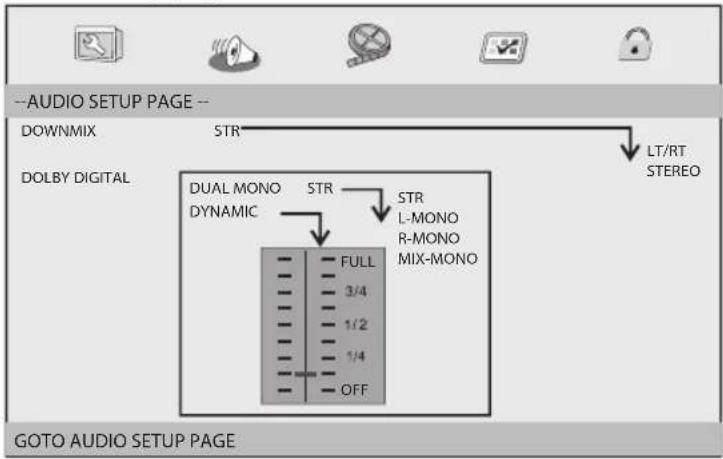
MIXING
This option allows the user to configure the stereo analog output of your DVD player.
LT/RT: Select this option if your DVD player is connected to the Dolby Pro Logic decoder.
STEREO: Select this option if the output provides audio from two front speakers.
DOLBY DIGITAL
Dolby Digital setup options include the "Dual mono" and "Dynamic" options.
DUAL MONO
STEREO: The signal from the left channel will be sent to the left speaker and the signal from the right channel will be sent to the right speaker.
L-MONO: The signal from the left channel will be sent to the left and right speaker.
R-MONO: The signal from the right channel will be sent to the left and right speaker.
MIX-MONO: The mixed mono signal from the left and right channel is sent to the left and right speaker.
DYNAMIC
Dynamic rage compression.
VIDEO SETUP menu
Video setup page
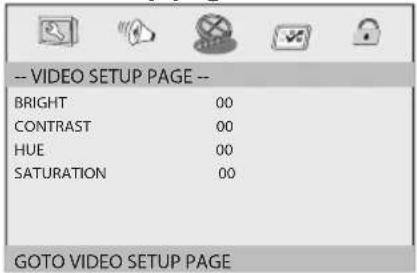
The brightness, contrast, tint and saturation can be adjusted in this menu.
PREFERENCES menu
Preferences setup page
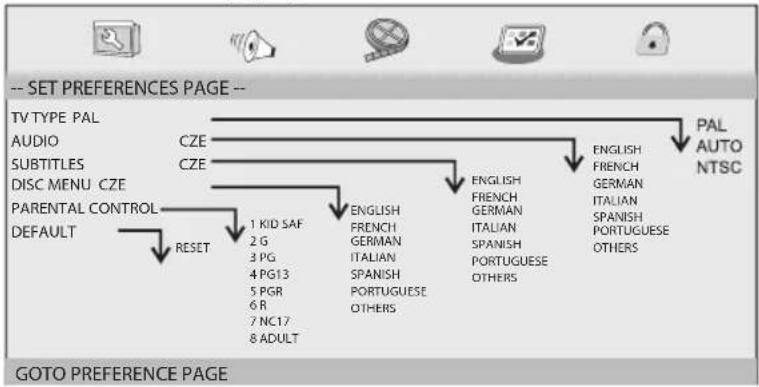
flowchart
graph TD
    A["-- SET PREFERENCES PAGE --"] --> B["TV TYPE PAL AUDIO"]
    A --> C["CZE"]
    A --> D["CZE"]
    A --> E["DISC MENU CZE"]
    A --> F["PARENTAL CONTROL"]
    A --> G["DEFAULT"]
    G --> H["RESET"]
    H --> I["1 KID SAF 2 G 3 PG 4 PG13 5 PGR 6 R 7 NC17 8 ADULT"]
    H --> J["ENGLISH FRENCH GERMAN ITALIAN SPANISH PORTUGUESE OTHERS"]
    H --> K["ENGLISH FRENCH GERMAN ITALIAN SPANISH PORTUGUESE OTHERS"]
    L["PAL AUTO NTSC"] --> M["ENGLISH FRENCH GERMAN ITALIAN SPANISH PORTUGUESE OTHERS"]
TV TYPE
When connecting the TV via AV OUT, select the colour system corresponding to your TV. This DVD player is compatible with the PAL and NTSC system.
PAL: Choose this system if a PAL system TV is connected. Signals from an NTSC disk will be fed to the output in PAL format.
NTSC: Choose this system if a NTSC system TV is connected. Signals from an PAL disk will be fed to the output in NTSC format.
AUTO: The output video signal format is automatically switched according to the format of the played disk.
AUDIO
Select the audio track language (if available).
SUBTITLES
Select the subtitles language (if available).
DISC MENU
Select the disc menu language (if available).
PARENTAL CONTROL
Some DVD disks use a classification system, either for the entire disk or for certain scenes. With this feature, you can prevent playing disks unsuitable for children or substitute inappropriate scenes with alternatives. Classification levels 1 through 8 differ in each country and depend on the local applicable law.
DEFAULT
Reset the device to factory default settings.
ECG
PASSWORD SETUP menu
Password setup page
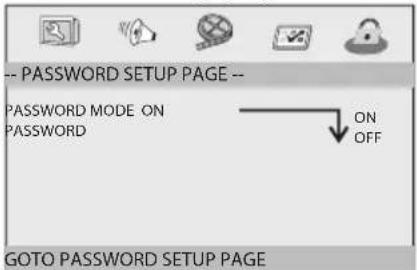
PASSWORD MODE: Set the password mode to On or Off. If the password is set to Off, changes to the parental control will not require entering the password.
PASSWORD: Displays the password change page.
EN
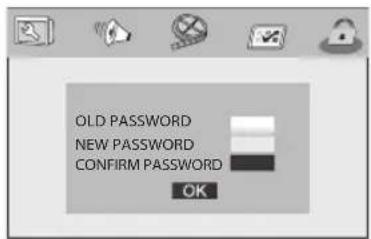
OLD PASSWORD: Enter your old password (the factory set password is 1369) and the cursor automatically jumps to the new password entry.
NEW PASSWORD: Enter the new four digit password via the numerical buttons on the remote controller, the cursor automatically jumps to the new password confirmation.
CONFIRM PASSWORD: Enter the new password again to confirm. If the confirmation is unsuccessful, the cursor will remain at this position. Once the correct new password is entered, the cursor automatically jumps to OK.
OK: When the cursor is on this item, confirm the password setup by pressing ENTER:
Note: By changing the password, you also change the parental control password. The default password (1369) remains active even after the password change.
TECHNICAL SPECIFICATIONS
Electric parameters
Power AC \~100–240 V, 50/60 Hz
Power input < 10 W
Operating humidity 5 % to 90 %
Video output 1 Vp-p (75 Ω)
Audio out 1.2 Vrms (1 kHz, 0 dB)
Sound 2 speakers 1 W (1 kHz, 0 dB)
System
Laser Semi-conductor laser, 650 nm wavelength
TV system NTSC/PAL
Frequency characteristic 20 Hz to 20 kHz (1 dB)
Signal/noise ratio More than 80 dB (ANALOG OUT connectors)
Dynamic range More than 85 dB (DVD/CD)
Battery
Voltage 7.4 V
Charging time 3 to 4 hours
Storage temperature -20 °C to +45 °C
Storage humidity 65 ±20 %
Charging temperature / humidity 20 °C to +45 °C / 65 ±20 %
Discharging temperature / humidity -20 °C to +65 °C / 65 ±20 %
USE AND DISPOSAL OF WASTE
Wrapping paper and corrugated paperboard – deliver to scrapyard. Packing foil, PE bags, plastic elements – throw into plastic recycling containers.
DISPOSAL OF PRODUCTS AT THE END OF LIFETIME
Disposal of electric and electronic equipment (valid in EU member countries and other European countries with an implemented recycling system)
The represented symbol on the product or package means the product shall not be treated as domestic waste. Hand over the product to the specified location for recycling electric and electronic equipment. Prevent negative impacts on human health and the environment by properly recycling your product.
Recycling contributes to preserving natural resources. For more information on the recycling of this product, refer to your local authority, domestic waste processing organization or store, where you purchased the product.

08/05

This product complies with EU directive requirements on electromagnetic compatibility and electrical safety.
The instruction manual is available at website www.ecg.cz.
Changes in text and technical parameters reserved.
ECG
29





ECG






ECG


www.ecg.cz
- DVP 9809 BLACK
- DVD PŘEHRÁVAČ
- DVD PREHRÁVAČ
- DVD PLAYER
- BEZPEČNOSTNÍ UPOZORNĚNÍ
- ECG
- Safety measures
- WARNING: High volume
- CONTENTS
- AUDIO
- PLAY/PAUSE
- STOP
- MODE
- VOL+
- Skip forward
- Skip back
- Button ▶▶
- Button
- STEP
- SEARCH
- SUBTITLE
- ANGLE
- TITLE
- ENTER
- SETUP
- VOL-
- REPEAT
- SLOW
- PROGRAM
- ZOOM
- SYSTEM SETUP
- GENERAL SETUP menu
- General setup page
- TV DISPLAY
- ANGLE MARK
- OSD LANGUAGE
- CLOSED CAPTIONS
- SCREENSAVER
- AUTO STANDBY
- AUDIO SETUP menu
- MIXING
- DOLBY DIGITAL
- DUAL MONO
- DYNAMIC
- VIDEO SETUP menu
- PREFERENCES menu
- TV TYPE
- AUDIO
- SUBTITLES
- DISC MENU
- PARENTAL CONTROL
- DEFAULT
- PASSWORD SETUP menu
- EN
- TECHNICAL SPECIFICATIONS
- Electric parameters
- System
- Battery
- USE AND DISPOSAL OF WASTE
- DISPOSAL OF PRODUCTS AT THE END OF LIFETIME
- www.ecg.cz
Brand : ECG
Model : DVP 9809
Category : Portable DVD Player