
DH 009 - Clock ECG - Free user manual and instructions
Find the device manual for free DH 009 ECG in PDF.


| Type | Digital Clock |
| Brand | ECG |
| Model | DH 009 |
| Display | LCD with backlight |
| Display Size | 75 x 63 mm |
| Dimensions | 136 x 147 x 27 mm |
| Power Source | 2 x AAA batteries (1.5V) |
| Battery Life | Approximately 1 year |
| Time Format | 12h/24h selectable |
| Calendar | Day, date, month, year |
| Alarm | Yes, with snooze (5 minutes) |
| Alarm Duration | 1 minute |
| Temperature Measurement | Indoor only, range -9.9°C to 50°C, accuracy ±0.1°C |
| Operating Temperature | 0°C to 50°C |
| Wall Mount | Yes, with keyhole slot |
| Stand | Built-in foldable stand |
| Controls | Buttons and touch panel |
| Functions | Time, alarm, calendar, thermometer, snooze, backlight |
| Cleaning & Maintenance | Use soft, dry cloth; avoid water, solvents, and extreme conditions |
| Safety | Do not tamper with internal components; protect from shocks and moisture |
| Disposal | Recycle as electronic waste per local regulations (WEEE) |
Frequently Asked Questions - DH 009 ECG
User questions about DH 009 ECG
0 question about this device. Answer the ones you know or ask your own.
Ask a new question about this device
Download the instructions for your Clock in PDF format for free! Find your manual DH 009 - ECG and take your electronic device back in hand. On this page are published all the documents necessary for the use of your device. DH 009 by ECG.
USER MANUAL DH 009 ECG
ECG
DH 009
DIGITÁLNÍ HODINY
NÁVOD K OBSLUZE
DIGITÁLNE HODINY
NÁVOD NA OBSLUHU
ZEGAR CYFROWY
INSTRUKCJA OBSŁUGI
DIGITÁLIS ÓRA
HASZNÁLATI ÚTMUTATÓ
DIGITALE UHR
BEDIENUNGSANLEITUNG
DIGITAL CLOCK
INSTRUCTION MANUAL
CZ
SK
PL
HU
DE
EN
POPIS
Podsvícení displeje
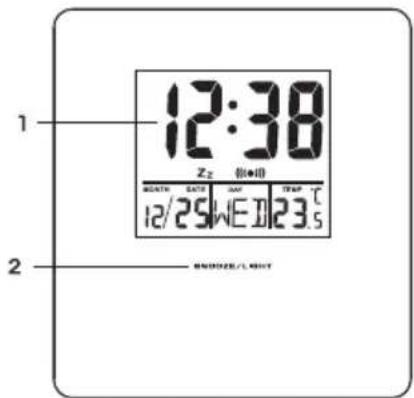
- LCD displej: ČAS / BUDÍK / KALENDÁR / TEPLOMER
- Dotykový panel: STOP BUDÍK / SVETLO / ZDRIEMNUTIE
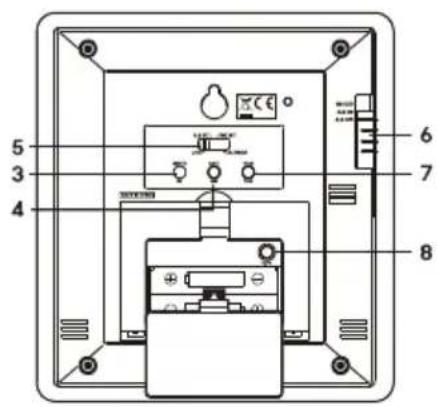
- Tlačidlo HR/MONTH (hodiny/mesiac)
- Tlačidlo MIN/DATE (minúty/deň)
- Prepínač CALENDAR/TIME SET/ALARM SET/LOCK (kalendár/nastavenie hodín/nastavenie budíka/zámka)
- Prepínač SNOOZE/ALARM ON/ALARM OFF (zdriemnutie/zapnút budík/vypnút budík)
- Tlačidlo 12HR/24HR/YEAR (12/24 h systém/rok)
HU
-
LCD display: TIME / ALARM / CALENDAR / THERMOMETER
-
Touch panel: STOP ALARM / LIGHT / SNOOZE
-
HR/MONTH (hours/month) button
-
MIN/DATE (minutes/day) button
-
Switch CALENDAR/TIME SET/ALARM SET/LOCK (calendar/time set/alarm set/lock)
-
Switch SNOOZE/ALARM ON/ALARM OFF (snooze / alarm on / alarm off)
-
12HR/24HR/YEAR (12/24h system / year) button
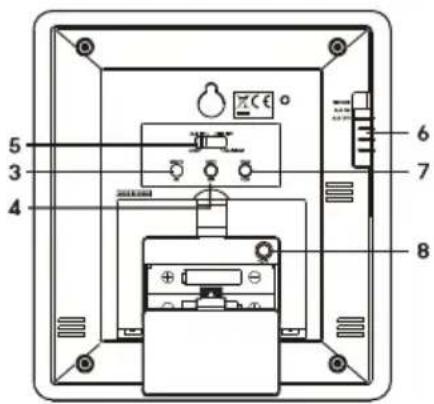
- The configuration of your particular device may differ slightly from the pictured model.
- (AA) or (AAA) batteries. Different models may use different types of batteries. When choosing the correct type of batteries, please, follow the relevant battery symbol engraved on the bottom of the battery compartment.
OPERATING INSTRUCTIONS
Battery installation
Open the battery compartment cover on the rear of the device and insert two AAA batteries. Observe the marked polarity of the batteries.
NOTE: Remove the transparent protective foil from the LCD display so the display would be easy to read.
Setting the calendar
Move the switch (5) to CALENDAR position. Press MONTH, DATE or YEAR to set the desired item on the calendar.
NOTE: Invalid calendar setting will be automatically corrected. For example, February 30 would be corrected to February 1, April 31 would be corrected to April 1.
Setting the clock
Move the switch (5) to TIME SET position and using the HR and MIN buttons, set the required time.
Setting alarm
-
Move the switch (5) to ALM SET position, the display shows symbol "ALARM". Using the HR and MIN buttons, set the desired wake up time.
-
Move the alarm clock switch (6) to ALARM ON position. The clock display shows symbol (●). The alarm clock is now activated.
-
If you move the alarm clock switch (6) to SNOOZE position, you activate the snooze mode, postponing the alarm.
Lock function
- After setting the time and the alarm, move the switch (5) to LOCK position, to prevent change in the time or alarm clock settings by mistake when accidentally pushing a button.
Using the snooze function
Move the alarm clock switch (6) to SNOOZE position, the display shows symbol Zz. The snooze function is now activated. When the alarm clock sounds, you can postpone waking up by pressing the SNOOZE/LIGHT button. The alarm stops ringing and starts again 5 minutes later.
If you want to switch off the alarm entirely, move the alarm clock switch (6) to OFF position.
Wake up time: 1 minute
Time display in 12h/24h format
- Press the 12HR/24HR button to select the required format.
- In the 12h format, it displays together the time a symbol "AM" or "PM", denoting morning or afternoon.
Temperature display
Press the °C/°F button to select the required unit of temperature.
The device measures inside temperature only.
Wall mount or using stand
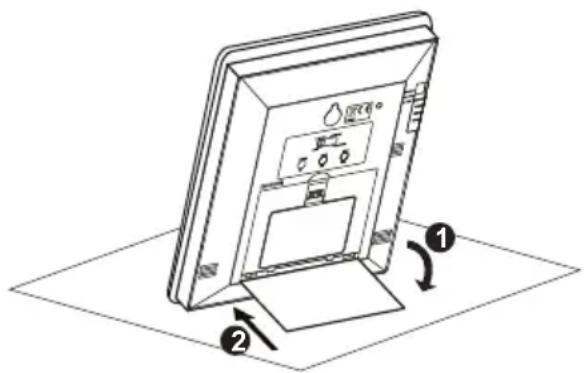
The device is equipped with a built-in stand, which can be opened and you can place the clock on an even surface. You can also close the stand and mount the clock on the wall. Screw the screw in the wall in such a way, that its head protrudes 3 mm out of the wall. Then fi t the clock on the screw with the lower part of the hole with larger diameter and move the clock downward to secure it well to the wall.
Display backlight
You can press the front touch panel to find out even in the dark what time it is. The display lights up for a few moments with soft light so that you can see the time easily and clearly.
NOTE:
Frequent use of the light depletes the battery.
CLEANING AND MAINTENANCE
- Do not expose the device to extreme temperatures or humidity and protect it from water.
- Protect the device from contact with aggressive substances, like perfumes, alcohol or cleaning agents.
- Protect the device from dust and from shocks, falls and excessive force.
- Do not tamper with the internal components of the device. The device could be damaged and it could void the warranty.
EN
TECHNICAL SPECIFICATIONS
Calendar with a display of days of the week
Displaying hours and minutes
Time display format: 12/24 hours
Range of operating temperatures: 0 °C to 50 °C
Range of temperature measurements: -9.9 °C to 50 °C
Accuracy of temperature measurement: 0.1 °C
Power: 2 × 1.5 V type AAA
Battery life: about 1 year
Dimensions of the device: 136 × 147 × 27 mm
Display size: 75 × 63 mm
USE AND DISPOSAL OF WASTE
Wrapping paper and corrugated paperboard – deliver to scrapyard. Packing foil, PE bags, plastic elements – throw into plastic recycling containers.
DISPOSAL OF PRODUCTS AT THE END OF LIFETIME
Disposal of electric and electronic equipment (valid in EU member countries and other European countries with an implemented recycling system)
The represented symbol on the product or package means the product shall not be treated as domestic waste. Hand over the product to the specified location for recycling electric and electronic equipment. Prevent negative impacts on human health and the environment by properly recycling your product.
Recycling contributes to preserving natural resources. For more information on the recycling of this product, refer to your local authority, domestic waste processing organization or store, where you purchased the product.
This product complies with EU directive requirements on electromagnetic compatibility and electrical safety.
Changes in text and technical parameters reserved.


08/05

www.ecg.cz
- DH 009
- DIGITÁLNÍ HODINY
- DIGITÁLNE HODINY
- ZEGAR CYFROWY
- DIGITÁLIS ÓRA
- DIGITALE UHR
- DIGITAL CLOCK
- POPIS
- Podsvícení displeje
- OPERATING INSTRUCTIONS
- Battery installation
- Setting the calendar
- Setting the clock
- Setting alarm
- Lock function
- Using the snooze function
- Time display in 12h/24h format
- Temperature display
- Wall mount or using stand
- Display backlight
- NOTE:
- CLEANING AND MAINTENANCE
- TECHNICAL SPECIFICATIONS
- USE AND DISPOSAL OF WASTE
- DISPOSAL OF PRODUCTS AT THE END OF LIFETIME
- www.ecg.cz
Brand : ECG
Model : DH 009
Category : Clock