
129503 - Service Pliers Equip - Free user manual and instructions
Find the device manual for free 129503 Equip in PDF.


| Product Type | Cable Tester |
| Brand | Equip |
| Model | 129503 |
| Power Supply | 9V block battery (MASTER unit only) |
| Tested Cable Types | RJ11, RJ12, RJ45, ISDN |
| Test Modes | Fast (continuous scan), Slow (step-by-step) |
| Indicators | LEDs for each pin (1-8) and shielding (G) |
| Remote Unit | No battery required |
| Usage Environment | Indoor, dry, clean rooms only |
| Safety Precautions | Do not measure energized lines; do not use if damaged; protect from moisture and heat |
| Maintenance | Replace 9V battery if green strobe LED fails to illuminate |
| Included Accessories | MASTER unit, REMOTE unit, battery clip |
Frequently Asked Questions - 129503 Equip
User questions about 129503 Equip
0 question about this device. Answer the ones you know or ask your own.
Ask a new question about this device
Download the instructions for your Service Pliers in PDF format for free! Find your manual 129503 - Equip and take your electronic device back in hand. On this page are published all the documents necessary for the use of your device. 129503 by Equip.
USER MANUAL 129503 Equip
- Do not use the cable tester NS-468 if it is damaged.
• This device is only for use inside dry and clean rooms. - This device must be protected from moisture, splash water and impact of heat.
Intended use
The cable tester is used for fast testing of ISDN-, and network cable (RJ11, RJ45).
Configuration and shielding will be tested. Installed cable could be also tested.
Another employment than indicated is not permissible!
Changes can lead to the damage of this product, beyond that is this connected with dangers, like e.g. short-circuit, fire, electrical impact etc.
For all special and personal injuries, which occur of not intended use, not the manufacturer, but the operator is responsible.
Please note that serving and/or connection errors lie outside of our sphere of influence.
Understandably we cannot take over any adhesion for damage, which occur from it.
The entire product may not be changed and/or converted!
Preparation / Measurement

No energized lines measure!
Insertion of battery:
To insert the battery (9 V-Block) remove battery cover from MASTER-Device. Connect the battery clip to the battery.
For operations of the REMOTE-device there is no battery needed.
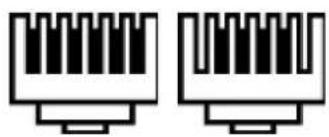
Plugs / Cable:

natural_image
Pure electrical circuit lines without any symbolsRJ45
RJ12 / RJ11

natural_image
Two identical electrical connector pin symbols with no text or labelsMeasurement:
- Connect the plugs of the cable which can be measured with the suitable sockets of the MASTER and the Remote device.
- By pushing the switch to „ON“ -Position you turn the device to „FAST Test Modus“. Here each individual contact of the cable is successively examined. The electrical connection is indicated at the MASTER and at the REMOTE device over an LED.
- By pushing the switch to „S“-Position you turn the device to „SLOW Test Modus.
- By pushing the switch to „OFF“-Position you turn the device off.
- The result of measurement is indicated over the status LEDs (see table of the most usual connections) at both devices. At cable with shielding shines additionally the "G"-LED
| Cable Display | Master | Display Remote |
| RJ45-Network cable (1:1, completely connected, with shielding) | 1-2-3-4-5-6-7-8-G 1-2-3-4-5-6-7-8-G | |
| RJ45-Network cable (crossover, completely connected, without shielding) | 1-2-3-4-5-6-7-8 1-4-3-2-5-6-7-8 | |
| ISDN-Cable, 4-pin 3-4-5-6 | 3-4-5-6 | |
| RJ12-Cable, 6-pin 1-2-3-4-5-6 1-2-3-4-5-6 | ||
| RJ11-Cable, 4-pin 2-3-4-5 | 2-3-4-5 |
Symbol-declaration

The symbol with the exclamation mark in the triangle refers to important notes in this operating instruction, which are to be considered absolutely. Or if danger for your health exists, e.g. by electrical impact.
Troubleshooting:
If green strobe LED will not illuminate with switch in "ON" or "S" position, change 9 Volt battery in MASTER UNIT. There are no batteries located in REMOTE UNIT.

Sicherheitshinweise

natural_image
Pure electrical circuit lines without any symbolsRJ45
RJ12 / RJ11
natural_image
Two identical electrical connector pin symbols with no text or labelsMessung:


Brand : Equip
Model : 129503
Category : Service Pliers