
BTHF-SOLAR - Car Kit i-TEC - Free user manual and instructions
Find the device manual for free BTHF-SOLAR i-TEC in PDF.


| Product Type | Bluetooth Hands-free Car Kit |
| Model | BTHF-SOLAR |
| Brand | i-TEC |
| Dimensions | 123 x 46 x 20 mm |
| Weight | 133.3 g |
| Battery Type | Li-ion 3.7V / 550 mAh |
| Talk Time | Up to 13 hours |
| Standby Time | Up to 800 hours |
| Charging Time (USB) | Approximately 3 hours (first charge 3.5 hours) |
| Charging Time (Solar) | Approximately 18 hours |
| Bluetooth Version | v2.1 + EDR (BlueCore 5 chip) |
| Bluetooth Class | Class 2 |
| Maximum Range | Up to 10 m |
| Supported Profiles | Handsfree, Headset 1.5 |
| Multipoint | Yes (up to 8 paired, works with last 2) |
| Solar Panel | Integrated for charging |
| Speaker | 30 mm |
| Microphone | With echo cancellation |
| Processor | DSP (Digital Signal Processor) for noise reduction |
| Voice Dialing | Supported (if phone supports) |
| Redial | Supported (last number) in Handsfree profile |
| Mute Function | Yes |
| Hold Call Mode | Yes |
| Package Contents | Bluetooth unit, car charger, USB cable, windscreen holder, user guide |
| Warranty | 24 months |
Frequently Asked Questions - BTHF-SOLAR i-TEC
User questions about BTHF-SOLAR i-TEC
0 question about this device. Answer the ones you know or ask your own.
Ask a new question about this device
Download the instructions for your Car Kit in PDF format for free! Find your manual BTHF-SOLAR - i-TEC and take your electronic device back in hand. On this page are published all the documents necessary for the use of your device. BTHF-SOLAR by i-TEC.
USER MANUAL BTHF-SOLAR i-TEC
Thank you for purchasing our product. Please kindly review the informations contained in the guide thoroughly.
i-tec SOLAR - Bluetooth MULTIPOINT Handsfree CarKit is equipped by a digital technology for wireless communication. This Handsfree device contains a DSP processor (Digital Signal processor) that eliminates interference, improves a signal reception and guarantees exceptional sound quality. Handsfree CarKit is portable, very compact, fully wireless; it could communicate with any mobile telephone that supports and fulfils the Bluetooth protocol of the profile Headset or Handsfree.
i-tec SOLAR is designed as a portable handsfree, enabling the user to communicate freely without a need to hold the telephone in hand.
Do not forget: When driving, use the Handsfree safely and in compliance with valid legislative of given country.
Package contents
- Bluetooth ^ i-tec SOLAR
• Automotive power supply (12 / 24 V)
• Interconnecting cable for charging (USB A-USB Mini) - Windscreen holder
• Guide
Specifications
• standard: Bluetooth v2.1+ EDR (BlueCore 5 chip)
• solar panel for charging
• frequency: 2,4-2,480 GHz
• maximum operating radius: Up to 10 m, Bluetooth Class2
- supported profiles: Handsfree a Headset 1.5 (selectable when pairing)
- talk time: Up to 13 hours
- stand-by time: Up to 800 hours
• period of battery recharging:
USB cable: approximately 3h (first charging 3,5h); solar panel: approximately 18h
- battery type: Li-ion 3,7V/550mAh
• car charger: input =12-24V / output =5V/400mA - loudspeaker: 30 mm
- microphone: With function of suppressing echo cancellation
- weight: 133.3 g
• dimensions: 123 x 46 x 20 mm -
other:
-
full duplex equipment
- compatible with all currently available telephones with Bluetooth
- integrated „smart“ DSP processor (Digital Signal Processor), eliminating interference and echo
- supporting voice dialing (provided it is supported by the telephone)
- supporting redial / only for the profile Handstre
- possibility of pairing with more telephones
- one button for receipt and end of the call
- pushbutton for refusing the call
- controls of loudness
IMPORTANT ADVICE
Prior to first use, the Handsfree batteries' kit must be charged at least 3,5 hours!
CHARGING THE HANDSFREE
Handsfree could be charged any time in your car with aid of vehicle power supply or, through the USB port PC/NB. Handsfree indicates by blinking the red LED 1x/3s that batteries are flat. Using solar power charge, the operation time (talk time and standby time) will be extended continuously without any additional charge required by the car charger.
- Connect the charger into a connector for the charger (6).
LED diode Charge (battery charging) (5):
a. lights red: Battery has still a low charge
b. red ceases to light (appx. after 3h of charging): Battery is fully charged
- After the batteries are fully charged, disconnect the charger.
LED diode Bluetooth (5): Light is blinking blue (in case it is paired with mobile telephone).
Note: 1. You must charge Handsfree by power adaptor, if you do not use Handsfree for more than several months. Red LED will shine only after 15-35 minutes charging time.
- You can charge Handsfree CarKit owing to solar panel on the back side of Handsfree as well. If the Handsfree receives sufficient sunlight for 2 hours, you can talk for duration of up 1 hour. Solar panel is able to charge internal battery from zero capacity to full capacity for about 18 hours.
USE OF HANDSFREE
Description of Handsfree
- Mute Button
- Volume Up (VOL +)
- Windscreen Holder
- Microphone
- Multi-function Button (MFB) / under this button is LED (blue and red)
- Micro USB Charging Socket
- Volume Down (VOL-)
- Speaker
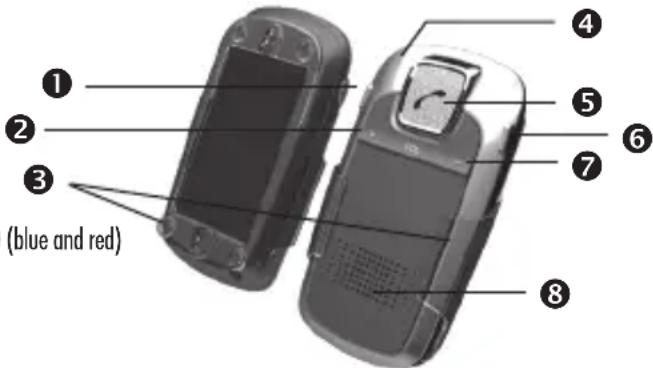
Installation into car
- Use low pressure to input Handsfree into windscreen holder's guiding clips (with mounted suction cups) up to utmost position. Release Handsfree from holder – it is backward motion with low pressure again.
- Press Handsfree with help suction cups on facies in a car (e.g. glass). Handsfree must be installed facing to user – then you can easily use it while driving a car.
Note:
- We recommend to clear suction cups and glass before mounting of windscreen holder – then holder will firmly hold and it will not fall off from glass during driving car
- Holder has foam plastic pillars also - when you want to use holder without suction cups; foam plastic pillars are primarily identified for prevention of solar panel; please, foam don't remove plastic pillars!
Switching Handsfree ON
From OFF position, Handsfree is switched ON by pushing the MFB (5) for at least 4 sec. 1 times brief tone will be heard and blue LED will commence blinking at intervals of 3sec - this indicates the Handsfree reached a standby mode.
Note: Prior to a first use, the Handsfree device must be paired with the mobile telephone (see chapter on "pairing")
Switching Handsfree OFF
From a standby position, Handsfree is switched OFF by pushing the MFB (5) for at least 4 sec. One longer tone shall be heard and the blue LED Bluetooth (5) will change the colour from blue to red (will blinking 5 times). After several seconds, the device will shut down.
Note: To save power, Handsfree CarKit will automatically turn off if it is not connected to any device for more than 10 minutes.
Pairing
Note: Pairing could be implemented even when Handsfree CarKit is connected with the charger.
Actual Pairing Procedure
- Locate the telephone to a close proximity of the Handsfree (ideally, up to 1m away).
- Handsfree is at the beginning switched off.
- Depress for about 6 sec. the MFB (5) pushbutton. After a long tone is heard, the LED diode Bluetooth (5) commences to blink alternatively blue and red. Leave the Handsfree for about 2 minutes in pairing regime.
- Afterwards, proceed in locating and connecting the Bluetooth device in accordance with the guide to your mobile telephone - MT (your phone shall discover and announce the Handsfree device as SOLAR).
- When asked about the password (PIN) of the device, select 0000.
- Pairing was successful as long as the diode LED of the Bluetooth (5) ceases to blink alternative colours and shall flash only blue, with 3 sec intervals. Usually, your mobile telephone shall display the message about successful (resp. unsuccessful) pairing and the icon Handsfree (Auto) or Headset (Earphones) will appear.
Note:
- In case the pairing was unsuccessful within 2 minutes, please repeat the pairing process from the beginning. When the pairing was successful, the Handsfree is ready for use.
- Keep the MT and the Handsfree within a maximum of 10 m distance apart, otherwise the connection may be lost. In such a case, (e.g. on the MT there is not the icon of Headset or Handsfree) the mutual connection must be re-established.
- Loss of connection between the MT and Handsfree kit is indicated on the Handsfree by three brief sound signals, every minute for over 10 minutes.
Answer a call
During incoming call, both Handsfree CarKit and the telephone will ring (depending on the given telephone).
- For accepting the call, depress MFB (5)
- For terminating the call, depress MFB (5)
CALL REALIZATION
Normal dialling
- Dial the requested phone number / contact with aid of your telephone, as usual. Under regular conditions, the sound will be transferred into Handsfree.
- For terminating the call, depress MFB (5)
Voice dialling
- First, activate the function of the voice dialling on your telephone and record the voice commands.
Details could be found in the manual of your telephone.
Note: For use of the voice dialling, this function must be supported also by your mobile telephone and You must have in your telephone (NOT ON THE SIM CARD) saved the voice commands. - Briefly depress the pushbutton MFB (5).
- From the loudspeaker, a short sound signal will be heard.
- Pronounce the voice command. Handsfree shall repeat your voice command and implement it automatically.
- For terminating the call, depress MFB (5)
Note:
- For terminating the dialling number, depress MFB (5) long
- Hiss and noises in your surrounding may affect the function of voice dialling. Record your voice commands in a quiet location.
Repeat of the last dialled number (Redial)
For redialling of the last called number (Redial) depress 2x the pushbutton MFB (5). From the loudspeaker, a short sound signal will be heard.
REDIRECTING THE CALL BETWEEN THE TELEPHONE AND THE HANDSFREE.
From Handsfree to telephone
Depress simultaneously the pushbuttons VOL+ (2) and VOL- (7) for about 3 sec or, switch the Handsfree off. The call will be redirected into the telephone.
From telephone to Handsfree
Depress simultaneously the pushbuttons VOL+ (2) and VOL- (7) for about 3 sec or switch directly to phone. The call will be redirected from the telephone into the Handsfree.
REJECT A CALL (ONLY IN THE PROFILE HANDSFREE)
Depress the pushbutton MFB (5) for about 3 sec. to hear a short sound signal.
Volume Control
Volume control is exercised by pushbuttons VOL+ (2) and VOL- (7) – this could be done after pairing as well as during the phone call. Note: In case that high loudness is selected, there may be occasioned a decrease in quality of the phone call (echo, hisses from the surroundings)
Mute mode
To convert the call into mute, depress the Mute pushbutton (1) once. LED lights red: Return to normal mode is implemented by repeated depression of the pushbutton Mute (1) for 3 sec. and the LED shall commence to flash blue again.
Hold the call mode
- 2x shortly press button MFB (5). Return to normal mode - 2x shortly press button MFB (5) again.
I-TEC SOLAR ADVANCED FUNCTION:
A: MULTIPOINT
i-tec SOLAR - Bluetooth MULTIPOINT Handsfree CarKit may be paired with up to 8 telephones equipped with the technology Bluetooth, but it works with only 2 last paired MT (if the Multipoint function is ON).
Multipoint ON/OFF
Multipoint mode is default switched off.
Multipoint ON: Under Standby mode, press and hold VOL+ (2) button for 3s until you hear a beep.
Multipoint OFF: Under Standby mode press and hold VOL- (7) button for 3s until you hear a beep.
Pairing with two phones (MT):
- Handsfree CarKit is OFF and Multipoint mode is ON.
- Press and hold MFT (5) button for 6s and pair with the first phone
- Turn OFF CarKit. Then press and hold MFT (5) button for 6s and pair with the second phone
- Power OFF the CarKit again; then turn ON and CarKit will automatically connect with last 2 paired phones.
USING MULTIPOINT MODE
Answer a call
Incoming call for one phone:
- Answer a call - Press MFT (5) button once.
- Ending a call - Press MFT (5) button once.
- If there is a second call from other phone during conversation (advice note is only on some types of phones), you have to answer the call on second phone
Note: Some types of phones support this function: If you end the call with the first phone before finishing of ringing, then CarKit automatically switch on the second phone and you are able to answer a call by press MFT (5) button once
Voice dialing
For the 1st MT: Briefly press VOL+ (2) button and say the name of person you wish to call. CarKit repeat the name and start dialing. For the 2nd MT: Briefly press MFT (5) button and say the name of person you wish to call. CarKit repeats the name and starts dialing.
Last number redialing
For the 1st MT: Press twice VOL+ (2) button. From speaker you can hear a beep.
For the 2nd MT: Press twice MFT (5). From speaker you can hear a beep.
B: MULTIPLE PAIRING / SWITCHING BETWEEN THE TELEPHONES:
i-tec SOLAR - Bluetooth MULTIPPOINT Handsfree CarKit may be paired with up to 8 telephones equipped with the technology Bluetooth, but it works with only 2 last paired MT (if the Multipoint function is ON). Pairing with additional (ninth and so on) telephone shall automatically cancel the telephone(s) that were not used for the longest time. Therefore, Handsfree CarKit shall retain in the memory up to 8 telephones.
Between paired telephones, it is simple to switch using the following methods:
- Disconnecting the actually used telephone, using the item "Active equipment" in the Bluetooth menu of the telephone.
- Connecting the desired telephone, using the item "Paired equipment" in the Bluetooth menu of the telephone, by command "CONNECT".
C: CHARGING THE HANDSFREE!!!
For charging, we recommend to use only the car charger that is developed for this Handsfree.
SAFETY INSTRUCTIONS
- i-tec SOLAR - Bluetooth MULTIPOINT Handsfree CarKit is not protected against rain and cannot be used in humid environment.
- Caution: Never submerge the Handsfree in water!!
- Do not toss the earpiece around, nor change its shape.
- Do not expose it to extreme temperatures. Operating temperatures are 0-40°C.
- Do not dispose of it in the fire.
- Do not take the Handsfree apart - it is solely the service matter.
- Do not leave the Handsfree with little children – they could swallow the small parts.
- Use Handsfree in the car only in compliance with the road safety regulations. In the car, do not locate it over places where there are airbags to be expanded.
- Switch off the Handsfree before entering the airplane (in case the using is permitted in the airplane), when entering hospitals, in the proximity to blasting operations and quarries.
- In case of a long period of non-use, remove the batteries and store the device in a dry location (not exposed to extreme temperature, humidity and dust)
WARRANTY
Warranty is 24 months
The warranty is not applicable if product:
- has been subject to physical abuse, exposed to water, moisture or liquid
- has been damaged mechanical - shock, stroke, crash
- has been place near fire
- has been visibly damaged non authorized repairing
- has been with damaged cabling
I-TEC SOLAR - BLUETOOTH MULTIPOINT HANDSFREE CARKIT
Note: Marking is in compliance with EU Directive 2002/96/EC and EN50419
English
This equipment is marked with the above recycling symbol. It means that at the end of the life of the equipment you must dispose of it separately at an appropriate collection point and not place it in the normal domestic unsorted waste stream. This wil benefit the environment for all. (European Union only)
Deutsch


- Package contents
- Specifications
- IMPORTANT ADVICE
- CHARGING THE HANDSFREE
- USE OF HANDSFREE
- Description of Handsfree
- Installation into car
- Switching Handsfree ON
- Switching Handsfree OFF
- Pairing
- Actual Pairing Procedure
- Note:
- Answer a call
- CALL REALIZATION
- Normal dialling
- Voice dialling
- Repeat of the last dialled number (Redial)
- REDIRECTING THE CALL BETWEEN THE TELEPHONE AND THE HANDSFREE.
- From Handsfree to telephone
- From telephone to Handsfree
- REJECT A CALL (ONLY IN THE PROFILE HANDSFREE)
- Volume Control
- Mute mode
- Hold the call mode
- I-TEC SOLAR ADVANCED FUNCTION:
- A: MULTIPOINT
- Multipoint ON/OFF
- Pairing with two phones (MT):
- USING MULTIPOINT MODE
- Voice dialing
- Last number redialing
- B: MULTIPLE PAIRING / SWITCHING BETWEEN THE TELEPHONES:
- C: CHARGING THE HANDSFREE!!!
- SAFETY INSTRUCTIONS
- WARRANTY
- The warranty is not applicable if product:
- I-TEC SOLAR - BLUETOOTH MULTIPOINT HANDSFREE CARKIT
- English
- Deutsch
Brand : i-TEC
Model : BTHF-SOLAR
Category : Car Kit