
RC7055AP3Z - Tumble dryer LG - Free user manual and instructions
Find the device manual for free RC7055AP3Z LG in PDF.


| Product Type | Tumble Dryer |
| Brand | LG |
| Model | RC7055AP3Z |
| Capacity | 7 kg |
| Energy Class | A++ |
| Drying Technology | Condenser with Heat Pump |
| Dimensions (H x W x D) | 85 cm x 60 cm x 60 cm |
| Weight | 45 kg |
| Power Supply | 220-240 V ~ 50 Hz |
| Power Consumption (Annual) | 176 kWh |
| Number of Programs | 14 |
| Key Programs | Cotton, Synthetics, Delicates, Wool, Mix, Quick 30, Shirts, Bedding, Sportswear, Towels |
| Control Type | Electronic with Rotary Dial and LED Display |
| Display | LED with Time Remaining and Cycle Status |
| Door Style | Transparent with Reversible Hinge |
| Drum Material | Stainless Steel |
| Lint Filter | Easily Removable, Mesh Type |
| Condenser Cleaning | Manual Cleaning Every 3 Months |
| Child Lock | Yes |
| Delay Start | Up to 19 Hours |
| Smart Diagnosis | Yes |
| Noise Level | 63 dB |
| Warranty | 2 Years Parts and Labor |
Frequently Asked Questions - RC7055AP3Z LG
User questions about RC7055AP3Z LG
0 question about this device. Answer the ones you know or ask your own.
Ask a new question about this device
Download the instructions for your Tumble dryer in PDF format for free! Find your manual RC7055AP3Z - LG and take your electronic device back in hand. On this page are published all the documents necessary for the use of your device. RC7055AP3Z by LG.
USER MANUAL RC7055AP3Z LG
natural_image
Cartoon illustration of a person washing machine with a magnifying glass showing the screen (no text or symbols)
bsah
Buben s extra velkou kapacitou
natural_image
Cartoon illustration of a washing machine with a 'No' symbol and waving hand (no text or symbols on the machine itself)natural_image
Cartoon illustration of a washing machine with a hand holding a fan next to a chair, no text or symbols present.natural_image
Simple line drawing of a mechanical component with no text or symbolsnatural_image
Cartoon illustration of a woman holding a bag and a washing machine with a 'no' symbol (no text or labels)natural_image
Hand using a power tool to switch an electrical outlet (no text or symbols visible)natural_image
Cartoon illustration of a washing machine with a distressed expression and a 'no' symbol above it, next to a printer (no text or symbols on the main image)natural_image
Illustration of a hand using a tool to clean or brush the cloth (no text or symbols)natural_image
Illustration of a hand holding a small electrical socket next to an open electrical outlet with a circular head (no text or symbols)natural_image
Cartoon illustration of a washing machine with a distressed dog reacting to its shock (no text or symbols)natural_image
Cartoon illustration of a woman standing next to a washing machine with a large door open, no text or symbols present.natural_image
Cartoon illustration of a person running away from a washing machine with a surprised expression (no text or symbols)natural_image
Cartoon illustration of a washing machine with a hand waving, connected to an electrical outlet (no text or symbols)natural_image
Cartoon illustration of a washing machine with two paint cans, one waving and the other smiling (no text or symbols)natural_image
Cartoon illustration of a washing machine with a worker reacting to it, no text or symbols presentnatural_image
Cartoon illustration of a washing machine and a smiling book character (no text or symbols)natural_image
Illustration of a woman washing clothes next to a washing machine with a switch, no text or symbols presentnatural_image
Cartoon illustration of a washing machine with hands holding a tool, no text or symbols presentnatural_image
Cartoon illustration of a dog and a boy reacting to a washing machine with a prohibition symbol (no text or labels)natural_image
Cartoon illustration of a distressed washing machine with a child running away, no text or symbols presentnatural_image
Illustration of a woman standing next to a washing machine with a door open, no text or symbols presentnatural_image
Cartoon illustration of a washing machine and two spray bottles reacting to a stop sign (no text or symbols on the devices)natural_image
Cartoon illustration of a washing machine with a bandaged head and surprised expression (no text or symbols)natural_image
Cartoon illustration of a distressed washing machine with open mouth and waving hands, no text or symbols presentnatural_image
Technical line drawing of a refrigerator interior showing ventilation duct, air vent, and wiring (no text or symbols)⚠ UPOZORNĚNÍ
natural_image
Technical illustration of a mechanical component before and after assembly (no text or symbols)3-2) 550mm
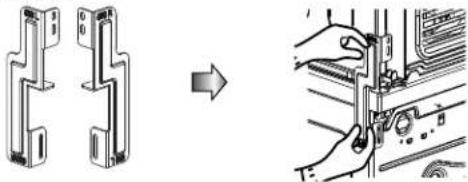
natural_image
Technical illustration showing a mechanical component being processed into a device (no text or symbols present)
ávod k instalaci
Pokyny k uzemnění
natural_image
Illustration of a front-loading washing machine with control panel and door (no text or symbols)natural_image
Line drawing of a front-loading washing machine with control panel and door (no text or symbols)■ RC7055AP3Z
RC7055AP2Z
RC7055APZ
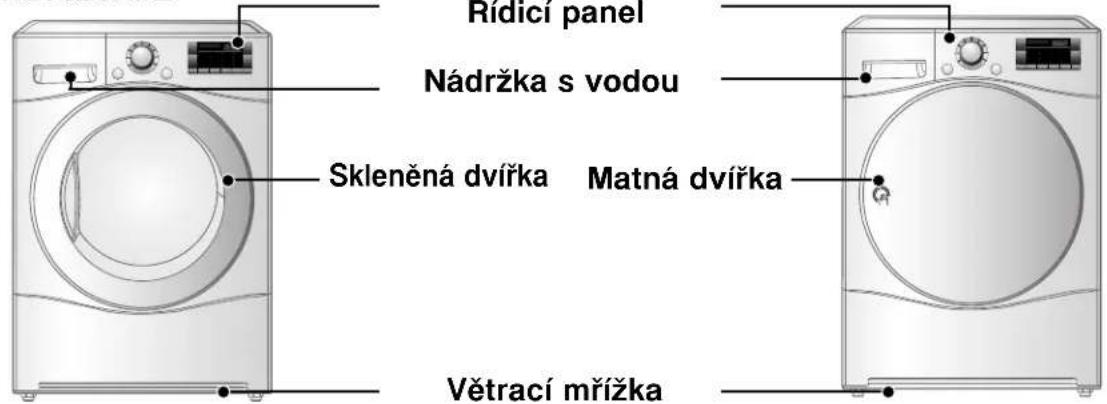
natural_image
Illustration of a hand pressing down on a washing machine control panel with a digital timer (no text or symbols)Zapněte spotřebič.

natural_image
Illustration of a hand cleaning a circular object from a window, showing no text or symbolsOtevřete dvířka
natural_image
Diagram of a hand holding a component above a curved panel with a grid pattern, showing an upward arrow (no text or symbols present)Zkontrolujte filtr.
Používání sušičky
5. Zavřete dvířka.
natural_image
Hand holding a circular dial on a control panel (no text or symbols visible)natural_image
Illustration of hands cleaning a plate with checkered pattern (no text or symbols)Vyjměte prádlo.
natural_image
Diagram of a curved air purifier with a central component inserted, showing no text or symbols.natural_image
Illustration of a circular device with radial slots and a pointer, no visible text or symbolsnatural_image
Illustration of a showerhead with patterned circular background and two hanging gloves on a wooden tray (no text or symbols)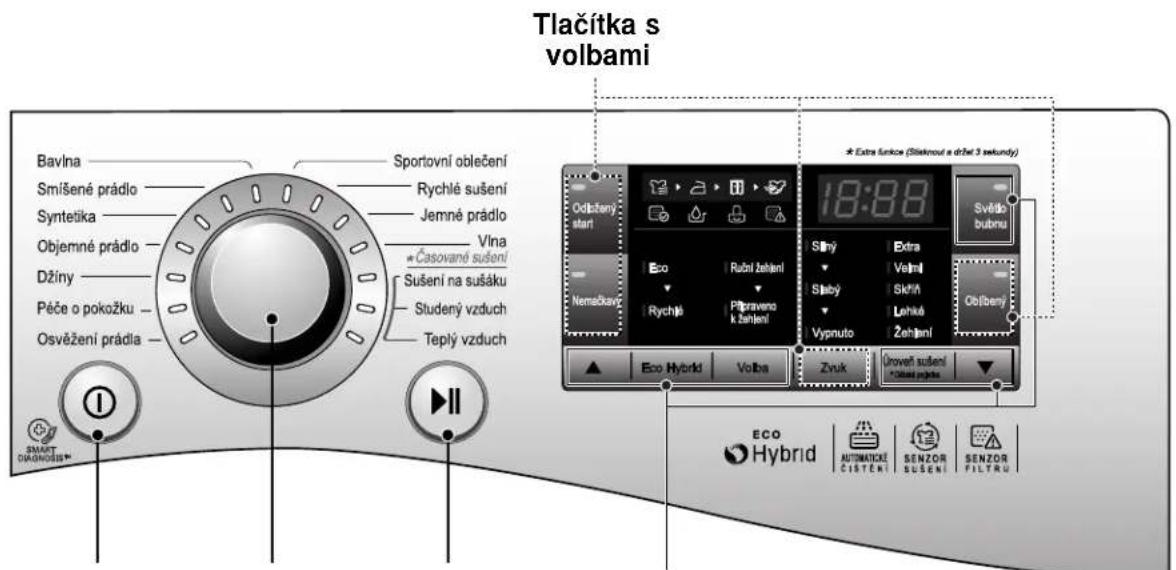
natural_image
Technical line drawing of a circular mechanical component with layered rings (no text or symbols)- Vytáhněte filtr.

natural_image
Diagram showing a hand adjusting a curved panel with a directional arrow (no text or symbols)natural_image
Diagram of a mechanical device with a central component and surrounding grid structure (no text or symbols)natural_image
Hand holding a small object over a grid-patterned surface, with an arrow pointing downward (no text or symbols visible)- Zavřete dvířka
!
VAROVÁNÍ
natural_image
Hand inserting a device into a washing machine (no text or symbols visible)natural_image
Diagram of a showerhead spraying water onto a surface, no text or symbols presentnatural_image
Pure diagram of a curved line inside a rectangular frame, without any text, numbers, or symbols.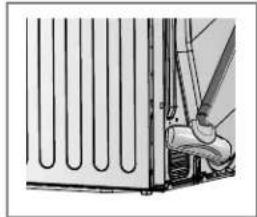
natural_image
Technical illustration of a mechanical assembly with pipes and a valve (no text or symbols)Poznámka
natural_image
Illustration of hands using a tool to adjust or install a component, no text or symbols visiblenatural_image
Hand holding a small object against a wall, possibly a device or panel (no visible text or symbols)natural_image
Hand inserting a cable into a wall-mounted device (no text or symbols visible)
Čidlo vlhkosti?
natural_image
Illustration showing a hand cleaning air conditioner cover and a close-up of the washing machine with a hand pointing to it (no text or symbols present)
Návod k sušení
natural_image
Three technical line drawings of mechanical components: a coiled wire, an arch-shaped bracket, and a conical tool (no text or symbols)- Sušák

natural_image
Technical line drawing of two mechanical bracket assemblies (no text or symbols)Držák: 2EA, Šroub: 4EA
natural_image
Hand pressing a button on a device control panel (no text or symbols visible)natural_image
Illustration of a hand pressing down on a kitchen fan with a control knob (no text or symbols)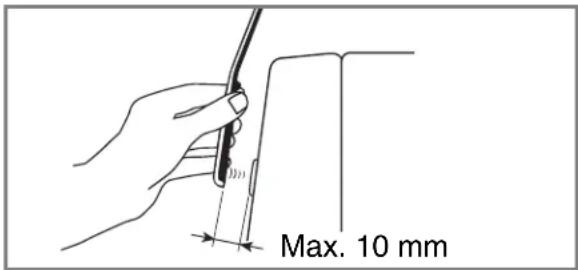
natural_image
Symbol of a trash bin crossed with a diagonal line, no text or labels presentnatural_image
Cartoon illustration of a person washing a refrigerator with a magnifying glass showing the screen (no text or symbols)Vel'ký bubon s mimoriadnou kapacitou
natural_image
Cartoon illustration of a washing machine with a 'No' symbol and waving hand (no text or symbols on the machine itself)- Pred zapojením napájacej šnúry sa uistite, či je na pájacia šnúra uzemnená a pripojená cez istič obvodu.
natural_image
Simple line drawing of a mechanical component with no text or symbols, including a prohibition symbol (no text or labels)natural_image
Illustration of a girl and a washing machine with a prohibition symbol (no text or labels)natural_image
Cartoon illustration of a washing machine with a distressed expression and a radio nearby (no text or symbols)natural_image
Cartoon illustration of a washing machine and a chair with a prohibition symbol (no text or labels)natural_image
Hand using a power tool to switch an electrical outlet (no text or symbols visible)- Odpojte napájaciu šnúru uchopením za zástrčku. Net'ahajte za šnúru.
natural_image
Illustration of a hand using a tool to clean or brush the fabric (no text or symbols)natural_image
Illustration of a hand holding a plug and a wall socket with a circular head, no text or symbols presentnatural_image
Cartoon illustration of a washing machine with a distressed person reacting to it, no text or symbols presentnatural_image
Cartoon illustration of a woman opening a door next to a washing machine, with no text or symbols present.natural_image
Cartoon illustration of a child running away from a washing machine with a surprised expression (no text or symbols)natural_image
Cartoon illustration of a washing machine with a hand waving, connected to an electrical outlet (no text or symbols)natural_image
Cartoon illustration of a washing machine with two smaller containers, one waving and the other holding a bottle (no text or symbols)natural_image
Cartoon illustration of a washing machine with a worker reacting to it, no text or symbols present- Na sušičku nestriekajte vodu.
natural_image
Cartoon illustration of a washing machine and a smiling cube character, no text or symbols presentnatural_image
Cartoon illustration of a washing machine with hands holding a tool, no text or symbols presentnatural_image
Cartoon illustration of a child reacting to a washing machine with a large monster, no text or symbols presentnatural_image
Cartoon illustration of a child running away from a washing machine with a distressed face, no text or symbols present.natural_image
Cartoon illustration of a woman standing next to a washing machine with a door open, no text or symbols presentnatural_image
Cartoon illustration of a washing machine with two smaller bottles reacting to it, no text or symbols present.natural_image
Cartoon illustration of a washing machine with a bandaged head and surprised expression (no text or symbols)natural_image
Cartoon illustration of a distressed washing machine with open arms and a 'no' symbol (no text or labels)natural_image
Technical line drawing of a refrigerator interior showing ventilation duct, air vent, and control panel (no text or symbols)⚠️ VAROVANIE
natural_image
Diagram showing a mechanical component before and after assembly, with no visible text or symbols3-2) 21,7 palca (550 mm)

natural_image
Technical illustration showing a mechanical assembly transforming into a disassembled component (no text or symbols present)P
okyny na inštaláciu
Pokyny pre uzemnenie
natural_image
Line drawing of a front-loading washing machine with control panel and door (no text or symbols)natural_image
Line drawing of a front-loading washing machine with control panel and door (no text or symbols)Sušička klesáSušička sa zdvíha
■ RC7055AP3Z
RC7055AP2Z
RC7055APZ

RC7055AP1Z

natural_image
Illustration of a hand pressing down on a washing machine control panel with a digital display (no text or symbols)Zapnite napájanie.

natural_image
Illustration of a hand cleaning a circular object from a window, showing no text or symbolsOtvorte dvierka.
natural_image
Diagram showing a hand holding a small component over a curved panel with a grid pattern, no text or symbols present.Skontrolujte filter.
P revádzka sušičky
5. Zatvorte dvierka.
natural_image
Hand holding a circular dial on a control panel (no text or symbols visible)natural_image
Illustration of hands cleaning a patterned object with checkered pattern (no text or symbols)Vytiahnite bielizeň.

natural_image
Diagram of a curved air conditioner unit with a hose inserted, showing internal grid structure (no text or symbols)natural_image
Illustration of a circular mechanical component with a pointer and grid pattern, no visible text or symbolsnatural_image
Illustration of a circular mechanical component with two spherical flanges, no text or symbols present.Tlačidlá možností

Hlavný vypínač
natural_image
Technical line drawing of a mechanical component with concentric circular features (no text or symbols)- Vytiahnite filter.

natural_image
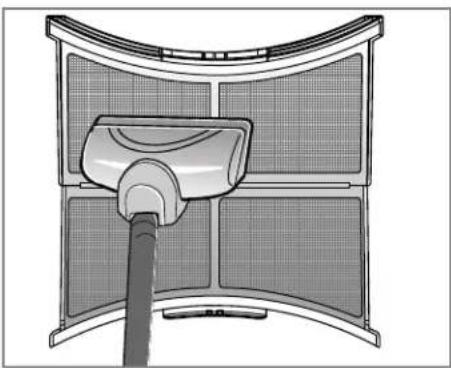
Diagram showing a hand holding a rectangular object with a vertical arrow pointing upward, next to a grid-patterned panel (no text or symbols)- Vyčistite filter pomocou vysávača alebo ho opláchnite pod tečúcou vodou.

natural_image
Cross-sectional diagram of a mechanical device with internal components (no text or symbols)natural_image
Illustration of a hand using a tool to adjust or install a grid-patterned object (no text or symbols visible)- Zatvorte dvierka.
UPOZORNENIE
natural_image
Illustration of a hand inserting a device into a washing machine (no text or symbols visible)natural_image
Diagram of a kitchen sink with water spray and a cleaning tool above it (no text or symbols)natural_image
Pure diagram of a curved pipe or tube inside a rectangular frame, without any text, numbers, or symbols.
natural_image
Technical line drawing of a mechanical assembly with no visible text or symbolsPoznámka:
natural_image
Illustration of hands installing or adjusting a black component on a mechanical component (no text or symbols visible)natural_image
Hand holding a small object against a wall, with curved lines and a handle (no text or symbols visible)natural_image
Hand holding a cable with a connector, connected to a wall-mounted panel (no text or symbols visible)
Snímač vlhkosti?
natural_image
Illustration showing a hand cleaning a washing machine with a cloth, and a close-up of the washing machine's lid (no text or symbols)
Sprievodca sušením
| CYKLUS | Kapacita sušičky | Zobrazený čas sušenia(Vrátane času na ochladenie) | ||
| Eco Rýchlosť | ||||
| Bavlna | Extra | 7 kg | 170 min 95 min | |
| Vysoká | 7 kg | 160 min | 90 min | |
| Do skrine | 7 kg | 150 min | 85 min | |
| Jemná | 7 kg | 140 min | 79 min | |
| Žehlička | 7 kg | 110 min | 67 min | |
| Zmiešaný textil | Vysoká | 3,5 kg | 70 min | 53 min |
| Do skrine | 3,5 kg | 60 min | 48 min | |
| Žehlička | 3,5 kg | 50 min | 41 min | |
| Bez osobitej starostlivosti | Do skrine | 3,5 kg | 70 min | 41 min |
| Žehlička | 3,5 kg | 60 min | 35 min | |
| Objemná položka | 2 kg | 120 min | 70 min | |
| Džínsy | 3 kg | 110 min | 60 min | |
| Šetrný k pokožke | 4,5 kg | - | 135 min | |
| Obnovenie | 1,5 kg | - | 39 min | |
| Športové oblečenie | 2 kg | 50 min | - | |
| Rýchle sušenie | 3 kg | - | 50 min | |
| Jemný textil | 1,5 kg | 48 min | - | |
| Vlna | 1 kg | 29 min | ||
Priadze
natural_image
Three technical line drawings of mechanical components: a coiled wire, a U-shaped bracket with a handle, and a conical tool (no text or symbols)- Polica na sušenie

Stohovacia súprava
natural_image
Technical line drawing of two mechanical bracket assemblies (no text or symbols)Držiak: 2EA, Skrutka: 4EA
Zakúpené samostatne
natural_image
Hand pressing a button on a device control panel (no text or symbols visible)natural_image
Illustration of a hand pressing down on a kitchen fan with control buttons (no text or symbols)
natural_image
Symbol of a trash bin crossed with a diagonal line, no text or numbers presentnatural_image
Illustration of a person washing a washing machine with a magnifying glass showing the screen (no text or symbols)Ultra Big Capacity Drum
The ultra big 7kg capacity drum on this LG dryer allows you to dry more washing at once, saving time!
Lower Energy Consumption
LG Heat Pump dryers use less energy than conventional dryers due to an optimized heat exchanger and Auto Cleaning™ technology. This LG Heat Pump dryer has been designed to save your money.
- Reduced Drying Times
Drying times are now shorter due to LG's Hybrid Heating System and the optimized heat exchanger on this LG dryer.
Reduced Noise Levels
We have reduced the operating noise of this LG dryer by using innovative sound-absorbing and noise-screening technologies, making it much quieter than conventional dryers.
Ease of Use
The wide, electronically controlled LED display on this machine is very easy to use. Simply select the cycle you require and your LG dryer will do the rest. Smart Diagnosis™ is available.
C
ontents
Safety Instructions 55
Installation Instructions 58
Appearance & Design 62
Operating Your Dryer 63
Additional Functions 67
Caring for Your Dryer 69
Additional Tips for Smart Use 71
Troubleshooting Guide 74
Technical Data 77
Warranty 78
Safety Instructions
For your safety, the information in this manual must be followed to minimize the risk of fire or explosion, electric shock, or to prevent property damage, injury to persons or death.
WARNING
- Serious injury or death may occur when not observing the following rules.
- It is strictly forbidden to use the product for anything other than the manufacturer authorized usage. LG doesn't take full responsibility for the damage by inaccurate and improper use.
- Do not repair or replace any part of the dryer or attempt any servicing unless specifically recommended in the user-maintenance instructions or published user-repair instructions that you understand and have the skills to carry out.

Hazards
natural_image
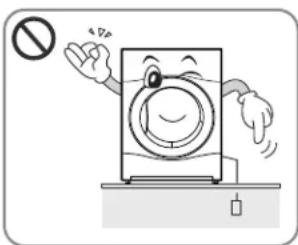
Cartoon illustration of a washing machine with a 'No' symbol and waving hand (no text or symbols on the machine itself)- Before plugging in the power cord, make sure the cord is earthed and connected to a circuit breaker.
No earthing may cause breakdowns or an electric shock.

natural_image
Cartoon illustration of a washing machine with a toilet and armchair, no text or symbols present- Do not use a damaged power cord or place heavy objects on the cord.
A damaged power cord may cause fire or electric shock.

natural_image
Simple line drawing of a box with wires and a prohibition symbol (no text or labels)- Do not plug into an adaptor. Do not use with an extension lead.
Abnormal heating of outlet may cause a fire.

- Do not touch the plug or switch with wet hands.
May cause an electric shock.
natural_image
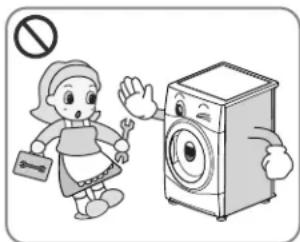
Illustration of a woman in a kitchen holding a wrench next to a washing machine, with no text or symbols present.- Do not remove the top plate when installing the dryer.
- Do not modify this product.
May cause breakdown, fire or electric shock.

natural_image
Hand using a tool to switch an electrical outlet with a circular component (no text or symbols visible)- Disconnect the power by grasping the cord, not the plug.
May cause damage of cord resulting in fire or electric shock.

natural_image
Cartoon illustration of a washing machine with surprised expression and a refrigerator nearby (no text or symbols)- Keep the dryer away from cookers, naked flames, or any other inflammable objects.
May cause fire or parts to melt.

natural_image
Illustration of a hand using a tool to clean or brush the cloth (no text or symbols)- Wipe dirt and stains from the power cord and insert the plug firmly into the socket.
Dirt and poor connections may cause fire.
S
afety Instructions

natural_image
Illustration of a hand holding a plug and a wall socket with a circular head, no text or symbols present- Do not use if power cord, plug or socket is damaged.
May cause fire or electric shock.

natural_image
Cartoon illustration of a washing machine with a distressed dog reacting to its shock (no text or symbols)- Keep pets away from the dryer.
Pets may damage the dryer, or may receive an electric shock.

natural_image
Illustration of a woman standing next to a washing machine with a door open, no text or symbols present- Do not install or store the dryer where it will be exposed to the weather.
May cause fire, electric shock or malfunction.
natural_image
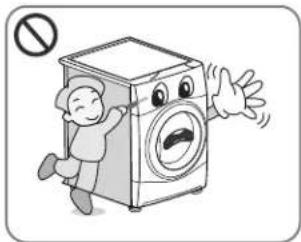
Cartoon illustration of a person running away from a washing machine with a surprised expression (no text or symbols)- Do not press buttons using sharp implements such as knives and screwdrivers.
May damage the dryer or cause electric shock.
natural_image
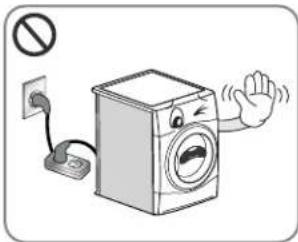
Cartoon illustration of a washing machine with a hand waving, connected to an electrical outlet (no text or symbols)- Do not use an extension cord or an adaptor to connect to the power.
May cause fire or electric shock.

natural_image
Cartoon illustration of a washing machine and two containers with expressive gestures (no text or symbols)- Do not dry articles that have been cleaned in, washed in, soaked in, or spotted with combustible or explosive substances (such as wax, oil, paint, gasoline, degreasers, dry-cleaning solvents, kerosene, etc.).
May cause fire or explosion.
natural_image
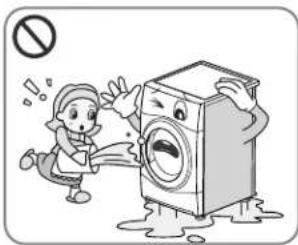
Cartoon illustration of a washing machine with a worker reacting to its shock, no text or symbols present- Do not splash water on to the dryer.
May cause fire or electric shock.

natural_image
Cartoon illustration of a washing machine and a smiling box, both waving and reacting (no text or symbols)- Do not place flammable items near the dryer.
May cause toxic gases, parts damage, fire or explosion.
natural_image
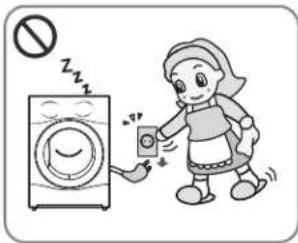
Illustration of a woman washing clothes next to a washing machine with a phone, no text or symbols present- Unplug the power cord when cleaning or not using the dryer.
Water or dirt may cause an electric shock.
natural_image
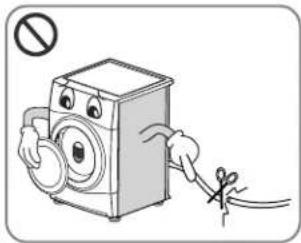
Cartoon illustration of a washing machine with hands holding a tool, no text or symbols present- Before the appliance is removed from service or discarded, unplug the appliance then disassemble the door and cut off the power cord to prevent misuse.
May cause accident and injury.
natural_image
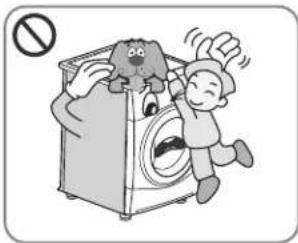
Cartoon illustration of a child reacting to a washing machine with a large dog on top (no text or symbols)- Do not allow children or pets to play on or inside the dryer.
• The appliance is not intended for use by young children or infirm persons without supervision.
- Young children should be supervised to ensure that they do not play with appliance.
Children and pets may injure or suffocate themselves.
natural_image
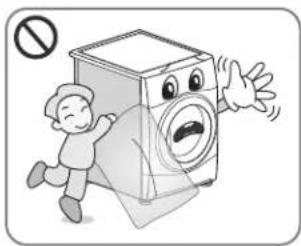
Cartoon illustration of a washing machine with a child running away and a person reacting in shock (no text or symbols)- The packing bag is not a toy. Destroy after opening.
To avoid the possibility of suffocation, keep the packing bag away from babies and children.
Safety Instructions

natural_image
Cartoon illustration of a woman standing next to a washing machine with a door open, no text or symbols present- If this appliance is supplied with power from a cord extension set or an electrical connector, the portable outlet device must be positioned so that it is not subject to damp or splashing.
It may cause an electric shock, a fire, malfunction or deformation.

natural_image
Cartoon illustration of a washing machine and two spray bottles reacting to a stop sign (no text or symbols on the devices)- Items that have been spotted or soaked with vegetable or cooking oil constitute as a fire hazard and should not be placed in the tumble dryer.
- Items that have been soiled with substances such as cooking oil, acetone, alcohol, petrol, kerosene, spot removers, turpentine, waxes and wax removers should be washed in hot water with an extra amount of detergent before being dried in the tumble dryer.
May cause spontaneous combustion leading to explosion and fire.

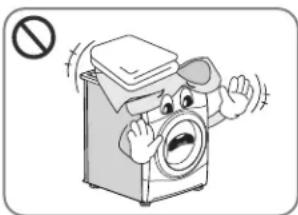
- Items made of foam, rubber, plastic, or other heat-sensitive fabrics (such as bathroom rugs, nonslip mats or raincoats) should not be dried in a tumble dryer on a heat setting.
- Items such as foam rubber (latex foam), shower caps, waterproof textiles, rubber backed articles and clothes or pillows fitted with foam rubber pads should not be dried in the tumble dryer.
May cause spontaneous combustion leading to explosion and fire.
natural_image
Cartoon illustration of a washing machine with a bandaged top and surprised expression (no text or symbols)- Plastic articles such as shower caps or waterproof nappy covers should not be placed in the tumble dryer.
May cause spontaneous combustion leading to explosion and fire.

natural_image
Cartoon illustration of a distressed washing machine with open arms and a 'no' symbol (no text or labels)-
If the tumble dryer is installed on a carpet, it may be damaged due to poor air ventilation.
May cause spontaneous combustion leading to explosion and fire. -
Fabric softeners, or similar products, should be used as specified by the fabric softener instructions.
- To reduce the risk of injury to persons, adhere to all industry recommended safety procedures including the use of long sleeved gloves and safety glasses.
Failure to follow all of the safety warnings in this manual could result in property damage, injury to persons or death.
Installation Instructions
The following instructions will guide you through the initial steps of setting up your dryer.
Please note that every section of this manual provides important information regarding the preparation and use of your dryer, and it is important that you review this entire manual before proceeding with any installation or use. Be sure to observe all listed warnings and cautions. These installation instructions are intended for use by qualified installers. Read these installation instructions completely and carefully.
Safety Information
Risk of Injury
The dryer is very heavy so you shouldn't try to lift it alone.
Do not lift the dryer by grasping any of the protruding parts, e.g. the jog dial or the door, they may break off.
Risk of Falling or Tripping Up
Ensure there are no loose hoses or cables.
Check the dryer for damage occurred during transportation.
Do not connect the dryer if it has visible signs of damage.
If you are not confident, contact your local LG agent. Always empty the dryer completely before transporting it.
Your dryer should not be located near to a gas hob, cooker, heater or grill, as flames from the burners could damage your dryer. When the dryer is fitted beneath a work surface, allow 30cm\~50cm space at either side of the dryer and at the back of the dryer to allow air to exit the rear grille. This air flow is critical for condensation of water during the drying process.
If you use this dryer near or stacked on top of your washing machine, separate main plugs and sockets must be used for each appliance.
Do not use 2-way adaptor or extension lead.
You can stack the dryer on top your washing machine to save space. A stacking kit is available from your local appliance specialist.
- Stacking Installation Instructions
Your LG dryer can be placed on top of a front loading washing machine and securely fixed with a stacking kit (see following page for instructions). This installation must be conducted by an experienced installer to ensure it has been installed correctly.
An installer will ensure you have the correct stacking kit for your model of washing machine and will ensure it is firmly fixed. For these reasons, expert fitting is essential.
CAUTION
CAUTION Concerning the power cord
Most appliances recommend they be placed upon a dedicated circuit; that is, a single outlet circuit which powers only that appliance and has no additional outlets or branch circuits. Check the specification page of this owner's manual to be certain.
Do not overload wall outlets. Overloaded wall outlets, loose or damaged wall outlets, extension cords, frayed power cords, or damaged or cracked wire insulations are dangerous. Any of these could result in an electric shock or fire. Periodically examine the cord of your appliance, and if its appearance indicates damage or deterioration, unplug it, discontinue use of the appliance, and have the cord replaced with an exact replacement part by an authorized servicer.
Protect the power cord from physical or mechanical abuse, such as being twisted, kinked, trapped in a door, or walked upon. Pay particular attention to plugs, wall outlets, and the point where the cord exits the appliance.
Installation Instructions
Stacking Kit
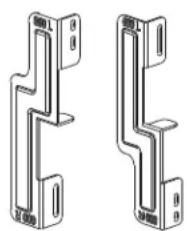
In order to stack this dryer an LG stacking kit is required.

This dryer may only be stacked on top of an LG washer. DO NOT attempt to stack this dryer on any other washer, as damage, injury or property damage could result.
| Shape and assembly direction | Washer Top plate size | |
| 21.7 inch (550mm) | 23.6 inch (600mm) | |
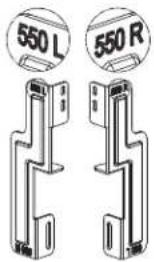 | 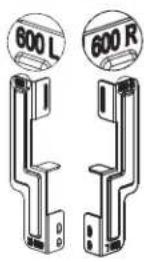 | |
Installation Procedure
- Place the LG dryer on the LG washing machine.
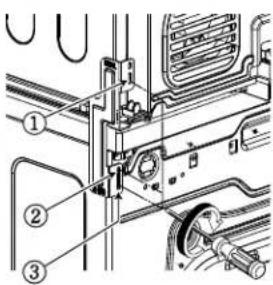
- Remove the two screws from the bottom of the rear cover on each side as illustrated below.

natural_image
Technical line drawing of a refrigerator interior showing ventilation duct, seat, and wiring (no text or symbols)▲ WARNING
- Incorrect installation can cause serious accidents.
- The weight of the dryer and the height of installation makes the stacking procedure too risky for one person. This procedure should be performed by 2 or more experienced service personnel.
- The dryer is not suitable for a built-in installation. Please do not install as a built-in appliance.
-
Do not operate if the dryer is disassembled.
-
Align the stacking kit holes and the rear cover holes.
3-1) 23.6 inch(600mm)

natural_image
Diagram of two mechanical components with a right-pointing arrow indicating transformation (no text or symbols present)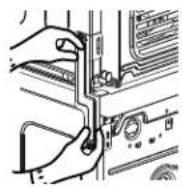
3-2) 21.7 inch(550mm)
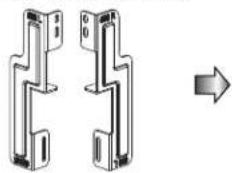
natural_image
Diagram of two mechanical bracket assemblies with a right-pointing arrow indicating transformation (no text or symbols present)
- Fasten the 2 screws that were removed earlier from dryer to stacking kit.
- Use 4 screws in accessory box [0.6inch(16mm)] to assemble washer rear cover and stacking kit.
- The procedure for the opposite side will be the same.

Installation Instructions
Earthing Instructions
This appliance must be earthed. In the event of malfunction or breakdown, earthing will reduce the risk of electric shock by providing a path of least resistance for the electric current. This appliance is equipped with a earthed cord and an earthing plug. The plug must be plugged into an appropriate outlet that is properly installed and earthed in accordance with local Standards.
Additional Grounding Procedure
Some countries may require a separate ground. In such cases, the required accessory ground wire, clamp and screw must be purchased separately.
Condensed Water Drain
This appliance can be plumbed directly into the mains waste with the adaptor supplied. Condensed water will drain away. A plumber will be required.
WARNING
The dryer should not be installed next to a refrigeration appliance.
▶ Do not install the Heat Pump dryer next to the high-temperature appliance like refrigerator, oven or stove etc. which can cause poor drying performance and programme duration, and adversely affect the proper functioning of the compressor.
The Heat Pump dryer performs best at a room temperature of 23^
Note
- The damper in the door lock assembly and the packing for the rack assembly in the drum should be removed before use.
- For better drying performance, please keep the rear of product away from wall.
- Do not install the dryer where there is a risk of frost or dust.
- The tumbles dryer may not be able to operate properly or may be damaged by freezing of condensed water in the pump and drain hose.
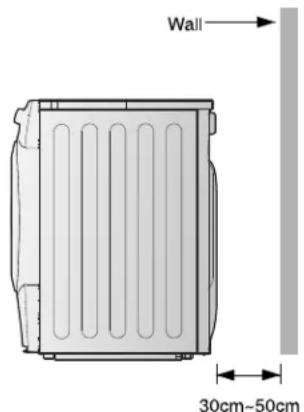
WARNING
Avoid installing the product around a heat source.
The rear side of the dryer must be well ventilated.
If not, this may cause problems.
Installation Instructions
Level the Dryer

natural_image
Illustration of a front-loading washing machine with control panel and door (no text or symbols)- Levelling the dryer prevents unnecessary noise and vibration. Place your dryer on a solid, level floor.
Place the dryer in an area free from flammable materials, condensation and not liable to freezing.

- If the dryer is not properly level, adjust the front levelling feet as necessary.
Turn them clockwise to raise and counter-clockwise to lower until the dryer no longer wobbles, both front-to-back and side-to-side and corner-to-corner.

natural_image
Line drawing of a front-loading washing machine with control panel and door (no text or symbols)* Diagonal Check When pushing down the edges of the machine, the machine should not move up and down at all (Please, check both directions). If machine rocks when pushing the machine top plate diagonally, adjust the feet again.
A
ppearance & Design
Product Layout
■ RC7055AP3Z
RC7055AP2Z
RC7055APZ

RC7055AP1Z

Control Panel


Cycle Selection Table
| Sensor Dry Cycle | |||
| Cycle | Laundry Type | Detail | Dry Level |
| Cotton | Towels, dressing gowns and bed linen | For thick and quilted fabrics | Extra |
| Terry towels, tea towels, towels and bed linen | For thick and quilted fabrics that do not need to be ironed | Very | |
| Bath towels, tea towels, underwear and cotton socks | For fabrics that do not need to be ironed | Cupboard | |
| Sheets, pillowcase and towels | For fabrics that do not need to be ironed | Light | |
| Bed linen, table linen, towels, T-shirts, polo shirts and work clothes | For fabrics that need to be ironed | Iron | |
| Mixed Fabric | Bed linen, table linen, tracksuits, anoraks and blankets | For thick and quilted fabrics that do not need to be ironed | Very |
| Shirts and blouses | For fabrics that do not need to be ironed | Cupboard | |
| Trousers, dressers, skirts and blouses | For fabrics that need to be ironed | Iron | |
| Easy Care | Shirts, T-shirts, trousers, under-wear and socks | For polyamide, acrylic, and polyester that do not need to be ironed | Cupboard |
| Shirts, T-shirts, under-wear, anoraks and socks | For polyamide, acrylic, polyester that do need to be ironed | Iron | |
| Bulky Item | Bed clothes, sheets | For bulky items | - |
| Jeans | Jeans and colour fading garments. | For jeans which do not need to be ironed | - |
| Skin Care | T-shirts, pillowcase, and towels | For cotton fabrics which do not need to be ironed | - |
| Refresh (Refer to the Note) | Shirts and blouses | Odour removal of fabric(For fabrics in need of odour removal) | - |
| Sports Wear | Soccer kit and training wear | For polyester material | - |
| Quick Dry | Linen and towels, excluding fabrics applied to delicate, sports wear, bulky item cycle. | For small loads of suitable fabrics with short drying times | - |
| Delicate | Silk, fine fabrics and lingerie | For fabrics that are heat-sensitive like synthetic fabrics | - |
| Wool For wool fabri | Wool | - | |
| Timed Drying Cycle | |||
| Rack Dry | Silk, wool, delicate lingerie | Refresh clothes without tumble drying | - |
| Cool Air | All fabrics that need refreshing | Tumbles without heat | - |
| Warm Air | Bath towels, bath robes, dishcloth and quilted fabrics made of acrylic | Small Items & damp clothingEveryday items suitable for heat drying | - |
Note
When using the "Refresh" course, please spray cold or warm water on the fabric for a fresher result. (The recommend amount is 20cc of water per shirt.)

CAUTION
If the load is less than 1kg, please use the "Warm Air" Cycle in Timed Drying Cycle. Wool items should be dried using the "Wool" Cycle and heat-sensitive fabrics including silk, underwear and lingerie should be dried using the "Delicate" Cycle. Please comply with the recommended laundry load when you select your desired Cycle - found on page 71. Otherwise, your clothes may be damaged.

perating Your Dryer

Please read before using your LG dryer for the first time
※ After removing the packaging, please carry out the following checks to ensure the LG dryer is correctly installed and ready for use. (See installation instructions)
- Check the dryer is well balanced by using a spirit level. If not, adjust the feet of the LG dryer until the machine is balanced.
- Check the water container, filter, control panel and drum to make sure everything is in place.
- Set the machine to dry for 5 minutes to warm up the drum.
- Open the door between loads the first few times you use the machine to allow any odours from the interior of the LG dryer to disperse.
Note
The final part of a tumble dryer cycle occurs without heat (cool down cycle) to ensure that the items are left at a temperature that will not damage them.
1. Turn the power on.
First, press the "Power" button. The indicator light above the button will become illuminated indicating that the machine is all set to run.
2. Open the door.
3. Check the filter and water container are clean.
The filter is inside the door rim or in the back of the door. It needs to be cleaned before and after drying.
Open the door and check the filter is clean. If not, please clean it referring to page 69.
Also check if water container need to be emptied for optimum drying results.
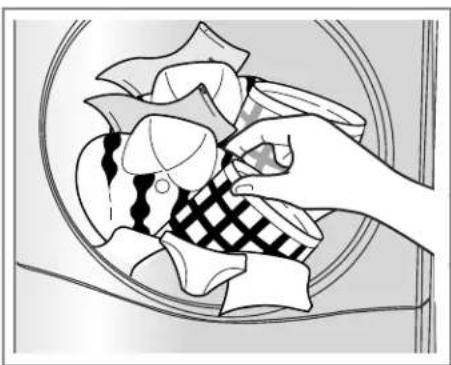
4. Place laundry into the drum after sorting.
The clothes should be sorted by fabric type and dryness level and all the strings and belts of clothes should be well tied and fixed before being put into the drum.
Push the laundry to the back to keep it away from the door seal.
If not, the door seal and clothes may be damaged.

CAUTION
Do not dry unwashed items in the tumble dryer.

natural_image
Illustration of a hand pressing down on a washing machine control panel with a digital timer (no text or symbols)Turn the power on.

natural_image
Illustration of a hand cleaning a circular object, showing two sequential steps (no text or symbols)Open the Door.
Glass Door Opaque Door

natural_image
Diagram showing a hand holding a small component above a curved panel with a grid pattern, no text or symbols present.Check the filter.

perating Your Dryer
5. Close the door.
Before you close the door, make sure fabrics are placed well inside and that foreign objects, especially flammable ones, are not caught around door.
CAUTION
- Be careful not to trap laundry between the door and rubber seal.
6. Select the drying cycle you want.
You can choose a cycle by turning the cycle selector knob until the required cycle is indicated. If you press Start/Pause button without choosing a cycle, the dryer will proceed with the Cupboard cycle. [Please refer to Cycle Selection table (page 63) for the detailed information.
7. Press the start button.
You will hear drum rotating.
8. After the cycle has finished, open the door and remove the laundry.
CAUTION
Be careful! The drum inside could still be hot.
(Operation time varies depending on your cycle selection or options.)
Note
The final part of a tumble dryer cycle occurs without heat (cool down cycle) to ensure that the items are left at a temperature that will not damage them.
9. Clean the filter and empty water container.
The filter should be cleaned after each load.
10. Turn off the dryer.
Press the "Power" button.
CAUTION
- Take care if using a vacuum cleaner to clean the filter, as it is easily damaged and torn. If there is a residue build up on the filter, scrub the filter with a brush to remove.
- If you want to open the door while the dryer is operating, please press the Start/Pause button first, wait until the drum completely stops and then open the door.

natural_image
Hand holding a circular dial with three buttons, no text or symbols visibleSelect the desired cycle.
natural_image
Illustration of hands cleaning a plate with checkered pattern and cloth (no text or symbols)Take out the laundry.
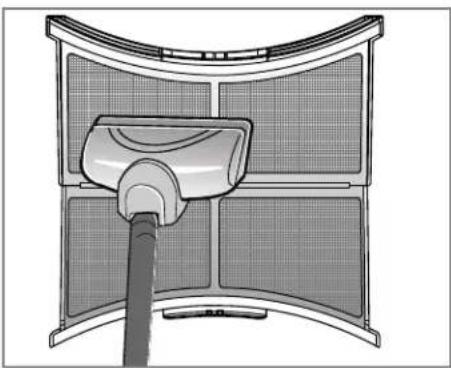
natural_image
Diagram of a curved panel with a central device emitting liquid, no text or symbols presentClean the filter. (Replace the filter if it is damaged.)
WARNING
Never stop a tumble dryer before the end of the drying cycle unless all items are quickly removed and spread out so that the heat is dissipated.
CAUTION
This dryer must not be used for purposes other than those for which it was designed.

perating your dryer

Rack Dry
The dryer rack is placed inside the dryer like the picture. Remove and discard packing material before use.
The Rack Dry is designed for use with items that must be dried flat, without tumbling, including sweaters and delicate fabrics.
To use the Rack Dry :
1.Open the door.
2.Do not remove the filter.
3. Place dryer rack over the bottom of the dryer door opening.
Reset the Rack on the dryer back lodge.
Push down on the frame front to secure over filter.
4. Place wet items on top of the rack. Allow space around items for air to circulate.
The rack does not move, but the drum will rotate.
5. Close the door.
6. Turn power on and select Rack Dry.
Note
Check the filter and remove any lint accumulated from items dried on the Rack. If preferred, set up Eco by pressing Eco Hybrid™ button.
- Insert wire edge to the drum center.
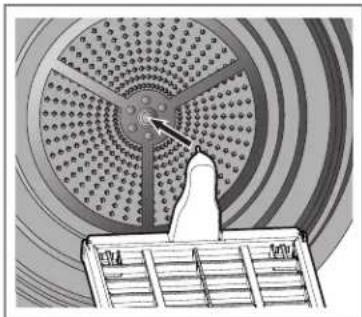
natural_image
Illustration of a circular patterned structure with a pointer and a small inset showing a grid, no text or symbols present.- Place delicate fabrics or sports shoes.

natural_image
Illustration of a circular mechanical component with internal components and two spherical parts on a tray (no text or symbols)Additional Functions
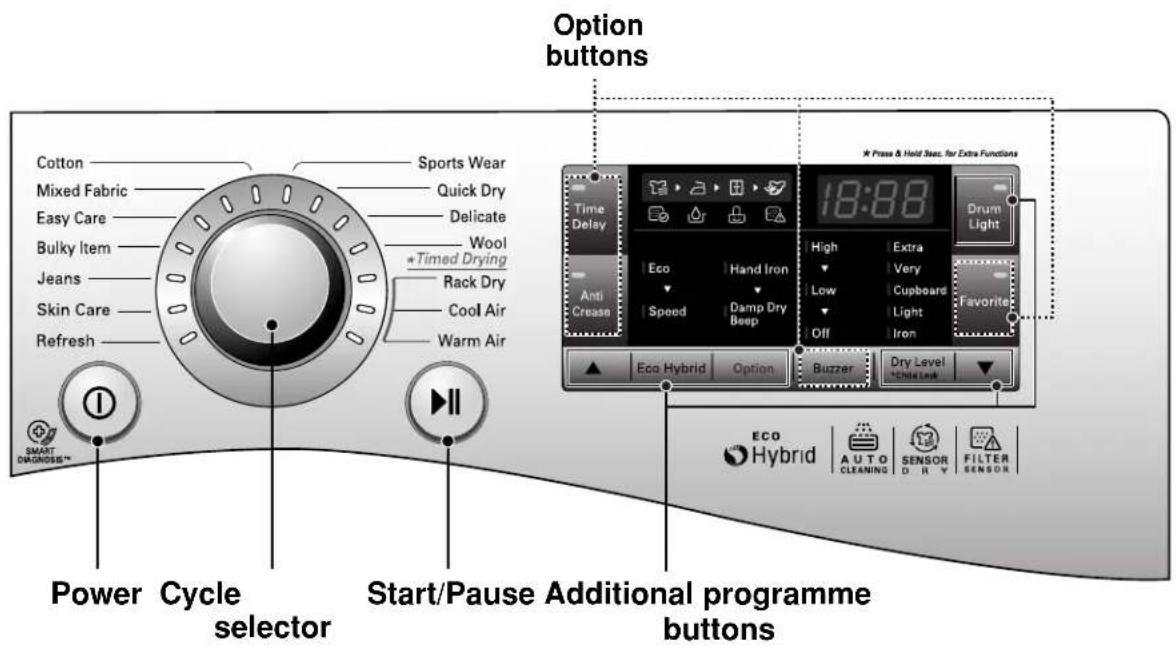
Power
- Press the Power button to turn power on and off.
- To cancel the Time Delay function, the power button should be pressed.
Cycle Selector
• Cycles are available according to the laundry type.
- The lamp will light up to indicate selected cycle.
Start/Pause
- This Start/Pause button is used to start dry cycle or pause the dry cycle.
- Press the Start/Pause button to stop the cycle temporarily.
- When in Pause, the power is turned off automatically after 4 minutes.
Additional Programme
- Use these buttons to select the desired options for the selected cycle.
Options
- This allows you to select additional options and will light when select.
A
dditional Functions
Time Delay
You can use the Time Delay option to delay the finishing time of drying cycle.
Maximum Time Delay is 19 hours.
Minimum Time Delay is 3 hours.
- Turn the dryer on.
- Select a cycle.
- Set time delay hour(s) by press the “▲”, “▼” button.
- Press Start/Pause button.
Anti Crease
The Anti-Crease option prevents creases that are formed when the laundry is not unloaded promptly at the end of the drying cycle. When Anti Crease is selected, the dryer repeatedly runs and pauses, giving you 2 hours to unload the laundry. If the door is opened during the Anti-Crease option, the option is cancelled.
Favorite
Favorite option allows you to store a customized dry cycle for future use.
- Turn the dryer on.
- Select a cycle.
- Select the option or additional programme. (Anti-Crease, Eco Hybrid™ etc.)
- Press and hold Favorite option button for 3 seconds.
The Favorite option is now stored for future use. To reuse the stored cycle, select
Favorite option and press the Start/Pause.
Drum Light
Whilst the dryer is running it is possible to see inside the drum if you select the Drum Light function.
- Light on : Door is opened.
- Light off : Door is closed.
Off automatically.
Eco Hybrid™
This additional program offers the option of either saving energy or time.
- Eco: energy saving option. (Heat Pump only)
- Speed: time saving option. (Heat Pump + Heater) You will see "speed" indication on the LED.
Option
Hand Iron
This function keeps the garments more moist than the standard Iron dry level.
Note
| Cycle Dry Level | Option | |
| Cotton | Iron | Hand Iron is available |
| Mixed Fabric | ||
| Easy Care | ||
Damp Dry Beep
This function lets you know when the clothes are ready for ironing.
Note
| Cycle Dry Level | Option | |
| Cotton | Extra / Very Cupboard / Light | Damp Dry Beep is available |
| Mixed Fabric | Very / Cupboard | |
| Easy Care | Cupboard | |
Child Lock ( & )
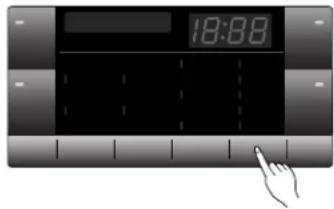
For the safety of your children, press Dry Level button for about 3 seconds.
You will see “💡” indication on the LED. You can see “☐L” sign on LED window.
- All controls except Child Lock and Power buttons will be disabled.
- Child Lock lasts after the end of cycle.
Note
For "Child Lock is off", press Dry Level button for about 3 seconds.
Buzzer
This is an option to enable you to adjust volume of beeper sound.

aring for Your Dryer
Caring for your Dryer is very Important
It's not difficult to care for your dryer but it is important that you do care for it to get the best out of it.
Clean Filter
Clean filter after each use and check it before each use. It should also be cleaned if the “Clean Filter” light becomes illuminated and the buzzer sounds whilst the dryer is in operation.
Cleaning or emptying the filter will reduce drying times and energy consumption and lengthen the dryer life.
CAUTION
- The lint trap has to be cleaned frequently, if applicable.
- Lint must not to be allowed to accumulate around the tumble dryer.
-
Filter must be cleaned after every cycle completes.
-
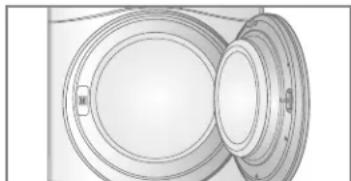
Open the door.
natural_image
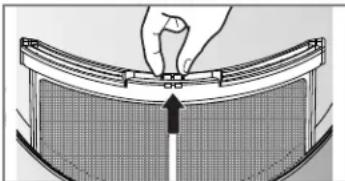
Technical line drawing of a mechanical component with circular and rectangular features (no text or symbols)- Pull the filter out.
natural_image
Diagram of a hand adjusting a curved panel with a grid pattern and an arrow indicating direction (no text or symbols)- Clean the filter by using a vacuum cleaner or rinsing under the tap.

natural_image
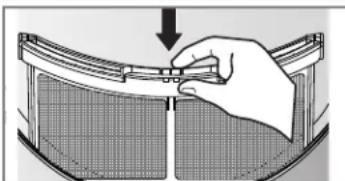
Diagram of a mechanical device with a cylindrical component inserted into a housing (no text or symbols visible)- Replace the filter.
- Push the filter all the way down to avoid interference with the door.
natural_image
Illustration of a hand using a tool to adjust or install a component on a curved surface (no text or symbols visible)- Close the door.
CAUTION
- After washing the filter, please dry thoroughly.
- Lint must not be left to accumulate in the dryer.
Note
If the filter is not in your dryer, you can not operate the dryer.

If "Clean Filter" symbol is displayed during the operation, clean the filter promptly.
- Cool the dryer down and follow the above steps.
- Press the Start/Pause button.
Empty Water Container
Condensed water is collected in the water container. Empty the water container after every use. Not doing so will affect the drying performance. If the water container is full, the "Empty Water" lamp glows and the buzzer sounds while the dryer is operating. If this should occur, the water container needs to be emptied within the next hour.
- Pull out the water container.

natural_image
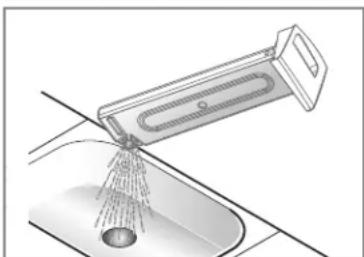
Illustration of a hand inserting a door into a washing machine (no text or symbols visible)- Empty water container in the sink.
natural_image
Diagram of a kitchen sink with a tool spraying water from a drain (no text or symbols)-
Push it back into the dryer.
-
Press the Start/Pause button.
Note
A high atmospheric temperature and a small room may both increase drying time as well as energy consumption.
WARNING
Do not drink the condensed water.
CAUTION
If the laundry is not spun at a high speed during washing, energy consumption and drying time will increase. In some instances, LED window may display “☐” (Empty water symbol) and the dryer may stop because the water container is full.
C
aring for Your Dryer

Ventilation Grill and Cool Air Inlet Grill
Vacuum the front ventilation grill 3-4 times a year to make sure there is no build up of lint or dirt that may cause improper air flow.

natural_image
Simple line drawing of a curved surface with a circular top and horizontal base (no text or symbols)
natural_image
Technical line drawing of a mechanical assembly with no visible text or symbolsNote
- Warm air is exhausted through the ventilation grill.
- Adequate ventilation should be provided to avoid the back flow of gases into the room from units burning other fuels, such as open fires.

Condensed Water Drain-out
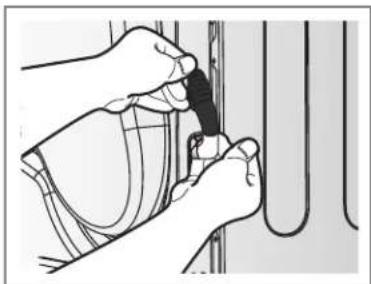
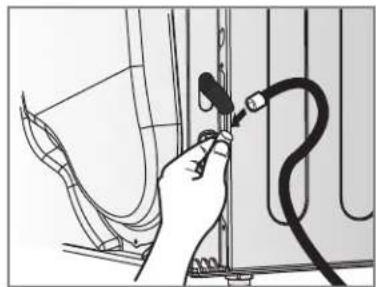
Normally, condensed water is pumped up to the water container where water is collected until manually emptied. Water can also be drained out directly to a mains drain, especially when the dryer is stacked on top of a washing machine. With a connecting kit for the mains drain hose, simply change the water path and re-route to the drainage facility as below:
- Take connecting kit out.
natural_image
Illustration of hands using a tool to adjust or install a component, no text or symbols visible- Separate water container hose from the kit.

natural_image
Hand holding a small object against a wall, no visible text or symbols- Connect drain hose to the kit.
natural_image
Hand holding a cable with a connector, connected to a wall-mounted panel (no text or symbols visible)
Moisture Sensor?
The device senses the moisture level of the laundry during operation, which means it must be cleaned regularly to remove any build-up of lime scale on the surface of the sensor. Wipe the sensors inside drum. (as illustrated)

A
dditional Tips for Smart Use

Drying Guide
| CYCLE | Capacity of dryer | Display Drying Time (Including Cooling Time) | ||
| Eco | Speed | |||
| Cotton | Extra | 7 kg | 170 min 95 min | |
| Very | 7 kg | 160 min | 90 min | |
| Cupboard | 7 kg | 150 min | 85 min | |
| Light | 7 kg | 140 min | 79 min | |
| Iron | 7 kg | 110 min | 67 min | |
| Mixed Fabric | Very | 3,5 kg | 70 min | 53 min |
| Cupboard | 3,5 kg | 60 min | 48 min | |
| Iron | 3,5 kg | 50 min | 41 min | |
| Easy Care | Cupboard | 3,5 kg | 70 min | 41 min |
| Iron | 3,5 kg | 60 min | 35 min | |
| Bulky Item | 2 kg | 120 min | 70 min | |
| Jeans | 3 kg | 110 min | 60 min | |
| Skin Care | 4,5 kg | - | 135 min | |
| Refresh | 1,5 kg | - | 39 min | |
| Sports Wear | 2 kg | 50 min | - | |
| Quick Dry | 3 kg | - | 50 min | |
| Delicate | 1,5 kg | 48 min | - | |
| Wool | 1 kg | 29 min | ||
Woollens
Dry woollens on "wool" cycle. Be sure to follow fabric care label "symbols" first. Wool may not be completely dried from the cycle, so don't repeat drying. Pull woollens to their original shape and dry them flat.
Woven and Loopknit Materials
Some woven and loopknit materials may shrink, depending on quality.
Permanent Press and Synthetics
Do not overload your dryer. Take out permanent press items as soon as the dryer stops to reduce creases.
Baby Clothes and Night Gowns
Always check the manufacturer's instructions.
Rubber and Plastics
Do not dry any items made from or containing rubber or plastics such as:
a) Aprons, Bibs and Chair Covers
b) Curtains and Table Clothes
c) Bathmats
Fiberglass
Do not dry fiberglass articles in your dryer.
Glass particles left in the dryer could be picked up by your clothes the next time you use the dryer and irritate your skin.
Fabric Care Labels
Clothes have their own wash care labels, so drying according to the wash care label is recommended.
Not only that, the laundry must be sorted according to size and type of fabric.
For the best drying performance and most efficient energy usage, do not overload the dryer.
Below are fabric care labels.
| Symbols | Instructions |
| Dry | |
| Tumble dry | |
| Permanent Press / Crease resistant | |
| Gentle / Delicate | |
| Do not tumble dry | |
| Do not dry | |
| High heating | |
| Medium heating | |
| Low heating | |
| No heat / air | |
| Line Dry / hang to dry | |
| Drip dry | |
| Dry flat | |
| In the shade |

Product Specification
| LG FULLY AUTOMATIC CLOTHES DRYER | ||
| Maker | LG Electronics | |
| Model | RC7055**** | |
| Rated Capacity | kg | 7kg |
| Dryer Type | Condenser Household Tumble Dryer | |
| Energy Efficiency Class | A++ | |
| Annual Energy Consumption (AEc) | kWh/yr | 206 |
| Automatic Tumble Dryer | Yes | |
| EU Ecolabel Award | No | |
| E dry | kWh | 1.73 |
| E dry ^1/2 | kWh | 0.93 |
| Power Consumption at Full Load | ||
| -. Off-mode (Po) | W | 0.4 |
| -. Left-on mode (Pl) | W | 0.4 |
| Duration of Left-on mode | min | 10 |
| Standard Cotton Programme | Cotton Cupboard Eco | |
| Drying Time (Tt) | min | 135 |
| -. Tdry | min | 175 |
| -. Tdry ^1/2 | min | 105 |
| Condensation Efficiency Class | A | |
| -. Ct | % | 91 |
| -. Cdry | % | 92 |
| -. Cdry ^1/2 | % | 91 |
| Sound Power Level | dB | 64 |
| Programme | Dry Level | Option (Eco HybridTM) | Load Content | Capacity | Estimated Performance | |||
| Energy Efficiency (kWh) | Drying Time (min) | Left-on mode (PI) (W) | Off mode (Po) (W) | |||||
| Cotton (Bavlna) | Cupboard (Skřín) | Eco | Cotton 100% | 7kg | 1.73 | 175 | 0.4 | 0.4 |
| Cotton 100% | 3.5kg | 0.93 | 105 | |||||
| Mixed Fabric (Smíšené prádlo) | Cupboard (Skřín) | Eco | Polyester 65%+Cotton35% | 3.5kg 0. | .67 78 | |||
| Easy Care (Syntetika) | Cupboard (Skřín) | Speed (Rychlé) | Polyester 65%+Cotton35% | 3.5kg 0. | .79 91 | |||
Note
- Tested in accordance with EN61121 and Directive 932/2012
- Set programme at "Cotton Cupboard Eco (Bavlna Skřín Eco) (Full & Half Load)" for test in accordance in conformity with EN61121 and Directive 932/2012
- Standard Cotton programme : Cotton (Bavlna) Cupboard(Skřín) + Eco Option(Default) (This is the most efficient programmes in terms of the test conditions proposed by EN61121 and Directive 932/2012)
- Information about the ‘standard cotton programme’ and shall specify that it is suitable to dry normal wet cotton laundry and that it is the most efficient programme in terms of energy consumption for drying wet cotton laundry;
- The test results depend on room temperature, type and amount of load, water hardness and water inlet temperature.
- If product is installed as built under, it may cause performance degradation.
A
dditional Tips for Smart Use
- Spare Parts
Spare parts that are required under the terms of warranty are provided free of charge. If the warranty has expired then spare parts must be purchased from the service center.
- Disposal of the Dryer
It is requested that you dispose of your dryer safely to protect your children and others from possible injury.
The door, lid and other protruding parts must be removed and the power cord should be cut off before safe disposal.
Service Contact
If there is a problem with your dryer, first consult the Trouble Shooting Guide. If you cannot find the error and you are unable to resolve the problem, please contact the Service Center.
A Customer Service representative will ask you the following questions:
- Name, address and postcode.
- Phone number.
- Description of problem.
- Model number and serial number of your dryer.
- Date of Purchase.
Accessory Parts
- Your dryer comes with accessories such as:
- Condensing Drain Hose and Hose Holder

natural_image
Three technical line drawings of mechanical components: a coiled wire, an arch-like bracket with a handle, and a conical tool (no text or symbols)- Dryer Rack

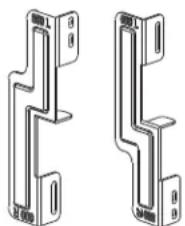
Stacking Kit
natural_image
Technical line drawing of two mechanical bracket components (no text or symbols)Holder : 2EA, Screw : 4EA
Purchased Separately
- The stacking kit can be used for washer top plate size 550mm and 600mm for both.
If stacking is needed, you must stack the dryer upon LG washing machine. A stacking kit is sold separately.
Troubleshooting Tips
To save you time and money, the following page will help answer your questions before service call.
Questions What to do
| Dryer won't run | 1. Check dryer is plugged in.2. Check "Start/Pause" button is pressed.3. Check door is properly closed.4. Check room temperature is below 5°C.5. Check a fuse is blown or the circuit breaker is tripped and replace them.(Caution: electric dryers generally use two fuses or breakers)After emptying the water container and cleaning filter during operation, you must press Start/Pause button, then the dryer will operate again. |
| It takes a long time to dry | 1. Filter should be cleaned after each load.2. Check water container is emptied.3. Select correct cycle setting for fabric type.4. Check air ventilation grille or rear vents of dryer are not obstructed.5. Check clothes are not excessively wet.6. Check the dryer is overloaded. |
| Dryer is operating but “Time Left” in the display doesn't change. | This is not a malfunction.Drying time is estimated and will recalculate throughout the cycle as it senses the dryness of the load. |
| Check filter is clean. | |
| Clothes are covered in fluff | 1. Check the filter is clean.2. Check all the items in the dryer are clean.3. Check all the laundry has been correctly sorted by fabric type.4. Check the dryer is not overloaded.5. Check if there are any paper, tissues or other degradable items amongst the laundry and remove. |
| The drying time is not consistent | The drying time for a load will vary depending on the heat setting, the size of the load, the type of fabrics, the wetness of the clothes and the condition of the filter. |
| Water is leaking | Check the water hose or drain hose is properly connected. |
| The clothes are creased | Check the dryer is not overloaded. Try a shorter drying time and remove items whilst they still retain a slight amount of moisture. Use the anti-crease option. |
| The garments have shrunk | To avoid shrinkage, please follow the care and use instructions for your garment, as some fabrics shrink naturally when washed and should not be placed in a dryer. |
 | Please check the filter is in the dryer. |

roubleshooting Guide
Error Mode
- : The door must be closed and Start/Pause button must be pressed for re-operation. If error message continues to occur, unplug the power cord and call the service center for advice.
•, tE1 tE2 tE3 tE4 F1 0E
: If error message continues to occur, unplug the power cord and call the service center for advice.
- Drum light does not work
- Contact the customer service center.
Troubleshooting Guide
Note
Smart Diagnosis™ function is available only for the products with a Smart Diagnosis™ mark. Should you have an analog phone, the Smart Diagnosis function may not operate.
Using Smart Diagnosis™
- Only use this feature when instructed to do so by the call center. The transmission sounds similar to a fax machine, and so has no meaning except to the call center. - Smart Diagnosis™ cannot be activated if the dryer does not power up. If this happens, then troubleshooting must be done without Smart Diagnosis™.
If you experience problems with your dryer, call the customer information center. Follow the call center agent's instructions, and do the following steps when requested:
- Press the Power button to turn on the dryer. Do not press any other buttons or turn the cycle selector knob.

natural_image
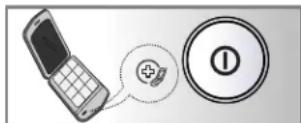
Hand pressing a button on a device control panel (no text or symbols visible)- When instructed to do so by the call center, place the mouthpiece of your phone close to the "Smart Diagnosis™" icon and Power button.

natural_image
Illustration of a hand pressing down on a kitchen fan with control buttons (no text or symbols)
- Press and hold the “▲ (More)” button for three seconds, while holding the mouthpiece of your phone close to the "Smart Diagnosis™" icon and Power button.
-
Keep the phone in place until the tone transmission has finished. This takes about 6 seconds, and the display will count down the time.
-
For best results, do not move the phone while the tones are being transmitted.
- If the call center agent is not able to get an accurate recording of the data, you may be asked to try again.
-
Pressing the Power button during the transmission will shut off the Smart Diagnosis™.
-
Once the countdown is over and the tones have stopped, resume your conversation with the call center agent, who will then be able to assist you using the information transmitted for analysis at the call to customer information center.
Note
"Smart Diagnosis is a troubleshooting feature designed to assist, not replace, the traditional method of troubleshooting through service calls. The effectiveness of this feature depends upon various factors, including, but not limited to, the reception of the phone being used for transmission, any external noise that may be present during the transmission, and the acoustics of the room where the machine is located. LG does not guarantee that Smart Diagnosis would accurately troubleshoot any given issue."

Net Weight : 55.9kg ,Opaque Door 57.4kg ,Glass(Cr) Door
Electrical Requirements
| Volts Hertz Watts | |
| 230 V 50 Hz 1800 |
Ensure you connect the dryer to the correct electricity voltage. The ratings plate on your dryer shows you what the voltage should be.
Max. capacity : 7 kg
Allowable temperature : 5 \~ 35°C
Depth with door open : 1090mm
Ventilation Requirement
| Alcove or under counter | Closet |
| Ensure air flow of 112 cu.ft./min through dryer | Closet door must have 2 (louvered) openings, each having a minimum area of 60 sq. inches (387 sq.cm), located 3 inches (8 cm) from bottom and top of door. |
Disposal of your old appliance
natural_image
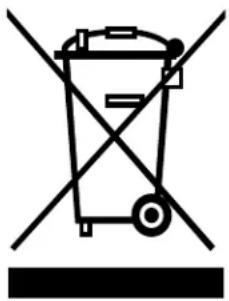
Symbol of a trash bin crossed with a diagonal line, no text or labels present- When this crossed-out wheeled bin symbol is attached to a product it means the product is covered by the European Directive 2002/96/EC.
- All electrical and electronic products should be disposed of separately from the municipal waste stream via designated collection facilities appointed by the government or the local authorities.
- The correct disposal of your old appliance will help prevent potential negative consequences for the environment and human health.
- For more detailed information about disposal of your old appliance, please contact your city office, waste disposal service or the shop where you purchased the product.
• Information of fluorinated greenhouse gases used as refrigerant of this dryer
| Chemical name | Composition of Gases Total GWP (kg CO _2 –eq) |
| R – 134a 100% HFC – 134a 1300 |
Note
- When disposing of the appliance, cut off the mains cable, destroy the plug and disassemble the door to prevent children being trapped inside.
■ What is not covered.
• Service trips to your home to instruct you on the product.
If the product is connected to any voltage other than that shown on the rating plate.
- Faults caused by accidental damage, neglect, misuse or Acts of God. If the fault is caused by reasons except for normal domestic use or use in accordance with the owner's manual.
- Faults caused by vermin, for example rats, mice etc.
- Noise or vibration that is considered normal, for example, water drain sound, spin sound or warning beeps.
- Correcting the installation for example, levelling the product, adjustment of drain.
- Normal maintenance recommended by the owner's manual.
- Removal of foreign objects/substances from the machine including the pump and inlet hose filter, for example, grit, nails, bra wires and buttons, etc.
- Replacing fuses, correcting wiring or correcting plumbing.
- Correction of unauthorized repairs.
Incidental or consequential damage to personal property caused by possible defects with this appliance.
- If this product is used for commercial purposes its warranty is invalidated.
(Example: Public places such as public bathroom, lodging house, training center, dormitory)
- If the product is installed outside the normal service area, any cost of transportation involved in the repair of the products, or the replacement of a defective part, shall be borne by the owner.
| • Clean the lint filters after each use. | • Empty water container after each use. |
| • Cleaning and Care | • Empty water container after each use. |
| A Caution | • Open water container after each use. |
Memo
Memo

LG
Life's Good
Dovozce do ČR a SR:
INFO linka - CZ: 810 555 810
INFO linka - SK: 0850 111 154
www.lgecz.cz
e-mail:info@lgecz.cz
- bsah
- Buben s extra velkou kapacitou
- ⚠ UPOZORNĚNÍ
- ávod k instalaci
- Pokyny k uzemnění
- Používání sušičky
- Zavřete dvířka.
- !
- VAROVÁNÍ
- Poznámka
- Čidlo vlhkosti?
- Vel'ký bubon s mimoriadnou kapacitou
- ⚠️ VAROVANIE
- P
- okyny na inštaláciu
- Pokyny pre uzemnenie
- P revádzka sušičky
- Zatvorte dvierka.
- Hlavný vypínač
- UPOZORNENIE
- Poznámka:
- Snímač vlhkosti?
- Priadze
- Stohovacia súprava
- Ultra Big Capacity Drum
- Lower Energy Consumption
- - Reduced Drying Times
- Reduced Noise Levels
- Ease of Use
- C
- ontents
- Safety Instructions
- WARNING
- Hazards
- S
- afety Instructions
- Installation Instructions
- Safety Information
- Risk of Injury
- Risk of Falling or Tripping Up
- Check the dryer for damage occurred during transportation.
- - Stacking Installation Instructions
- CAUTION
- CAUTION Concerning the power cord
- Stacking Kit
- Installation Procedure
- ▲ WARNING
- Earthing Instructions
- Additional Grounding Procedure
- Condensed Water Drain
- Note
- Level the Dryer
- A
- ppearance & Design
- Product Layout
- Control Panel
- perating Your Dryer
- Please read before using your LG dryer for the first time
- Turn the power on.
- Open the door.
- Check the filter and water container are clean.
- Place laundry into the drum after sorting.
- Close the door.
- Select the drying cycle you want.
- Press the start button.
- After the cycle has finished, open the door and remove the laundry.
- Clean the filter and empty water container.
- Turn off the dryer.
- Rack Dry
- Additional Functions
- Power
- Cycle Selector
- Start/Pause
- Additional Programme
- Options
- dditional Functions
- Time Delay
- Anti Crease
- Favorite
- Drum Light
- Eco Hybrid™
- Option
- Hand Iron
- Damp Dry Beep
- Child Lock ( & )
- Buzzer
- aring for Your Dryer
- Caring for your Dryer is very Important
- Clean Filter
- Empty Water Container
- Ventilation Grill and Cool Air Inlet Grill
- Condensed Water Drain-out
- Moisture Sensor?
- dditional Tips for Smart Use
- Woollens
- Woven and Loopknit Materials
- Permanent Press and Synthetics
- Baby Clothes and Night Gowns
- Rubber and Plastics
- Fiberglass
- Fabric Care Labels
- - Spare Parts
- - Disposal of the Dryer
- Service Contact
- Accessory Parts
- Troubleshooting Tips
- roubleshooting Guide
- Error Mode
- - Drum light does not work
- Troubleshooting Guide
- Using Smart Diagnosis™
- Disposal of your old appliance
- ■ What is not covered.
- Memo
- LG
- Life's Good
Brand : LG
Model : RC7055AP3Z
Category : Tumble dryer