
TriZone 500 D16.513 - Toothbrush ORAL-B - Free user manual and instructions
Find the device manual for free TriZone 500 D16.513 ORAL-B in PDF.


| Product Type | Electric Toothbrush |
| Brand | Oral-B |
| Model | TriZone 500 D16.513 |
| Brushing Modes | Daily Clean, Sensitive |
| Timer | Professional timer: 30-second intervals, 2-minute total |
| Pressure Sensor | Yes - pulsation stops and sound changes when too much pressure |
| Battery Type | Rechargeable (internal) |
| Charging Time | Approx. 12-16 hours for full charge |
| Battery Life | Up to 7 days (twice daily, 2 minutes) |
| Charge Indicator | Green light flashes while charging, steady for 5 seconds when full |
| Low Battery Indicator | Red light flashes when power is low |
| Noise Level | ≤ 65 dB(A) |
| Waterproof Rating | Handle waterproof, safe for bathroom use |
| Compatible Brush Heads | Oral-B Precision Clean, Sensitive, TriZone (INDICATOR bristles) |
| Brush Head Replacement | Every 3 months or when bristles splay/color fades halfway |
| Cleaning Instructions | Rinse brush head and handle under water; charger wipe with damp cloth; brush head holder dishwasher-safe |
| Safety Features | Overcharge protection; do not use if cord damaged; not for children under 3 |
| Warranty | 2 years from purchase date |
Frequently Asked Questions - TriZone 500 D16.513 ORAL-B
User questions about TriZone 500 D16.513 ORAL-B
0 question about this device. Answer the ones you know or ask your own.
Ask a new question about this device
Download the instructions for your Toothbrush in PDF format for free! Find your manual TriZone 500 D16.513 - ORAL-B and take your electronic device back in hand. On this page are published all the documents necessary for the use of your device. TriZone 500 D16.513 by ORAL-B.
USER MANUAL TriZone 500 D16.513 ORAL-B
natural_image
Illustration of a white electric toothbrush with two blue screw base holders, against a solid blue background (no text or symbols visible)
natural_image
Illustration of an Oral-B electric toothbrush with a digital sensor emitting blue light (no text or symbols on the device itself)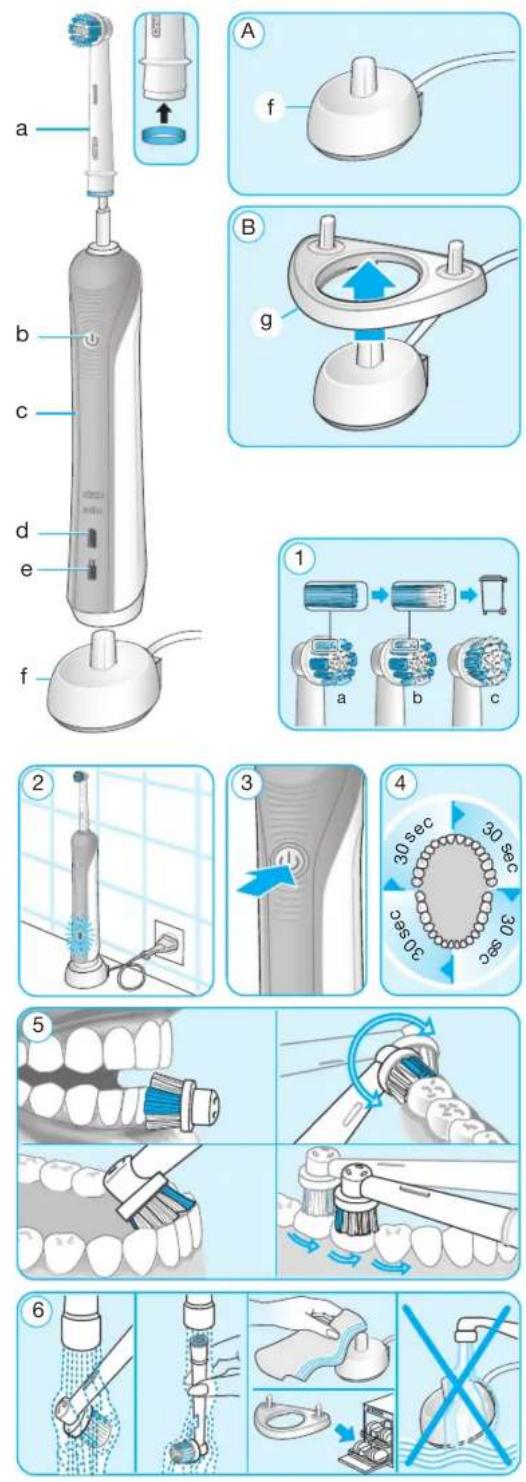
English
Welcome to Oral-B!
Before operating this toothbrush, please read these instructions and save this manual for future reference.
IMPORTANT
- Periodically check the cord for damage. If cord is damaged, take the charging unit to an Oral-B Service Centre. A damaged or non-functioning unit should no longer be used. Do not modify or repair the product. This may cause fire, electric shock or injury.
- This product is not intended for use by children under age three. Children from 3 to 14 years and persons with reduced physical, sensory or mental capabilities or lack of experience and knowledge can use the toothbrush, if they have been given supervision or instruction concerning use of the appliance in a safe way and understand the hazards involved.
- Cleaning and maintenance shall not be performed by children.
• Children shall not play with the appliance.
- Use this product only for its intended use as described in this manual. Do not use attachments which are not recommended by the manufacturer.
WARNING
- If the product is dropped, the brush head should be replaced before the next use even if no damage is visible.
- Do not place the charger in water or liquid or store where it can fall or be pulled into a tub or sink. Do not reach for it when fallen into water. Unplug immediately.
- Do not disassemble the product except when disposing of the battery. When taking out the battery for disposal of the unit, use caution not to short the positive (+) and negative (−) terminals.
- When unplugging, always hold the power plug instead of the cord. Do not touch the power plug with wet hands. This can cause an electric shock.
- If you are undergoing treatment for any oral care condition, consult your dental professional prior to use.
Description
a Brush head
b On/off button (mode selection with model 800 only)
c Handle
d Charge indicator light
e Low charge indicator light
f Basic charger
g Brush head holder (depending on model)
Specifications:
Noise level: ≤65 dB (A)
For voltage specifications please refer to the bottom of the charging unit.
Connecting and charging
Your toothbrush has a waterproof handle, is electrically safe and designed for use in the bathroom.
- Plug the basic charger (f) or the assembled charging unit (picture A/B) into an electrical outlet and place the toothbrush handle (c) on the charging unit.
- The green charge indicator light (d) flashes while the handle is being charged. Once it is fully charged, the green charge indicator light shines continuously for 5 seconds and then it turns off. A full charge enables up to seven days of regular brushing (twice a day, 2 minutes) (picture 2).
- If the rechargeable battery is low the red low charge indicator light (e) is flashing for some seconds when turning your tooth-brush on/off.
- For everyday use, the toothbrush handle can be stored on the charging unit to maintain it at full power. Overcharging is impossible. However, for environmental reasons, Oral-B recommends to unplug the charger until the next recharge is required.
- To maintain the maximum capacity of the rechargeable battery, unplug the charging unit and fully discharge the handle with regular use at least every 6 months.
Please note: If the charge indicator light is not flashing immediately, continue charging. It will appear in 10–15 minutes.
Using your toothbrush
Brushing technique
Wet brush head and apply any kind of toothpaste. To avoid splashing, guide the brush head to your teeth before switching on the appliance (picture 3). When brushing your teeth with one of the rotating brush heads guide the brush head slowly from tooth to tooth, spending a few seconds on each tooth surface.
When using the TriZone brush head place the toothbrush bristles against the teeth at a slight angle towards the gumline. Apply light pressure and start brushing in back and forth motions, just like you would do with a manual toothbrush.
With any brush head start brushing the outsides, then the insides and finally the chewing surfaces. Brush all four quadrants of your mouth equally. You may also consult your dentist or dental hygienist about the right technique for you (picture 5).
In the first days of using any electric toothbrush, your gums may bleed slightly. In general, bleeding should stop after a few days. Should it persist after 2 weeks, please consult your dentist or dental hygienist. If you have sensitive teeth and gums, Oral-B recommends using the «Sensitive» mode (depending on model).
Brushing modes (depending on model)
«Daily Clean» – Standard mode for daily mouth cleaning
«Sensitive» – Gentle, yet thorough cleaning for sensitive areas
How to switch between modes:
- When pressing the on/off button (b) your toothbrush automatically starts in the «Daily Clean» mode.
- To switch to the «Sensitive» mode, successively press the on/off button.
- To turn off your toothbrush from the «Sensitive» mode, press the on/off button once more.
- If you wish to turn off your toothbrush from the «Daily Clean» or «Sensitive» mode, push and hold down the on/off button until the motor stops.
Pressure Sensor
To promote optimal brushing your toothbrush has a pressure control feature installed. If too much pressure is applied, the movement of the brush head will continue but its pulsation will stop. In addition you will also hear a different sound while brushing.
Professional Timer
A short stuttering sound at 30-second intervals reminds you to brush equally all four quadrants of your mouth (picture 4).
A long stuttering sound indicates the end of the professionally recommended 2-minute brushing time. The elapsed brushing time is memorised, even when the handle is briefly switched off during brushing. When pausing longer than 30 seconds the timer resets.
Brush heads
Oral-B offers you a variety of different brush heads that fit your Oral-B toothbrush.

Oral-B Precision Clean brush head
cups each tooth with a curved bristle trim and reaches deep between teeth at the same time.

Oral-B Sensitive brush head
features an extra soft bristle structure that is gentle on teeth and gums.

Oral-B TriZone brush head
triple zone cleaning action for outstanding plaque removal, even in between teeth.
Oral-B brush heads feature light blue INDICATOR® bristles to help you monitor brush head replacement need. With thorough brushing, twice a day for two minutes, the blue color will fade halfway down approximately in a 3-month period. If the bristles splay before the color recedes, you may exert too much pressure on teeth and gums (picture 1).
We do not recommend using the Oral-B FlossAction or Oral-B 3D White brush head with braces. You may use the Oral-B Ortho brush head, specifically designed to clean around braces and wires.
Cleaning recommendations
After brushing, rinse your brush head or accessory carefully under running water for some seconds with the handle switched on. Switch off the handle and remove the brush head or accessory. Clean both parts separately under running water then wipe them dry before reassembling the toothbrush. Disassemble the charging unit before cleaning. Never place the charger in dishwasher or water; it should be cleaned with a damp cloth only. Brush head holder (g) is dishwasher-safe (picture 6).
Subject to change without notice.
Environmental Notice
This product contains rechargeable batteries. se do not dispose of the product in the household waste at the end of its useful life. Disposal can take place at an Oral-B Braun Service Centre or at approved recycling or disposing locations in accordance with local regulations.

Guarantee
We grant 2 years guarantee on the product commencing on the date of purchase. Within the guarantee period we will eliminate, free of charge, any defects in the appliance resulting from faults in materials or workmanship, either by repairing or replacing the complete appliance as we may choose.
This guarantee extends to every country where this appliance is supplied by Braun or its appointed distributor.
This guarantee does not cover: damage due to improper use, normal wear or use, especially regarding the brush heads, as well as defects that have a negligible effect on the value or operation of the appliance. The guarantee becomes void if repairs are undertaken by
unauthorised persons and if original Braun parts are not used. To obtain service within the guarantee period, hand in or send the complete appliance with your sales receipt to an authorised Oral-B Braun Customer Service Centre.
For UK only:
This guarantee in no way affects your rights under statutory law.
Warranty replacement brush heads
Oral-B warranty will be voided if electric rechargeable handle damage is found to be attributed to the use of non-Oral-B replacement brush heads.
Oral-B does not recommend the use of non Oral-B replacement brush heads.
- Oral-B has no control over the quality of non-Oral-B replacement brush heads. Therefore, we cannot ensure the cleaning performance of non-Oral-B replacement brush heads, as communicated with the electric rechargeable handle at time of initial purchase.
- Oral-B cannot ensure a good fit of non-Oral-B replacement brush heads.
- Oral-B cannot predict the long-term effect of non-Oral-B replacement brush heads on handle wear.
All Oral-B replacement brush heads carry the Oral-B logo and meet Oral-B's high quality standards. Oral-B does not sell replacement brush heads or handle parts under any other brand name.
Polski
Witamy w Oral-B!
GB/PL/CZ/SK/H/HR/SLO/LT/LV/EST

- English
- IMPORTANT
- WARNING
- Description
- a Brush head
- Specifications:
- Connecting and charging
- Using your toothbrush
- Brushing technique
- Brushing modes (depending on model)
- Pressure Sensor
- Professional Timer
- Brush heads
- Cleaning recommendations
- Environmental Notice
- Guarantee
- For UK only:
- Warranty replacement brush heads
- Polski
Brand : ORAL-B
Model : TriZone 500 D16.513
Category : Toothbrush