
HIVE AURA 4 ANC - Headphones Niceboy - Free user manual and instructions
Find the device manual for free HIVE AURA 4 ANC Niceboy in PDF.


| Product Type | Wireless Over-Ear Headphones |
| Brand | Niceboy |
| Model | HIVE AURA 4 ANC |
| Bluetooth Version | 5.2 |
| Frequency Band | 2.4 GHz |
| Bluetooth Profiles | A2DP, AVRCP, HFP |
| Supported Codecs | AAC, SBC |
| Driver Size | 40 mm |
| Frequency Response | 20 Hz - 20 kHz |
| Sensitivity | 97 ± 3 dB |
| Playback Time (without ANC) | Up to 60 hours at 50% volume |
| Playback Time (with ANC) | Up to 30 hours at 50% volume |
| Charging Time | 2 - 3 hours |
| Charging Input | USB-C, 5V / 1A |
| Wireless Range | 10 m |
| Active Noise Cancellation | Yes (ANC switch on ear cup) |
| Microphone | Built-in for calls |
| Voice Assistant Support | Siri and Google Assistant |
| App Compatibility | Niceboy ION app for iOS and Android |
| Included Accessories | Travel case, USB-C cable, AUX cable (3.5 mm), Airplane adapter |
| Safety Information | Do not expose to moisture; avoid high volumes to prevent hearing damage; battery is consumable (6 months life) |
| Cleaning Instructions | Wipe with a soft, dry cloth; do not use liquids |
| Regulatory Compliance | CE, RoHS |
Frequently Asked Questions - HIVE AURA 4 ANC Niceboy
User questions about HIVE AURA 4 ANC Niceboy
0 question about this device. Answer the ones you know or ask your own.
Ask a new question about this device
Download the instructions for your Headphones in PDF format for free! Find your manual HIVE AURA 4 ANC - Niceboy and take your electronic device back in hand. On this page are published all the documents necessary for the use of your device. HIVE AURA 4 ANC by Niceboy.
USER MANUAL HIVE AURA 4 ANC Niceboy
User Manual / Wireless Headphones

CZ
OBSAH BALENÍ
Cestovní pouzdro
https://niceboy.eu/cs/declaration/hive-aura-4-anc
INFORMACE PRO UŽIVATELE K LIKVIDACI ELEKTRICKÝCH A ELEKTRONICKÝCH ZAŘÍZENÍ (DOMÁCNOSTI)
USB-C charging cable
AUX cable jack (3.5 mm)
Airplane adapter
Instructions for Use
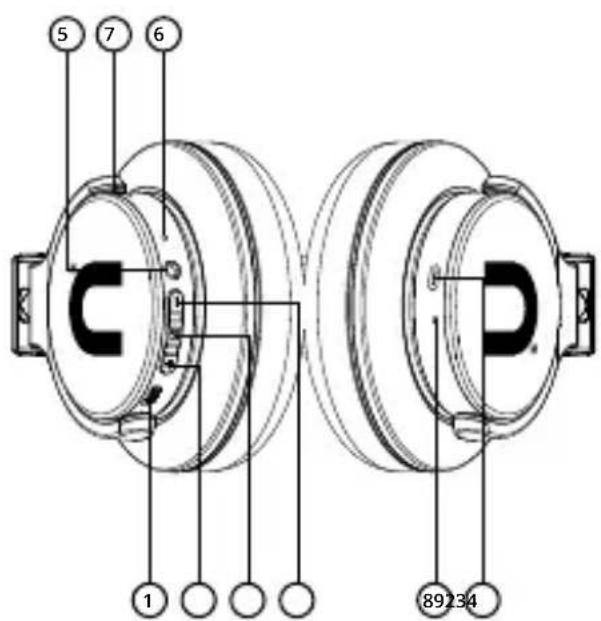
PRODUCT DESCRIPTION
- ANC switch
- Increase volume / Next track
- Multifunctional button
- Decrease volume / Previously played track
- 3.5 mm jack AUX port
- Microphone
- Operational LED indicator
- Charging LED indicator
- USB-C charging input slot
CHARGING
We recommend fully charging the headphones before their first use to maximize the battery's lifespan. The speaker takes approximately 3 hours to fully charge. Low battery is announced by an audible signal. To charge the headphones, connect the enclosed USB-C cable to the charging port (9) and connect to any charging adapter (voltage 5V and output current minimum of 1A) or to a USB port on your PC. Charging is signalled by the LED indicator (8) shining red, the diode will shine blue when charging is complete.
POWER ON THE HEADPHONES AND CONNECT TO BLUETOOTH
- Press and hold the multifunctional button (3) until the operational LED indicator (7) begins to flash blue-red and you hear the audio signal. The headphones are now in pairing mode.
- Activate Bluetooth on your device and select "Niceboy HIVE Aura 4 ANC" from the list of available devices. Your device will connect to the headphones. Successful pairing is announced by an audio signal and the operational LED indicator (7) will begin to shine red.
Note: The headphones will automatically connect to the device with which they were last paired. In an effort to extend battery life, the headphones will automatically power off after 5 minutes of the connection to your device being lost or not being connected to another device.
POWERING OFF THE HEADPHONES
Press and hold the multifunctional button (3) for approx. 3 seconds to power off the headphones. An audio signal will sound and the LED indicator (7) will shine red once before shutting off.
ANC FUNCTION
Press switch (1) to activate the ANC function (Active Noise Cancelling). The operational diode (7) will shine green while the ANC mode is active. This function may also be activated in the event that the headphones are powered off and you are playing music via the audio cable.
MUSIC CONTROLS
Play/pause: press the multifunctional button. (3)
Next track: press and hold the "+" button. (2)
Previous track: press and hold the "-" button. (4)
Increase volume: press the "+" button. (2)
Decrease volume: press the "-" button. (4)
TELEPHONE CALLS
Press the multifunctional button to accept and end calls. You may decline a call by pressing the multifunctional button for approx. 2 seconds.
Note: Some mobile telephones prefer to set up calls to their own microphone and headphones. Should this be the case, alter the settings according to the instructions given for your own device.
SIRI AND GOOGLE ASSISTANT
You may activate voice assistance while in standby mode or when listing to music by pressing the multifunctional button (3) twice.
CONNECTING TO THE APP
- Download the app by scanning the QR code using your mobile phone, or search for "Niceboy ION" in the mobile app store and download the app.
- Start the „Niceboy ION“ app and sign up with a new account or use your existing account.
- After setting the password, go to the next step „Add device“.
- Switch on Bluetooth; nearby devices will be found based on the strength of the signal.
- Press the „+“ button
- Wait for the prompt „Connection“
- Adding the device successful: "completed" is displayed
- Your device is successfully connected.
Note: Prior to pairing to any new device, it is necessary to reset the earphones to the factory settings each time when you wish to connect the earphones to the Niceboy ION app on the new device.
FACTORY SETTINGS
In case of technical problems, reset the earphones to the factory settings as follows.
- Switch off the earphones, remove them from the paired devices list and turn off Bluetooth.
- Switch on the earphones so that they are in pairing mode. The LED flashes alternately blue and red.
- Briefly press the multifunction button (3) twice.
- Immediately long press the same button to turn off the headphones.
- After turning the headphones back on, the process is complete.
SPECIFICATIONS
BT version: 5.2
Frequency band: 2.4GHz
Radio frequency power: ≤ 2,5mW
Supported BT profiles: A2DP, AVRCP, HFP
Supported codecs: AAC, SBC
Frequency: 20Hz - 20kHz
Sensitivity: 97+/-3dB
Playback time: up to 60 hours (at 50% volume)
Playback time with ANC: up to 30 hours (at 50% volume)
Range: 10 m
Speaker: 40 mm
Time to charge: 2 - 3 hours
SAFETY INFORMATION
Listening to music at excessive volume can damage your hearing. Do not subject the equipment to fluids and moisture. Do not expose the device to excessively high/low temperatures, and do not attempt to disassemble it. Protect the device from sharp objects and falls from height. Batteries - Improper handling (prolonged charging, short circuit, breakage by other objects, etc.) may result in fire, overheating or battery leakage. The battery or accumulator that may be included with the product has a life of six months because it is a consumable item.
Information on all frequency bands in which the radio equipment operates and intentionally transmits radio waves as well as the maximum radio frequency power transmitted in the frequency band in which the radio equipment is operated is included in the instructions and safety information.
The manual may be downloaded in its electronic form at www.niceboy.eu under the support section. NICEBOY s.r.o. hereby declares that the type of radio equipment Niceboy HIVE AURA 4 ANC complies with Directives 2014/53 / EU, 2014/30 / EU, 2014/35 / EU, and 2011/65 / EU. The full content of EU Declaration of Conformity is available on the following websites:
https://niceboy.eu/en/declaration/hive-aura-4-anc
USER INFORMATION FOR DISPOSING ELECTRICAL AND ELECTRONIC DEVICES (HOME USE)
This symbol located on a product or in the product's original documentation means that the used electrical or electronic products may not be disposed together with the communal waste. In order to dispose of these products correctly, take them to a designated collection site, where they will be accepted for free. By disposing of a product in this way, you are helping to protect precious natural resources and helping to prevent any potential negative impacts on the environment and human health, which could be the result of incorrect waste disposal. You may receive more detailed information from your local authority or nearest collection site. According to national regulations, fines may also be given out to anyone who disposes of this type of waste incorrectly.
User information for disposing electrical and electronic devices (business and corporate use) In order to correctly dispose of electrical and electronic devices for business and corporate use, refer to the product's manufacturer or importer. They will provide you with information regarding all disposal methods and, according to the date stated on the electrical or electronic device on the market, they will tell you who is responsible for financing the disposal of this electrical or electronic device. Information regarding disposal processes in other countries outside the EU. The symbol displayed above is only valid for countries within the European Union. For the correct disposal of electrical and electronic devices, request the relevant information from your local authorities or the device seller.
DE
LIEFERUMFANG
Reisehülle
Kabellose Kopfhörer
USB-C-Ladekabel
https://niceboy.eu/pl/declaration/hive-aura-4-anc
INFORMACJA DLA UŻYTKOWNIKÓW DOTYCZĄCA UTYLIZACJI SPRZĘTU ELEKTRYCZNEGO I ELEKTRONICZNEGO (GOSPODARSTWA DOMOWE)
Praha 4, Czech Republic, ID: 294 16 876.
Made in China.
RoHS CE 📧 📧
- User Manual / Wireless Headphones
- CZ
- OBSAH BALENÍ
- INFORMACE PRO UŽIVATELE K LIKVIDACI ELEKTRICKÝCH A ELEKTRONICKÝCH ZAŘÍZENÍ (DOMÁCNOSTI)
- PRODUCT DESCRIPTION
- CHARGING
- POWER ON THE HEADPHONES AND CONNECT TO BLUETOOTH
- POWERING OFF THE HEADPHONES
- ANC FUNCTION
- MUSIC CONTROLS
- TELEPHONE CALLS
- SIRI AND GOOGLE ASSISTANT
- CONNECTING TO THE APP
- FACTORY SETTINGS
- SPECIFICATIONS
- SAFETY INFORMATION
- USER INFORMATION FOR DISPOSING ELECTRICAL AND ELECTRONIC DEVICES (HOME USE)
- DE
- LIEFERUMFANG
- INFORMACJA DLA UŻYTKOWNIKÓW DOTYCZĄCA UTYLIZACJI SPRZĘTU ELEKTRYCZNEGO I ELEKTRONICZNEGO (GOSPODARSTWA DOMOWE)
Brand : Niceboy
Model : HIVE AURA 4 ANC
Category : Headphones