XT4700 - Elliptical bike Octane - Free user manual and instructions
Find the device manual for free XT4700 Octane in PDF.


| Product Type | Elliptical Trainer |
| Brand | Octane Fitness |
| Model | XT4700 |
| Resistance System | Eddy current magnetic, 20 levels |
| Stride Length | 20 inches (adjustable) |
| Display | LCD with time, distance, calories, pulse, RPM |
| Heart Rate Monitoring | Contact grips and Polar telemetry compatible |
| Preset Programs | 12 programs including fat burn, interval, custom |
| Max User Weight | 350 lbs (159 kg) |
| Dimensions (L x W x H) | 70 x 30 x 65 inches |
| Product Weight | 250 lbs (113 kg) |
| Power Requirement | 120V, 60Hz, AC adapter included |
| Flywheel Weight | 30 lbs (13.6 kg) perimeter weighted |
| Pedals | Oversized, cushioned with adjustable angle |
| Handlebar | Moving arms with integrated heart rate sensors |
| Transport | Rear transport wheels |
| Warranty | 2 years parts, 1 year labor |
| Maintenance | Clean with damp cloth, lubricate rail every 3 months |
| Safety Features | Emergency stop key, stable steel frame |
| Accessories Included | AC adapter, user manual, assembly tools |
Frequently Asked Questions - XT4700 Octane
User questions about XT4700 Octane
0 question about this device. Answer the ones you know or ask your own.
Ask a new question about this device
Download the instructions for your Elliptical bike in PDF format for free! Find your manual XT4700 - Octane and take your electronic device back in hand. On this page are published all the documents necessary for the use of your device. XT4700 by Octane.
USER MANUAL XT4700 Octane
text_image
Time Calculus Distortion Speed Stride Balance MINI HR Level OFF IN Speed X Mode 1 built-in portable driver to announce you with distance limits. Take us together with increased movement and take the distance. Increased distance limits for change and forward turn Pack Area Load Back Load Back Quick Start / Quick Stride Check Save Make Clean Finish Clear Programs Balance Load Clean Clean Feed"XT" CONSOLE GUIDE & SET-UP INSTRUCTIONS—STANDARD CONSOLE
TABLE OF CONTENTS
Standard Console Guide
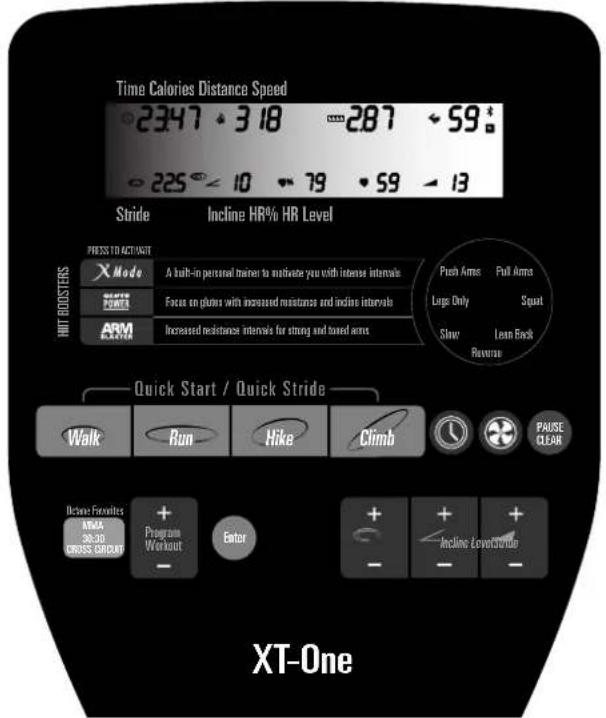
- XT-One, XT4700, XT3700 Console Features.... 1
- Dynamic Display (LCD)....2
- Keypad Buttons....4
User (Club) Settings....7
Additional Support Information 8
- Cleaning and Maintenance....8
- Diagnostics....8
- Programs 8
- Important Safety Information ....8
- Customer Support....8
STANDARD CONSOLE GUIDE
Get ready to Fuel Your Workout with the Octane Fitness elliptical cross trainer! The standard console offers a variety of pre-programmed workouts managed by sophisticated electronics that will keep you interested and motivated. Use this guide to become familiar with its features, data display and keypad buttons; then hop on, start pedaling, choose your workout and adjust the settings. Enjoy!
XT-One/XT4700/XT3700 Console Features
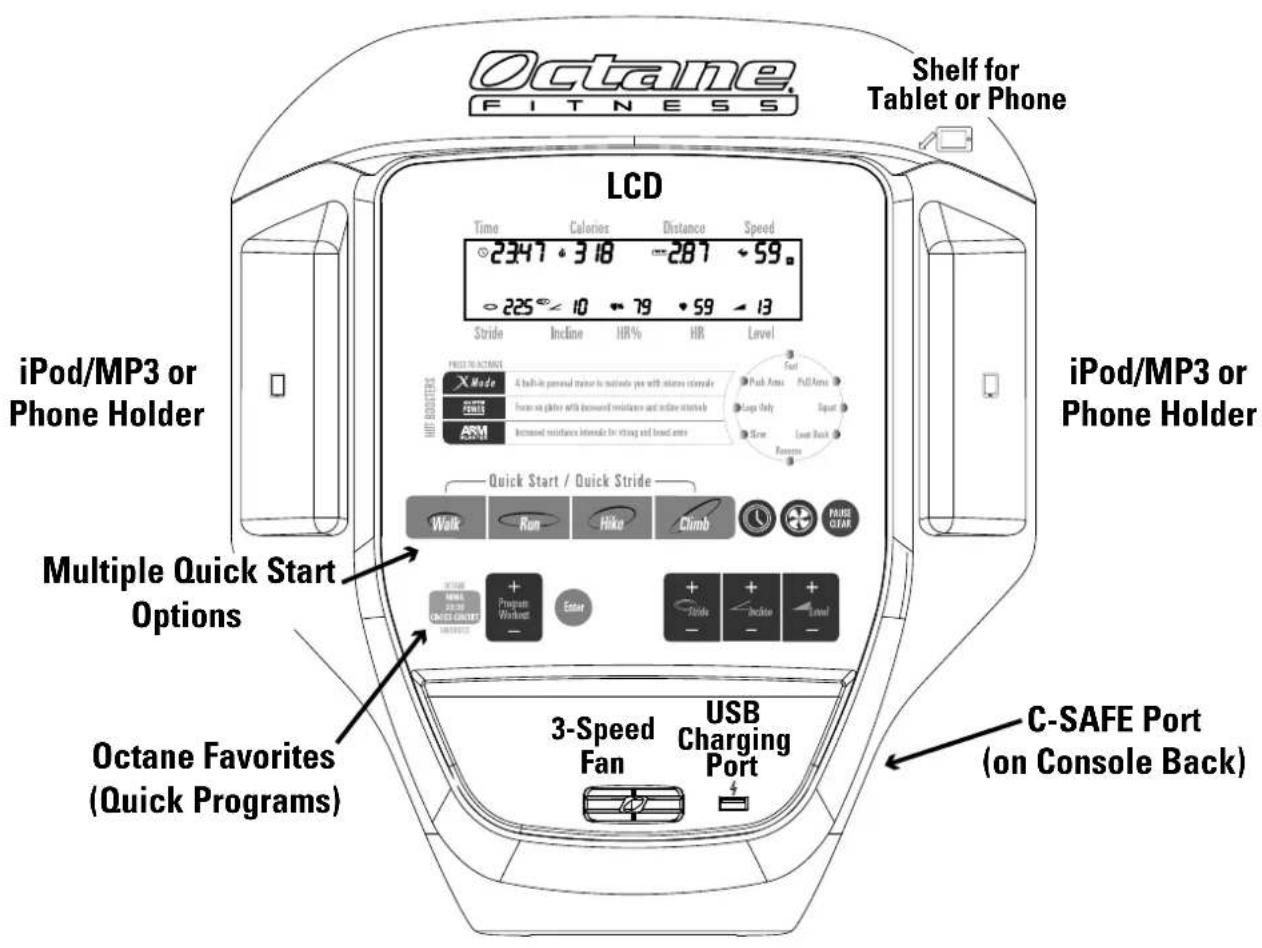
The XT standard console incorporates many features to enhance your workout experience:
- An integrated LCD that provides important workout data and instructions to keep your workout safe and interesting;
- Convenient shelves and pockets for your phone, tablet, iPod ®/MP3 and other electronic devices, plus a USB charging port to keep your devices charged throughout your workout;
• A 3-speed fan for cooling comfort; - Pre-programmed keypad buttons to get you into your favorite programs quickly;
• C-SAFE input for intra-club networking.
text_image
Octane FITNESS LCD Time Calories Distance Speed 2347 318 -287 59 225 10 79 59 13 Stride Incline HR% HR Level iPod/MP3 or Phone Holder iPod/MP3 or Phone Holder Multiple Quick Start Options Octane Favorites (Quick Programs) Quick Start / Quick Stride Walk Run Hike Climb PAUSE Program Workshop Enter Stride Incite Level 3-Speed Fan USB Charging Port C-SAFE Port (on Console Back)Dynamic Display (LCD)
text_image
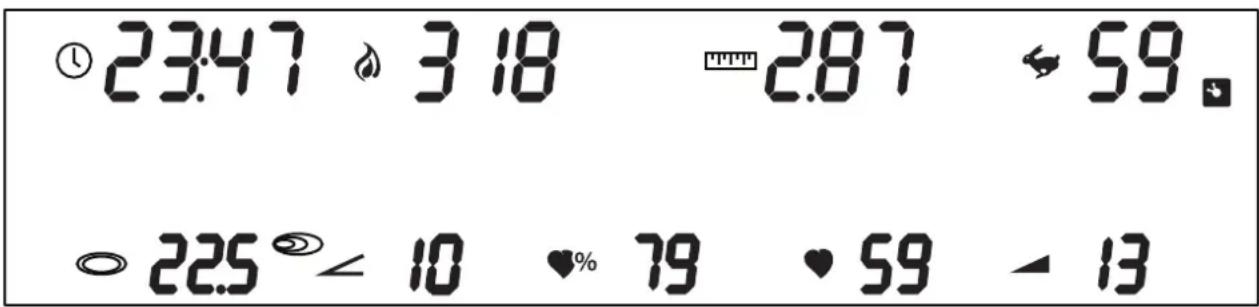
① 23:47 ⚡ 3 18 = -2.87 ↔ 59. ◦ 22.5 ⚙ 10 ♥% 79 ♥ 59 ▲ 13The top portion of the standard console is an LCD which prompts you to enter important information, dynamically displays all of the important workout data, and highlights aspects of your workout such as upcoming intervals and resistance changes. Watch the display as you set up and progress through your workout—it will guide you, motivate you, and reward you with summary information at the end of your session.
| Icon Description | |
 | Displays workout time, counting up from 0:00. Time can be increased or decreased during your workout. The maximum workout time that users can set is 99:00. When actual workout time is displayed, the timer goes up to 99:59, then the display rolls over to 0:00. Refer to User (Club) Settings later in this manual to learn how to change the maximum workout time and to switch from a "count up" to "count down" display. |
 | Displays an estimate of the totalcaloriesburned during the workout, based on the user's entered weight. If no specific weight is entered, calories are based on a 150 lb. (68 kg) user. |
| [TTTT] | Displays an estimate of thedistanceyou have traveled. Distance can be shown in either miles (English) or kilometers (metric). The factory default setting is English. Refer to User (Club) Settings later in this manual to learn how to switch from English to metric. |
 | Displays your currentspeedin revolutions per minute (rpm). |
 | When lit, this icon indicates that ANT+tmwireless communications is active and detecting signal from the optional wireless heart rate chest strap. |
  | Displays yourstride length, the approximate horizontal distance of the elliptical pattern in inches (English) or centimeters (metric). The stride length ranges from 20 inches (51 cm) to 28 inches (71 cm). |
  | When lit, this icon indicates thatSmartStrideis activated. As you vary your pace and direction, SmartStride intuitively adjusts stride length in 1-inch (2-centimeter) increments to replicate natural movement. Simultaneously press the Stride (+) and (-) buttons on the keypad to activate/deactivate SmartStride. |
 (XT-One)♥% (XT-One)♥% | Displays theincline level(1-10), where 1 is the least incline and 10 is the greatest incline.Displays your current heart rate percentage, calculated as current heart rate divided by theoretical maximum heart rate (TMHR). Note: The standard TMHR is calculated for a 40-year old user weighing 150 lbs. (68 kg). You must have entered your age during program setup and be wearing a wireless heart rate transmitter or consistently grasping the contact heart rate sensor grips on the handlebars in order to get an accurate reading of Heart Rate % for your age and weight. |
| ♥ | Displays heart rate in beats per minute (BPM). Note: You must be wearing a wireless heart rate transmitter or consistently grasping the contact heart rate sensor grips on the stationary handlebars. |
| Displays the resistance level (1-30), where 1 is the lowest resistance level and 30 is the highest. | |
text_image
Time Calories Distance Speed 2347 318 287 59* 225 10 79 59 13 Stride Incline HR% HR Level PRESS TO ACT INATE X Mode A built-in personal trainer to motivate you with intense intervals Push Arms Full Arms FRUIT POINT Fores on glaze with increased resistance and incline intervals Large Only Squat ARM EXAM Increased resistance intervals for strong and based arms Slow Lean Back Reversus HUNT BOOSTERS Quick Start / Quick Stride Walk Run Hike Climb PAUSE CLEAR Replace Favorites + Program Workout Enter Anclining Love/Stride ATMIA 26-30 CROSS GROUT - - - - - XT-One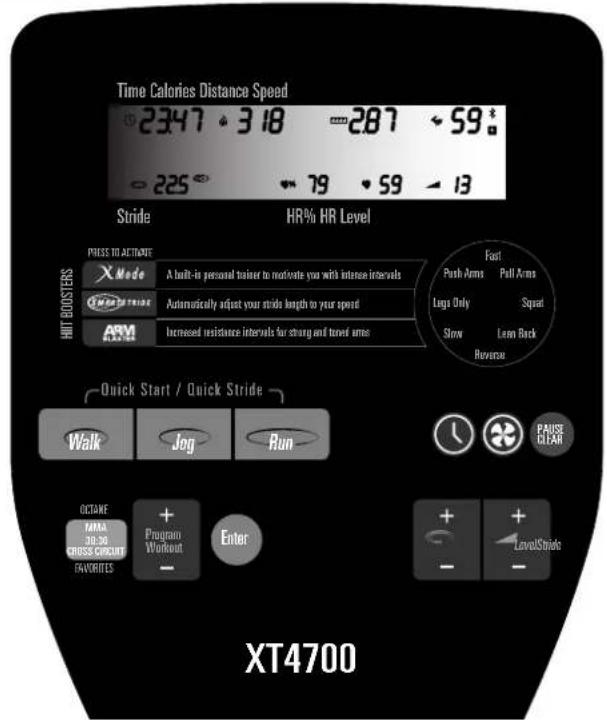
text_image
Time Calories Distance Speed 2347 318 -287 59* -225 79 59 13 Stride HR% HR Level PRESS TO ACTIVATE X Mode A built-in personal trainer to motivate your with intense intervals Automatically adjust your stride length to your speed Increased resistance intervals for strong and tuned arms HUNT BOOSTERS ARM ARM Fast Push Arms Pull Arms Legs Only Squat Slow Learn Back Reverse Quick Start / Quick Stride Walk Jog Run PAUSE CLEAR OCTARE Program TOMA Workout CROSS CIRCUIT FAVORITES Enter + + - - - - LevelStride XT4700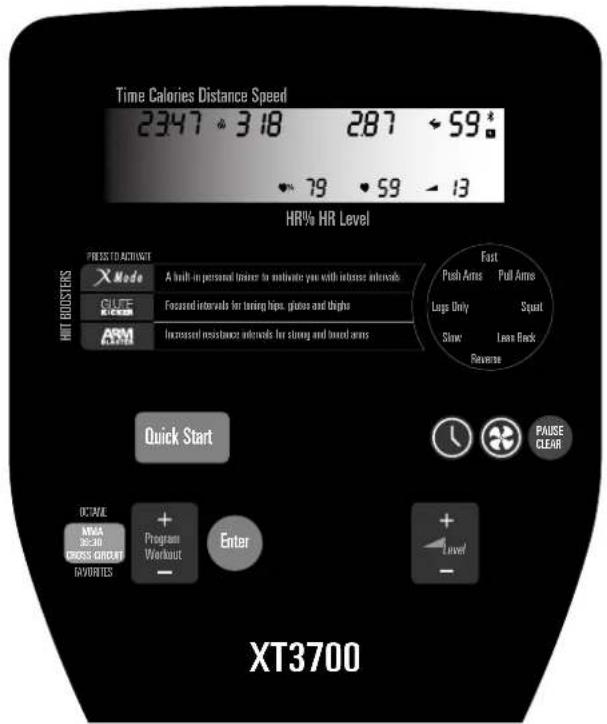
text_image
Time Calories Distance Speed 2347 318 287 59* HR% HR Level PRESS TO ACTIVAT X Mode A built-in personnel trainer to motivate you with infarcces intervals. CUTE R-COM Focused intervals for toning hips, gluves and thighs ARM Increased resistance intervals for strong and bound arms Fast Push Arms Pull Arms Lungs Only Squat Slow Leave Back Reverse HIT BODDERS Quick Start PAUSE CLEAR OCTAVE MMA 36-30 GROSS CIRCUIT GAVOURLES Program Workout Enter + - Level XT3700Keypad Buttons
HIITBoostersXMode | Ramp up any workout with the press of a button, activating one of these signature Octane Fitness high-intensity interval training boosters:This great motivational tool keeps your workout fresh and exciting in any program. Every other minute X-Mode kicks in, adding four levels of resistance and prompting you to perform combinations of eight different challenges:Fast Pick up the pace—we recommend 50-60 rpm, but you should find your own comfort level.Squat Bend slightly at the knees as you pedal. You'll feel this one in your quadriceps and glutes in no time!Reverse Pedal backwards to change the muscle focus on your entire lower body.Lean Back Grab the stationary handlebars and lean slightly backwards. This changes the muscle focus to your lower body. You will feel this in your quadriceps.Legs Only Either hold the stationary handlebars or naturally swing your arms.Push Arms Focus on pushing with your arms to work your chest and triceps.Pull Arms Focus on pulling with your arms to work your biceps and lats.Slow Slow down to 30-40 rpm to allow yourself to recover.Designed to boost cardiovascular endurance while building strength and muscle tone, ArmBlaster adds upper-body strength sessions to the cardio program profile that you have selected. Every minute, resistance increases for a muscle-building, 10-repetition set as you transfer the workload from your lower body to your upper body. |
| GLUTEPower(XT-One) | Challenge your quads and glutes with this workout booster that pushes back! Press the GlutePower button during any workout, then increase your speed. The faster you go, the greater the resistance level and the steeper the incline. Slow down again and the resistance and incline decrease. |
 (XT4700) (XT4700) | SmartStride automatically replicates natural movement by analyzing and measuring your pace and direction and intuitively adjusting stride length in 1-inch (2-centimeter) increments from 20 inches (51 cm) to 28 inches (671 cm). Press the SmartStride button and the machine will analyze your speed and make the appropriate adjustments as your pace or direction changes. |
 (XT3700) (XT3700) | GluteKicker is an aggressive subset of X-Mode that is focused on your glutes, hips, and thighs. It uses four prompts: Reverse, Squat, Fast, and Lean Back. GluteKicker sessions last for one minute, with a one-minute recovery period. Every minute, resistance increases for a muscle-building power 30-second set as you place your hands on the stationary handlebars and transfer the workload to the lower body.During a HIIT Booster session, the level of resistance can be changed by pressing any (+) or (-) key on the keypad. Press the HIIT Booster button a second time to deactivate the session. |
Quick Start / Quick Stride  (XT4700) (XT4700)  (XT-One) (XT-One) (XT-One) (XT-One) | The easiest way for you to start your workout is to simply push a Quick Start button initiating a 30-minute program at resistance Level 5 (XT-One) or Level 1 (XT4700/XT3700). On the XT-One and XT4700, values for Stride and Incline (XT-One only) are set to simulate the chosen motion:Stride 22" (61 cm), Incline 1(XT-One)Stride 24" (61 cm)Stride 28" (71 cm), Incline 1 (XT-One)Stride 24" (61 cm), Incline 5 (XT-One)Stride 28" (71 cm), Incline 10 (XT-One)The calories readout will be based on a 150 lb. (68 kg) user, age 40. Once you have selected Quick Start, you can program Time, Level or Stride in any order. (Age and Weight can only be changed by selecting a program using the Program Workout button and entering the values during setup.) |
 | Press the clock button (Time), then any (+) or (−) to increase or decrease the time of your workout, in 1 minute increments. The standard workout time is 30:00. The maximum time is 99:00; this value can be changed in User (Club) Settings if a different maximum workout time better suits your environment. |
 | Press the Fan button to initiate a cool breeze to help keep you comfortable as you work out. Press again to increase the airflow (two additional levels), or a fourth time to turn it off. Move the vent as desired to direct the airflow. |
| Pause Clear | Press once to pause your workout. The standard pause time is 0:55. To restart a paused workout, push any key or just begin pedaling. If you stop pedaling during a workout, the unit will automatically begin a pause phase; simply start pedaling to resume your workout. Press the Pause Clear button twice within two seconds, and the machine is reset and ready for another workout. |
| Octane FavoritesMMA30:30 | Press the Octane Favorites button to quickly jump to one of these signature programs:Battle the Octane elliptical in 5-minute rounds that include 5 alternating 'fight' and 'recover' intervals of various lengths, simulating a Mixed Martial Arts bout. The harder you punch with your arms, the harder the Octane elliptical 'fights back' with increased resistance.Press this button a second time to take on this challenging program which provides a simple test of fitness level with 5 sets of 30-second sprint and recovery intervals. For each set, the program monitors heart rate and calculates the average minimum and average maximum heart rates and the average number of beats the heart rate recovers between sprint intervals. Heart rate recovery is a relative indicator of fitness level; a higher number indicates a more rapid heart rate recovery and therefore represents a relatively better level of fitness. |
| CROSS CiRCUIT Solo | The third press of the Octane Favorites button takes you to this popular cross-training program which combines cardio intervals on the elliptical with sets of strength and toning exercises off the machine using Powerblocks or simple equipment such as hand weights, a fitness ball or body-weight exercises. Note: This program is available only when the CROSS CiRCUIT programs, designed for use with the optional CROSS CiRCUIT Pro Accessory, have been activated in User (Club) Settings. |
| CROSS CiRCUIT Group | Working out with an instructor? Toggle to this Octane Favorite and follow your trainer's lead for a great cardio and strength workout. Note: This program is available only when the CROSS CiRCUIT programs, designed for use with the optional CROSS CiRCUIT Pro Accessory, have been activated in User (Club) Settings. |
| Up (+) and Down (−) Keys | |
| Program Workout | Press Program Workout (+) or (−) to scroll through the programs, then press Enter to select a program. Program changes can be made any time during your workout. When you change programs, the LCD message center prompts you to enter new program values as needed. |
 | Press Stride (+) or (−) to increase or decrease the stride length of the XT-One or XT4700. Each key press equals one-half (1/2) inch (English) or one centimeter (metric). The stride length ranges from 20 inches (51 cm) to 28 inches (71 cm). The default stride length for preset resistance and heart rate controlled programs is 24" (61 cm). For variable stride programs, the default forward or long stride is 28" (71 cm) and the default backward or short stride is 24" (61 cm). |
 | Press Incline (+) or (−) to increase or decrease the incline of the XT-One; 1 is the least incline and 10 is the steepest. For programs other than the preset Quick Start programs, the standard setting is 1. |
 | Press Level (+) or (−) to increase or decrease the resistance level. There are 30 levels of resistance for most programs. For heart rate controlled programs, the Level button increases your target heart rate. To save a change in target heart rate, press Enter. |
| Enter | Selects any of the changed values or items from the above keys. |
| "Hidden" Key (XT-One) | |
| SmartStride (Stride + / -) | SmartStride, available exclusively on Octane Fitness ellipticals, automatically replicates natural movement by analyzing and measuring an exerciser's pace and direction and intuitively adjusting stride length in 1-inch (2-centimeter) increments from 20 inches 51 cm) to 28 inches (71 cm). To activate SmartStride in any program, simultaneously press the Stride (+) and (-) buttons on the keypad, then pedal at a comfortable walking speed. The machine will analyze your stride to set a baseline. Then, as you workout and your pace or direction changes, SmartStride makes the appropriate adjustments to your stride length. Size-based programming (described later in this manual) allows you to set the starting forward stride length that best fits your leg length and fitness level. To deactivate SmartStride, simultaneously press the Stride (+) and (-) buttons on the keypad a second time. |
USER (CLUB) SETTINGS
Many of the standard features and controls of Octane Fitness units can be customized to fit your personal preferences or workout environment. In just a few simple steps, you can set up the machine to skip the Warm-Up, count down your workout time (instead of counting up), limit the maximum workout time, display units in English or metric, mute the console beeps and more. All of these adjustments are easily completed and are saved as the new standard for the machine—you don't need to reset them for each use.
To access these functions, press and hold both the Level Up (+) and Level Down (−) keys for three seconds, or until you hear a beep. The following customizable functions are displayed in sequence in the LCD; use the Enter key to toggle through the available options (shown in the matrix display) for each function, and press any Up (+) or Down (−) to select a setting and move to the next function. To exit without changing any values, press Pause Clear twice.
Available functions may differ from those listed below, depending upon your software version.
| Warm-Up | This feature may be turned “ON” (to include a 3-minute warm-up in each workout) or “OFF”. The factory default setting is “ON”. |
| Clock Direction | The cross-trainer can track workout time by counting “UP” or “DOWN”. The factory default setting is “UP”. |
| Max Workout Time | You may set the maximum workout time for users to the value that is best for your environment. The factory default setting is “OFF”, allowing users to use the machine for as long as they would like without reset on goal-based programs. Press the Enter key one time to move from“OFF” to ten minutes (10:00), then press and hold ENTER to scroll to any value between ten minutes (10:00) and 120 minutes. (The setting rolls back to “OFF” if you scroll past 120 minutes). Press the Up (+) or Down (−) key to save the value you desire. Note: Programs with a time value as part of the program setup are always limited to 120 minutes maximum time, even if the Max Workout Time is “OFF”. |
| Default Workout Time | Default Workout Time governs the standard value that users see when they program a workout with a ‘time’ setting; that is, a goal-based program. The factory default setting is 30 minutes. Default Workout Time may be set to any value between ten minutes (10:00) and the current Max Workout Time setting. If Max Workout Time is set to “OFF”, Default Workout Time is 120 minutes. Press and hold ENTER to scroll through in one-minute increments to the value you want, then press the Up (+) or Down (−) key to save the value you desire. |
| Unit Type | You may choose to have the weight and distance units displayed in “ENGLISH” (pounds and miles) or “METRIC” (kilograms and kilometers). The factory default setting is “ENGLISH”. |
| CROSS CIRCUIT Pro | Select “OFF” to disable the two CROSS CiRCUIT Pro programs (for use with the optional CROSS CiRCUIT Pro Kit). Factory default is “ON”. |
| Default Stride (XT-One, XT4700) | You may set the default stride length of the unit to any value between 20” and 28” (51-71 cm) in 1/2” (1 cm) increments. Use the Enter key to scroll through the possible values, then press any Up (+) or Down (−) key to select the value you desire. The factory default setting is 24” (61 cm). |
| Default Incline (XT-One) | You may set the default incline of the unit to any value between 1 (least incline) and 10 (steepest). Use the Enter key to scroll through the possible values, then press any Up (+) or Down (−) key to select. For programs other than the preset Quick Start programs, the factory default setting is 1. |
| Beep | You may turn the console sounds “ON” or “OFF”. The factory default setting is “ON”. |
| ID | If you have more than one Octane Fitness unit on site, use this setting to give each a unique identification number for pairing with a mobile device. Choose any value between 0 and 127. The factory default setting is 1. |
| Language | Choose one of several languages options for the console display. The factory default setting is “ENGLISH”. |
| Exit | When EXIT is displayed in the LCD, press Enter to leave User (Club) Settings. All of your selections will be saved and become the new standard settings for your machine. They may be changed at any time by repeating these setup procedures. |
ADDITIONAL SUPPORT INFORMATION
Cleaning and Maintenance
WARNING! This machine contains moving parts. Take caution when trying to locate and fix any problem with the machine.
Your Octane Fitness product has been manufactured to withstand many hours of hard use with minimal required maintenance. Use only a soft, slightly damp lint-free cloth to clean the console lens of your elliptical. Abrasive cloths, towels, paper towels, and similar items may cause damage to surface. Do not use window cleaners, household cleaners, aerosol sprays, solvents, alcohol, ammonia, or abrasive cleaners, as they, too, may damage the lens. Periodically wipe off the machine with a clean towel, and vacuum underneath the pedals and inside of the machine near the pedals.
Diagnostics
Your Octane product offers a diagnostics mode to test the electrical functions. These diagnostics allow you to identify the software version of your unit and to check the functions of the LCD, keypad, adjustment motors and other electrical elements. To enter the diagnostics mode, hold down the Program Workout (+) and (−) keys simultaneously for three (3) seconds. Tests and results are displayed in the LCD. Use any (+) and (−) key to navigate through the diagnostic tests options (which may vary by product and software version). For additional information and instructions for using the available diagnostics, refer to your Product Service Manual or contact Octane Fitness Customer Service at 888.OCTANE4 or 763.757.2662, extension 1.
Programs
In addition to Quick Start / Quick Stride options, your product features several built-in programs with a wide range of options to keep workouts interesting:
Manual Heart Rate Interval Fat Burn Progressive Hills (XT-One)
Random MMA CROSS CiRCUIT Solo Smart Stride (XT-One)
Distance Goal 30:30 CROSS CiRCUIT Group PowerWalk (XT4700)
Calorie Goal Constant Watts Mountain Peak (XT-One) Dual Direction (XT4700)
Interval
Constant METs
30:30 Hills (XT-One)
Stride Interval (XT4700)
Descriptions of each program are found in the Octane Fitness Program and Features Guide (Part Number 110751-001), available online at www.octanefitness.com.
Important Safety Information
The Octane Fitness Product Safety Information for Commercial Products (Part Number 107786-001), shipped with the product base unit, contains important details for safe setup and operation of the Octane Fitness product. Users are expected to be familiar with the contents of this document before using the elliptical.
Customer Support
Should you have any questions regarding your Octane Fitness product, please visit https://support.octanefitness.com where you will find answers to many common questions. To speak to an Octane Fitness Customer Service specialist, please call 888.OCTANE4 or 763.757.2662, extension 1. Live support is available Monday through Friday, 7:30 a.m. to 6 p.m. (United States Central Time).
Join the OCTANE FITNESS Community.

text_image
f Twitter p YouTube g+ BLOGsearch: Octane Fitness
Free Downloads, Workout Inspiration, Team Atmosphere

text_image
Octane FITNESSFUEL YOUR LIFE™
Octane Fitness Octane Fitness International
US & Canada, Latin America, Asia & Asian Pacific Europe, Middle East, Africa
7601 Northland Drive North Rivium Westlaan 15
Suite 100 2909 LD Capelle a/d Ijssel
Brooklyn Park, MN 55428 The Netherlands
Phone: 888.OCTANE4 (US and Canada) Phone: +31 10 2662412
763.757.2662 (Latin America, Asia and Asian Pacific) Fax: +31 10 2662444
Fax: 763.323.2064