
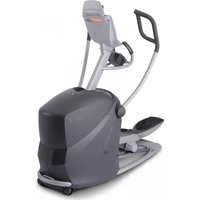
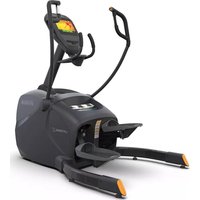
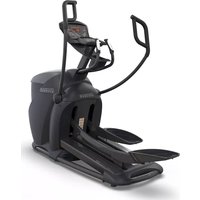
xRide xR6x - Elliptical bike Octane - Free user manual and instructions
Find the device manual for free xRide xR6x Octane in PDF.


| Product Type | Elliptical Bike |
| Brand | Octane |
| Model | xRide xR6x |
| Dimensions (L x W x H) | 60 x 30 x 70 inches |
| Product Weight | 200 lbs |
| Maximum User Weight | 350 lbs |
| Resistance Type | Magnetic |
| Resistance Levels | 20 |
| Stride Length | 20 inches |
| Pedal Size | 17 x 7 inches |
| Display Type | LCD |
| Display Metrics | Time, Distance, Calories, Speed, RPM, Heart Rate |
| Workout Programs | 12 |
| Heart Rate Monitor | Pulse grip handles |
| Power Source | Self-powered (generator) or optional AC adapter |
| Foldable | No |
| Transport Wheels | Yes |
| Leveling Feet | Yes |
| Warranty – Frame | Lifetime |
| Warranty – Parts | 2 years |
| Warranty – Labor | 1 year |
| Assembly Required | Yes (tools included) |
Frequently Asked Questions - xRide xR6x Octane
User questions about xRide xR6x Octane
0 question about this device. Answer the ones you know or ask your own.
Ask a new question about this device
Download the instructions for your Elliptical bike in PDF format for free! Find your manual xRide xR6x - Octane and take your electronic device back in hand. On this page are published all the documents necessary for the use of your device. xRide xR6x by Octane.
USER MANUAL xRide xR6x Octane
xRide™
xR6x / xR6xi
OPERATIONS MANUAL
TABLE OF CONTENTS
GETTING STARTED .... 1
- Important Safety Information......1
- Warranty Information......1
- Learn More...and Join the Octane Fitness Community .... 1
- Visual Product Overview ...... 2
- SMARTLINK® by Octane Fitness....2
- Adjusting the Seat....3
- User Set-Up Functions....4
- Cleaning and Maintenance .... 4
ELECTRONICS 5
- Keypad Buttons .... 5
- Console Options....7
- Octane Boosters .... 8
- Dynamic Display (LCD) 9
- SMARTLIGHT® 10
OCTANE FITNESS PROGRAMS .... 11
- How Does Workload Resistance (Level) Work? ...... 11
- xR6 Program Settings—Value Ranges.... 11
- xR6 Program Reference....12
HEART RATE FEATURES 14
- Heart Rate Monitoring and HeartLogic Intelligence™ 14
Get ready to Fuel Your Workout with the Octane Fitness elliptical cross trainer! You will soon be challenging yourself with a variety of pre-programmed workouts managed by sophisticated electronics that keep you interested and motivated. Getting started is easy; just move one of the moving handlebars toward the back of the unit and have a seat. Follow the prompts to program your workout, and you are on your way!
Important Safety Information
Anyone using this product should consult a physician before starting an exercise program. This is especially important for persons over 35 or those with pre-existing health conditions. If at any time during a workout an exerciser experiences chest pains, nausea, dizziness, or shortness of breath, he or she should stop exercising immediately and consult a physician before starting again.
The Octane Fitness Product Safety Information for xRide Ellipticals (Part Number 109862-001), shipped with the product, contains important details for safe set-up and operation of the Octane Fitness elliptical. Users are expected to review this document before using the elliptical.
Warranty Information
The Octane Fitness elliptical is warranted to be free of all defects in material and workmanship for a specific period of time from original date of purchase. Please refer to the Octane Fitness Limited Consumer Warranty (Part Number 104198-001) included in your information packet for full terms and details of warranty coverage.
Learn More...and Join the Octane Fitness Community!
Should you have any questions regarding your elliptical, please log on to www.octanefitness.com where you will find answers to many common questions and tips on using your elliptical. If you would like to speak to an Octane Fitness Customer Service specialist, please call 1-888-OCTANE4 or 763-757-2662 extension 1.
Or...find Octane Fitness on your favorite social media site—Facebook, Twitter, YouTube or Pinterest! Just search for "Octane Fitness" to get connected with a community of users who are enjoying free downloads and workout inspiration in a team atmosphere. Come join us!

search: Octane Fitness
Visual Product Overview
Enjoy the many great features of your Octane elliptical:

SMARTLINK® by Octane Fitness
To ramp up your workout and take full advantage of the features and programming of your xR6xi elliptical, head to the iTunes Store and download SMARTLINK by Octane Fitness for your iPad*. This free app guides your workouts, tracks your progress and offers great motivation to keep pushing toward your goals.
Adjusting the Seat
The comfort and effectiveness of your workout on the xR6 begins with proper seat position. Both the height of the seat and the tilt of the seatback on the xR6 seat are adjustable, ensuring that you can find just the right position to suit your preference and deliver the best possible workout.
Note: When adjusting seat height or tilt, make sure you hear and feel the adjustment mechanism lock into position.
Adjusting seat height
Adjust seat height on the xR6 Series using the handle located just under the front edge of the seat. While bracing yourself with your feet on the platform, lift up on the handle and use your legs to move the seat into a comfortable height. Place your feet on the pedals and pedal forward, stopping when one pedal is at its lowest point. Check the position of your leg on this pedal; your knee should be slightly bent. If your leg is fully extended, or your knee is bent too much, readjust the seat height until you have the proper leg extension.
Adjusting seatback tilt
Adjust the tilt of the seatback on the xR6 Series using the handle located just under the left edge of the seat. You may choose one of five positions, with position 1 being the most upright and position 5 being the most reclined. To adjust, lean forward slightly, then pull out on the yellow knob to disengage the tilt lock. Press back to recline or shift your weight slightly forward to tilt the seatback up. Release the knob, then shift your weight slightly until you hear the tilt lock pop into position.

Note: Once you have adjusted the tilt of the seatback to a comfortable position, pedal forward and recheck your leg extension. You may need to readjust the seat height to compensate for the change in tilt.
Tip: Be sure to record the position numbers of both the seat height (1-20) and the seatback tilt (1-5) so that you can quickly set the seat when you are ready to begin your next workout.
User Set-up Functions
Program features, console settings, and controls of the xR6x/xR6xi ellipticals can be adjusted to fit your personal preferences or workout environment. To access the User Set-up functions, press and hold both the Level (▲) and Level (▼) keys for three seconds, or until you hear a beep. The following customizable functions are displayed in sequence; use the ENTER key to toggle through the available options for each function, and press any (▲) or (▼) key to select a setting and move to the next function. To exit without changing any values, press PAUSE CLEAR twice. Once saved, values become the new standard and do not need to be reset for each use.
| Warm-Up | This feature may be turned “ON” (to include a 3-minute warm-up in each workout) or “OFF”. Heart rate controlled programs and advanced programs always include a 3-minute warm-up, even if the warm-up is turned off here. The factory default setting is “ON”. |
| Pause | Turning this function to “OFF” prevents the console from entering “Pause” mode when the user stops pedaling. With this setting the unit will only “Pause” when the Pause Clear button is pressed. The factory default setting is “ON”. The “OFF” setting is primarily used during product demonstrations. |
| Clock Direction | The Octane elliptical can track workout time by counting “UP” or “DOWN”. The factory default setting is “UP”. |
| Units | You may choose to have the weight and distance units displayed in “ENGLISH” (pounds and miles) or “METRIC” (kilograms and kilometers). The factory default setting is “ENGLISH”. |
| Beep | You may turn the console sounds “ON” or “OFF”. The factory default setting is “ON”. |
| ID | If you have more than one Octane xRide, Q-Series or Zero Runner on site, use this setting to give each a unique identification number for pairing with your iPad. Choose any value between 0 and 127. The factory default setting is 1. |
| Language | Choose one of several languages options for your console display. The factory default setting is “ENGLISH”. |
| Exit | When EXIT is displayed, press Enter to leave User Set-up. All of your selections will be saved and become the new standard settings for your machine. They may be changed at any time by repeating these set-up procedures. |
Cleaning and Maintenance of the xR6 Series Elliptical
WARNING! This machine contains moving parts. Take caution when trying to locate and fix any problem with the machine.
Your Octane Fitness elliptical has been manufactured to withstand many hours of hard use with minimal required maintenance. Use only a soft, slightly damp lint-free cloth to clean the console lens of your elliptical. Abrasive cloths, towels, paper towels, and similar items may cause damage to surface. Do not use window cleaners, household cleaners, aerosol sprays, solvents, alcohol, ammonia, or abrasive cleaners, as they, too, may damage the lens. Do not use bleach on the console as it will damage the surface..
Please contact your local Octane Fitness dealer should you have any questions or encounter any maintenance issues with your elliptical. If you would like to speak directly to an Octane Fitness customer service specialist, please call 888.OCTANE4 or 763.757.2662, ext. 1, or visit www.octanefitness.com.
ELECTRONICS
The Octane Fitness ellipticals feature simple, easy to understand keypads and a dynamic display which provides all the information you need to get started and stay motivated during your workout. Check out the program descriptions found later in this manual to choose the workout that is just right for you.
Getting started is easy—just move one of the moving handlebars toward the back of the unit and have a seat, then choose your workout and adjust the settings. DedicatedLogic™ programming gives you the ultimate in ease of use and total flexibility for programming your console. This allows you to start your workout, then program the electronics, and to change settings at any time during your workout. This ease of use starts by giving each key only one function. This makes it easy to understand how each key works.

xR6x

xR6xi
Keypad Buttons
 | The Power button turns the LCD console on or off. |
| Quick Start | The easiest way for you to start your workout is to simply push the Quick Start button, setting the machine in a manual program at resistance Level 1. The calories readout will be based on a 150 lb. (68 kg) user, age 40. Once you have selected Quick Start, you can program Time or Level in any order. (Age and Weight can only be changed by selecting one of the Programs on your elliptical and entering the values during Program set-up.) |
30:30(XR6xi) | The 30:30 program is an Octane Favorite. Press this button on the xR6xi to take on this challenging program which provides a simple test of fitness level with 5 sets of 30-second sprint and recovery intervals. For each set, the program monitors heart rate and calculates the average minimum and average maximum heart rates and the average number of beats the heart rate recovers between sprint intervals. Heart rate recovery is a relative indicator of fitness level; a higher number indicates a more rapid heart rate recovery and therefore represents a relatively better level of fitness. Note: For this program to work properly, you must be wearing a wireless heart rate transmitter or consistently grasping the contact heart rate sensor grips on the stationary handlebars.Press this button and then press ENTER to activate Movement Management Mode (M.O.M.), a unique control feature offered on Octane Fitness ellipticals which disables the console buttons and increases the resistance in the movement of the pedals so that the pedals do not move as easily. The MOM icon in the lower right corner of the LCD lights to show that M.O.M. is activated, and the keypad does not respond to key presses. This control feature may discourage children from experimenting with the machine. To unlock M.O.M., press the button again, holding it for 3 seconds until the console responds.CAUTION! M.O.M. mode is provided to reduce the likelihood that children can pedal the elliptical cross-trainer. This feature does not lock the machine; the pedals still move and the potential for injury still exists. It is the responsibility of the user to supervise children and keep them off the elliptical cross trainer to minimize the likelihood of injury. |
| Pause Clear | Press once to pause your workout. The standard pause time is 10 minutes. To restart a paused workout, push any key or just begin pedaling. If you stop pedaling during a workout, the unit will automatically begin a pause phase; simply start pedaling to resume your workout. Press the Pause Clear button twice within two seconds, and your machine is reset and ready for another workout. |
| Up and Down Keys | |
| Program Workout | Press the Program Workout (▲) or (▼) to scroll through the programs, then press Enter to select a program. Program changes can be made any time during your workout. When you change programs, the LCD message center prompts you to enter new program values as needed. |
 | Press the clock button (Time), then (▲) or (▼) to increase or decrease the time of your workout, in 1 minute increments. The standard workout time is 30:00. The maximum time is 99:00. Note: the Time button is inactive during program warm-up. |
| Level | Press Level (▲) or (▼) to increase or decrease the resistance level of the machine. There are 20 levels of resistance for preset resistance programs and the 30:30 fitness number program. For heart rate controlled programs on the xR6xi, the Level button increases your target heart rate. To save a change in target heart rate, press Enter. |
| Enter | Selects any of the changed values or items from the above keys. |
Console Options
Your Octane Fitness elliptical is equipped with one of two console options, the 'x' or the 'xi'. Both models feature a selection of pre-programmed workouts, the Octane Fitness Workout Boosters, and the SMARTLIGHT lightbar and dynamic LCD to provide workout directions and feedback.
![Octavo® AIRBUS 6.5 Time Calcium Distance Speed 2347 + 318 =287 - 59 HR Level xR6.x Reset [Reset] Current switch for setting the airbus system +100% current switch for setting the airbus system +100% current switch for setting the airbus system +100% current switch for setting the airbus system +100%…](/content/2026/05/1015696/images/7fa3dbb0ee2febb54cad83ec4ad240fcdd96b4a1df3adbfaa01250b4d29e6030.jpg)
The xR6xi console also offers wireless heart rate monitoring, multiple colors in the SMARTLIGHT and an upper dock and SMARTLINK connectivity for your iPad * , as well as ANT+.
Octane Boosters
Your Octane Fitness Elliptical offers three 'boosters' to add motivation and variety to your workout. Press the "Boost Your Workout" button on the console to toggle through and choose one of these great challenges:
| X-Mode | This great motivational tool keeps your workout fresh and exciting in any program. Every other minute X-Mode kicks in, adding four levels of resistance and prompting you to perform combinations of six different challenges:Push-Legs Focus on pushing with your legs to work your quadriceps and glutes.Pull-Arms Focus on pulling with your arms to work your biceps and lats.Push-Arms Focus on pushing with your arms to work your chest and triceps.Reverse Pedal backwards to change the muscle focus in your legs.Fast Pick up the pace—we recommend 60+ rpm, but you should find your own comfort level.Resistance + Sweat it out as you work your entire body with a quick burst at 3 additional levels of resistance—a total of 7 levels higher than your program resistance level!During an X-Mode session, the level of resistance can be changed by pressing any (▲) or (▼) key on the keypad. |
| Chest Press | Press the “Boost Your Workout” button a second time to select Chest Press, a proprietary program designed to boost endurance and build strength and muscle tone in your upper body. Chest Press integrates cardio sessions with strength sessions focused on the chest, arms, and back. The cardio session follows the selected program profile. For each Chest Press interval, resistance increases 10 levels (or to the maximum resistance of 20) for a muscle-building, 10-repetition set. . During the Chest Press set, the level of resistance can be changed by pressing any (▲) or (▼) key. |
| Leg Press | Leg Press is an aggressive routine to help you build strength and power in your leg muscles. Initiate Leg Press sessions by pressing the “Boost Your Workout” button a third time. Leg Press integrates cardio sessions with strength sessions focused on the legs. The cardio session follows the selected program profile. For each Leg Press interval, resistance increases 10 levels (or to the maximum resistance of 20) for a muscle-building, 15-repetition set. During the Leg Press session, the level of resistance can be changed by pressing any (▲) or (▼) key on the keypad or the right handlebar. |
A fourth click of the "Boost Your Workout" button cancels all boosters.
Note: Before starting your workout, you can customize some of the booster settings on the xR6xi, such as interval times and resistance changes. From the "Octane Fitness" scroll screen that displays before you begin pedaling, press and hold the Booster button until you hear a beep, then follow the prompts in the LCD message center, using the (▲/▼) and Enter keys to make your selections.
Dynamic Display (LCD)

The LCD display prompts you to enter important information, dynamically displays all of the important workout data and highlights aspects of your workout such as upcoming intervals and resistance changes. Watch the display as you set up and progress through your workout—it will guide you, motivate you, and reward you with summary information at the end of your session.
 | Displays workout time, counting up from 0:00. Time can be increased or decreased during your workout. The maximum time that users can set is 99:00. When actual workout time is displayed, the timer goes up to 99:59, then the display rolls over to 0:00. Refer to User Set-up Functions to learn how to switch from a “count up” to “count down” display |
 | Displays an estimate of the totalcaloriesburned during the workout, based on the user’s entered weight. If no specific weight is entered, calories are based on a 150 lb. (68 kg) user.. |
| Displays an estimate of thedistanceyou have traveled. Distance can be shown in either miles (English) or kilometers (metric). When you first purchase your elliptical the display will be in English. Refer to User Set-up Functions to learn how to switch from English to metric.Note:On the elliptical, 400 revolutions is approximately one mile; therefore, if you are pedaling at 50 rpm, you will “travel” approximately one mile in 8 minutes. | |
 | Displays your currentspeedin revolutions per minute (rpm). |
 (xR6xi) (xR6xi) | When lit, this icon indicates that a device is connected viaBluetooth®is active and a compatible iPad device is connected to the console. |
 (xR6xi) (xR6xi) | When lit, this icon indicates thatANT+wireless communications is active and detecting signal from the optional wireless heart rate chest strap. |
 (xR6xi) (xR6xi) | Displays your currentheart rate percentage(current heart rate / theoretical maximum heart rate).Note:You must have entered your age during program setup and be wearing a wireless heart rate transmitter or consistently grasping the contact heart rate sensor grips on the handlebars in order to get an accurate reading of Heart Rate %. |
 | Displaysheart ratein beats per minute (BPM).Note:You must be wearing a wireless heart rate transmitter (on the xR6xi) or consistently grasping the contact heart rate sensor grips on the stationary handlebars. |
| [TTA4] | Displays the resistancelevel(1-20), where 1 is the lowest resistance level and 20 is the highest. |
| [MOM] | When lit, this icon indicates thatM.O.M.mode (described under “Keypad Buttons”) is active. |
SMARTLIGHT®
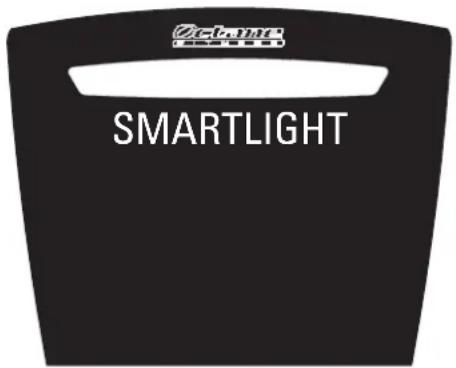
SMARTLIGHT at the top of the console communicates important information for your workout. On both the xR6x and xR6xi, SMARTLIGHT functions primarily as an intensity meter, giving you visual affirmation as your resistance level or speed increases or decreases.
On the xR6xi, SMARTLIGHT uses multiple colors to communicate additional information about your workout:
- Workout Booster selection and status. When no booster is selected, and between booster intervals, SMARTLIGHT is an orange intensity meter. When a booster is first selected, the color changes to indicate which booster is selected: XMode (green), GluteKicker (yellow) or ArmBlaster (blue). When a booster is active, SMARTLIGHT blinks to indicate that a booster session is about to begin.
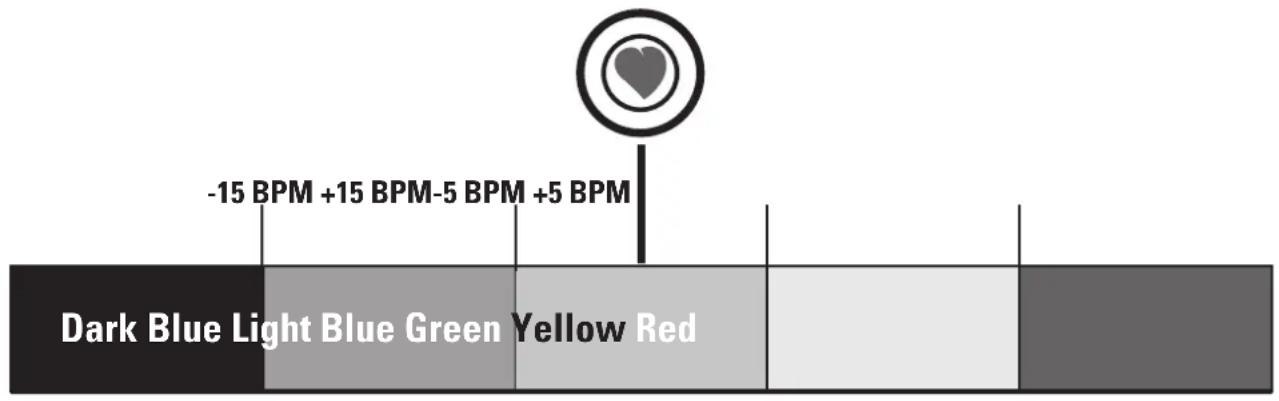
- Target Heart Rate "Zone meter". During heart-rate controlled programs, SMARTLIGHT is dark blue when your target heart rate is 15 or more beats per minute (BPM) lower than your goal, changing to light blue when your heart rate is 15 to 5 BPM less than your goal, and to green when you are within 5 BPM of your target. SMARTLIGHT changes to yellow when your heart rate is more than 5 BPM above your goal, and to red when you are 15 or more BPM above your goal. When your workout is over and it's time to cool down, SMARTLIGHT is a slowly blinking dark blue. Follow these color indicators as they prompt you to adjust your speed or intensity to keep your workout "in the zone".
OCTANE FITNESS PROGRAMS
The xR6x has six built-in programs to keep your workouts interesting:
Classic programs: Manual—Random—Interval—Beginner
Goal programs: Distance Goal—Calorie Goal
The xR6xi with wireless heart rate includes an additional three programs to further challenge and motivate:
Heart rate and advanced programs: Fat Burn—HR Interval—30:30
Programs begin with a warm-up to ease your body into your intense workout. During the warm-up, the resistance increases each minute. At the end of the warm-up, you will be at your selected resistance value or target heart rate. You can change the level at any time during the warm-up.
Choose the program that best fits your workout needs for any given day. You decide how hard to work by setting the resistance level and goal (such as time, distance, or calories). Program your workout your way!
How Does Workload Resistance (Level) Work?
| Nominal Level | Except as noted below, you select a consistent level of resistance for your workout, and increase or decrease it whenever you choose using the Level (▲) or (▼) keys on the keypad. |
| Program Level | The Random and Distance Goal programs let you select an overall resistance level for the program. This level is the average resistance level for the workout. The range of resistance levels during these workouts are plus (+) or minus (-) 4 of the entered program level. That is, for program Level 5, minimum resistance is Level 1 and maximum resistance is Level 9. During the workout, the overall program resistance level is displayed. You can change the Level at any time. |
| Resistance in Heart Rate Controlled and Advanced Programs | Fat Burn and Heart Rate Interval ask you to enter the target heart rate level. If the target HR is reached during the warm-up, the warm-up ends and the selected heart rate controlled program begins. The resistance level during the heart rate controlled workout is controlled by the machine, increasing or decreasing as necessary to keep your heart rate on target. |
In the 30:30 advanced program you select a "Sprint" Level for the 'work' portion of your workout. The rest and recovery intervals are set to Level 1.
Use the quick-reference charts on the following pages to help select and set up the programs.
| xR6x / xR6xi PROGRAM SETTINGS—VALUE RANGES | |||
| Setting Standard Values* Minimum Value Maximum Value | |||
| Time | 30:00 | 1:00 | 99:00 |
| Level | 1 | 1 | 20 |
| Age | 40 | 15 | 99 |
| Weight | 150 lbs. (68 kg) | 70 lbs. (32 kg) | 300 lbs. (181 kg) |
| Intervals | 2 | 1 | 4 |
| Interval (x) Time | 00:30 | 00:15 | 99:00 |
| Interval (x) Level | 1 | 1 | 20 |
| Target (Heart Rate) | (220 - Age) * %; varies by program | 80 | (220 - Age) |
| Calorie Goal | 350 | 150 | 1000 |
| Distance Goal | 10K (6.2 miles) | 1K (.62 miles) | 21K (13.1 miles) |
| Sprint Level (30:30) | 8 | 4 | 20 |
| *Standard program values are used if no values are entered within 4 seconds of Message Center prompts. | |||
| CLASSIC PROGRAMS | |||
| Programs & Standard Settings Description | |||
 | Get on and go; constant resistance simulates walking or jogging on a flat surface. The oval racetrack equals 1/4 mile (or 400 meters); the counter in the matrix display shows laps completed. | ||
 | Enjoy computer-randomized resistance variation with a virtually infinite number of combinations. Get a new course each time you select the program or change the level. Each interval lasts one minute. | ||
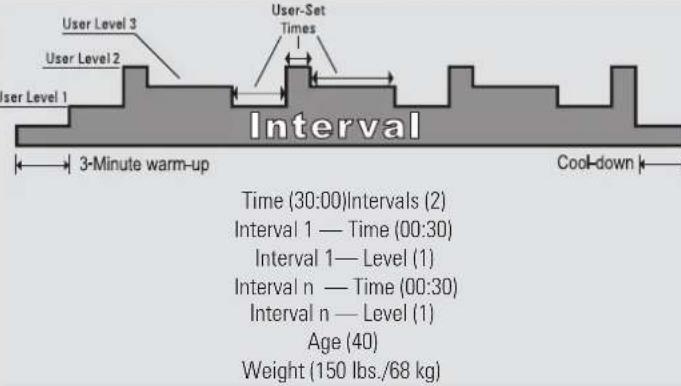 | Design a custom workout of up to 4 alternating intervals of user-defined duration and resistance. Use Level (▲) or (▼) to adjust interval resistance mid-workout. | ||
 | Follow a 14-day planned workout sequence to help jump-start your exercise program. Each day's workout includes preset values for resistance level, time and a suggested speed (RPM). The values gradually increase in intensity each day, building up your stamina and getting you ready to workout on your own. Use Level (▲) or (▼) to chose the day (1-14) and you're ready to go! | ||
| GOAL PROGRAMS | |||
| Programs & Standard Settings Description | |||
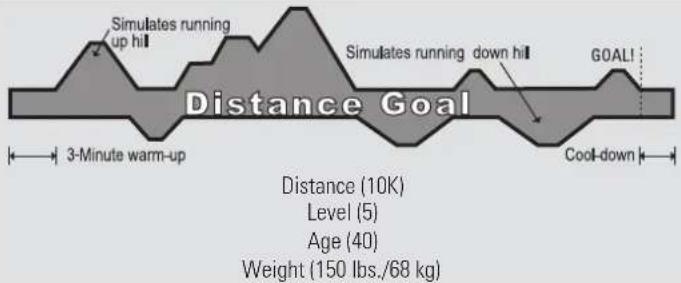 | Complete a virtual race—a great way to train for an actual event. Take to the hills as gradual resistance changes simulate variance in terrain, replicating the challenges encountered when walking or running outside. The distance readout counts down from 6.2 miles (10 kilometers). Use Level (▲) or (▼) to adjust interval resistance mid-workout. | ||
 | Get moving on a flat course until you have burned your target number of calories. Use Level (▲) or (▼) to adjust interval resistance mid-workout. Watch the calories fall away! | ||
| xR6xi HEART RATE PROGRAMS | |||
| Programs & Standard Settings Description | |||
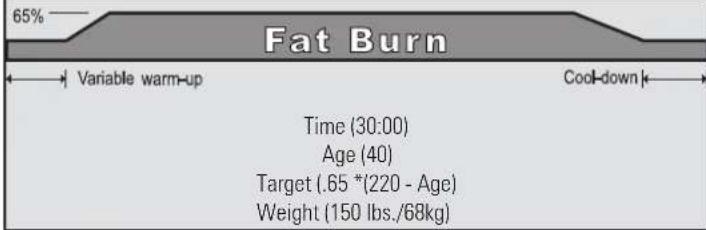 | Maximize the percentage of calories burned from fat versus carbohydrates with this controlled workout at 65% of theoretical maximum heart rate (or user-specified target heart rate). Use Level (▲) or (▼ to adjust interval target heart rates mid-workout. | ||
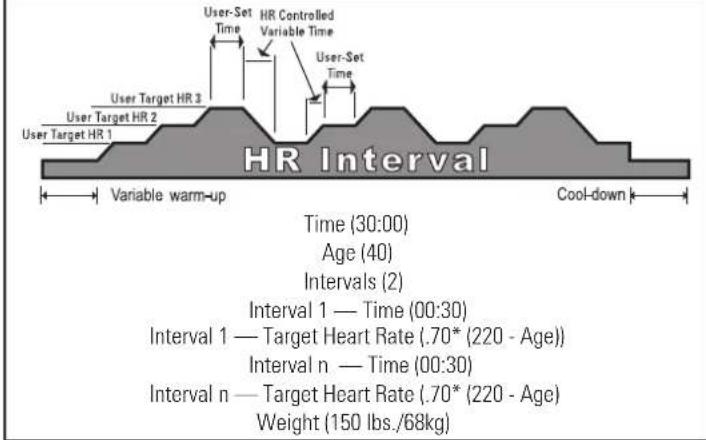 | Build a custom heart-rate controlled workout of up to 4 alternating intervals of user-defined duration and target heart rates. Use Level (▲) or (▼) to adjust interval target heart rates mid-workout. | ||
| xR6xi ADVANCED PROGRAMS | |||
| Programs & Standard Settings Description | |||
| Time (30:00)Sprint Level (8)Age (40)Weight (150 lbs./68kg) | This challenging program provides a simple test of fitness level with 5 sets of 30-second sprint and recovery intervals. For each set, the program monitors heart rate and calculates the average minimum and average maximum heart rates and the average number of beats the heart rate recovers between sprint intervals. Heart rate recovery is a relative indicator of fitness level; a higher number indicates a more rapid heart rate recovery and therefore represents a relatively better level of fitness. | ||
| xR6xi ADVANCED PROGRAMS | |
| Programs & Standard Settings Description | |
| This challenging program provides a simple test of fitness level with 5 sets of 30-second sprint and recovery intervals. For each set, the program monitors heart rate and calculates the average minimum and average maximum heart rates and the average number of beats the heart rate recovers between sprint intervals. Heart rate recovery is a relative indicator of fitness level; a higher number indicates a more rapid heart rate recovery and therefore represents a relatively better level of fitness. | |
HEART RATE FEATURES
Heart Rate Monitoring And Heartlogic Intelligence
The xR6 ellipticals are equipped with state-of-the-art heart rate monitoring and control technologies that help you make the most of your training efforts. Both models include on-demand heart rate monitoring—just grasp the digital contact heart rate grip sensors on the stationary handlebars and your current heart rate is displayed on the console.
For even greater control of your workout, the xR6xi is also equipped with HeartLogic Intelligence, Octane Fitness' sophisticated yet easy to use heart rate control technology. This sophisticated solution provides the most accurate and effective workout possible using heart rate data captured by a wireless chest strap or the digital contact heart rate grip sensors on the handlebars.
The xR6xi features premium workouts designed to take full advantage of the benefits of heart rate zone training: Fat Burn, Heart Rate Interval and 30:30. The console displays time-in-zone, current heart rate, heart rate %, and target heart rate so you know exactly where you are and where you should be.
| Using the digital contact heart rate sensors | The digital contact heart rate sensors are located on the stationary handlebars of the xR6x and xR6xi. The grips can be used to check your heart rate during your workout. For the most accurate heart rate reading possible, grasp each contact heart rate grip so that the contact sensor portion of the grip rests in the palm of your hand. Grip the contact sensors firmly, and keep your hands steady and in place. |
| Using a wireless chest strap (xR6xi) | The wireless chest strap transmits your heart rate to the xR6xi electronics console at a distance of up to three feet. You may use any PolarTM-compatible (5 KHz, coded or non-coded) transmitter. Adjust the length of the elastic strap and fasten the transmitter around your torso, underneath your shirt. Place the strap just below your chest. Make sure the logo is away from you and right side up. It may help to moisten the electrodes on the back of the transmitter with a small amount of water for better contact with the skin. The electrodes are the ribbed portion on the back side of the transmitter that sits against your skin. Make sure the strap fits snugly but doesn't restrict breathing. The contact handgrips reading takes priority if both the wireless and contact heart rate grips are in use. |
| Using a Bluetooth heart rate monitor (xR6xi) | You can connect a Bluetooth heart rate monitor to your xR6xi through the SMARTLINK app. While wearing your monitor, open SMARTLINK. A message will appear in the app indicating that a heart monitor has been detected. Select "YES" to connect the monitor to your elliptical. A message is then displayed confirming the connection, and the Bluetooth icon next to your heart rate reading in the app will be illuminated. |
| Using an ANT+ heart rate monitor (xR6xi) | To connect your ANT+ monitor to your xR6xi, stand close to the right side of the Octane console while wearing your monitor until the ANT+ icon in the upper right corner of the console illuminates. This indicates that your device is connected and you may then proceed with your workout. |
| Heart rate programs (xR6xi) | The xR6xi provides two heart rate controlled programs, Fat Burn and Heart Rate Interval, to offer you more variety to suit your personal needs. The 30:30 program also uses heart rate data to provide an assessment of heart rate recovery. We recommend that you try different programs to determine your favorite. Refer to the Program Reference chart for more information. |
Our customer service team is available to answer any questions you may have about your Octane Fitness elliptical. Please join us in a 'live' chat at www.octanefitness.com, or call 1-888-OCTANE4 or 763-757-2662, ext. 1.
And don't forget to Fuel Your Workout on the xR6xi by downloading the free SMARTLINK by Octane Fitness for your iPad!
Join the OCTANE FITNESS Community.

search: Octane Fitness
Free Downloads, Workout Inspiration, Team Atmosphere

FUEL YOUR LIFE™
Octane Fitness Octane Fitness International
US & Canada, Latin America, Asia & Asian Pacific Europe, Middle East, Africa
7601 Northland Drive North Rivium Westlaan 19
Suite 100 2909 LD, Capelle a/d Ijssel
Brooklyn Park, MN 55428 The Netherlands
Phone: 888.OCTANE4 (US and Canada) Phone: +31 10 2662412
763.757.2662 (Latin America, Asia and Asian Pacific) Fax: +31 10 2662444
Fax: 763.323.2064
©2014 Octane Fitness, LLC. All rights reserved. Octane Fitness, DedicatedLogic, Fuel Your Life, HeartLogic, SMARTLIGHT, SMARTLINK, X-Mode, Chest Press and Leg Press are registered trademarks of Octane Fitness. Any use of these trademarks, without the express written consent of Octane Fitness, is forbidden. iTunes, iPad, iPod and iPhone are trademarks of Apple Inc., registered in the U.S. and other countries. Bluetooth is a registered trademark of the Bluetooth SIG. ANT+ is a registered trademark of ANT Wireless.
109589-001 REV B
- TABLE OF CONTENTS
- GETTING STARTED .... 1
- ELECTRONICS 5
- OCTANE FITNESS PROGRAMS .... 11
- HEART RATE FEATURES 14
- IMPORTANT SAFETY INFORMATION
- WARRANTY INFORMATION
- LEARN MORE...AND JOIN THE OCTANE FITNESS COMMUNITY
- VISUAL PRODUCT OVERVIEW
- SMARTLINK® BY OCTANE FITNESS
- ADJUSTING THE SEAT
- ADJUSTING SEAT HEIGHT
- ADJUSTING SEATBACK TILT
- USER SET-UP FUNCTIONS
- CLEANING AND MAINTENANCE OF THE XR6 SERIES ELLIPTICAL
- ELECTRONICS
- CONSOLE OPTIONS
- OCTANE BOOSTERS
- DYNAMIC DISPLAY (LCD)
- SMARTLIGHT®
- OCTANE FITNESS PROGRAMS
- HOW DOES WORKLOAD RESISTANCE (LEVEL) WORK
- HEART RATE FEATURES
- HEART RATE MONITORING AND HEARTLOGIC INTELLIGENCE
- JOIN THE OCTANE FITNESS COMMUNITY
- FREE DOWNLOADS, WORKOUT INSPIRATION, TEAM ATMOSPHERE
- FUEL YOUR LIFE™
- OCTANE FITNESS OCTANE FITNESS INTERNATIONAL
Brand : Octane
Model : xRide xR6x
Category : Elliptical bike