
Wireless HD Sender Classic - TV signal amplifier MEGASAT - Free user manual and instructions
Find the device manual for free Wireless HD Sender Classic MEGASAT in PDF.


| Product Type | Wireless HDMI Extender / TV Signal Amplifier |
| Brand | Megasat |
| Model | Wireless HD Sender Classic |
| Dimensions (L x W x H) | 164 x 124 x 34 mm |
| Power Supply - Transmitter | 5V / 2A DC |
| Power Supply - Receiver | 5V / 1A DC |
| AC Input | 100-240V AC, 50/60 Hz |
| Video Resolution | Up to 1080p |
| Video Frame Rate | 30 fps (NTSC) / 25 fps (PAL) |
| Transmission Range | Up to 30 meters (Line of Sight) |
| Frequency Band | 2.4 GHz ISM Band (2403-2478 MHz) |
| IR Pass-Through Frequency | 30 KHz ~ 60 KHz |
| Main Functions | Wireless HD video/audio transmission; IR remote extension; automatic frequency hopping |
| Care and Cleaning | Unplug before cleaning; use soft cloth with mild detergent; no solvents |
| Safety Precautions | Do not expose to liquids; ensure ventilation; avoid direct sunlight/heat; do not open casing |
| Included Accessories | Transmitter, Receiver, 2 power adapters, IR sensor, 2 HDMI cables (1m), manual |
| Compliance | CE, EMC and Low Voltage Directives |
| Operating Temperature | 0°C ~ 50°C |
| Storage Temperature | -30°C ~ 70°C |
Frequently Asked Questions - Wireless HD Sender Classic MEGASAT
User questions about Wireless HD Sender Classic MEGASAT
0 question about this device. Answer the ones you know or ask your own.
Ask a new question about this device
Download the instructions for your TV signal amplifier in PDF format for free! Find your manual Wireless HD Sender Classic - MEGASAT and take your electronic device back in hand. On this page are published all the documents necessary for the use of your device. Wireless HD Sender Classic by MEGASAT.
USER MANUAL Wireless HD Sender Classic MEGASAT
natural_image
Exterior view of a Megasat wireless router with two antennas and a power interface (no text or symbols on the device body)Wireless HD Sender Classic
Bedienungsanleitung
Inhaltsverzeichnis
natural_image
Exterior view of a black MEGASAT wireless router with two antennas and a control panel (no visible text or symbols on the device body)Wireless HD Sender Classic
User manual
Content
Safety Instructions....03
-
Introduction 04
-
Delivery 04
-
Designations....05
3.1 Transmitter 05
3.2 Receiver 05
- Installation 06
4.1 Setup the Transmitter to the Television and HD device....06
4.2 Setup the Receiver to the Television 06
4.3 Power to Receiver and Transmitter....07
-
Configure the IR Function with 56 KHz....07
-
Troubleshooting 08
-
Specifications....09
Safety Instructions
Please read the manual thoroughly before operating the equipment. In case of incorrect or improper handling, the warranty becomes void.
Power supply: Before start please check the correct operation voltage of the power point. The operating voltage of this device is AC 100 \~ 240V,50/60Hz.
Overload: Do not overload a wall outlet, extension cord or adapter, neither use damaged power cord or touch it with wet hand as this may result in electric shock.
Liquid: The device shall not be exposed to dripping or splashing water, and that no objects filled with liquids, such as base, shall be placed on the apparatus.
Ventilation: Keep the slots on top of the device uncover to allow sufficient airflow to the unit. Do not put the device on soft furnishings or carpets. Do not expose the device to direct light or do not place it near a heater or in humid conditions. Do not stack other electronic equipments on top of the device.
Risk of suffocation: Do not let children play with films or other packaging components, there is a risk of suffocation.
Cleaning: Plug out the device from the wall outlet before cleaning. Clean the device by a soft cloth or mild solution of washing-up liquid (no solvents).
Location: Put the device indoor in order to avoid lightening, raining or sunlight.
Uncover: Do not remove the cover, to reduce the risk of electric shock. Contact qualified and licensed service personnel to repair the receiver, or contact your dealer.
1. Introduction
Wireless HD Sender Classic allows users to place their HDTV set-top box or projector where they want, free of the constraint of cables. Just connect your HD-TV to the Sender with a HDMI cable and connect your AV equipments (Blue-Ray Players, HD set-up boxes, game consoles, HD media players or streamers).
Besides HDTVs, any display with an HDMI input, such as LCD and plasma monitors or projectors, are compatible with the Wireless HD Sender Classic.
It operates the transmission in 2.4 GHz frequencies hopping and it changes its communication frequency automatically in case of interference from another RF system. With built-in antennas, it can transmit video content to 30 meters LOS (Line of sight) with no latency.
IR Blaster Extender Cable is included in the package so users can point their remote control of the AV source at the HD Sender directly for device operation.
Note:
The wireless link might take up to 80 seconds to connect between transmitter and receiver, and show video on the TV screen. Please be patient and wait for a while.
2. Delivery
Please check whether the following items are present in the package. If any items is missed or damaged, please call your dealer.
- 1x Wireless HD Transmitter
• 1x Wireless HD Receiver - 2x Power supply
- 1x Infrared sensor
- 2x HDMI cable (1 m)
- 1x User manual
3. Designations
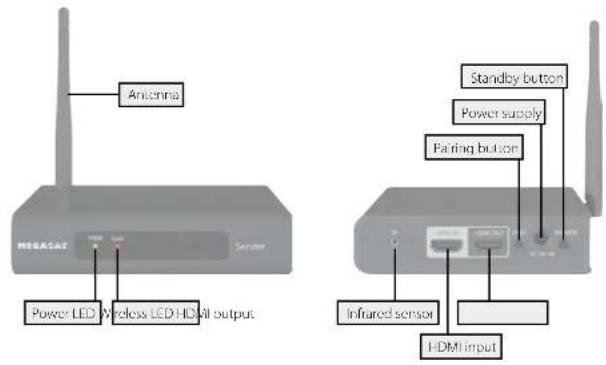
3.1 Transmitter
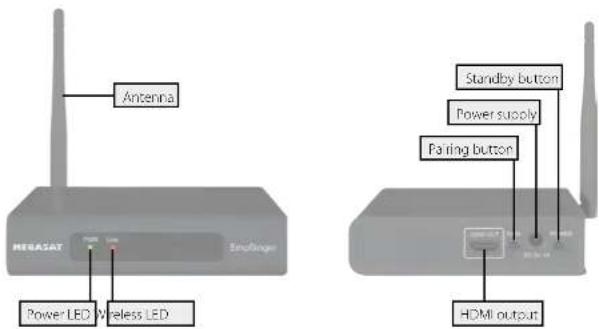
3.2 Receiver
4. Installation
flowchart
graph TD
    A["Television"] -->|HDMI cable| B["Infrared sensor"]
    B --> C["TransmitterReceive Set-top box"]
    C --> D["Television"]
    E["Remote Control"] --> F["Antenna"]
    F --> G["Antenna"]
    G --> H["Antenna"]
    I["HDMI cable"] -.-> J["Television"]
    K["Infrared sensor"] -.-> L["TransmitterReceive Set-top box"]
4.1 Setup the Transmitter to the Television and HD device
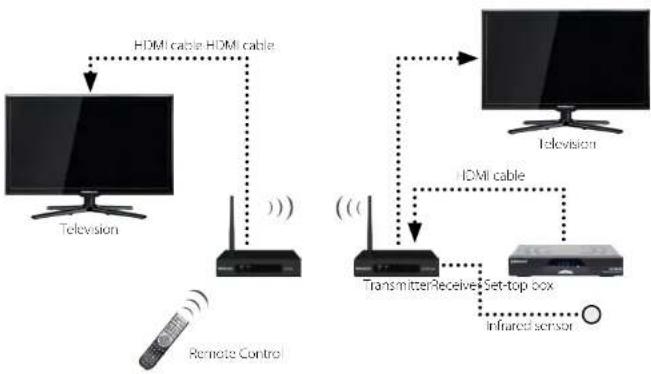
- Connect the Transmitter "HDMI IN" to the AV source "HDMI OUT" with HDMI cable. The Transmitter has a HDMI input for the AV device, like PS3, Blue-Ray Player or set-top box.
- Connect the Transmitter "HDMI OUT" to the HDTV set (or an HD projector) "HDMI IN" with HDMI cable.
- Put the Infrared sensor on the HD device to control it with the original remote.
- Connect the supplied power adapter to the DC IN jack of the Transmitter and an outlet. The LED indicator in the POWER button lights up in solid red when the Transmitter is connected to the power mains.
4.2 Setup the Receiver to the Television.
- Connect the HDMI cable to the HDMI OUT jack of the HD Receiver and to your HDTV set (or an HD projector).
- Connect the supplied power adapter to the DC IN jack of the Receiver and an outlet. The LED indicator in the POWER button lights up in solid red when the Transmitter is connected to the power mains.
4. Installation
4.3 Power to Receiver and Transmitter
- After the power cord is plugged into the electrical outlet, press the power button to power on the Receiver and Transmitter.
- Ensure your TV set or projector is in "HDMI input" mode, and is already powered on.
- Receiver and Transmitter Status Indicator on LED:
| POWER LED Red Power Off | ||
| Green Power On | ||
| WIRELESS LED Red Wireless connected | ||
| Red Blink | ||
5. Configure the IR Function with 56 KHz
If the Transmitter is connected to a display device with Remote controls infrared frequency in 56 KHz which is not a remote control standard frequency. This is why you must configure the function return control to the zapping from the receiver work properly.
To do this:
- Turn on all the devices and display the image of the Transmitter on TV screen.
- Press the PAIR button of the Receiver between 2 and 3 seconds and then let the PAIR button free, and observe the message "38 KHz" is displayed in the upper right side of the TV.
- During the message, 38 KHz is displayed, press the PAIR button of the Receiver between 2 and 3 seconds again and then let the PAIR button free, and observe the message, "Press and hold a button of the remote control" is displayed.
- With the remote display device, press a key on the device remote control to the Receiver while the message Keep pressed a button on the remote control is displayed (Repeat from point 1 if message is no longer displayed).
- Configuration is completed when the message, OK Learning (56 KHz) is displayed.
-
After configuration process is successful, you could use the remote control with 56 KHz zapping from the Receiver works correctly. If you use another display device with 38 KHz remote control, there are normally no adjustment to make.
-
Troubleshooting
| Problem Solution | |
| The power indicator (red LED) doesn't light up. | Check if the power plugs of Transmitter and Receiver are properly inserted into a functioning power outlet. |
| No video is displayed on your TV screen. | Verify that the proper cables have been selected and installed between the Transmitter input and your AV device output.On your TV side (connected to the Receiver), select the HDMI as input source.Verify the POWER LED and WIRELESS LED indicator of booth devices.Wireless LED lighting up in Red BlinkEnsure the transmission range between the transmitter and the receiver is not over 30 meter (LOS - line of sight) transmission distance. Move the transmitter closer to the receiver.Wireless un-lightingEnsure the proper cables are connected between the transmitter and your AV devices.Ensure your source devices connected to the transmitter are powered on.Ensure the proper cables are connected between the receiver and your TV near the receiver. |
| No audio. Check your TV's volume is properly set and not set in „MUTE" mode. | |
| Infrared sensor can't control source device. | Check where is IR sensor of Source device. Make sure IR Blaster sensor is close and straight to Source device's IR sensor.Check the Transmitter has powered on. |
| The video doesn't display smoothly. Check Transmitter connected to the correct adapter in 5V / 2A. | |
- Specifications
| Model Name Transmitter | Receiver | ||
| I lost Interface 1x HDMI input | (type A)1x HDMI output (type A)1x Remote extender jack1x DC IN jack | 1x HDMI output (type A)1x DC IN jack | |
| Switch 1x Pair button | 1x Power ON/OFF button | 1x Pair button1x Power ON/OFF button | |
| Operating Voltage | 5 V / 2 A,100-240 V AC / 50-60 Hz | 5 V / 1 A,100-240 V AC / 50-60 Hz | |
| Video Resolution | Up to 1080p | 1080p | |
| Video Frame Rate | 30 fps at 720 x 480 for FCC25 fps at 720 x 576 for CE | ||
| Video Modulation | 16QAM, QPSK | ||
| IR Pass Through | 30 KHz ~ 60 KHz | ||
| Frequency Band | 2.4 GHz ISM Band (2403MHz ~ 2478MHz)Hopping channel spacing:1 MHz for CE / 3 MHz for FCC | ||
| Audio | Support: I2SSample Rate: 48KHzFrequency Band: 10 Hz ~ 20 KHz | ||
| ID Pairing | By Pair Button | ||
| Power LED | Red | Power Off | |
| Green | Power On | ||
| Wireless LED | Red | Wireless Connected | |
| Red blink | Search Signal / Unconnected | ||
| Operating Range | 30 meter | ||
| Dimensions | 164 x 124 x 34 mm (L/W/H) | ||
| Temperature Range | 0° ~ 50°C (Operating), -30° ~ 70°C (Storage) | ||
Note:
Weight and dimensions are not absolutely exact values.
Technical details can be changed at any time without prior notice.
Declaration of Conformity Notes
This complies with the following directives / standards is confirmed:
Electromagnetic Compatibility Directive 2004/108/EG
EN 55013: 2001 + A1: 2003 + A2: 2006
EN 55020:2007
EN 61000 3-2:2006 | A1:2009 | A2:2009
EN 61000-3-3:2008
Low Voltage Directive 2006/95/EG
EN 60065: 2002 + A1: 2006 + A11: 2008
Status: 1.0 August 2015 // Technical changes, misprints and errors reserved. Megasat Werke GmbH | Industriestraße 4a | D-97618 Niederlauer | www.megasat.tv | info@megasat.tv
- Bedienungsanleitung
- Inhaltsverzeichnis
- Content
- Safety Instructions
- Introduction
- Note:
- Delivery
- Designations
- Installation
- Setup the Transmitter to the Television and HD device
- Setup the Receiver to the Television.
- Power to Receiver and Transmitter
- Configure the IR Function with 56 KHz
- Declaration of Conformity Notes
Brand : MEGASAT
Model : Wireless HD Sender Classic
Category : TV signal amplifier