
RSA5065-TG - Measurement Rigol - Free user manual and instructions
Find the device manual for free RSA5065-TG Rigol in PDF.


| Type | Real-time Spectrum Analyzer with Tracking Generator |
| Model | RSA5065-TG |
| Frequency Range | 9 kHz to 6.5 GHz |
| Tracking Generator Frequency Range | 9 kHz to 6.5 GHz |
| Resolution Bandwidth (RBW) | 1 Hz to 10 MHz (selectable) |
| Displayed Average Noise Level (DANL) | Typical -165 dBm/Hz (preamp on) |
| Phase Noise | Typically -108 dBc/Hz at 1 GHz, 10 kHz offset |
| Real-time Bandwidth | 40 MHz (standard) |
| Measurement Modes | GPSA, RTSA (Normal, Density, Spectrogram, PvT, etc.) |
| Advanced Measurements (Options) | ACP, CHP, OBW, EBW, C/N, Harmonics, TOI, etc. |
| Display | 10.1 inch TFT LCD, 1024 x 600 pixels |
| Communication Interfaces | USB (Device), LAN (10/100 Base-T), HDMI output |
| Remote Control | SCPI over USB or LAN |
| Power Supply | 100-240 VAC, 50/60 Hz, 150 W max |
| Dimensions (W x H x D) | 350 x 220 x 115 mm (approx) |
| Weight | 5.0 kg (approx) |
| Operating Temperature | 0°C to 50°C |
| Storage Temperature | -20°C to 70°C |
| Included Accessories | Power cord, USB cable, Quick guide, CD with software |
| Safety | Designed for indoor use, overvoltage category II |
Frequently Asked Questions - RSA5065-TG Rigol
:CALC:MARK:MAX.:SENS:FREQ:CENT 3.25 GHz.*SAV and *RCL are also available.:INP:GAIN:STAT ON.User questions about RSA5065-TG Rigol
0 question about this device. Answer the ones you know or ask your own.
Ask a new question about this device
Download the instructions for your Measurement in PDF format for free! Find your manual RSA5065-TG - Rigol and take your electronic device back in hand. On this page are published all the documents necessary for the use of your device. RSA5065-TG by Rigol.
USER MANUAL RSA5065-TG Rigol
RSA5000 Series Real-time Spectrum Analyzer
Jan. 26, 2018
RIGOL TECHNOLOGIES, INC.
Guaranty and Declaration
Copyright
© 2017 RIGOL TECHNOLOGIES, INC. All Rights Reserved.
Trademark Information
RIGOL is a registered trademark of RIGOL TECHNOLOGIES, INC.
Publication Number
PGD20102-1110
Software Version
00.01.00
Software upgrade might change or add product features. Please acquire the latest version of the manual from RIGOL website or contact RIGOL to upgrade the software.
Notices
● RIGOL products are covered by P.R.C. and foreign patents, issued and pending.
- RIGOL reserves the right to modify or change parts of or all the specifications and pricing policies at the company's sole decision.
● Information in this publication replaces all previously released materials.
● Information in this publication is subject to change without notice.
- RIGOL shall not be liable for either incidental or consequential losses in connection with the furnishing, use, or performance of this manual, as well as any information contained.
- Any part of this document is forbidden to be copied, photocopied, or rearranged without prior written approval of RIGOL.
Product Certification
RIGOL guarantees that this product conforms to the national and industrial standards in China as well as the ISO9001:2008 standard and the ISO14001:2004 standard. Other international standard conformance certifications are in progress.
Contact Us
If you have any problem or requirement when using our products or this manual, please contact RIGOL.
E-mail: service@rigol.com
Website: www.rigol.com
Document Overview
This manual introduces how to program and control RIGOL RSA5000 series spectrum analyzer by using SCPI commands through USB and LAN interface.
Main Topics in this Manual:
Chapter 1 Programming Overview
This chapter introduces how to set up remote communication between the spectrum analyzer and the PC, the remote control methods, the syntax, symbols, parameters, and abbreviation rules of the SCPI commands.
Chapter 2 Command System
This chapter introduces the syntax, function, parameters, and usage of each command.
Chapter 3 Programming Examples
This chapter illustrates how to control the RSA5000 series by programming in the development environments such as Visual C++, Visual Basic, and LabVIEW.
Tip
For the latest version of this manual, download it from the official website of RIGOL (www.rigol.com).
Format Conventions in this Manual:
1. Keys:
The keys on the front panel are usually denoted by the format of "Key Name (Bold) + Text Box". For example, FREQ denotes the FREQ key.
2. Menu keys:
The menu softkeys are usually denoted by the format of "Menu Word (Bold) + Character Shading". For example, Center Freq denotes the center frequency menu item under the FREQ function key.
3. Connectors:
The connectors on the front or rear panel are usually denoted by the format of "Connector Name (Bold) + Square Brackets (Bold)". For example, [Gen Output 50Ω].
4. Operation Procedures:
"→" indicates the next step of operation. For example, FREQ → Center Freq indicates pressing FREQ on the front panel and then pressing the menu softkey Center Freq.
Content Conventions in this Manual:
The RSA5000 series spectrum analyzer includes the following models. Unless otherwise specified, this manual takes RSA5065-TG as an example to illustrate the usage of each command of RSA5065 series spectrum analyzer.
| Model | Frequency Range | Tracking Generator |
| RSA5065 | 9 kHz to 6.5 GHz | None |
| RSA5032 | 9 kHz to 3.2 GHz | None |
| RSA5065-TG | 9 kHz to 6.5 GHz | 6.5 GHz |
| RSA5032-TG | 9 kHz to 3.2 GHz | 3.2 GHz |
Contents
Guaranty and Declaration .... I
Document Overview ......II
Chapter 1 Programming Overview....1-1
Build Remote Communication....1-2
Remote Control Method 1-3
SCPI Command Overview 1-4
Syntax....1-4
Symbol Description 1-4
Parameter Type....1-5
Command Abbreviation 1-5
Chapter 2 Command System....2-1
:CALCulate Commands....2-2
:CALCulate:BANDwidth|BWIDth:NDB 2-4
:CALCulate:BANDwidth|BWIDth:RESult? 2-4
:CALCulate:BANDwidth|BWIDth:RLEFt? 2-5
:CALCulate:BANDwidth|BWIDth:RRIGHT? 2-5
:CALCulate:BANDwidth|BWIDth[:STATE] 2-5
:CALCulate:LLINe:ALL:DELete....2-6
:CALCulate:LLINe:TEST 2-6
:CALCulate:LLINe
:CALCulate:LLINe
:CALCulate:LLINe
:CALCulate:LLINe
:CALCulate:LLINe
:CALCulate:LLINe
:CALCulate:LLINe
:CALCulate:LLINe
:CALCulate:LLINe
:CALCulate:LLINe
:CALCulate:LLINe
:CALCulate:LLINe
:CALCulate:MARKer:AOFF 2-13
:CALCulate:MARKer:COUPIe[:STATe] 2-13
:CALCulate:MARKer:PEAK:EXCursion 2-14
:CALCulate:MARKer:PEAK:EXCursion:STATE 2-14
:CALCulate:MARKer:PEAK:SEARch:MODE 2-15
:CALCulate:MARKer:PEAK:SORT 2-16
:TRACe:MATH:PEAK:SORT 2-16
:CALCulate:MARKer:PEAK:TABLE:READout 2-16
:TRACe:MATH:PEAK:THReshold 2-16
:CALCulate:MARKer:PEAK:TABLE[:STATE] 2-17
:TRACe:MATH:PEAK:TABLE:STATE 2-17
:CALCulate:MARKer:PEAK:THReshold 2-18
:CALCulate:MARKer:PEAK:THReshold:STATE 2-18
:CALCulate:MARKer:TABLE[:STATE] 2-19
:CALCulate:MARKer:TRCKing[:STATE] 2-19
:CALCulate:MARKer
:CALCulate:MARKer
:CALCulate:MARKer
:CALCulate:MARKer
:CALCulate:MARKer
:CALCulate:MARKer
:CALCulate:MARKer
:CALCulate:MARKer
:CALCulate:MARKer
:CALCulate:MARKer
:CALCulate:MARKer
:CALCulate:MARKer
:CALCulate:MARKer
:CALCulate:MARKer
:CALCulate:MARKer
:CALCulate:MARKer
:CALCulate:MARKer
:CALCulate:MARKer
:CALCulate:MARKer
:CALCulate:MARKer
:CALCulate:MARKer
:CALCulate:MARKer
:CALCulate:MARKer
:CALCulate:MARKer
:CALCulate:MARKer
:CALCulate:MARKer
:CALCulate:MARKer
:CALCulate:MARKer
:CALCulate:MARKer
:CALCulate:MARKer
:CALCulate:MARKer
:CALCulate:MARKer
:CALCulate:MARKer
:CALCulate:MARKer
:CALCulate:MATH 2-38
:CALCulate:NTData[:STATE] 2-39
:CALibration Commands 2-40
:CALibration:[ALL] 2-40
:CALibration:AUTO....2-40
:CONFigure Commands 2-41
:CONFigure? 2-41
:CONFigure:ACPower 2-42
:CONFigure: CNRatio 2-42
:CONFigure:DENSity 2-42
:CONFigure:DSPEctrogram....2-43
:CONFigure:EBWidth....2-43
:CONFigure:HDI St 2-43
:CONFigure:LPSTep 2-43
:CONFigure:MCHPower 2-44
:CONFigure:NORMAL 2-44
:CONFigure:OBWidth 2-44
:CONFigure:PSGRam 2-45
:CONFigure:PSPectrum 2-45
:CONFigure:PVT 2-45
:CONFigure:SANalyzer 2-45
:CONFigure:SPECTrogram....2-46
:CONFigure:TOI 2-46
:CONFigure:TPOWer 2-46
:COUPIe Commands 2-47
:COUPIe 2-47
:DISPLAY Commands....2-48
:DISPLAY:BACKlight 2-49
:DISPLAY:ENABLE 2-49
:DISPLAY:GRATicule[:STATE] 2-50
:DISPLAY:HDMI[:STATE] 2-50
:DISPLAY:PVTime:WINDOW:TRACe:X[:SCALe]:COUPIe 2-51
:DISPLAY:PVTime:WINDOW:TRACe:X[:SCALe]:PDIVision 2-51
:DISPLAY:PVTime:WINDOW:TRACe:X[:SCALe]:RLEVel 2-52
:DISPLAY:PVTime:WINDOW:TRACe:X[:SCALe]:RPOSITION....2-52
:DISPLAY:PVTime:WINDOW:TRACe:Y[:SCALe]:PDIVision 2-53
:DISPLAY:PVTime:WINDOW:TRACe:Y[:SCALe]:RLEVel
:DISPLAY:VIEW:DENSITY:AADJust 2-54
:DISPLAY:VIEW:DENSITY:CNONlinear 2-54
:DISPLAY:VIEW:DENSITY:CPALlettes 2-55
:DISPLAY:VIEW:DENSITY:HDHue 2-55
:DISPLAY:VIEW:DENSITY:LDHue 2-56
:DISPLAY:VIEW:DENSITY:PERSistence 2-56
:DISPLAY:VIEW:DENSITY:PERSistence:INFINITE 2-57
:DISPLAY:VIEW[:SELECT] 2-57
:DISPLAY:VIEW:SPECTrogram:AADJust 2-58
:DISPLAY:VIEW:SPECTrogram:BOTTOM 2-58
:DISPLAY:VIEW:SPECTrogram:HUE 2-59
:DISPLAY:VIEW:SPECTrogram:POSITION....2-59
:DISPLAY:VIEW:SPECTrogram:REFERENCE 2-60
:DISPLAY:VIEW:SPECTrogram:TRACe:COUPle 2-60
:DISPLAY:VIEW:SPECTrogram:TRACe:SELection 2-61
:DISPLAY:WINDOW:SELECT 2-61
:DISPLAY:WINDOW:TRACe:Y:DLINe 2-62
:DISPLAY:WINDOW:TRACe:Y:DLINe:STATE 2-63
:DISPLAY:WINDOW:TRACe:Y[:SCALe]:NRLevel 2-63
:DISPLAY:WINDOW:TRACe:Y[:SCALe]:NRPosition 2-64
:DISPLAY:WINDOW:TRACe:Y[:SCALe]:PDIVision....2-64
:DISPLAY:WINDOW:TRACe:Y[:SCALe]:RLEVel 2-65
:DISPLAY:WINDOW:TRACe:Y[:SCALe]:RLEVel:OFFSET 2-65
:DISPLAY:WINDOW:TRACe:Y[:SCALe]:SPACING....2-66
:FETCH Commands 2-67
:FETCH:ACPower? 2-68
:FETCH:ACPower:LOWer? 2-68
:FETCH:ACPower:MAIN? 2-69
:FETCH:ACPower:UPPer? 2-69
:FETCH: CNRatio? 2-70
:FETCH: CNRatio: CARRier? 2-70
:FETCH: CNRatio: CNRatio? 2-71
:FETCH: CNRatio: NOISE? 2-71
:FETCH:EBWidth? 2-72
:FETCH:HARMonics:AMPLitude:ALL? 2-72
:FETCH:HARMonics:AMPLitude?
:FETCH:HARMonics[:DISTortion]? 2-73
:FETCH:HARMonics:FREQuency:ALL? 2-74
:FETCH:HARMonics:FREQUENCY?
:FETCH:HARMonics:FUNDamental? 2-75
:FETCH:OBWidth? 2-75
:FETCH:OBWidth:OBWidth? 2-76
:FETCH:OBWidth:OBWidth:FERRor? 2-76
:FETCH:SANalyzer
:FETCH:TOIntercept? 2-77
:FETCH:TOIntercept:IP3? 2-78
:FETCH:TPOWer? 2-78
:FORMAT Commands 2-79
:FORMAT:BORDER 2-79
:FORMAT[:TRACe][:DATA] 2-80
IEEE 488.2 Common Commands....2-81
* CLS 2-82
* ESE....2-82
*ESR? 2-83
* IDN? 2-83
* OPC 2-84
* RCL 2-84
* RST 2-84
*SAV 2-85
* SRE 2-85
* STB? 2-86
* TRG 2-86
* TST? 2-86
* WAI 2-86
:INITiate Commands 2-87
:INITiate:CONTinuous 2-87
:INITiate[:IMMediate]....2-87
:INSTrument Commands....2-88
:INSTrument:COUPLE:FREQuency:CENTER 2-88
:INSTrument:DEFault 2-88
:INSTrument:NSELect 2-89
:INSTrument[:SELECT] 2-89
:MMEMory Commands....2-90
:MMEMory:DElete 2-90
:MMEMory:LOAD:FMT 2-91
:MMEMory:LOAD:LI Mit 2-91
:MMEMory:LOAD:STATE 2-92
:MMEMory:LOAD:TRACe 2-92
:MMEMory:LOAD:TRACe:DATA 2-93
:MMEMory:MOVE....2-93
:MMEMory:STORE:LI Mit 2-94
:MMEMory:STORE:MTABle....2-94
:MMEMory:STORe:PTABle 2-95
:MMEMory:STORE:RESults 2-95
:MMEMory:STORE:SCReen 2-96
:MMEMory:STORE:STATE....2-96
:MMEMory:STORE:TRACe....2-97
:MMEMory:STORE:TRACe:DATA....2-97
:OUTPUT Commands....2-98
:OUTPUT[:EXTernal][:STATE]....2-98
:READ Commands 2-99
:READ:ACPower? 2-100
:READ:ACPower:LOWer? 2-100
:READ:ACPower:MAIN? 2-101
:READ:ACPower:UPPer? 2-101
:READ:CNRatio? 2-101
:READ: CNRatio:CARRIER? 2-102
:READ: CNRatio: CNRatio? 2-102
:READ: CNRatio: NOISE? 2-102
:READ:EBWidth? 2-103
:READ:HARMonics:AMPLitude:ALL? 2-103
:READ:HARMonics:AMPLitude?
:READ:HARMonics[:DISTortion]? 2-104
:READ:HARMonics:FREQuency:ALL? 2-105
:READ:HARMonics:FREQuency?
:READ:HARMonics:FUNDamental? 2-106
:READ:OBWidth? 2-106
:READ:OBWidth:OBWidth? 2-106
:READ:OBWidth:OBWidth:FERRor? 2-107
:READ:SANalyzer
:READ:TOIntercept? 2-108
:READ:TOIntercept:IP3? 2-108
:READ:TPOWer? 2-109
:SENSe Commands.... 2-110
:SENSe:ACPower:AVERAGE:COUNT 2-113
:SENSe:ACPower:AVERAGE[:STATE] 2-113
:SENSe:ACPower:AVERAGE:TCONtrol 2-114
:SENSe:ACPower:BANDwidth:ACHannel 2-114
:SENSe:ACPower:BANDwidth:INTegration 2-115
:SENSe:ACPower:CSPacing.... 2-115
:SENSe:ACQuisition:TIME 2-116
:SENSe:ACQuisition:TIME:AUTO 2-116
:SENSe:ACQuisition:TIME:PVTime 2-117
:SENSe:ACQuisition:TIME:PVTime:AUTO 2-118
:SENSe:AVERAGE:COUNT 2-118
:TRACe:AVERAGE:COUNT 2-118
:SENSe:AVERAGE:COUNT:CURRENT? 2-119
:TRACe:AVERAGE:COUNT:CURRENT? 2-119
:SENSe:AVERAGE:TYPE 2-119
:TRACe
:SENSe:AVERAGE:TYPE:AUTO 2-120
:SENSe:BANDwidth|BWIDth:EMIFilter:STATE.... 2-120
:SENSe:BANDwidth|BWIDth[:RESolution] 2-121
:SENSe:BANDwidth|BWIDth[:RESolution]:SELECT 2-122
:SENSe:BANDwidth|BWIDth[:RESolution]:SELECT:AUTO[:STATE] 2-123
:SENSe:BANDwidth|BWIDth:SHAPe 2-123
:SENSe:BANDwidth|BWIDth:VIDeo 2-124
:SENSe:BANDwidth|BWIDth:VIDeo:AUTO 2-124
:SENSe:BANDwidth|BWIDth:VIDeo:RATio 2-125
:SENSe:BANDwidth|BWIDth:VIDeo:RATio:AUTO 2-126
:SENSe:CNRatio:AVERAGE:COUNT 2-126
:SENSe:CNRatio:AVERAGE[:STATE] 2-127
:SENSe:CNRatio:BANDwidth:INTegration 2-128
:SENSe:CNRatio:BANDwidth:NOISe 2-129
:SENSe:CNRatio:OFFSET.... 2-129
:INPut:IMPedance 2-130
:SENSe:CORRection:IMPedance[:INPut][:MAGNitude] 2-130
:SENSe:CORRection:SA[:RF]:GAIN 2-130
:SENSe:DEMod:GAIN:AUTO 2-131
:SENSe:DEMod:GAIN:INCRement 2-132
:SENSe:DEMod:STATE 2-132
:SENSe:DEVector[:FUNCTION] 2-134
:SENSe:DETEctor:TRACe
:SENSe:EBWidth:AVERAGE:COUNT 2-135
:SENSe:EBWidth:AVERAGE[:STATE] 2-136
:SENSe:EBWidth:AVERAGE:TCONtrol 2-136
:SENSe:EBWidth:FREQuency:SPAN 2-137
:SENSe:EBWidth:MAXHold:STATE 2-137
:SENSe:EBWidth:XDB 2-138
:SENSe:FREQuency:CENTer.... 2-139
:SENSe:FREQuency:CENTer:STEP:AUTO 2-139
:SENSe:FREQuency:CENTer:STEP[:INCRement] 2-140
:SENSe:FREQUENCY:SPAN:BANDwidth[:RESolution]:RATio 2-141
:SENSe:FREQuency:SPAN:BANDwidth[:RESolution]:RATio:AUTO 2-142
:SENSe:FREQuency:SPAN:FULL 2-142
:SENSe:FREQUENCY:SPAN:PREVIOUS 2-142
:SENSe:FREQuency:SPAN:ZERO 2-143
:SENSe:FREQuency:START 2-143
:SENSe:FREQuency:STOP 2-143
:SENSe:FREQUENCY:TUNE:IMMediate 2-144
:SENSe:HDISt:AVERAGE:COUNt 2-144
:SENSe:HDISt:AVERAGE[:STATE] 2-145
:SENSe:HDIST:AVERAGE:TCONtrol 2-145
:SENSe:HDIST:NUMBERS 2-146
:SENSe:HDIST:TIME 2-146
:SENSe:MCHPower:AVERAGE:COUNT 2-147
:SENSe:MCHPower:AVERAGE:TCONtrol 2-148
:SENSe:OBWidth:AVERAGE:COUNT 2-149
:SENSe:OBWidth:AVERAGE[:STATE] 2-149
:SENSe:OBWidth:MAXHold:STATE 2-151
:SENSe:OBWidth:PERCent 2-151
:SENSe:POWer[:RF]:ATTenuation:AUTO 2-152
:SENSe:POWer[:RF]:MIXer:RANGE[:UPPer] 2-153
:SENSe:SIGCapture:2FSK:AMPDown 2-154
:SENSe:SIGCapture:2FSK:MARK1:FREQ 2-155
:SENSe:SIGCapture:2FSK:MARK1:SWitch[:STATE] 2-156
:SENSe:SIGCapture:2FSK:MARK2:FREQ 2-156
:SENSe:SIGCapture:2FSK:MARK2:SWitch[:STATe] 2-157
:SENSe:SIGCapture:2FSK:MAXHold[:STATe] 2-157
:SENSe:SIGCapture:2FSK:PEAKAmp? 2-158
:SENSe:SIGCapture:2FSK:PEAKFreq? 2-158
:SENSe:SIGCapture:2FSK:PF? 2-159
:SENSe:SIGCapture:2FSK:PFSWitch[:STATE] 2-159
:SENSe:SIGCapture:2FSK:RESET 2-160
:SENSe:SIGCapture:2FSK:SIGNal 2-160
:SENSe:SWEep:TIME 2-161
:SENSe:SWEep:TIME:AUTO:RULes 2-162
:SENSe:TOI:AVERAGE[:STATE] 2-163
:SENSe:TOI:AVERAGE:TCONtrol 2-164
:SENSe:TOI:FREQuency:SPAN 2-164
:SENSe:TPOWer:AVERAGE:COUNT 2-165
:SENSe:TPOWer:LLIMit 2-167
:SENSe:TPOWer:MODE 2-167
:SENSe:TPOWer:RLIMit 2-168
:SOURce Commands 2-169
:SOURce:CORRection:OFFSET 2-169
:SOURce[:EXTernal]:POWer[:LEVel][:IMMediate][:AMPLitude]....2-169
:SOURce:TRACe:REFERENCE:STATE....2-170
:SOURce:TRACe:STORref 2-170
:STATus Commands 2-171
:STATus:OPERation:CONDITION? 2-172
:STATus:OPERation:ENABLE 2-172
:STATus:OPERation[:EVENT]? 2-173
:STATus:PRESet 2-173
:STATus:QUESTIONable:CONDITION? 2-173
:STATus:QUESTIONable:ENABLE 2-174
:STATus:QUESTIONable[:EVENT]? 2-175
:SYSTEM Commands.... 2-176
:SYSTem:BEEPer:STATE 2-177
:SYSTem:COMMunicate:LAN[:SELF]:APPLY 2-177
:SYSTEM:COMMunicate:LAN[:SELF]:AUToip:STATE 2-177
:SYSTem:COMMunicate:LAN[:SELF]:DHCP:STATe 2-178
:SYSTEM:COMMunicate:LAN[:SELF]:IP:ADDRess.... 2-178
:SYSTem:COMMunicate:LAN[:SELF]:IP:DNS:AUTO[:STATE] 2-179
:SYSTem:COMMunicate:LAN[:SELF]:IP:DNSBack....2-180
:SYSTem:COMMunicate:LAN[:SELF]:IP:DNSPreferred 2-180
:SYSTem:COMMunicate:LAN[:SELF]:IP:DNSServer 2-180
:SYSTem:COMMunicate:LAN[:SELF]:IP:GATeway 2-181
:SYSTEM:COMMunicate:LAN[:SELF]:IP:SUBMask.... 2-182
:SYSTem:COMMunicate:LAN[:SELF]:MANuip:STATE 2-182
:SYSTem:COMMunicate:LAN[:SELF]:MDNS:STATE 2-183
:SYSTem:COMMunicate:LAN[:SELF]:RESet 2-183
:SYSTem:CONFigure:INFormation? 2-184
:SYSTem:SCPI:DISPLAY 2-189
:SYSTem:SHOW 2-189
:TRACe Commands 2-191
:TRACe:CLEar:ALL 2-191
:TRACe[:DATA] 2-192
:TRACe:MATH:A....2-193
:TRACe:MATH:B....2-194
:TRACe:MATH:CONST 2-194
:TRACe:MATH:PEAK[:DATA]? 2-195
:TRACe:MATH:PEAK:POINts? 2-195
:TRACe:MATH:REFERENCE 2-195
:TRACe:MATH:STATE 2-196
:TRACe:MATH:TYPE 2-196
:TRACe:PRESet:ALL 2-197
:TRACe
:TRACe
:TRACe
:TRACe
:TRIGger Commands 2-200
:TRIGger[:SEQUence]:ATRigger 2-201
:TRIGger[:SEQUence]:ATRigger:STATE 2-201
:TRIGger[:SEQUence]:EXTernal
:TRIGger[:SEQUence]:EXTernal
:TRIGger[:SEQUence]:EXTernal
:TRIGger[:SEQUence]:FMT:APTRigger 2-203
:TRIGger[:SEQUence]:FMT:CRI Teria 2-204
:TRIGger[:SEQUence]:FMT:DELay 2-205
:TRIGger[:SEQUence]:FMT:DELay:STATE 2-205
:TRIGger[:SEQUence]:FMT:MASK 2-206
:TRIGger[:SEQUence]:FMT:MASK:EDIT 2-206
:TRIGger[:SEQUence]:FMT:MASK:RELative:AMPLitude....2-207
:TRIGger[:SEQUence]:FMT:MASK:RELative:FREQuency....2-208
:TRIGger[:SEQUence]:FMT:MASK
:TRIGger[:SEQUence]:FMT:MASK
:TRIGger[:SEQUence]:FMT:MASK
:TRIGger[:SEQUence]:FMT:MASK
:TRIGger[:SEQUence]:HOLDoff 2-210
:TRIGger[:SEQUence]:HOLDoff:STATE 2-211
:TRIGger[:SEQUence]:SOURce 2-211
:TRIGger[:SEQUence]:VIDeo:DELay 2-212
:TRIGger[:SEQUence]:VIDeo:DELay:STATE 2-212
:TRIGger[:SEQUence]:VIDeo:LEVel....2-213
:TRIGger[:SEQUence]:VIDeo:SLOPe 2-213
:TRIGger2:MODE 2-214
:UNIT Command....2-215
:UNIT:POWer 2-215
Chapter 3 Programming Examples ...... 3-1
Programming Instructions....3-2
Programming Preparations....3-2
Visual C++ 6.0 Programming Example ....3-3
Visual Basic 6.0 Programming Example....3-11
LabVIEW 2010 Programming Example....3-15
Linux Programming Example....3-19
Programming Preparations 3-19
Linux Programming Procedures 3-22
Chapter 4 Appendix.... 4-1
Appendix A: Default Settings 4-1
Appendix B: Warranty....4-6
Chapter 1 Programming Overview
This chapter introduces how to set up remote communication between the spectrum analyzer and the PC, the remote control methods, the syntax, symbols, parameters, and abbreviation rules of the SCPI commands.
Contents in this chapter:
◆ Build Remote Communication
◆ Remote Control Method
◆ SCPI Command Overview
Build Remote Communication
RSA5000 supports communication with PC via USB and LAN interface for remote control. This chapter introduces in details how to use Ultra Sigma to send commands through the USB interface to control the analyzer.
Operation Procedures:
1. Install Ultra Sigma (PC) software.
You can download Ultra Sigma from the official website of RIGOL (www.rigol.com) and install the software according to the installation wizard.
2. Connect the analyzer to the PC and configure the interface parameters for the instrument RSA5000 supports three communication interfaces: USB and LAN.
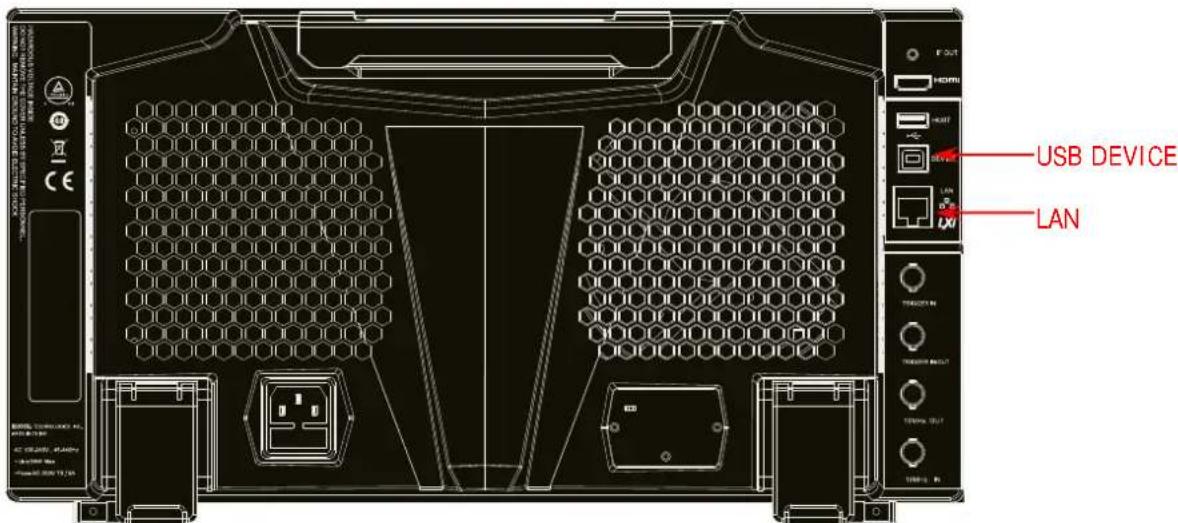
Figure 1-1 RSA5000 Communication Interface
(1) Remote communication via USB: Use the USB cable to connect the USB DEVICE interface on the rear panel of RSA5000 to the USB HOST interface of the PC.
(2) Remote communication via LAN:
- Make sure that your PC has been accessed to the local area network.
- Check whether the local area network where your PC resides supports DHCP or auto IP mode. If not, you need to obtain the available network interface parameters, including the IP address, subnet mask, default gateway, and DNS.
- Connect RSA5000 to the local area network by using a network cable.
- Press System → Interface → LAN to configure the IP address, subnet mask, default gateway, and DNS for the instrument.
3. Check whether the connection is successful.
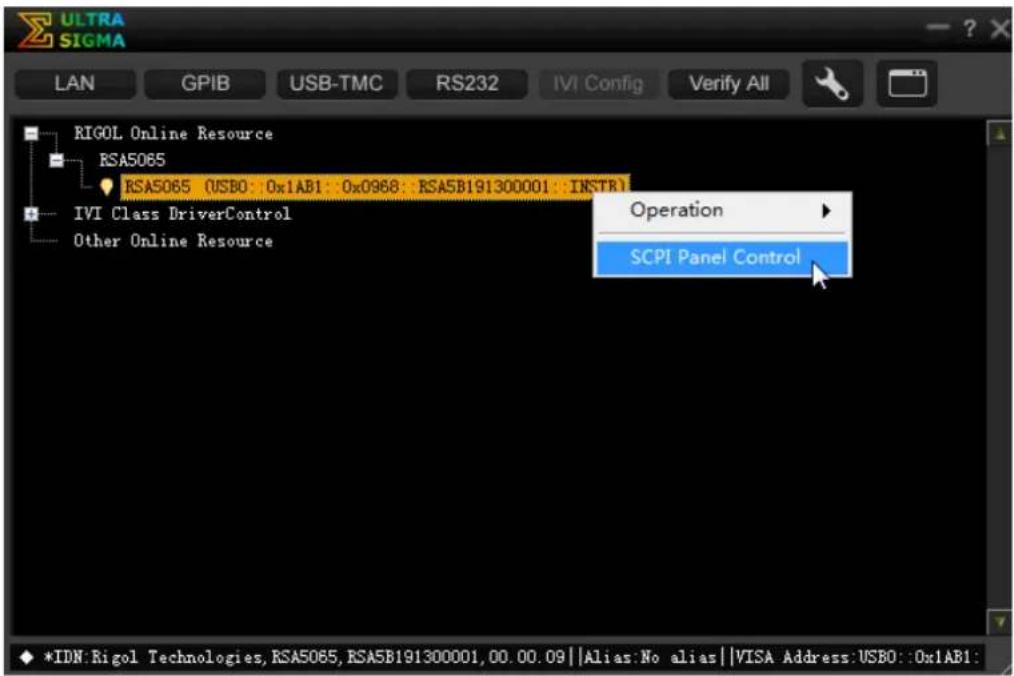
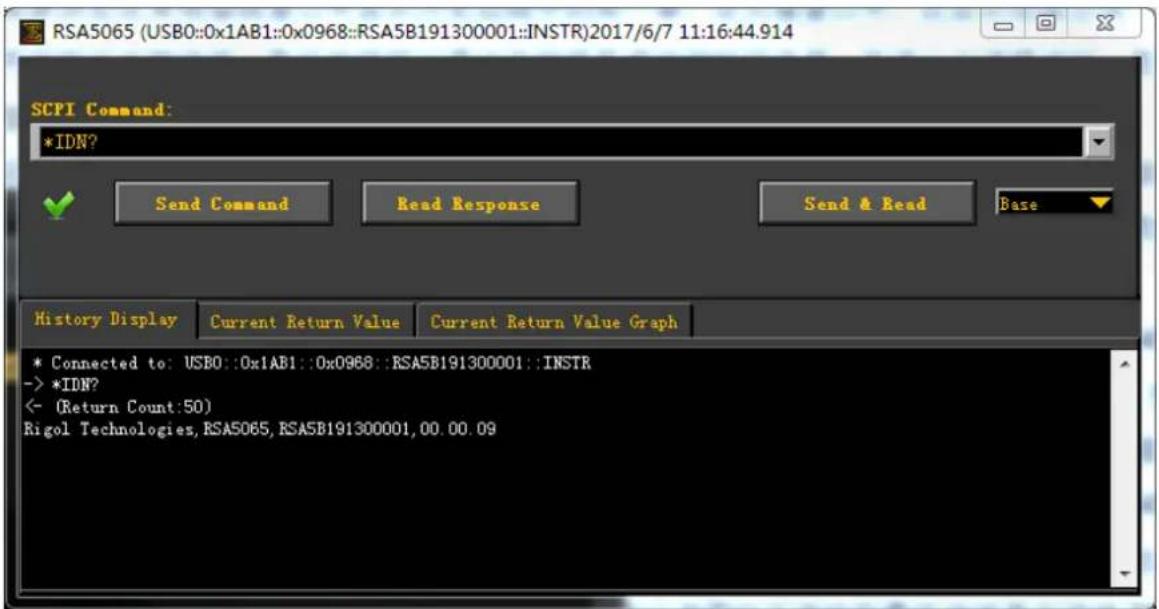
Run Ultra Sigma, and then search for the resources and right-click the resource name. Select "SCPI Panel Control" to open the SCPI command control panel. In the SCPI command control panel, input a correct command. After that, click Send Command first and then click Read Response. Or you can also directly click Send & Read to verify whether the connection works properly. The following figure takes USB interface as an example to illustrate it.
Remote Control Method
1. User-defined programming
You can refer to the SCPI (Standard Commands for Programmable Instruments) commands listed in Chapter 2 in this manual to control RSA5000 by programming in LabVIEW, Visual C++, and other development environments. For details, refer to descriptions in Chapter 4 in this manual.
2. Send SCPI commands via the PC software
You can use the PC software to send commands to control RSA5000 remotely. RIGOL Ultra Sigma is recommended. You can download the software from RIGOL official website (www.rigol.com).
SCPI Command Overview
SCPI (Standard Commands for Programmable Instruments) is a standardized instrument programming language that is built upon the existing standard IEEE 488.1 and IEEE 488.2 and conforms to various standards, such as the floating point operation rule in IEEE 754 standard, ISO 646 7-bit coded character set for information interchange (equivalent to ASCII programming). This chapter introduces the syntax, symbols, parameters, and abbreviation rules of the SCPI commands.
Syntax
The SCPI commands provide a hierarchical tree structure, and consist of multiple subsystems. Each command subsystem consists of one root keyword and one or more sub-keywords. The command line usually starts with ":"; the keywords are separated by ":" and are followed by the parameter settings available; "?" is added at the end of the command line to indicate a query; the commands and parameters are separated by spaces.
For example,
:CALCulate:BANDwidth:NDB
:CALCulate:BANDwidth:NDB?
CALCulate is the root keyword of the command. BANDwidth is the second-level keyword, and NDB is the third-level keyword. The command line starts with ":"", and a colon is also used to separate the multiple-level keywords.
In some commands with multiple parameters, "," is often used to separate these parameters. For example, :SYSTem:DATE
Symbol Description
The following four symbols are not part of the SCPI command, and they are not sent with the commands, but taken as delimiters to better describe the parameters in the command.
1. Braces {}
The parameters enclosed in the braces are optional. You do not have to set it, also you can set for one or more times.
2. Vertical Bar
The vertical bar is used to separate multiple parameters. When using the command, you must select one of the parameters. For example, in the command :CALCulate:MARKer
3. Square Brackets [ ]
The content (command keyword) in the square brackets can be omitted. If a keyword is omitted, it will be set to the default. For example, for the :SENSe:POWer[:RF]:ATTenuation? command, sending any of the four commands below can generate the same effect:
:POWer:ATTenuation?
:POWer:RF:ATTenuation?
:SENSe:POWer:ATTenuation?
:SENSe:POWer:RF:ATTenuation?
4. Angle Brackets < >
The parameter enclosed in the angle brackets must be replaced by an effective value. For example, send the :SENSe:FREQUENCY:CENTer 1000 command in :SENSe:FREQUENCY:CENTer
Parameter Type
The command parameters introduced in this manual include 6 types: Bool, Keyword, Integer, Consecutive Real Number, Discrete, and ASCII String.
1. Bool
The parameter can be set to OFF (0) or ON (1).
2. Keyword
The parameter can be any of the values listed.
3. Integer
Unless otherwise specified, the parameter can be any integer within the effective value range. Note: Do not set the parameter to a decimal, otherwise, errors will occur.
4. Consecutive Real Number
Unless otherwise specified, the parameter could be any value within the effective value range according to the accuracy requirement (by default, there are 9 digits after the decimal point).
5. Discrete
The parameter could only be one of the specified values and these values are discontinuous.
6. ASCII String
The parameter can be the combinations of ASCII characters.
Command Abbreviation
All the commands are case-insensitive. They can all be written in upper case or in lower case. For abbreviations, you only need to input all the upper-case letters in the command. For example, :CALCulate:BANDwidth:NDB? can be abbreviated as :CALC:BAND:NDB? or :calc:band:ndb?
Chapter 2 Command System
This chapter introduces the commands of the RSA5000 series spectrum analyzer.
Contents in this chapter:
◆ :CALCulate Commands
◆ :CALibration Commands
◆ :CONFigure Commands
◆ :COUPIe Commands
◆ :DISPLAY Commands
◆ :FETCH Commands
◆ :FORMAT Commands
IEEE 488.2 Common Commands
◆ : INITiate Commands
◆ :INSTrument Commands
◆ :MMEMory Commands
◆ :OUTPUT Commands
◆ :READ Commands
:SENSe Commands
◆ :SOURCE Commands
◆ :STATus Commands
◆ :SYSTem Commands
◆ :TRACe Commands
◆ :TRIGger Commands
◆ :UNIT Command
Remarks:
- The commands concerning the advanced measurement are only available for the RSA5000 model installed with relevant options. For details, refer to remarks for each command subsystem.
- The commands related to the tracking generator are only available for RSA5065-TG/RSA5032-TG. They are only available for GPSA mode.
- For the command set, unless otherwise specified, the query command returns "N/A" (without quotations in its return format) if no specified option is installed. If the queried function is disabled or improper type match is found, the query command will return "Error" (without quotations in its return format).
- This manual takes RSA5065 as an example to illustrate the range of the parameters in each command.
:CALCulate Commands
Command List:
◆ :CALCulate:BANDwidth|BWIDth:NDB
◆ :CALCulate:BANDwidth|BWIDth:RESult?
◆ :CALCulate:BANDwidth|BWIDth:RLEFt?
◆ :CALCulate:BANDwidth|BWIDth:RRIGht?
◆ :CALCulate:BANDwidth|BWIDth[:STATe]
◆ :CALCulate:LLINe:ALL:DELete
◆ :CALCulate:LLINe:TEST
◆ :CALCulate:LLINe
◆ :CALCulate:LLINe
◆ :CALCulate:LLINe
◆ :CALCulate:LLINe
◆ :CALCulate:LLINe
◆ :CALCulate:LLINe
◆ :CALCulate:LLINe
◆ :CALCulate:LLINe
◆ :CALCulate:LLINe
◆ :CALCulate:LLINe
◆ :CALCulate:LLINe
◆ :CALCulate:LLINe
◆ :CALCulate:MARKer:AOFF
◆ :CALCulate:MARKer:COUPIe[:STATE]
◆ :CALCulate:MARKer:PEAK:EXCursion
◆ :CALCulate:MARKer:PEAK:EXCursion:STATE
CALCulate:MARKer:PEAK:SEARch:MODE
◆ :CALCulate:MARKer:PEAK:SORT
◆ :TRACe:MATH:PEAK:SORT
◆ :CALCulate:MARKer:PEAK:TABLE:READout
◆ :TRACe:MATH:PEAK:THReshold
◆ :CALCulate:MARKer:PEAK:TABLE[:STATE]
◆ :TRACe:MATH:PEAK:TABLe:STATe
◆ :CALCulate:MARKer:PEAK:THReshold
◆ :CALCulate:MARKer:PEAK:THReshold:STATE
◆ :CALCulate:MARKer:TABLE[:STATE]
◆ :CALCulate:MARKer:TRCKing[:STATE]
◆ :CALCulate:MARKer
◆ :CALCulate:MARKer
CALCulate:MARKer
◆ :CALCulate:MARKer
◆ :CALCulate:MARKer
◆ :CALCulate:MARKer
◆ :CALCulate:MARKer
CALCulate:MARKer
◆ :CALCulate:MARKer
◆ :CALCulate:MARKer
◆ :CALCulate:MARKer
◆ :CALCulate:MARKer
◆ :CALCulate:MARKer
◆ :CALCulate:MARKer
◆ :CALCulate:MARKer
◆ :CALCulate:MARKer
◆ :CALCulate:MARKer
◆ :CALCulate:MARKer
◆ :CALCulate:MARKer
◆ :CALCulate:MARKer
◆ :CALCulate:MARKer
◆ :CALCulate:MARKer
◆ :CALCulate:MARKer
◆ :CALCulate:MARKer
◆ :CALCulate:MARKer
◆ :CALCulate:MARKer
◆ :CALCulate:MARKer
◆ :CALCulate:MARKer
◆ :CALCulate:MARKer
◆ :CALCulate:MARKer
◆ :CALCulate:MARKer
◆ :CALCulate:MARKer
◆ :CALCulate:MARKer
◆ :CALCulate:MARKer
◆ :CALCulate:MATH
◆ :CALCulate:NTData[:STATE]
:CALCulate:BANDwidth| BWIDth:NDB
Syntax
:CALCulate:BANDwidth|BWIDth:NDB
Description
Sets the N value in N dB BW measurement. Queries the N value in N dB BW measurement.
Parameter
| Name | Type | Range | Default |
| Consecutive Real Number | -140 dB to -0.01 dB | -3.01 dB |
Remarks
This command is invalid for the PvT measurement mode in RTSA.
Return Format
The query returns the N value in scientific notation.
Example
The following command sets N to -4. :CALCulate:BANDwidth:NDB -4 :CALCulate:BWIDth:NDB -4
The following query returns -4.000000e+00. :CALCulate:BANDwidth:NDB? :CALCulate:BWIDth:NDB?
:CALCulate:BANDwidth| BWIDth:RESult?
Syntax
:CALCulate:BANDwidth|BWIDth:RESult?
Description
Queries the measurement results of the N dB band, and its unit is Hz.
Remarks
This command is invalid for the PvT measurement mode in RTSA.
Return Format
The query returns the bandwidth value in scientific notation (with Hz as the unit). If the two points which are located at both sides of the current marker with N dB fall or rise in its peak amplitude are not found, the query returns -1.000000000e+02.
:CALCulate:BANDwidth| BWIDth:RLEFt?
Syntax
:CALCulate:BANDwidth|BWIDth:RLEFt?
Description
Queries the frequency value of the frequency point that is located at the left side of the current marker with N dB fall or rise in its peak amplitude.
Remarks
This command is invalid for the PvT measurement mode in RTSA.
Return Format
The query returns the frequency value in scientific notation (with Hz as the unit).
If the frequency point that is located at the left side of the current marker with N dB fall or rise in its peak amplitude is not found, the query returns -1.000000000e+02.
:CALCulate:BANDwidth| BWIDth:RRIGht?
Syntax
:CALCulate:BANDwidth|BWIDth:RRIGHT?
Description
Queries the frequency value of the frequency point that is located at the right side of the current marker with N dB fall or rise in its peak amplitude.
Remarks
This command is invalid for the PvT measurement mode in RTSA.
Return Format
The query returns the frequency value in scientific notation (with Hz as the unit).
If the frequency point that is located at the right side of the current marker with N dB fall or rise in its peak amplitude is not found, the query returns -1.000000000e+02.
:CALCulate:BANDwidth| BWIDth [:STATe]
Syntax
:CALCulate:BANDwidth|BWIDth[:STATE] OFF|ON|0|1
:CALCulate:BANDwidth|BWIDth[:STATE]?
Description
Enables or disables the N dB bandwidth measurement function.
Queries the status of the N dB bandwidth measurement function.
Parameter
| Name | Type | Range | Default |
| — | Bool | OFF|ON|0|1 | OFF|0 |
Remarks
This command is invalid for the PvT measurement mode in RTSA.
Return Format
The query returns 0 or 1.
Example
The following command enables the N dB BW measurement function. :CALCulate:BANDwidth:STATE ON or :CALCulate:BANDwidth:STATE 1 :CALCulate:BWIDth:STATE ON or :CALCulate:BWIDth:STATE 1
The following query returns 1. :CALCulate:BANDwidth:STATe? :CALCulate:BWIDth:STATe?
:CALCulate:LLI Ne:ALL:DELe te
Syntax
:CALCulate:LLINe:ALL:DELete
Description
Deletes all the limit line data.
:CALCulate:LLI Ne:TEST
Syntax
:CALCulate:LLINe:TEST OFF|ON|0|1 :CALCulate:LLINe:TEST?
Description
Enables or disables the limit line test function. Queries the status of the limit line test function.
Parameter
| Name | Type | Range | Default |
| — | Bool | OFF|ON|0|1 | ON|1 |
Return Format
The query returns 0 or 1.
Example
The following command disables the limit line test function. :CALCulate:LLINe:TEST OFF or :CALCulate:LLINe:TEST 0
The following query returns 0. :CALCulate:LLINe:TEST?
:CALCulate:LLINe:AMPLitude:CMODE:RELative
Syntax
:CALCulate:LLINe
:CALCulate:LLINe
Description
Enables or disables the coupling functions between the selected limit line data points and the reference level.
Queries the status of the coupling functions between the selected limit line data points and the reference level.
Parameter
| Name | Type | Range | Default |
| Discrete | 1|2|3|4|5|6 | —— | |
| —— | Bool | OFF|ON|0|1 | OFF|0 |
Remarks
OFF|0: disables the coupling function. That is, "Fixed" is selected under Y to Ref, and the amplitude of the current limit line editing point is not affected by the reference level.
ON|1: enables the coupling function. That is, "Relative" is selected under Y to Ref, and the amplitude of the current limit line editing point is the difference between the current point with the current reference level. At this time, if the reference level changes, the position of the current editing point will move up and down with it.
Return Format
The query returns 0 or 1.
Example
The following command disables the coupling functions between the selected limit line data points and the reference level.
:CALCulate:LLINe2:AMPLitude:CMODe:RELative OFF or :CALCulate:LLINe2:AMPLitude:CMODe:RELative 0
The following query returns 0.
:CALCulate:LLINe2:AMPLitude:CMODe:RELative?
:CALCulate:LLI Ne:BUI Ld
Syntax
:CALCulate:LLINe
Description
Builds the limit line from the selected trace.
Parameter
| Name | Type | Range | Default |
| Discrete | 1|2|3|4|5|6 | — | |
| — | Keyword | TRACE1|TRACE2|TRACE3|TRACE4|TRACE5|TRACE6 | — |
Example
The following command builds Limit Line 2 from Trace2.
:CALCulate:LLINe2:BUILD TRACE2
:CALCulate:LLINe:COPY
Syntax
:CALCulate:LLINe
Description
Copies the selected limit line to the current limit line.
Parameter
| Name | Type | Range | Default |
| Discrete | 1|2|3|4|5|6 | —— | |
| —— | Keyword | LLINE1|LLINE2|LLINE3|LLINE4|LLINE5|LLINE6 | —— |
Remarks
If the limit line to be copied that you select is the same as the current limit line, no operation should be performed.
Example
The following command copies Limit Line 1 to Limit Line 2.
:CALCulate:LLINe2:COPY LLINE1
:CALCulate:LLINe:DATA
Syntax
:CALCulate:LLINe
:CALCulate:LLINe
Description
Edits one limit line, and marks it with n.
Queries the limit line data that you are editing currently.
Parameter
| Name | Type | Range | Default |
| Discrete | 1|2|3|4|5|6 | 1 | |
| Consecutive Real Number | 0 Hz to 6.5 GHz (X-axis indicates frequency)0 μs to 6.5 ks (X-axis indicates time) | — | |
| Consecutive Real Number | -1,000 dBm to 1,000 dBm | — | |
| Discrete | 0|1 | 0 |
Remarks
Return Format
Queries the returned limit line data that you are editing currently.
Example
The following command edits a limit line that contains three points, and marks it Limit Line 2.
:CALCulate:LLINe2:DATA 50,100,0,100,150,1,200,200,1
The following query returns 50,100,0,100,150,1,200,200,1.
:CALCulate:LLINe2:DATA?
:CALCulate:LLINe:DELe te
Syntax
:CALCulate:LLINe
Description
Deletes the selected limit line.
Parameter
| Name | Type | Range | Default |
| Discrete | 1|2|3|4|5|6 | — |
Example
The following command deletes Limit Line 2.
:CALCulate:LLINe2:DELe te
:CALCulate:LLINe:DI SPlay
Syntax
:CALCulate:LLINe
:CALCulate:LLINe
Description
Turns on or off the selected limit line.
Queries the status of the selected limit line.
Parameter
| Name | Type | Range | Default |
| Discrete | 1|2|3|4|5|6 | 1 | |
| —— | Bool | OFF|ON|0|1 | OFF|0 |
Return Format
The query returns 0 or 1.
Example
The following command turns on Limit Line 2.
:CALCulate:LLINe2:DISPLAY ON or :CALCulate:LLINe2:DISPLAY 1
The following query returns 1.
:CALCulate:LLINe2:DISPLAY?
:CALCulate:LLI Ne:FAI L?
Syntax
:CALCulate:LLINe
Description
Queries the measurement results of the selected limit line and its associated trace.
Parameter
| Name | Type | Range | Default |
| Discrete | 1|2|3|4|5|6 | — |
Remarks
If you enable the test for the displayed trace and its corresponding limit line, and each displayed trace has its corresponding limit line enabled, then you can run the command to query whether the trace test passes.
Return Format
The query returns 0 (pass) or 1 (fail).
:CALCulate:LLINe:FREQUENCY:CMODE:RELative
Syntax
:CALCulate:LLINe
:CALCulate:LLINe
Description
Enables or disables the coupling functions between the selected limit line data points and the center frequency.
Queries the status of the coupling functions between the selected limit line data points and the center frequency.
Parameter
| Name | Type | Range | Default |
| Discrete | 1|2|3|4|5|6 | — | |
| — | Bool | OFF|ON|0|1 | OFF|0 |
Remarks
OFF|0: disables the coupling function. That is, "Fixed" is selected under X to CF, and the frequency of the current limit line editing point is not affected by the center frequency.
ON|1: enables the coupling function. That is, "Relative" is selected under X to CF, and the amplitude of the current limit line editing point is the difference between the current point with the current center frequency. At this time, if the center frequency changes, the position of the current editing point will move left and right with it.
Return Format
The query returns 0 or 1.
Example
The following command disables the coupling functions between data points of Limit Line 2 and the center frequency.
:CALCulate:LLINe2:FREQuency:CMODE:RELative OFF or :CALCulate:LLINe2:FREQuency:CMODE:RELative 0
The following query returns 0.
:CALCulate:LLINe2:FREQuency:CMODe:RELative?
:CALCulate:LLINe:MARGIN
Syntax
:CALCulate:LLINe
:CALCulate:LLINe
Description
Sets the margin for the selected limit line.
Queries the margin for the selected limit line.
Parameter
| Name | Type | Range | Default |
| Discrete | 1|2|3|4|5|6 | — | |
| Consecutive Real Number | -40 dB to 0 dB | 0 dB |
Return Format
The query returns the margin for the limit line in scientific notation.
Example
The following command sets the margin for Limit Line 2 to 1 dB.
:CALCulate:LLINe2:MARGIN 1 dB
The following query returns 1.000000e+00.
:CALCulate:LLINe2:MARGIN?
:CALCulate:LLINe:MARGin:STATe
Syntax
:CALCulate:LLINe
:CALCulate:LLINe
Description
Enables or disables the margin for the selected limit line.
Queries the status of the margin for the selected limit line.
Parameter
| Name | Type | Range | Default |
| Discrete | 1|2|3|4|5|6 | — | |
| — | Bool | OFF|ON|0|1 | OFF|0 |
Return Format
The query returns 0 or 1.
Example
The following command turns on the margin for Limit Line 2.
:CALCulate:LLINe2:MARGIN:STATE ON or :CALCulate:LLINe2:MARGIN:STATE 1
The following query returns 1.
:CALCulate:LLINe2:MARGIN:STATe?
:CALCulate:LLINe:TRACe
Syntax
:CALCulate:LLINe
:CALCulate:LLINe
Description
Sets the trace to be tested against the current limit line.
Queries the trace to be tested against the current limit line.
Parameter
| Name | Type | Range | Default |
| Discrete | 1|2|3|4|5|6 | — | |
| — | Discrete | 1|2|3|4|5|6 | Refer to "Remarks" |
Remarks
Limit Line 1 and 2: The default is Trace 1.
Limit Line 3 and 4: The default is Trace 2.
Limit Line 5 and 6: The default is Trace 3.
Return Format
The query returns 1, 2, 3, 4, 5, or 6.
Example
The following command sets that Trace 2 is tested against Limit Line 3.
:CALCulate:LLINe3:TRACe 2
The following query returns 2.
:CALCulate:LLINe3:TRACe?
:CALCulate:LLINe:TYPE
Syntax
:CALCulate:LLINe
:CALCulate:LLINe
Description
Sets the type of the specified limit line.
Queries the type of the specified limit line.
Parameter
| Name | Type | Range | Default |
| Discrete | 1|2|3|4|5|6 | — | |
| — | Keyword | UPPer|LOWer | Refer to "Remarks" |
Remarks
Limit Line 1, Limit Line 3, and Limit Line 5 belong to the upper type; Limit Line 2, Limit Line 4, and Limit Line 6 belong to the lower type.
Return Format
The query returns UPP or LOW.
Example
The following command sets Limit Line 2 to the upper type.
:CALCulate:LLINe2:TYPE UPPer
The following query returns UPP.
:CALCulate:LLINe2:TYPE?
:CALCulate:MARKer:AOFF
Syntax
:CALCulate:MARKer:AOFF
Description
Turns off all the enabled markers.
:CALCulate:MARKer:COUPLE[:STATE]
Syntax
:CALCulate:MARKer:COUPLE[:STATE] OFF|ON|0|1
:CALCulate:MARKer:COUPLE[:STATE]?
Description
Enables or disables the couple marker function.
Queries the state of the couple marker function.
Parameter
| Name | Type | Range | Default |
| —— | Bool | OFF|ON|0|1 | OFF|0 |
Remarks
When you enable the couple marker function, moving any marker will make other markers (that are not fixed or off) move along with it.
Return Format
The query returns 0 or 1.
Example
The following command disables the couple marker function.
:CALCulate:MARKer:COUPLE:STATE OFF or :CALCulate:MARKer:COUPLE:STATE 0
The following query returns 0.
:CALCulate:MARKer:COUPLE:STATE?
:CALCulate:MARKer:PEAK:EXCursion
Syntax
:CALCulate:MARKer:PEAK:EXCursion
Description
Sets the amplitude of the peak. Its unit is dB. Queries the peak amplitude.
Parameter
| Name | Type | Range | Default |
| Consecutive Real Number | 0 dB to 100 dB | 6 dB |
Return Format
The query returns the peak amplitude in scientific notation.
Example
The following command sets the peak amplitude to 12 dB. :CALCulate:MARKer:PEAK:EXCursion 12
The following query returns 1.200000e+01. :CALCulate:MARKer:PEAK:EXCursion?
:CALCulate:MARKer:PEAK:EXCursion:STATE
Syntax
:CALCulate:MARKer:PEAK:EXCursion:STATE OFF|ON|0|1 :CALCulate:MARKer:PEAK:EXCursion:STATE?
Description
Enables or disables the excursion state function. Queries the status of the peak amplitude function.
Parameter
| Name | Type | Range | Default |
| — | Bool | OFF|ON|0|1 | ON|1 |
Return Format
The query returns 0 or 1.
Example
The following command enables the peak amplitude function. :CALCulate:MARKer:PEAK:EXCursion:STATE ON or :CALCulate:MARKer:PEAK:EXCursion:STATE 1
The following query returns 1. :CALCulate:MARKer:PEAK:EXCursion:STATE?
:CALCulate:MARKer:PEAK:SEARch:MODE
Syntax
:CALCulate:MARKer:PEAK:SEARch:MODE PARameter|MAXimum
:CALCulate:MARKer:PEAK:SEARch:MODE?
Description
Sets the peak search mode.
Queries the peak search mode.
Parameter
| Name | Type | Range | Default |
| —— | Keyword | PARameter|MAXimum | MAXimum |
Remarks
- PARameter: indicates parameter. If "parameter" is selected under search mode, the system will search for the peak of the specified parameter on the trace.
● MAXimum: indicates maximum. If "maximum" is selected under search mode, the system will search for the maximum value on the trace.
The command is only valid for the peak search executed by sending
the :CALCulate:MARKer
Next Peak, Next Peak Right, Next Peak Left, and Minimum Peak are all searched based on "parameter".
Return Format
The query returns PAR or MAX.
Example
The following command sets the peak search mode to "parameter".
:CALCulate:MARKer:PEAK:SEARch:MODE PARameter
The following query returns PAR.
:CALCulate:MARKer:PEAK:SEARch:MODE?
:CALCulate:MARKer:PEAK:SORT
:TRACe:MATH:PEAK:SORT
Syntax
:CALCulate:MARKer:PEAK:SORT FREQUENCY|AMPLitude
:CALCulate:MARKer:PEAK:SORT?
:TRACe:MATH:PEAK:SORT FREQUENCY| AMPLitude
:TRACe:MATH:PEAK:SORT?
Description
Sets the sorting order of the data displayed in the peak table.
Queries the sorting order of the data displayed in the peak table.
Parameter
| Name | Type | Range | Default |
| —— | Keyword | FREQuency|AMPLitude | AMPLitude |
Remarks
FREQUENCY: lists the peaks in order of ascending frequency.
AMPLitude: lists the peaks in order of descending amplitude.
Return Format
The query returns FREQ or AMPL.
Example
The following command sets the data in the peak table to be sorted in descending amplitude.
:CALCulate:MARKer:PEAK:SORT AMPLitude
:TRACe:MATH:PEAK:SORT AMPLitude
The following query returns AMPL.
:CALCulate:MARKer:PEAK:SORT?
:TRACe:MATH:PEAK:SORT?
:CALCulate:MARKer:PEAK:TABLE:READout
:TRACe:MATH:PEAK:THReshold
Syntax
:CALCulate:MARKer:PEAK:TABLE:READout ALL|GTDLine|LTDLine
:CALCulate:MARKer:PEAK:TABLE:READout?
:TRACe:MATH:PEAK:THReshold NORMAL|DLMore|DLLess
:TRACe:MATH:PEAK:THReshold?
Description
Sets the peak criteria that the displayed peak must meet.
Queries the peak criteria that the displayed peak must meet.
Parameter
| Name | Type | Range | Default |
| —— Keyword | ALL| GTDLine| LTDLineNORMal| DLMore| DLLess | ALL | |
Remarks
ALL|NORMal: lists all the peaks defined by the peak criteria, and displays data based on the current sorting order in the peak table.
GTDLine|DLMore: lists the peaks that are greater than the defined display line and that meet the peak criteria.
LTDLine|DLLess: lists the peaks that are smaller than the defined display line and that meet the peak criteria.
Return Format
The query returns ALL (NORM), GTDL (DLM), or LTDL (DLL).
Example
The following command lists all the peaks that are greater than the defined display line and that meet the peak criteria.
:CALCulate:MARKer:PEAK:TABLE:READout GTDLine
:TRACe:MATH:PEAK:THReshold DLMore
The following query returns GTDL.
:CALCulate:MARKer:PEAK:TABLE:READout?
The following query returns DLM.
:TRACe:MATH:PEAK:THReshold?
:CALCulate:MARKer:PEAK:TABLE[:STATE]
:TRACe:MATH:PEAK:TABLE:STATE
Syntax
:CALCulate:MARKer:PEAK:TABLE[:STATE] OFF|ON|0|1
:CALCulate:MARKer:PEAK:TABLE[:STATE]?
:TRACe:MATH:PEAK:TABLE:STATE OFF|ON|0|1
:TRACe:MATH:PEAK:TABLE:STATE?
Description
Enables or disables the peak table.
Queries the status of the peak table.
Parameter
| Name | Type | Range | Default |
| — | Bool | OFF|ON|0|1 | OFF|0 |
Return Format
The query returns 0 or 1.
Example
The following command enables the peak table.
:CALCulate:MARKer:PEAK:TABLE:STATE ON or :CALCulate:MARKer:PEAK:TABLE:STATE 1
:TRACe:MATH:PEAK:TABLE:STATE ON or :TRACe:MATH:PEAK:TABLE:STATE 1
The following query returns 1.
:CALCulate:MARKer:PEAK:TABLE:STATe?
:TRACe:MATH:PEAK:TABLE:STATe?
:CALCulate:MARKer:PEAK:THReshold
Syntax
:CALCulate:MARKer:PEAK:THReshold
:CALCulate:MARKer:PEAK:THReshold?
Description
Sets the peak threshold, and its default unit is dBm.
Queries the peak threshold.
Parameter
| Name | Type | Range | Default |
| Consecutive Real Number | -200 dBm to 0 dBm | -90 dBm |
Return Format
The query returns the peak threshold in scientific notation.
Example
The following command sets the peak threshold to -100 dB.
:CALCulate:MARKer:PEAK:THReshold -100
The following query returns -1.000000e+02.
:CALCulate:MARKer:PEAK:THReshold?
:CALCulate:MARKer:PEAK:THReshold:STATE
Syntax
:CALCulate:MARKer:PEAK:THReshold:STATE OFF|ON|0|1
:CALCulate:MARKer:PEAK:THReshold:STATe?
Description
Enables or disables the peak threshold function.
Queries the status of the peak threshold function.
Parameter
| Name | Type | Range | Default |
| — | Bool | OFF|ON|0|1 | ON|1 |
Return Format
The query returns 0 or 1.
Example
The following command enables the peak threshold function.
:CALCulate:MARKer:PEAK:THReshold:STATE ON or :CALCulate:MARKer:PEAK:THReshold:STATE 1
The following query returns 1.
:CALCulate:MARKer:PEAK:THReshold:STATE?
:CALCulate:MARKer:TABLE[:STATE]
Syntax
:CALCulate:MARKer:TABLE[:STATE] OFF|ON|0|1
:CALCulate:MARKer:TABLE[:STATE]?
Description
Enables or disables the marker table.
Queries the status of the marker table.
Parameter
| Name | Type | Range | Default |
| — | Bool | OFF|ON|0|1 | OFF|0 |
Return Format
The query returns 0 or 1.
Example
The following command disables the marker table.
:CALCulate:MARKer:TABLE:STATE OFF or :CALCulate:MARKer:TABLE:STATE 0
The following query returns 0.
:CALCulate:MARKer:TABLE:STATE?
:CALCulate:MARKer:TRCKing[:STATE]
Syntax
:CALCulate:MARKer:TRCKing[:STATE] OFF|ON|0|1
:CALCulate:MARKer:TRCKing[:STATe]?
Description
Enables or disables the signal track.
Queries the status of the signal track.
Parameter
| Name | Type | Range | Default |
| — | Bool | OFF|ON|0|1 | OFF|0 |
Remarks
When the signal track is enabled, the instrument will execute a peak search after each sweep, and set the frequency value at the current peak to the center frequency to keep the signal always displayed at the center of the screen.
This command is only available for GPSA mode.
Return Format
The query returns 0 or 1.
Example
The following command enables the signal track.
:CALCulate:MARKer:TRCKing:STATE ON or :CALCulate:MARKer:TRCKing:STATE 1
The following query returns 1.
:CALCulate:MARKer:TRCKing:STATe?
:CALCulate:MARKer:CPSearch[:STATE]
Syntax
:CALCulate:MARKer
:CALCulate:MARKer
Description
Enables or disables continuous peak search function, and marks the peak value with n. Queries the status of continuous peak search function.
Parameter
| Name | Type | Range | Default |
| Discrete | 1|2|3|4|5|6|7|8 | — | |
| — | Bool | OFF|ON|0|1 | OFF|0 |
Return Format
The query returns 0 or 1.
Example
The following command performs the continuous peak search function, and marks with Marker 1. :CALCulate:MARKer1:CPSeatch:STATE ON or :CALCulate:MARKer1:CPSeatch:STATE 1
The following query returns 1. :CALCulate:MARKer1:CPSeatch:STATE?
:CALCulate:MARKer:FCOunt:GATetime
Syntax
:CALCulate:MARKer
Description
Sets the gate time for Marker n. The unit is s. Queries the gate time for Marker n.
Parameter
| Name | Type | Range | Default |
| Discrete | 1|2|3|4|5|6|7|8 | — | |
| Consecutive Real Number | 1 μs to 500 ms | 100 ms |
Remarks
This command is only available for GPSA mode.
Return Format
The query returns the gate time for Marker n in scientific notation.
Example
The following command sets the gate time for Marker 2 to 10 ms. :CALCulate:MARKer2:FCOunt:GATetime 0.01
The following query returns 1.000000e-02. :CALCulate:MARKer2:FCOunt:GATetime?
:CALCulate:MARKer:FCOunt:GATetime:AUTO
Syntax
:CALCulate:MARKer
:CALCulate:MARKer
Description
Turns on or off the auto gate time for Marker n.
Queries the status of the auto gate time for Marker n.
Parameter
| Name | Type | Range | Default |
| Discrete | 1|2|3|4|5|6|7|8 | —— | |
| —— | Bool | OFF|ON|0|1 | OFF|0 |
Remarks
This command is only available for GPSA mode.
Return Format
The query returns 1 or 0.
Example
The following command enables the auto gate time for Marker n.
:CALCulate:MARKer2:FCOunt:GATetime:AUTO ON or :CALCulate:MARKer2:FCOunt:GATetime:AUTO 1
The following query returns 1.
:CALCulate:MARKer2:FCOunt:GATetime:AUTO?
:CALCulate:MARKer:FCOunt[:STATe]
Syntax
:CALCulate:MARKer
:CALCulate:MARKer
Description
Enables or disables the frequency counter function of the specified marker.
Queries the status of the frequency counter function of the specified marker.
Parameter
| Name | Type | Range | Default |
| Discrete | 1|2|3|4|5|6|7|8 | — | |
| — | Bool | OFF|ON|0|1 | OFF|0 |
Remarks
This command is only available for GPSA mode.
Return Format
The query returns 0 or 1.
Example
The following command enables the frequency counter function of Marker 2.
:CALCulate:MARKer2:FCOunt:STATE ON or :CALCulate:MARKer2:FCOunt:STATE 1
The following query returns 1.
:CALCulate:MARKer2:FCOunt:STATe?
:CALCulate:MARKer:FCOunt:X?
Syntax
:CALCulate:MARKer
Description
Queries the readout of the frequency counter of the specified marker.
Parameter
| Name | Type | Range | Default |
| Discrete | 1|2|3|4|5|6|7|8 | — |
Remarks
This command is only available for GPSA mode.
Return Format
The query returns the readout in integer. Its unit is Hz. When the frequency counter function is disabled, the command returns NAN.
:CALCulate:MARKer:FUNCTION
Syntax
:CALCulate:MARKer
Description
Selects the special measurement type for the specified marker. Queries the special measurement type of the specified marker.
Parameter
| Name | Type | Range | Default |
| Discrete | 1|2|3|4|5|6|7|8 | — | |
| —— | Keyword | NOISE|BPOWer|BDENsity|OFF | OFF |
Remarks
NOISE: indicates the noise measurement. BPOWer: indicates the bandwidth power. BDENsity: indicates the bandwidth density OFF: turns off all the measurements.
Return Format
The query returns NOIS, BPOW, BDEN, or OFF.
Example
The following command sets the measurement type of Marker 1 to noise measurement. :CALCulate:MARKer1:FUNCTION NOISE
The following query returns NOIS. :CALCulate:MARKer1:FUNCTION?
:CALCulate:MARKer:FUNCTION:BAND:LEFT
Syntax
:CALCulate:MARKer
:CALCulate:MARKer
Description
Sets the left edge frequency or time of the signal involved in the calculation for the band function. Queries the left edge frequency or time of the signal involved in the calculation for the band function.
Parameter
| Name | Type | Range | Default |
| Discrete | 1|2|3|4|5|6|7|8 | -- | |
| Consecutive Real Number | 0 to band right | center frequency-bandwidth/2 capture time/2-bandwidth/2 (PvT) sweep time/2-bandwidth/2 (zero span) |
Remarks
This command is only valid when the corresponding bandwidth function is enabled.
This command is used to set the left edge time when the zero span is enabled in GPSA mode or when in the PvT view in RTSA mode.
Return Format
The query returns the left edge frequency or time of the signal in scientific notation.
Example
The following command sets the left edge frequency of the signal involved in the calculation for the Marker 1 band function to 2 MHz.
:CALCulate:MARKer1:FUNCTION:BAND:LEFT 2000000
The following query returns 2.000000000e+06.
:CALCulate:MARKer1:FUNCTION:BAND:LEFT?
:CALCulate:MARKer:FUNCTION:BAND:RIGHT
Syntax
:CALCulate:MARKer
:CALCulate:MARKer
Description
Sets the right edge frequency or time of the signal involved in the calculation for the band function. Queries the right edge frequency or time of the signal involved in the calculation for the band function.
Parameter
| Name | Type | Range | Default |
| Discrete | 1|2|3|4|5|6|7|8 | -- | |
| Consecutive Real Number | band left to +∞ | center frequency+ bandwidth/2 capture time/2+ bandwidth/2 (PvT) sweep time/2+ bandwidth/2 (zero span) |
Remarks
This command is only valid when the corresponding bandwidth function is enabled.
This command is used to set the right edge time when the zero span is enabled in GPSA mode or when in the PvT view in RTSA mode.
Return Format
The query returns the right edge frequency or time of the signal in scientific notation.
Example
The following command sets the right edge frequency of the signal involved in the calculation for the Marker 1 band function to 4 GHz.
:CALCulate:MARKer1:FUNCTION:BAND:RIGHT 4000000000
The following query returns 4.000000000e+09.
:CALCulate:MARKer1:FUNCTION:BAND:RIGHT?
:CALCulate:MARKer:FUNCTION:BAND:SPAN
Syntax
:CALCulate:MARKer
:CALCulate:MARKer
Description
Sets the bandwidth or the time span of the signal involved in the calculation for the band function.
Queries the bandwidth or the time span of the signal involved in the calculation for the band function.
Parameter
| Name | Type | Range | Default |
| Discrete | 1|2|3|4|5|6|7|8 | -- | |
| Consecutive Real Number | 0 to +∞ | span/2capture time/20 (PvT)sweep time/20 (zero span) |
Remarks
This command is only valid when the corresponding bandwidth function is enabled.
This command is used to set the signal time when the zero span is enabled in GPSA mode or when in the PvT view in RTSA mode.
Return Format
The query returns the bandwidth of the signal involved in the calculation for the band function in scientific notation.
Example
The following command sets the bandwidth of the signal involved in the calculation for the Marker 1 band function to 500 MHz.
:CALCulate:MARKer1:FUNCTION:BAND:SPAN 500000000
The following query returns 5.000000000e+08.
:CALCulate:MARKer1:FUNCTION:BAND:SPAN?
:CALCulate:MARKer:FUNCTION:BAND:SPAN:AUTO
Syntax
:CALCulate:MARKer
:CALCulate:MARKer
Description
Enables or disables the band span auto function.
Queries the status of band span auto function.
Parameter
| Name | Type | Range | Default |
| Discrete | 1|2|3|4|5|6|7|8 | -- | |
| -- | Bool | OFF|ON|0|1 | ON|1 |
Remarks
This command is only valid when the corresponding bandwidth function is enabled.
Return Format
The query returns 1 or 0.
Example
The following command enables the band span auto function of Marker 1.
:CALCulate:MARKer1:FUNCTION:BAND:SPAN:AUTO ON
or :CALCulate:MARKer1:FUNCTION:BAND:SPAN:AUTO 1
The following query returns 1.
:CALCulate:MARKer1:FUNCTION:BAND:SPAN:AUTO?
:CALCulate:MARKer:LI Nes[:STATE]
Syntax
:CALCulate:MARKer
:CALCulate:MARKer
Description
Enables or disables the marker line of the specified marker. Queries the status for the marker line of the specified marker.
Parameter
| Name | Type | Range | Default |
| Discrete | 1|2|3|4|5|6|7|8 | — | |
| — | Bool | OFF|ON|0|1 | OFF |
Remarks
If the marker is not visible in the selected area, enable the marker line function to extend the marker line to the display area for better observation.
The PvT only supports setting the marker on Trace 1.
Return Format
The query returns 0 or 1.
Example
The following command enables the marker line of Marker 1.
:CALCulate:MARKer1:LINes:STATE ON or :CALCulate:MARKer1:LINes:STATE 1
The following query returns 1.
:CALCulate:MARKer1:LINes:STATe?
:CALCulate:MARKer:MAXimum:LEFT
Syntax
:CALCulate:MARKer
Description
Searches for and marks the nearest peak which is located at the left side of the current peak and meets the peak search condition.
Parameter
| Name | Type | Range | Default |
| Discrete | 1|2|3|4|5|6|7|8 | —— |
Remarks
When no peak is found, a prompt message "No peak found" is displayed on the screen.
Example
The following command performs one left peak search, and marks with Marker 2.
:CALCulate:MARKer2:MAXimum:LEFT
:CALCulate:MARKer:MAXimum[:MAX]
Syntax
:CALCulate:MARKer
Description
Performs one peak search based on the search mode set by the :CALCulate:MARKer:PEAK:SEARch:MODE command and marks it with the specified marker.
Parameter
| Name | Type | Range | Default |
| Discrete | 1|2|3|4|5|6|7|8 | — |
Remarks
When no peak is found, a prompt message "No peak found" is displayed on the screen.
Example
The following command performs one peak search, and marks with Marker 2.
:CALCulate:MARKer2:MAXimum:MAX
:CALCulate:MARKer:MAXimum:NEXT
Syntax
:CALCulate:MARKer
Description
Searches for and marks the peak whose amplitude on the trace is next to that of the current peak and which meets the peak search condition.
Parameter
| Name | Type | Range | Default |
| Discrete | 1|2|3|4|5|6|7|8 | —— |
Remarks
When no peak is found, a prompt message "No peak found" is displayed on the screen.
Example
The following command performs one next peak search, and marks with Marker 2. :CALCulate:MARKer2:MAXimum:NEXT
:CALCulate:MARKer:MAXimum:RIGHT
Syntax
:CALCulate:MARKer
Description
Searches for and marks the nearest peak which is located at the right side of the current peak and meets the peak search condition.
Parameter
| Name | Type | Range | Default |
| Discrete | 1|2|3|4|5|6|7|8 | — |
Remarks
When no peak is found, a prompt message "No peak found" is displayed on the screen.
Example
The following command performs one right peak search, and marks with Marker 2. :CALCulate:MARKer2:MAXimum:RIGHT
:CALCulate:MARKer:MI Nimum
Syntax
:CALCulate:MARKer
Description
Searches for and marks the peak with the minimum amplitude on the trace.
Parameter
| Name | Type | Range | Default |
| Discrete | 1|2|3|4|5|6|7|8 | —— |
Remarks
When no peak is found, a prompt message "No peak found" is displayed on the screen.
Example
The following command performs one minimum search, and marks it with Marker 2.
:CALCulate:MARKer2:MINimum
:CALCulate:MARKer:MODE
Syntax
:CALCulate:MARKer
:CALCulate:MARKer
Description
Sets the type of the specified marker.
Queries the type of the specified marker.
Parameter
| Name | Type | Range | Default |
| Discrete | 1|2|3|4|5|6|7|8 | — | |
| — | Keyword | POSITION|DELTa|FIXed|OFF | OFF |
Remarks
POSITION: indicates the normal marker.
DELTa: indicates difference between two data points.
FIXed: indicates that the marker is fixed.
OFF: turns off the selected marker.
The PvT only supports setting the marker on Trace 1.
Return Format
The query returns POS, DELT, FIX, or OFF.
Example
The following command sets the type of Marker 1 to Position.
:CALCulate:MARKer1:MODE POSITION
The following query returns POS.
:CALCulate:MARKer1:MODE?
:CALCulate:MARKer:PTPeak
Syntax
:CALCulate:MARKer
Description
Performs the peak-peak search and marks it with a specified marker.
Parameter
| Name | Type | Range | Default |
| Discrete | 1|2|3|4|5|6|7|8 | — |
Remarks
After the command is executed, the marker mode of the specified marker selects "Delta" automatically. The peak search results will be marked by the reference marker (by default, the next marker), and the minimum search will be marked by the Delta marker.
Example
The following command performs the peak-peak search, and marks the peak-peak position with the reference marker (Marker 2) and the Delta marker (Marker 1), respectively.
:CALCulate:MARKer1:PTPeak
:CALCulate:MARKer:REFERENCE
Syntax
:CALCulate:MARKer
:CALCulate:MARKer
Description
Sets the reference marker for the specified marker.
Queries the reference marker for the specified marker.
Parameter
| Name | Type | Range | Default |
| Discrete | 1|2|3|4|5|6|7|8 | — | |
| Integer 1 to 8 | By default, the marker following the specified marker is considered to be the reference marker. |
Remarks
Each marker can have another marker to be its reference marker.
It the current marker is a Delta marker, the measurement result of the marker will be determined by the reference marker.
Any marker cannot have itself to be the reference marker.
The PvT only supports setting the marker on Trace 1.
Example
The following command sets the reference marker for Marker 1 to 2.
:CALCulate:MARKer1:REFERENCE 2
The following query returns 2.
:CALCulate:MARKer1:REFERENCE?
:CALCulate:MARKer[:SET]:CENTer
Syntax
:CALCulate:MARKer
Description
Sets the frequency of the specified marker to the center frequency of the analyzer.
Parameter
| Name | Type | Range | Default |
| Discrete | 1|2|3|4|5|6|7|8 | —— |
Remarks
If the marker mode of the specified marker is Position or Fixed, the center frequency will be set to the frequency of the marker.
If the specified marker mode is Delta, the center frequency will be set to the frequency of the Delta marker. This function is invalid in zero span.
This command is invalid for the PvT measurement mode in RTSA.
Example
The following command sets the frequency at Marker 1 (Position) to the center frequency. :CALCulate:MARKer1:SET:CENTer
:CALCulate:MARKer[:SET]:DELTa:CENTer
Syntax
:CALCulate:MARKer
Description
Sets the frequency difference of the specified Delta marker to the center frequency of the analyzer.
Parameter
| Name | Type | Range | Default |
| Discrete | 1|2|3|4|5|6|7|8 | —— |
Remarks
It is only valid when the current marker mode is "Delta".
This function is invalid in zero span.
This command is invalid for the PvT measurement mode in RTSA.
Example
The following command sets the frequency difference of the Delta Marker 1 to the center frequency of the analyzer.
:CALCulate:MARKer1:SET:DELTa:CENTer
:CALCulate:MARKer[:SET]:DELTa:SPAN
Syntax
:CALCulate:MARKer
Description
Sets the frequency difference of the specified Delta marker to the span of the analyzer.
Parameter
| Name | Type | Range | Default |
| Discrete | 1|2|3|4|5|6|7|8 | — |
Remarks
It is only valid when the current marker mode is "Delta".
This function is invalid in zero span.
This command is invalid for the PvT measurement mode in RTSA.
Example
The following command sets the frequency difference of the Delta Marker 1 to the span of the analyzer.
:CALCulate:MARKer1:SET:DELTa:SPAN
:CALCulate:MARKer[:SET]:RLEVel
Syntax
:CALCulate:MARKer
Description
Sets the amplitude of the specified marker to the reference level of the analyzer.
Parameter
| Name | Type | Range | Default |
| Discrete | 1|2|3|4|5|6|7|8 | — |
Remarks
If the marker mode of the specified marker is Position or Fixed, the reference level will be set to the amplitude of the marker.
If the specified marker mode is Delta and the current marker is the reference marker, then the reference level is set to the amplitude of the reference marker; if the current marker is the Delta marker, then the reference level is set to the amplitude of the Delta marker.
Example
The following command sets the amplitude of Marker 2 (Position) to the reference level of the analyzer.
:CALCulate:MARKer2:SET:RLEVel
:CALCulate:MARKer[:SET]:START
Syntax
:CALCulate:MARKer
Description
Sets the frequency of the specified marker to the start frequency of the analyzer.
Parameter
| Name | Type | Range | Default |
| Discrete | 1|2|3|4|5|6|7|8 | — |
Remarks
If the marker mode of the specified marker is Position or Fixed, the start frequency will be set to the frequency of the marker.
If the specified marker mode is Delta, the start frequency will be set to the frequency of the Delta marker. This function is invalid in zero span.
This command is invalid for the PvT measurement mode in RTSA.
Example
The following command sets the frequency of Marker 3 (Position) to the start frequency of the analyzer. :CALCulate:MARKer3:SET:START
:CALCulate:MARKer[:SET]:STEP
Syntax
:CALCulate:MARKer
Description
Sets the frequency of the specified marker to the center frequency step of the analyzer.
Parameter
| Name | Type | Range | Default |
| Discrete | 1|2|3|4|5|6|7|8 | — |
Remarks
If the marker mode of the specified marker is Position or Fixed, the center frequency step will be set to the frequency of the marker.
If the specified marker mode is Delta, the center frequency step will be set to the frequency difference between the Delta marker and the reference marker.
This function is invalid in zero span.
This command is invalid for the PvT measurement mode in RTSA.
Example
The following command sets the frequency of Marker 4 (Position) to the center frequency step of the analyzer.
:CALCulate:MARKer4:SET:STEP
:CALCulate:MARKer[:SET]:STOP
Syntax
:CALCulate:MARKer
Description
Sets the frequency of the specified marker to the stop frequency of the analyzer.
Parameter
| Name | Type | Range | Default |
| Discrete | 1|2|3|4|5|6|7|8 | — |
Remarks
If the marker mode of the specified marker is Position or Fixed, the stop frequency will be set to the frequency of the marker.
If the specified marker mode is Delta, the stop frequency will be set to the frequency of the Delta marker. This function is invalid in zero span.
This command is invalid for the PvT measurement mode in RTSA.
Example
The following command sets the frequency of Marker 2 (Position) to the stop frequency of the analyzer.
:CALCulate:MARKer2:SET:STOP
:CALCulate:MARKer:STATe
Syntax
:CALCulate:MARKer
:CALCulate:MARKer
Description
Enables or disables the specified marker.
Queries the status for the specified marker.
Parameter
| Name | Type | Range | Default |
| Discrete | 1|2|3|4|5|6|7|8 | — | |
| — | Bool | OFF|ON|0|1 | OFF|0 |
Remarks
If the specified marker is disabled currently, by default, the marker mode is "Position" when you send the command to enable the marker.
The PvT only supports setting the marker on Trace 1.
Return Format
The query returns 0 or 1.
Example
The following command enables Marker 1.
:CALCulate:MARKer1:STATE ON or :CALCulate:MARKer1:STATE 1
The following query returns 1.
:CALCulate:MARKer1:STATe?
:CALCulate:MARKer:TRACe
Syntax
:CALCulate:MARKer
:CALCulate:MARKer
Description
Sets the marker trace for the specified marker.
Queries the marker trace for the specified marker.
Parameter
| Name | Type | Range | Default |
| Discrete | 1|2|3|4|5|6|7|8 | —— | |
| Discrete | 1|2|3|4|5|6 | 1 |
Remarks
You can also run the :CALCulate:MARKer
The PvT does not support this command.
Return Format
The query returns any integer from 1 to 6.
If the marker trace is set to "Auto", the query command returns a trace number on which the marker is placed.
Example
The following command sets the marker trace of Marker 1 to Trace 2.
:CALCulate:MARKer1:TRACe 2
The following query returns 2.
:CALCulate:MARKer1:TRACe?
:CALCulate:MARKer:TRACe:AUTO
Syntax
:CALCulate:MARKer
:CALCulate:MARKer
Description
Enables or disables the auto trace marking of the specified marker.
Queries the status of the auto trace marking of the specified marker.
Parameter
| Name | Type | Range | Default |
| Discrete | 1|2|3|4|5|6|7|8 | — | |
| — | Bool | OFF|ON|0|1 | ON|1 |
Remarks
When you disable the auto marking of the trace, the currently enabled marker will stay on the corresponding trace.
The PvT does not support this command.
Return Format
The query returns 0 or 1.
Example
The following command sets the marker trace of Marker 1 to Auto.
:CALCulate:MARKer1:TRACe:AUTO ON or :CALCulate:MARKer1:TRACe:AUTO 1
The following query returns 1.
:CALCulate:MARKer1:TRACe:AUTO?
:CALCulate:MARKer:X
Syntax
:CALCulate:MARKer
:CALCulate:MARKer
Description
Sets the X-axis value of the specified marker. Its default unit is Hz.
Queries the X-axis value of the specified marker.
Parameter
| Name | Type | Range | Default |
| Discrete | 1|2|3|4|5|6|7|8 | — | |
| Consecutive Real Number | Refer to "Remarks" | — |
Remarks
If the readout mode is frequency, it cannot exceed the frequency range of the sweep and the units available are Hz (default), kHz, MHz, and GHz.
If the readout mode is time, it cannot exceed the time range of the sweep and the units available are s (default), s, ms, and ks.
can be any value within the available range of the current X axis.
If the marker mode of the specified marker is Position or Fixed, this command sets the X value of the marker.
If the specified marker mode is Delta, this command sets the X value of the delta marker relative to the reference marker.
The PvT only supports setting the marker on Trace 1.
Return Format
The query returns the X-axis value of the marker in scientific notation.
Example
The following command sets the X-axis value of Marker 1 to 150 MHz (the readout mode is frequency).
:CALCulate:MARKer1:X 150000000
The following query returns 1.500000000e+08.
:CALCulate:MARKer1:X?
:CALCulate:MARKer:X:READout
Syntax
:CALCulate:MARKer
:CALCulate:MARKer
Description
Sets the readout mode of the X axis of the specified marker.
Queries the readout mode of the X axis of the specified marker.
Parameter
| Name | Type | Range | Default |
| Discrete | 1|2|3|4|5|6|7|8 | — | |
| — | Keyword | FREQuency|TIME|ITIMe|PERiod | Refer to "Remarks" |
Remarks
FREQUENCY: indicates frequency. It is the default readout mode in non-zero span mode.
TIME: indicates time. It is the default readout mode in zero span mode.
ITIMe: indicates the reciprocal of time. It is available only in zero span mode and a Delta marker is selected.
PERiod: indicates period. It is not available in zero span mode.
The PvT does not support this command.
Return Format
The query returns FREQ, TIME, ITIM, or PER.
Example
The following command sets the readout mode of the X axis of Marker 1 to "Time".
:CALCulate:MARKer1:X:READout TIME
The following query returns TIME.
:CALCulate:MARKer1:X:READout?
:CALCulate:MARKer:X:READout:AUTO
Syntax
:CALCulate:MARKer
:CALCulate:MARKer
Description
Enables or disables the auto readout mode of the specified marker.
Queries the auto readout mode of the specified marker.
Parameter
| Name | Type | Range | Default |
| Discrete | 1|2|3|4|5|6|7|8 | — | |
| — | Bool | OFF|ON|0|1 | ON|1 |
Remarks
When the auto readout mode is enabled, if the marker trace changes, the readout mode will be re-determined based on the destination trace.
The PvT does not support this command.
Return Format
The query returns 0 or 1.
Example
The following command enables the auto readout mode of Marker 1 in the X-axis.
:CALCulate:MARKer1:X:READout:AUTO ON or :CALCulate:MARKer1:X:READout:AUTO 1
The following query returns 1.
:CALCulate:MARKer1:X:READout:AUTO?
:CALCulate:MARKer:Y
Syntax
:CALCulate:MARKer
:CALCulate:MARKer
Description
Sets the Y-axis value of the specified fixed marker.
Queries the Y-axis value of the specified marker, and its default unit is dBm.
Parameter
| Name | Type | Range | Default |
| Discrete | 1|2|3|4|5|6|7|8 | —— | |
| Consecutive Real Number | -170 dBm to 30 dBm | —— |
Remarks
This setting command is only available when there is only one marker and it is a fixed marker.
If the marker mode of the specified marker is Position or Fixed, the query command queries the Y value of the marker.
If the marker mode of the specified marker is Delta, the query command queries the Y-axis difference between the reference marker and the Delta marker.
The PvT only supports setting the marker on Trace 1.
Return Format
The query returns the Y-axis value in scientific notation.
Example
The following command sets the Y-axis value of Marker 1 is -59.6 dBm.
:CALCulate:MARKer1:Y -59.6
The following query returns -5.960000000e+01.
:CALCulate:MARKer1:Y?
:CALCulate:MARKer:Z:POSITION
Syntax
:CALCulate:MARKer
:CALCulate:MARKer
Description
Sets the trace number of the trace where the marker stays in the Spectrogram view.
Queries the trace number of the trace where the marker stays in the Spectrogram view.
Parameter
| Name | Type | Range | Default |
| Discrete | 1 | 2|3 4|5|6|7|8 | —— | |
| Integer | 1 to 8192 | 1 |
Remarks
Only when you select the Spectrogram view of the Spectrogram, Density Spectrogram or PvT Spectrogram in RTSA mode, can this command be effective.
Return Format
The query returns the trace number in integer.
Example
The following command sets the trace number of the trace where the marker1 stays in to 100.
:CALCulate:MARKer1:Z:POSITION 100
The following query returns 100.
:CALCulate:MARKer1:Z:POSITION?
:CALCulate:MATH
Syntax
:CALCulate:MATH
:CALCulate:MATH?TRACE1|TRACE2|TRACE3|TRACE4|TRACE5|TRACE6
Description
Sets mathematical operations between traces and, in some cases, user-defined offsets.
Queries the math operation function of the specified trace.
Parameter
| Name | Type | Range | Default |
| Keyword | TRACE1|TRACE2|TRACE3|TRACE4|TRACE5|TRACE6 | — | |
| Keyword | PDIFFerence|PSUM|LOFFset|LMOFFset|LDIFFerence|OFF | OFF | |
| Keyword | TRACE1|TRACE2|TRACE3|TRACE4|TRACE5|TRACE6 | TRACE5 | |
| Keyword | TRACE1|TRACE2|TRACE3|TRACE4|TRACE5|TRACE6 | TRACE6 | |
| Consecutive Real Number | -100 dB to 100 dB 0 dB | ||
| Consecutive Real Number | -170 dBm to 30 dBm 0 dBm |
Remarks
PDIFFerence: indicates the power difference between Operand 1 and Operand 2.
PSUM: indicates the power sum between Operand 1 and Operand 2.
LOFFset: indicates the sum between Operand 1 and the offset parameter
LMOFFset: indicates the difference between Operand 1 and the offset parameter
LDIFFerence: indicates that Operand 1 (Op1) minus Operand 2 (Op2), and then plus the reference parameter value
OFF: disables the operation function.
For certain operation, if some parameters are irrelevant in the operation, you can replace these parameters with ",," in the command. The returned parameters are separated by commas. The returned results of the irrelevant parameters are undefined. The empty fields are replaced by ",".
Return Format
The query returns the operation function of the specified trace, namely, PDIF, PSUM, LOFF, LMOFF, LDIF, or OFF.
Example
The following command sets Trace 1 to the power difference math operation, and sets Operand Trace 1 to Trace 4 and Operand Trace 2 to Trace 5.
:CALCulate:MATH TRACE1,PDIFference,TRACE4,TRACE5,,
The following query returns PDIFference.
:CALCulate:MATH?TRACE1
:CALCulate:NTData[:STATe]
Syntax
:CALCulate:NTData[:STATE] OFF|ON|0|1
:CALCulate:NTData[:STATe]?
Description
Enables or disables the normalize function.
Queries the status of normalization.
Parameter
| Name | Type | Range | Default |
| — | Bool | OFF|ON|0|1 | OFF|0 |
Remarks
This command is only available for RSA5065-TG/RSA5032-TG working in GPSA mode.
This command is only valid when the tracking generator function is enabled.
Return Format
The query returns 0 or 1.
Example
The following command enables normalization.
:CALCulate:NTData:STATE ON or :CALCulate:NTData:STATE 1
The following query returns 1.
:CALCulate:NTData:STATe?
:CALibration Commands
Command List:
◆ :CALibration:[ALL]
◆ :CALibration:AUTO
:CALibration:[ALL]
Syntax
:CALibration:[ALL]
Description
Executes self-calibration immediately.
Remarks
If the self-calibration succeeded, the command :CALibration:[ALL]? returns 0; if failed, the command :CALibration:[ALL]? returns 1.
Example
The following command executes the self-calibration immediately.
:CALibration:ALL
:CALibration:AUTO
Syntax
:CALibration:AUTO OFF|ON|0|1
:CALibration:AUTO?
Description
Enables or disables auto calibration.
Query the setting status of auto calibration.
Parameter
| Name | Type | Range | Default |
| — | Bool | OFF|ON|0|1 | OFF|0 |
Return Format
The query returns 0 or 1.
Example
The following command enables auto calibration.
:CALibration:AUTO ON or :CALibration:AUTO 1
The following query returns 1.
:CALibration:AUTO?
:CONFigure Commands
Command List:
◆ :CONFigure ?
◆ :CONFigure:ACPower*
◆ :CONFigure: CNRatio*
◆ :CONFigure:DENSITY
◆ :CONFigure:DSPEctrogram
◆ :CONFigure:EBWidth *
◆ :CONFigure:HDIST*
◆ :CONFigure:LPSTep
◆ :CONFigure:MCHPower *
◆ :CONFigure:NORMAL
◆ :CONFigure:OBWidth *
◆ :CONFigure:PSGRam
◆ :CONFigure:PSPectrum
◆ :CONFigure:PVT
◆ :CONFigure:SANalyzer
◆ :CONFigure:SPECTrogram
◆ :CONFigure:TOI *
◆ :CONFigure:TPOWer*
Remarks:
The commands with * are only available for the RSA5000 series that has been installed with advanced measurement kit option.
:CONFigure?
Syntax
:CONFigure?
Description
Queries the current measurement function.
Return Format
The query returns SAN, TPOW, ACP, MCHP, OBW, EBW, CNR, HARM, TOI, NORM, DENS, SPEC, DSPE, PVT, PSP, or PSGR. The explanations for the return results are as follows: SAN (swept SA), TPOW (time-domain power), ACP (adjacent power), MCHP (multi-channel power), OBW (occupied bandwidth), EBW (emission bandwidth), CNR (carrier/noise ratio), HARM (harmonics distortion), TOI (third-order intercept), NORM (Normal), DENS (Density), SPEC (Spectrogram), DSPE (Density Spectrogram), PVT (power versus time), PSP (PvT Spectrum), PSGR (PvT Spectrogram).
:CONFigure:ACPower
Syntax
:CONFigure:ACPower
Description
Sets the analyzer to be in the ACP measurement state.
Remarks
This command is only available for GPSA mode.
Running this command will discontinue the current measurement and restore the specified measurement of the instrument to the default factory state.
After changing any measurement setup, running the :READ Commands will initialize the measurement, and you do not have to set the measurement to the default.
:CONFigure: CNRatio
Syntax
:CONFigure: CNRatio
Description
Sets the analyzer to be in the CNR measurement state.
Remarks
This command is only available for GPSA mode.
Running this command will discontinue the current measurement and restore the specified measurement of the instrument to the default factory state.
After changing any measurement setup, running the :READ Commands will initialize the measurement, and you do not have to set the measurement to the default.
:CONFigure:DENSITY
Syntax
:CONFigure:DENSITY
Description
Sets the analyzer to be in the Density measurement state.
Remarks
This command is only available for RTSA mode.
Running this command will discontinue the current measurement and restore the specified measurement of the instrument to the default factory state.
:CONFigure:DSPEctrogram
Syntax
:CONFigure:DSPEctrogram
Description
Sets the analyzer to be in the Density Spectrogram measurement state.
Remarks
This command is only available for RTSA mode.
Running this command will discontinue the current measurement and restore the specified measurement of the instrument to the default factory state.
:CONFIGure:EBWidth
Syntax
:CONFigure:EBWidth
Description
Sets the analyzer to be in the EBW measurement state.
Remarks
This command is only available for GPSA mode.
Running this command will discontinue the current measurement and restore the specified measurement of the instrument to the default factory state.
After changing any measurement setup, running the :READ Commands will initialize the measurement, and you do not have to set the measurement to the default.
:CONFigure:HDI St
Syntax
:CONFigure:HDIST
Description
Sets the analyzer to be in the harmonic distortion measurement state.
Remarks
This command is only available for GPSA mode.
Running this command will discontinue the current measurement and restore the specified measurement of the instrument to the default factory state.
After changing any measurement setup, running the :READ Commands will initialize the measurement, and you do not have to set the measurement to the default.
:CONFigure:LPSTep
Syntax
:CONFigure:LPSTep
Description
Resets all the parameters in the current measurement mode.
:CONFigure:MCHPower
Syntax
:CONFigure:MCHPower
Description
Sets the analyzer to be in the MCHP measurement state.
Remarks
This command is only available for GPSA mode.
Running this command will discontinue the current measurement and restore the specified measurement of the instrument to the default factory state.
After changing any measurement setup, running the :READ Commands will initialize the measurement, and you do not have to set the measurement to the default.
:CONFigure:NORMal
Syntax
:CONFigure:NORMAL
Description
Sets the analyzer to be in the Normal measurement state.
Remarks
This command is only available for RTSA mode.
Running this command will discontinue the current measurement and restore the specified measurement of the instrument to the default factory state.
:CONFigure:OBWidth
Syntax
:CONFigure:OBWidth
Description
Sets the analyzer to be in the OBW measurement state.
Remarks
This command is only available for GPSA mode.
Running this command will discontinue the current measurement and restore the specified measurement of the instrument to the default factory state.
After changing any measurement setup, running the :READ Commands will initialize the measurement, and you do not have to set the measurement to the default.
:CONFigure:PSGRam
Syntax
:CONFigure:PSGRam
Description
Sets the analyzer to be in the PvT Spectrogram measurement state.
Remarks
This command is only available for RTSA mode.
Running this command will discontinue the current measurement and restore the specified measurement of the instrument to the default factory state.
:CONFigure:PSPectrum
Syntax
:CONFigure:PSPectrum
Description
Sets the analyzer to be in the PvT Spectrum measurement state.
Remarks
This command is only available for RTSA mode.
Running this command will discontinue the current measurement and restore the specified measurement of the instrument to the default factory state.
:CONFigure:PVT
Syntax
:CONFigure:PVT
Description
Sets the analyzer to be in the PvT measurement state.
Remarks
This command is only available for RTSA mode.
Running this command will discontinue the current measurement and restore the specified measurement of the instrument to the default factory state.
:CONFigure:SANalyzer
Syntax
:CONFigure:SANalyzer
Description
This command is only available for GPSA mode.
This command will disable the currently activated measurement function, and set the analyzer to the swept SA mode.
:CONFigure:SPECTrogram
Syntax
:CONFigure:SPECTrogram
Description
Sets the analyzer to be in the Spectrogram measurement state.
Remarks
This command is only available for RTSA mode.
Running this command will discontinue the current measurement and restore the specified measurement of the instrument to the default factory state.
:CONFigure:TOI
Syntax
:CONFigure:TOI
Description
Sets the analyzer to be in the TOI measurement state.
Remarks
This command is only available for GPSA mode.
Running this command will discontinue the current measurement and restore the specified measurement of the instrument to the default factory state.
After changing any measurement setup, running the :READ Commands will initialize the measurement, and you do not have to set the measurement to the default.
:CONFigure:TPOWer
Syntax
:CONFigure:TPOWer
Description
Sets the analyzer to be in the time-domain power measurement state.
Remarks
This command is only available for GPSA mode.
Running this command will discontinue the current measurement and restore the specified measurement of the instrument to the default factory state.
After changing any measurement setup, running the :READ Commands will initialize the measurement, and you do not have to set the measurement to the default.
:COUPLE Commands
Command List:
◆ :COUPIe
:COUPle
Syntax
:COUPIe ALL
Description
Sets all the manual/auto settings in the current measurement mode to "Auto".
:DI SPlay Commands
Command List:
◆ :DISPLAY:BACKlight
◆ :DISPLAY:ENABLE
◆ :DISPLAY:GRATicule[:STATE]
◆ :DISPLAY:HDMI[:STATE]
◆ :DISPLAY:PVTime:WINDOW:TRACe:X[:SCALe]:COUPle
◆ :DISPLAY:PVTime:WINDOW:TRACe:X[:SCALe]:PDIVision
◆ :DISPLAY:PVTime:WINDOW:TRACe:X[:SCALe]:RLEVel
◆ :DISPLAY:PVTime:WINDOW:TRACE:X[:SCALe]:RPOSITION
◆ :DISPLAY:PVTime:WINDOW:TRACe:Y[:SCALe]:PDIVision
◆ :DISPLAY:PVTime:WINDOW:TRACe:Y[:SCALe]:RLEVel
◆ :DISPLAY:VIEW:DENSITY:AADJust
◆ :DI SPlay:VIEW:DENSITY:CNONlinear
◆ :DISPLAY:VIEW:DENSITY:CPALettes
◆ :DISPLAY:VIEW:DENSITY:HDHue
◆ :DISPLAY:VIEW:DENSITY:LDHue
◆ :DISPLAY:VIEW:DENSITY:PERSistence
◆ :DISPLAY:VIEW:DENSITY:PERSistence:INFinite
◆ :DISPLAY:VIEW[:SELECT]
◆ :DISPLAY:VIEW:SPECTrogram:AADJust
◆ :DISPLAY:VIEW:SPECTrogram:BOTTom
◆ :DISPLAY:VIEW:SPECTrogram:HUE
◆ :DISPLAY:VIEW:SPECTrogram:POSITION
◆ :DISPLAY:VIEW:SPECTrogram:REFERENCE
◆ :DISPLAY:VIEW:SPECTrogram:TRACe:COUPLE
◆ :DISPLAY:VIEW:SPECTrogram:TRACe:SElection
◆ :DISPLAY:WINDOW:SELECT
◆ :DISPLAY:WINDOW:TRACe:Y:DLINe
◆ :DISPLAY:WINDOW:TRACe:Y:DLINe:STATE
◆ :DISPLAY:WINDOW:TRACe:Y[:SCALe]:NRLevel *
◆ :DISPLAY:WINDOW:TRACe:Y[:SCALe]:NRPosition*
◆ :DISPLAY:WINDOW:TRACe:Y[:SCALe]:PDIVision
◆ :DISPLAY:WINDOW:TRACe:Y[:SCALe]:RLEVel
◆ :DISPLAY:WINDOW:TRACe:Y[:SCALe]:RLEVel:OFFSET
◆ :DISPLAY:WINDOW:TRACe:Y[:SCALe]:SPACING
Remarks:
The commands with * are only available for RSA5065-TG/RSA5032-TG.
:DI SPlay:BACKlight
Syntax
:DISPLAY:BACKlight
:DISPLAY:BACKlight?
Description
Sets the brightness of the backlight of LCD.
Queries the brightness of the backlight of LCD.
Parameter
| Name | Type | Range | Default |
| Integer | 1 to 100 | 100 |
Return Format
The query returns the brightness of the LCD backlight in integer.
Example
The following command sets the brightness of the LCD backlight to 50.
:DISPLAY:BACKlight 50
The following query returns 50.
:DISPLAY:BACKlight?
:DI SPlay:ENABLE
Syntax
:DISPLAY:ENABLE OFF|ON|0|1
:DI SPlay:ENABLE?
Description
Turns on or off the LCD.
Queries the status of the LCD.
Parameter
| Name | Type | Range | Default |
| — | Bool | OFF|ON|0|1 | ON|1 |
Return Format
The query returns 0 or 1.
Example
The following command enables the LCD.
:DISPLAY:ENABLE ON or :DISPLAY:ENABLE 1
The following query returns 1.
:DISPLAY:ENABLE?
:DI SPlay:GRATicule[:STATe]
Syntax
:DISPLAY:GRATicule[:STATE] OFF|ON|0|1
:DISPLAY:GRATicule[:STATE]?
Description
Enables or disables the display of the graticule.
Queries the display of the graticule.
Parameter
| Name | Type | Range | Default |
| — | Bool | OFF|ON|0|1 | ON|1 |
Return Format
The query returns 0 or 1.
Example
The following command enables display of the graticule.
:DISPLAY:GRATicule:STATE ON or :DISPLAY:GRATicule:STATE 1
The following query returns 1.
:DISPLAY:GRATicule:STATE?
:DI SPlay:HDMI[:STATe]
Syntax
:DISPLAY:HDMI[:STATe] OFF|ON|0|1
:DISPLAY:HDMI[:STATE]?
Description
Enables or disables HDMI.
Queries the status of HDMI.
Parameter
| Name | Type | Range | Default |
| — | Bool | OFF|ON|0|1 | OFF|0 |
Return Format
The query returns 0 or 1.
Example
The following command enables HDMI.
:DISPLAY:HDMI:STATE ON or :DISPLAY:HDMI:STATE 1
The following query returns 1.
:DISPLAY:HDMI:STATE?
:DI SPlay:PVTime:WINDow:TRACe:X[:SCALe]:COUPLE
Syntax
:DISPLAY:PVTime:WINDOW:TRACE:X[:SCALe]:COUPLE OFF|ON|0|1
:DISPLAY:PVTime:WINDOW:TRACe:X[:SCALe]:COUPIe?
Description
Enables or disables the auto scale function for the horizontal axis in the PvT view. Queries the status of the auto scale function for the horizontal axis in the PvT view.
Parameter
| Name | Type | Range | Default |
| -- | Bool | OFF|ON|0|1 | ON|1 |
Remarks
This command is only valid when the PvT view in RTSA mode is selected.
Return Format
The query returns 1 or 0.
Example
The following command enables the auto scale function for the horizontal axis in the PvT view.
:DISPLAY:PVTime:WINDOW:TRACe:X:SCALe:COUPIe ON
or :DISPLAY:PVTime:WINDOW:TRACe:X:SCALe:COUPLE 1
The following query returns 1.
:DISPLAY:PVTime:WINDOW:TRACe:X:SCALe:COUPIe?
:DI SPlay:PVTime:WI NDow:TRACe:X[:SCALe]:PDI Vision
Syntax
:DISPLAY:PVTime:WINDOW:TRACe:X[:SCALe]:PDIVision
:DISPLAY:PVTime:WINDOW:TRACe:X[:SCALe]:PDIVision?
Description
Sets the unit per division in the horizontal axis of the PvT view.
Queries the unit per division in the horizontal axis of the PvT view.
Parameter
| Name | Type | Range | Default |
| Consecutive Real Number | 20 μs to 4 s | acquisition time/10 |
Remarks
This command is only valid when the PvT view in RTSA mode is selected.
Return Format
The query returns the X-axis scale value in scientific notation.
Example
The following command sets the horizontal scale in the PvT view to 40 s.
:DISPLAY:PVTime:WINDOW:TRACe:X:SCALe:PDIVision 0.00004
The following query returns 4.000000000e-07.
:DISPLAY:PVTime:WINDOW:TRACe:X:SCALe:PDIVision?
:DI SPlay:PVTime:WINDow:TRACe:X[:SCALe]:RLEVel
Syntax
:DISPLAY:PVTime:WINDOW:TRACE:X[:SCALe]:RLEVel
:DISPLAY:PVTime:WINDOW:TRACE:X[:SCALe]:RLEVel?
Description
Sets the reference time for the horizontal axis in the PvT view.
Queries the reference time for the horizontal axis in the PvT view.
Parameter
| Name | Type | Range | Default |
| Consecutive Real Number | -1 s to 40 s | 0 μs |
Remarks
This command is only valid when the PvT view in RTSA mode is selected.
Return Format
The query returns the reference time for the horizontal axis in scientific notation.
Example
The following command sets the reference time for the horizontal axis in the PvT view to 2 s.
:DISPLAY:PVTime:WINDOW:TRACE:X:SCALe:RLEVel 2
The following query returns 2.000000000e+00.
:DISPLAY:PVTime:WINDOW:TRACE:X:SCALe:RLEVel?
:DI SPlay:PVTime:WI NDow:TRACe:X[:SCALe]:RPOSITION
Syntax
:DISPLAY:PVTime:WINDOW:TRACE:X[:SCALe]:RPOSITION LEFT|CENTER|RIGHT
:DISPLAY:PVTime:WINDOW:TRACe:X[:SCALe]:RPOSITION?
Description
Sets the position of the reference time in the horizontal axis of the PvT view.
Queries the position of the reference time in the horizontal axis of the PvT view.
Parameter
| Name | Type | Range | Default |
| -- | Keyword | LEFT|CENTer|RIGHT | LEFT |
Remarks
This command is only valid when the PvT view in RTSA mode is selected.
Return Format
The query returns LEFT, CENT, or RIGH.
Example
The following command sets the position of the reference time in the horizontal axis of the PvT view to "Left".
:DISPLAY:PVTime:WINDOW:TRACe:X:SCALe:RPOSITION LEFT
The following query returns LEFT.
:DISPLAY:PVTime:WINDOW:TRACe:X:SCALe:RPOSITION?
:DI SPlay:PVTime:WI NDow:TRACe:Y[:SCALe]:PDI Vision
Syntax
:DISPLAY:PVTime:WINDOW:TRACE:Y[:SCALe]:PDIVision
:DISPLAY:PVTime:WINDOW:TRACe:Y[:SCALe]:PDI Vision?
Description
Sets the unit per division in the vertical axis of the PvT view.
Queries the unit per division in the vertical axis of the PvT view.
Parameter
| Name | Type | Range | Default |
| Consecutive Real Number | 0.1 dB to 20 dB | 10 dB |
Remarks
This command is only valid when the PvT view in RTSA mode is selected.
Return Format
The query returns the Y-axis scale value in scientific notation.
Example
The following command sets the vertical scale in the PvT view to 15 dB.
:DISPLAY:PVTime:WINDOW:TRACe:Y:SCALe:PDIVision 15
The following query returns 1.500000000e+01.
:DISPLAY:PVTime:WINDOW:TRACE:Y:SCALe:PDIVision?
:DI SPlay:PVTime:WI NDow:TRACe:Y[:SCALe]:RLEVel
Syntax
:DISPLAY:PVTime:WINDOW:TRACE:Y[:SCALe]:RLEVel
:DISPLAY:PVTime:WINDOW:TRACE:Y[:SCALe]:RLEVel?
Description
Sets the reference level for the vertical axis in the PvT view.
Queries the reference level for the vertical axis in the PvT view.
Parameter
| Name | Type | Range | Default |
| Discrete | 1|2|3 | 1 | |
| Consecutive Real Number | -250 dBm to 250 dBm | 0 dBm |
Remarks
This command is only valid when the PvT view in RTSA mode is selected.
Return Format
The query returns the reference level for the vertical axis in scientific notation.
Example
The following command sets the reference level for the vertical axis in the PvT view to 100 dBm.
:DISPLAY:PVTime:WINDOW:TRACe:Y:SCALe:RLEVel 100
The following query returns 1.000000000e+02.
:DISPLAY:PVTime:WINDOW2:TRACe:Y:SCALe:RLEVel?
:DI SPlay:VI EW:DENSITY:AADJust
Syntax
:DISPLAY:VIEW:DENSITY:AADJust
Description
Sets the highest density hue to the highest density value found in the current bitmap; sets the lowest density hue to the lowest non-zero density value found in the current bitmap.
Remarks
This command is only available for Density and Density Spectrogram in RTSA mode.
:DI SPlay:VI EW:DENSITY:CNONlinear
Syntax
:DISPLAY:VIEW:DENSITY:CNONlinear
:DISPLAY:VIEW:DENSITY:CNONlinear?
Description
Sets the curve nonlinearity.
Queries the curve nonlinearity.
Parameter
| Name | Type | Range | Default |
| Consecutive Real Number | -100 to 100 | 75 |
Remarks
This command is only available for Density and Density Spectrogram in RTSA mode.
Within the range between the highest density hue and lowest density hue, setting the curve nonlinearity can change the gradient among different density hues, making the displayed results move towards either the higher or lower end of the gradient. Increasing the curve nonlinearity value will compress the colors towards the higher end of the color bar, and decreasing the nonlinearity value will compress the colors towards the lower end of the color bar.
Return Format
The query returns the curve nonlinearity value in scientific notation.
Example
The following command sets the curve nonlinearity value to 50.
:DISPLAY:VIEW:DENSITY:CNONlinear 50
The following query returns 5.000000e+01.
:DISPLAY:VIEW:DENSITY:CNONlinear?
:DI SPlay:VI EW:DENSity:CPALettes
Syntax
:DISPLAY:VIEW:DENSITY:CPALettes COOL|WARM|RADar|FIRE|FROSt
:DISPLAY:VIEW:DENSITY:CPALlettes?
Description
Sets the color palette of Density.
Queries the color palette of Density.
Parameter
| Name | Type | Range | Default |
| —— | Keyword | COOL|WARM|RADar|FIRE|FROSt | WARM |
Remarks
This command is only available for Density and Density Spectrogram in RTSA mode.
Return Format
The query returns COOL, WARM, RAD, FIRE, or FROS.
Example
The following command sets the color palette of Density to Cool.
:DISPLAY:VIEW:DENSITY:CPALlettes COOL
The following query returns COOL.
:DISPLAY:VIEW:DENSITY:CPALettes?
:DI SPlay:VI EW:DENSity:HDHue
Syntax
:DISPLAY:VIEW:DENSITY:HDHue
:DISPLAY:VIEW:DENSITY:HDHue?
Description
Sets the highest density hue.
Queries the highest density hue.
Parameter
| Name | Type | Range | Default |
| Consecutive Real Number | 0.1 to 100 | 100 |
Remarks
This command is only available for Density and Density Spectrogram in RTSA mode.
Return Format
The query returns the highest density hue in scientific notation.
Example
The following command sets the highest density hue to 60.
:DISPLAY:VIEW:DENSITY:HDHue 60
The following query returns 6.000000e+01.
:DISPLAY:VIEW:DENSITY:HDHue?
:DI SPlay:VI EW:DENSITY:LDHue
Syntax
:DISPLAY:VIEW:DENSITY:LDHue
:DISPLAY:VIEW:DENSITY:LDHue?
Description
Sets the lowest density hue.
Queries the lowest density hue.
Parameter
| Name | Type | Range | Default |
| Consecutive Real Number | 0 to 99.9 | 0 |
Remarks
This command is only available for Density and Density Spectrogram in RTSA mode.
Return Format
The query returns the lowest density hue in scientific notation.
Example
The following command sets the lowest density hue to 30.
:DISPLAY:VIEW:DENSITY:LDHue 30
The following query returns 3.000000e+01.
:DISPLAY:VIEW:DENSITY:LDHue?
:DI SPlay:VI EW:DENSITY:PERSistence
Syntax
:DISPLAY:VIEW:DENSITY:PERSistence
:DISPLAY:VIEW:DENSITY:PERSistence?
Description
Sets the persistence time.
Queries the persistence time.
Parameter
| Name | Type | Range | Default |
| Consecutive Real Number | 0 s to 10 s | 300 ms |
Remarks
This command is only available for Density and Density Spectrogram in RTSA mode.
Return Format
The query returns the persistence time in scientific notation.
Example
The following command sets the persistence time to 5 s.
:DISPLAY:VIEW:DENSITY:PERSistence 5
The following query returns 5.000000e+00.
:DISPLAY:VIEW:DENSITY:PERSistence?
:DI SPlay:VI EW:DENSity:PERSistence:I NFinite
Syntax
:DISPLAY:VIEW:DENSITY:PERSistence:INFinite OFF|ON|0|1
:DISPLAY:VIEW:DENSITY:PERSistence:INFinite?
Description
Enables or disables the infinite mode of the persistence time.
Queries the status of the infinite mode of the persistence time.
Parameter
| Name | Type | Range | Default |
| —— | Bool | OFF|ON|0|1 | OFF|0 |
Remarks
This command is only available for Density and Density Spectrogram in RTSA mode.
Return Format
The query returns 0 or 1.
Example
The following command enables the infinite mode of the persistence time.
:DISPLAY:VIEW:DENSITY:PERSistence:INFinite ON or :DISPLAY:VIEW:DENSITY:PERSistence:INFinite 1
The following query returns 1.
:DISPLAY:VIEW:DENSITY:PERSistence:INFinite?
:DI SPlay:VI EW[:SELect]
Syntax
:DISPLAY:VIEW[:SELECT] NORMAL|SPECTrogram|DENSITY|DSPectrogram|PVT|PVTSpectrum|PSPectrogram
:DISPLAY:VIEW[:SELect]?
Description
Sets the current display view.
Queries the current display view.
Parameter
| Name | Type | Range | Default |
| —— Keyword | NORMAL|SPECTrogram|DENSITY|DSPectrogram|PVT|PVT Spectrum|PSPectrogram | NORMAL | |
Remarks
NORMAL: indicates the normal view.
SPECTrogram: indicates Spectrogram.
DENSITY: indicates Density.
DSPectrogram: indicates Density and Density Spectrogram.
PVT: indicates Power versus Time spectrum.
PVT Spectrum: indicates PvT Spectrum.
PSPectrogram: indicates PvT Spectrogram.
This command is only available for RTSA mode.
Return Format
The query returns NORM, SPEC, DENS, DSP, PVT, PVTS, or PSP.
Example
The following commands sets the current view to Spectrogram.
:DISPLAY:VIEW:SELECT SPECtrogram
The following query returns SPEC.
:DISPLAY:VIEW:SELECT?
:DI SPlay:VI EW:SPECtrogram:AADJust
Syntax
:DISPLAY:VIEW:SPECTrogram:AADJust
Description
Auto adjusts the reference hue position and bottom hue position based on the highest amplitude value and the lowest amplitude value found in the spectrogram, respectively.
Remarks
The reference hue position is set to the highest amplitude value, and the bottom hue position to the lowest amplitude value.
This command is only available for Spectrogram in RTSA mode or the view that contains the spectrogram.
:DI SPlay:VI EW:SPECtrogram:BOTTom
Syntax
:DISPLAY:VIEW:SPECTrogram:BOTTOM
:DISPLAY:VIEW:SPECTrogram:BOTTom?
Description
Sets the bottom hue position displayed in the graticule.
Queries the bottom hue position displayed in the graticule.
Parameter
| Name | Type | Range | Default |
| Integer | 0 to min (90%, with the reference position value -10%) | 0 |
Remarks
Any amplitudes lower than the bottom hue position are displayed as black.
This command is only available for Spectrogram in RTSA mode or the view that contains the spectrogram.
Return Format
Queries the bottom hue position displayed in the graticule in integer.
Example
The following command sets the bottom hue position displayed in the graticule to 40.
:DISPLAY:VIEW:SPECTrogram:BOTTom 40
The following query returns 40.
:DISPLAY:VIEW:SPECTrogram:BOTTom?
:DI SPlay:VI EW:SPECtrogram:HUE
Syntax
:DISPLAY:VIEW:SPECTrogram:HUE
:DISPLAY:VIEW:SPECTrogram:HUE?
Description
Sets the reference hue.
Queries the reference hue.
Parameter
| Name | Type | Range | Default |
| Consecutive Real Number | 0 to 359.9 | 0 |
Remarks
The reference hue indicates the hue value at the top of the color bar in the spectrogram.
This command is only available for Spectrogram in RTSA mode or the view that contains the spectrogram.
Return Format
The query returns the reference hue value in scientific notation.
Example
The following command sets the reference hue value to 120.
:DISPLAY:VIEW:SPECTrogram:HUE 120
The following query returns 1.200000e+02.
:DISPLAY:VIEW:SPECTrogram:HUE?
:DI SPlay:VI EW:SPECTrogram:POSITION
Syntax
:DISPLAY:VIEW:SPECTrogram:POSITION
:DISPLAY:VIEW:SPECTrogram:POSITION?
Description
Sets the trace to be displayed in the spectrogram.
Queries the trace to be displayed in the spectrogram.
Parameter
| Name | Type | Range | Default |
| Integer | 1 to 8,192 (RTSA) | 1 |
Remarks
This command is only available for Spectrogram in RTSA mode or the view that contains the spectrogram. In the trace window displayed in the spectrogram mode, you can determine the trace either by the trace number or the trace time. Trace 1 indicates the latest trace. If you select the trace by trace time, the trace that is closest to the set time will be selected.
Return Format
The query returns the displayed trace number in integer.
Example
The following command sets the displayed trace number to 146.
:DISPLAY:VIEW:SPECTrogram:POSITION 146
The following query returns 146.
:DISPLAY:VIEW:SPECTrogram:POSITION?
:DI SPlay:VI EW:SPECtrogram:REFERENCE
Syntax
:DISPLAY:VIEW:SPECTrogram:REFERENCE
:DISPLAY:VIEW:SPECTrogram:REFERENCE?
Description
Sets the position of the reference hue displayed in the graticule.
Queries the position of the reference hue displayed in the graticule.
Parameter
| Name | Type | Range | Default |
| Integer | Max (10%, bottom hue value + 10%) to 100 | 100 |
Remarks
This command is only available for Spectrogram in RTSA mode or the view that contains the spectrogram.
Return Format
Queries the reference hue position displayed in the graticule in integer.
Example
The following command sets the reference hue position displayed in the graticule to 60.
:DISPLAY:VIEW:SPECTrogram:REFERENCE 60
The following query returns 60.
:DISPLAY:VIEW:SPECTrogram:REFERENCE?
:DI SPlay:VI EW:SPECtrogram:TRACe:COUPLE
Syntax
:DISPLAY:VIEW:SPECTrogram:TRACE:COUPLE ON|OFF|1|0
:DISPLAY:VIEW:SPECTrogram:TRACe:COUPle?
Description
Enables or disables coupling the marker to the trace.
Queries whether the marker is coupled to the trace.
Parameter
| Name | Type | Range | Default |
| — | Bool | OFF|ON|0|1 | OFF|0 |
Remarks
When you select "Off", the command allows you to fix the current marker to the displayed trace that is active when the marker is turned on.
When you select "On", the marker will stay on the selected trace and change with the trace.
This command is only available for Spectrogram in RTSA mode or the view that contains the spectrogram.
Return Format
The query returns 0 or 1.
Example
The following command enables coupling the marker to the trace.
:DISPLAY:VIEW:SPECTrogram:TRACe:COUPLE ON or :DISPLAY:VIEW:SPECTrogram:TRACe:COUPLE 1
The following query returns 1.
:DISPLAY:VIEW:SPECTrogram:TRACe:COUPLE?
:DI SPlay:VI EW:SPECTrogram:TRACe:SELlection
Syntax
:DISPLAY:VIEW:SPECTrogram:TRACE:SElection TIME|TNUMber
:DISPLAY:VIEW:SPECTrogram:TRACe:SELlection?
Description
Sets the selection method for the displayed trace.
Queries the selection method for the displayed trace.
Parameter
| Name | Type | Range | Default |
| —— | Keyword | TIME|TNUMber | TNUMber |
Remarks
TIME: indicates the trace time.
TNUMber: indicates the trace number.
Each trace is associated with a time value that represents the acquisition time. The formula is as follows:
Trace Time = Trace Number x Acquisition Time.
This command is only available for Spectrogram in RTSA mode or the view that contains the spectrogram.
Return Format
The query returns TIME or TNUM.
Example
The following command sets the selection method for the displayed trace to Time.
:DISPLAY:VIEW:SPECTrogram:TRACe:SELlection TIME
The following query returns TIME.
:DISPLAY:VIEW:SPECTrogram:TRACe:SELlection?
:DI SPlay:WINDow:SELect
Syntax
:DISPLAY:WINDOW:SELECT SPECtrum|PVT
:DISPLAY:WINDOW:SELECT?
Description
Selects a window in the current view.
Queries the currently selected window type.
Parameter
| Name | Type | Range | Default |
| —— | Keyword | SPECtrum|PVT | —— |
Remarks
This command is only available for Density Spectrogram, PvT Spectrum, or PvT Spectrogram in RTSA mode.
Return Format
The query returns SPEC or PVT.
Example
The following command selects the PvT window in the PvT Spectrum view.
:DISPLAY:WINDOW:SELECT PVT
The following query returns PVT.
:DISPLAY:WINDOW:SELECT?
:DI SPlay:WI NDow:TRACe:Y:DLI Ne
Syntax
:DISPLAY:WINDOW:TRACe:Y:DLINe
:DISPLAY:WINDOW:TRACe:Y:DLINe?
Description
Sets the position of the display line. Its default unit is dBm.
Queries the position of the display line.
Parameter
| Name | Type | Range | Default |
| Consecutive Real Number | Current amplitude range | -25 dBm |
Remarks
By default, the display line is disabled. When the display line is enabled for the first time, its position is -25 dBm.
Return Format
The query returns the position of the display line in scientific notation.
Example
The following command sets the position of the display line to -10 dBm.
:DISPLAY:WINDOW:TRACe:Y:DLINe -10
The following query returns -1.000000e+01.
:DISPLAY:WINDOW:TRACe:Y:DLINe?
:DI SPlay:WI NDow:TRACe:Y:DLI Ne:STATe
Syntax
:DISPLAY:WINDOW:TRACE:Y:DLINE:STATE OFF|ON|0|1
:DISPLAY:WINDOW:TRACe:Y:DLINe:STATE?
Description
Turns on or off the display line.
Queries the status of the display line.
Parameter
| Name | Type | Range | Default |
| — | Bool | OFF|ON|0|1 | OFF|0 |
Return Format
The query returns 0 or 1.
Example
The following command enables the display line.
:DISPLAY:WINdow:TRACe:Y:DLINe:STATE ON or :DISPLAY:WINdow:TRACe:Y:DLINe:STATE 1
The following query returns 1.
:DISPLAY:WINdow:TRACe:Y:DLINe:STATe?
:DI SPlay:WI NDow:TRACe:Y[:SCALe]:NRLevel
Syntax
:DISPLAY:WINDOW:TRACe:Y[:SCALe]:NRLevel
:DISPLAY:WINDOW:TRACE:Y[:SCALe]:NRLevel?
Description
Sets the reference level of normalization.
Queries the reference level of normalization.
Parameter
| Name | Type | Range | Default |
| Consecutive Real Number | -200 dB to 200 dB | 10 dB |
Remarks
This command is only available for RSA5065-TG/RSA5032-TG working in GPSA mode.
This command is only valid when the tracking generator function is enabled.
Return Format
The query returns the reference level of normalization in scientific notation.
Example
The following command sets the reference level of normalization to -20 dB.
:DISPLAY:WINDOW:TRACE:Y:SCALe:NRLevel -20
The following query returns -2.000000e+01.
:DISPLAY:WINDOW:TRACe:Y:SCALe:NRLevel?
:DI SPlay:WI NDow:TRACe:Y[:SCALe]:NRPosition
Syntax
:DISPLAY:WINDOW:TRACe:Y[:SCALe]:NRPosition
:DISPLAY:WINDOW:TRACe:Y[:SCALe]:NRPosition?
Description
Sets the reference position of normalization.
Queries the reference position of normalization.
Parameter
| Name | Type | Range | Default |
| Integer | 0% to 100% | 100% |
Remarks
This command is only available for RSA5065-TG/RSA5032-TG working in GPSA mode.
This command is only valid when the tracking generator function is enabled.
Return Format
The query returns the reference position of normalization in integer.
Example
The following command sets the reference position of normalization to 50%.
:DISPLAY:WINDOW:TRACe:Y:SCALe:NRPosition 50
The following query returns 50.
:DISPLAY:WINDOW:TRACe:Y:SCALe:NRPosition?
:DI SPlay:WI NDow:TRACe:Y[:SCALe]:PDI Vision
Syntax
:DISPLAY:WINDOW:TRACE:Y[:SCALe]:PDI Vision
:DISPLAY:WINDOW:TRACe:Y[:SCALe]:PDI Vision?
Description
Sets the Y-axis scale type.
Queries the Y-axis scale type.
Parameter
| Name | Type | Range | Default |
| Consecutive Real Number | 0.1 dB to 20 dB | 10 dB |
Return Format
The query returns the Y-axis scale value in scientific notation.
Example
The following command sets the Y-axis scale value to 15 dB.
:DISPLAY:WINDOW:TRACe:Y:SCALe:PDIVision 15
The following query returns 1.500000e+01.
:DISPLAY:WINDOW:TRACe:Y:SCALe:PDIVision?
:DI SPlay:WI NDow:TRACe:Y[:SCALe]:RLEVel
Syntax
:DISPLAY:WINDOW:TRACe:Y[:SCALe]:RLEVel
:DISPLAY:WINDOW:TRACe:Y[:SCALe]:RLEVel?
Description
Sets the reference level.
Queries the reference level.
Parameter
| Name | Type | Range | Default |
| Consecutive Real Number | -170 dBm to 30 dBm | 0 dBm |
Return Format
The query returns the reference level in scientific notation.
Example
The following command sets the reference level to -10 dB.
:DISPLAY:WINDOW:TRACe:Y:SCALe:RLEVel -10
The following query returns -1.000000e+01.
:DISPLAY:WINDOW:TRACe:Y:SCALe:RLEVel?
:DI SPlay:WINDOW:TRACe:Y[:SCALe]:RLEVel:OFFSET
Syntax
:DISPLAY:WINDOW:TRACE:Y[:SCALe]:RLEVel:OFFSET
:DISPLAY:WINDOW:TRACe:Y[:SCALe]:RLEVel:OFFSET?
Description
Sets the reference level offset.
Queries the reference level offset.
Parameter
| Name | Type | Range | Default |
| Consecutive Real Number | -300 dB to 300 dB | 0 dB |
Remarks
The offset of the reference level only modifies the reference level and amplitude readout of the marker, but does not change the position of the curve.
Return Format
The query returns the offset of the reference level in scientific notation.
Example
The following command sets the reference level offset to 10 dB.
:DISPLAY:WINDOW:TRACe:Y:SCALe:RLEVel:OFFSET 10
The following query returns 1.000000e+01.
:DISPLAY:WINDOW:TRACE:Y:SCALe:RLEVel:OFFSET?
:DI SPlay:WI NDow:TRACe:Y[:SCALe]:SPACing
Syntax
:DISPLAY:WINDOW:TRACE:Y[:SCALe]:SPACING LINear|LOGarithmic
:DISPLAY:WINDOW:TRACe:Y[:SCALe]:SPACING?
Description
Sets the Y-axis scale type.
Queries the Y-axis scale type.
Parameter
| Name | Type | Range | Default |
| —— | Keyword | LINear|LOGarithmic | LOGarithmic |
Remarks
LINear: indicates linear.
LOGarithmic: indicates log.
Return Format
The query returns LIN or LOG.
Example
The following command sets the Y-axis scale type to LOG.
:DISPLAY:WINDOW:TRACe:Y:SCALe:SPACING LOGarithmic
The following query returns LOG.
:DISPLAY:WINDOW:TRACE:Y:SCALe:SPACING?
:FETCH Commands
Command List:
◆ :FETCH:ACPower?
◆ :FETCH:ACPower:LOWer?
◆ :FETCH:ACPower:MAIN?
◆ :FETCH:ACPower:UPPer?
◆ :FETCH: CNRatio?
◆ :FETCH: CNRatio: CARRier?
◆ :FETCH: CNRatio: CNRatio?
◆ :FETCH: CNRatio: NOI Se?
◆ :FETCH:EBWidth?
◆ :FETCH:HARMonics:AMPLitude:ALL?
◆ :FETCH:HARMonics:AMPLitude?
◆ :FETCH:HARMonics[:DISTortion]?
◆ :FETCH:HARMonics:FREQuency:ALL?
◆ :FETCH:HARMonics:FREQuency?
◆ :FETCH:HARMonics:FUNDamental?
◆ :FETCH:OBWidth?
◆ :FETCH:OBWidth:OBWidth?
◆ :FETCH:OBWidth:OBWidth:FERRor?
◆ :FETCH:SANalyzer
◆ :FETCH:TOIntercept?
◆ :FETCH:TOIntercept:IP3?
◆ :FETCH:TPOWer?
Remarks:
The :FETCH commands are only available for the RSA5000 series that has been installed with advanced measurement kit (AMK) option.
:FETCH:ACPower?
Syntax
:FETCH:ACPower?
Description
Queries the results of adjacent channel power measurement.
Remarks
This command is only valid when the adjacent channel power measurement in GPSA mode is enabled. The power unit of the return value is consistent with the current Y-axis unit.
This command will select data from the latest measurement results, and then transmit the data to the output buffer.
Return Format
The query returns 5 values (main channel power, upper channel power, the power difference between the upper channel and the main channel (in dBc), the lower channel power, the power difference between the lower channel and the main channel (in dBc)) in scientific notation, and the values are separated by commas.
Example
The following query returns
-5.150423000e+01,-5.173441000e+01,-2.301865000e-01,-5.142665000e+01,7.757568000e-02.
:FETCH:ACPower?
:FETCH:ACPower:LOWer?
Syntax
:FETCH:ACPower:LOWer?
Description
Queries the lower channel power of the adjacent channel power measurement.
Remarks
This command is only valid when the adjacent channel power measurement in GPSA mode is enabled. The power unit of the return value is consistent with the current Y-axis unit.
This command will select data from the latest measurement results, and then transmit the data to the output buffer.
Return Format
The query returns the lower channel power in scientific notation.
Example
The following query returns -5.142665000e+01.
:FETCH:ACPower:LOWer?
:FETCH:ACPower:MAIN?
Syntax
:FETCH:ACPower:MAIN?
Description
Queries the main channel power of the adjacent channel power measurement.
Remarks
This command is only valid when the adjacent channel power measurement in GPSA mode is enabled. The power unit of the return value is consistent with the current Y-axis unit.
This command will select data from the latest measurement results, and then transmit the data to the output buffer.
Return Format
The query returns the main channel power in scientific notation.
Example
The following query returns -5.150423000e+01.
:FETCH:ACPower:MAIN?
:FETCH:ACPower:UPPer?
Syntax
:FETCH:ACPower:UPPer?
Description
Queries the upper channel power of the adjacent channel power measurement.
Remarks
This command is only valid when the adjacent channel power measurement in GPSA mode is enabled. The power unit of the return value is consistent with the current Y-axis unit.
This command will select data from the latest measurement results, and then transmit the data to the output buffer.
Return Format
The query returns the upper channel power in scientific notation.
Example
The following query returns -5.173441000e+01.
:FETCH:ACPower:UPPer?
:FETCH: CNRatio?
Syntax
:FETCH: CNRatio?
Description
Queries the results of C/N ratio measurement.
Remarks
This command is only valid when the C/N ratio measurement in GPSA mode is enabled.
The power unit of the return value is consistent with the current Y-axis unit.
This command will select data from the latest measurement results, and then transmit the data to the output buffer.
Return Format
The query returns the carrier power, noise power, and C/N ratio (in dB) in scientific notation. They are separated by commas.
Example
The following query returns -6.048788000e+01,-6.186192000e+01,1.374039000e+00.
:FETCH: CNRatio?
:FETCH: CNRatio: CARRier?
Syntax
:FETCH: CNRatio: CARRier?
Description
Queries the carrier power.
Remarks
This command is only valid when the C/N ratio measurement in GPSA mode is enabled.
The power unit of the return value is consistent with the current Y-axis unit.
This command will select data from the latest measurement results, and then transmit the data to the output buffer.
Return Format
The query returns the carrier power in scientific notation.
Example
The following query returns -1.484203000e+01.
:FETCH: CNRatio: CARRier?
:FETCH: CNRatio: CNRatio?
Syntax
:FETCH: CNRatio: CNRatio?
Description
Queries the results of C/N ratio measurement.
Remarks
This command is only valid when the C/N ratio measurement in GPSA mode is enabled.
This command will select data from the latest measurement results, and then transmit the data to the output buffer.
Return Format
The query returns the C/N ratio in scientific notation.
Example
The following query returns 8.956909000e-02.
:FETCH: CNRatio: CNRatio?
:FETCH: CNRatio: NOI Se?
Syntax
:FETCH: CNRatio: NOI Se?
Description
Queries the noise power.
Remarks
This command is only valid when the C/N ratio measurement in GPSA mode is enabled.
The power unit of the return value is consistent with the current Y-axis unit.
This command will select data from the latest measurement results, and then transmit the data to the output buffer.
Return Format
The query returns the noise power in scientific notation.
Example
The following query returns -1.442294000e+01.
:FETCH: CNRatio: NOI Se?
:FETCH:EBWidth?
Syntax
:FETCH:EBWidth?
Description
Queries the result of the emission bandwidth measurement.
Remarks
This command is only valid when the emission bandwidth measurement in GPSA mode is enabled. This command will select data from the latest measurement results, and then transmit the data to the output buffer.
Return Format
The query returns the emission bandwidth in integer, and its unit is Hz.
Example
The following query returns 5.000000000e+04.
:FETCH:EBWidth?
:FETCH:HARMonics:AMPLitude:ALL?
Syntax
:FETCH:HARMonics:AMPLitude:ALL?
Description
Queries the amplitudes of the first 10 harmonics. The first harmonic is the fundamental waveform.
Remarks
This command is only valid when the harmonic distortion measurement in GPSA mode is enabled. The amplitude unit of the return value is consistent with the current Y-axis unit. This command will select data from the latest measurement results, and then transmit the data to the output buffer.
Return Format
The query returns the amplitudes of the first 10 harmonics in scientific notation (separated by commas). If the number of harmonics under measurement is less than 10, the harmonics that are not measured do not have return values.
Example
The following query returns -1.692102000e+01,-6.458423000e+01,-7.509421000e+01,-7.924328000e+01,-7.847027000e+01,-7.885457000e+01,-7.882358000e+01,-7.921457000e+01,-7.923057000e+01,-7.915358000e+01. :FETCH:HARMonics:AMPLitude:ALL?
:FETCH:HARMonics:AMPLitude?
Syntax
:FETCH:HARMonics:AMPLitude?
Description
Queries the amplitude of the specified harmonic.
Parameter
| Name | Type | Range | Default |
| Integer | 1 to 10 | — |
Remarks
This command is only valid when the harmonic distortion measurement in GPSA mode is enabled.
The amplitude unit of the return value is consistent with the current Y-axis unit.
The query returns --- when the harmonic read does not have data.
This command will select data from the latest measurement results, and then transmit the data to the output buffer.
Return Format
The query returns the amplitude of the specified harmonic in scientific notation.
Example
The following query returns -1.692102000e+01.
:FETCH:HARMonics:AMPLitude? 1
:FETCH:HARMonics[:DI STortion]?
Syntax
:FETCH:HARMonics[:DISTortion]?
Description
Queries the percentage of the total harmonic distortion.
Remarks
This command is only valid when the harmonic distortion measurement in GPSA mode is enabled. This command will select data from the latest measurement results, and then transmit the data to the output buffer.
Return Format
The query returns the percentage of the total harmonic distortion in scientific notation.
Example
The following query returns 1.510000000e-02.
:FETCH:HARMonics:DISTortion?
:FETCH:HARMonics:FREQuency:ALL?
Syntax
:FETCH:HARMonics:FREQUENCY:ALL?
Description
Queries the frequencies of the first 10 harmonics. The first harmonic is the fundamental waveform.
Remarks
This command is only valid when the harmonic distortion measurement in GPSA mode is enabled. This command will select data from the latest measurement results, and then transmit the data to the output buffer.
Return Format
The query returns the frequencies of the first 10 harmonics in scientific notation (separated by commas). The unit is Hz.
If the number of harmonics under measurement is less than 10, the harmonics that are not measured do not have return values.
Example
The following query returns 4.550000000e+07,9.100000000e+07,1.365000000e+08,1.820000000e+08,2.275000000e+08,2.730000000e+08,3.185000000e+08,3.640000000e+08,4.095000000e+08,4.550000000e+08. :FETCH:HARMonics:FREQUENCY:ALL?
:FETCH:HARMonics:FREQuency?
Syntax
:FETCH:HARMonics:FREQuency?
Description
Queries the frequency of the specified harmonic.
Parameter
| Name | Type | Range | Default |
| Integer | 1 to 10 | — |
Remarks
This command is only valid when the harmonic distortion measurement in GPSA mode is enabled. The query returns --- when the harmonic read does not have data. This command will select data from the latest measurement results, and then transmit the data to the output buffer.
Return Format
The query returns the frequency of the specified harmonic in scientific notation. The unit is Hz.
Example
The following query returns 4.550000000e+07.:FETCH:HARMonics:FREQUENCY?1
:FETCH:HARMonics:FUNDamental?
Syntax
:FETCH:HARMonics:FUNDamental?
Description
Queries the frequency of the fundamental waveform.
Remarks
This command is only valid when the harmonic distortion measurement in GPSA mode is enabled.
This command has the same function as :FETCH:HARMonics:FREQuency? 1.
This command will select data from the latest measurement results, and then transmit the data to the output buffer.
Return Format
The query returns the frequency of the fundamental waveform in scientific notation. The unit is Hz.
Example
The following query returns 4.550000000e+07.
:FETCH:HARMonics:FUNDamental?
:FETCH:OBWidth?
Syntax
:FETCH:OBWidth?
Description
Queries the results of the occupied bandwidth measurement.
Remarks
This command is only valid when the occupied bandwidth measurement in GPSA mode is enabled.
This command will select data from the latest measurement results, and then transmit the data to the output buffer.
Return Format
The query returns the occupied bandwidth (Hz) and the transmit frequency error (Hz) in scientific notation.
They are separated by commas.
Example
The following query returns 1.860000000e+06,2.000000000e+04.
:FETCH:OBWidth?
:FETCH:OBWidth:OBWidth?
Syntax
:FETCH:OBWidth:OBWidth?
Description
Queries the occupied bandwidth.
Remarks
This command is only valid when the occupied bandwidth measurement in GPSA mode is enabled. This command will select data from the latest measurement results, and then transmit the data to the output buffer.
Return Format
The query returns the occupied bandwidth in scientific notation. Its unit is Hz.
Example
The following query returns 1.860000000e+06.
:FETCH:OBWidth:OBWidth?
:FETCH:OBWidth:OBWidth:FERRor?
Syntax
:FETCH:OBWidth:OBWidth:FERRor?
Description
Queries the transmit frequency error.
Remarks
This command is only valid when the occupied bandwidth measurement in GPSA mode is enabled. This command will select data from the latest measurement results, and then transmit the data to the output buffer.
Return Format
The query returns the transmit frequency error in scientific notation. The unit is Hz.
Example
The following query returns 2.000000000e+04.
:FETCH:OBWidth:OBWidth:FERRor?
:FETCH:SANalyzer?
Syntax
:FETCH:SANalyzer
Description
Queries the measurement results or trace data in the cache area.
Parameter
| Name | Type | Range | Default |
| Discrete | 1|2|3|4|5|6 | — |
Remarks
This command will select data from the latest measurement results, and then transmit the data to the output buffer.
This command is only valid in GPSA mode.
Return Format
The query returns the measurement data of Trace n in scientific notation. The measurement data are returned in x,y pairs, separated by commas. The unit is Hz.
Example
The following query returns
0,0,0,0,-1.000000000e+02,0,801,0,0,0,-3.19e+01,0.00e+00,0.00e+00,0.00e+00,0.00e+00,0.00e+00,0.
00e+00,0.00e+00.
:FETCH:SANalyzer1?
:FETCH:TOI ntercept?
Syntax
:FETCH:TOIntercept?
Description
Queries the results of TOI measurement.
Remarks
This command is only valid when the TOI measurement in GPSA mode is enabled.
The amplitude unit of the return value is consistent with the current Y-axis unit.
This command will select data from the latest measurement results, and then transmit the data to the output buffer.
Return Format
The query returns the measurement results of TOI in the following format:
Base Lower frequency (Hz), amplitude, Base Upper frequency (Hz), amplitude, 3rd Order Lower frequency (Hz), amplitude, intercept, 3rd Order Upper frequency (Hz), amplitude, intercept.
Example
The following query returns
1.500450000e+09,-8.131735000e+01,1.500450000e+09,-8.131735000e+01,1.500450000e+09,-8.13173
5000e+01,-8.131735000e+01,1.500450000+09,-8.131735000e+01,-8.131735000e+01.
:FETCH:TOIntercept?
:FETCH:TOI ntercept:I P3?
Syntax
:FETCH:TOIntercept:IP3?
Description
The query returns the minor value of the intercepts of the Third Order Lower and Third Order Upper.
Remarks
This command is only valid when the TOI measurement in GPSA mode is enabled.
This command will select data from the latest measurement results, and then transmit the data to the output buffer.
Return Format
The query returns the minor one in scientific notation.
Example
The following query returns -8.131735000e+01.
:FETCH:TOIntercept:IP3?
:FETCH:TPOWer?
Syntax
:FETCH:TPOWer?
Description
Queries the result of T-power measurement.
Remarks
This command is only valid when the T-power measurement in GPSA mode is enabled.
The power unit of the return value is consistent with the current Y-axis unit.
This command will select data from the latest measurement results, and then transmit the data to the output buffer.
Return Format
The query returns the T-power measurement result in scientific notation.
Example
The following query returns -1.658941000e+01.
:FETCH:TPOWer?
:FORMAT Commands
Command List:
◆ :FORMAT:BORDER
◆ :FORMAT[:TRACe][:DATA]
:FORMAT:BORDER
Syntax
:FORMAT:BORDER NORMAL|SWAPped
:FORMAT:BORDER?
Description
Selects the binary data byte order for data transmission.
Queries the binary data byte order for data transmission.
Parameter
| Name | Type | Range | Default |
| —— | Keyword | NORMal|SWAPped | NORMAL |
Remarks
NORMAL: indicates that the byte sequence begins with the most significant byte (MSB) and ends with the least significant byte (LSB).
SWAPped: indicates that the byte sequence begins with the least significant byte (LSB) and ends with the most significant byte (MSB).
Return Format
The query returns NORM or SWAP.
Example
The following command queries the binary data byte order for data transmission to NORMAL.
:FORMAT:BORDER NORMAL
The following query returns NORM.
:FORMAT:BORDER?
:FORMAT[:TRACe][:DATA]
Syntax
:FORMAT[:TRACe][:DATA] ASCii|INTeger,32|REAL,32|REAL,64
:FORMAT[:TRACe][:DATA]?
Description
Sets the input/output format of the trace data.
Queries the input/output format of the trace data.
Parameter
| Name | Type | Range | Default |
| —— | Keyword | ASCii| INTeger,32| REAL,32| REAL,64 | ASCii |
Remarks
ASCII: ASCII characters, separated by commas.
INTeger,32: binary 32-bit integer values.
REAL,32: binary 32-bit real values.
REAL,64: binary 64-bit real values.
Return Format
The query returns ASC,8, INT,32, REAL,32, or REAL,64.
Example
The following command sets the input/output format of the trace data to REAL,32.
:FORMAT:TRACe:DATA REAL,32
The following query returns REAL,32.
:FORMAT:TRACe:DATA?
IEEE 488.2 Common Commands
IEEE 488.2 common commands are used to operate or query the status registers. For the structure of the status register, refer to ":STATus Commands".
Command List:
* CLS
* ESE
*ESR?
* IDN?
* OPC
* RCL
* RST
*SAV
* SRE
*STB?
*TRG
* TST?
* WAI
\* CLS
Syntax
* CLS
Description
Clears all the event registers and status byte registers.
\* ESE
Syntax
* ESE
* ESE?
Description
Sets the enable register for the standard event status register.
Queries the enable register for the standard event status register.
Parameter
| Name | Type | Range | Default |
| Integer | Refer to "Remarks" | 0 |
Remarks
Bit 2, bit 3, bit 4, and bit 7 are reserved; you can set their values but they will not affect the system. Bit 1 and bit 6 are not used and are always treated as 0; therefore, the range of
Return Format
The query returns an integer. The integer equals to the binary-weighted sum of all the bits set in the register. For example, the query returns 144 if bit 4 (16 in decimal) and bit 7 (128 in decimal) are enabled.
Example
The following command sets the enable register for the standard event status register to 16.
* ESE 16
The following query returns 16.
* ESE?
\* ESR?
Syntax
* ESR?
Description
Queries and clears the event register for the standard event status register.
Remarks
Bit 1 and bit 6 in the standard event status register are not in use, and are regarded as 0. The query returns a decimal value that corresponds to the binary values ranging from 00000000 (0 in decimal) to 11111111 (255 in decimal) and of which bit 1 and bit 6 are 0.
Return Format
The query returns an integer. The integer equals to the binary-weighted sum of all the bits set in the register. For example, the query returns 144 if bit 4 (16 in decimal) and bit 7 (128 in decimal) are enabled.
Example
The following query returns 24 (bit 3 and bit 4 have been set).
* ESR?
\* IDN?
Syntax
* IDN?
Description
Queries the ID string of the instrument.
Return Format
The query returns the ID string in the following format:
Rigol Technologies,
XX.XX.XX: software version of the instrument
Example
The following query returns Rigol Technologies, RSA5065, RSA7A010200001, 00.01.00.
* IDN?
\* OPC
Syntax
* OPC
* OPC?
Description
Sets bit 0 (Operation Complete, OPC) in the standard event status register to 1 after the current operation is finished.
Queries whether the current operation is finished.
Return Format
The query returns 1 after the current operation is finished; otherwise, the query returns 0.
\* RCL
Syntax
* RCL
Description
Recalls the selected register.
Parameter
| Name | Type | Range | Default |
| Integer | 1 to 16 | — |
Example
The following command recalls Register 1.
* RCL 1
\* RST
Syntax
* RST
Description
Restores the instrument to its factory default settings.
\* SAV
Syntax
*SAV
Description
Saves the current instrument state to the selected register.
Parameter
| Name | Type | Range | Default |
| Integer | 1 to 16 | — |
Example
The following command saves the current instrument state to Register 1.
*SAV 1
\* SRE
Syntax
* SRE
*SRE?
Description
Sets the enable register for the status byte register.
Queries the enable register for the status byte register.
Parameter
| Name | Type | Range | Default |
| Integer | Refer to "Remarks" | 0 |
Remarks
Bit 0 and Bit 1 are not used and are always treated as 0; therefore, the range of
Return Format
The query returns an integer. The integer equals to the binary-weighted sum of all the bits set in the register. For example, the query returns 144 if Bit 4 (16 in decimal) and Bit 7 (128 in decimal) are enabled.
Example
The following command sets the enable register for the status byte register to 16.
*SRE 16
The following query returns 16.
*SRE?
\* STB?
Syntax
* STB?
Description
Queries the event register for the status byte register.
Remarks
Bit 0 and Bit 1 in the status byte register are not in use, and are regarded as 0. The query returns a decimal value that corresponds to the binary values ranging from 00000000 (0 in decimal) to 11111111 (255 in decimal) and of which Bit 0 and Bit 1 are 0.
Return Format
The query returns an integer. The integer equals to the binary-weighted sum of all the bits set in the register. For example, the query returns 144 if bit 4 (16 in decimal) and bit 7 (128 in decimal) are enabled.
Example
The following query returns 24 (bit 3 and bit 4 have been set).
* STB?
\* TRG
Syntax
* TRG
Description
Triggers a sweep or measurement immediately.
\* TST?
Syntax
* TST?
Description
Queries whether the self-check operation is finished.
Remarks
The query returns 0 or 1. A zero is returned if the test is successful, 1 if it fails.
\* WAI
Syntax
* WAI
Description
Wait for the operation to finish.
: I NI Tiate Commands
Command List:
◆ :INI Tiate:CONTinuous
◆ :INITiate[:IMMediate]
Remarks:
The commands with * are only available for the RSA5000 series that has been installed with advanced measurement kit option.
:I NI Tiate:CONTinuous
Syntax
:INITiate:CONTinuous OFF|ON|0|1
: INITiate:CONTinuous?
Description
Selects continuous (ON|1) or single (OFF|0) measurement mode.
Queries the current measurement mode.
Parameter
| Name | Type | Range | Default |
| — | Bool | OFF|ON|0|1 | ON|1 |
Return Format
The query returns 0 or 1.
Example
The following command sets the instrument to sweep continuously.
:INITiate:CONTINUOUS ON or :INITiate:CONTINUOUS 1
The following query returns 1.
: INITiate:CONTinuous?
:I NI Tiate[:I MMediate]
Syntax
:INI Tiate[:IMMediate]
Description
In non-measurement state, initialize a sweep.
In measurement state, trigger a measurement.
Explanation
Use the :FETCH? command to transmit a measurement result from the internal memory to the output buffer.
:INSTrument Commands
Command List:
◆:INSTrument:COUPLE:FREQuency:CENTer
◆ :INSTrument:DEFault
◆ :INSTrument:NSELect
◆ :INSTrument[:SELECT]
:INSTrument:COUPLE:FREQuency:CENTer
Syntax
:INSTRument:COUPLE:FREQUENCY:CENTER ALL|NONE :INSTRument:COUPLE:FREQUENCY:CENTER?
Description
Turns on or off the global center frequency of the instrument. Queries the setting status of the global center frequency of the instrument.
Parameter
| Name | Type | Range | Default |
| —— | Keyword | ALL|NONE | NONE |
Remarks
NONE: turns off the global center frequency.
ALL: turns on the global center frequency.
If you execute this command in any mode, the center frequency of the current mode is set to the global center frequency. Adjusting the center frequency in a mode, while the global center frequency is on, will modify the global center frequency.
Return Format
The query returns ALL or NONE.
Example
The following command enables the global center frequency of the instrument. :INSTRument:COUPLE:FREQUENCY:CENTER ALL
The following query returns ALL. :INSTRument:COUPLE:FREQUENCY:CENTER?
:INSTrument:DEFault
Syntax
:INSTrument:DEFault
Description
Resets the parameters of the current mode to the factory default settings.
:INSTrument:NSELect
:INSTrument[:SELect]
Syntax
:INSTrument:NSELect 1|2
:INSTrument:NSELect?
:INSTrument[:SELECT] SA|RTSA
:INSTrument[:SELECT]?
Description
Selects the working mode of the instrument.
Queries the working mode of the instrument.
Parameter
| Name | Type | Range | Default |
| — | Discrete | 1|2 | 1 |
| — | Keyword | SA|RTSA | SA |
Remarks
The above parameters 1|2 correspond to SA|RTSA, respectively.
After running the command of switching the working mode, we recommend you set the timeout value to 8 s first and then perform the follow-up operation. Or, you can perform the next step after a delay of 8 s.
Example
The following command sets the working mode of the instrument to GPSA.
:INSTrument:NSELect 1
:INSTrument:SELECT SA
The following query returns 1 or SA.
:INSTrument:NSELect?
:INSTrument:SELECT?
:MMEMory Commands
Command List:
◆ :MMEMory:DELe te
◆ :MMEMory:LOAD:FMT
◆ :MMEMory:LOAD:LIMit
◆ :MMEMory:LOAD:STATE
◆ :MMEMory:LOAD:TRACe
◆ :MMEMory:LOAD:TRACe:DATA
◆ :MMEMory:MOVE
◆ :MMEMory:STORe:LIMit
◆ :MMEMory:STORe:MTABLE
◆ :MMEMory:STORe:PTABLE
◆ :MMEMory:STORe:RESults
◆ :MMEMory:STORe:SCReen
◆ :MMEMory:STORe:STATe
◆ :MMEMory:STORe:TRACe
◆ :MMEMory:STORe:TRACe:DATA
Remarks:
The mode name in the following path contains "gpsa" and rtsa" modes. The return path takes "gpsa" as an example.
:MMEMory:DElete
Syntax
:MMEMory:DElete
Description
Deletes a specified file.
Parameter
| Name | Type | Range | Default |
| ASCII String | — | — |
Remarks
This operation fails if the specified file does not exist.
Example
The following command deletes the "state1.sta" file from the "/gpsa/state" folder.
:MMEMory:DElete /gpsa/state/state1.sta
:MMEMory:LOAD:FMT
Syntax
:MMEMory:LOAD:FMT
Description
Loads the edited FMT file (.csv).
Parameter
| Name | Type | Range | Default |
| Keyword | UPPer|LOWer | —— | |
| ASCII String | —— | —— |
Remarks
This operation fails if the specified file does not exist.
This command is only available for RTSA mode.
Example
The following command loads the FMT file (mask1.csv) to the upper mask.
:MMEMory:LOAD:FMT upper,mask1.csv
Imports the edited limit line file (.csv).
Parameter
| Name | Type | Range | Default |
| Keyword | LLINE1|LLINE2|LLINE3|LLINE4|LLINE5|LLINE6 | — | |
| ASCII String | — | — |
Remarks
This operation fails if the specified file does not exist.
Example
The following command imports the limit line file (upp1.csv) to Limit1.
:MMEMory:LOAD:LIMit LLINE1,upp1.csv
:MMEMory:LOAD:STATE
Syntax
:MMEMory:LOAD:STATE
Description
Imports the specified state file (.sta).
Parameter
| Name | Type | Range | Default |
| ASCII String | — | — |
Remarks
This operation fails if the specified file does not exist.
Example
The following command imports the state file (state1.sta) to the instrument. :MMEMory:LOAD:STATE state1.sta
:MMEMory:LOAD:TRACe
Syntax
:MMEMory:LOAD:TRACE
Description
Imports the specified trace file (.trs) and the current instrument state.
Parameter
| Name | Type | Range | Default |
| Keyword | TRACE1|TRACE2|TRACE3|TRACE4|TRACE5|TRACE6 | —— | |
| ASCII String | —— | —— |
Remarks
This operation fails if the specified file does not exist.
Example
The following command imports the current instrument state and the trace file (t1.trs) to Trace2. :MMEMory:LOAD:TRACe TRACE2,t1.trs
:MMEMory:LOAD:TRACe:DATA
Syntax
:MMEMory:LOAD:TRACe:DATA
Description
Imports the specified measurement data file (.csv).
Parameter
| Name | Type | Range | Default |
| Keyword | TRACE1|TRACE2|TRACE3|TRACE4|TRACE5|TRACE6 | —— | |
| ASCII String | —— | —— |
Remarks
This operation fails if the specified file does not exist.
Example
The following command imports the measurement data file (trace1.csv) to Trace1. :MMEMory:LOAD:TRACe:DATA TRACE1,trace1.csv
:MMEMory:MOVE
Syntax
:MMEMory:MOVE
Description
Renames the specified file
Parameter
| Name | Type | Range | Default |
| ASCII String | — | — | |
| ASCII String | — | — |
Remarks
Example
The following command renames the state file (state1.sta) in the folder (/gpsa/state) as "state2.sta". :MMEMory:MOVE /gpsa/state/state1.sta,/gpsa/state/state2.sta
:MMEMory:STORe:LI Mit
Syntax
:MMEMory:STORE:LIMIT
Description
Saves the currently edited limit line with a specified filename suffixed with ".csv" by default (you do not have to add the suffix manually) to a default path (/ "mode name"/limit).
Parameter
| Name | Type | Range | Default |
| Keyword | LLINE1|LLINE2|LLINE3|LLINE4|LLINE5|LLINE6 | —— | |
| ASCII String | —— | —— |
Remarks
If the specified file already exists, overwrite it.
Example
The following command saves Limit1 with the filename "low" to the folder (/gpsa/limit).
:MMEMory:STORe:LI Mit LLINE1,low
:MMEMory:STORe:MTABle
Syntax
:MMEMory:STORE:MTABLE
Description
Saves the marker table with a specified filename suffixed with ".csv" by default (you do not have to add the suffix manually) to the default path (/ "mode name"/measdata).
Parameter
| Name | Type | Range | Default |
| ASCII String | — | — |
Remarks
If the specified file already exists, overwrite it.
Example
The following command saves the marker table with the specified filename "MAK1" to the folder (/gpsa/measdata).
:MMEMory:STORe:MTABle MAK1
:MMEMory:STORe:PTABLE
Syntax
:MMEMory:STORe:PTABle
Description
Saves the peak table with a specified filename suffixed with ".csv" by default (you do not have to add the suffix manually) to the default path (/ "mode name"/measdata).
Parameter
| Name | Type | Range | Default |
| ASCII String | — | — |
Remarks
If the specified file already exists, overwrite it.
Example
The following command saves the peak table with the specified filename "PT1" to the folder (/gpsa/measdata).
:MMEMory:STORe:PTABle PT1
:MMEMory:STORe:RESults
Syntax
:MMEMory:STORE:RESULTS
Description
Saves the current measurement results with a specified filename suffixed with ".csv" by default (you do not have to add the suffix manually) to the default path (/ "mode name"/measdata).
Parameter
| Name | Type | Range | Default |
| ASCII String | — | — |
Remarks
If the specified file already exists, overwrite it.
This command is only valid when the advanced measurement function in GPSA mode is enabled.
Example
The following command saves the current measurement results with the specified filename "data" to the folder (/gpsa/measdata).
:MMEMory:STORE:RESults data
:MMEMory:STORe:SCReen
Syntax
:MMEMory:STORE:SCReen
Description
Saves the current screen image with the specified filename suffixed with ".jpg", ".png/", or ".bmp" to the default path (/ "mode name"/screen).
Parameter
| Name | Type | Range | Default |
| ASCII String | — | — |
Remarks
If the specified file already exists, overwrite it.
If a suffix (.jpg/.png/.bmp) following the filename exists, you can save the current screen image with a different format based on its different suffix.
If no suffix is followed with the filename, then by default, the current screen image is saved in the currently selected format.
Example
The following command saves the current screen image with the filename "screen.jpg" to the folder (/gpsa/screen).
:MMEMory:STORE:SCReen screen.jpg
:MMEMory:STORe:STATE
Syntax
:MMEMory:STORe:STATE
Description
Saves the current instrument state with the specified filename suffixed with ".sta" to the default path (/ "mode name"/state).
Parameter
| Name | Type | Range | Default |
| ASCII String | — | — |
Remarks
If the specified file already exists, overwrite it.
Example
The following command saves the current instrument state with the filename "state.sta" to the folder (/qpsa/state).
:MMEMory:STORe:STATe state
:MMEMory:STORe:TRACe
Syntax
:MMEMory:STORE:TRACE
Description
Saves the specified trace+state file with filename suffixed with ".trs" to the default path (/ "mode name"/tracestate).
Parameter
| Name | Type | Range | Default |
| Keyword | TRACE1|TRACE2|TRACE3|TRACE4|TRACE5|TRACE6 | —— | |
| ASCII String | —— | —— |
Remarks
If the specified file already exists, overwrite it.
Example
The following command saves the current instrument state and Trace 1 with the filename "mystate.trs" to the folder (/gpsa/tracestate).
:MMEMory:STORE:TRACE TRACE1,mystate
:MMEMory:STORe:TRACe:DATA
Syntax
:MMEMory:STORe:TRACe:DATA
Description
Saves the trace measurement results with a specified filename suffixed with ".csv" to the default path (/ "mode name"/measdata).
Parameter
| Name | Type | Range | Default |
| Keyword | TRACE1|TRACE2|TRACE3|TRACE4|TRACE5|TRACE6 | —— | |
| ASCII String | —— | —— |
Remarks
If the specified file already exists, overwrite it.
Example
The following command saves Trace1 measurement data with the specified filename "mydata.csv" to the folder (/gpsa/measdata).
:MMEMory:STORE:TRACe:DATA TRACE1,mydata
:OUTPUT Commands
Command List:
◆ :OUTPUT[:EXTernal][:STATE]
:OUTPUT[:EXTernal][:STATE]
Syntax
:OUTPUT[:EXTernal][:STATE] OFF|ON|0|1
:OUTPUT[:EXTernal][:STATE]?
Description
Enables or disables the output of the tracking generator.
Queries the on/off status of the tracking generator.
Parameter
| Name | Type | Range | Default |
| — | Bool | OFF|ON|0|1 | OFF|0 |
Remarks
This command is only available for RSA5065-TG/RSA5032-TG working in GPSA mode..
Return Format
The query returns 0 or 1.
Example
The following command enables the output of the tracking generator.
:OUTPUT:EXTernal:STATE ON or :OUTPUT:EXTernal:STATE 1
The following query returns 1.
:OUTPUT:EXTernal:STATE?
:READ Commands
Both the :READ and :FETCH Commands are used to acquire the measurement results. The difference is that the :FETCH Commands acquire the measurement results immediately, whereas the :READ commands start a measurement and return the measurement results after the measurement operation is finished.
Command List:
◆ :READ:ACPower?
◆ :READ:ACPower:LOWer?
◆ :READ:ACPower:MAIN?
◆ :READ:ACPower:UPPer?
◆ :READ: CNRatio?
◆ :READ: CNRatio: CARRier?
◆ :READ: CNRatio: CNRatio?
◆ :READ: CNRatio: NOI Se?
◆ :READ:EBWidth?
◆ :READ:HARMonics:AMPLitude:ALL?
◆ :READ:HARMonics:AMPLitude?
◆ :READ:HARMonics[:DISTortion]?
◆ :READ:HARMonics:FREQuency:ALL?
◆ :READ:HARMonics:FREQuency?
◆ :READ:HARMonics:FUNDamental?
◆ :READ:OBWidth?
◆ :READ:OBWidth:OBWidth?
◆ :READ:OBWidth:OBWidth:FERRor?
◆ :READ:SANalyzer
◆ :READ:TOIntercept?
◆ :READ:TOIntercept:IP3?
◆ :READ:TPOWer?
Remarks:
The :READ commands are only available for the RSA5000 series that has been installed with advanced measurement kit (AMK) option.
:READ:ACPower?
Syntax
:READ:ACPower?
Description
Executes one adjacent channel power measurement and returns the measurement results.
Remarks
The power unit of the returned value is consistent with the current Y-axis unit.
This command will select data from the latest measurement results, and then transmit the data to the output buffer.
This command is only available for GPSA mode.
Return Format
The query returns 5 values (main channel power, upper channel power, the power difference between the upper channel and the main channel (in dBc), the lower channel power, the power difference between the lower channel and the main channel (in dBc)) in scientific notation, and the values are separated by commas. For example,
-5.150423000e+01,-5.173441000e+01,-2.301865000e-01,-5.142665000e+01,7.757568000e-02
:READ:ACPower:LOWer?
Syntax
:READ:ACPower:LOWer?
Description
Executes one adjacent channel power measurement and returns the lower channel power.
Remarks
The power unit of the return value is consistent with the current Y-axis unit.
This command will select data from the latest measurement results, and then transmit the data to the output buffer.
This command is only available for GPSA mode.
Return Format
The query returns the lower channel power in scientific notation. For example, -5.142665000e+01
:READ:ACPower:MAIN?
Syntax
:READ:ACPower:MAIN?
Description
Executes one adjacent channel power measurement and returns the main channel power.
Remarks
The power unit of the return value is consistent with the current Y-axis unit.
This command will select data from the latest measurement results, and then transmit the data to the output buffer.
This command is only available for GPSA mode.
Return Format
The query returns the main channel power in scientific notation. For example, -5.150423000e+01
:READ:ACPower:UPPer?
Syntax
:READ:ACPower:UPPer?
Description
Executes one adjacent channel power measurement and returns the upper channel power.
Remarks
The power unit of the return value is consistent with the current Y-axis unit.
This command will select data from the latest measurement results, and then transmit the data to the output buffer.
This command is only available for GPSA mode.
Return Format
The query returns the upper channel power in scientific notation. For example, -5.173441000e+01
:READ: CNRatio?
Syntax
:READ: CNRatio?
Description
Executes one C/N ratio measurement and returns the measurement results.
Remarks
The power unit of the return value is consistent with the current Y-axis unit.
This command will select data from the latest measurement results, and then transmit the data to the output buffer.
This command is only available for GPSA mode.
Return Format
The query returns the carrier power, noise power, and C/N ratio (in dB) in scientific notation (separated by commas).
For example, -6.048788000e+01,-6.186192000e+01,1.374039000e+00
:READ: CNRatio:CARRier?
Syntax
:READ: CNRatio: CARRier?
Description
Executes one C/N ratio measurement and returns the carrier power.
Remarks
The power unit of the return value is consistent with the current Y-axis unit.
This command will select data from the latest measurement results, and then transmit the data to the output buffer.
This command is only available for GPSA mode.
Return Format
The query returns the carrier power in scientific notation. For example, -1.484203000e+01
:READ: CNRatio: CNRatio?
Syntax
:READ: CNRatio: CNRatio?
Description
Executes one C/N ratio measurement and returns the C/N ratio.
Remarks
This command will select data from the latest measurement results, and then transmit the data to the output buffer.
This command is only available for GPSA mode.
Return Format
The query returns the C/N ratio in scientific notation. For example, 8.956909000e-02
:READ: CNRatio:NOI Se?
Syntax
:READ: CNRatio: NOI Se?
Description
Executes one C/N ratio measurement and returns the noise power.
Remarks
The power unit of the return value is consistent with the current Y-axis unit.
This command will select data from the latest measurement results, and then transmit the data to the output buffer.
This command is only available for GPSA mode.
Return Format
The query returns the noise power in scientific notation. For example, -1.442294000e+01
:READ:EBWidth?
Syntax
:READ:EBWidth?
Description
Executes one emission bandwidth measurement and returns the measurement results.
Remarks
This command will select data from the latest measurement results, and then transmit the data to the output buffer.
This command is only available for GPSA mode.
Return Format
The query returns the emission bandwidth measurement results in scientific notation, and its unit is Hz. For example, 5.000000000+04
:READ:HARMonics:AMPLitude:ALL?
Syntax
:READ:HARMonics:AMPLitude:ALL?
Description
Executes one harmonic distortion measurement and returns the amplitudes of the first 10 harmonics.
Remarks
If the number of harmonics under measurement is less than 10, the harmonics that are not measured do not have return values.
The amplitude unit of the return value is consistent with the current Y-axis unit.
This command will select data from the latest measurement results, and then transmit the data to the output buffer.
This command is only available for GPSA mode.
Return Format
The query returns the amplitudes of the first 10 harmonics in scientific notation. They are separated by commas.
For example,
-1.692102000e+01,-6.458423000e+01,-7.509421000e+01,-7.924328000e+01,-7.847027000e+01,-7.885457000e+01,-7.882358000e+01,-7.921457000e+01,-7.923057000e+01,-7.915358000e+01
:READ:HARMonics:AMPLitude? < n>
Syntax
:READ:HARMonics:AMPLitude?
Description
Executes one harmonic distortion measurement and returns the amplitude of the specified harmonic.
Parameter
| Name | Type | Range | Default |
| Integer | 1 to 10 | — |
Remarks
The amplitude unit of the return value is consistent with the current Y-axis unit.
The query returns --- when the harmonic read does not have data.
This command will select data from the latest measurement results, and then transmit the data to the output buffer.
This command is only available for GPSA mode.
Return Format
The query returns the amplitude of the specified harmonic in scientific notation. For example, -1.692102000e+01
:READ:HARMonics[:DI STortion]?
Syntax
:READ:HARMonics[:DISTortion]?
Description
Executes one harmonic distortion measurement and returns the percentage of the total harmonic distortion.
Remarks
This command will select data from the latest measurement results, and then transmit the data to the output buffer.
This command is only available for GPSA mode.
Return Format
Queries the percentage of the total harmonic distortion in scientific notation. For example, 2.490393000e+02
:READ:HARMonics:FREQuency:ALL?
Syntax
:READ:HARMonics:FREQUENCY:ALL?
Description
Executes one harmonic distortion measurement and returns the frequencies of the first 10 harmonics.
Remarks
If the number of harmonics under measurement is less than 10, the harmonics that are not measured do not have return values.
This command will select data from the latest measurement results, and then transmit the data to the output buffer.
This command is only available for GPSA mode.
Return Format
The query returns the frequencies in scientific notation (separated by commas). The unit is Hz.
For example, 4.550000000e+07,9.100000000e+07,1.365000000e+07
:READ:HARMonics:FREQuency?
Syntax
:READ:HARMonics:FREQuency?
Description
Executes one harmonic distortion measurement and returns the frequency of the specified harmonic.
Parameter
| Name | Type | Range | Default |
| Integer | 1 to 10 | — |
Remarks
The query returns --- when the harmonic read does not have data.
This command will select data from the latest measurement results, and then transmit the data to the output buffer.
This command is only available for GPSA mode.
Return Format
The query returns the frequency of the specified harmonic in scientific notation. The unit is Hz. For example, 4.550000000e+07
:READ:HARMonics:FUNDamental?
Syntax
:READ:HARMonics:FUNDamental?
Description
Executes one harmonic distortion measurement and returns the frequency of the fundamental waveform.
Remarks
This command has the same function as :READ:HARMonics:FREQUENCY? 1.
This command will select data from the latest measurement results, and then transmit the data to the output buffer.
This command is only available for GPSA mode.
Return Format
The query returns the frequency of the fundamental waveform in scientific notation. The unit is Hz. For example, 4.550000000e+07
:READ:OBWidth?
Syntax
:READ:OBWidth?
Description
Executes one occupied bandwidth measurement and returns the measurement results.
Remarks
This command will select data from the latest measurement results, and then transmit the data to the output buffer.
This command is only available for GPSA mode.
Return Format
The query returns the occupied bandwidth (Hz) and the transmit frequency error (Hz) in scientific notation (separated by commas).
For example, 1.860000000e+06,2.000000000e+04
:READ:OBWidth:OBWidth?
Syntax
:READ:OBWidth:OBWidth?
Description
Executes one occupied bandwidth measurement and returns the occupied bandwidth.
Remarks
This command will select data from the latest measurement results, and then transmit the data to the output buffer.
This command is only available for GPSA mode.
Return Format
The query returns the occupied bandwidth in scientific notation. Its unit is Hz. For example, 1.860000000e+06
:READ:OBWidth:OBWidth:FERRor?
Syntax
:READ:OBWidth:OBWidth:FERRor?
Description
Executes one occupied bandwidth measurement and returns the transmit frequency error.
Remarks
This command will select data from the latest measurement results, and then transmit the data to the output buffer.
This command is only available for GPSA mode.
Return Format
The query returns the transmit frequency error in scientific notation. The unit is Hz. For example, 2.000000000+04
:READ:SANalyzer?
Syntax
:READ:SANalyzer
Description
Queries the measurement results or trace data in the buffer.
Parameter
| Name | Type | Range | Default |
| Discrete | 1|2|3|4|5|6 | — |
Remarks
This command will select data from the latest measurement results, and then transmit the data to the output buffer.
This command is only available for GPSA mode.
Return Format
The query returns the measurement data of Trace n in scientific notation. The measurement data are returned with a pair of data (x,y) , separated by commas. The unit is Hz.
Example
The following query returns
0,0,0,0,-1.000000000e+02,0,801,0,0,0,-3.19e+01,0.00e+00,0.00e+00,0.00e+00,0.00e+00,0.00e+00,0.
00e+00,0.00e+00
:FETCH:SANalyzer1?
:READ:TOI ntercept?
Syntax
:READ:TOIntercept?
Description
Executes one TOI measurement and returns the measurement results.
Remarks
The amplitude unit of the return value is consistent with the current Y-axis unit.
This command will select data from the latest measurement results, and then transmit the data to the output buffer.
This command is only available for GPSA mode.
Return Format
The query returns the measurement results of TOI in the following format:
Base Lower frequency (Hz), amplitude, Base Upper frequency (Hz), amplitude, 3rd Order Lower frequency (Hz), amplitude, intercept, 3rd Order Upper frequency (Hz), amplitude, intercept.
For example,
1.500450000e+09,-8.131735000e+01,1.500450000e+09,-8.131735000e+01,1.500450000e+09,-8.13173
5000e+01,-8.131735000e+01,1.500450000+09,-8.131735000e+01,-8.131735000e+01
:READ:TOI ntercept:I P3?
Syntax
:READ:TOIntercept:IP3?
Description
Executes one TOI measurement and returns the value of the intercept of the Third Order Lower or the Third Order Upper, whichever is smaller.
Remarks
This command will select data from the latest measurement results, and then transmit the data to the output buffer.
This command is only available for GPSA mode.
Return Format
The query returns the minor one in scientific notation. For example, -8.131735000e+01
:READ:TPOWer?
Syntax
:READ:TPOWer?
Description
Executes one T-power measurement and returns the measurement results.
Remarks
The power unit of the return value is consistent with the current Y-axis unit.
This command will select data from the latest measurement results, and then transmit the data to the output buffer.
This command is only available for GPSA mode.
Return Format
The query returns the T-power measurement result in scientific notation. For example, -1.658941000e+01
[:SENSe] Commands
Command List:
◆ :SENSe:ACPower:AVERAGE:COUNT
◆ :SENSe:ACPower:AVERage:TCONtrol
◆ :SENSe:ACPower:BANDwidth:ACHannel
◆ :SENSe:ACPower:BANDwidth:INTegration
◆ :SENSe:ACPower:CSPacing
◆ :SENSe:ACQuisition:TIME
◆ :SENSe: ACQuisition: TIME:AUTO
◆ :SENSe: ACQuisition: TIME: PVTime
◆ :SENSe:AVERAGE:COUNT
◆ :TRACe:AVERAGE:COUNT
◆ :SENSe:AVERAGE:COUNT:CURRENT
◆ :TRACe: AVERAGE: COUNT: CURRENT?
◆ :SENSe:AVERAGE:TYPE
◆ :TRACe
◆ :SENSe:AVERAGE:TYPE:AUTO
◆ :SENSe:BANDwidth|BWIDth:EMIFilter:STATE
◆ :SENSe:BANDwidth|BWIDth:SHAPe
◆ :SENSe:BANDwidth|BWIDth:VlDeo
◆ :SENSe:BANDwidth|BWIDth:VIDeo:RATio:AUTO
◆ :SENSe: CNRatio:AVERAGE:COUNT *
:SENSe:CNRatio:AVERAGE[:STATE] *
◆ :SENSe: CNRatio: AVERAGE: TCONtrol*
:SENSe: CNRatio:BANDwidth: INTegration*
◆ :SENSe: CNRatio:BANDwidth:NOI Se*
◆ :SENSe: CNRatio: OFFSET*
◆ :INPut:IMPedance
◆ :SENSe:CORRection:SA[:RF]:GAIN
◆ :SENSe:DEMod:GAIN:INCRement
◆ :SENSe:DEMod:STATe
:SENSe: DETector: TRACe: PVTime
:SENSe: DETector: TRACe
:SENSe: DETector: TRACe
◆ :SENSe:EBWidth:AVERAGE:COUNT *
◆ :SENSe:EBWidth:AVERAGE:TCONtrol*
◆ :SENSe:EBWidth:FREQUENCY:SPAN*
◆ :SENSe:EBWidth:XDB*
◆ :SENSe:FREQUENCY:CENTer
◆ :SENSe:FREQUENCY:OFFSET
◆ :SENSe:FREQuency:SPAN
◆ :SENSe:FREQuency:SPAN:PREVIOUS
◆ :SENSe:FREQuency:SPAN:ZERO
◆ :SENSe:FREQUENCY:STOP
◆ :SENSe:FREQuency:TUNE:IMMediate
◆ :SENSe:HDISt:AVERAGE:COUNT *
◆ :SENSe: HDIST: AVERAGE: TCONtrol*
◆ :SENSe:HDISt:NUMBERS*
◆ :SENSe:HDISt:TIME*
◆ :SENSe:OBWidth:AVERAGE:COUNT*
◆ :SENSe:OBWidth:FREQuency:SPAN*
◆ :SENSe:OBWidth:PERCent*
◆ :SENSe:POWer[:RF]:ATTenuation
◆ :SENSe:POWer[:RF]:ATTenuation:AUTO
◆ :SENSe:SIGCapture:2FSK:AMPDown *
◆ :SENSe:SIGCapture:2FSK:AMPUp*
◆ :SENSe:SIGCapture:2FSK:MAXHold[:STATe]*
◆ :SENSe:SIGCapture:2FSK:PEAKAmp?*
◆ :SENSe:SIGCapture:2FSK:PF?*
◆ :SENSe:SIGCapture:2FSK:PFSWitch[:STATe]*
◆ :SENSe:SIGCapture:2FSK:RESet*
◆ :SENSe:SIGCapture:2FSK:SIGNal*
◆ :SENSe:SWEep:POINTS
◆ :SENSe:SWEep:TIME
◆ :SENSe:SWEep:TIME:AUTO
◆ :SENSe:SWEep:TIME:AUTO:RULes
◆ :SENSe:TOI:AVERAGE:COUNT *
◆ :SENSe:TOI:AVERAGE[:STATE]*
◆ :SENSe:TOI:AVERAGE:TCONtrol*
◆ :SENSe:TOI:FREQuency:SPAN*
◆ :SENSe:TPOWer:AVERAGE:COUNT*
◆ :SENSe:TPOWer:AVERage[:STATE]*
◆ :SENSe: TPOWer: AVERAGE: TCONtrol*
◆ :SENSe:TPOWer:LLIMit*
◆ :SENSe:TPOWer:MODE*
◆ :SENSe:TPOWer:RLIMit*
Remarks: The commands with * are only available for the RSA5000series that has been installed with advanced measurement kit (AMK) option.
[:SENSe]:ACPower:AVERAGE:COUNT
Syntax
:SENSe:ACPower:AVERAGE:COUNT
Description
Sets the average count of the ACP measurement.
Queries the average count of the ACP measurement.
Parameter
| Name | Type | Range | Default |
| Integer | 1 to 1,000 | 10 |
Remarks
This command is only valid when the adjacent channel power measurement in GPSA mode is enabled.
Return Format
The query returns the average count in integer.
Example
The following command sets the average count to 100.
:SENSe:ACPower:AVERAGE:COUNT 100
The following query returns 100.
:SENSe:ACPower:AVERAGE:COUNT?
[:SENSe]:ACPower:AVERAGE[:STATe]
Syntax
:SENSe:ACPower:AVERAGE[:STATE] OFF|ON|0|1
Description
Enables or disables the average measurement function of the ACP measurement.
Queries the status of the average measurement function of the ACP measurement.
Parameter
| Name | Type | Range | Default |
| — | Bool | OFF|ON|0|1 | OFF|0 |
Remarks
This command is only valid when the adjacent channel power measurement in GPSA mode is enabled.
Return Format
The query returns 0 or 1.
Example
The following command enables the average measurement function.
:SENSe:ACPower:AVERage:STATE ON or :SENSe:ACPower:AVERage:STATE 1
The following query returns 1.
:SENSe:ACPower:AVERAGE:STATE?
[:SENSe]:ACPower:AVERAGE:TCONtrol
Syntax
:SENSe:ACPower:AVERAGE:TCONtrol EXPonential|REPeat
Description
Selects the average mode of the adjacent channel power measurement.
Queries the average mode of the adjacent channel power measurement.
Parameter
| Name | Type | Range | Default |
| —— | Keyword | EXPonential| REPeat | EXPonential |
Remarks
EXPonential: indicates the exponential average.
REPeat: indicates the repeat average.
When "EXPonential" is selected, the result is the exponential average of the measurement results obtained in the past N times (N is specified in :SENSe:ACPower:AVERage:COUNT).
When "REPeat" is selected, the result is the arithmetic average of the measurement results obtained in the past N times (N is specified in :SENSe:ACPower:AVERAGE:COUNt).
This command is only valid when the adjacent channel power measurement in GPSA mode is enabled.
Return Format
The query returns EXP or REP.
Example
The following command selects repeat average to the average mode.
:SENSe:ACPower:AVERAGE:TCONtrol REPeat
The following query returns REP.
:SENSe:ACPower:AVERAGE:TCONtrol?
[:SENSe]:ACPower:BANDwidth:ACHannel
Syntax
:SENSe:ACPower:BANDwidth:ACHannel
Description
Sets the bandwidth of the adjacent channel.
Queries the bandwidth of the adjacent channel.
Parameter
| Name | Type | Range | Default |
| Consecutive Real Number | 3 Hz to 2.166666 GHz | 2 MHz |
Remarks
This command is only valid when the adjacent channel power measurement in GPSA mode is enabled.
Return Format
The query returns the bandwidth of the adjacent channel in scientific notation. Its unit is Hz.
Example
The following command sets the bandwidth of the adjacent channel to 1 MHz.
:SENSe:ACPower:BANDwidth:ACHannel 1000000
The following query returns 1.000000000e+06.
:SENSe:ACPower:BANDwidth:ACHannel?
[:SENSe]:ACPower:BANDwidth:INTegration
Syntax
:SENSe:ACPower:BANDwidth:INTegration
Description
Sets the bandwidth of the main channel.
Queries the bandwidth of the main channel.
Parameter
| Name | Type | Range | Default |
| Consecutive Real Number | 3 Hz to 2.166666 GHz | 2 MHz |
Remarks
This command is only valid when the adjacent channel power measurement in GPSA mode is enabled.
Return Format
The query returns the bandwidth of the main channel in scientific notation. Its unit is Hz.
Example
The following command sets the bandwidth of the main channel to 1 MHz.
:SENSe:ACPower:BANDwidth:INTegration 1000000
The following query returns 1.000000000e+06.
:SENSe:ACPower:BANDwidth:INTegration?
[:SENSe]:ACPower:CSPacing
Syntax
:SENSe:ACPower:CSPacing
Description
Sets the center frequency difference (channel spacing) between the main channel and the adjacent channels.
Queries the channel spacing.
Parameter
| Name | Type | Range | Default |
| Consecutive Real Number | 3 Hz to 2.166666 GHz | 2 MHz |
Remarks
This command is only valid when the adjacent channel power measurement in GPSA mode is enabled.
Return Format
The query returns the channel spacing in scientific notation. Its unit is Hz.
Example
The following command sets the channel spacing to 1 MHz.
:SENSe:ACPower:CSPacing 1000000
The following query returns 1.000000000e+06.
:SENSe:ACPower:CSPacing?
[:SENSe]:ACQuisition:TIME
Syntax
:SENSe:ACQuisition:TIME
Description
Sets the acquisition time for producing one single trace or one bitmap. The unit is s.
Queries the acquisition time for producing one single trace or one bitmap.
Parameter
| Name | Type | Range | Default |
| Consecutive Real Number | 32 ms to 40 s (Density)100 μs to 40 s (others) | 1 ms |
Remarks
This command is only available for Normal, Density, Spectrogram, and Density Spectrogram in RTSA mode.
Return Format
The query returns the acquisition time in scientific notation.
Example
The following command sets the acquisition time to 0.5 s.
:SENSe:ACQuisition:TIME 0.5
The following query returns 5.000000000e-01.
:SENSe:ACQuisition:TIME?
[:SENSe]:ACQuisition:TIME:AUTO
Syntax
:SENSe:ACQuisition:TIME:AUTO OFF|ON|0|1
Description
Enables or disables the auto acquisition time for producing one single trace or one bitmap.
Queries the status of the auto acquisition time for producing one single trace or one bitmap.
Parameter
| Name | Type | Range | Default |
| —— | Bool | OFF|ON|0|1 | ON|1 |
Remarks
This command is only available for Normal, Density, Spectrogram, and Density Spectrogram in RTSA mode.
Return Format
The query returns 0 or 1.
Example
The following command enables the auto acquisition time for producing one single trace or one bitmap.
:SENSe:ACQuisition:TIME:AUTO ON or :SENSe:ACQuisition:TIME:AUTO 1
The following query returns 1.
:SENSe:ACQuisition:TIME:AUTO?
[:SENSe]:ACQuisition:TIME:PVTime
Syntax
:SENSe:ACQuisition:TIME:PVTime
Description
Sets the acquisition time for producing a single trace. The unit is s.
Queries the acquisition time for producing a single trace.
Parameter
| Name | Type | Range | Default |
| Consecutive Real Number | 0 s to 40 s | 30 ms |
Remarks
This command is only available for PvT, PvT Spectrum, and PvT Spectrogram in RTSA mode.
Return Format
The query returns the acquisition time in scientific notation.
Example
The following command sets the acquisition time to 0.5 s.
:SENSe:ACQuisition:TIME:PVTime 0.5
The following query returns 5.000000000e-01.
:SENSe:ACQuisition:TIME:PVTime?
[:SENSe]:ACQuisition:TIME:PVTime:AUTO
Syntax
:SENSe:ACQuisition:TIME:PVTime:AUTO OFF|ON|0|1
Description
Enables or disables the auto acquisition time for producing a single trace. Queries the status of the auto acquisition time for producing a single trace.
Parameter
| Name | Type | Range | Default |
| — | Bool | OFF|ON|0|1 | ON|1 |
Remarks
This command is only available for PvT, PvT Spectrum, and PvT Spectrogram in RTSA mode.
Return Format
The query returns 0 or 1.
Example
The following command enables the auto acquisition time for producing all the traces. :SENSe:ACQuisition:TIME:PVTime:AUTO ON or :SENSe:ACQuisition:TIME:PVTime:AUTO 1
The following query returns 1. :SENSe:ACQuisition:TIME:PVTime:AUTO?
[:SENSe]:AVERAGE:COUNT :TRACe:AVERAGE:COUNT
Syntax
:SENSe:AVERAGE:COUNT
:TRACe:AVERAGE:COUNT
Description
Sets the trace average count of the current measurement. Queries the trace average count of the current measurement.
Parameter
| Name | Type | Range | Default |
| Integer | 1 to 10,000 | 100 |
Remarks
This command is available for the swept SA measurement in GPSA mode and the RTSA mode.
Return Format
The query returns the average count in integer.
Example
The following command sets the average count to 100. :SENSe:AVERAGE:COUNT 100 :TRACe:AVERAGE:COUNT 100
The following query returns 100.
:SENSe:AVERAGE:COUNT?
:TRACE:AVERAGE:COUNT?
[:SENSe]:AVERAGE:COUNT:CURRENT?
:TRACe:AVERAGE:COUNT:CURRENT?
Syntax
:TRACE:AVERAGE:COUNT:CURRENT?
Description
Queries the current average times of the average trace.
Return Format
The query returns the current trace average count in integer.
[:SENSe]:AVERAGE:TYPE
:TRACe:AVERAGE:TYPE
Syntax
:SENSe:AVERAGE:TYPE LOG|RMS|SCALar
:TRACe
:TRACe
Description
Selects the average type of the swept SA analysis measurement.
Queries the average type of the swept SA analysis measurement.
Parameter
| Name | Type | Range | Default |
| Discrete | 1|2|3|4|5|6 | — | |
| — | Keyword | LOG|RMS|SCALar | LOG |
Remarks
LOG: indicates the log-power averaging.
RMS: indicates the power averaging.
SCALar: indicates the voltage averaging.
This command is only available for GPSA mode.
Return Format
The query returns LOG, RMS, or SCAL.
Example
The following command sets the average type of the swept SA analysis mode to Log.
:SENSe:AVERAGE:TYPE LOG
:TRACe1:AVERAGE:TYPE LOG
The following query returns LOG.
:SENSe:AVERAGE:TYPE?
:TRACe1:AVERAGE:TYPE LOG
[:SENSe]:AVERAGE:TYPE:AUTO
Syntax
:SENSe:AVERAGE:TYPE:AUTO OFF|ON|0|1
Description
Enables or disables the auto state for the average type of the swept SA analysis measurement. Queries the on/off auto state for the average type of the swept SA analysis measurement.
Parameter
| Name | Type | Range | Default |
| — | Bool | OFF|ON|0|1 | OFF|0 |
Remarks
This command is only available for GPSA mode.
Return Format
The query returns 0 or 1.
Example
The following command enables the auto state for the average type of the swept SA analysis mode.
:SENSe:AVERAGE:TYPE:AUTO ON or :SENSe:AVERAGE:TYPE:AUTO 1
The following query returns 1.
:SENSe:AVERAGE:TYPE:AUTO?
[:SENSe]:BANDwidth| BWIDth:EMI Filter:STATe
Syntax
:SENSe:BANDwidth|BWIDth:EMIFilter:STATE OFF|ON|0|1
Description
Enables or disables the EMI filter.
Queries the status of the EMI filter.
Parameter
| Name | Type | Range | Default |
| — | Bool | OFF|ON|0|1 | OFF|0 |
Remarks
ON: selects the EMI filter (-6 dB bandwidth).
OFF: selects the Gaussian filter (-3 dB bandwidth).
This command is only available for GPSA mode.
Return Format
The query returns 0 or 1.
Example
The following command selects the EMI filter.
:SENSe:BANDwidth:EMIFilter:STATE ON or :SENSe:BANDwidth:EMIFilter:STATE 1
:SENSe:BWIDth:EMIFilter:STATe ON or :SENSe:BWIDth:EMIFilter:STATe 1
The following query returns 1.
:SENSe:BANDwidth:EMIFilter:STATe?
:SENSe:BWIDth:EMIFilter:STATe?
[:SENSe]:BANDwidth| BWIDth[:RESolution]
Syntax
:SENSe:BANDwidth|BWIDth[:RESolution]
Description
Sets the resolution bandwidth (RBW).
Queries the resolution bandwidth.
Parameter
| Name | Type | Range | Default |
| Discrete | 1 Hz to 10 MHz (at 1-3-10 step) | 3 MHz |
Remarks
The setting command is only available for GPSA mode. The query command is available for both the GPSA and RTSA modes.
Return Format
In GPSA mode, the query returns the resolution bandwidth in scientific notation. Its unit is Hz. In RTSA mode, the query returns the specific frequency resolution value of RBW1 through RBW6.
Example
The following command sets RBW to 1,000 Hz.
:SENSe:BANDwidth:RESolution 1000
:SENSe:BWIDth:RESolution 1000
The following query returns 1.000000000e+03.
:SENSe:BANDwidth:RESolution?
:SENSe:BWIDth:RESolution?
[:SENSe]:BANDwidth| BWIDth[:RESolution]:AUTO
Syntax
:SENSe:BANDwidth|BWIDth[:RESolution]:AUTO OFF|ON|0|1
Description
Enables or disables the auto setting mode of RBW.
Queries the status of the auto setting mode of RBW.
Parameter
| Name | Type | Range | Default |
| — | Bool | OFF|ON|0|1 | ON|1 |
Remarks
In auto mode, the resolution bandwidth changes with the span (non-zero span).
This command is only available for GPSA mode.
Return Format
The query returns 0 or 1.
Example
The following command enables the auto setting mode of RBW. :SENSe:BANDwidth:RESolution:AUTO ON or :SENSe:BANDwidth:RESolution:AUTO 1 :SENSe:BWIDth:RESolution:AUTO ON or :SENSe:BWIDth:RESolution:AUTO 1
The following query returns 1. :SENSe:BANDwidth:RESolution:AUTO? :SENSe:BWIDth:RESolution:AUTO?
[:SENSe]:BANDwidth| BWIDth[:RESolution]:SELECT
Syntax
:SENSe:BANDwidth|BWIDth[:RESolution]:SELECT RBW1|RBW2|RBW3|RBW4|RBW5|RBW6
Description
Sets the resolution bandwidth (RBW). Queries the resolution bandwidth.
Parameter
| Name | Type | Range | Default |
| —— | Keyword | RBW1|RBW2|RBW3|RBW4|RBW5|RBW6 | RBW2 |
Remarks
This command is only available for RTSA mode. For details, refer to RSA5000 User's Guide. RBW1, RBW2, RBW3, RBW4, RBW5, and RBW6 corresponds to 98.823 kHz, 197.64 kHz, 395.29 kHz, 790.59 kHz, 1.5811 MHz, and 3.1623 MHz, respectively.
Return Format
The query returns RBW1, RBW2, RBW3, RBW4, RBW5, or RBW6.
Example
The following command selects RBW1. :SENSe:BANDwidth:RESolution:SELECT RBW1 :SENSe:BWIDth:RESolution:SELECT RBW1
The following query returns RBW1. :SENSe:BANDwidth:RESolution:SELect? :SENSe:BWIDth:RESolution:SELect?
[:SENSe]:BANDwidth| BWIDth[:RESolution]:SELect:AUTO[:STATe]
Syntax
:SENSe:BANDwidth|BWIDth[:RESolution]:SELECT:AUTO[:STATE] OFF|ON|0|1
Description
Enables or disables the auto setting mode of RBW.
Queries the status of the auto setting mode of RBW.
Parameter
| Name | Type | Range | Default |
| —— | Bool | OFF|ON|0|1 | ON|1 |
Remarks
This command is only available for RTSA mode.
Return Format
The query returns 0 or 1.
Example
The following command enables the auto setting mode of RBW.
:SENSe:BANDwidth:RESolution:SELECT:AUTO:STATE ON
or :SENSe:BANDwidth:RESolution:SELECT:AUTO:STATE 1
:SENSe:BWIDth:RESolution:SELECT:AUTO:STATE ON or :SENSe:BWIDth:RESolution:SELECT:AUTO:STATE 1
The following query returns 1.
:SENSe:BANDwidth:RESolution:SELECT:AUTO:STATE?
:SENSe: BWIDth: RESolution: SELECT:AUTO:STATe?
[:SENSe]:BANDwidth| BWIDth:SHAPe
Syntax
:SENSe:BANDwidth|BWIDth:SHAPe GAUSsian|FLATtop|BHARris|RECTangular|HANNing|KAI Ser
Description
Sets the filter type.
Queries the filter type.
Parameter
| Name | Type | Range | Default |
| —— | Keyword | GAUSsian|FLATtop|BHARris|RECTangular|HANNing|KAI Ser | GAUSsian |
Remarks
This command is only available for RTSA mode.
When "Rectangular" is set to be the filter type, the analyzer automatically selects RBW1, and "RBW2 through RBW6" is disabled.
Return Format
The query returns GAUS, FLAT, BHAR, RECT, HANN, or KAIS.
Example
The following command sets the filter type to Gaussian.
:SENSe:BANDwidth:SHAPe GAUSsian
:SENSe:BWIDth:SHAPe GAUSsian
The following query returns GAUS.
:SENSe:BANDwidth:SHAPe?
:SENSe:BWIDth:SHAPe GAUSsian
[:SENSe]:BANDwidth| BWIDth:VIDeo
Syntax
:SENSe:BANDwidth|BWIDth:VIDeo
Description
Sets the video bandwidth (VBW).
Queries the video bandwidth.
Parameter
| Name | Type | Range | Default |
| Discrete | 1 Hz to 10 MHz (at 1-3-10 step) | 3 MHz |
Remarks
This command is only available for GPSA mode.
Return Format
The query returns the video bandwidth in scientific notation. Its unit is Hz.
Example
The following command sets the video bandwidth to 1,000 Hz.
:SENSe:BANDwidth:VIDEO 1000
:SENSe:BWIDth:VIDeo 1000
The following query returns 1.000000000e+03.
:SENSe:BANDwidth:VIDeo?
:SENSe:BWIDth:VIDeo?
[:SENSe]:BANDwidth| BWI Dth:VI Deo:AUTO
Syntax
:SENSe:BANDwidth|BWIDth:VIDeo:AUTO OFF|ON|0|1
Description
Enables or disables the auto setting mode of VBW.
Queries the status of the auto setting mode of VBW.
Parameter
| Name | Type | Range | Default |
| — | Bool | OFF|ON|0|1 | ON|1 |
Remarks
This command is only available for GPSA mode.
Return Format
The query returns 0 or 1.
Example
The following command enables the auto setting mode of VBW.
:SENSe:BANDwidth:VIDeo:AUTO ON or :SENSe:BANDwidth:VIDeo:AUTO 1
:SENSe:BWIDth:VIDeo:AUTO ON or :SENSe:BWIDth:VIDeo:AUTO 1
The following query returns 1.
Sets the V/R ratio, that is, the ratio of VBW to RBW.
Queries the V/R ratio.
Parameter
| Name | Type | Range | Default |
| Discrete | 0.00001 to 3,000,000 (at 1-3-10 step) | 1 |
Remarks
This command is valid for the swept measurement in GPSA mode.
Return Format
The query returns the V/R ratio in scientific notation.
Example
The following command sets the V/R ratio to 0.01.
:SENSe:BANDwidth:VIDeo:RATio 0.01
:SENSe:BWIDth:VIDeo:RATio 0.01
The following query returns 1.000000000e-02.
:SENSe:BANDwidth:VIDeo:RATio?
:SENSe:BWIDth:VIDeo:RATio?
[:SENSe]:BANDwidth| BWI Dth:VI Deo:RATio:AUTO
Syntax
:SENSe:BANDwidth|BWIDth:VIDeo:RATio:AUTO OFF|ON|0|1
Description
Enables or disables the auto setting mode of V/R ratio.
Queries the status of the auto setting mode of V/R ratio.
Parameter
| Name | Type | Range | Default |
| — | Bool | OFF|ON|0|1 | ON|1 |
Remarks
This command is valid for the swept SA measurement in GPSA mode.
Return Format
The query returns 0 or 1.
Example
The following command enables the auto setting mode of V/R ratio.
:SENSe:BANDwidth:VIDeo:AUTO ON or :SENSe:BANDwidth:VIDeo:AUTO 1
:SENSe:BWIDth:VIDeo:AUTO ON or :SENSe:BWIDth:VIDeo:AUTO 1
The following query returns 1.
:SENSe:BANDwidth:VIDEO:AUTO?
:SENSe:BWIDth:VIDeo:AUTO?
[:SENSe]: CNRatio: AVERAGE: COUNT
Syntax
:SENSe: CNRatio:AVERAGE:COUNT
:SENSe: CNRatio: AVERAGE: COUNT?
Description
Sets the average count of the C/N ratio measurement.
Queries the average count of the C/N ratio measurement.
Parameter
| Name | Type | Range | Default |
| Integer | 1 to 1,000 | 10 |
Remarks
This command is only valid when the C/N ratio measurement in GPSA mode is enabled.
Return Format
The query returns the average count in integer.
Example
The following command sets the average count to 100.
:SENSe: CNRatio: AVERAGE: COUNT 100
The following query returns 100.
:SENSe: CNRatio: AVERage: COUNT?
[:SENSe]:CNRatio:AVERAGE[:STATE]
Syntax
:SENSe:CNRatio:AVERAGE[:STATE] OFF|ON|0|1
Description
Enables or disables the average measurement function of the C/N ratio measurement.
Queries the status of the average measurement function of the C/N ratio measurement.
Parameter
| Name | Type | Range | Default |
| —— | Bool | OFF|ON|0|1 | OFF|0 |
Remarks
This command is only valid when the C/N ratio measurement in GPSA mode is enabled.
Return Format
The query returns 0 or 1.
Example
The following command enables the average measurement function.
:SENSe: CNRatio: AVERAGE: STATe 1 or :SENSe: CNRatio: AVERAGE: STATe ON
The following query returns 1.
:SENSe: CNRatio: AVERage: STATe?
[:SENSe]: CNRatio: AVERage: TCONtrol
Syntax
:SENSe:CNRatio:AVERAGE:TCONtrol EXPonential|REPeat
Description
Sets the average mode of the C/N ratio measurement.
Queries the average mode of the C/N ratio measurement.
Parameter
| Name | Type | Range | Default |
| —— | Keyword | EXPonential| REPeat | EXPonential |
Remarks
EXPonential: indicates the exponential average.
REPeat: indicates the repeat average.
When "EXPonential" is selected, the result is the exponential average of the measurement results obtained in the past N times (N is specified in :SENSe:CNRatio:AVERAGE:COUNT).
When "REPeat" is selected, the result is the arithmetic average of the measurement results obtained in the past N times (N is specified in :SENSe:CNRatio:AVERAGE:COUNT).
This command is only valid when the C/N ratio measurement in GPSA mode is enabled.
Return Format
The query returns EXP or REP.
Example
The following command sets repeat average to the average mode.
:SENSe: CNRatio: AVERage: TCONtrol REPeat
The following query returns REP.
:SENSe: CNRatio: AVERage: TCONtrol?
[:SENSe]: CNRatio:BANDwidth:INTegration
Syntax
:SENSe: CNRatio:BANDwidth:INTegration
Description
Sets the carrier bandwidth.
Queries the carrier bandwidth.
Parameter
| Name | Type | Range | Default |
| Consecutive Real Number | 3 Hz to 2.166666 GHz | 2 MHz |
Remarks
This command is only valid when the C/N ratio measurement in GPSA mode is enabled.
The carrier bandwidth is correlated with the noise bandwidth. The range of the carrier bandwidth is from (noise bandwidth/20 to noise bandwidth×20).
Return Format
The query returns the carrier bandwidth in integer. Its unit is Hz.
Example
The following command sets the carrier bandwidth to 1 MHz.
:SENSe: CNRatio:BANDwidth: INTegration 1000000 or :SENSe: CNRatio:BANDwidth: INTegration 1MHz
The following query returns 1000000.
:SENSe: CNRatio: BANDwidth: INTegration?
Sets the noise bandwidth.
Queries the noise bandwidth.
Parameter
| Name | Type | Range | Default |
| Consecutive Real Number | 3 Hz to 2.166666 GHz | 2 MHz |
Remarks
This command is only valid when the C/N ratio measurement in GPSA mode is enabled.
Return Format
The query returns the noise bandwidth in integer. Its unit is Hz.
Example
The following command sets the noise bandwidth to 1 MHz.
:SENSe: CNRatio:BANDwidth:NOISE 1000000
The following query returns 1000000.
:SENSe: CNRatio: BANDwidth: NOISE?
[:SENSe]: CNRatio: OFFSET
Syntax
:SENSe:CNRatio:OFFSET
Description
Sets the center frequency difference (offset frequency) between the carrier waveform and the noise. Queries the offset frequency.
Parameter
| Name | Type | Range | Default |
| Consecutive Real Number | 3 Hz to 2.166666 GHz | 2 MHz |
Remarks
This command is only valid when the C/N ratio measurement in GPSA mode is enabled.
Return Format
The query returns the offset frequency in integer. Its unit is Hz.
Example
The following command sets the offset frequency to 1 MHz.
:SENSe: CNRatio: OFFSET 1000000
The following query returns 1000000.
:SENSe: CNRatio: OFFSET?
:INPut:IMPedance
[:SENSe]:CORRection:IMPedance[:INPut][:MAGNitude]
Syntax
:INPut:IMPedance 50|75
:INPut:IMPedance?
:SENSe:CORRection:IMPedance[:INPut][:MAGNitude] 50|75
Description
Sets the input impedance for voltage-to-power conversion. The unit is .
Queries the input impedance for voltage-to-power conversion.
Parameter
| Name | Type | Range | Default |
| — | Discrete | 50|75 | 50 |
Remarks
If the output impedance of the system under measurement is 75 Ω, you should use a 75 Ω to 50 Ω adapter (option) supplied by RIGOL to connect the analyzer with the system under test, and then set the input impedance to 75 Ω.
Return Format
The query returns 50 or 75.
Example
The following command sets the input impedance to 75 Ω.
:INPUT:IMPedance 75 or :SENSe:CORRection:IMPedance:INPUT:MAGNitude 75
The following query returns 75.
:INPUT:IMPedance? or :SENSe:CORRection:IMPedance:INPUT:MAGNitude?
[:SENSe]:CORRection:SA[:RF]:GAIN
Syntax
:SENSe:CORRection:SA[:RF]:GAIN
Description
Sets the external gain.
Queries the external gain.
Parameter
| Name | Type | Range | Default |
| Consecutive Real Number | -120 dB to 120 dB | 0 dB |
Return Format
The query returns the external gain value in scientific notation. The unit is dB.
Example
The following command set the external gain value to 20 dB.
:SENSe:CORRection:SA:RF:GAIN 20
The following query returns 2.000000000e+01.
:SENSe:CORRection:SA:RF:GAIN?
[:SENSe]:DEMod
Syntax
:SENSe:DEMod AM|FM|OFF
Description
Sets the demodulation type or disables the demodulation.
Queries the demodulation type.
Parameter
| Name | Type | Range | Default |
| —— | Keyword | AM|FM|OFF | OFF |
Remarks
AM: indicates the amplitude modulation.
FM: indicates the frequency modulation.
OFF: indicates off.
When AM or FM is selected, the spectrum analyzer enables the demodulation function automatically.
When OFF is selected, the spectrum analyzer disables the demodulation function.
This command is only available for GPSA mode.
Return Format
The query returns AM, FM, or OFF.
Example
The following command sets the demodulation type to AM.
:SENSe:DEMod AM
The following query returns AM.
:SENSe:DEMod?
[:SENSe]:DEMod:GAIN:AUTO
Syntax
:SENSe:DEMod:GAIN:AUTO OFF|ON|0|1
Description
Enables or disables the auto setting mode of the signal gain.
Queries the status of the signal gain.
Parameter
| Name | Type | Range | Default |
| —— | Bool | OFF|ON|0|1 | ON|1 |
Remarks
This command is only valid when the demodulation function (i.g. AM or FM is selected to be the demodulation type) in GPSA mode is enabled.
Return Format
The query returns 0 or 1.
Example
The following command enables the auto setting mode of signal gain.
:SENSe:DEMod:GAIN:AUTO ON or :SENSe:DEMod:GAIN:AUTO 1
The following query returns 1.
:SENSe:DEMod:GAIN:AUTO?
[:SENSe]:DEMod:GAIN:INCRement
Syntax
:SENSe:DEMod:GAIN:INCRement
Description
Sets the signal gain.
Queries the signal gain.
Parameter
| Name | Type | Range | Default |
| Integer | 1 to 7 | 7 |
Remarks
This command is only valid when the demodulation function (i.g. AM or FM is selected to be the demodulation type) in GPSA mode is enabled.
Return Format
The query returns the signal gain in integer.
Example
The following command sets the signal gain to 4.
:SENSe:DEMod:GAIN:INCRement 4
The following query returns 4.
:SENSe:DEMod:GAIN:INCRement?
[:SENSe]:DEMod:STATe
Syntax
:SENSe:DEMod:STATE OFF|ON|0|1
Description
Enables or disables the demodulation function.
Queries the status of the demodulation function.
Parameter
| Name | Type | Range | Default |
| —— | Bool | OFF|ON|0|1 | OFF|0 |
Remarks
When the demodulation function is enabled, the analyzer selects AM as the demodulation type by default. This command is only available for GPSA mode.
Return Format
The query returns 0 or 1.
Example
The following command enables the demodulation function.
:SENSe:DEMod:STATE 1 or :SENSe:DEMod:STATE ON
The following query returns 1.
:SENSe:DEMod:STATe?
[:SENSe]: DETector: TRACe: PVTime
Syntax
:SENSe: DETector: TRACe: PVTime AVERAGE|NEGative|POSitive|SAMPLE
:SENSe: DETector: TRACe: PVTime?
Description
Sets the detector type of the trace in the PvT view.
Queries the detector type of the trace in the PvT view.
Parameter
| Name | Type | Range | Default |
| —— | Keyword | AVERAGE|NEGative|POSitive|SAMPLE | POSitive |
Remarks
AVERAGE: indicates the voltage average.
NEGative: indicates the negative peak.
POSitive: indicates the positive peak.
SAMPLE: indicates the sample detector.
This command is only available for RTSA mode.
Return Format
The query returns AVER, NEG, POS, or SAMP.
Example
The following command sets the trace detector type to Positive.
:SENSe:DETEctor:TRACE:PVTime POSitive
The following query returns POS.
:SENSe:DETector:TRACe:PVTime?
[:SENSe]:DETEctor[:FUNCTION]
[:SENSe]:DETector:TRACe
Syntax
:SENSe:DETEctor[:FUNCTION] AVERAGE(VAVerage)|NEGative|NORMAL|POSitive|SAMPLE|QPEak|RAVerage(RMS)
:SENSe:DETEctor:TRACe
Description
Sets the detector type for the specified trace.
Queries the detector type for the specified trace.
Parameter
| Name | Type | Range | Default |
| Discrete | 1|2|3|4|5|6 | 1 | |
| —— Keyword | AVERAGE (VAverage)|NEGative|NORMal|POSitive|SAMPLE|QPEak|RAverage (RMS) | POSitive | |
Remarks
AVERAGE|VAverage: indicates the voltage average.
NEGative: indicates the negative peak.
NORMAL: indicates the normal detector.
POSitive: indicates the positive peak.
SAMPLE: indicates the sample detector.
QPEak: indicates the quasi-peak.
RAverage|RMS: indicates the RMS average.
In RTSA mode, the parameters in this command only include AVERAGE, NEGative, POSitive, and SAMPLE.
Return Format
The query returns AVER, NEG, NORM, POS, SAMP, QPE, or RAV.
Example
The following command sets the detector type of Trace 1 to Positive.
:SENSe:DE Tector:FUNCTION POSitive
:SENSe:DETEctor:TRACe1 POSitive
The following query returns POS.
:SENSe:DETector:FUNCTION?
:SENSe:DETector:TRACe1?
[:SENSe]:DETEctor:TRACe:AUTO
Syntax
:SENSe:DETector:TRACe
:SENSe: DETector: TRACe < n>: AUTO?
Description
Enables or disables the Detector Auto function for the specified trace. Queries the status of the Detector Auto function for the specified trace.
Parameter
| Name | Type | Range | Default |
| Discrete | 1|2|3|4|5|6 | 1 | |
| —— | Bool | OFF|ON|0|1 | ON|1 |
Return Format
The query returns 0 or 1.
Example
The following command enables the Detector Auto function for Trace 1. :SENSe:DETEctor:TRACe1:AUTO ON or :SENSe:DETEctor:TRACe1:AUTO 1
The following query returns 1. :SENSe:DETector:TRACe1:AUTO?
[:SENSe]:EBWidth:AVERAGE:COUNT
Syntax
:SENSe:EBWidth:AVERAGE:COUNT
Description
Sets the average count of the emission bandwidth measurement. Queries the average count of the emission bandwidth measurement.
Parameter
| Name | Type | Range | Default |
| Integer | 1 to 1,000 | 10 |
Remarks
This command is only valid when the emission bandwidth measurement in GPSA mode is enabled.
Return Format
The query returns the average count in integer.
Example
The following command sets the average count to 100. :SENSe:EBWidth:AVERAGE:COUNT 100
The following query returns 100. :SENSe:EBWidth:AVERAGE:COUNT?
[:SENSe]:EBWidth:AVERAGE[:STATE]
Syntax
:SENSe:EBWidth:AVERAGE[:STATe] OFF|ON|0|1
Description
Enables or disables the average measurement function of the emission bandwidth measurement. Queries the status of the average measurement function of the emission bandwidth measurement.
Parameter
| Name | Type | Range | Default |
| — | Bool | OFF|ON|0|1 | OFF|0 |
Remarks
This command is only valid when the emission bandwidth measurement in GPSA mode is enabled.
Return Format
The query returns 0 or 1.
Example
The following command enables the average measurement function. :SENSe:EBWidth:AVERAGE:STATE ON or :SENSe:EBWidth:AVERAGE:STATE 1
The following query returns 1. :SENSe:EBWidth:AVERAGE:STATE?
[:SENSe]:EBWidth:AVERAGE:TCONtrol
Syntax
:SENSe:EBWidth:AVERAGE:TCONtrol EXPonential|REPeat
Description
Sets the average mode of the emission bandwidth measurement. Queries the average mode of the emission bandwidth measurement.
Parameter
| Name | Type | Range | Default |
| —— | Keyword | EXPonential|REPeat | EXPonential |
Remarks
EXPonential: indicates the exponential average.
REPeat: indicates the repeat average.
When "EXPonential" is selected, the result is the exponential average of the measurement results obtained in the past N times (N is specified in :SENSe:EBWidth:AVERAGE:COUNT).
When "REPeat" is selected, the result is the arithmetic average of the measurement results obtained in the past N times (N is specified in :SENSe:EBWidth:AVERAGE:COUNT).
This command is only valid when the emission bandwidth measurement in GPSA mode is enabled.
Return Format
The query returns EXP or REP.
Example
The following command sets the average mode to Repeat.
:SENSe:EBWidth:AVERAGE:TCONtrol REPeat
The following query returns REP.
:SENSe:EBWidth:AVERage:TCONtrol?
[:SENSe]:EBWidth:FREQuency:SPAN
Syntax
:SENSe:EBWidth:FREQuency:SPAN
Description
Sets the span of the emission bandwidth measurement.
Queries the span of the emission bandwidth measurement.
Parameter
| Name | Type | Range | Default |
| Consecutive Real Number | 10 Hz to 6.5 GHz | 2 MHz |
Remarks
This command is only valid when the emission bandwidth measurement in GPSA mode is enabled.
This setting changes the span of the analyzer.
Return Format
The query returns the span in scientific notation. Its unit is Hz.
Example
The following command sets the span to 10 MHz.
:SENSe:EBWidth:FREQuency:SPAN 10000000
The following query returns 1.000000000e+07.
:SENSe:EBWidth:FREQuency:SPAN?
[:SENSe]:EBWidth:MAXHold:STATE
Syntax
:SENSe:EBWidth:MAXHold:STATE OFF|ON|0|1
Description
Enables or disables the EBW Max Hold.
Queries the status of the EBW Max Hold.
Parameter
| Name | Type | Range | Default |
| — | Bool | OFF|ON|0|1 | OFF|0 |
Remarks
This command is only valid when the emission bandwidth measurement in GPSA mode is enabled. When Max Hold is enabled, each measurement result is compared with the previous result, and then display
whichever is the maximum.
When Max Hold is disabled, the current measurement result is displayed.
Max Hold and average measurement are mutually exclusive. When Max Hold is enabled, the average measurement will be automatically disabled.
Return Format
The query returns 0 or 1.
Example
The following command enables the Max Hold.
:SENSe:EBWidth:MAXHold:STATE ON or :SENSe:EBWidth:MAXHold:STATE 1
The following query returns 1.
:SENSe:EBWidth:MAXHold:STATe?
[:SENSe]:EBWidth:XDB
Syntax
:SENSe:EBWidth:XDB
Description
Sets the value of X dB for the EBW measurement.
Queries the value of X dB for the EBW measurement.
Parameter
| Name | Type | Range | Default |
| Consecutive Real Number | -100 dB to -0.1 dB | -10 dB |
Remarks
This command is only valid when the emission bandwidth measurement in GPSA mode is enabled.
Return Format
The query returns the X dB value in scientific notation.
Example
The following command sets the X dB value to -20 dB.
:SENSe:EBWidth:XDB -20
The following query returns -2.000000000e+01.
:SENSe:EBWidth:XDB?
[:SENSe]:FREQuency:CENTer
Syntax
:SENSe:FREQUENCY:CENTER
Description
Sets the center frequency.
Queries the center frequency.
Parameter
| Name | Type | Range | Default |
| Consecutive Real Number | (Smin/2)^[2] to (Fmax - Smin/2) | Fmax^[1]/2 |
Note ^[1] : The maximum frequency Fmax is determined by the instrument model. RSA5000 includes two models: 3.2 GHz and 6.5 GHz.
Note ^[2] : Smin indicates the minimum span in non-zero span.
Return Format
The query returns the center frequency in scientific notation. The unit is Hz.
Example
The following command sets the center frequency to 1 MHz.
:SENSe:FREQuency:CENTER 1000000
The following query returns 1.000000000e+06.
:SENSe:FREQUENCY:CENTER?
[:SENSe]:FREQUENCY:CENTER:STEP:AUTO
Syntax
:SENSe:FREQUENCY:CENTER:STEP:AUTO OFF|ON|0|1
Description
Enables or disables the auto setting mode of the CF step.
Queries the status of the auto setting mode of the CF step.
Parameter
| Name | Type | Range | Default |
| — | Bool | OFF|ON|0|1 | ON|1 |
Return Format
The query returns 0 or 1.
Example
The following command enables the auto setting mode of the CF step.
:SENSe:FREQuency:CENTER:STEP:AUTO ON or :SENSe:FREQuency:CENTER:STEP:AUTO 1
The following query returns 1.
:SENSe:FREQuency:CENTER:STEP:AUTO?
[:SENSe]:FREQUENCY:CENTER:STEP[:INCRement]
Syntax
:SENSe:FREQUENCY:CENTER:STEP[:INCRement]
Description
Sets the CF step. Queries the CF step.
Parameter
| Name | Type | Range | Default |
| Consecutive Real Number | -Fmax to Fmax | Fmax/10 |
Return Format
The query returns the center frequency step in scientific notation. The unit is Hz.
Example
The following command sets the CF step to 100 kHz. :SENSe:FREQUENCY:CENTER:STEP:INCRement 100000
The following query returns 1.000000000e+05.:SENSe:FREQuency:CENTER:STEP:INCRement?
[:SENSe]:FREQuency:OFFSET
Syntax
:SENSe:FREQUENCY:OFFSET
Description
Sets the frequency offset. Queries the frequency offset.
Parameter
| Name | Type | Range | Default |
| Consecutive Real Number | -500 GHz to 500 GHz | 0 Hz |
Remarks
The change of this parameter only changes the display values of the center frequency, start frequency, and stop frequency; but does not affect any hardware settings of the spectrum analyzer.
Return Format
The query returns the frequency offset in scientific notation. The unit is Hz.
Example
The following command sets the frequency offset to 1 MHz. :SENSe:FREQUENCY:OFFSET 1000000
The following query returns 1.000000000e+06. :SENSe:FREQUENCY:OFFSET?
[:SENSe]:FREQuency:SPAN
Syntax
:SENSe:FREQUENCY:SPAN
Description
Sets the span.
Queries the span.
Parameter
| Name | Type | Range | Default |
| Consecutive Real Number | GPSA mode: 0 Hz, 10 Hz to FmaxRTSA mode: 5 kHz to 25 MHz5 kHz to 40 MHz (Option RSA5000-B40) | GPSA mode: FmaxRTSA mode: 25 MHz40 MHz (Option RSA5000-B40) |
Remarks
The span can be set to 0 only in GPSA mode. After the span is set to 0, the instrument enters the zero span mode; the X axis changes from frequency to time, and the instrument only displays signals whose frequency equals to the center frequency.
Return Format
The query returns the span in scientific notation. Its unit is Hz.
Example
The following command sets the span to 20 MHz.
:SENSe:FREQuency:SPAN 20000000
The following query returns 2.000000000e+07.
:SENSe:FREQuency:SPAN?
[:SENSe]:FREQuency:SPAN:BANDwidth[:RESolution]:RATio
Syntax
:SENSe:FREQUENCY:SPAN:BANDwidth[:RESolution]:RATio
Description
Sets the ratio of span to RBW.
Queries the ratio of span to RBW.
Parameter
| Name | Type | Range | Default |
| Discrete | 2 to 10,000 | 106 |
Remarks
This command is valid for the swept SA measurement in GPSA mode.
Return Format
The query returns the span/RBW ratio in integer.
Example
The following command sets the span/RBW ratio to 100.
:SENSe:FREQuency:SPAN:BANDwidth:RESolution:RATio 100
The following query returns 100.
:SENSe:FREQuency:SPAN:BANDwidth:RESolution:RATio?
[:SENSe]:FREQuency:SPAN:BANDwidth[:RESolution]:RATio:AUTO
Syntax
:SENSe:FREQUENCY:SPAN:BANDwidth[:RESolution]:RATio:AUTO OFF|ON|0|1
Description
Enables or disables the auto setting mode of span/RBW ratio.
Queries the status of the auto setting mode of span/RBW ratio.
Parameter
| Name | Type | Range | Default |
| — | Bool | OFF|ON|0|1 | ON|1 |
Remarks
This command is valid for the swept SA measurement in GPSA mode.
Return Format
The query returns 0 or 1.
Example
The following command enables the auto setting mode of span/bandwidth ratio.
:SENSe:FREQuency:SPAN:BANDwidth:RESolution:RATio:AUTO ON
or :SENSe:FREQuency:SPAN:BANDwidth:RESolution:RATio:AUTO 1
The following query returns 1.
:SENSe:FREQuency:SPAN:BANDwidth:RESolution:RATio:AUTO?
[:SENSe]:FREQuency:SPAN:FULL
Syntax
Description
Sets the maximum span (full span).
[:SENSe]:FREQuency:SPAN:PREVious
Syntax
Description
Sets the span to the last set value.
[:SENSe]:FREQuency:SPAN:ZERO
Syntax
Description
Sets the span to 0 (zero span).
Remarks
This command is only available for GPSA mode.
[:SENSe]:FREQuency:STARt
Syntax
:SENSe:FREQUENCY:START
Description
Sets the start frequency.
Queries the start frequency.
Parameter
| Name | Type | Range[1] | Default |
| Consecutive Real Number | 0 Hz to Fmax | center frequency-span/2 |
Note[1]: 0 Hz to (Fmax-10 Hz) in non-zero span.
Return Format
The query returns the start frequency in scientific notation. The unit is Hz.
Example
The following command sets the start frequency to 100 MHz.
:SENSe:FREQuency:START 100000000
The following query returns 1.000000000e+08.
:SENSe:FREQuency:START?
[:SENSe]:FREQuency:STOP
Syntax
:SENSe:FREQuency:STOP
Description
Sets the stop frequency.
Queries the stop frequency.
Parameter
| Name | Type | Range[1] | Default |
| Consecutive Real Number | 0 Hz to Fmax | center frequency+ span/2 |
Note[1]: 10 Hz to Fmax in non-zero span.
Return Format
The query returns the stop frequency in scientific notation. The unit is Hz.
Example
The following command sets the stop frequency to 10 MHz.
:SENSe:FREQuency:STOP 10000000
The following query returns 1.000000000e+07.
:SENSe:FREQuency:STOP?
[:SENSe]:FREQuency:TUNE:IMMediate
Syntax
Description
Automatically searches for the signal within the full frequency range, and adjusts the frequency and amplitude for optimal display effect of the signal.
Remarks
This command is invalid when the advance measurement function (AMK) is enabled in GPSA mode or when in RTSA mode.
[:SENSe]:HDI St: AVERAGE:COUNT
Syntax
:SENSe:HDISt:AVERAGE:COUNT
Description
Sets the average count of the harmonic distortion measurement.
Queries the average count of the harmonic distortion measurement.
Parameter
| Name | Type | Range | Default |
| Integer | 1 to 1,000 | 10 |
Remarks
This command is only valid when the harmonic distortion measurement in GPSA mode is enabled.
Return Format
The query returns the average count in integer.
Example
The following command sets the average count to 100.
:SENSe:HDIST:AVERAGE:COUNT 100
The following query returns 100.
:SENSe:HDIST:AVERAGE:COUNT?
[:SENSe]:HDI St:AVERAGE[:STATE]
Syntax
:SENSe:HDISt:AVERAGE[:STATE] OFF|ON|0|1
Description
Enables or disables the average measurement function of the harmonic distortion measurement. Queries the status of the average measurement function of the harmonic distortion measurement.
Parameter
| Name | Type | Range | Default |
| — | Bool | OFF|ON|0|1 | OFF|0 |
Remarks
This command is only valid when the harmonic distortion measurement in GPSA mode is enabled.
Return Format
The query returns 0 or 1.
Example
The following command enables the average measurement function. :SENSe:HDIST:AVERAGE:STATE ON or :SENSe:HDIST:AVERAGE:STATE 1
The following query returns 1. :SENSe:HDIST:AVERAGE:STATE?
[:SENSe]:HDI St: AVERAGE:TCONtrol
Syntax
:SENSe:HDISt:AVERAGE:TCONtrol EXPonential|REPeat
Description
Sets the average mode of the harmonic distortion measurement. Queries the average mode of the harmonic distortion measurement.
Parameter
| Name | Type | Range | Default |
| —— | Keyword | EXPonential|REPeat | EXPonential |
Remarks
EXPonential: indicates the exponential average.
REPeat: indicates the repeat average.
When "EXPonential" is selected, the result is the exponential average of the measurement results obtained in the past N times (N is specified in :SENSe:HDIST:AVERAGE:COUNT).
When "REPeat" is selected, the result is the arithmetic average of the measurement results obtained in the past N times (N is specified in :SENSe:HDIST:AVERAGE:COUNt).
This command is only valid when the harmonic distortion measurement in GPSA mode is enabled.
Return Format
The query returns EXP or REP.
Example
The following command sets the average mode to Repeat.
:SENSe:HDISt:AVERage:TCONtrol REPeat
The following query returns REP.
:SENSe:HDIST:AVERAGE:TCONtrol?
[:SENSe]:HDI St:NUMBers
Syntax
:SENSe:HDIST:NUMBERS
Description
Sets the number of harmonics to be measured.
Queries the number of harmonics to be measured.
Parameter
| Name | Type | Range | Default |
| Integer | 2 to 10 | 10 |
Remarks
This command is only valid when the harmonic distortion measurement in GPSA mode is enabled.
Return Format
The query returns the number of harmonics in integer.
Example
The following command sets the number of harmonics to 5.
:SENSe:HDIST:NUMBERS 5
The following query returns 5.
:SENSe:HDI St:NUMBers?
[:SENSe]:HDI St:TIME
Syntax
:SENSe:HDIST:TIME
Description
Sets the sweep time of the harmonic distortion measurement.
Queries the sweep time of the harmonic distortion measurement.
Parameter
| Name | Type | Range | Default |
| Consecutive Real Number | 20 μs to 6 ks | 1 ms |
Remarks
This command is only valid when the harmonic distortion measurement in GPSA mode is enabled.
This setting changes the sweep time of the analyzer.
Return Format
The query returns the sweep time in scientific notation. The unit is s.
Example
The following command sets the sweep time to 100 ms.
:SENSe:HDIST:TIME 0.1
The following query returns 1.000000000e-01.
:SENSe:HDIST:TIME?
[:SENSe]:MCHPower:AVERage:COUNt
Syntax
:SENSe:MCHPower:AVERAGE:COUNT
Description
Sets the average count of the multi-channel power measurement.
Queries the average count of the multi-channel power measurement.
Parameter
| Name | Type | Range | Default |
| Integer | 1 to 1,000 | 10 |
Remarks
This command is only valid when the multi-channel power measurement in GPSA mode is enabled.
Return Format
The query returns the average count in integer.
Example
The following command sets the average count to 100.
:SENSe:MCHPower:AVERage:COUNT 100
The following query returns 100.
:SENSe:MCHPower:AVERage:COUNT?
[:SENSe]:MCHPower:AVERAGE[:STATE]
Syntax
:SENSe:MCHPower:AVERage[:STATE] OFF|ON|0|1
Description
Enables or disables the average measurement function of the multi-channel power measurement. Queries the status of the average measurement function of the multi-channel power measurement.
Parameter
| Name | Type | Range | Default |
| — | Bool | OFF|ON|0|1 | ON|1 |
Remarks
This command is only valid when the multi-channel power measurement in GPSA mode is enabled.
Return Format
The query returns 0 or 1.
Example
The following command enables the average measurement function.
:SENSe:MCHPower:AVERAGE:STATE ON or :SENSe:MCHPower:AVERAGE:STATE 1
The following query returns 1.
:SENSe:MCHPower:AVERage:STATE?
[:SENSe]:MCHPower:AVERage:TCONtrol
Syntax
:SENSe:MCHPower:AVERAGE:TCONtrol EXPonential|REPeat
Description
Selects the average mode of the multi-channel power measurement.
Queries the average mode of the multi-channel power measurement.
Parameter
| Name | Type | Range | Default |
| —— | Keyword | EXPonential|REPeat | EXPonential |
Remarks
EXPonential: indicates the exponential average.
REPeat: indicates the repeat average.
When "EXPonential" is selected, the result is the exponential average of the measurement results obtained in the past N times (N is specified in :SENSe:MCHPower:AVERAGE:COUNT).
When "REPeat" is selected, the result is the arithmetic average of the measurement results obtained in the past N times (N is specified in :SENSe:MCHPower:AVERAGE:COUNt).
This command is only valid when the multi-channel power measurement in GPSA mode is enabled.
Return Format
The query returns EXP or REP.
Example
The following command sets the average mode to Repeat.
:SENSe:MCHPower:AVERage:TCONtrol REPeat
The following query returns REP.
:SENSe:MCHPower:AVERage:TCONtrol?
[:SENSe]:OBWidth:AVERAGE:COUNT
Syntax
:SENSe:OBWidth:AVERAGE:COUNT
Description
Sets the average count of the occupied bandwidth measurement.
Queries the average count of the occupied bandwidth measurement.
Parameter
| Name | Type | Range | Default |
| Integer | 1 to 1,000 | 10 |
Remarks
This command is only valid when the occupied bandwidth measurement in GPSA mode is enabled.
Return Format
The query returns the average count in integer.
Example
The following command sets the average count to 100.
:SENSe:OBWidth:AVERAGE:COUNT 100
The following query returns 100.
:SENSe:OBWidth:AVERage:COUNT?
[:SENSe]:OBWidth:AVERAGE[:STATe]
Syntax
:SENSe:OBWidth:AVERAGE[:STATE] OFF|ON|0|1
Description
Enables or disables the average measurement function of the occupied bandwidth measurement.
Queries the status of the average measurement function of the occupied bandwidth measurement.
Parameter
| Name | Type | Range | Default |
| — | Bool | OFF|ON|0|1 | ON|1 |
Remarks
This command is only valid when the occupied bandwidth measurement in GPSA mode is enabled.
Return Format
The query returns 0 or 1.
Example
The following command enables the average measurement function.
:SENSe:OBWidth:AVERAGE:STATE ON or :SENSe:ACPower:AVERAGE:STATE 1
The following query returns 1.
:SENSe:OBWidth:AVERAGE:STATE?
[:SENSe]:OBWidth:AVERAGE:TCONtrol
Syntax
:SENSe:OBWidth:AVERAGE:TCONtrol EXPonential|REPeat
Description
Selects the average mode of the occupied bandwidth measurement.
Queries the average mode of the occupied bandwidth measurement.
Parameter
| Name | Type | Range | Default |
| —— | Keyword | EXPonential| REPeat | EXPonential |
Remarks
EXPonential: indicates the exponential average.
REPeat: indicates the repeat average.
When "EXPonential" is selected, the result is the exponential average of the measurement results obtained in the past N times (N is specified in :SENSe:OBWidth:AVERAGE:COUNT).
When "REPeat" is selected, the result is the arithmetic average of the measurement results obtained in the past N times (N is specified in :SENSe:OBWidth:AVERAGE:COUNt).
This command is only valid when the occupied bandwidth measurement in GPSA mode is enabled.
Return Format
The query returns EXP or REP.
Example
The following command sets the average mode to Repeat.
:SENSe:OBWidth:AVERAGE:TCONtrol REPeat
The following query returns REP.
:SENSe:OBWidth:AVERage:TCONtrol?
[:SENSe]:OBWidth:FREQuency:SPAN
Syntax
:SENSe:OBWidth:FREQuency:SPAN
Description
Sets the span of the occupied bandwidth measurement.
Queries the span of the occupied bandwidth measurement.
Parameter
| Name | Type | Range | Default |
| Consecutive Real Number | 10 Hz to 6.5 GHz | 2 MHz |
Remarks
This command is only valid when the occupied bandwidth measurement in GPSA mode is enabled.
This setting changes the span of the analyzer.
Return Format
The query returns the span in scientific notation. The unit is Hz.
Example
The following command sets the span to 1 MHz.
:SENSe:OBWidth:FREQuency:SPAN 1000000
The following query returns 1.000000000e+06.
:SENSe:OBWidth:FREQuency:SPAN?
[:SENSe]:OBWidth:MAXHold:STATE
Syntax
:SENSe:OBWidth:MAXHold:STATE OFF|ON|0|1
Description
Enables or disables Max Hold of the occupied bandwidth measurement.
Queries the Max Hold state of the occupied bandwidth measurement.
Parameter
| Name | Type | Range | Default |
| — | Bool | OFF|ON|0|1 | OFF|0 |
Remarks
This command is only valid when the occupied bandwidth measurement in GPSA mode is enabled.
When Max Hold is enabled, each measurement result is compared with the previous result, and then display whichever is the maximum.
When Max Hold is disabled, the current measurement result is displayed.
Max Hold and average measurement mode are mutually exclusive. When Max Hold is enabled, the average measurement mode will be automatically disabled.
Return Format
The query returns 0 or 1.
Example
The following command enables the Max Hold.
:SENSe:OBWidth:MAXHold:STATE ON or :SENSe:OBWidth:MAXHold:STATE 1
The following query returns 1.
:SENSe:OBWidth:MAXHold:STATe?
[:SENSe]:OBWidth:PERCent
Syntax
:SENSe:OBWidth:PERCent
Description
Sets the percentage the signal power takes up in the whole span power (power ratio).
Queries the power ratio of the occupied bandwidth measurement.
Parameter
| Name | Type | Range | Default |
| Consecutive Real Number | 1 to 99.99 | 99 |
Remarks
This command is only valid when the occupied bandwidth measurement in GPSA mode is enabled. The range of
Return Format
The query returns the percentage in scientific notation.
Example
The following command sets the power ratio to 90%.
:SENSe:OBWidth:PERCent 90
The following query returns 9.000000000e+01.
:SENSe:OBWidth:PERCent?
[:SENSe]:POWer[:RF]:ATTenuation
Syntax
:SENSe:POWer[:RF]:ATTenuation
Description
Sets the attenuation of the RF front-end attenuator.
Queries the attenuation of the RF front-end attenuator.
Parameter
| Name | Type | Range | Default |
| Integer | 0 dB to 50 dB | 10 dB |
Return Format
The query returns the attenuation in integer. The unit is dB.
Example
The following command sets the attenuation to 20 dB.
:SENSe:POWer:RF:ATTenuation 20
The following query returns 20.
:SENSe:POWer:RF:ATTenuation?
[:SENSe]:POWer[:RF]:ATTenuation:AUTO
Syntax
:SENSe:POWer[:RF]:ATTenuation:AUTO OFF|ON|0|1
Description
Enables or disables the auto setting mode of the input attenuation.
Queries the status of the auto setting mode of the input attenuation.
Parameter
| Name | Type | Range | Default |
| — | Bool | OFF|ON|0|1 | ON|1 |
Return Format
The query returns 0 or 1.
Example
The following command disables the auto setting mode of the input attenuation.
:SENSe:POWer:RF:ATTenuation:AUTO OFF or :SENSe:POWer:RF:ATTenuation:AUTO 0
The following query returns 0.
:SENSe:POWer:RF:ATTenuation:AUTO?
[:SENSe]:POWer[:RF]:GAIN[:STATE]
Syntax
:SENSe:POWer[:RF]:GAIN[:STATE] OFF|ON|0|1
Description
Enable or disable the preamplifier.
Queries the status of the preamplifier.
Parameter
| Name | Type | Range | Default |
| — | Bool | OFF|ON|0|1 | OFF|0 |
Return Format
The query returns 0 or 1.
Example
The following command enables the preamplifier.
:SENSe:POWER:RF:GAIN:STATE ON or :SENSe:POWER:RF:GAIN:STATE 1
The following query returns 1.
:SENSe:POWer:RF:GAIN:STATe?
[:SENSe]:POWer[:RF]:MI Xer:RANGE[:UPPer]
Syntax
:SENSe:POWer[:RF]:MIXer:RANGE[:UPPer]
Description
Sets the maximum power of the input mixer.
Queries the maximum power of the input mixer.
Parameter
| Name | Type | Range | Default |
| Consecutive Real Number | -50 dBm to -10 dBm | -10 dBm |
Return Format
The query returns the maximum power of the input mixer in scientific notation. The unit is dBm.
Example
The following command sets the maximum power of the input mixer to -20 dBm.
:SENSe:POWer:RF:MIXer:RANGE:UPPer -20
The following query returns -2.000000000e+01.
:SENSe:POWer:RF:MIXer:RANGE:UPPer?
[:SENSe]:SI GCapture:2FSK:AMPDown
Syntax
:SENSe:SIGCapture:2FSK:AMPDown
Description
Sets the lower limit of the amplitude of 2FSK signal.
Queries the lower limit of the amplitude of 2FSK signal.
Parameter
| Name | Type | Range | Default |
| Consecutive Real Number | -400 dBm to amplitude upper limit | -100 dBm |
Remarks
This command is only available for RTSA mode and valid when the SSC function is enabled.
Return Format
The query returns the amplitude lower limit in scientific notation.
Example
The following command sets the amplitude lower limit to -20 dBm.
:SENSe:SIGCapture:2FSK:AMPDown -20
The following query returns -2.000000000e+01.
:SENSe:SIGCapture:2FSK:AMPDown?
[:SENSe]:SI GCapture:2FSK:AMPUp
Syntax
:SENSe:SIGCapture:2FSK:AMPUp
Description
Sets the upper limit of the amplitude of 2FSK signal.
Queries the upper limit of the amplitude of 2FSK signal.
Parameter
| Name | Type | Range | Default |
| Consecutive Real Number | -100 dBm to 320 dBm | -10 dBm |
Remarks
This command is only available for RTSA mode and valid when the SSC function is enabled.
Return Format
The query returns the amplitude upper limit in scientific notation.
Example
The following command sets the amplitude upper limit to -20 dBm.
:SENSe:SIGCapture:2FSK:AMPUp -20
The following query returns -2.000000000e+01.
:SENSe:SIGCapture:2FSK:AMPUp?
[:SENSe]:SI GCapture:2FSK:MARK1:FREQ
Syntax
:SENSe:SIGCapture:2FSK:MARK1:FREQ
Description
Sets the frequency value at Marker 1.
Queries the frequency value at Marker 1.
Parameter
| Name | Type | Range | Default |
| Consecutive Real Number | (start frequency) to (stop frequency) | Start Frequency |
Remarks
This command is only available for RTSA mode and valid when the SSC function is enabled.
Return Format
The query returns the frequency value of Marker 1 in scientific notation. The unit is Hz.
Example
The following command sets the frequency value at Marker 1 to 1 MHz.
:SENSe:SIGCapture:2FSK:MARK1:FREQ 1000000
The following query returns 1.000000000e+06.
:SENSe:SIGCapture:2FSK:MARK1:FREQ?
[:SENSe]:SI GCapture:2FSK:MARK1:SWitch[:STATe]
Syntax
:SENSe:SIGCapture:2FSK:MARK1:SWitch[:STATe] OFF|ON|0|1
Description
Enables or disables Mark 1.
Queries the on/off status of Marker 1.
Parameter
| Name | Type | Range | Default |
| -- | Bool | OFF|ON|0|1 | OFF|0 |
Remarks
This command is only available for RTSA mode and valid when the SSC function is enabled.
Return Format
The query returns 0 or 1.
Example
The following command enables Marker 1.
:SENSe:SIGCapture:2FSK:MARK1:SWitch:STATE ON or :SENSe:SIGCapture:2FSK:MARK1:SWitch:STATE 1
The following query returns 1.
:SENSe:SIGCapture:2FSK:MARK1:SWitch:STATe?
[:SENSe]:SI GCapture:2FSK:MARK2:FREQ
Syntax
:SENSe:SIGCapture:2FSK:MARK2:FREQ
Description
Sets the frequency value at Marker 2.
Queries the frequency value at Marker 2.
Parameter
| Name | Type | Range | Default |
| Consecutive Real Number | (start frequency) to (stop frequency) | Stop Frequency |
Remarks
This command is only available for RTSA mode and valid when the SSC function is enabled.
Return Format
The query returns the frequency value of Marker 2 in integer. The unit is Hz.
Example
The following command sets the frequency value at Marker 2 to 1 MHz.
:SENSe:SIGCapture:2FSK:MARK2:FREQ 1000000
The following query returns 1000000.
:SENSe:SIGCapture:2FSK:MARK2:FREQ?
[:SENSe]:SI GCapture:2FSK:MARK2:SWitch[:STATe]
Syntax
:SENSe:SIGCapture:2FSK:MARK2:SWitch[:STATe] OFF|ON|0|1
Description
Enables or disables Mark 2.
Queries the on/off status of Marker 2.
Parameter
| Name | Type | Range | Default |
| -- | Bool | OFF|ON|0|1 | OFF|0 |
Remarks
This command is only available for RTSA mode and valid when the SSC function is enabled.
Return Format
The query returns 0 or 1.
Example
The following command enables Marker 2.
:SENSe:SIGCapture:2FSK:MARK2:SWitch:STATE ON or :SENSe:SIGCapture:2FSK:MARK2:SWitch:STATE 1
The following query returns 1.
:SENSe:SIGCapture:2FSK:MARK2:SWitch:STATE?
[:SENSe]:SI GCapture:2FSK:MAXHold[:STATe]
Syntax
:SENSe:SIGCapture:2FSK:MAXHold[:STATe] OFF|ON|0|1
Description
Enables or disables the Max Hold.
Queries the on/off status of the Max Hold.
Parameter
| Name | Type | Range | Default |
| -- | Bool | OFF|ON|0|1 | OFF|0 |
Remarks
When the Max Hold is enabled (i.g. the SSC function is enabled), the signal captured each time will be compared with the last captured signal, whichever is the larger value will be displayed as the max hold trace.
Return Format
The query returns 0 or 1.
Example
The following command enables the Max Hold.
:SENSe:SIGCapture:2FSK:MAXHold:STATE ON or :SENSe:SIGCapture:2FSK:MAXHold:STATE 1
The following query returns 1.
:SENSe:SIGCapture:2FSK:MAXHold:STATe?
[:SENSe]:SI GCapture:2FSK:PEAKAmp?
Syntax
:SENSe:SIGCapture:2FSK:PEAKAmp?
Description
Queries the amplitude of the nth peak in the SSC measurement results.
Parameter
| Name | Type | Range | Default |
| Integer | 1 to 6 | 1 |
Remarks
This command is only available for RTSA mode and valid when the SSC function is enabled.
Return Format
The query returns the amplitude of the nth peak (i.g. the value of the parameter
Example
The following command queries the amplitude of the nth peak in the SSC measurement results, and returns 1.960000000e+01.
:SENSe:SIGCapture:2FSK:PEAKAmp? 1
[:SENSe]:SI GCapture:2FSK:PEAKFreq?
Syntax
:SENSe:SIGCapture:2FSK:PEAKFreq?
Description
Queries the frequency of the nth peak in the SSC measurement results.
Parameter
| Name | Type | Range | Default |
| Integer | 1 to 6 | 1 |
Remarks
This command is only available for RTSA mode and valid when the SSC function is enabled.
Return Format
The query returns the frequency of the nth peak (i.g. the value of the parameter
Example
The following command queries the frequency of the 1st peak in the SSC measurement results, and returns 3.250000000e+09.
:SENSe:SIGCapture:2FSK:PEAKFreq? 1
[:SENSe]:SI GCapture:2FSK:PF?
Syntax
Description
Queries the test result of the Pass/Fail function.
Remarks
This command is only available for RTSA mode and valid when the SSC function is enabled.
Return Format
The query returns PASS or FAIL.
Example
The following query returns PASS.
:SENSe:SIGCapture:2FSK:PF?
[:SENSe]:SI GCapture:2FSK:PFSWitch[:STATe]
Syntax
:SENSe:SIGCapture:2FSK:PFSWitch[:STATe] OFF|ON|0|1
Description
Enables or disables the Pass/Fail function.
Queries the on/off status of the Pass/Fail function.
Parameter
| Name | Type | Range | Default |
| -- | Bool | OFF|ON|0|1 | OFF|0 |
Remarks
This command is only available for RTSA mode and valid when the SSC function is enabled.
Return Format
The query returns 0 or 1.
Example
The following command enables the the Pass/Fail function.
:SENSe:SIGCapture:2FSK:PFSWitch:STATE ON or :SENSe:SIGCapture:2FSK:PFSWitch:STATE 1
The following query returns 1.
:SENSe:SIGCapture:2FSK:PFSWitch:STATE?
[:SENSe]:SI GCapture:2FSK:RESet
Syntax
Description
Performs the reset operation, deletes the original signal, and restarts to capture the signal.
Remarks
This command is only available for RTSA mode and valid when the SSC function is enabled.
[:SENSe]:SI GCapture:2FSK:SI GNaI
Syntax
:SENSe:SIGCapture:2FSK:SIGNal 0|1|2
Description
Selects the signal whose Limit value is required to be modified in the pass/fail test. Queries the signal whose Limit value is required to be modified in the pass/fail test.
Parameter
| Name | Type | Range | Default |
| -- | Discrete | 0|1|2 | 0 |
Remarks
0: selects to modify Signal 1.
1: selects to modify Signal 2.
2: selects to modify Signal 3.
This command is only available for RTSA mode and valid when the SSC function is enabled.
Return Format
The query returns 0, 1, or 2.
Example
The following command selects to modify Signal 1.
:SENSe:SIGCapture:2FSK:SIGNal 0
The following query returns 0.
:SENSe:SIGCapture:2FSK:SIGNal?
[:SENSe]:SWEep:POI Nts
Syntax
:SENSe:SWEep:POINTS
Description
Sets the number of sweep points.
Queries the number of sweep points.
Parameter
| Name | Type | Range | Default |
| Integer | 101 to 10,001 | 801 |
Remarks
This command is only available for GPSA mode.
Return Format
The query returns the number of sweep points in integer.
Example
The following command sets the number of sweep points to 650.
:SENSe:SWEep:POINts 650
The following query returns 650.
:SENSe:SWEep:POINTS?
[:SENSe]:SWEep:TIME
Syntax
:SENSe:SWEep:TIME
Description
Sets the sweep time.
Queries the sweep time.
Parameter
| Name | Type | Range | Default |
| Consecutive Real Number | 1 ms to 4,000 s (non-zero span)1 μs to 6,000 s (zero span) | 1 ms |
Remarks
This command is only available for GPSA mode.
Return Format
The query returns the sweep time in scientific notation. The unit is s.
Example
The following command sets the sweep time to 100 ms.
:SENSe:SWEep:TIME 0.1
The following query returns 1.000000000e-01.
:SENSe:SWEep:TIME?
[:SENSe]:SWEep:TIME:AUTO
Syntax
:SENSe:SWEep:TIME:AUTO OFF|ON|0|1
Description
Enables or disables auto sweep time.
Queries the status of the auto sweep time.
Parameter
| Name | Type | Range | Default |
| — | Bool | OFF|ON|0|1 | ON|1 |
Remarks
This command is only available for GPSA mode.
Return Format
The query returns 0 or 1.
Example
The following command enables the auto sweep time.
:SENSe:SWEep:TIME:AUTO ON or :SENSe:SWEep:TIME:AUTO 1
The following query returns 1.
:SENSe:SWEep:TIME:AUTO?
[:SENSe]:SWEep:TIME:AUTO:RULEs
Syntax
:SENSe:SWEep:TIME:AUTO:RULEs NORMAL|ACCuracy
Description
Selects the sweep type.
Queries the sweep type.
Parameter
| Name | Type | Range | Default |
| —— | Keyword | NORMAL| ACCuracy | NORMAL |
Remarks
NORMAL: indicates normal.
ACCuracy: indicates accuracy.
This command is only available for GPSA mode.
Return Format
The query returns NORM or ACC.
Example
The following command selects the sweep type to Accuracy.
:SENSe:SWEep:TIME:AUTO:RULEs ACCuracy
The following query returns ACC.
:SENSe:SWEep:TIME:AUTO:RULes?
[:SENSe]:TOI:AVERAGE:COUNT
Syntax
:SENSe:TOI:AVERAGE:COUNT
Description
Sets the average count of the TOI measurement.
Queries the average count of the TOI measurement.
Parameter
| Name | Type | Range | Default |
| Integer | 1 to 1,000 | 10 |
Remarks
This command is only valid when the TOI measurement in GPSA mode is enabled.
Return Format
The query returns the average count in integer.
Example
The following command sets the average count to 100.
:SENSe:TOI:AVERAGE:COUNT 100
The following query returns 100.
:SENSe:TOI:AVERAGE:COUNT?
[:SENSe]:TOI:AVERAGE[:STATE]
Syntax
:SENSe:TOI:AVERAGE[:STATE] OFF|ON|0|1
Description
Enables or disables the average measurement function of the TOI measurement.
Queries the status of the average measurement function of the TOI measurement.
Parameter
| Name | Type | Range | Default |
| — | Bool | OFF|ON|0|1 | ON|1 |
Remarks
This command is only valid when the TOI measurement in GPSA mode is enabled.
Return Format
The query returns 0 or 1.
Example
The following command enables the average measurement function.
:SENSe:TOI:AVERAGE:STATE ON or :SENSe:TOI:AVERAGE:STATE 1
The following query returns 1.
:SENSe:TOI:AVERAGE:STATe?
[:SENSe]:TOI:AVERAGE:TCONtrol
Syntax
:SENSe:TOI:AVERAGE:TCONtrol EXPonential|REPeat
Description
Selects the average mode of the TOI measurement.
Queries the average mode of the TOI measurement.
Parameter
| Name | Type | Range | Default |
| —— | Keyword | EXPonential|REPeat | EXPonential |
Remarks
EXPonential: indicates the exponential average.
REPeat: indicates the repeat average.
When "EXPonential" is selected, the result is the exponential average of the measurement results obtained in the past N times (N is specified in :SENSe:TOI:AVERAGE:COUNt).
When "REPeat" is selected, the result is the arithmetic average of the measurement results obtained in the past N times (N is specified in :SENSe:TOI:AVERAGE:COUNT).
This command is only valid when the TOI measurement in GPSA mode is enabled.
Return Format
The query returns EXP or REP.
Example
The following command sets the average mode to Repeat.
:SENSe:TOI:AVERAGE:TCONtrol REPeat
The following query returns REP.
:SENSe:TOI:AVERAGE:TCONtrol?
[:SENSe]:TOI :FREQuency:SPAN
Syntax
:SENSe:TOI:FREQuency:SPAN
Description
Sets the span of the TOI measurement.
Queries the span of the TOI measurement.
Parameter
| Name | Type | Range | Default |
| Consecutive Real Number | 10 Hz to 6.5 GHz | 2 MHz |
Remarks
This command is only valid when the TOI measurement in GPSA mode is enabled.
This setting will change the span of the analyzer.
Return Format
The query returns the span in scientific notation. The unit is Hz.
Example
The following command sets the span to 1 MHz.
:SENSe:TOI:FREQuency:SPAN 1000000
The following query returns 1.000000000e+06.
:SENSe:TOI:FREQuency:SPAN?
[:SENSe]:TPOWer:AVERAGE:COUNT
Syntax
:SENSe:TPOWer:AVERAGE:COUNT
Description
Sets the average count of the T-power measurement.
Queries the average count of the T-power measurement.
Parameter
| Name | Type | Range | Default |
| Integer | 1 to 1,000 | 10 |
Remarks
This command is only valid when the T-power measurement in GPSA mode is enabled.
Return Format
The query returns the average count in integer.
Example
The following command sets the average count to 100.
:SENSe:TPOWer:AVERAGE:COUNT 100
The following query returns 100.
:SENSe:TPOWer:AVERage:COUNT?
[:SENSe]:TPOWer:AVERAGE[:STATE]
Syntax
:SENSe:TPOWer:AVERAGE[:STATE] OFF|ON|0|1
Description
Enables or disables the average measurement function of the T-power measurement.
Queries the status of the average measurement function of the T-power measurement.
Parameter
| Name | Type | Range | Default |
| — | Bool | OFF|ON|0|1 | OFF|0 |
Remarks
This command is only valid when the T-power measurement in GPSA mode is enabled.
Return Format
The query returns 0 or 1.
Example
The following command enables the average measurement.
:SENSe:TPOWer:AVERAGE:STATE ON or :SENSe:TPOWer:AVERAGE:STATE 1
The following query returns 1.
:SENSe:TPOWer:AVERage:STATe?
[:SENSe]:TPOWer:AVERAGE:TCONtrol
Syntax
:SENSe:TPOWer:AVERAGE:TCONtrol EXPonential|REPeat
Description
Sets the average mode of the T-power measurement.
Queries the average mode of the T-power measurement.
Parameter
| Name | Type | Range | Default |
| —— | Keyword | EXPonential|REPeat | EXPonential |
Remarks
EXPonential: indicates the exponential average.
REPeat: indicates the repeat average.
When "EXPonential" is selected, the result is the exponential average of the measurement results obtained in the past N times (N is specified in ":SENSe:TPOWer:AVERAGE:COUNT").
When "REPeat" is selected, the result is the arithmetic average of the measurement results obtained in the past N times (N is specified in ":SENSe:TPOWer:AVERAGE:COUNT").
This command is only valid when the T-power measurement in GPSA mode is enabled.
Return Format
The query returns EXP or REP.
Example
The following command sets the average mode to Repeat.
:SENSe:TPOWer:AVERage:TCONtrol REPeat
The following query returns REP.
:SENSe:TPOWer:AVERAGE:TCONtrol?
[:SENSe]:TPOWer:LLI Mit
Syntax
Sets the start line for the T-power measurement.
Queries the start line for the T-power measurement.
Parameter
| Name | Type | Range | Default |
| Consecutive Real Number | 0 μs to (current value of stop line) | 0 μs |
Remarks
This command is only valid when the T-power measurement in GPSA mode is enabled.
Return Format
The query returns the start line in scientific notation. The unit is s.
Example
The following command sets the start line to 5 ms.
:SENSe:TPOWer:LLIMit 0.005
The following query returns 5.000000000e-03.
:SENSe:TPOWer:LLIMit?
[:SENSe]:TPOWer:MODE
Syntax
:SENSe:TPOWer:MODE AVERAGE|PEAK|RMS
Description
Sets the power type for the T-power measurement.
Queries the power type for the T-power measurement.
Parameter
| Name | Type | Range | Default |
| —— | Keyword | AVERAGE|PEAK|RMS | PEAK |
Remarks
AVERAGE: indicates average power.
PEAK: indicates peak power
RMS: indicates the RMS power.
This command is only valid when the T-power measurement in GPSA mode is enabled.
Return Format
The query returns AVER, PEAK, or RMS.
Example
The following command sets the power type to Average.
:SENSe:TPOWer:MODE AVERage
The following query returns AVER.
:SENSe:TPOWer:MODE?
[:SENSe]:TPOWer:RLI Mit
Syntax
:SENSe:TPOWer:RLIMit
Description
Sets the stop line for the T-power measurement.
Queries the stop line for the T-power measurement.
Parameter
| Name | Type | Range | Default |
| Consecutive Real Number | current value of start line to current value of sweep time | 1 ms |
Remarks
This command is only valid when the T-power measurement in GPSA mode is enabled.
Return Format
The query returns the stop line in scientific notation. The unit is s.
Example
The following command sets the stop line to 10 ms.
:SENSe:TPOWer:RLIMit 0.01
The following query returns 1.000000000e-02.
:SENSe:TPOWer:RLIMit?
:SOURce Commands
Command List:
◆ :SOURCE:CORRection:OFFSET
◆ :SOURCE[:EXTernal]:POWer[:LEVel][:IMMediate][:AMPLitude]
◆ :SOURce:TRACe:REFERENCE:STATE
◆ :SOURCE:TRACe:STORref
Remarks:
The :SOURce commands are only available for RSA5065-TG/RSA5032-TG working in GPSA mode.
:SOURce:CORRection:OFFSET
Syntax
:SOURce:CORRection:OFFSET
:SOURce:CORRection:OFFSET?
Description
Sets the offset of the output amplitude of the tracking generator.
Queries the offset of the output amplitude of the tracking generator.
Parameter
| Name | Type | Range | Default |
| Consecutive Real Number | -200 dB to 200 dB | 0 dB |
Return Format
The query returns the offset in scientific notation.
This parameter only changes the readout of the tracking generator output power, but does not affect the actual output power.
Example
The following command sets the offset to 10 dB.
:SOURce:CORRection:OFFSET 10
The following query returns 1.000000000e+01.
:SOURce:CORRection:OFFSET?
:SOURce[:EXTernal]:POWer[:LEVel][:IMMediate][:AMPLitude]
Syntax
:SOURCE[:EXTernal]:POWER[:LEVel][:IMMEDIATE][:AMPLitude]
:SOURCE[:EXTernal]:POWer[:LEVel][:IMMEDIATE][:AMPLitude]?
Description
Sets the output amplitude of the tracking generator.
Queries the output amplitude of the tracking generator.
Parameter
| Name | Type | Range | Default |
| Consecutive Real Number | -40 dBm to 0 dBm | -10 dBm |
Return Format
The query returns the output amplitude in scientific notation.
Example
The following command sets the output amplitude to -10 dB.
:SOURce:EXTernal:POWer:LEVel:IMMediate:AMPLitude -10
The following query returns -1.000000000e+01.
:SOURce:EXTernal:POWer:LEVel:IMMediate:AMPLitude?
:SOURce:TRACe:REFERENCE:STATE
Syntax
:SOURce:TRACe:REFERENCE:STATE OFF|ON|0|1
:SOURce:TRACe:REFERENCE:STATE?
Description
Sets whether to display the reference trace of normalization.
Queries whether to display the reference trace of normalization.
Parameter
| Name | Type | Range | Default |
| — | Bool | OFF|ON|0|1 | OFF|0 |
Remarks
This command is only valid when the tracking generator function is enabled.
Return Format
The query returns 0 or 1.
Example
The following command enables the reference trace.
:SOURce:TRACe:REF:STATE ON or :SOURCE:TRACe:REF:STATE 1
The following query returns 1.
:SOURce:TRACe:REF:STATe?
:SOURce:TRACe:STORref
Syntax
:SOURce:TRACe:STORref
Description
Saves the reference trace of normalization.
Remarks
This command is only valid when the tracking generator function is enabled.
:STATus Commands
The :STATus commands and IEEE 488.2 Common Commands are used to operate or query the status registers. The structure of the status register is shown in the following figure. The STATus commands are used to set and query the questionable status register and operation status register. IEEE488.2 common commands can be used to operate on the standard event status register and status byte register.
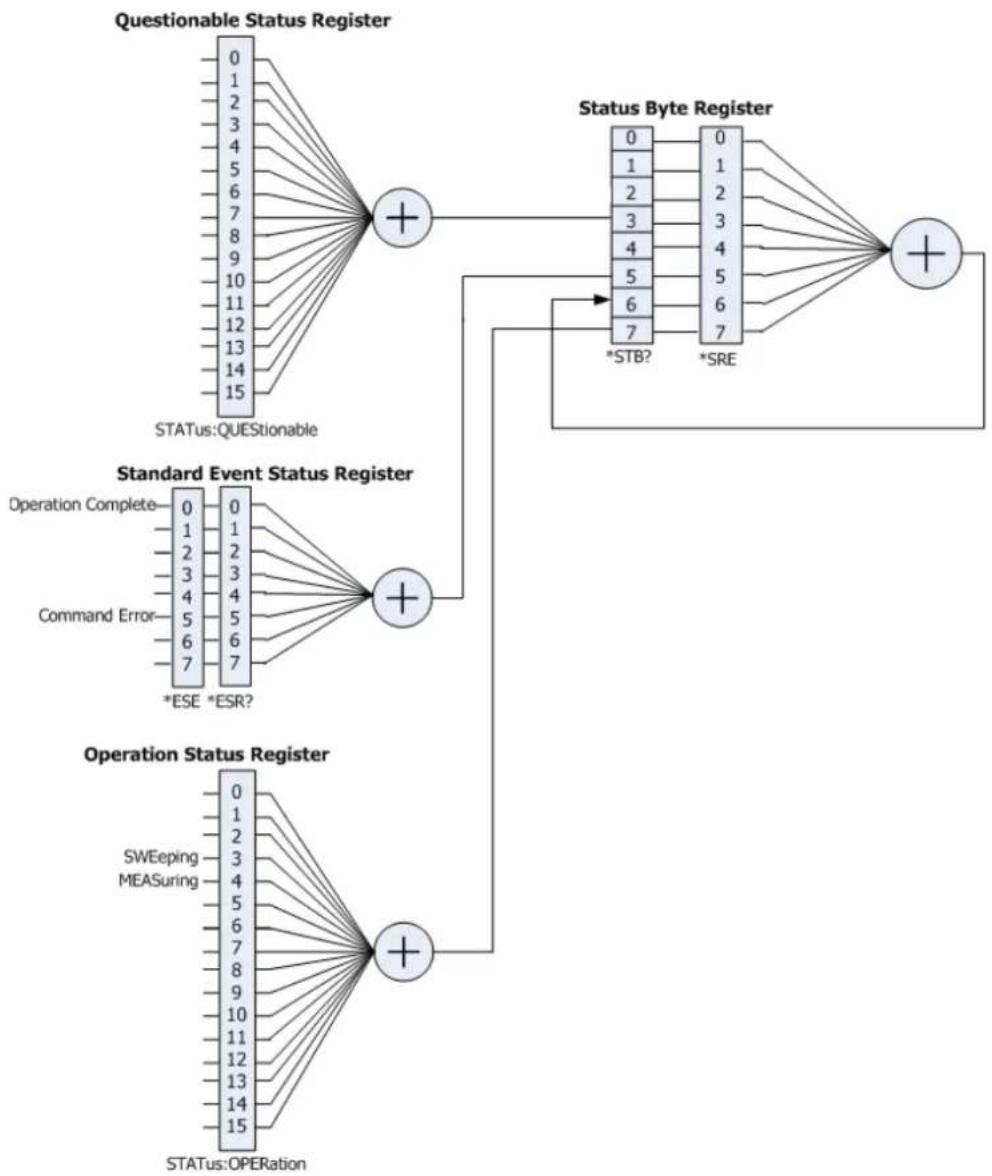
flowchart
graph TD
    A["Questionable Status Register"] --> B["+"]
    C["Standard Event Status Register"] --> D["+"]
    E["Operation Status Register"] --> F["+"]
    B --> G["Status Byte Register"]
    D --> H["*STB?"]
    D --> I["*SRE"]
    G --> J["0"]
    G --> K["1"]
    G --> L["2"]
    G --> M["3"]
    G --> N["4"]
    G --> O["5"]
    G --> P["6"]
    G --> Q["7"]
    H --> R["0"]
    H --> S["1"]
    H --> T["2"]
    H --> U["3"]
    H --> V["4"]
    H --> W["5"]
    H --> X["6"]
    H --> Y["7"]
    I --> Z["0"]
    I --> AA["1"]
    I --> AB["2"]
    I --> AC["3"]
    I --> AD["4"]
    I --> AE["5"]
    I --> AF["6"]
    I --> AG["7"]
    J --> AH["0"]
    J --> AI["1"]
    J --> AJ["2"]
    J --> AK["3"]
    J --> AL["4"]
    J --> AM["5"]
    J --> AN["6"]
    J --> AO["7"]
    K --> AP["0"]
    K --> AQ["1"]
    K --> AR["2"]
    K --> AS["3"]
    K --> AT["4"]
    K --> AU["5"]
    K --> AV["6"]
    K --> AW["7"]
    L --> AX["0"]
    L --> AY["1"]
    L --> AZ["2"]
    L --> BA["3"]
    L --> BB["4"]
    L --> BC["5"]
    L --> BD["6"]
    L --> BE["7"]
    M --> BF["0"]
    M --> BG["1"]
    M --> BH["2"]
    M --> BI["3"]
    M --> BJ["4"]
    M --> BK["5"]
    M --> BL["6"]
    M --> BM["7"]
    N --> BN["0"]
    N --> BO["1"]
    N --> BP["2"]
    N --> BQ["3"]
    N --> BR["4"]
    N --> BS["5"]
    N --> BT["6"]
    N --> BU["7"]
    O --> BV["0"]
    O --> BW["1"]
    O --> BX["2"]
    O --> BY["3"]
    O --> BZ["4"]
    O --> CA["5"]
    O --> CB["6"]
    O --> CC["7"]
    P --> CD["0"]
    P --> CE["1"]
    P --> CF["2"]
    P --> CG["3"]
    P --> CH["4"]
    P --> CI["5"]
    P --> CJ["6"]
    P --> CK["7"]
    Q --> CL["0"]
    Q --> CM["1"]
    Q --> CN["2"]
    Q --> CO["3"]
    Q --> CP["4"]
    Q --> CQ
    R --> CR["0"]
    R --> CS["1"]
    R --> CT["2"]
    R --> CU["3"]
    R --> CV["4"]
    R --> CW["5"]
    R --> CX["6"]
    R --> CY["7"]
Command List:
◆ :STATUS:OPERation:CONDITION?
◆ :STATUS:OPERation:ENABLE
◆ :STATUS:OPERation[:EVENT]?
:STATus:PRESet
◆ :STATUS:QUESTIONable:CONDITION?
◆ :STATus:QUESTIONable:ENABLE
◆ :STATus:QUESTIONable[:EVENT]?
:STATus:OPERation:CONDITION?
Syntax
:STATus:OPERation:CONDITION?
Description
Queries the condition register of the Operation Status Register.
Return Format
The query returns the condition register in integer. For example, 24.
:STATus:OPERation:ENABLE
Syntax
:STATUS:OPERation:ENABLE
:STATUS:OPERation:ENABLE?
Description
Sets the enable register of the Operation Status Register.
Queries the enable register of the Operation Status Register.
Parameter
| Name | Type | Range | Default |
| Integer | Refer to "Remarks" | 0 |
Remarks
The following table lists the bit definitions for the operation status register. The bit 0 to bit 2, bit 5 to bit 7, bit 13 and bit 14 are reserved; they can be set but will not affect the instrument. The bit 15 and bit 12 to bit 8 are not used and are always treated as 0; therefore, the range of
| Bit | Value | Definition |
| 0 | 1 | Reserved |
| 1 | 2 | Reserved |
| 2 | 4 | Reserved |
| 3 | 8 | SWEeping |
| 4 | 16 | MEASuring |
| 5 | 32 | Reserved |
| 6 | 64 | Reserved |
| 7 | 128 | Reserved |
| 8 | 0 | Not Used |
| 9 | 0 | Not Used |
| 10 | 0 | Not Used |
| 11 | 0 | Not Used |
| 12 | 0 | Not Used |
| 13 | 8192 | Reserved |
| 14 | 16384 | Reserved |
| 15 | 0 | Not Used |
Return Format
The query returns the enable register of the Operation Status Register in integer.
Example
The following command sets the enable register of the Operation Status Register to 100.
:STATUS:OPERation:ENABLE 100
The following query returns 100.
:STATUS:OPERation:ENABLE?
:STATus:OPERation[:EVENT]?
Syntax
:STATus:OPERation[:EVENT]?
Description
Queries the event register of the Operation Status Register.
Return Format
The query returns the event register of the Operation Status Register in integer. For example, 24.
:STATus:PRESet
Syntax
:STATus:PRESet
Description
Clears the enable register of the Operation Status Register and Questionable Status Register.
:STATus:QUESTIONable:CONDITION?
Syntax
:STATUS:QUESTIONable:CONDITION?
Description
Queries the condition register of the Questionable Status Register.
Return Format
The query returns the condition register of the Questionable Status Register in integer. For example, 0.
:STATus:QUESTIONable:ENABLE
Syntax
:STATUS:QUESTIONable:ENABLE
:STATus:QUESTIONable:ENABLE?
Description
Sets the enable register of the Questionable Status Register. Queries the enable register of the Questionable Status Register.
Parameter
| Name | Type | Range | Default |
| Integer | Refer to "Remarks" | 0 |
Remarks
The following table lists the bit definitions for the questionable status register. The bit 0 to bit 8, bit 13 and bit 14 are reserved; they can be set but will not affect the instrument. The bit 15 and bit 12 to bit 9 are not used and are always treated as 0; therefore, the range of
| Bit | Value | Definition |
| 0 | 1 | Reserved |
| 1 | 2 | Reserved |
| 2 | 4 | Reserved |
| 3 | 8 | Reserved |
| 4 | 16 | Reserved |
| 5 | 32 | Reserved |
| 6 | 64 | Reserved |
| 7 | 128 | Reserved |
| 8 | 256 | Reserved |
| 9 | 0 | Not Used |
| 10 | 0 | Not Used |
| 11 | 0 | Not Used |
| 12 | 0 | Not Used |
| 13 | 8192 | Reserved |
| 14 | 16384 | Reserved |
| 15 | 0 | Not Used |
Return Format
The query returns the enable register of the Questionable Status Register in integer.
Example
The following command sets the enable register of the Questionable Status Register to 100. :STATus:QUESTIONable:ENABLE 100
The following query returns 100. :STATUS:QUESTIONable:ENABLE?
:STATus:QUESTIONable[:EVENT]?
Syntax
:STATUS:QUESTIONable[:EVENT]?
Description
Queries the event register of the Questionable Status Register.
Return Format
Queries the event register of the Questionable Status Register in integer. For example, 0.
:SYSTem Commands
Command List:
◆ :SYSTem:BEEPer:STATe
◆ :SYSTem:COMMunicate:LAN[:SELF]:APPLy
◆ :SYSTem:COMMunicate:LAN[:SELF]:AUToip:STATe
◆ :SYSTem:COMMunicate:LAN[:SELF]:DHCP:STATe
◆ :SYSTem:COMMunicate:LAN[:SELF]:IP:ADDRess
◆ :SYSTem:COMMunicate:LAN[:SELF]:IP:DNS:AUTO[:STATE]
◆ :SYSTem:COMMunicate:LAN[:SELF]:IP:DNSBack
◆ :SYSTem:COMMunicate:LAN[:SELF]:IP:DNSPreferred
◆ :SYSTem:COMMunicate:LAN[:SELF]:IP:DNSServer
◆ :SYSTem:COMMunicate:LAN[:SELF]:IP:GATeway
◆ :SYSTem:COMMunicate:LAN[:SELF]:IP:SUBMask
◆ :SYSTem:COMMunicate:LAN[:SELF]:MANuip:STATe
◆ :SYSTem:COMMunicate:LAN[:SELF]:MDNS:STATe
◆ :SYSTem:COMMunicate:LAN[:SELF]:RESet
◆ :SYSTem:CONFigure:INFormation?
◆ :SYSTem:DATE
◆ :SYSTem:FSWitch[:STATE]
◆ :SYSTem:LANGUAGE
◆ :SYSTem:LKEY
◆ :SYSTem:OPTION:STATE?
◆ :SYSTem:PON:TYPE
◆ :SYSTem:PRESet
◆ :SYSTem:PRESet:SAVE
◆ :SYSTem:PRESet:TYPE
◆ :SYSTem:PRESet:USER:SAVE
◆ :SYSTem:SCPI:DISPLAY
◆ :SYSTem:SHOW
◆ :SYSTem:TIME
:SYSTem:BEEPer:STATe
Syntax
:SYSTem:BEEPer:STATE OFF|ON|0|1
:SYSTem:BEEPer:STATe?
Description
Turns on or off the beeper.
Queries the status of the beeper.
Parameter
| Name | Type | Range | Default |
| —— | Bool | OFF|ON|0|1 | OFF|0 |
Return Format
The query returns 0 or 1.
Example
The following command turns on the beeper.
:SYSTem:BEEPer:STATE ON or :SYSTem:BEEPer:STATE 1
The following query returns 1.
:SYSTem:BEEPer:STATe?
:SYSTem:COMMunicate:LAN[:SELF]:APPLy
Syntax
:SYSTem:COMMunicate:LAN[:SELF]:APPLY
Description
Applies the LAN interface parameter settings.
:SYSTem:COMMunicate:LAN[:SELF]:AUTOip:STATE
Syntax
:SYSTem:COMMunicate:LAN[:SELF]:AUTOip:STATe OFF|ON|0|1
:SYSTem:COMMunicate:LAN[:SELF]:AUTOip:STATE?
Description
Enables or disables the auto IP setting mode.
Queries the status of the auto IP setting mode.
Parameter
| Name | Type | Range | Default |
| —— | Bool | OFF|ON|0|1 | OFF|0 |
Remarks
The analyzer attempts to acquire the IP address configuration according to the sequence of DHCP, Auto IP, and Manual IP. These three modes cannot be disabled at the same time.
ON|1: enables the auto IP mode.
OFF|0: disables the auto IP mode and selects DHCP configuration mode.
Return Format
The query returns 0 or 1.
Example
The following command enables the auto IP setting mode.
:SYSTem:COMMunicate:LAN:SELF:AUTOip:STATE ON or :SYSTem:COMMunicate:LAN:SELF:AUTOip:STATE 1
The following query returns 1.
:SYSTem:COMMunicate:LAN:SELF:AUTOip:STATe?
:SYSTem:COMMunicate:LAN[:SELF]:DHCP:STATE
Syntax
:SYSTem:COMMunicate:LAN[:SELF]:DHCP:STATe OFF|ON|0|1
:SYSTem:COMMunicate:LAN[:SELF]:DHCP:STATe?
Description
Enables or disables the DHCP configuration mode.
Queries the status of the DHCP configuration mode.
Parameter
| Name | Type | Range | Default |
| — | Bool | OFF|ON|0|1 | ON|1 |
Remarks
The analyzer attempts to acquire the IP address configuration according to the sequence of DHCP, Auto IP, and Manual IP. These three modes cannot be disabled at the same time.
ON|1: enables the DHCP configuration mode.
OFF|0: disables the DHCP configuration mode and selects the auto IP mode.
Return Format
The query returns 0 or 1.
Example
The following command enables the DHCP configuration mode.
:SYSTem:COMMunicate:LAN:SELF:DHCP:STATE ON or :SYSTem:COMMunicate:LAN:SELF:DHCP:STATE 1
The following query returns 1.
:SYSTem:COMMunicate:LAN:SELF:DHCP:STATE?
:SYSTem:COMMunicate:LAN[:SELF]:IP:ADDRess
Syntax
:SYSTem:COMMunicate:LAN[:SELF]:IP:ADDRess
:SYSTEM:COMMunicate:LAN[:SELF]:IP:ADDRess?
Description
Sets the IP address.
Queries the IP address.
Parameter
| Name | Type | Range | Default |
| ASCII String | Refer to "Remarks" | — |
Remarks
The format of
This command is only valid in manual IP setting mode.
Return Format
The query returns the current IP address in the format of "nnn.nnn.nnn.nnn".
Example
The following command sets the IP address to "172.16.3.199".
:SYSTem:COMMunicate:LAN:SELF:IP:ADDRess 172.16.3.199
The following query returns 172.16.3.199.
:SYSTem:COMMunicate:LAN:SELF:IP:ADDRess?
:SYSTem:COMMunicate:LAN[:SELF]:IP:DNS:AUTO[:STATE]
Syntax
:SYSTem:COMMunicate:LAN[:SELF]:IP:DNS:AUTO[:STATE] OFF|ON|0|1
:SYSTem:COMMunicate:LAN[:SELF]:IP:DNS:AUTO[:STATE]?
Description
Sets the mode to obtain the DNS.
Queries the mode to obtain the DNS.
Parameter
| Name | Type | Range | Default |
| — | Bool | OFF|ON|0|1 | OFF|0 |
Remarks
ON|1: enables the auto mode of DNS, that is, selects the auto mode.
OFF|0: disables the auto mode of DNS, that is, selects the manual mode.
Return Format
The query returns 0 or 1.
Example
The following command enables the auto mode of DNS.
:SYSTem:COMMunicate:LAN:SELF:IP:DNS:AUTO:STATE ON
or :SYSTem:COMMunicate:LAN:SELF:IP:DNS:AUTO:STATE 1
The following query returns 1.
:SYSTem:COMMunicate:LAN:SELF:IP:DNS:AUTO:STATE?
:SYSTem:COMMunicate:LAN[:SELF]:IP:DNSBack
Syntax
:SYSTem:COMMunicate:LAN[:SELF]:IP:DNSBack
:SYSTem:COMMunicate:LAN[:SELF]:IP:DNSBack?
Description
Sets the backup address for the DNS.
Queries the backup address for the DNS.
Parameter
| Name | Type | Range | Default |
| ASCII String | Refer to "Remarks" | — |
Remarks
The format of
This command is only valid in manual DNS setting mode.
Return Format
The query returns the current backup DNS address in the format of "nnn.nnn.nnn.nnn".
Example
The following command sets the backup address of DNS to "172.16.2.2".
:SYSTem:COMMunicate:LAN:SELF:IP:DNSBack 172.16.2.2
The following query returns 172.16.2.2.
:SYSTem:COMMunicate:LAN:SELF:IP:DNSBack?
:SYSTem:COMMunicate:LAN[:SELF]:IP:DNSPreferred
:SYSTem:COMMunicate:LAN[:SELF]:IP:DNSServer
Syntax
:SYSTEM:COMMunicate:LAN[:SELF]:IP:DNSPreferred
:SYSTem:COMMunicate:LAN[:SELF]:IP:DNSPreferred?
:SYSTem:COMMunicate:LAN[:SELF]:IP:DNSServer
:SYSTem:COMMunicate:LAN[:SELF]:IP:DNSServer?
Description
Sets the preferred address for the DNS.
Queries the preferred address for the DNS.
Parameter
| Name | Type | Range | Default |
| ASCII String | Refer to "Remarks" | — |
Remarks
The format of
This command is only valid in manual DNS setting mode.
Return Format
The query returns the currently preferred DNS address in the format of "nnn.nnn.nnn.nnn".
Example
The following command sets the preferred DNS address to "172.16.2.2".
:SYSTem:COMMunicate:LAN:SELF:IP:DNSPreferred 172.16.2.2
:SYSTem:COMMunicate:LAN:SELF:IP:DNSServer 172.16.2.2
The following query returns 172.16.2.2.
:SYSTem:COMMunicate:LAN:SELF:IP:DNSPreferredr?
:SYSTem:COMMunicate:LAN:SELF:IP:DNSServer?
:SYSTem:COMMunicate:LAN[:SELF]:IP:GATeway
Syntax
:SYSTem:COMMunicate:LAN[:SELF]:IP:GATeway
:SYSTem:COMMunicate:LAN[:SELF]:IP:GATeway?
Description
Sets the default gateway.
Queries the default gateway.
Parameter
| Name | Type | Range | Default |
| ASCII String | Refer to "Remarks" | — |
Remarks
The format of
This command is only valid in manual IP setting mode.
Return Format
The query returns the current default gateway in the format of "nnn.nnn.nnn.nnn".
Example
The following command sets the default gateway to "172.16.3.1".
:SYSTem:COMMunicate:LAN:SELF:IP:GATeway 172.16.3.1
The following query returns 172.16.3.1.
:SYSTem:COMMunicate:LAN:SELF:IP:GATeway?
:SYSTem:COMMunicate:LAN[:SELF]:IP:SUBMask
Syntax
:SYSTem:COMMunicate:LAN[:SELF]:IP:SUBMask
:SYSTem:COMMunicate:LAN[:SELF]:IP:SUBMask?
Description
Sets the subnet mask.
Queries the subnet mask.
Parameter
| Name | Type | Range | Default |
| ASCII String | Refer to "Remarks" | — |
Remarks
The format of
Return Format
The query returns the current subnet mask in the format of "nnn.nnn.nnn.nnn".
Example
The following command sets the subnet mask to "255.255.255.0".
:SYSTem:COMMunicate:LAN:SELF:IP:SUBMask 255.255.255.0
The following query returns 255.255.255.0.
:SYSTem:COMMunicate:LAN:SELF:IP:SUBMask?
:SYSTem:COMMunicate:LAN[:SELF]:MANuip:STATE
Syntax
:SYSTem:COMMunicate:LAN[:SELF]:MANuip:STATE OFF|ON|0|1
:SYSTem:COMMunicate:LAN[:SELF]:MANuip:STATe?
Description
Enables or disables the manual IP setting mode.
Queries the status of the manual IP setting mode.
Parameter
| Name | Type | Range | Default |
| — | Bool | OFF|ON|0|1 | OFF|0 |
Remarks
The analyzer attempts to acquire the IP address configuration according to the sequence of DHCP, Auto IP, and Manual IP. These three modes cannot be disabled at the same time.
ON|1: enables the manual IP mode.
OFF|0: disables the manual IP mode and selects the DHCP mode.
Return Format
The query returns 0 or 1.
Example
The following command enables the manual IP setting mode.
:SYSTEM:COMMunicate:LAN:SELF:MANuip:STATE ON or :SYSTEM:COMMunicate:LAN:SELF:MANuip:STATE
1
The following query returns 1.
:SYSTem:COMMunicate:LAN:SELF:MANuip:STATE?
:SYSTem:COMMunicate:LAN[:SELF]:MDNS:STATE
Syntax
:SYSTem:COMMunicate:LAN[:SELF]:MDNS:STATE OFF|ON|0|1
:SYSTem:COMMunicate:LAN[:SELF]:MDNS:STATE?
Description
Enables or disables the state of the network information sending.
Queries the on/off status of the network information sending.
Parameter
| Name | Type | Range | Default |
| —— | Bool | OFF|ON|0|1 | OFF|0 |
Remarks
ON|1: The state of the network information sending is turned on.
ON|0: The state of the network information sending is turned off.
Return Format
The query returns 0 or 1.
Example
The following command sets the state of the network information sending to "on".
:SYSTem:COMMunicate:LAN:SELF:MDNS:STATE ON or :SYSTem:COMMunicate:LAN:SELF:MDNS:STATE 1
The following query returns 1.
:SYSTem:COMMunicate:LAN:SELF:MDNS:STATE?
:SYSTem:COMMunicate:LAN[:SELF]:RESet
Syntax
:SYSTem:COMMunicate:LAN[:SELF]:RESet
Description
Resets the LAN setting: enable the DHCP, disable Auto IP and the Manual IP.
:SYSTem:CONFigure:INFormation?
Syntax
:SYSTem:CONFigure:INFormation?
Description
Queries the system information of the spectrum analyzer.
Remarks
The system information includes the model, serial number, software and hardware version number, and firmware version number.
Return Format
The query returns the system information. For example,
Model: RSA5065
SN:RSA5B192000020
Main Board:00.01.00
Keyboard:00.01.00
CPU:00.01.00
SPU:00.01.02
WPU:00.01.00
BOOT:00.01.00
OS:00.01.00
Firmware:00.01.00
Note: When you use RSA5065-TG/RSA5032-TG, the query also returns information about "TG Board".
:SYSTem:DATE
Syntax
:SYSTem:DATE
:SYSTem:DATE?
Description
Sets the date of the instrument.
Queries the date of the instrument.
Parameter
| Name | Type | Range | Default |
| ASCII String | 2000 to 2099 | —— | |
| ASCII String | 01 to 12 | —— | |
| ASCII String | 01 to 31 | —— |
Return Format
The query returns the current date in the format of "YYYY,MM,DD".
Example
The following command sets the date of the instrument to 2017/11/16.
:SYSTem:DATE 2017,11,16
The following query returns 2017,11,16
:SYSTem:DATE?
Sets the power switch on the front panel to be turned on or off. Queries whether the power switch on the front panel is turned on or off.
Parameter
| Name | Type | Range | Default |
| — | Bool | OFF|ON|0|1 | ON|1 |
Return Format
The query returns 0 or 1.
Example
The following command sets the power switch on the front panel is turned off. :SYSTem:FSWitch:STATE OFF or :SYSTem:FSWitch:STATE 0
The following query returns 0. :SYSTem:FSWitch:STATe?
:SYSTem:LANGUAGE
Syntax
Sets the language of the instrument. Queries the language of the instrument.
Parameter
| Name | Type | Range | Default |
| —— | Keyword | ENGLISH|CHINese | ENGLISH |
Return Format
The query returns ENGL or CHIN.
Example
The following command sets the language to English. :SYSTem:LANGUAGE ENGLISH
The following query returns ENGL. :SYSTem:LANGUAGE?
:SYSTem:LKEY
Syntax
:SYSTem:LKEY
Description
Installs and activates the specified option.
Parameter
| Name | Type | Range | Default |
| ASCII String | — | — | |
| ASCII String | — | — |
Remarks
The parameter
Example
The following command installs the option RSA5000-PA.
:SYSTem:LKEY
RSA5000-PA@8AD12B8EBC5DF492D1D4289B7CBA5B6150BF6F5D752D645C36D74530B05F39B49C461B2
3A50D6C94A34E06782AC4380070B0D1A86BA84E02768391FFD70C2103
:SYSTem:OPTION:STATe?
Syntax
:SYSTEM:OPTION:STATE?
Description
Queries whether an option is activated or not.
Parameter
| Name | Type | Range | Default |
| ASCII String | — | — |
Return Format
The query returns 0 (not activated) or 1 (activated).
Example
The following command queries whether the option RSA5000-PA is activated. :SYSTem:OPTION:STATe? RSA5000-PA
:SYSTem:PON:TYPE
Syntax
:SYSTem:PON:TYPE PRESet|LAST
:SYSTem:PON:TYPE?
Description
Selects the setting type the instrument recalls at power-on.
Queries what setting type the instrument recalls at power-on.
Parameter
| Name | Type | Range | Default |
| —— | Keyword | PRESet|LAST | PRESet |
Remarks
PRESet: indicates preset settings, including factory default settings and 6 user-defined settings.
LAST: indicates the last setting.
Return Format
The query returns PRES or LAST.
Example
The following command sets the instrument to recall the last setting.
:SYSTem:PON:TYPE LAST
The following query returns LAST.
:SYSTem:PON:TYPE?
:SYSTem:PRESet
Syntax
:SYSTem:PRESet
Description
Recalls the preset settings of the system and recovers the system to the state specified by the :SYSTem:PRESet:TYPE command.
:SYSTem:PRESet:SAVE
Syntax
:SYSTem:PRESet:SAVE USER1|USER2|USER3|USER4|USER5|USER6
Description
Saves the specified user setting.
Parameter
| Name | Type | Range | Default |
| —— | Keyword | USER1|USER2|USER3|USER4|USER5|USER6 | —— |
:SYSTem:PRESet:TYPE
Syntax
:SYSTem:PRESet:TYPE FACTory|USER1|USER2|USER3|USER4|USER5|USER6
:SYSTem:PRESet:TYPE?
Description
Selects the preset type of the system to be the factory mode or any one of the items from User1 to User6. Queries the preset type of the system.
Parameter
| Name | Type | Range | Default |
| —— | Keyword | FACTory|USER1|USER2|USER3|USER4|USER5|USER6 | FACTory |
Return Format
The query returns FACT, USER1, USER2, USER3, USER4, USER5, or USER6.
Example
The following command sets the preset type of the system to User5.
:SYSTem:PRESet:TYPE USER5
The following query returns USER5.
:SYSTem:PRESet:TYPE?
Saves the current user setting.
Remarks
If the current preset type is "FACTory", save the current user setting to User1. If the current preset type is "User1 through User6", save the current user setting to the specified user.
:SYSTem:SCPI:DI SPlay
Syntax
:SYSTem:SCPI:DISPLAY OFF|ON|0|1
:SYSTem:SCPI:DISPLAY?
Description
Enables or disables the SCPI display.
Queries the status for the SCPI display.
Parameter
| Name | Type | Range | Default |
| — | Bool | OFF|ON|0|1 | OFF|0 |
Remarks
When you use the SCPI commands to control the instrument remotely, turning on the SCPI display will go to the specified menu of the corresponding command; turning off the SCPI Display will not go to the specified menu.
Return Format
The query returns 0 or 1.
Example
The following command enables the SCPI display.
:SYSTem:SCPI:DISPLAY 1 or :SYSTem:SCPI:DISPLAY ON
The following query returns 1.
:SYSTem:SCPI:DISPLAY?
:SYSTem:SHOW
Syntax
:SYSTem:SHOW OFF|SYSTem|OPTION|LICense
:SYSTem:SHOW?
Description
Displays the system-related information.
Queries the system-related information.
Parameter
| Name | Type | Range | Default |
| —— | Keyword | OFF|SYSTem|OPTION|LICense | OFF |
Remarks
OFF: turns off the system information display.
SYSTem: displays the system information.
OPTION: displays the option information.
LICense: displays the registration information.
Return Format
The query returns OFF, SYST, OPT, or LIC.
Example
The following command displays the system information.
:SYSTem:SHOW SYSTem
The following query returns SYST.
:SYSTem:SHOW?
:SYSTem:TIME
Syntax
:SYSTem:TIME
:SYSTem:TIME?
Description
Sets the system time of the instrument.
Queries the system time of the instrument.
Parameter
| Name | Type | Range | Default |
| ASCII String | 00 to 23 | — | |
| ASCII String | 00 to 59 | — | |
| ASCII String | 00 to 59 | — |
Return Format
The query returns the current system time in the format of "HH,MM,SS".
Example
The following command sets the system time to "15:10:30".
:SYSTem:TIME 15,10,30
The following query returns 15,10,30.
:SYSTem:TIME?
:TRACe Commands
Command List:
◆ :TRACe:CLEar:ALL
◆ :TRACe[:DATA]
:TRACe:MATH:A
:TRACe:MATH:B
:TRACe:MATH:CONST
◆ :TRACe:MATH:PEAK[:DATA]?
◆ :TRACe:MATH:PEAK:POINTS?
:TRACe:MATH:REFERENCE
:TRACe:MATH:STATE
◆ :TRACe:MATH:TYPE
◆ :TRACe:PRESet:ALL
◆ :TRACe
◆ :TRACe
◆ :TRACe
◆ :TRACe
:TRACe:CLEar:ALL
Syntax
:TRACe:CLEar:ALL
Description
Clears all the traces, that is, all the points on the trace will be reset to the minimum value of the trace.
:TRACe[:DATA]
Syntax
:TRACe[:DATA]
TRACE1|TRACE2|TRACE3|TRACE4|TRACE5|TRACE6,
:TRACE[:DATA]?TRACE1|TRACE2|TRACE3|TRACE4|TRACE5|TRACE6
Description
Load the user data into the specified trace.
Query the logarithmic data of the specified trace.
Parameter
| Name | Type | Range | Default |
| -- Keyword | TRACE1|TRACE2|TRACE3|TRACE4|TRACE5|TRACE6 | -- | |
| ASCII String | -- | -- | |
| ASCII String | -- | -- |
Explanation
- Use the :FORMAT[:TRACe][:DATA] command to set the format of the user data.
Data block ^[1] . Select this parameter when the data format is ASCII. The two neighboring data points are separated by a comma (1 byte) and a space (1 byte) and each point is expressed in scientific notation; for example, -1.390530e+01 (13 bytes). Up to 801 points can be sent.
Data block ^[1] . Select this parameter when the data format is REAL[,32] | REAL[,64] | INTeger[,32] and each point is represented by a 32 bit (4 bytes) | 64 bit (4 bytes) | 32 bit (4 bytes) binary number. Up to 801 points can be sent.
Use the :FORMAT:BORDER command to set the byte order of the binary data transmission.
- When VSWR is enabled, the :TRACe? TRACE1 command returns the reference data of the VSWR, the :TRACe? TRACE6 command returns the trace data of the calibration currently enabled and the :TRACe? TRACE3 (the current mathematical operation trace) command returns the difference (the return loss) between the reference data and trace data.
Return Format
The query returns the data of the specified trace and the format of the return data depends on the setting of the :FORMAT[:TRACe][:DATA] command.
Example ^[2]
1. When the data format is ASCii
The command below sends the user data to trace 1.
:TRACe:DATA TRACE1, -1.390530e+01, -7.108871e+01, -7.089631e+01, -6.992984e+01, -7.010770e+01, .....
The query below returns -1.390530e+01, -7.108871e+01, -7.089631e+01, -6.992984e+01, -7.010770e+01, .....
:TRACe:DATA?TRACE1
2. When the data format is REAL[,32]
The command below sends the user data to trace 2.
:TRACe:DATA
TRACE2,#900000320411111111111111111111111111110011111111111111111111111101110 111111111111111111111111111010011.....
The query below returns
900000320411111111111111111111111100111111111111111111111110110111111
11111111111111111111010011.....
Note: As the PC software converts the binary data returned to ASCII character, the return value is unrecognizable code when the PC software is used to execute the query command. :TRACE:DATA?TRACE2
Remark:
[1] The format of the data block is "Data Block Header + Data Block"; wherein, the format of the data block header is as follows.

The number of digits of XXXXXXXXX
The first figure (9) following # denotes the number of digits of the number in the data block header; this number denotes the number of bytes of the data in this transmission (add 0 before the number when the number of digits is less than 9). For example, the data block header is #9000000100 when 100 bytes of data is transmitted.
[2] In the two examples here, 801 points are transmitted and the queries return 801 points. However, due to the limited space, the succeeding data is omitted here. The return values in the above examples are acquired when the trace stops sweeping.
:TRACe:MATH:A
Syntax
:TRACe:MATH:A T1|T2|T3|T4|T5|T6
:TRACe:MATH:A?
Description
Sets Op1 in the trace math operation formula to Trace 1, Trace 2, Trace 3, Trace 4, Trace 5, or Trace 6. Queries which trace is Op1 represented in the trace math operation formula.
Parameter
| Name | Type | Range | Default |
| —— | Keyword | T1|T2|T3|T4|T5|T6 | T1 |
Return Format
The query returns T1, T2, T3, T4, T5, or T6.
Example
The following command sets Op1 to Trace 2.
:TRACe:MATH:A T2
The following query returns T2.
:TRACe:MATH:A?
:TRACe:MATH:B
Syntax
:TRACe:MATH:B T1|T2|T3|T4|T5|T6
:TRACe:MATH:B?
Description
Sets Op2 in the trace math operation formula to Trace 1, Trace 2, Trace 3, Trace 4, Trace 5, or Trace 6. Queries which trace is Op2 represented in the trace math operation formula.
Parameter
| Name | Type | Range | Default |
| — | Keyword | T1|T2|T3|T4|T5|T6 | T2 |
Return Format
The query returns T1, T2, T3, T4, T5, or T6.
Example
The following command sets Op2 to Trace 1.
:TRACe:MATH:B T1
The following query returns T1.
:TRACe:MATH:B?
:TRACe:MATH:CONST
Syntax
:TRACE:MATH:CONST
:TRACe:MATH:CONST?
Description
Sets the log offset in the trace math operation formula.
Queries the log offset in the trace math operation formula.
Parameter
| Name | Type | Range | Default |
| Consecutive Real Number | -100 dB to 100 dB | 0 dB |
Return Format
The query returns the log offset in scientific notation.
Example
The following command sets the log offset to 50 dB.
:TRACe:MATH:CONST 50
The following query returns 5.000000000e+01.
:TRACe:MATH:CONST?
:TRACe:MATH:PEAK[:DATA]?
Syntax
:TRACe:MATH:PEAK[:DATA]?
Description
Queries the frequencies (Hz) and amplitudes (the unit is the same as the current Y-axis unit) of the peaks in the peak table.
Remarks
This command only queries Trace 1.
Return Format
The query returns the frequencies and amplitudes of the peaks in the peak table in the following format. At most, 20 pairs of frequencies and amplitudes can be returned.
For example, 1.000000000e+09,-1.463000000e+01,9.999890000e+08,-4.172000000e+01.
:TRACe:MATH:PEAK:POI Nts?
Syntax
:TRACe:MATH:PEAK:POINTS?
Description
Query the number of peaks in the peak table.
Return Format
The query returns an integer ranging from 0 to 20.
:TRACe:MATH:REFERENCE
Syntax
:TRACe:MATH:REFERENCE
:TRACe:MATH:REFERENCE?
Description
Sets the log reference in the trace math operation formula.
Queries the log reference in the trace math operation formula.
Parameter
| Name | Type | Range | Default |
| Consecutive Real Number | -170 dBm to 30 dBm | 0 dBm |
Return Format
The query returns the log reference in scientific notation.
Example
The following command sets the log reference to 50 dBm.
:TRACe:MATH:REFERENCE 50
The following query returns 5.000000000e+01.
:TRACe:MATH:REFERENCE?
:TRACe:MATH:STATe
Syntax
:TRACe:MATH:STATe OFF|ON|0|1
:TRACe:MATH:STATe?
Description
Enables or disables the math operation.
Queries the status of the math operation of the trace.
Parameter
| Name | Type | Range | Default |
| — | Bool | OFF|ON|0|1 | OFF|0 |
Return Format
The query returns 0 or 1.
Example
The following command enables the math operation of the trace.
:TRACe:MATH:STATE 1 or :TRACe:MATH:STATE ON
The following query returns 1.
:TRACe:MATH:STATe?
:TRACe:MATH:TYPE
Syntax
:TRACe:MATH:TYPE A+B|A-B|A+CONST|A-CONST|A-B+REF
:TRACe:MATH:TYPE?
Description
Sets the operation type of the trace.
Queries the operation type of the trace.
Paramter
| Name | Type | Range | Default |
| —— | Keyword | A+B|A-B|A+CONST|A-CONST|A-B+REF | A+B |
Remarks
The parameter A+B, A-B, A+CONST, A-CONST, and A-B+REF corresponds to Op1-Op2, Op1+Op2,
Op1+Offset, Op1-Offset, and Op1-Op2+Ref, respectively
Return Format
The query returns A+B, A-B, A+CONST, A-CONST, or A-B+REF.
Example
The following command sets the operation type of the trace to A+B.
:TRACe:MATH:TYPE A+B
The following query returns A+B.
:TRACe:MATH:TYPE?
:TRACe:PRESet:ALL
Syntax
:TRACe:PRESet:ALL
Description
Resets all the traces.
Remarks
Enables Trace 1, and sets other traces to be in blank state. This does not affect the trace type and the detector type.
:TRACe:DI SPlay:STATe
Syntax
:TRACe
:TRACe
Description
Enables or disables the display of the specified trace.
Queries the status for the specified trace.
Parameter
| Name | Type | Range | Default |
| Discrete | 1|2|3|4|5|6 | — | |
| — | Bool | OFF|ON|0|1 | Refer to "Remarks" |
Remarks
By default, Trace 1 is enabled (ON), and Trace 2 through Trace 6 are disabled (OFF).
Return Format
The query returns 1 or 0.
Example
The following command enables the display of Trace 1.
:TRACe1:DISPLAY:STATE ON or :TRACe1:DISPLAY:STATE 1
The following query returns 1.
:TRACe1:DISPLAY:STATE?
:TRACe:MODE
:TRACe:TYPE
Syntax
:TRACe
:TRACe
:TRACe
:TRACe
Description
Sets the type of the specified trace.
Queries the type of the specified trace.
Parameter
| Name | Type | Range | Default |
| Discrete | 1|2|3|4|5|6 | — | |
| — | Keyword | WRITe| AVERage| MAXHold| MINHold | WRITe |
Remarks
WRITE: indicates clear/write.
AVERAGE: indicates average.
MAXHold: indicates the maximum hold.
MINHold: indicates the minimum hold.
In the window that contains the Density view, only Trace 1 is available.
In the window that contains the PvT view, only Trace 1 is available and the trace type can only be selected to "Clear Write".
Return Format
The query returns WRIT, AVER, MAXH, or MINH.
Example
The following command sets the type of Trace 1 to Max Hold.
:TRACe1:MODE MAXHold
:TRACe1:TYPE MAXHold
The following query returns MAXH.
:TRACe1:MODE?
:TRACe1:TYPE?
:TRACe:UPDATE:STATE
Syntax
:TRACe
:TRACe
Description
Enables or disables the update of the specified trace.
Queries the status for the update of the specified trace.
Parameter
| Name | Type | Range | Default |
| Discrete | 1|2|3|4|5|6 | —— | |
| —— | Bool | OFF|ON|0|1 | Refer to "Remarks" |
Remarks
By default, Trace 1 is enabled (ON), and Trace 2 thru Trace 6 are disabled (OFF).
Return Format
The query returns 1 or 0.
Example
The following command enables the update of Trace 1.
:TRACe1:UPDATE:STATE ON or :TRACe1:UPDATE:STATE 1
The following query returns 1.
:TRACe1:UPDATE:STATE?
:TRIGger Commands
Command List:
◆ :TRIGger[:SEQUence]:ATRigger
◆ :TRIGger[:SEQUence]:ATRigger:STATE
◆ :TRIGger[:SEQUence]:EXTernal
◆ :TRIGger[:SEQUence]:EXTernal
◆ :TRIGger[:SEQUence]:EXTernal
◆ :TRIGger[:SEQUence]:FMT:APTRigger
◆ :TRIGger[:SEQUence]:FMT:CRITeria
◆ :TRIGger[:SEQUence]:FMT:DELay
:TRIGger[:SEQUence]:FMT:DELay:STATE
◆ :TRIGger[:SEQUence]:FMT:MASK
◆ :TRIGger[:SEQUence]:FMT:MASK:EDIT
◆ :TRIGger[:SEQUence]:FMT:MASK:RELative:AMPLitude
◆ :TRIGger[:SEQUence]:FMT:MASK:RELative:FREQuency
◆ :TRIGger[:SEQUence]:FMT:MASK
◆ :TRIGger[:SEQUence]:FMT:MASK
◆ :TRIGger[:SEQUence]:FMT:MASK
◆ :TRIGger[:SEQUence]:FMT:MASK
◆ :TRIGger[:SEQUence]:HOLDoff
◆ :TRIGger[:SEQUence]:HOLDoff:STATE
◆ :TRIGger[:SEQUence]:SOURce
◆ :TRIGger[:SEQUence]:VIDeo:DELay
◆ :TRIGger[:SEQUence]:VIDeo:DELay:STATE
◆ :TRIGger[:SEQUence]:VIDeo:LEVel
◆ :TRIGger[:SEQUence]:VIDeo:SLOPe
◆ :TRIGger2:MODE
:TRI Gger[:SEQUence]:ATRigger
Syntax
:TRIGger[:SEQUence]:ATRigger
:TRIGger[:SEQUence]:ATRigger?
Description
Sets the time that the analyzer will wait for the trigger to be initiated automatically. Queries the time that the analyzer will wait for the trigger to be initiated automatically.
Parameter
| Name | Type | Range | Default |
| Consecutive Real Number | 1 ms to 100 s | 100 ms |
Remarks
This command is only valid when the auto triggering function is enabled.
Return Format
The query returns the time value in scientific notation. The unit is s.
Example
The following command sets the time to 10 ms.
:TRIGger:SEQUence:ATRigger 0.01
The following query returns 1.000000000e-02.
:TRIGger:SEQUence:ATRigger?
:TRIGger[:SEQUence]:ATRigger:STATE
Syntax
:TRIGger[:SEQUence]:ATRigger:STATe OFF|ON|0|1
:TRIGger[:SEQUence]:ATRigger:STATe?
Description
Enables or disables the auto trigger function.
Queries the setting status of auto trigger function.
Parameter
| Name | Type | Range | Default |
| — | Bool | OFF|ON|0|1 | OFF|0 |
Return Format
The query returns 1 or 0.
Example
The following command enables the auto trigger function.
:TRIGger:SEQUence:ATRigger:STATE ON or :TRIGger:SEQUence:ATRigger:STATE 1
The following query returns 1.
:TRIGger:SEQUence:ATRigger:STATe?
:TRIGger[:SEQUence]:EXTernal:DELAY
Syntax
:TRIGger[:SEQUence]:EXTernal
:TRIGger[:SEQUence]:EXTernal
Description
Sets the delay time for the external trigger.
Queries the delay time for the external trigger.
Parameter
| Name | Type | Range | Default |
| Discrete | 1|2 | — | |
| Consecutive Real Number | 0 μs to 500 ms | 1 μs |
Remarks
When the parameter n is set to 1, it indicates External Trigger 1; when set to 2, it indicates External Trigger 2.
This command is only valid when the external trigger delay function is enabled.
Return Format
The query returns the delay time for the external trigger in scientific notation. The unit is s.
Example
The following command sets the delay time for External Trigger 1 to 100 ms.
:TRIGger:SEQUence:EXTernal1:DELay 0.1
The following query returns 1.000000000e-01.
:TRIGger:SEQUence:EXTernal1:DELay?
:TRIGger[:SEQUence]:EXTernal:DELay:STATe
Syntax
:TRIGger[:SEQUence]:EXTernal
:TRIGger[:SEQUence]:EXTernal
Description
Enables or disables the external trigger delay function.
Queries the status of the external trigger delay function.
Parameter
| Name | Type | Range | Default |
| Discrete | 1|2 | — | |
| — | Bool | OFF|ON|0|1 | OFF|0 |
Remarks
When the parameter n is set to 1, it indicates External Trigger 1; when set to 2, it indicates External Trigger 2.
Return Format
The query returns 1 or 0.
Example
The following command enables the delay function of External Trigger 1.
:TRIGger:SEQUence:EXTernal1:DELay:STATE ON or :TRIGger:SEQUence:EXTernal1:DELay:STATE 1
The following query returns 1.
:TRIGger:SEQUence:EXTernal1:DELay:STATe?
:TRI Gger[:SEQUence]:EXTernal:SLOPe
Syntax
:TRIGger:SEQUence:EXTernal
:TRIGger:SEQUence:EXTernal
Description
Sets the trigger edge for the external trigger.
Queries the trigger edge for the external trigger.
Parameter
| Name | Type | Range | Default |
| Discrete | 1|2 | — | |
| — | Keyword | POSitive|NEGative | POSitive |
Remarks
When the parameter n is set to 1, it indicates External Trigger 1; when set to 2, it indicates External Trigger 2.
● POSitive: indicates the rising edge.
● NEGative: indicates the falling edge.
Return Format
The query returns POS or NEG.
Example
The following command sets the trigger edge of External Trigger 1 to Positive.
:TRIGger:SEQUence:EXTernal1:SLOPe POSitive
The following query returns POS.
:TRIGger:SEQUence:EXTernal1:SLOPe?
:TRIGger[:SEQUence]:FMT:APTRigger
Syntax
:TRIGger[:SEQUence]:FMT:APTRigger
:TRIGger[:SEQUence]:FMT:APTRigger?
Description
Sets the number of times for acquisition after each effective trigger is completed.
Queries the number of times for acquisition after each effective trigger is completed.
Parameter
| Name | Type | Range | Default |
| Integer | Refer to "Remarks" | 1 |
Remarks
The minimum value of the parameter
"Outside", the maximum value of the parameter
This command is only valid when you select FMT to be the trigger source in RTSA mode.
Return Format
The query returns the number of acquisition times in integer.
Example
The following command sets the number of acquisition times to 5.
:TRIGger:SEQUence:FMT:APTRigger 5
The following query returns 5.
:TRIGger:SEQUence:FMT:APTRigger?
:TRI Gger[:SEQUence]:FMT:CRI Teria
Syntax
:TRIGger[:SEQUence]:FMT:CRITERia ENTer|LEAVE|INSide|OUTSide|ELEave|LENTer
:TRIGger[:SEQUence]:FMT:CRITERia?
Description
Sets the trigger criteria for FMT.
Queries the trigger criteria for FMT.
Parameter
| Name | Type | Range | Default |
| —— | Keyword | ENTer|LEAVE|INSide|OUTSide|ELEave|LENTer | ENTer |
Remarks
This command is only valid when you select FMT to be the trigger source in RTSA mode.
Return Format
The query returns ENT, LEAV, INS, OUTS, ELE, or LENT.
Example
The following command sets the trigger criteria for FMT to Enter.
:TRIGger:SEQUence:FMT:CRITERia ENTer
The following query returns ENT.
:TRIGger:SEQUence:FMT:CRITERiar?
:TRI Gger[:SEQUence]:FMT:DELay
Syntax
:TRIGger[:SEQUence]:FMT:DELAY
:TRIGger[:SEQUence]:FMT:DELay?
Description
Sets the delay time for FMT.
Queries the delay time for FMT.
Parameter
| Name | Type | Range | Default |
| Consecutive Real Number | 0 us to 500 ms | 1 μs |
Remarks
When "Inside" or "Outside" is selected to be the trigger criteria, the FMT trigger delay command is invalid. This command is only valid when the following conditions are met: FMT is selected to be the trigger source in RTSA mode; FMT trigger delay function is enabled.
Return Format
The query returns the delay time for FMT in scientific notation. The unit is s.
Example
The following command sets the delay time for FMT to 100 ms.
:TRIGger:SEQUence:FMT:DELay 0.1
The following query returns 1.000000000e-01.
:TRIGger:SEQUence:FMT:DELay?
:TRIGger[:SEQUence]:FMT:DELay:STATE
Syntax
:TRIGger[:SEQUence]:FMT:DELAY:STATE OFF|ON|0|1
:TRIGger[:SEQUence]:FMT:DELay:STATe?
Description
Enables or disables the FMT trigger delay function.
Queries the status of the FMT trigger delay function.
Parameter
| Name | Type | Range | Default |
| — | Bool | OFF|ON|0|1 | OFF|0 |
Remarks
This command is only valid when you select FMT to be the trigger source in RTSA mode.
Return Format
The query returns 1 or 0.
Example
The following command enables the FMT trigger delay function.
:TRIGger:SEQUence:FMT:DELay:STATE ON or :TRIGger:SEQUence:FMT:DELay:STATE 1
The following query returns 1.
:TRIGger:SEQUence:FMT:DELay:STATE?
:TRI Gger[:SEQUence]:FMT:MASK
Syntax
:TRIGger[:SEQUence]:FMT:MASK UPPer|LOWER|BOTH
:TRIGger[:SEQUence]:FMT:MASK?
Description
Sets the mask to be used for the current trigger.
Queries the mask to be used for the current trigger.
Parameter
| Name | Type | Range | Default |
| — | Keyword | UPPer|LOWer|BOTH | UPPer |
Remarks
This command is only valid when you select FMT to be the trigger source in RTSA mode.
Return Format
The query returns UPP, LOW, or BOTH.
Example
The following command sets the mask to be used for the current trigger to Upper.
:TRIGger:SEQUence:FMT:MASK UPPer
The following query returns UPP.
:TRIGger:SEQUence:FMT:MASK?
:TRI Gger[:SEQUence]:FMT:MASK:EDI T
Syntax
:TRIGger[:SEQUence]:FMT:MASK:EDIT UPPer|LOWer
:TRIGger[:SEQUence]:FMT:MASK:EDIT?
Description
Sets the mask type that is currently viewed/edited.
Queries the mask type that is currently viewed/edited.
Parameter
| Name | Type | Range | Default |
| — | Keyword | UPPer|LOWer | UPPer |
Remarks
This command is only valid when you select FMT to be the trigger source in RTSA mode.
Return Format
The query returns UPP or LOW.
Example
The following command sets the mask that is currently viewed/edited to Upper.
:TRIGger:SEQUence:FMT:MASK:EDIT UPPer
The following query returns UPP.
:TRIGger:SEQUence:FMT:MASK:EDIT?
:TRIGger[:SEQUence]:FMT:MASK:RELative:AMPLitude
Syntax
:TRIGger[:SEQUence]:FMT:MASK:RELative:AMPLitude ON|OFF|1|0
:TRIGger[:SEQUence]:FMT:MASK:RELative:AMPLitude?
Description
Sets whether the amplitudes of the mask points are coupled to the reference level of the instrument. Queries whether the amplitudes of the mask points are coupled to the reference level of the instrument.
Parameter
| Name | Type | Range | Default |
| — | Bool | OFF|ON|0|1 | OFF|0 |
Remarks
OFF|0: disables the coupling function. That is, when "Fixed" is selected under Y Axis Type, the amplitude of the current mask point will not be affected by the reference level.
ON|1: enables the coupling function. That is, when "Relative" is selected under Y Axis Type, the amplitude of the current mask point is the difference between the point and the current reference level.
If you modify the state of this parameter after the mask has been set, the amplitude of the mask should make corresponding changes based on the state of the parameter, so as to keep the relations between the mask and the reference level of the instrument unchanged.
When on, the amplitude of the mask point is expressed as an offset from the reference level.
This command is only valid when you select FMT to be the trigger source in RTSA mode.
Return Format
The query returns 1 or 0.
Example
The following command enables the coupling relationship between the amplitudes of the mask points and the instrument's reference level.
:TRIGger:SEQUence:FMT:MASK:RELative:AMPLitude ON
or :TRIGger:SEQUence:FMT:MASK:RELative:AMPLitude 1
The following query returns 1.
:TRIGger:SEQUence:FMT:MASK:RELative:AMPLitude?
:TRIGger[:SEQUence]:FMT:MASK:RELative:FREQuency
Syntax
:TRIGger[:SEQUence]:FMT:MASK:RELative:FREQUENCY ON|OFF|1|0
:TRIGger[:SEQUence]:FMT:MASK:RELative:FREQuency?
Description
Sets whether the frequencies of the mask points are coupled to the center frequency of the instrument. Queries whether the frequencies of the mask points are coupled to the center frequency of the instrument.
Parameter
| Name | Type | Range | Default |
| — | Bool | OFF|ON|0|1 | OFF|0 |
Remarks
OFF|0: disables the coupling function. That is, when "Fixed" is selected under X Axis Type, the frequency of the current mask point will not be affected by the center frequency.
ON|1: enables the coupling function. That is, when "Relative" is selected under X Axis Type, the frequency of the current mask point is the difference between the point and the current center frequency.
If you modify the state of this parameter after the mask has been set, the frequency of the mask should make corresponding changes based on the state of the parameter, so as to keep the relations between the mask and the center frequency of the instrument unchanged.
When on, the frequencies of the mask points are expressed as an offset from the center frequency. At this time, the frequencies of the mask points can be negative values.
This command is only valid when you select FMT to be the trigger source in RTSA mode.
Return Format
The query returns 1 or 0.
Example
The following command enables the coupling relationship between the frequencies of the mask points and the instrument's center frequency.
:TRIGger:SEQUence:FMT:MASK:RELative:FREQuency ON
or :TRIGger:SEQUence:FMT:MASK:RELative:FREQuency 1
The following query returns 1.
:TRIGger:SEQUence:FMT:MASK:RELative:FREQuency?
:TRI Gger[:SEQUence]:FMT:MASK:BUI Ld
Syntax
:TRIGger[:SEQUence]:FMT:MASK
Description
Creates a mask from a trace.
Parameter
| Name | Type | Range | Default |
| Discrete | 1|2 | —— | |
| —— | Keyword | TRACE1|TRACE2|TRACE3|TRACE4|TRACE5|TRACE6 | —— |
Remarks
When
This command is only valid when you select FMT to be the trigger source in RTSA mode.
Example
The following command creates a upper mask from trace1.
:TRIGger:SEQUence:FMT:MASK1:BUILD TRACE1
:TRIGger[:SEQUence]:FMT:MASK:DATA
Syntax
:TRIGger[:SEQUence]:FMT:MASK
:TRIGger[:SEQUence]:FMT:MASK
Description
Edits the mask parameters.
Queries the mask parameters.
Parameter
| Name | Type | Range | Default |
| Discrete | 1|2 | — | |
| Consecutive Real Number | 0 Hz to 6.5 GHz | ||
| Consecutive Real Number | -1,000 dBm to 1,000 dBm |
Remarks
When
This command is only valid when you select FMT to be the trigger source in RTSA working mode.
Return Format
The query returns the mask parameters that are being edited currently in scientific notation.
Example
The following command edits the two points of the upper mask.
:TRIGger:SEQUence:FMT:MASK1:DATA -80000000, -50, 80000000, -50
The following query returns -8.000000e+07 , -5.000000e+01 , 8.000000e+07 , -5.000000e+01
:TRIGger:SEQUence:FMT:MASK1:DATA?
:TRIGger[:SEQUence]:FMT:MASK:DElete
Syntax
:TRIGger[:SEQUence]:FMT:MASK
Description
Deletes the specified mask.
Parameter
| Name | Type | Range | Default |
| Discrete | 1|2 | — |
Remarks
When
This command is only valid when you select FMT to be the trigger source in RTSA mode.
:TRI Gger[:SEQUence]:FMT:MASK:NEW
Syntax
:TRIGger[:SEQUence]:FMT:MASK
Description
Clears the currently activated mask and creates a default new mask.
Parameter
| Name | Type | Range | Default |
| Discrete | 1|2 | — |
Remarks
When
This command is only valid when you select FMT to be the trigger source in RTSA working mode.
:TRI Gger[:SEQUence]:HOLDoff
Syntax
:TRIGger[:SEQUence]:HOLDoff
:TRIGger[:SEQUence]:HOLDoff?
Description
Sets the trigger holdoff time.
Queries the trigger holdoff time.
Parameter
| Name | Type | Range | Default |
| Consecutive Real Number | 100 us to 500 ms (GPSA)0 us to 10 s (RTSA) | 100 ms |
Remarks
This command is only valid when the trigger holdoff function is enabled.
Return Format
The query returns the trigger holdoff time in scientific notation. The unit is s.
Example
The following command sets the trigger holdoff time to 100 ms.
:TRIGger:SEQUence:HOLDoff 0.1
The following query returns 1.000000000e-01.
:TRIGger:SEQUence:HOLDoff?
:TRIGger[:SEQUence]:HOLDoff:STATE
Syntax
:TRIGger[:SEQUence]:HOLDoff:STATE OFF|ON|0|1
:TRIGger[:SEQUence]:HOLDoff:STATe?
Description
Enables or disables the trigger holdoff function.
Queries the status of the trigger holdoff function.
Parameter
| Name | Type | Range | Default |
| — | Bool | OFF|ON|0|1 | OFF|0 |
Return Format
The query returns 1 or 0.
Example
The following command enables the trigger holdoff function.
:TRIGger:SEQUence:HOLDoff:STATE ON or :TRIGger:SEQUence:HOLDoff:STATE 1
The following query returns 1.
:TRIGger:SEQUence:HOLDoff:STATe?
:TRI Gger[:SEQUence]:SOURce
Syntax
:TRIGger[:SEQUence]:SOURCE EXTernal1|EXTernal2|IMMEDIATE|VIDeo|FMT|POWer
:TRIGger[:SEQUence]:SOURce?
Description
Sets the trigger source.
Queries the trigger source.
Parameter
| Name | Type | Range | Default |
| —— | Keyword | EXTernal1|EXTernal2|IMMmediate|VIDeo|FMT|POWer | IMMmediate |
Remarks
EXTernal1: indicates External Trigger 1.
EXTernal2: indicates External Trigger 2.
IMMediate: indicates the free-run trigger.
VIDeo: indicates the video trigger. This command is only available for GPSA mode.
FMT: indicates the frequency mask trigger. This command is only available for RTSA mode.
Power: indicates the IF power trigger. This command is only available for RTSA mode.
Return Format
The query returns EXT1, EXT2, IMM, VID, FMT, or POW.
Example
The following command sets the trigger source to free-run trigger.
:TRIGger:SEQUence:SOURce IMMEDIATE
The following query returns IMM.
:TRIGger:SEQUence:SOURce?
:TRI Gger[:SEQUence]:VI Deo:DELay
Syntax
:TRIGger[:SEQUence]:VIDeo:DELay
:TRIGger[:SEQUence]:VIDeo:DELay?
Description
Sets the delay time for the video trigger.
Queries the delay time for the video trigger.
Parameter
| Name | Type | Range | Default |
| Consecutive Real Number | 0 μs to 500 ms 1 μs |
Remarks
This command is only valid when the video trigger delay function is enabled in GPSA mode.
Return Format
The query returns the delay time for video trigger in scientific notation. The unit is s.
Example
The following command sets the delay time for the video trigger to 100 ms.
:TRIGger:SEQUence:VIDeo:DELay 0.1
The following query returns 1.000000e-01.
:TRIGger:SEQUence:VIDeo:DELay?
:TRIGger[:SEQUence]:VI Deo:DELay:STATe
Syntax
:TRIGger[:SEQUence]:VIDeo:DELay:STATE OFF|ON|0|1
:TRIGger[:SEQUence]:VIDeo:DELay:STATE?
Description
Enables or disables the video trigger delay function.
Queries the status of the video trigger delay function.
Parameter
| Name | Type | Range | Default |
| —— | Bool | OFF|ON|0|1 | OFF|0 |
Remarks
This command is only available for GPSA mode.
Return Format
The query returns 1 or 0.
Example
The following command enables the delay function for the video trigger.
:TRIGger:SEQUence:VIDeo:DELay:STATE ON or :TRIGger:SEQUence:VIDeo:DELay:STATE 1
The following query returns 1.
:TRIGger:SEQUence:VIDeo:DELay:STATe?
:TRIGger[:SEQUence]:VI Deo:LEVel
Syntax
:TRIGger:SEQUence:VIDeo:LEVel
:TRIGger:SEQUence:VIDeo:LEVel?
Description
Sets the trigger level of the video trigger.
Queries the trigger level of the video trigger.
Parameter
| Name | Type | Range | Default |
| Consecutive Real Number | -140 dBm to 30 dBm | -25 dBm |
Remarks
This command is only valid when the following conditions are met: in GPSA mode; selecting the video trigger.
Return Format
The query returns the trigger level in scientific notation.
Example
The following command sets the trigger level of the video trigger to 10 dBm.
:TRIGger:SEQUence:VIDeo:LEVel 10
The following query returns 1.000000e+01.
:TRIGger:SEQUence:VIDeo:LEVel?
:TRIGger[:SEQUence]:VI Deo:SLOPe
Syntax
:TRIGger[:SEQUence]:VIDeo:SLOPe POSitive|NEGative
:TRIGger[:SEQUence]:VIDeo:SLOPe?
Description
Sets the polarity of the video trigger.
Queries the polarity of the video trigger.
Parameter
| Name | Type | Range | Default |
| —— | Keyword | POSitive|NEGative | POSitive |
Remarks
POSitive: indicates the positive slew rate.
NEGative: indicates the negative slew rate.
This command is only available for GPSA mode.
Return Format
The query returns POS or NEG.
Example
The following command sets the polarity of the video trigger to Positive.
:TRIGger:SEQUence:VIDeo:SLOPe POSitive
The following query returns POS.
:TRIGger:SEQUence:VIDeo:SLOPe?
:TRIGger2:MODE
Syntax
:TRIGger2:MODE IN|OUT|0|1
:TRIGger2:MODE?
Description
Sets the interface type of External Trigger 2. Queries the interface type of External Trigger 2.
Parameter
| Name | Type | Range | Default |
| —— | Keyword | IN|OUT|0|1 | IN|0 |
Remarks
IN|0: indicates the input interface. OUT|1: indicates the output interface.
Return Format
The query returns 0 or 1.
Example
The following command sets External Trigger 2 to the input interface.
:TRIGger2:MODE IN
The following query returns 0.
:TRIGger2:MODE?
:UNIT Command
Command List:
:UNIT:POWer
:UNIT:POWER
Syntax
:UNIT:POWer DBM|DBMV|DBUV|V|W
:UNIT:POWer?
Description
Sets the unit of the Y axis.
Queries the unit of the Y axis.
Parameter
| Name | Type | Range | Default |
| —— Keyword DBM|DBMV | DBUV|V|W | Refer to "Remarks" |
Remarks
The default log unit is dBm.
The default linear unit is V.
Return Format
The query returns DBM, DBMV, DBUV, V, or W.
Example
The following command sets the amplitude unit to Watts.
:UNIT:POWer W
The following query returns W.
:UNIT:POWER?
Chapter 3 Programming Examples
This chapter lists some programming examples to illustrate how to use commands to realize the common functions of the spectrum analyzer in the development environments such as Visual C++ 6.0, Visual Basic 6.0, and LabVIEW 2010. Also, the chapter lists some examples to illustrate how to control the spectrum analyzer to realize the common functions in Linux operating system. These examples are programmed based on NI-VISA library.
NI-VISA (National Instrument-Virtual Instrument Software Architecture), developed by NI (National Instrument), provides an advanced programming interface to communicate with various instruments through their bus lines. NI-VISA enables you to realize the communication between the analyzer and PC through instrument buses (such as USB). VISA defines a set of software commands with which users can control the instrument without the need to understand how the interface bus works. For details, please refer to the NI-VISA Help.
Contents in this chapter:
◆ Programming Instructions
◆ Programming Preparations
◆ Visual C++ 6.0 Programming Example
◆ Visual Basic 6.0 Programming Example
LabVIEW 2010 Programming Example
Linux Programming Example
Programming Instructions
This section introduces the problems that might occur during the programming process as well as their solutions. If these problems occur, please resolve them according to the corresponding instructions.
- When you build a working environment via the network, it is recommended that you build a pure local area network.
- If the local area network environment is complicated (e.g. many devices and broadcast messages exist), it is recommended that you add some fault tolerance during the programming process. For the details, refer to the "InstrWriteEx()" and "InstrReadEx()" for instrument write/read operations with exception handling functions in "Visual C++ 6.0 Programming Example".
- The socket programming port No. of this device is 5555.
Programming Preparations
The programming preparations introduced here are only applicable to programming by using Visual C++ 6.0, Visual Basic 6.0, and LabVIEW 2010 development tools in Windows operating system. For the preparations of programming in Linux operating system, refer to "Programming Preparations" in "Linux Programming Example".
First, check whether your PC has installed NI's VISA library. If not, download it from http://www.ni.com/visa/. In this manual, the default installation path is C:\Program Files\IVI Foundation\VISA.
Connect spectrum analyzer to the PC via the USB interface of the analyzer. Use the USB cable to connect the analyzer to the PC via the USB DEVICE interface on the rear panel of the analyzer.
After the analyzer is connected to the PC properly, start the analyzer. In this case, "Found New Hardware Wizard" dialog box appears on the PC. Please install "USB Test and Measurement Device (IVI)" according to the wizard.
By now, the programming preparations are complete. The following parts will make a detailed introduction about the programming instances in the Visual C++ 6.0, Visual Basic 6.0, and LabVIEW 2010 development environment.
Visual C++ 6.0 Programming Example
Enter the Visual C++6.0 programming environment, and perform the following procedures.
- Create a MFC project based on a dialog box and name it "DemoForRSA" in this example.
- Click Project → Settings to open the "Project Setting" dialog box. In the dialog box, click the Link tab, add "visa32.lib" under Object/library modules, then click OK to close the dialog box.
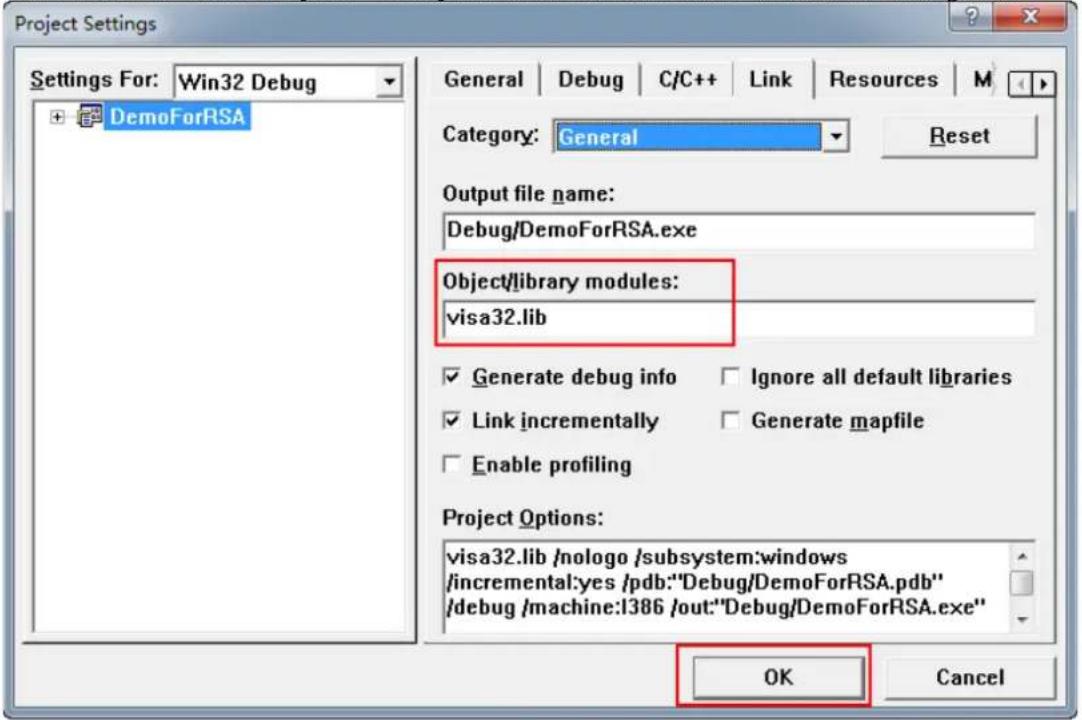
- Click Tools → Options to open the "Options" dialog box. Then, click the Directories tab. Select Include files from the drop-down list under Show directories for. Double click the empty space under Directories to enter the specified path of Include files: C:\Program Files\IVI Foundation\VISA\WinNT\include. Click OK to close the dialog box. Select Library files from the drop-down list under Show directories for. Double click the empty space under Directories to enter the specified path of Library files: C:\Program Files\IVI Foundation\VISA\WinNT\lib\msc. Click OK to close the dialog box.
Note: The two paths added here are related to the installation path of NI-VISA on your PC. By default, NI-VISA is installed under C:\Program Files\IVI Foundation\VISA.
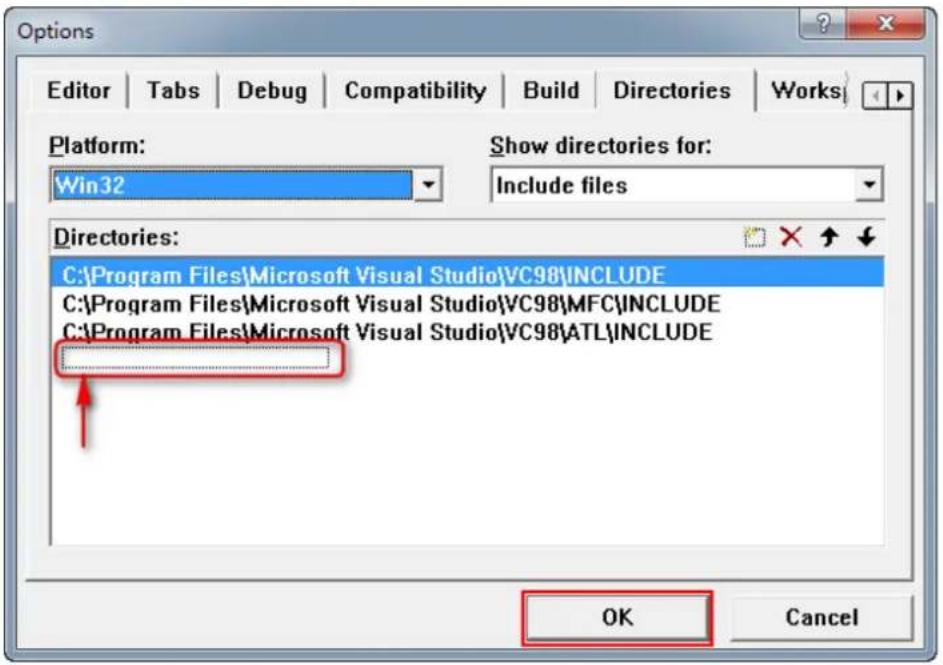
By now, VISA library has been added.
- Add the Text, Edit, and Button controls, as shown in the figure below.
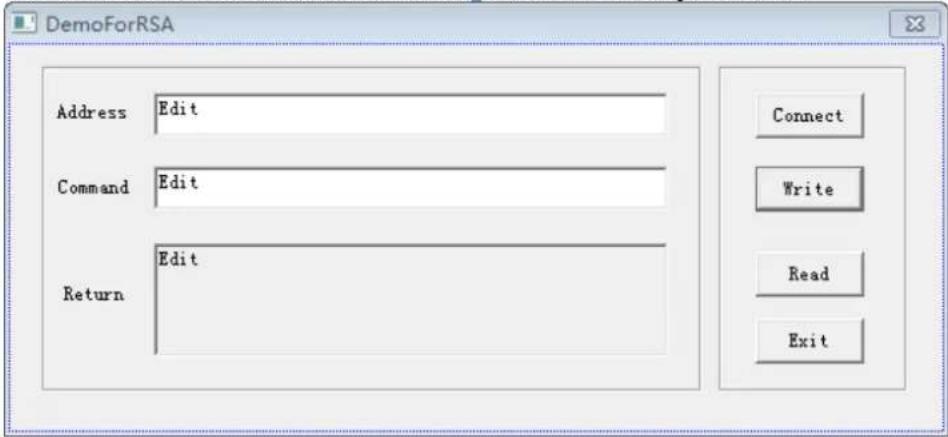
- Add the control variables.
Click View → ClassWizard, and then click the Member Variables tab to add the following three variables:
Address CString m_strInstrAddr Command CString m_strCommand Return CString m_strResult
- Encapsulate the read and write operations of VISA.
1) Encapsulate the write operation of VISA for easier operation. bool CDemoForRSADlg::InstrWrite(CString strAddr, CString strContent) //Write operation { ViSession defaultRM,instr; ViStatus status; ViUInt32 retCount; char * SendBuf = NULL; char * SendAddr = NULL; bool bWriteOK = false; CString str;
// Change the address's data style from CString to char*
SendAddr = strAddr.GetBuffer(strAddr.GetLength());
strcpy(SendAddr,strAddr);
strAddr.ReleaseBuffer();

// Change the command's data style from CString to char*
SendBuf = strContent.GetBuffer(strContent.GetLength());
strcpy(SendBuf,strContent);
strContent.ReleaseBuffer();

//Open a VISA resource
status = viOpenDefaultRM(&defaultRM);
if (status < VI_SUCCESS)
{
    AfxMessageBox("No VISA resource was opened!");
    return false;
}

status = viOpen(defaultRM, SendAddr, VI_NULL, VI_NULL, &instr);

//Write command to the instrument
status = viWrite(instr, (unsigned char *)SendBuf, strlen(SendBuf), &retCount);

//Close the system
status = viClose(instr);
status = viClose(defaultRM);

return bWriteOK;
}

2) Encapsulate the read operation of VISA for easier operation.
bool CDemoForRSADlg::InstrRead(CString strAddr, CString *pstrResult) //Read operation
{
    ViSession defaultRM,instr;
    ViStatus status;
    ViUInt32 retCount;
    char * SendAddr = NULL;
    unsigned char RecBuf[MAX_REC_SIZE];
    bool bReadOK = false;
    CString str;

    // Change the address's data style from CString to char*
    SendAddr = strAddr.GetBuffer(strAddr.GetLength());
    strcpy(SendAddr,strAddr);
    strAddr.ReleaseBuffer();

    memset(RecBuf,0,MAX_REC_SIZE);

    //Open a VISA resource
status = viOpenDefaultRM(&defaultRM);
if (status < VI_SUCCESS)
{
    // Error Initializing VISA...exiting
    AfxMessageBox("No VISA resource was opened!");
    return false;
}

//Open the instrument
status = viOpen(defaultRM, SendAddr, VI_NULL, VI_NULL, &instr);

//Read from the instrument
status = viRead(instr, RecBuf, MAX_REC_SIZE, &retCount);

//Close the system
status = viClose(instr);
status = viClose(defaultRM);

(*pstrResult).Format("%s", RecBuf);

return bReadOK;
}

3) Encapsulate the read operation with exception handling function of VISA.
ViStatus CDemoForRSADlg::OpenVisaDevice(CString strAddr) //Open a VISA device
{
    ViStatus status;
    char * SendAddr = NULL;

    // Change the address's data style from CString to char*
    SendAddr = strAddr.GetBuffer(strAddr.GetLength());
    strcpy(SendAddr, strAddr);
    strAddr.ReleaseBuffer();

    //Open a VISA resource
    status = viOpenDefaultRM(&m_SessRM);

    if (status == 0)
    {
    //Open the device
    status = viOpen(m_SessRM, SendAddr, VI_NULL, VI_NULL, &m_SessInstr);

    //If you fail to open the connection, close the resource
    if (status != 0)
    {
    viClose(m_SessRM);
    }
    }

    return status;
}

ViStatus CDemoForRSADlg::CloseVisaDevice() //Close a VISA device
{
    ViStatus status;

    //Close the device
    status = viClose(m_SessInstr);

    if (status == 0)
    {
    //close the resource
    status = viClose(m_SessRM);
    }

    return status;
bool CDemoForRSADlg::InstrWriteEx(CString strAddr, CString strContent) //Write operation with exception handling
{
    ViStatus status;
    ViUInt32 retCount;
    char * SendBuf = NULL;
    bool bWriteOK = true;

    // Change the address's data style from CString to char*
    SendBuf = strContent.GetBuffer(strContent.GetLength());
    strcpy(SendBuf, strContent);
    strContent.ReleaseBuffer();

    do
    {
    //Write command to the instrument
    status = viWrite(m_SessInstr, (unsigned char *)SendBuf, strlen(SendBuf), &retCount);

    //If an error occurs, perform error handling
    if (status < 0)
    {
    //If the time exceeds the limit value, resend the command after a delay of 1s
    if (VI_ERROR_TMO == status)
    {
    Sleep(1000);
    status = viWrite(m_SessInstr, (unsigned char *)SendBuf, strlen(SendBuf), &retCount);
    }
    else
    {
    //If another error occurs, reopen the connection after the connection is closed and resend the command
    status = CloseVisaDevice();
    Sleep(1000);
    status = OpenVisaDevice(m_strInstrAddr);
    if (status == 0)
    {
    status = viWrite(m_SessInstr, (unsigned char *)SendBuf, strlen(SendBuf), &retCount);
    }
    }
    }
    } while (status < 0);

    return bWriteOK;
}

bool CDemoForRSADlg::InstrReadEx(CString strAddr, CString *pstrResult) //Read operation with exception handling
{
    ViStatus status;
    ViUInt32 retCount;
    char * SendAddr = NULL;
    unsigned char RecBuf[MAX_REC_SIZE];
bool bReadOK = true;

// Change the address's data style from CString to char*
SendAddr = strAddr.GetBuffer(strAddr.GetLength());
strcpy(SendAddr,strAddr);
strAddr.ReleaseBuffer();

memset(RecBuf,0,MAX_REC_SIZE);

do
{
    //Read from the instrument
    status = viRead(m_SessInstr, RecBuf, MAX_REC_SIZE, &retCount);
    if (status < 0)
    {
    //If the time exceeds the limit value, read from the instrument after a delay of 1s
    if (VI_ERROR_TMO == status)
    {
    Sleep(1000);
    status = viRead(m_SessInstr, RecBuf, MAX_REC_SIZE, &retCount);
    }
    else
    {
    //If another error occurs, reopen the connection after the connection is closed and reread from instrument
    status = CloseVisaDevice();
    Sleep(1000);
    status = OpenVisaDevice(m_strInstrAddr);
    if (status == 0)
    {
    status = viRead(m_SessInstr, RecBuf, MAX_REC_SIZE, &retCount);
    }
    }
}

while (status < 0);

(*pstrResult).Format("%s",RecBuf);

return bReadOK;
}
- Add the control message response codes.
1) Connect to the instrument
void CDemoForRSADlg::OnBtConnectInstr() // Connect to the instrument
{
    // TODO: Add your control notification handler code here
    ViStatus status;
    ViSession defaultRM;
    ViString expr = "?*";
    ViPFindList findList = new unsigned long;
    ViPUInt32 retcnt = new unsigned long;
    ViChar instrDesc[1000];
    CString strSrc = "";
    CString strInstr = "";
    unsigned long i = 0;
    bool bFindRSA = false;
status = viOpenDefaultRM(&defaultRM);
if (status < VI_SUCCESS)
{
    // Error Initializing VISA...exiting
    MessageBox("No VISA instrument was opened ! ");
    return;
}

memset(instrDesc,0,1000);

// Find resource
status = viFindRsrc(defaultRM,expr,findList, retcnt, instrDesc);

for (i = 0;i < (* retcnt);i++)
{
    // Get instrument name
    strSrc.Format("%s",instrDesc);
    InstrWrite(strSrc,"*IDN?");
    ::Sleep(200);
    InstrRead(strSrc,&strInstr);

    // If the instrument(resource) belongs to the RSA series then jump out //from the loop
    strInstr.MakeUpper();
    if (strInstr.Find("RSA") >= 0)
    {
    bFindRSA = true;
    m_strInstrAddr = strSrc;
    break;
    }

    // Find next instrument
    status = viFindNext(*findList,instrDesc);
}

if (bFindRSA == false)
{
    MessageBox("Didn't find any RSA!");
}
UpdateData(false);
}

2) Write Operation
void CDemoForRSADlg::OnBtWrite() //Write operation
{
    // TODO: Add your control notification handler code here
UpdateData(true);
    if (m_strInstrAddr.IsEmpty())
    {
    MessageBox("Please connect to the instrument first!");
    }
    InstrWrite(m_strInstrAddr,m_strCommand);
    m_strResult.Empty();
    UpdateData(false);
}

3) Read Operation
void CDemoForRSADlg::OnBtRead() //Read operation
{
//TODO: Add your control notification handler code here
UpdateData(true);
InstrRead(m_strInstrAddr,&m_strResult);
UpdateData(false);
}
- Run the results.
1) Click Connect to search for the spectrum analyzer;
2) Input "*IDN?" in the "Command" edit box;
3) Click Write to write the command into the spectrum analyzer;
4) Click Read to read the return value.
The execution result is as shown in the figure below.
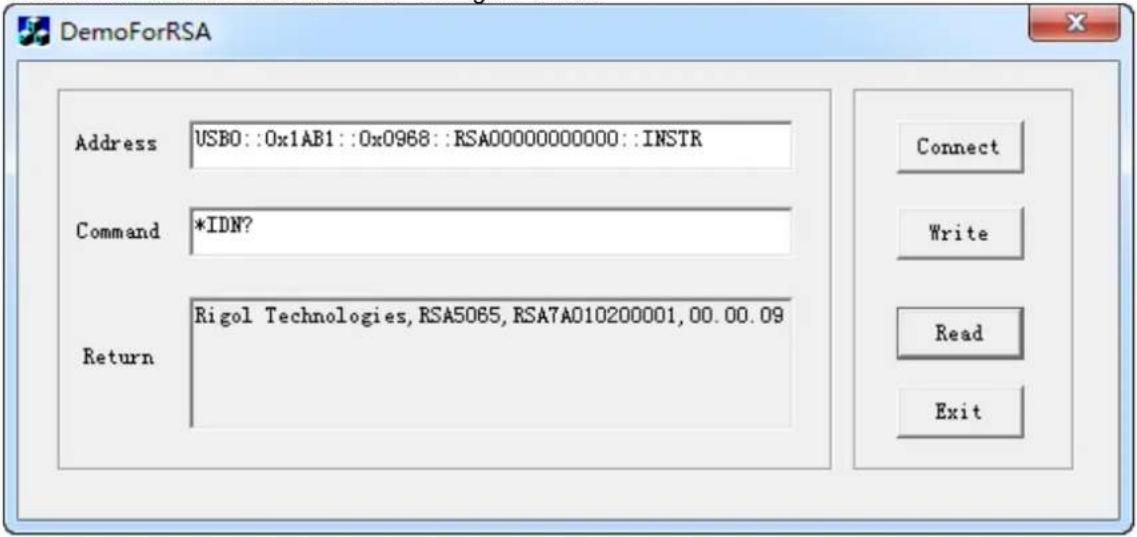
Visual Basic 6.0 Programming Example
Enter the Visual Basic 6.0 programming environment, and perform the following procedures.
-
Build a standard application program project (Standard EXE), and name it "DemoForRSA".
-
Open Project → Add File.... Search for the visa32.bas file from the include folder in the installation path of NI-VISA, and then add the file to the project. The visa32.bas module contains all VISA functions and constant statements.
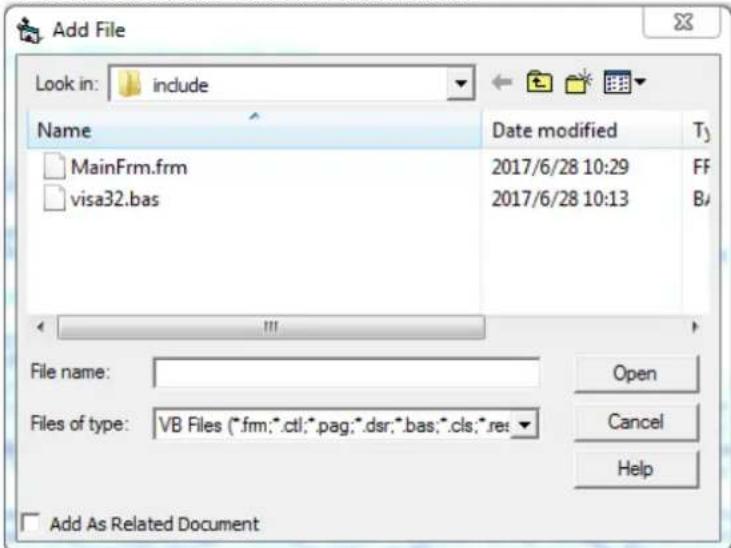
Then, add the Declare Sub Sleep Lib "kernel32" (ByVal dw Milliseconds As Long) statement into the visa32.bas module; or you can also create a new module to declare the Sleep function.
- Add the Label, Text, and Button controls. The layout interface for adding controls is as follows:
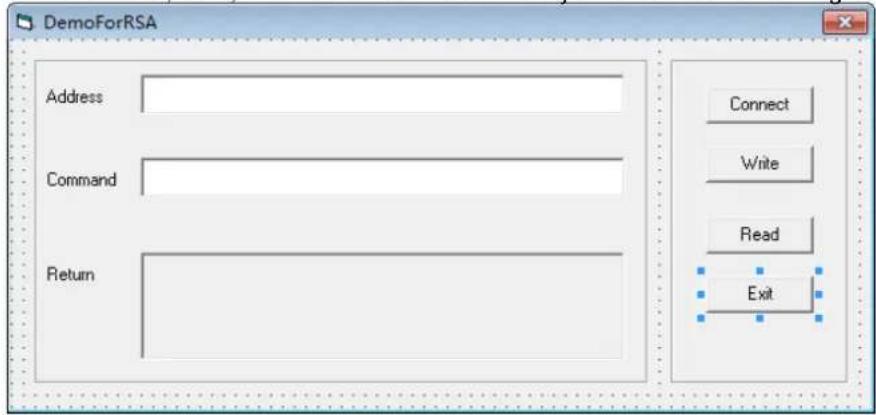
- Encapsulate the read and write operations of VISA.
1) Encapsulate the write operation of VISA for easier operation.
'Function Name: InstrWrite
'Function: Send command to the instrument
'Input: rsrcName, instrument(resource) name strCmd, Command
Public Sub InstrWrite(rsrcName As String, strCmd As String)
Dim status As Long
Dim dfltRM As Long
Dim sesn As Long
Dim rSize As Long

'Initialize the system
status = viOpenDefaultRM(dfltRM)
'Failed to initialize the system
If (status < VI_SUCCESS) Then
    MsgBox " No VISA resource was opened! "
    Exit Sub
End If

'Open the VISA instrument
status = viOpen(dfltRM, rsrcName, VI_NULL, VI_NULL, sesn)
'Failed to open the instrument
If (status < VI_SUCCESS) Then
    MsgBox "Failed to open the instrument!"
    Exit Sub
End If

'Write command to the instrument
status = viWrite(sesn, strCmd, Len(strCmd), rSize)
'Failed to write to the instrument
If (status < VI_SUCCESS) Then
    MsgBox " Faild to write to the instrument!"
    Exit Sub
End If

'Close the system
status = viClose(sesn)
status = viClose(dfltRM)

nd Sub
2) Encapsulate the read operation of VISA for easier operation.
'Function Name: InstrRead
'Function: Read the return value from the instrument
'Input: rsrcName, Resource name
'Return: The string gotten from the instrument
Public Function InstrRead(rsrcName As String) As String
Dim status As Long
Dim dfltRM As Long
Dim sesn As Long
Dim strTemp0 As String * 256
Dim strTemp1 As String
Dim rSize As Long
'Begin by initializing the system
status = viOpenDefaultRM(dfltRM)
'Initialization failed
If (status < VI_SUCCESS) Then
    MsgBox " Failed to open the instrument!"
    Exit Function
End If
'Open the instrument
status = viOpen(dfltRM, rsrcName, VI_NULL, VI_NULL, sesn)
'Failed to open the instrument
If (status < VI_SUCCESS) Then
MsgBox "Failed to open the instrument!"
Exit Function
End If

'Read from the instrument
stasus = viRead(sesn, strTemp0, 256, rSize)
'Reading failed
If (status < VI_SUCCESS) Then
    MsgBox "Failed to read from the instrument!"
    Exit Function
End If

'Close the system
status = viClose(sesn)
status = viClose(dfltRM)

'Remove the space at the end of the string
strTemp1 = Left(strTemp0, rSize)
InstrRead = strTemp1
End Function
- Add the control event codes.
1) Connect to the instrument
'Connect to the instrument
Private Sub CmdConnect_Click()
    Const MAX_CNT = 200
    Dim status As Long
    Dim dfltRM As Long
    Dim sesn As Long
    Dim fList As Long
    Dim buffer As String * MAX_CNT, Desc As String * 256
    Dim nList As Long, retCount As Long
    Dim rsrcName(19) As String * VI_FIND_BUFLEN, instrDesc As String * VI_FIND_BUFLEN
    Dim i, j As Long
    Dim strRet As String
    Dim bFindRSA As Boolean

'Initialize the system
status = viOpenDefaultRM(dfltRM)
'Initialization failed
If (status < VI_SUCCESS) Then
    MsgBox " No VISA resource was opened ! "
    Exit Sub
End If

'Find instrument resource
Call viFindRsrc(dfltRM, "USB?* INSTR", fList, nList, rsrcName(0))
'Get the list of the instruments (resources)
strRet = ""
bFindRSA = False
For i = 0 To nList - 1
'Get the instrument name
InstrWrite rsrcName(i), "*IDN?"
Sleep 200
strRet = InstrRead(rsrcName(i))
'Continuing searching for the resource until an RSA instrument is found
strRet = UCase(strRet)
j = InStr(strRet, "RSA")
If (j >= 0) Then
    bFindRSA = True
    Exit For
End If

Call viFindNext(fList + i - 1, rsrcName(i))
Next i
'Display'
If (bFindRSA = True) Then
    TxtInsAddr.Text = rsrcName(i)
Else
    TxtInsAddr.Text = ""
End If
End Sub
2) Write Operation
'Write the command to the instrument
Private Sub CmdWrite_Click()
    If (TxtInsAddr.Text = "") Then
    MsgBox ("Please write the instrument address! ")
End If

InstrWrite TxtInsAddr.Text, TxtCommand.Text
End Sub
3) Read Operation
'Read the return value from the instrument
Private Sub CmdRead_Click()
    Dim strTemp As String
    strTemp = InstrRead(TxtInsAddr.Text)
    TxtReturn.Text = strTemp
End Sub
- Run the results.
1) Click Connect to search for the spectrum analyzer;
2) Input "*IDN?" in the "Command" edit box;
3) Click Write to write the command into the spectrum analyzer;
4) Click Read to read the return value.
The execution result is as shown in the figure below.
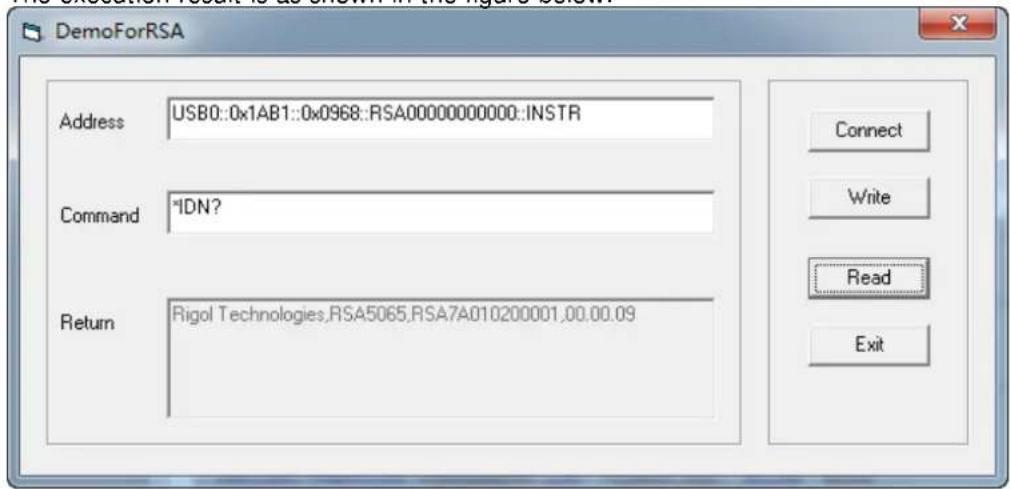
LabVIEW 2010 Programming Example
Enter the Labview 2010 programming environment, and perform the following procedures.
-
Create a VI file, and name it "DemoForRSA".
-
Add controls to the front panel interface, including the Address field, Command field, and Return field, the Connect button, the Write button, the Read button, and the Exit button.
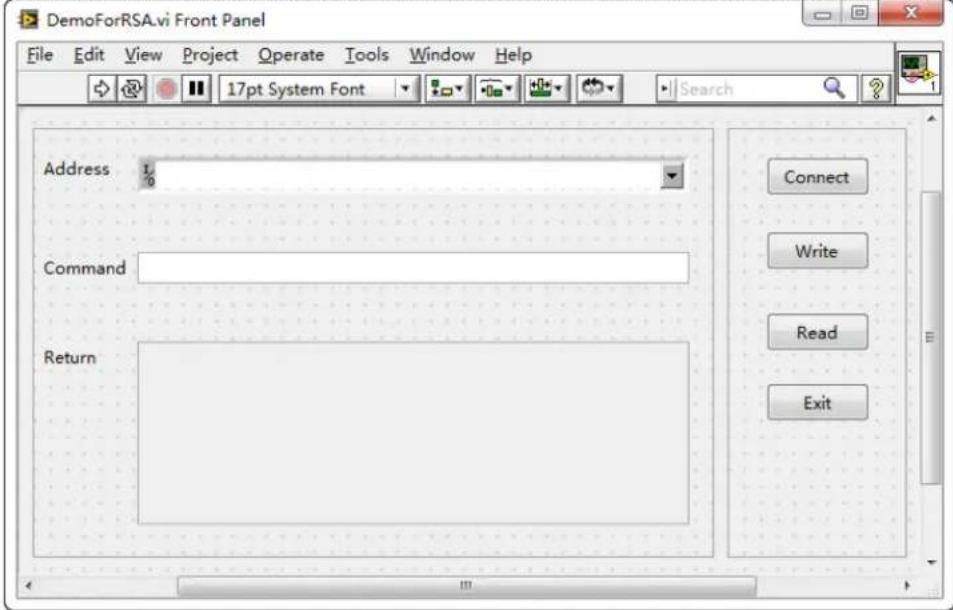
- Click Show Block Diagram under the Window menu to create an event structure.
![DemoForRSA.vi Block Diagram * File Edit View Project Operate Tools Window Help Address Command Return Connect Write Read Exit L/C abc abc TF TF TF TF [0] Timeout Type Time](/content/2026/05/841767/images/9f2374ab74b9fdedd30f2074fe125b5ea6b0ddaf7369d599e4fc1d90f8c56b25.jpg)
- Add the events (including connecting to the instrument, write operation, read operation, and exit) 1) Connect to the instrument
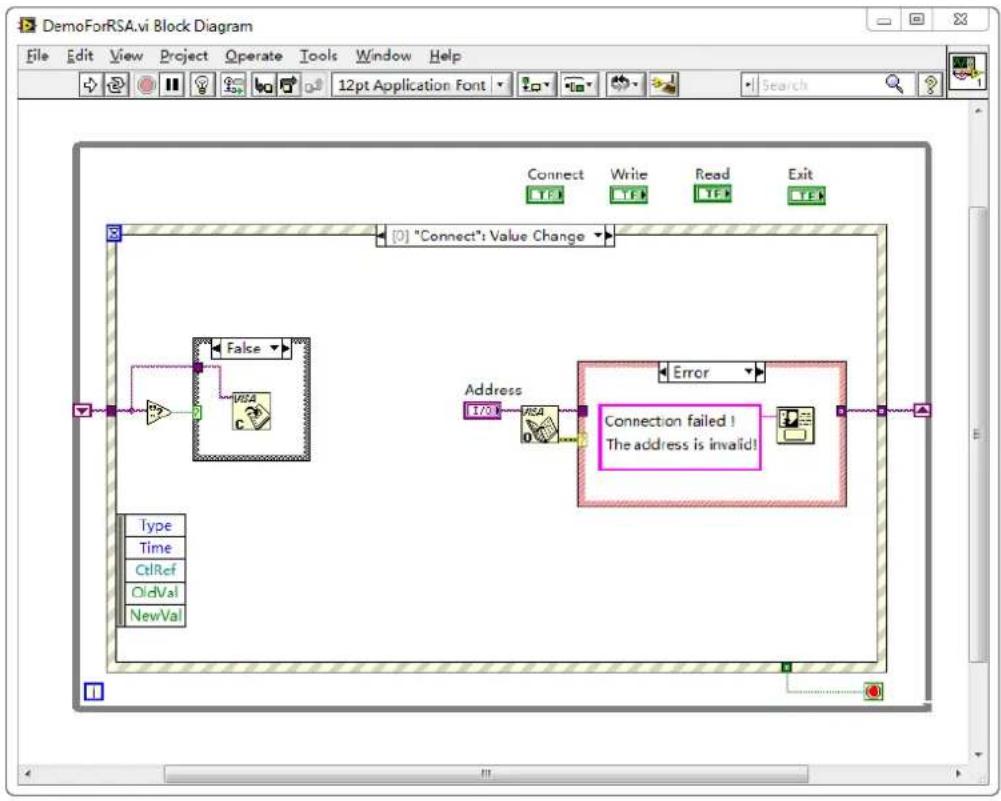
flowchart
graph TD
    A["Connect"] --> B["Write"]
    B --> C["Read"]
    C --> D["Exit"]
    E["Type"] --> F["Time"]
    F --> G["CtRef"]
    G --> H["OldVal"]
    H --> I["NewVal"]
    J["False"] --> K["RSA C"]
    L["Address"] --> M["Error"]
    N["Connection failed ! The address is invalid!"] --> O["Image"]
2) Write operation (including error confirmation)
![DemoForRSA.vi Block Diagram File Edit View Project Operate Tools Window Help Connect Write Read Exit [1] "Write": Value Change True Please connect to the instrument first! Type Time CtrlRef OldVal NewVal](/content/2026/05/841767/images/cd873e7154124c9f0c3611018c9d3e416261673311168b1f5ea5bd217c5a1d91.jpg)
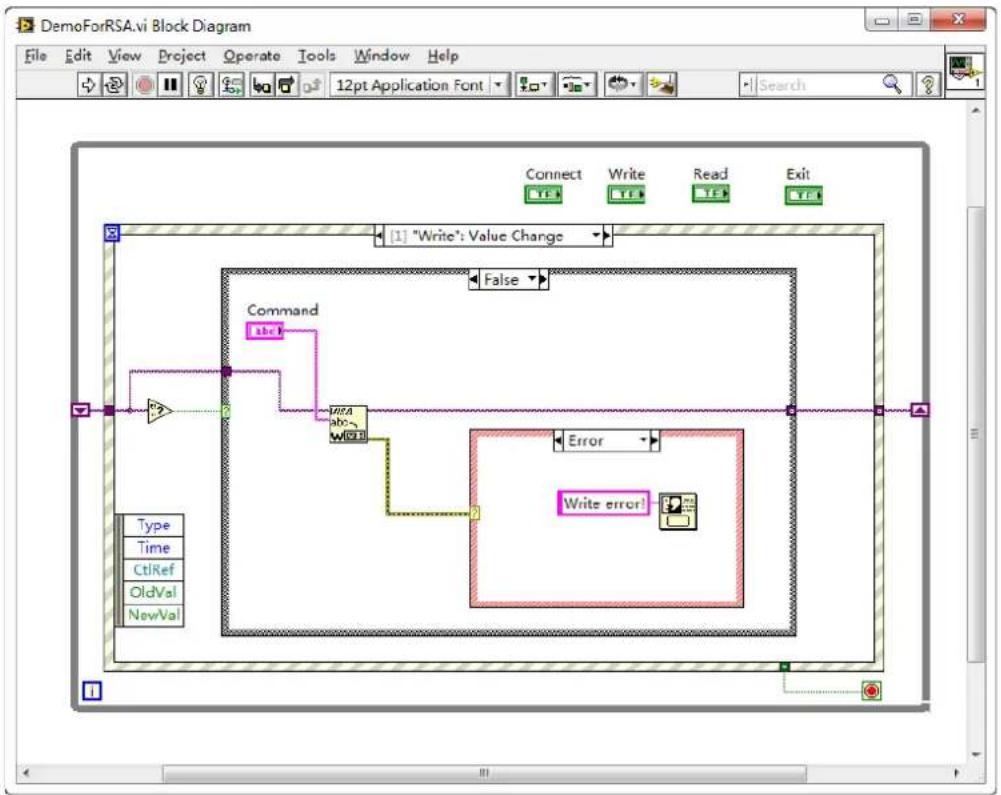
flowchart
graph TD
    A["Command"] --> B["abc"]
    B --> C["Write error!"]
    C --> D["Error"]
    D --> E["False"]
    E --> F["Connect"]
    E --> G["Write"]
    E --> H["Read"]
    E --> I["Exit"]
3) Read operation (including error correction advice)
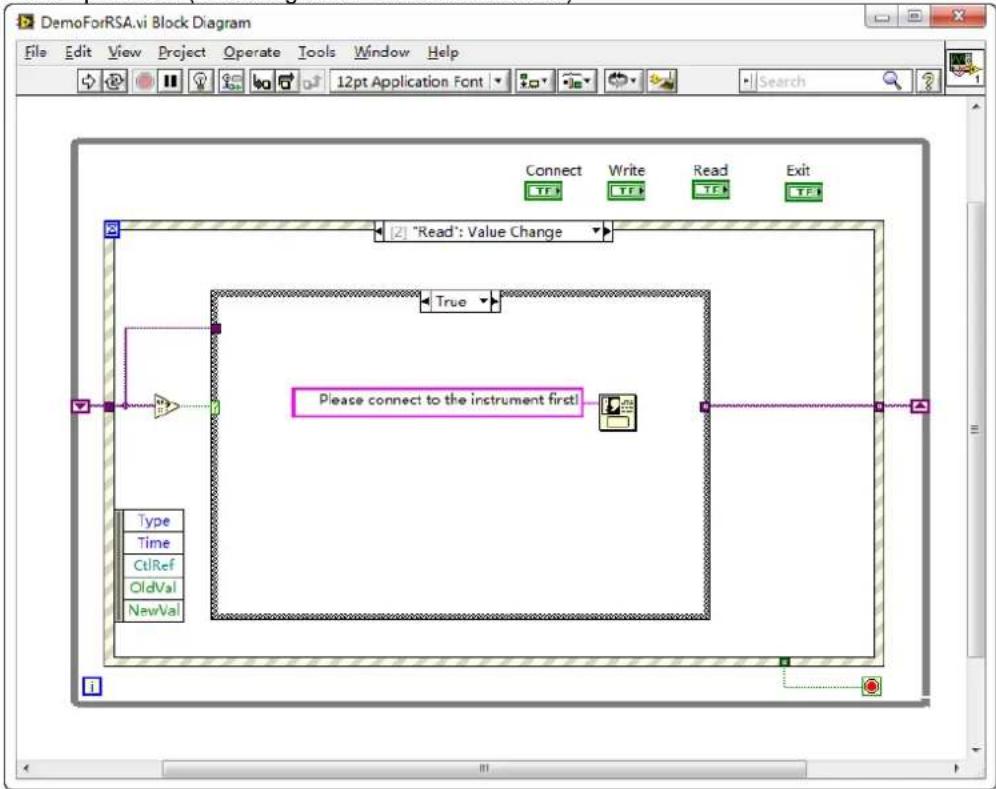
flowchart
graph TD
    A["Connect"] --> B["Write"]
    B --> C["Read"]
    C --> D["Exit"]
    E["True"] --> F["Please connect to the instrument first!"]
    G["Type"] --> H["Time"]
    I["CtRef"] --> J["OldVal"]
    K["NewVal"] --> L["End"]
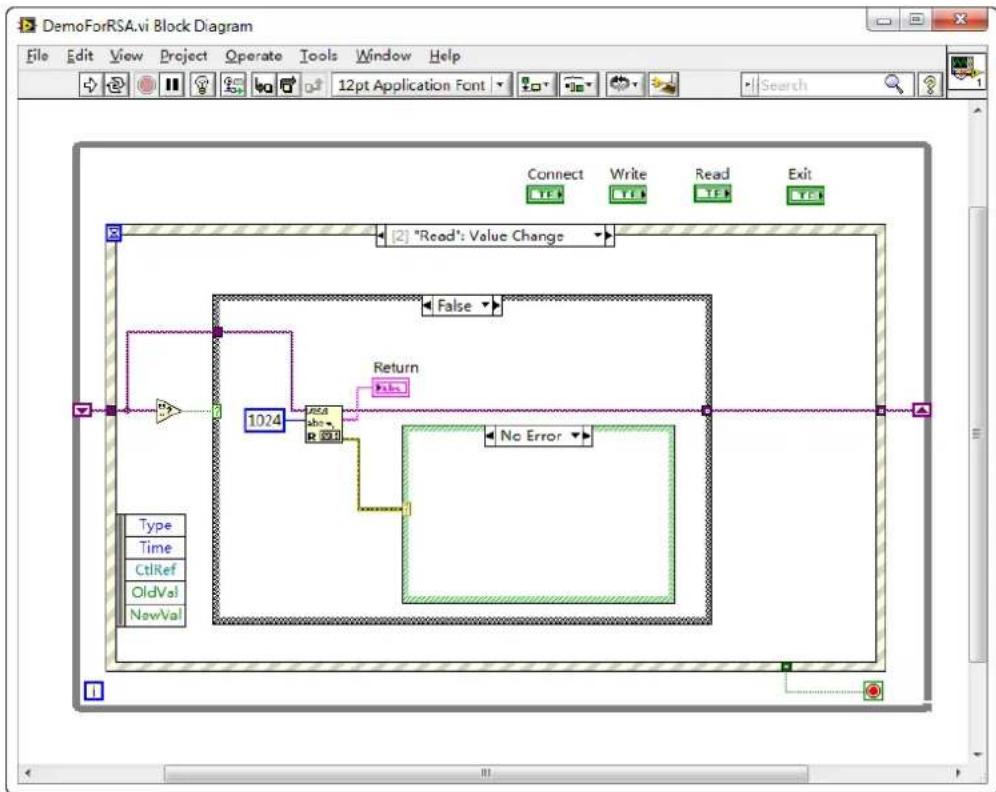
flowchart
graph TD
    A["1024"] --> B["Add R"]
    B --> C["No Error"]
    D["False"] --> E["Connect"]
    F["Write"] --> G["Write"]
    H["Read"] --> I["Read"]
    J["Exit"] --> K["Exit"]
    style A fill:#f9f,stroke:#333
    style B fill:#ccf,stroke:#333
    style C fill:#cfc,stroke:#333
    style D fill:#fcc,stroke:#333
    style E fill:#ffc,stroke:#333
    style F fill:#fcc,stroke:#333
    style G fill:#fcc,stroke:#333
    style H fill:#fcc,stroke:#333
    style I fill:#fcc,stroke:#333
    style J fill:#fcc,stroke:#333
    style K fill:#fcc,stroke:#333
4) Exit
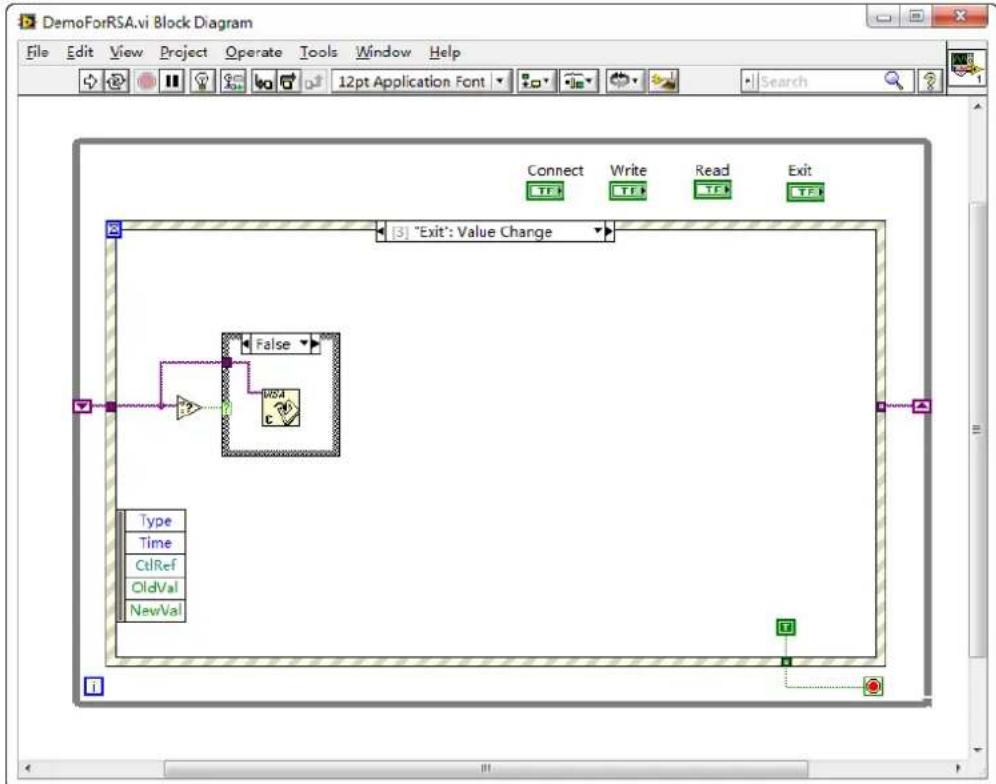
flowchart
graph TD
    A["False"] --> B["Time"]
    B --> C["EndVal"]
    D["Type"] --> E["Time"]
    E --> F["CtRef"]
    F --> G["OldVal"]
    G --> H["NewVal"]
    I["Connect"] --> J["Write"]
    J --> K["Read"]
    K --> L["Exit"]
5) Run the program, and then the following interface is displayed below. Click the VISA resource name from the drop-down list under Address, and click Connect to connect the instrument. Then, input a command in the Command field. Click Write to write the command to the instrument. If the command is a query (e.g.*IDN?), click Write to write the command into the instrument, and then click Read. The return value is displayed in the Return field. Click Exit to
exit the program.
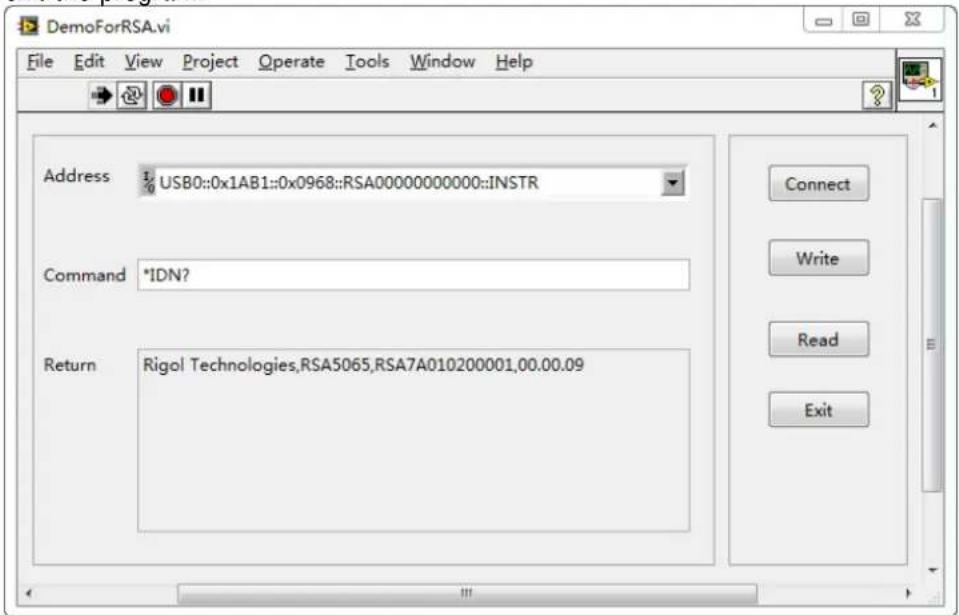
Linux Programming Example
This section illustrates how to program and control the spectrum analyzer to realize the common functions in Linux operating system.
Programming Preparations
- Programming environment:
Operating system: Fedroa 8 (Linux-2.6.23)
GCC version: gcc-4.1.2
- Install the VISA library. First, check whether your PC has installed NI's VISA library. If not, download it from NI website (http://www.ni.com/visa/). The installation procedures are as follows:
Download the VISA library NI-VISA-4.4.0.ISO from the NI website.
Create a new directory.
# mkdir NI VISA
Mount the isofile
mount -o loop -t iso9660 NI-VISA-4.4.0.iso NI_VISA
Enter the NI_VISA directory to install
# cd NI VISA
./INSTALL
Unmount the isofile
# umount NI_VISA
After the installation is finished, the default installation path is /usr/local.
- Build communication between the spectrum analyzer and the PC. Use the network cable to connect the analyzer to the PC via the LAN interface on the rear panel of the analyzer. You can also use a network cable to connect the spectrum analyzer to the local area network where the PC resides.
After the spectrum analyzer is connected to the PC properly, configure the network address for the spectrum analyzer to make its address to be within the same network segment where the PC resides. For example, if the network address and DNS setting configured for the PC are as shown in the figures
below, then, the network address of the spectrum analyzer should be configured as follows.
IP Address: 172.16.3.X*
Default Gateway: 172.16.3.1
Subnet Mask: 255.255.255.0
DNS: 172.16.2.2
Note*: X can be any value not in use from 2 to 254.
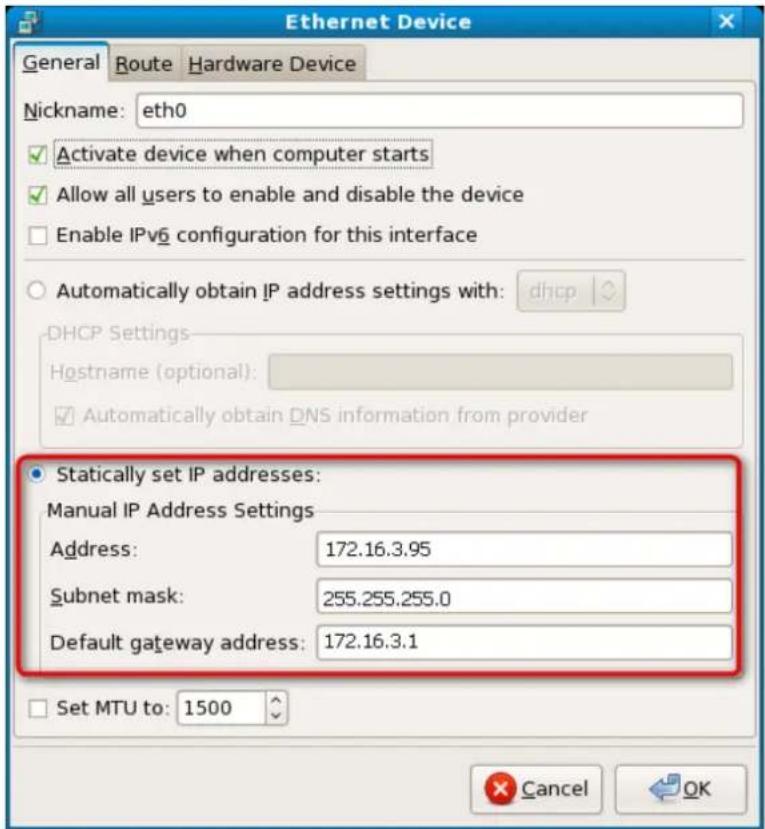
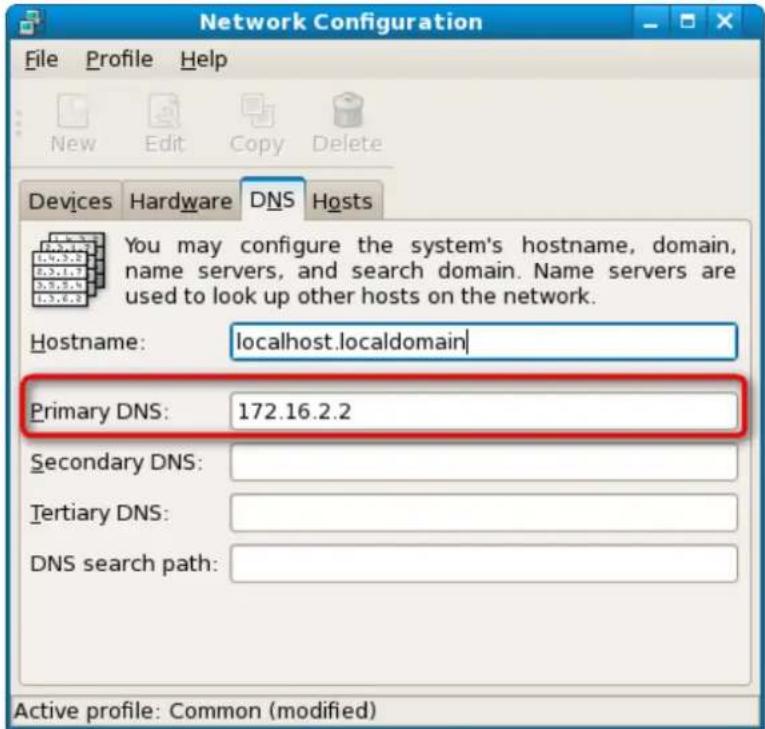
- Use either of the following two methods to add the library location to the search path of the library, so that the program can load the installed library file automatically.
Method 1: Specify the search path of the library in the environment variable LD_LIBRARY_PATH. Operation Method: Add the library file path /usr/local/lib to the LD_LIBRARY_PATH variable in the /etc/profile file, as shown in the figure below.
USER="`id -un`
LOGNAME=$USER
MAIL="/var/spool/mail/$USER"
fi

HOSTNAME='/bin/hostname`
HISTSIZE=1000

if [ -z "INPUTRC" -a ! -f "HOME/.inputrc" ]; then
    INPUTRC=/etc/inputrc
fi
LD_LIBRARY_PATH=$LD_LIBRARY_PATH:/usr/local/lib
#:/usr/local/vxipnp/linux/lib
export PATH USER LOGNAME MAIL HOSTNAME HISTSIZE INPUTRC LD_LIBRARY_PATH

for i in /etc/profile.d/*.sh ; do
    if [ -r "$i" ]; then
    . $i
    fi
done

unset i
Method 2: Add the search path of the library in the /etc/ld.so.conf file.
Operation Method: # echo "/usr/local/lib" >> /etc/ld.so.conf, as shown in the figure below. After setting the search path of the library in /etc/ld.so.conf, run the /sbin/ldconfig command to update /etc/ld.so.cache (this command should have the root permission) to ensure the location of the library when executing the program.
include 1d.so.conf.d/*.conf
/usr/local/lib

"/etc/1d.so.conf" 2L, 43C
Linux Programming Procedures
- Edit the DemoForRSA.h header file and declare a class to encapsulate the operation and property of the instrument.
<h1 id="ifndef-demo_for_rsa_h">ifndef DEMO_FOR_RSA_H</h1>
<h1 id="define-demo_for_rsa_h">define DEMO_FOR_RSA_H</h1>
#include <stdio.h>
#include <string.h>
#include <stdlib.h>
#include <iostream>
//# include <syswait.h>
using namespace std;
#define MAX_SEND_BUF_SIZE 50
#define MAX_REC_SIZE 300
class DemoForRSA
{
    // Construction
public:
    DemoForRSA();
bool InstrRead(string strAddr, string & pstrResult);
bool InstrWrite(string strAddr, string strContent);
bool ConnectInstr();
string m_strInstrAddr;
string m_strResult;
string m_strCommand;
};
void makeup(string & instr);
#endif
- Edit the DemoForRSA.cpp file to realize various operations of the instrument.
#include "visa.h"
#include "DemoForRSA.h"
DemoForRSA::DemoForRSA()
{
    m_strInstrAddr = "";
    m_strResult = "";
    m_strCommand = "";
}

bool DemoForRSA::ConnectInstr()
{
    ViUInt32 retCount;
    ViStatus status;
    ViSession defaultRM;
    ViString expr = "?*";
    ViPFindList findList = new unsigned long;
    ViPUInt32 retcnt = new unsigned long;
    string strSrc = "";
string strInstr = "";
ViChar instrDesc[1000];

unsigned long i = 0;
bool bFindRSA = false;
memset(instrDesc, 0, 1000);

//Turn on the VISA device
status = viOpenDefaultRM(&defaultRM);

if (status < VI_SUCCESS)
{
    cout << "No VISA equipment!" << endl;
    return false;
}

//Search for resources
status = viFindRsrc(defaultRM, expr, findList, retcnt, instrDesc);

for (i = 0; i < (* retcnt); i++)
{
    // Acquire the instrument name
    strSrc = instrDesc;

    InstrWrite(strSrc, "*IDN?");
    usleep(200);
    InstrRead(strSrc, strInstr);

    // If the RSA series is found, then exit
    makeup(strInstr);
    if (strInstr.find("RSA", 0) > 0)
    {
    bFindRSA = true;
    m_strInstrAddr = strSrc;
    break;
    }

    // Acquire the next device
    status = viFindNext(*findList, instrDesc);
}

if (bFindRSA == false)
{
    printf("RSA device not found!\n");
    return false;
}

return true;
}

bool DemoForRSA::InstrWrite(string strAddr, string strContent) // Write operation
{
ViSession defaultRM, instr;
ViStatus status;
ViUInt32 retCount;
char * SendBuf = NULL;
char * SendAddr = NULL;
bool bWriteOK = false;
string str;

//Address conversion, convert the string type to char*
SendAddr = const_cast<char*>(strAddr.c_str());

//Address conversion, convert the string type to char*
SendBuf = const_cast<char*>(strContent.c_str());

//Turn on the specified device
status = viOpenDefaultRM(&defaultRM);
if (status < VI_SUCCESS)
{
    cout<<"No VISA equipment!"<<endl;
    return false;
}

status = viOpen(defaultRM, SendAddr, VI_NULL, VI_NULL, &instr);

//Write command to the device
status = viWrite(instr, (unsigned char *)SendBuf, strlen(SendBuf), &retCount);

//Turn off the device
status = viClose(instr);
status = viClose(defaultRM);
return bWriteOK;
}

bool DemoForRSA::InstrRead(string strAddr, string & pstrResult) //Read operation
{
ViSession defaultRM,instr;
ViStatus status;
ViUInt32 retCount;
char* SendAddr = NULL;
char * result = NULL;
bool bReadOK = false;
unsigned char RecBuf[MAX_REC_SIZE];
string str;
memset(RecBuf,0,MAX_REC_SIZE);

result=char*)malloc(MAX_REC_SIZE*sizeof(char));
memset(result,0,MAX_REC_SIZE);

//Address conversion, convert the string type to char*
SendAddr=const_cast<char*>(strAddr.c_str());

//Turn on the VISA device
status = viOpenDefaultRM(&defaultRM);
if (status < VI_SUCCESS)
{
    // Error Initializing VISA...exiting
    cout<<"No VISA equipment!"<<endl;
    return false;
}

//Turn on the specified device
status = viOpen(defaultRM, SendAddr, VI_NULL, VI_NULL, &instr);

//Read from the device
status = viRead(instr, RecBuf, MAX_REC_SIZE, &retCount);

//Turn off the device
status = viClose(instr);
status = viClose(defaultRM);
sprintf(result, "%s", RecBuf);
pstrResult = result;
free(result);
return bReadOK;
}

void makeup(string &instr)
{
    string outstr = "";
    if (instr == "")
    {
    exit(0);
    }

    for (int i = 0; i < instr.length(); i++)
    {
    instr[i] = toupper(instr[i]);
    }
}
- Edit the function file mainloop.cpp to complete the flow control.
include "DemoForRSA.h"
void menudisplay()
{
    cout << "\t\t Please operate the instrument:\n read write quit" << endl;
}

int main()
{
    DemoForRSA demo;
    char temp[50];
    if (!demo.ConnectInstr())
    {
    cout << "can not connect the equipment!" << endl;
    return 0;
    }
    else
    {
    cout << "\n connect equipment success!" << endl;
    cout << "the equipment address is :" << demo.m_strInstrAddr << endl;
    }

    while(1)
    {
    menudisplay();
    // cin >> demo.m_strCommand;
    cin.getline(temp, 50);
    demo.m_strCommand = temp;
    if (demo.m_strCommand[0] = 'r' && demo.m_strCommand[1] = 'e'
    }
}
&& demo.m_strCommand[2]='a' && demo.m_strCommand[3]='d')
{
    //demo.InstrWrite(demo.m_strInstrAddr,"*IDN?");
    //demo.InstrRead(demo.m_strInstrAddr,demo.m_strResult);
    cout<<"read result:"<<demo.m_strResult<<endl;
    demo.m_strResult="";
}

else if (demo.m_strCommand[0]='w' && demo.m_strCommand[1]='r'
    && demo.m_strCommand[2]='i' && demo.m_strCommand[3]='t' &&
    demo.m_strCommand[4]='e')
{
    if (demo.m_strInstrAddr="")
    {
    cout<<"Please connect the instrument! \n";
    }
    demo.InstrWrite(demo.m_strInstrAddr,demo.m_strCommand.substr(5,40));
    usleep(200);

    //Read operation
    demo.InstrRead(demo.m_strInstrAddr,demo.m_strResult);

    }

    else if (demo.m_strCommand[0] == 'q' && demo.m_strCommand[1] == 'u'
    && demo.m_strCommand[2] == 'i' && demo.m_strCommand[3] == 't')
    {
    break;
    }
    else if(demo.m_strCommand != "")
    {
    cout<<"Bad command!"<<endl;
    }
}
return 1;
- makefile file
src = DemoForRSA.cpp mainloop.cpp DemoForRSA.h
obj = DemoForRSA.o mainloop.o
INCLUDE= -l/usr/local/vxipnp/linux/include
LIB= -lvisa -lc -lpthread
CC=
demo : $(obj)
(CC)(INCLUDE) (LIB) -o demo(obj)

mainloop.o : mainloop.cpp DemoForRSA.h
(CC) -c< -o $@
DemoForRSA.o: DemoForRSA.cpp DemoForRSA.h
(CC) -c< -o $@
.PHONY : clean
clean:
rm demo \$(obj)
5. Run the results.
1) #make
2) ./demo
3) When the program runs, the instrument is connected automatically. If no instrument is found, a prompt message "No VISA equipment!" is displayed, and the system exits the program. If the instrument is found and successfully connected, the following interface is displayed, as shown in the figure below.
4) Input write
5) Input "read" to read the return value, as shown in the figure below.
![[123456@localhost last]$ ./demo connetc equipment success! the equipment address is :TCPIP0::172.16.3.95::INSTR Please operate the instrument: read write quit write*IDN? Please operate the instrument: read write quit read read result:Rigo1 Technologies, RSA5065, RSA5B191300001, 00.00.09 Please operate the instrument: read write quit](/content/2026/05/841767/images/a42dad05b3276ccfbfd109d84bef198cb680a1e3260bd9f3aa0b1b4e5fb16277.jpg)
Chapter 4 Appendix
Appendix A: Default Settings
Sending the *RST command can restore the instrument to default settings, as shown in the table below.
| Parameter Name | GPSA Parameter Value | RTSA Parameter Value (RSA5000-B40) | |
| Non-PvT | PvT | ||
| FREQ | |||
| Center Freq | 3.25 GHz | 3.25 GHz | |
| Start Freq | 0 Hz | 3.23 GHz | |
| Stop Freq | 6.5 GHz | 3.27 GHz | |
| CF Step | Auto, 650 MHz | Auto, 4 MHz | |
| Freq Offset | 0 Hz | 0 Hz | |
| Signal Track | Off | -- | |
| SPAN | |||
| Span | 6.5 GHz | 40 MHz | |
| Ref Value | -- | -- | 0 us |
| Scale/Div | -- | -- | 2.99885 ms |
| Ref Position | -- | -- | Left |
| Auto Scale | -- | -- | Auto |
| AMPT | |||
| Ref Level | 0 dBm | 0 dBm | |
| Attenuation | Auto, 10 dB | Auto, 10 dB | |
| RF Preamp | Off | Off | |
| Y Axis Unit | dBm | dBm | |
| Scale Type | Log | Log | |
| Scale/Div | 10 dB | 10 dB | |
| Max Mixer Lvl | -10 dBm | -10 dBm | |
| Ref Offset | 0 dB | 0 dB | |
| BW | |||
| RBW | Auto, 3 MHz | Auto, 197.64 kHz (RBW2) | -- |
| SPAN/RBW Ratio | Auto, 106 | -- | -- |
| VBW | Auto, 3 MHz | -- | -- |
| VBW/RBW Ratio | Auto, 1 | -- | -- |
| Filter Type | -- | Gaussian | -- |
| Sweep | |||
| Sweep Points | 801 | -- | |
| Sweep Time | Auto, 1 ms | -- | |
| Acq Time | -- | Auto, 31.9960 ms | Auto, 21.9855 ms |
| Sweep Time Mode | Continuous | Continuous | |
| Sweep Time Rule | Normal | -- | |
| Trigger | |||
| Trigger Source | Free Run | Free Run | |
| Trigger Holdoff | Off, 100 ms | Off, 100 ms | |
| Auto Trig | Off, 100 ms | Off, 0 us | |
| Slope | Positive | Positive | |
| Trig Delay | Off, 1 us | Off, 1 us | |
| Trigger Level | -25 dBm | -- | |
| Acq/Trigger | -- | 1 | |
| Power | -- | 0 dB | |
| Mask Type | -- | Upper | |
| Trigger Mask | -- | Upper | |
| Trigger Criteria | -- | Enter | |
| Active Mask | -- | Upper | |
| Frequency | -- | 0 Hz | |
| Amplitude | -- | 0 dB | |
| Build From Trace | -- | Trace1 | |
| X Offset | -- | 0 Hz | |
| Y Offset | -- | 0 dB | |
| X Axis Type | -- | Relative | |
| Y Axis Type | -- | Relative | |
| Trace | |||
| Selected Trace | Trace1 | Trace1 | -- |
| Trace Type | Clear Write | Clear Write | -- |
| Trace Det | Normal | Pos Peak | Pos Peak |
| Detector Auto | On | On | On |
| Trace Update | On | On | On |
| Trace Display | On | On | On |
| Math Function | Off | Off | -- |
| Op1 | Trace5 | Trace5 | -- |
| Op2 | Trace6 | Trace6 | -- |
| Offset | 0 dB | 0 dB | -- |
| Reference | 0 dB | 0 dB | -- |
| TG[1] | |||
| Output | Off | -- | |
| Amplitude | -40 dBm | -- | |
| Amplitude Offset | 0 dB | -- | |
| Normalize | Off | -- | |
| Reference Level | 0 dB | -- | |
| Reference Position | 100% | -- | |
| Reference Trace | Off | -- | |
| Mode | |||
| Measurement Mode | GPSA | ||
| Mode Setup | |||
| Global CF Mode | Off, 3.25 GHz | Off, 3.25 GHz | |
| Meas[2] | |||
| Measurement Function | Swept SA Measurement | Normal | |
| Measure Setup[2] (GPSA) | |||
| Swept SA Measurement | |||
| Avg Number | 100 | ||
| Avg Mode | Log | ||
| Avg State | On | ||
| Test Limits | Off | ||
| Select Limit | Limit1 | ||
| Limit State | Off | ||
| Test Trace | Trace1 | ||
| Limit Type | Upper | ||
| X to CF | Relative | ||
| Y to Ref | Relative | ||
| Margin | Off, 0 dB | ||
| Frequency | 0 Hz | ||
| Amplitude | 0 dBm | ||
| Build From Trace | Trace1 | ||
| X Offset | 0 Hz | ||
| Y Offset | 0 dB | ||
| Select Limit | Limit1 | ||
| Limit Type | Upper | ||
| X To CF | Fixed | ||
| Y To Ref | Fixed | ||
| Margin | Off, 0 dB | ||
| Test Trace | Trace1 | ||
| Test Limits | On | ||
| Limit State | Off | ||
| T-Power | |||
| Avg Number | Off, 10 | ||
| Avg Mode | Exponential | ||
| Avg State | On | ||
| TP Type | Peak | ||
| Start Line | 0 us | ||
| Stop Line | 1 ms | ||
| ACP | |||
| Avg Number | Off, 10 | ||
| Avg Mode | Exponential | ||
| Avg State | On | ||
| Main Chan BW | 2 MHz | ||
| Adj Chan BW | 2 MHz | ||
| Chan Spacing | 2 MHz | ||
| Multichan Pwr | |||
| Avg Number | Off, 10 | ||
| Avg Mode | Exponential | ||
| Avg State | On | ||
| Channel Span | 3 GHz | ||
| Channel Sheet | Off | ||
| Channel Freq | 3.25 GHz | ||
| Occupied BW | |||
| Avg Number | Off, 10 | ||
| Avg Mode | Exponential | ||
| Avg State | On | ||
| Max Hold | Off | ||
| OBW Span | 2 MHz | ||
| Power Ratio | 99% | ||
| Emission BW | |||
| Avg Number | Off, 10 | ||
| Avg Mode | Exponential | ||
| Avg State | On | ||
| Max Hold | Off | ||
| EBW Span | 2 MHz | ||
| EBW X dB | -10 dB | ||
| C/ N Ratio | |||
| Avg Number | Off, 10 | ||
| Avg Mode | Exponential | ||
| Avg State | On | ||
| Offset Freq | 2 MHz | ||
| Noise BW | 2 MHz | ||
| Carrier BW | 2 MHz | ||
| Harmo Dist | |||
| Avg Number | Off, 10 | ||
| Avg Mode | Exponential | ||
| Avg State | On | ||
| No. of Harmo | 10 | ||
| Harmonic ST | 1 ms | ||
| TOI | |||
| Avg Number | Off, 10 | ||
| Avg Mode | Exponential | ||
| Avg State | On | ||
| TOI Span | 2 MHz | ||
| Measure Setup^[2] (RTSA) | |||
| Normal | |||
| Avg Number | 100 | ||
| Test Limits | Off | ||
| Select Limit | Limit1 | ||
| Limit State | Off | ||
| Test Trace | Trace1 | ||
| Limit Type | Upper | ||
| X to CF | Relative | ||
| Y to Ref | Relative | ||
| Margin | Off, 0 dB | ||
| Frequency | 0 Hz | ||
| Amplitude | 0 dBm | ||
| Build From Trace | Trace1 | ||
| X Offset | 0 Hz | ||
| Y Offset | 0 dB | ||
| Density | |||
| Avg Number | 100 | ||
| Persistence | 300 ms | ||
| Pers Inf | Off | ||
| Color Palettes | Warm | ||
| Highest Density Hue | 100 | ||
| Lowest Density Hue | 0 | ||
| Curve Nonlinearity | 75 | ||
| Hue Truncate | Off | ||
| Spectrogram | |||
| Avg Number | 100 | ||
| Display Trace | 0 | ||
| Trace Selection | Trace Number | ||
| Couple Marker Trace | Off | ||
| Ref Hue | 0 | ||
| Ref Hue Pos | 100 | ||
| Bottom Hue Pos | 0 | ||
| SSC | |||
| Max Hold | Off | ||
| Mark Line1 | Off, 3.23 GHz | ||
| Marker Line2 | Off, 3.27 GHz | ||
| Pass/Fail | Off | ||
| Signal | 1 | ||
| Ampt Up | -100 dBm | ||
| Ampt Down | -100 dBm | ||
| Marker | |||
| Selected Marker | Marker1 | Marker1 | Marker1 |
| Marker Mode | Position | Position | Position |
| Reference Marker | Marker2 | Marker2 | Marker2 |
| Marker Trace | Auto, Trace1 | Auto, Trace1 | -- |
| Marker Freq | 3.25 GHz | 3.25 GHz | 14.9942 ms |
| Marker Readout | Frequency | Frequency | -- |
| Readout Auto | On | On | -- |
| Line State | Off | Off | Off |
| Couple Markers | Off | Off | Off |
| Marker Table | Off | Off | Off |
| Peak | |||
| Cont Peak | Off | Off | |
| Pk-Pk Search | Maximum Value | Maximum Value | |
| Peak Threshold | On, -90 dBm | On, -90 dBm | |
| Peak Excursion | On, 6 dB | On, 6 dB | |
| Threshold Line | Off | Off | |
| Peak Table | Off | Off | |
| Peak Table Sort | Amplitude | Frequency | |
| Table Readout | All | All | |
| Marker Func | |||
| N dB Bandwidth | Off, -3.01 dB | Off, -3.01 dB | -- |
| Band Function | Off | Off | Off |
| Marker Counter Switch | Off | -- | -- |
| Gate Time | On, 100 ms | -- | -- |
| System[3] | |||
| Power On | Preset | Preset | |
| Preset Type | Default | Default | |
| Align Auto | On | On | |
| LAN Setting Mode | DHCP | DHCP | |
| Display Line | Off, -25 dBm | Off, -25 dBm | |
| Graticule | On | On | |
| HDMI | Off | Off | |
| HDMI Resolution | 1024*768 60Hz | 1024*768 60Hz | |
| LCD | On | On | |
| LCD Backlight | 80% | 80% | |
| Power Switch | Default | Default | |
| Beep Switch | Off | Off | |
| User key | Off | Off | |
| Language | English | English | |
Note[1]: This function is only available for RSA5065-TG/RSA5032-TG working in GPSA mode.
Note ^[2] : This function is only available for RSA5000 installed with the corresponding option.
Note ^[3] : Not affected by Preset settings.
Appendix B: Warranty
RIGOL TECHNOLOGIES, INC. (hereinafter referred to as RIGOL) warrants that the product will be free from defects in materials and workmanship within the warranty period. If a product proves defective within the warranty period, RIGOL guarantees free replacement or repair for the defective product.
To get repair service, please contact with your nearest RIGOL sales or service office.
There is no other warranty, expressed or implied, except such as is expressly set forth herein or other applicable warranty card. There is no implied warranty of merchantability or fitness for a particular purpose. Under no circumstances shall RIGOL be liable for any consequential, indirect, ensuing, or special damages for any breach of warranty in any case.
- RSA5000 Series Real-time Spectrum Analyzer
- Guaranty and Declaration
- Copyright
- Trademark Information
- Publication Number
- Software Version
- Notices
- Product Certification
- Contact Us
- Document Overview
- Main Topics in this Manual:
- Chapter 1 Programming Overview
- Chapter 2 Command System
- Chapter 3 Programming Examples
- Tip
- Format Conventions in this Manual:
- Keys:
- Menu keys:
- Connectors:
- Operation Procedures:
- Content Conventions in this Manual:
- Contents
- Guaranty and Declaration .... I
- Document Overview ......II
- Chapter 1 Programming Overview....1-1
- Chapter 2 Command System....2-1
- Chapter 3 Programming Examples ...... 3-1
- Chapter 4 Appendix.... 4-1
- Contents in this chapter:
- Build Remote Communication
- Operation Procedures:
- Install Ultra Sigma (PC) software.
- Connect the analyzer to the PC and configure the interface parameters for the instrument RSA5000 supports three communication interfaces: USB and LAN.
- Check whether the connection is successful.
- Remote Control Method
- User-defined programming
- Send SCPI commands via the PC software
- SCPI Command Overview
- Syntax
- Symbol Description
- Braces {}
- Vertical Bar
- Square Brackets [ ]
- Angle Brackets < >
- Parameter Type
- Bool
- Keyword
- Integer
- Consecutive Real Number
- Discrete
- ASCII String
- Command Abbreviation
- Remarks:
- :CALCulate Commands
- Command List:
- :CALCulate:BANDwidth| BWIDth:NDB
- Description
- Remarks
- Return Format
- Example
- :CALCulate:BANDwidth| BWIDth:RESult?
- :CALCulate:BANDwidth| BWIDth:RLEFt?
- :CALCulate:BANDwidth| BWIDth:RRIGht?
- :CALCulate:BANDwidth| BWIDth [:STATe]
- :CALCulate:LLI Ne:ALL:DELe te
- :CALCulate:LLI Ne:TEST
- :CALCulate:LLINe:AMPLitude:CMODE:RELative
- :CALCulate:LLI Ne:BUI Ld
- :CALCulate:LLINe:COPY
- :CALCulate:LLINe:DATA
- :CALCulate:LLINe:DELe te
- :CALCulate:LLINe:DI SPlay
- :CALCulate:LLI Ne:FAI L?
- :CALCulate:LLINe:FREQUENCY:CMODE:RELative
- :CALCulate:LLINe:MARGIN
- :CALCulate:LLINe:MARGin:STATe
- :CALCulate:LLINe:TRACe
- :CALCulate:LLINe:TYPE
- :CALCulate:MARKer:AOFF
- :CALCulate:MARKer:COUPLE[:STATE]
- :CALCulate:MARKer:PEAK:EXCursion
- :CALCulate:MARKer:PEAK:EXCursion:STATE
- :CALCulate:MARKer:PEAK:SEARch:MODE
- :CALCulate:MARKer:PEAK:SORT
- :TRACe:MATH:PEAK:SORT
- :CALCulate:MARKer:PEAK:TABLE:READout
- :TRACe:MATH:PEAK:THReshold
- :CALCulate:MARKer:PEAK:TABLE[:STATE]
- :TRACe:MATH:PEAK:TABLE:STATE
- :CALCulate:MARKer:PEAK:THReshold
- :CALCulate:MARKer:PEAK:THReshold:STATE
- :CALCulate:MARKer:TABLE[:STATE]
- :CALCulate:MARKer:TRCKing[:STATE]
- :CALCulate:MARKer:CPSearch[:STATE]
- :CALCulate:MARKer:FCOunt:GATetime
- :CALCulate:MARKer:FCOunt:GATetime:AUTO
- :CALCulate:MARKer:FCOunt[:STATe]
- :CALCulate:MARKer:FCOunt:X?
- :CALCulate:MARKer:FUNCTION
- :CALCulate:MARKer:FUNCTION:BAND:LEFT
- :CALCulate:MARKer:FUNCTION:BAND:RIGHT
- :CALCulate:MARKer:FUNCTION:BAND:SPAN
- :CALCulate:MARKer:FUNCTION:BAND:SPAN:AUTO
- :CALCulate:MARKer:LI Nes[:STATE]
- :CALCulate:MARKer:MAXimum:LEFT
- :CALCulate:MARKer:MAXimum[:MAX]
- :CALCulate:MARKer:MAXimum:NEXT
- :CALCulate:MARKer:MAXimum:RIGHT
- :CALCulate:MARKer:MI Nimum
- :CALCulate:MARKer:MODE
- :CALCulate:MARKer:PTPeak
- :CALCulate:MARKer:REFERENCE
- :CALCulate:MARKer[:SET]:CENTer
- :CALCulate:MARKer[:SET]:DELTa:CENTer
- :CALCulate:MARKer[:SET]:DELTa:SPAN
- :CALCulate:MARKer[:SET]:RLEVel
- :CALCulate:MARKer[:SET]:START
- :CALCulate:MARKer[:SET]:STEP
- :CALCulate:MARKer[:SET]:STOP
- :CALCulate:MARKer:STATe
- :CALCulate:MARKer:TRACe
- :CALCulate:MARKer:TRACe:AUTO
- :CALCulate:MARKer:X
- :CALCulate:MARKer:X:READout
- :CALCulate:MARKer:X:READout:AUTO
- :CALCulate:MARKer:Y
- :CALCulate:MARKer:Z:POSITION
- :CALCulate:MATH
- :CALCulate:NTData[:STATe]
- :CALibration Commands
- :CALibration:[ALL]
- :CALibration:AUTO
- :CONFigure Commands
- :CONFigure?
- :CONFigure:ACPower
- :CONFigure: CNRatio
- :CONFigure:DENSITY
- :CONFigure:DSPEctrogram
- :CONFIGure:EBWidth
- :CONFigure:HDI St
- :CONFigure:LPSTep
- :CONFigure:MCHPower
- :CONFigure:NORMal
- :CONFigure:OBWidth
- :CONFigure:PSGRam
- :CONFigure:PSPectrum
- :CONFigure:PVT
- :CONFigure:SANalyzer
- :CONFigure:SPECTrogram
- :CONFigure:TOI
- :CONFigure:TPOWer
- :COUPLE Commands
- :COUPle
- :DI SPlay Commands
- :DI SPlay:BACKlight
- :DI SPlay:ENABLE
- :DI SPlay:GRATicule[:STATe]
- :DI SPlay:HDMI[:STATe]
- :DI SPlay:PVTime:WINDow:TRACe:X[:SCALe]:COUPLE
- :DI SPlay:PVTime:WI NDow:TRACe:X[:SCALe]:PDI Vision
- :DI SPlay:PVTime:WINDow:TRACe:X[:SCALe]:RLEVel
- :DI SPlay:PVTime:WI NDow:TRACe:X[:SCALe]:RPOSITION
- :DI SPlay:PVTime:WI NDow:TRACe:Y[:SCALe]:PDI Vision
- :DI SPlay:PVTime:WI NDow:TRACe:Y[:SCALe]:RLEVel
- :DI SPlay:VI EW:DENSITY:AADJust
- :DI SPlay:VI EW:DENSITY:CNONlinear
- :DI SPlay:VI EW:DENSity:CPALettes
- :DI SPlay:VI EW:DENSity:HDHue
- :DI SPlay:VI EW:DENSITY:LDHue
- :DI SPlay:VI EW:DENSITY:PERSistence
- :DI SPlay:VI EW:DENSity:PERSistence:I NFinite
- :DI SPlay:VI EW[:SELect]
- :DI SPlay:VI EW:SPECtrogram:AADJust
- :DI SPlay:VI EW:SPECtrogram:BOTTom
- :DI SPlay:VI EW:SPECtrogram:HUE
- :DI SPlay:VI EW:SPECTrogram:POSITION
- :DI SPlay:VI EW:SPECtrogram:REFERENCE
- :DI SPlay:VI EW:SPECtrogram:TRACe:COUPLE
- :DI SPlay:VI EW:SPECTrogram:TRACe:SELlection
- :DI SPlay:WINDow:SELect
- :DI SPlay:WI NDow:TRACe:Y:DLI Ne
- :DI SPlay:WI NDow:TRACe:Y:DLI Ne:STATe
- :DI SPlay:WI NDow:TRACe:Y[:SCALe]:NRLevel
- :DI SPlay:WI NDow:TRACe:Y[:SCALe]:NRPosition
- :DI SPlay:WI NDow:TRACe:Y[:SCALe]:PDI Vision
- :DI SPlay:WI NDow:TRACe:Y[:SCALe]:RLEVel
- :DI SPlay:WINDOW:TRACe:Y[:SCALe]:RLEVel:OFFSET
- :DI SPlay:WI NDow:TRACe:Y[:SCALe]:SPACing
- :FETCH Commands
- :FETCH:ACPower?
- :FETCH:ACPower:LOWer?
- :FETCH:ACPower:MAIN?
- :FETCH:ACPower:UPPer?
- :FETCH: CNRatio?
- :FETCH: CNRatio: CARRier?
- :FETCH: CNRatio: CNRatio?
- :FETCH: CNRatio: NOI Se?
- :FETCH:EBWidth?
- :FETCH:HARMonics:AMPLitude:ALL?
- :FETCH:HARMonics:AMPLitude?
- :FETCH:HARMonics[:DI STortion]?
- :FETCH:HARMonics:FREQuency:ALL?
- :FETCH:HARMonics:FREQuency?
- :FETCH:HARMonics:FUNDamental?
- :FETCH:OBWidth?
- :FETCH:OBWidth:OBWidth?
- :FETCH:OBWidth:OBWidth:FERRor?
- :FETCH:SANalyzer?
- :FETCH:TOI ntercept?
- :FETCH:TOI ntercept:I P3?
- :FETCH:TPOWer?
- :FORMAT Commands
- :FORMAT:BORDER
- :FORMAT[:TRACe][:DATA]
- IEEE 488.2 Common Commands
- \* CLS
- \* ESE
- \* ESR?
- \* IDN?
- \* OPC
- \* RCL
- \* RST
- \* SAV
- \* SRE
- \* STB?
- \* TRG
- \* TST?
- \* WAI
- : I NI Tiate Commands
- :I NI Tiate:CONTinuous
- :I NI Tiate[:I MMediate]
- Explanation
- :INSTrument Commands
- :INSTrument:COUPLE:FREQuency:CENTer
- :INSTrument:DEFault
- :INSTrument:NSELect
- :INSTrument[:SELect]
- :MMEMory Commands
- :MMEMory:DElete
- :MMEMory:LOAD:FMT
- :MMEMory:LOAD:STATE
- :MMEMory:LOAD:TRACe
- :MMEMory:LOAD:TRACe:DATA
- :MMEMory:MOVE
- :MMEMory:STORe:LI Mit
- :MMEMory:STORe:MTABle
- :MMEMory:STORe:PTABLE
- :MMEMory:STORe:RESults
- :MMEMory:STORe:SCReen
- :MMEMory:STORe:STATE
- :MMEMory:STORe:TRACe
- :MMEMory:STORe:TRACe:DATA
- :OUTPUT Commands
- :OUTPUT[:EXTernal][:STATE]
- :READ Commands
- :READ:ACPower?
- :READ:ACPower:LOWer?
- :READ:ACPower:MAIN?
- :READ:ACPower:UPPer?
- :READ: CNRatio?
- :READ: CNRatio:CARRier?
- :READ: CNRatio: CNRatio?
- :READ: CNRatio:NOI Se?
- :READ:EBWidth?
- :READ:HARMonics:AMPLitude:ALL?
- :READ:HARMonics:AMPLitude? < n>
- :READ:HARMonics[:DI STortion]?
- :READ:HARMonics:FREQuency:ALL?
- :READ:HARMonics:FREQuency?
- :READ:HARMonics:FUNDamental?
- :READ:OBWidth?
- :READ:OBWidth:OBWidth?
- :READ:OBWidth:OBWidth:FERRor?
- :READ:SANalyzer?
- :READ:TOI ntercept?
- :READ:TOI ntercept:I P3?
- :READ:TPOWer?
- [:SENSe] Commands
- [:SENSe]:ACPower:AVERAGE:COUNT
- [:SENSe]:ACPower:AVERAGE[:STATe]
- [:SENSe]:ACPower:AVERAGE:TCONtrol
- [:SENSe]:ACPower:BANDwidth:ACHannel
- [:SENSe]:ACPower:BANDwidth:INTegration
- [:SENSe]:ACPower:CSPacing
- [:SENSe]:ACQuisition:TIME
- [:SENSe]:ACQuisition:TIME:AUTO
- [:SENSe]:ACQuisition:TIME:PVTime
- [:SENSe]:ACQuisition:TIME:PVTime:AUTO
- [:SENSe]:AVERAGE:COUNT :TRACe:AVERAGE:COUNT
- [:SENSe]:AVERAGE:COUNT:CURRENT?
- :TRACe:AVERAGE:COUNT:CURRENT?
- [:SENSe]:AVERAGE:TYPE
- :TRACe:AVERAGE:TYPE
- [:SENSe]:AVERAGE:TYPE:AUTO
- [:SENSe]:BANDwidth| BWIDth:EMI Filter:STATe
- [:SENSe]:BANDwidth| BWIDth[:RESolution]
- [:SENSe]:BANDwidth| BWIDth[:RESolution]:AUTO
- [:SENSe]:BANDwidth| BWIDth[:RESolution]:SELECT
- [:SENSe]:BANDwidth| BWIDth[:RESolution]:SELect:AUTO[:STATe]
- [:SENSe]:BANDwidth| BWIDth:SHAPe
- [:SENSe]:BANDwidth| BWIDth:VIDeo
- [:SENSe]:BANDwidth| BWI Dth:VI Deo:AUTO
- [:SENSe]:BANDwidth| BWI Dth:VI Deo:RATio:AUTO
- [:SENSe]: CNRatio: AVERAGE: COUNT
- [:SENSe]:CNRatio:AVERAGE[:STATE]
- [:SENSe]: CNRatio: AVERage: TCONtrol
- [:SENSe]: CNRatio:BANDwidth:INTegration
- [:SENSe]: CNRatio: OFFSET
- :INPut:IMPedance
- [:SENSe]:CORRection:IMPedance[:INPut][:MAGNitude]
- [:SENSe]:CORRection:SA[:RF]:GAIN
- [:SENSe]:DEMod
- [:SENSe]:DEMod:GAIN:AUTO
- [:SENSe]:DEMod:GAIN:INCRement
- [:SENSe]:DEMod:STATe
- [:SENSe]: DETector: TRACe: PVTime
- [:SENSe]:DETEctor[:FUNCTION]
- [:SENSe]:DETector:TRACe
- [:SENSe]:DETEctor:TRACe:AUTO
- [:SENSe]:EBWidth:AVERAGE:COUNT
- [:SENSe]:EBWidth:AVERAGE[:STATE]
- [:SENSe]:EBWidth:AVERAGE:TCONtrol
- [:SENSe]:EBWidth:FREQuency:SPAN
- [:SENSe]:EBWidth:MAXHold:STATE
- [:SENSe]:EBWidth:XDB
- [:SENSe]:FREQuency:CENTer
- [:SENSe]:FREQUENCY:CENTER:STEP:AUTO
- [:SENSe]:FREQUENCY:CENTER:STEP[:INCRement]
- [:SENSe]:FREQuency:OFFSET
- [:SENSe]:FREQuency:SPAN
- [:SENSe]:FREQuency:SPAN:BANDwidth[:RESolution]:RATio
- [:SENSe]:FREQuency:SPAN:BANDwidth[:RESolution]:RATio:AUTO
- [:SENSe]:FREQuency:SPAN:FULL
- [:SENSe]:FREQuency:SPAN:PREVious
- [:SENSe]:FREQuency:SPAN:ZERO
- [:SENSe]:FREQuency:STARt
- [:SENSe]:FREQuency:STOP
- [:SENSe]:FREQuency:TUNE:IMMediate
- [:SENSe]:HDI St: AVERAGE:COUNT
- [:SENSe]:HDI St:AVERAGE[:STATE]
- [:SENSe]:HDI St: AVERAGE:TCONtrol
- [:SENSe]:HDI St:NUMBers
- [:SENSe]:HDI St:TIME
- [:SENSe]:MCHPower:AVERage:COUNt
- [:SENSe]:MCHPower:AVERAGE[:STATE]
- [:SENSe]:MCHPower:AVERage:TCONtrol
- [:SENSe]:OBWidth:AVERAGE:COUNT
- [:SENSe]:OBWidth:AVERAGE[:STATe]
- [:SENSe]:OBWidth:AVERAGE:TCONtrol
- [:SENSe]:OBWidth:FREQuency:SPAN
- [:SENSe]:OBWidth:MAXHold:STATE
- [:SENSe]:OBWidth:PERCent
- [:SENSe]:POWer[:RF]:ATTenuation
- [:SENSe]:POWer[:RF]:ATTenuation:AUTO
- [:SENSe]:POWer[:RF]:GAIN[:STATE]
- [:SENSe]:POWer[:RF]:MI Xer:RANGE[:UPPer]
- [:SENSe]:SI GCapture:2FSK:AMPDown
- [:SENSe]:SI GCapture:2FSK:AMPUp
- [:SENSe]:SI GCapture:2FSK:MARK1:FREQ
- [:SENSe]:SI GCapture:2FSK:MARK1:SWitch[:STATe]
- [:SENSe]:SI GCapture:2FSK:MARK2:FREQ
- [:SENSe]:SI GCapture:2FSK:MARK2:SWitch[:STATe]
- [:SENSe]:SI GCapture:2FSK:MAXHold[:STATe]
- [:SENSe]:SI GCapture:2FSK:PEAKAmp?
- [:SENSe]:SI GCapture:2FSK:PEAKFreq?
- [:SENSe]:SI GCapture:2FSK:PF?
- [:SENSe]:SI GCapture:2FSK:PFSWitch[:STATe]
- [:SENSe]:SI GCapture:2FSK:RESet
- [:SENSe]:SI GCapture:2FSK:SI GNaI
- [:SENSe]:SWEep:POI Nts
- [:SENSe]:SWEep:TIME
- [:SENSe]:SWEep:TIME:AUTO
- [:SENSe]:SWEep:TIME:AUTO:RULEs
- [:SENSe]:TOI:AVERAGE:COUNT
- [:SENSe]:TOI:AVERAGE[:STATE]
- [:SENSe]:TOI:AVERAGE:TCONtrol
- [:SENSe]:TOI :FREQuency:SPAN
- [:SENSe]:TPOWer:AVERAGE:COUNT
- [:SENSe]:TPOWer:AVERAGE[:STATE]
- [:SENSe]:TPOWer:AVERAGE:TCONtrol
- [:SENSe]:TPOWer:LLI Mit
- [:SENSe]:TPOWer:MODE
- [:SENSe]:TPOWer:RLI Mit
- :SOURce Commands
- :SOURce:CORRection:OFFSET
- :SOURce[:EXTernal]:POWer[:LEVel][:IMMediate][:AMPLitude]
- :SOURce:TRACe:REFERENCE:STATE
- :SOURce:TRACe:STORref
- :STATus Commands
- :STATus:OPERation:CONDITION?
- :STATus:OPERation:ENABLE
- :STATus:OPERation[:EVENT]?
- :STATus:PRESet
- :STATus:QUESTIONable:CONDITION?
- :STATus:QUESTIONable:ENABLE
- :STATus:QUESTIONable[:EVENT]?
- :SYSTem Commands
- :SYSTem:BEEPer:STATe
- :SYSTem:COMMunicate:LAN[:SELF]:APPLy
- :SYSTem:COMMunicate:LAN[:SELF]:AUTOip:STATE
- :SYSTem:COMMunicate:LAN[:SELF]:DHCP:STATE
- :SYSTem:COMMunicate:LAN[:SELF]:IP:ADDRess
- :SYSTem:COMMunicate:LAN[:SELF]:IP:DNS:AUTO[:STATE]
- :SYSTem:COMMunicate:LAN[:SELF]:IP:DNSBack
- :SYSTem:COMMunicate:LAN[:SELF]:IP:DNSPreferred
- :SYSTem:COMMunicate:LAN[:SELF]:IP:DNSServer
- :SYSTem:COMMunicate:LAN[:SELF]:IP:GATeway
- :SYSTem:COMMunicate:LAN[:SELF]:IP:SUBMask
- :SYSTem:COMMunicate:LAN[:SELF]:MANuip:STATE
- :SYSTem:COMMunicate:LAN[:SELF]:MDNS:STATE
- :SYSTem:COMMunicate:LAN[:SELF]:RESet
- :SYSTem:CONFigure:INFormation?
- :SYSTem:DATE
- :SYSTem:LANGUAGE
- :SYSTem:LKEY
- :SYSTem:OPTION:STATe?
- :SYSTem:PON:TYPE
- :SYSTem:PRESet
- :SYSTem:PRESet:SAVE
- :SYSTem:PRESet:TYPE
- :SYSTem:SCPI:DI SPlay
- :SYSTem:SHOW
- :SYSTem:TIME
- :TRACe Commands
- :TRACe:CLEar:ALL
- :TRACe[:DATA]
- Example [2]
- When the data format is ASCii
- When the data format is REAL[,32]
- 900000320411111111111111111111111100111111111111111111111110110111111
- Remark:
- :TRACe:MATH:A
- :TRACe:MATH:B
- :TRACe:MATH:CONST
- :TRACe:MATH:PEAK[:DATA]?
- :TRACe:MATH:PEAK:POI Nts?
- :TRACe:MATH:REFERENCE
- :TRACe:MATH:STATe
- :TRACe:MATH:TYPE
- :TRACe:PRESet:ALL
- :TRACe:DI SPlay:STATe
- :TRACe:MODE
- :TRACe:TYPE
- :TRACe:UPDATE:STATE
- :TRIGger Commands
- :TRI Gger[:SEQUence]:ATRigger
- :TRIGger[:SEQUence]:ATRigger:STATE
- :TRIGger[:SEQUence]:EXTernal:DELAY
- :TRIGger[:SEQUence]:EXTernal:DELay:STATe
- :TRI Gger[:SEQUence]:EXTernal:SLOPe
- :TRIGger[:SEQUence]:FMT:APTRigger
- :TRI Gger[:SEQUence]:FMT:CRI Teria
- :TRI Gger[:SEQUence]:FMT:DELay
- :TRIGger[:SEQUence]:FMT:DELay:STATE
- :TRI Gger[:SEQUence]:FMT:MASK
- :TRI Gger[:SEQUence]:FMT:MASK:EDI T
- :TRIGger[:SEQUence]:FMT:MASK:RELative:AMPLitude
- :TRIGger[:SEQUence]:FMT:MASK:RELative:FREQuency
- :TRI Gger[:SEQUence]:FMT:MASK:BUI Ld
- :TRIGger[:SEQUence]:FMT:MASK:DATA
- :TRIGger[:SEQUence]:FMT:MASK:DElete
- :TRI Gger[:SEQUence]:FMT:MASK:NEW
- :TRI Gger[:SEQUence]:HOLDoff
- :TRIGger[:SEQUence]:HOLDoff:STATE
- :TRI Gger[:SEQUence]:SOURce
- :TRI Gger[:SEQUence]:VI Deo:DELay
- :TRIGger[:SEQUence]:VI Deo:DELay:STATe
- :TRIGger[:SEQUence]:VI Deo:LEVel
- :TRIGger[:SEQUence]:VI Deo:SLOPe
- :TRIGger2:MODE
- :UNIT Command
- :UNIT:POWER
- Programming Instructions
- Programming Preparations
- Visual C++ 6.0 Programming Example
- Visual Basic 6.0 Programming Example
- LabVIEW 2010 Programming Example
- Linux Programming Example
- mount -o loop -t iso9660 NI-VISA-4.4.0.iso NI_VISA
- ./INSTALL
- Linux Programming Procedures
- include "DemoForRSA.h"
- Run the results.
- Chapter 4 Appendix
- Appendix A: Default Settings
- Appendix B: Warranty
Brand : Rigol
Model : RSA5065-TG
Category : Measurement