
ET-959 - Thermometer Clas Ohlson - Free user manual and instructions
Find the device manual for free ET-959 Clas Ohlson in PDF.


| Product Type | Thermocouple Thermometer |
| Brand | Clas Ohlson |
| Model | ET-959 |
| Dimensions | 185 × 66 × 33 mm |
| Weight | 245 g |
| Power Supply | 1 × 6LR61, 9V battery (sold separately) |
| Operating Time | Approx. 30 hours |
| Thermocouple Types | Type K and Type J (selectable) |
| Temperature Range (Type K) | -200 to 1370 °C |
| Temperature Range (Type J) | -200 to 1100 °C |
| Resolution | 0.1 °C up to 1000 °C; 1 °C above 1000 °C |
| Accuracy (Type K, 0-1000 °C) | ±0.5% + 1 °C |
| Accuracy (Type K, -200-0 °C) | ±0.5% + 2 °C |
| Display Functions | T1, T2, T1-T2, Hold, Avg, Max/Min, Backlight |
| Auto Power Off | After 15 minutes of inactivity |
| Backlight Duration | 30 seconds |
| Operating Temperature | -20 to 60 °C (10–90% RH) |
| Storage Temperature | -20 to 60 °C (10–75% RH) |
| Cleaning | Wipe with a dry cloth |
| Storage | Dry, dust-free environment, remove battery if not used for long time |
| Safety | Avoid high temperature, dust, vibration, impacts, humidity; do not immerse in water; do not open casing |
| Disposal | Recycle according to local regulations; do not dispose with household waste |
Frequently Asked Questions - ET-959 Clas Ohlson
User questions about ET-959 Clas Ohlson
0 question about this device. Answer the ones you know or ask your own.
Ask a new question about this device
Download the instructions for your Thermometer in PDF format for free! Find your manual ET-959 - Clas Ohlson and take your electronic device back in hand. On this page are published all the documents necessary for the use of your device. ET-959 by Clas Ohlson.
USER MANUAL ET-959 Clas Ohlson
Thermocouple Thermometer
Temperaturmätare
Temperaturmåler
Lämpömittari
Temperaturmessgerät
Art.no
36-6895
Model
ET-959
Ver. 20170830
Thermocouple Thermometer
Art.no 36-6895 Model ET-959
Please read the entire instruction manual before using the product and then save it for future reference. We reserve the right for any errors in text or images and any necessary changes made to technical data. In the event of technical problems or other queries, please contact our Customer Services.
Safety
- Never subject the product to high temperature, dust, heavy vibration, impacts, humidity or moisture.
- Do not place the product where there is a risk of it falling into water or other liquid.
- Never try to open the casing. Repairs and service should only be performed by qualified tradesmen, and only with original spare parts.
- Do not let children play with the product.
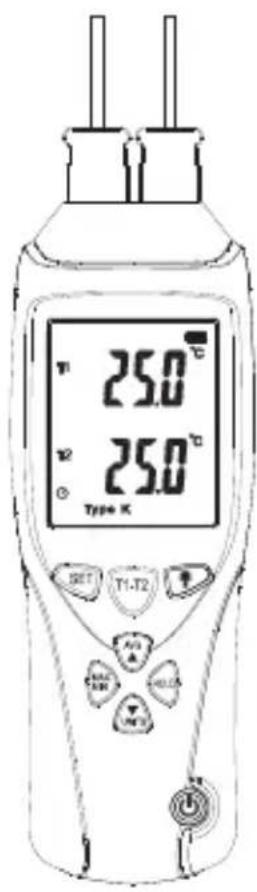
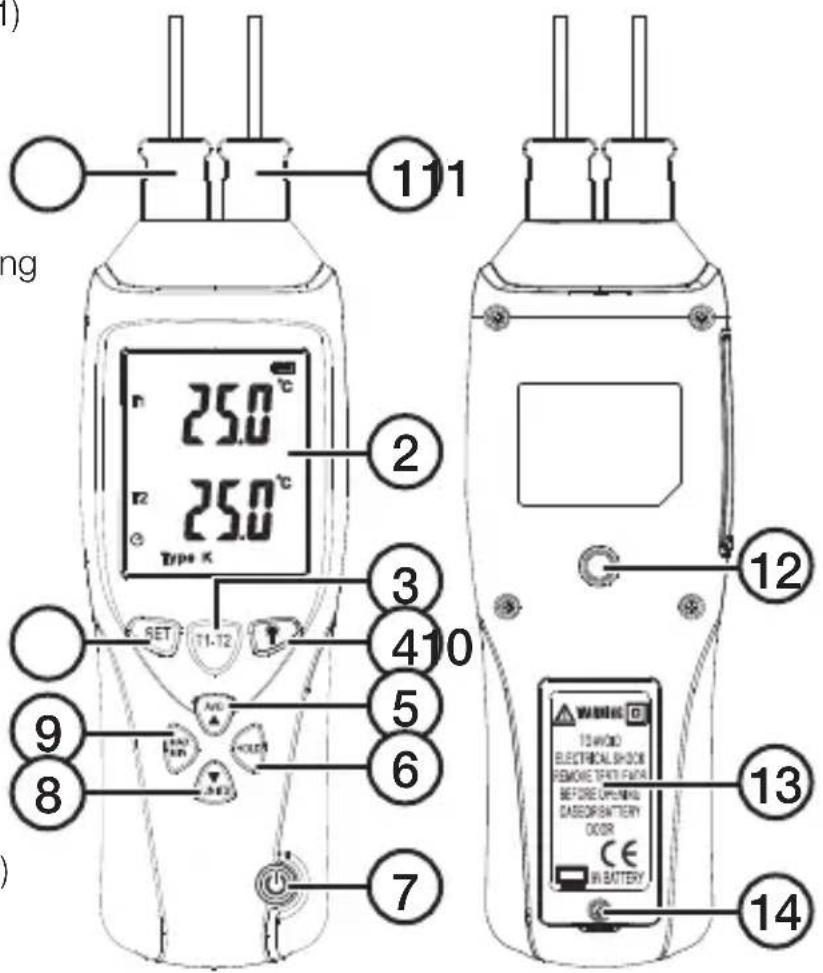
Buttons and functions
- T1 (thermocouple input 1)
- LCD display
- [T1-T2] T2 or T1-T2 display selector
- [ ] Backlight
- [AVG ▲] Average reading
- [HOLD] Reading hold
- [ ⏻] On/off
- [UNITS ▼] Unit of temperature, °C or °F
- [MAX MIN] Max/min temperature
- [SET] Thermocouple selection, type K or type J
- T2 (thermocouple input 2)
- Tripod thread (tripod sold separately)
- Battery cover
- Battery cover screw
Display
-
"MIN", min. temp.
-
"MAX", max temp.
-
, battery charge level
-
"°C/°F", unit for T1
-
Reading T1
-
“°C/°F”, unit for T2
-
Reading T2/T1-T2
-
"HOLD", held reading
-
"AVG", average reading
-
"Type K/J", type of thermocouple
-
Ⓥ, auto power off
-
"T2", indicates that the reading is from the T2 input
-
"T1-T2", indicates that the reading is the difference between T1 and T2
-
"T1", indicates that the reading is from the T1 input
![MIN MAX T1 88.8.0 °C] T1-T2 T2 88.8.0 °C] Type KJ AVG HOLD 222324](/content/2026/05/840431/images/abc54a8af3fd55c22e023b9626c4722417509d20e30ba73cf767cfa70e4f49c1.jpg)
Operating instructions
Battery insertion
-
Undo the screw (14), remove the battery cover (13) and insert a battery, 1 × 6LR61 , 9V (sold separately).
-
Refit the battery cover and tighten the screw.
Thermocouples
Connect the two thermocouples to the input connections (1 and 11) on the top of the thermometer.
Note: Make sure that the connector is the right way round, it will only fit in one way. The wide pin on the connector should fit into the widest hole.
Switching on/off
-
Press [ ↓] to switch the thermometer on.
-
Hold in [ ⏻] for 3 seconds to switch the thermometer off.
-
The thermometer will automatically shut off after 15 minutes if none of the buttons is pressed.
Display backlight
- Press [ ] to switch the thermometer on.
- Quick-press [ ] (4) to switch the backlight on/off.
- The display backlight will go out automatically after 30 seconds if no button is pressed.
Measuring temperature
- Press [ ] to switch the thermometer on.
- Quick-press [SET] (10) to select the type of thermocouple; type K (two are included) or type J.
- Press [UNITS ▼] (8) to select the unit of temperature, °C or °F.
- Position the thermocouples so that they are in contact with the test object.
- Read the temperature from the T1 input (always shown on the display).
- Press [T1-T2] (3) repeatedly to display the temperature reading from T2 or T1-T2 (the difference between T1 and T2).
Temperament measuring functions
- Press [HOLD] (6) to hold/release the reading on the display.
- Press [AVG ▲] (5) to display the average temperature of the 10 latest readings. Press [AVG ▲] again to return to normal display mode.
- Press [MAX MIN] (9) repeatedly to display the max/min reading. Hold [MAX MIN] in for 3 seconds to return to normal display mode.
Care and maintenance
- The thermometer can be cleaned by wiping it with a dry cloth.
- Whenever the thermometer is not to be used for a long time, the battery should be removed and the thermometer should be stored in a dry, dust-free environment, out of children's reach.
Responsible disposal
This symbol indicates that this product should not be disposed of with general household waste. This applies throughout the entire EU. In order to prevent any harm to the environment or health hazards caused by incorrect waste disposal, the product must be handed in for recycling so that the material can be disposed of in a responsible manner. When recycling your product, take it to your local collection facility or contact the place of purchase. They will ensure that the product is disposed of in an environmentally sound manner.

natural_image
Symbol of a trash bin crossed with two crossed arms, no text or labels presentSpecifications
Battery 1 × 6LR61, 9 V (sold separately)
Measuring range
(type K thermocouple) -200 to 1370 °C
Measuring range
(type J thermocouple) -200 to 1100 °C
Resolution 0.1 °C up to 1000 °C 1 °C over 1000 °C
Accuracy (type K thermocouple) -200 to 0 °C (±0.5 % +2 °C)
0 to 1000 °C (±0.5 % +1 °C) 1000 to 1370 °C (±1.0 % +1 °C)
Accuracy (type J thermocouple) -200 to 0 °C (±0.5 % +2 °C)
0 to 1000 °C (±0.15 % +1 °C) 1000 to 1100 °C (±0.5 % +1 °C)
Operating time Approx 30 hours
Operating temperature -20 to 60 °C (10–90 % RH)
Storage temperature -20 to 60 °C (10–75 % RH)
Size 185 × 66 × 33 mm
Weight 245 g
Temperaturmätare
Art.nr 36-6895 Modell ET-959
natural_image
Symbol of a trash bin crossed with no text or numbers, representing waste sorting or disposal (no text present)Specifikationer
Batteri 1 × 6LR61, 9 V (säljs separat)
natural_image
Symbol of a trash bin crossed with no text or numbers, representing waste sorting or disposal (no text present)Spesifikasjoner
Batteri 1 × 6LR61, 9 V (selges separat)
natural_image
Symbol of a trash bin with crossed lines indicating no waste or restriction, and a solid black rectangle below (no text or labels)Tekniset tiedot
1000...1370 °C (±1,0 % +1 °C)
Postal 10 – 13 Market Place
Kingston Upon Thames
Surrey
KT1 1JZ
Deutschland
Kundenservice Hotline: 040 2999 78111
E-Mail: kundenservice@clasohlson.de
Homepage
www.clasohlson.de
Postanschrift

- Thermocouple Thermometer
- Safety
- Buttons and functions
- Display
- Operating instructions
- Battery insertion
- Thermocouples
- Switching on/off
- Display backlight
- Measuring temperature
- Temperament measuring functions
- Care and maintenance
- Responsible disposal
- Specifications
- Temperaturmätare
- Specifikationer
- Spesifikasjoner
- Tekniset tiedot
- Deutschland
Brand : Clas Ohlson
Model : ET-959
Category : Thermometer