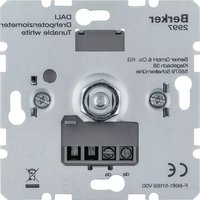
2997 - Light dimmer HAGER - Free user manual and instructions
Find the device manual for free 2997 HAGER in PDF.


| Product Type | Rotary Potentiometer DALI with Power Supply (Tunable White) |
| Brand | Hager |
| Model | 2997 |
| Application | Brightness and color temperature setting for DALI luminaires |
| Power Supply | AC 230 V~, 50/60 Hz, max. 2 W |
| DALI Voltage | DC 16 V (typ.) |
| Output Current | Max. 52 mA |
| Number of DALI Subscribers | Max. 26 per unit, up to 104 with parallel connection |
| Max. Active Units in Parallel | 4 |
| Color Temperature Range | 2000 ... 10000 K |
| Ambient Temperature | -5 ... +45 °C |
| Control Functions | Switch light, adjust brightness, set color temperature, save switch-on brightness, save basic brightness, save color temperature limits |
| Installation | Mount in appliance box per DIN 49073; connect to DALI ballasts |
| Safety Instructions | Electrical installation only by skilled persons; disconnect power before work |
| Warranty | Within scope of statutory provisions; contact point of sale or regional representative |
Frequently Asked Questions - 2997 HAGER
User questions about 2997 HAGER
0 question about this device. Answer the ones you know or ask your own.
Ask a new question about this device
Download the instructions for your Light dimmer in PDF format for free! Find your manual 2997 - HAGER and take your electronic device back in hand. On this page are published all the documents necessary for the use of your device. 2997 by HAGER.
USER MANUAL 2997 HAGER
Rotary potentiometer DALI with power supply
Art. no.: 2998
Rotary potentiometer DALI, Tunable white
Art. no.: 2997
Operating instructions
1 Safety instructions

Electrical devices may only be mounted and connected by electrically skilled persons.
Serious injuries, fire or property damage possible. Please read and follow manual fully.
Danger of electric shock. Always disconnect before carrying out work on the devise or load. In so doing, take all the circuit breakers into account, which support dangerous voltages to the device and or load.
These instructions are an integral part of the product, and must remain with the end customer.
2 Device components

Figure 1
(1) DALI potentiometer
(2) Frame
(3) Central plate
(4) Control knob
(5) Screw terminals
3 Function
Intended use
– Brightness setting for luminaires with DALI interface
- Setting the colour temperature for luminaires with DALI Device Type 8 for Tunable White in accordance with IEC 62386-209
- Mounting in appliance box according to DIN 49073
Product characteristics
- The DALI potentiometer with power supply unit supplies the control current for 26 DALI subscribers.
- Parallel switching of up to four DALI potentiometers with power supply unit with the option of supplying up to 104 DALI subscribers.
- The DALI potentiometer without a power supply unit is powered using the DALI voltage and serves as an additional control section.
- Saving of colour temperature limiting values and a basic or switch-on brightness.
To ensure fault-free operation, do not combine the device with other DALI controllers.
Behaviour after a mains voltage failure
When the mains voltage returns, the lighting is switched to the brightness and colour temperature present before the mains voltage failed.
4 Operation
Operation can take place from multiple control sections and always applies to all connected subscribers (broadcast).
Switch light
■ Press the control knob.
Adjust the brightness
■ Turn the control knob.
Turn slowly = Brightness change small Turn quickly = Brightness change great
Setting colour temperature

flowchart
graph TD
    A["Top Circle"] --> B["W"]
    A --> C["C"]
    B --> D["Bottom Circle"]
    C --> D
    D --> E["Arrow Up"]
    style A fill:#f9f,stroke:#333
    style C fill:#f9f,stroke:#333
Figure 2
■ Turn pressed control knob.
Turn left (W) = warmer light (reduce colour temperature) Turn right (C) = colder light (increase colour temperature)
Save switch-on brightness
If the lighting is not always to be switched on with the same brightness, then this can be saved as a switch-on brightness.
■ Switch on light.
■ Set required switch-on brightness.
■ Press the control knob briefly twice in succession (double-click).
The lighting briefly switches to maximum brightness twice. The switch-on brightness is saved.
If the lighting switches off after the double-click, then the time between the first and second presses was too long.
Delete switch-on brightness
■ Switch the light off.
■ Press the control knob briefly twice in succession (double-click).
After about 2 seconds the lighting switches to maximum brightness.
The switch-on brightness has been deleted.
5 Information for electrically skilled persons

DANGER!
Mortal danger of electric shock.
Before carrying out work on the device or load, disengage all the corresponding circuit breakers. Cover up live parts!
5.1 Fitting and electrical connection
Connecting and fitting the device
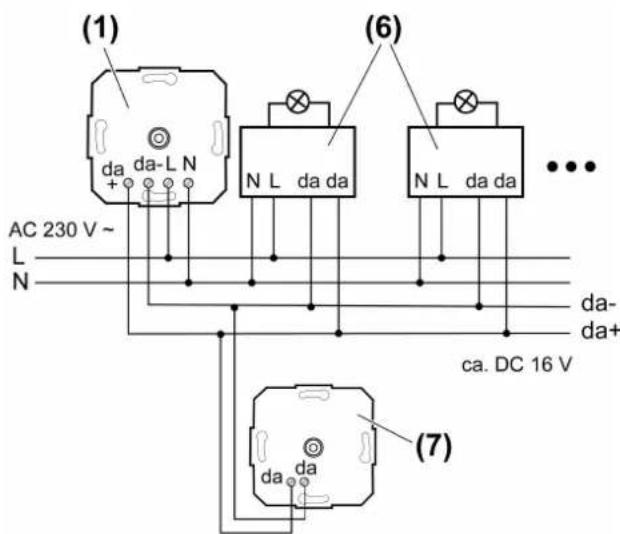
■ Connect the DALI potentiometer and DALI electrical ballast according to the wiring example (Figure 3). In so doing, observe the data of the electrical ballast manufacturer.
■ When switching multiple DALI potentiometers with a power supply unit in parallel, ensure correct polarity.
■ If multiple circuit breakers supply dangerous voltages to the device or load, couple the miniature circuit breakers or label them with a warning, to ensure disconnection is guaranteed.
i Ensure that the control cable is of the appropriate type, cross-section and routing for the VDE specifications for 250 V cable, control voltage has basic insulation.
The control cable and load cable can be run in a shared cable, e.g. NYM J 5×1.5.
The connected DALI subscribers may be operated on different phases.
5.2 Commissioning
Saving a basic brightness
The basic brightness should be set to a state that does not directly lead to an increase in brightness when turning the DALI potentiometer at minimum brightness.
■ Set lighting to minimum brightness.
■ Turn the DALI potentiometer to the point that where the brightness begins to increase.
■ Press the control knob for longer than 10 seconds.
The lighting switches briefly off and on again. The basic brightness is saved.
Saving colour temperature limiting values
The setting range of the DALI potentiometer can be adjusted to the colour temperature of the luminaire with this setting.
When saving the colour temperature, you must ensure that the last turn of the pressed control knob (Figure 2) is made to the left for the warmest light colour (W) and to the right for the coldest light colour (C).
■ Turn pressed control knob to the left (W) until reaching the warmest light colour required, and hold it in this position for more than 10 seconds.
The light switches off three times and then switches on again. The warmest light colour is saved.
■ Turn pressed control knob to the right (C) until reaching the coldest light colour required, and hold it in this position for more than 10 seconds.
The light switches off three times and then switches on again. The coldest light colour is saved.
Deleting the basic brightness and colour temperature limiting values
■ Switch the lighting off.
■ Press the control knob for longer than 10 seconds.
Briefly switch the lighting to maximum brightness and then off again. The stored values are deleted.
DALI subscribers of different manufacturers may deviate from the acknowledgements given here.
6 Appendix
6.1 Technical data
Rated voltage AC 230 V\~
Mains frequency 50 / 60 Hz
Power consumption max. 2 W
Ambient temperature -5 ... +45 °C
Rated voltage DALI DC 16 V (typ.)
Output current max. 52 mA
Colour temperature setting 2000 ... 10000 K
Number of DALI subscribers max. 26
Number of active DALI potentiometers max. 4
Terminal-specific cable cross-section:
single stranded max. 4 mm²
6.2 Warranty
We reserve the right to make technical and formal changes to the product in the interest of technical progress.
Our products are under guarantee within the scope of the statutory provisions.
If you have a warranty claim, please contact the point of sale or ship the device postage free with a description of the fault to the appropriate regional representative.





- Safety instructions
- Device components
- Function
- Intended use
- Product characteristics
- Behaviour after a mains voltage failure
- Operation
- Switch light
- Adjust the brightness
- Save switch-on brightness
- Delete switch-on brightness
- Information for electrically skilled persons
- DANGER!
- Fitting and electrical connection
- Commissioning
- Saving colour temperature limiting values
- Appendix
- Technical data
- Warranty
Brand : HAGER
Model : 2997
Category : Light dimmer