
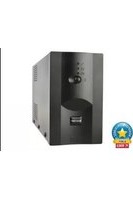
EG-UPSO-1000 - Inverter EnerGenie - Free user manual and instructions
Find the device manual for free EG-UPSO-1000 EnerGenie in PDF.


| Product Type | Online Uninterruptible Power Supply (UPS) |
| Model | EG-UPSO-1000 |
| Rated Capacity | 1 kVA / 900 W |
| Input Voltage | 208 / 220 / 230 / 240 Vac (selectable) |
| Input Frequency | 50 / 60 Hz (auto-sense) |
| Output Voltage | 208 / 220 / 230 / 240 Vac (selectable) |
| Output Frequency | 50 / 60 Hz ± 0.1 Hz (battery mode) |
| Transfer Time | 0 ms (mains to battery) |
| Battery Type | Sealed lead-acid, maintenance-free |
| Internal Battery | 2 x 12 V / 9 Ah |
| DC Voltage | 24 V |
| Recharge Time | 90% capacity restored in 3 hours |
| Communication Ports | RS232 (standard), USB (optional), SNMP slot (optional) |
| Display | LCD + LED indicators |
| Dimensions (W x D x H) | 144 x 312 x 216 mm |
| Weight | 11 kg |
| Operating Temperature | 0°C to 40°C |
| Humidity | 0% to 95% RH (non-condensing) |
| Noise Level | ≤50 dB @ 1m |
| Protection Features | Overload, short circuit, over-temperature, battery deep discharge, surge |
| Operation Modes | Line, Battery, Bypass, ECO, CUCF |
| Input Power Factor | ≥0.99 |
| Output Power Factor | 0.9 |
| Included Accessories | Power cord, communication cable, user manual, CD-ROM |
| Certifications | LVD (2014/35/EU), EMC (2014/30/EU), RoHS (2011/65/EU) |
Frequently Asked Questions - EG-UPSO-1000 EnerGenie
User questions about EG-UPSO-1000 EnerGenie
0 question about this device. Answer the ones you know or ask your own.
Ask a new question about this device
Download the instructions for your Inverter in PDF format for free! Find your manual EG-UPSO-1000 - EnerGenie and take your electronic device back in hand. On this page are published all the documents necessary for the use of your device. EG-UPSO-1000 by EnerGenie.
USER MANUAL EG-UPSO-1000 EnerGenie
natural_image
Three energy storage units with digital display and control panel, no visible text or symbols on the devices themselves.ONLINE UPS, 1000/2000/3000 VA
Table of Contents
1 Safety Information....- 2 -
1.1 UPS safety information....- 2 -
1.2 Battery safety information....- 2 -
2 Product Overview....-4 -
2.1 Specifications....-4-
2.2 Rear panel features....- 6 -
3 Installation....-8 -
3.1 Unpacking inspection ....- 8 -
3.2 Installation information....- 8 -
3.3 Installation and output connection....- 9 -
4 Network Functions ...... - 9 -
4.1 Communication port ...... - 9 -
4.2 EPO port (optional) - 10 -
4.3 Intelligent card (optional) - 10 -
5 Operation....- 11 -
5.1 Button operation.... - 11 -
5.2 Display interface.... - 12 -
5.3 UPS On/Off operation....- 13 -
5.4 UPS Settings....- 15 -
5.5 Parameters inquiring operation....- 16 -
5.6 Operation mode.... - 17 -
6 Fault Messages....- 19 -
7 Troubleshooting ....- 24 -
8 Software Download & Installation - 26 -





1 Safety Information
1.1 UPS safety information
- Read all safety information and operating instructions carefully before attempting to install, service or maintain the UPS. Save this manual properly for reuse.
●This UPS is intended for indoor use only. - Do not operate this UPS in direct sunlight, in contact with fluids, or where there is excessive dust or humidity.
- Be sure the air vents on the UPS are not blocked. Allow adequate space against the wall for proper ventilation.
- Do not open the UPS case as you will, there is a high risk of electric shocks inside. All connection/wiring/servicing must be performed by a qualified electrician.
- Do not connect to the equipment like hair dryer or electric heater.
- Do not use liquid extinguisher if there is a fire, a dry powder extinguisher is recommended.
CAUTION
UPS has high voltage inside, do not repair it by yourself. If any questions, please contact local service center or dealer.
1.2 Battery safety information
- Environmental factors impact battery life. Elevated ambient temperatures, poor quality utility power, and frequent short duration discharges will shorten battery life. Replacing battery periodically can help to keep UPS in normal state and assure backup time required.
- Battery installing or replacing should be performed by a qualified electrician. If you want to replace the battery cable, please purchase it from our local service center or distributors to avoid fever and lighter which can cause fire by inadequate power capacity.
●Batteries may cause electric shocks and have a high short circuit current, follow below requirements before installing or replacing the batteries.
A. Remove wristwatches, rings, jewelry and other conductive materials.
B. Only use tools with insulated grips and handles.
C. Wear insulated shoes and gloves.
D. Do not put the metal tools or parts on the batteries.
E. Before disconnecting the terminals from the batteries, cut off all the loads to the batteries first.
- Do not dispose of the batteries with fire. The batteries may explode.
- Do not open or mutilate batteries. Released electrolyte inside is harmful to the skin and eyes, and maybe toxic.
- Do not connect the positive pole and negative pole directly, otherwise it will cause electric shocks or will be on fire.
- The battery circuit is not isolated from the input voltage, high voltage may occur between the battery terminals and ground, check if there is no voltage there before touching.
Note: Symbol instructions:
| Symbol | Significations | Symbol | Significations |
 | Caution |  | Protective earth |
 | Danger! High Voltage! |  | Disable/mute audible alarm |
 | Turn on |  | Overload |
 | Turn off |  | Battery inspection |
 | Standby or Shutdown |  | Repeat |
 | AC |  | Display screen repeat key |
 | DC |  | Battery |
2 Product Overview
2.1 Specifications
| Model | EG-UPSO-1000 | EG-UPSO-2000 | EG-UPSO-3000 | |
| Rated Capacity | 1 kVA / 900W | 2 kVA / 1800W | 3 kVA / 2700W | |
| Input | ||||
| Rated input voltage | 208 Vac / 220 Vac / 230 Vac / 240 Vac | |||
| Rated input frequency | 50 Hz / 60 Hz (auto-sense) | |||
| Input voltage range | 110 ~ 176Vac (power derating linearly between 50% and 100% load); 176 ~ 280Vac (no derating); 280 ~ 300Vac (power derating 50%) | |||
| Input frequency range | 40~70 Hz | |||
| PFC | ≥ 0.99 | |||
| THDI | ≤ 6% | |||
| Bypass voltage range | -25% ~ +15% (settable) | |||
| Output | ||||
| Output voltage | 208 Vac / 220 Vac / 230 Vac / 240 Vac(settable) | |||
| Voltage accuracy | ± 1% | |||
| Output PF | 0.9 | |||
| Inverter overload capability | 105% ~ 125% load: transfer to bypass in 1 min; 125% ~ 150% load: transfer to bypass in 30 s; > 150% load: transfer to bypass in 300 ms | |||
| From mains mode to BAT mode | 0ms (transfer time) | |||
| From mains mode to bypass | 4 ms (typical) | |||
| Output frequency | Line mode | Same as input frequency | ||
| BAT mode | (50 / 60 ± 0.1) Hz | |||
| Total voltage harmonic distortion | ≤ 2% (linear load); ≤ 5% (non-linear load) | |||
| Batteries | ||||||
| Battery type | Sealed lead acid maintenance free battery | |||||
| DC voltage | 24 V | 36V | 48 V | 72V | 72 V | 96V |
| Inbuilt battery | 12 V / 9 Ah | 12 V / 7 Ah | 12 V / 9 Ah | 12 V / 7 Ah | 12 V / 9 Ah | 12 V / 7 Ah |
| Quantity | 2 | 3 | 4 | 6 | 6 | 8 |
| Charger output voltage | 27.1 ± 0.4 | 40.6 ± 0.6 | 54.2 ± 0.8 | 81.3 ± 1.2 | 81.3 ± 1.2 | 108.4 ± 1.6 |
| Recharging time | Standard model: 90% capacity restored in 3 hours;Long time model: depend on the capacity of battery | |||||
| Charging current (Max.) | Standard model: 1 A | |||||
| System Control and Communications | ||||||
| Protections | Over-temp protection; Fan testing protection; Overload protection;Output short circuit protection; Battery discharge protection | |||||
| Communication port | Standard: RS232; Options: USB, SNMP card, dry contacts | |||||
| Display | LCD+LED | |||||
| Environmental | ||||||
| Operatinghumidity | 0 ~ 95 % RH @ 0 ~ 40°C (non-condensing) | |||||
| Storage temperature | -25°C ~ 55°C(exclude batteries) | |||||
| Operating altitude | ≤ 1000m, above 1000m, derate 1% for each rising 100m | |||||
| Protection class | IP20 | |||||
| Noise level | ≤50dB (at 1m) | |||||
| Others | ||||||
| Dimensions (mm)W × D × H | 144*312*216 | 144*371*216 | 144*417*216 | 191*419*335 | ||
| Weight (kg) | 11 | 12.8 | 16.4 | 23.1 | 24.3 | 29.4 |
* Derate capacity to 70% in CUCF mode and to 90% when the output voltage is adjusted to 208Vac.
Note:
| Model | Type |
| EG-UPSO-1000 | 1 kVA Standard model |
| EG-UPSO-2000 | 2 kVA Standard model |
| EG-UPSO-3000 | 3 kVA Standard model |
2.2 Rear panel features
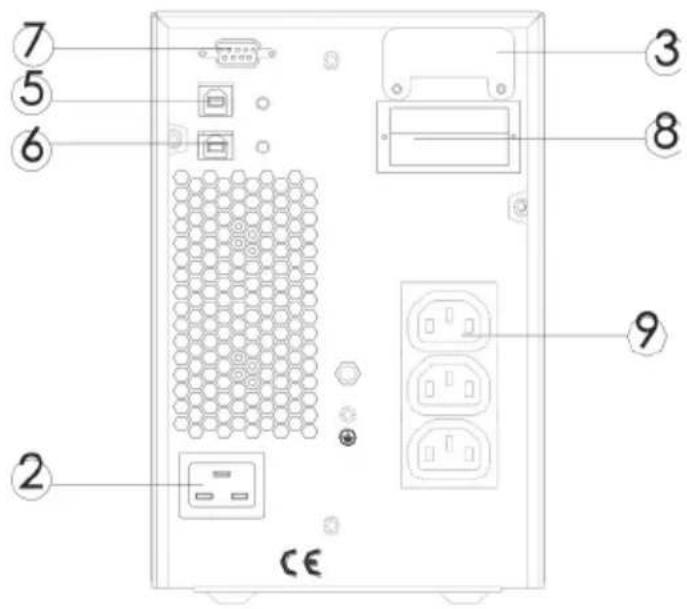
a. EG-UPSO-1000 (DC24V) rear panel

b. EG-UPSO-2000 (DC48V) rear panel

c. EG-UPSO-3000 (DC72V) rear panel
| 1 AC input socket | 6 RS232 port |
| 2Battery connector | 7 Intelligent slot |
| 3Fan | 8 Output sockets |
| 4USB port | |
| 5EPO (Emergency Power Off) port |
Note:
The figure is for reference only. Due to the technology upgrading and development, the real unit might be different from the figure.
3 Installation
3.1 Unpacking inspection
- Open the UPS package and inspect the contents upon receipt. The accessories attached to the UPS contain a power cord, a user manual, communication cable, CD-ROM. The long backup model also includes the cable for connection to battery bank.
- Check if the unit is damaged during transport. Do not power on and notify the carrier and dealer if find damaged or parts missing.
- Verify this unit is the model you want to buy. Check the model name showed both on the front panel and rear panel.
Note:
Keep the packaging box and packaging materials for future transport use. The equipment is heavy. Always handleit with care.
3.2 Installation information
- The UPS installation environment must be in good ventilation, away from water, flammable gases and corrosive entities.
- Do not lie down the UPS against the wall so that front and side panel air intake hole, rear panel air outtake hole will be unobstructed.
- The ambient temperature around the UPS should be within 0°C\~40°C (non-condensing).
- If dismantling the machine at low temperatures, there may be condensation droplets, users can not install or operate it before UPS completely got dry both inside and outside, otherwise there will be danger of electric shocks.
-
Place the UPS near the mains source so that can cut off utility power without any delay in case of emergency.
-
Make sure the load connected to the UPS is off when users connect it to UPS, and then turn on the load one by one later.
- Connect the UPS with the power outlet which is over-current protected. Do not connect the UPS with power outlets whose rated current is less than the maximum input current of this UPS.
- All power outlets should be configured with earthing device for safety.
- UPS could be electrified or powered no matter the input power cord is tied or not, even when the UPS is off. The only way to cut off the output is switching off the UPS and disconnecting the mains power supply.
- For all standard model UPS, it is advised to charge the batteries over 8 hours before using. Once the AC mains power energizes the UPS, it will automatically charge the batteries. Without prior charging, UPS output remains as usual but with shorter back-up time than normal.
- When connected to motor, display equipment, laser printer etc., UPS power selection should be based on the startup power of the load which is usually twice as rated power.
- Wiring by a qualified electrician is required. Ensure input cables and output cables are connected correctly and firmly.
- If install a leakage current protective switch, please install it on output cable.
3.3 Installation and output connection
Normally, output connection of 1\~3kVA series is configured with power outlets or terminal blocks, users can plug the load cable into the UPS power outlets to energize the load. Make sure the mains cable and breakers in the building are enough for the rated capacity of UPS to avoid the hazards of electric shock or fire.
4 Network Functions
4.1 Communication port
Users could monitor the UPS system through the communication port such as standard RS232 port and USB port with computer. Connecting this UPS with computer by communication cable could achieve UPS management easily.
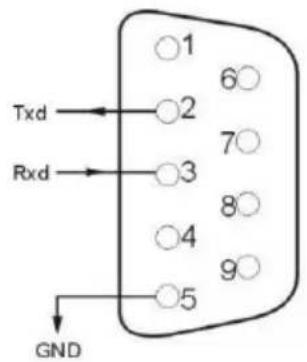
>RS232 port:
| Pins | 1 | 2 | 3 | 4 | 5 | 6 | 7 | 8 | 9 |
| Indication | empty | send | receive | empty | ground | empty | empty | empty | empty |
Note:
RS232 interface is set as below:
- Bit rate: 2400 bps
- Byte: 8bit
- Completion code: 1 bit
- Bit pattern: None
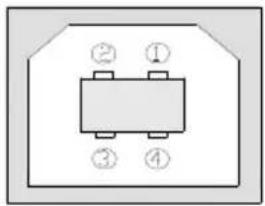
>USB port:
| Pins | 1 | 2 | 3 | 4 |
| Indication | +5V | date+ | date- | GND |
4.2 EPO port (optional)
EPO is the short for Emergency Power Off. EPO port is on the rear panel of the UPS. It's green. Users can cut off the output of UPS immediately by operating EPO port in case of emergency.

natural_image
Pure electrical circuit lines without any symbolsNormally, pin1 and pin2 are connected so that the machine can be working normally. When some emergencies happen, and when users have to cut off the output, just need to disconnect the connection between pin1 and pin2, or just pulling it out.
4.3 Intelligent card (optional)
There is an intelligent slot on the rear panel of the UPS, it's for SNMP card and dry contacts. Users can insert any type intelligent card from those three into it to monitor and manage the UPS. And users don't have to turn off the UPS when install the intelligent card. Follow below process:
- First of all, remove the intelligent slot cover;
- Then insert the intelligent card (SNMP card and dry contacts);
• Finally, screw the intelligent card back.
SNMP card (optional)
SNMP card on UPS is compatible with the most software, hardware and network operating system, it is a network management of UPS, with this function, UPS can login on internet, which can supply information of UPS status and input power, and even possible to control UPS via net management system.
Dry contacts card (optional)
Insert the dry contacts card into the intelligent slot. It's another type function of intelligent monitoring.

flowchart
graph TD
    A["UPS FAIL"] --> B["1"]
    C["SUMMARY ALARM"] --> D["2"]
    E["GND"] --> F["3"]
    G["REMOTE SHUTDOWN"] --> H["4"]
    I["COMMON"] --> J["5"]
    B --> K["BYPASS"]
    D --> L["BATTERY LOW"]
    F --> M["UPS ON"]
    H --> N["LINE LOSS"]
| Position | Definition |
| PIN1 | ON: UPS is malfunctioning |
| PIN2 | ON: Alarm (system failure) |
| PIN3 | Ground |
| PIN4 | Remote shutdown |
| PIN5 | Common |
| PIN6 | ON: Bypass mode |
| PIN7 | ON: Battery low |
| PIN8 | ON: Inverter mode;OFF: Bypass mode |
| PIN9 | ON: No AC power in |
5 Operation
5.1 Button operation
| Button | Function |
“ON” key | Press the two keys for more than half a second to turn on the UPS. |
“OFF” key | Press the two keys for more than half a second to turn off the UPS. |
TEST/MUTE key | Press the two keys for more than 1 second in Line mode or ECO mode or CUCF mode: UPS runs the self-test function.Press the two keys for more than 1 second in battery mode: UPS runs the mute function. |
INQUIRING key | Not in setting mode:Pressorfor more than half a second (less than 2 seconds): display the items orderly.Pressfor more than 2 seconds: Circularly and orderly display the items every 2 seconds, when press the key for some time again, it will turn to output status.In setting mode:Pressorfor more than half a second (less than 2 seconds): Select the setting option. |
FUNCTION SETTINGS key | Not in setting mode:Press the key for more than 2 seconds: Function settings interface.In setting mode:Press the key for more than half a second (less than 2 seconds): go to the function setting options.Press the key for more than 2 seconds: exit from this function settings interface. |
5.2 Display interface

- Icon display
- UPS status information
Operation mode
| Display | Function |
| Icon display | |
 | Load icon: The approximate load capacity percentage (0-25%, 26-50%, 51-75% and 76-100%) is indicated by the number of load bar sections illuminated. When UPS is overloaded, the load icon will flash. |
  | Mute icon: Indicates the audible alarm is disabled / mute. Press the mute key in the battery mode, the mute icon flash.Fan icon: Indicates fan working status. When the fan normally runs, the icon displays rotation; if the fan is not connected or faulty, the icon will flash. |
 | Fault icon: Indicates UPS is in fault mode. |
 | Battery status icon: Indicates the battery capacity of 0-25%, 26-50%, 51-75%, and 76-100%. When the capacity of battery get low or battery disconnected, the battery status icon will flash. |
| UPS status information | |
 | In non-setting mode, it displays UPS output information when UPS normally runs; Fault code will be told in fault mode.In setting mode, users could adjust different output voltage, activate ECO mode, activate CUCF mode, select an ID number and so on by operating function setting keys and inquiring key. |
 | |
| Operation mode | |
 | Indicates the power capacity of UPS within 20 seconds after starting up. Indicates UPS operation mode in 20 seconds, such as STDBY (standby mode), BYPASS (Bypass mode), LINE (AC mode), BAT (Battery mode), BATT (Battery Self Test mode), ECO (Economic mode), SHUTDN (Shutdown mode), CUCF (Constant Voltage and Constant Frequency mode). |
| LED indicator light functions | |
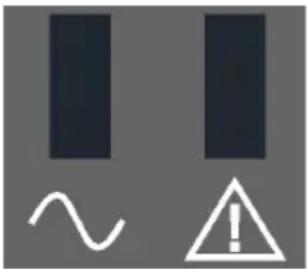 | They are respectively inverter light and fault light from left to right.The inverter light (green LED indicator light) illuminates continuously: it indicates that UPS is in mains mode or ECO mode or power supply status in battery mode.The fault light (red LED indicator light) illuminates continuously: it indicates that UPS is in fault status.Note: For LED indication in different modes, please refer to LED/display panel and alarm list. |
5.3 UPS On/Off operation
| Operation | Description |
| Turn on the UPS | > Turn on the UPS with mains powerWith mains power connected, UPS works in bypass mode, its output is same as the input voltage within the input range. If there is no need of outputvoltage when mains power connected, you can set up bPS to 'OFF'. Default bPS is ON, it means there is bypass output when power on.Press the ON key for more than half a second to start the UPS, then it will start the inverter.Once started, the UPS will perform a self-test function. When the self-test finishes, it will turn to online mode.>Turn on the UPS by battery without mains powerWhen main power is disconnected, press the ON key for more than half a second to start UPS.The operation of UPS startup process is almost same as above process with mains power. After the self-test finishes, UPS will work in battery mode. |
| Turn off the UPS | >Turn off the UPS in Line modePress the OFF key for more than half a second to turn off the UPS.After UPS shutdown, there is no output. If output is needed, you can set BPS 'ON' on LCD setting menu.>Turn off the UPS in battery mode without mains powerPress the OFF key for more than half a second to turn off the UPS.When UPS shut down, it will do self-test first, until there is no display on the panel. |
| UPS self-test/mute test operation | When UPS is in LINE Mode, press the self-test/mute key for more than 1 second. UPS gets to self-test mode and tests its status. It will exit automatically after finishing test.When UPS is in BAT Mode, press the self-test/mute key for more than 1 second, the buzzer stops beeping. If you press the self-test/mute key for one more second, it will restart to beep again. |
| UPS Setting | Enter Setup interface. Press and hold the function setting key for more than 2 seconds, then come to Setup interface, press and hold the inquiring key (◀, ▶) for more than half a second (less than 2 seconds), select the function setting, choose the setup interface, at the moment, the letters flash.Enter the setup interface. Press and hold the function setting key for more than half a second (less than 2 seconds), then come to the setup interface, at this time, the letters doesn't flash any more, the numerical value flash. Press and hold the inquiring key (◀, ▶) for more than half a second (less than 2 seconds), select the numerical value in accordance with the function.Confirm the setup interface. After selecting numerical value, press and hold the function setting for more than half a second (less than 2 seconds). Now, the setting function is completed and the numerical value illuminates without flashing.Exit from the setup interface. Press and hold function setting key for more than half a second (less than 2 seconds), exit from the setup interface and return to the main interface.Note:UPS could not be set until it is connected to the battery and it is turned off and switched to Stdby mode (standby mode).Disconnect mains power after setting.The LCD display screen will automatically extinguish in about 1 min, and the setting will be configured normally. |
5.4 UPS Settings
• Output voltage setting
| LCD display | Settings |
 | For 208/220/230/240 VAC models, you may choose the following output voltage:208: output voltage is 208Vac220: output voltage is 220Vac230 (default): output voltage is 230Vac240: output voltage is 240Vac |
● Low voltage of battery setting
| LCD display | Settings |
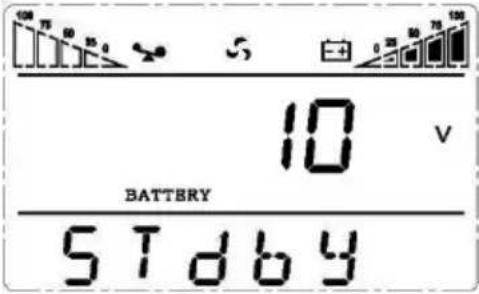 | The battery voltage selecting interface. You may choose the following output voltage:9.8: Low voltage of battery is 9.8Vdc9.9: Low voltage of battery is 9.9Vdc10: Low voltage of battery is 10Vdc10.2: Low voltage of battery is 10.2Vdc10.5: Low voltage of battery is 10.5VdcdEF (default): EOD voltage automatically varies with loads, including 20 hours discharge protection |
- Bypass mode setting
| LCD display | Settings |
 | Enable or disable Bypass function. You may choose the following two options:ON: Bypass enableOFF (default): Bypass disable |
- AUO setting
| LCD display | Setting |
 | AUO setting only can be set in Stdby mode or Bypass mode. You may choose the following two options:ON: UPS will start up automatically and works in Line mode when connect mains.OFF (Default): UPS won’t start up automatically when connect mains except EOD, it will work in standby or bypass mode. |
5.5 Parameters inquiring operation
Press the inquiring key or for more than half a second (less than 2 seconds) to inquire about items. The inquired items include Input, Battery, Output, Load and Temperature. The displayed items on LCD screen are shown as following:
| LCD display | Description |
 | Output: Display the output voltage and output frequency of the UPS. As the following graphic shows, the output voltage is 220V, the output frequency is 50Hz. |
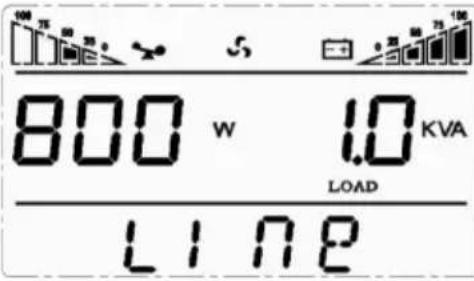 | Load: Display the numerical value of the active power (WATT) and apparent power (VA) of the load. For example, as the following graphics shows, the WATT of the load is 800W, VA is 1.0kVA (when disconnect loads, it is a normal phenomenon to show a small numerical value of WATT and VA). |
 | Version and Temperature: Indicate firmware version of UPS and display the highest temperature of UPS components; As the following graphics shows, the firmware version is v1.7, the maximum temperature is 40°C. |
 | Input: Display the voltage and frequency of the input. As the following graphics shows, the input voltage is 220V, input frequency is 50Hz. |
 | Battery: Display the voltage and capacity of the battery. As the following graphics shows, the battery voltage is 24V, the capacity of battery is 100% (the capacity of battery is approximately reckoned according to the battery voltage). |
 | Warning: Display the warning code. |
5.6 Operation mode
| Operation mode and LCD display | Description |
Bypass mode | Turn to bypass mode under the following three conditions:Connect mains power and the bypass setup is ON.Turn off the UPS in line mode and the bypass setup is ON.Overload in line mode.Note:When UPS is working in bypass mode, it has no back up function. |
Line mode | Being in line mode are as following: When input mains corresponding to the working conditions, UPS will work in line mode, LCD displays ‘Line’. |
Stdby mode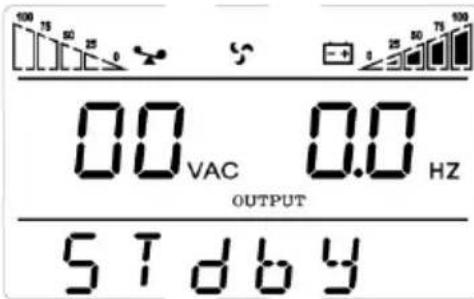 | UPS is powered off and no output supply power, but still can charge batteries. |
Battery mode | Being in battery mode are as following: the buzzer beeps once every 4 seconds.When the mains power is low or unstable, UPS will turn to battery mode at once, and LCD displays ‘batt’. |
ECO mode
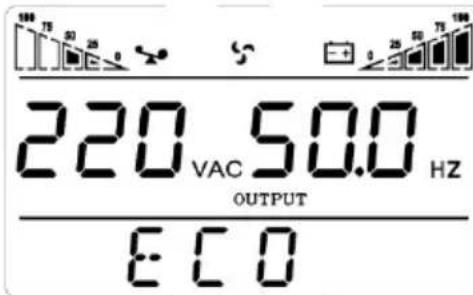
Being in ECO mode are as following: When the input mains meet the input range of the ECO mode and the ECO function is on, the UPS works in ECO mode. If input mains exceed the range of ECO several times within one minute but stays in inverter input range, UPS will work in inverting mode automatically. LCD displays 'ECO'.
CUCF mode

Frequency conversion mode is mainly to provide a stable voltage and frequency (mainly in terms of frequency). After starting this mode, its output will not be affected by utility to meet input needs of some precision equipment and make users' load more stable and secure. After opening CUCF mode setup, LCD displays 'CUCF'. In CUCF mode, the loading capacity will drop to 70% of the original capacity. The output frequency is fixed at the setting value, it doesn't vary with utility change. And the UPS cannot be set to bypass mode in this mode.
Fault mode

When UPS has a failure, the buzzer beeps and the UPS turns to fault mode. UPS cuts off the output and LCD displays fault codes. At the moment, users can press the mute key to make the buzzer stop beeping temporarily to wait for maintenance. Users can also press the OFF key to shut down the UPS when confirm that there is no serious fault.
6 Fault Messages
Table 1: Fault code messages
| S/N | Working status | LCD display messages | Alarm beep | LCD flashes | LED flashes | |
| Inverter | Fault | |||||
| 1 | Inverter mode (mains power) | |||||
| Mains power voltage | Working mode displays Line | No beep | No flash | Flash always | / | |
| Mains power high/low voltage protection, switch to battery mode | Working mode displays bAT | One beep / 4 sec | One flash / 4 sec | One flash / sec | / | |
| 2 | Battery mode | |||||
| Battery voltage - normal | Working mode displays bAT | One beep / 4 sec | One flash / 4 sec | One flash / sec | / | |
| Warning for abnormal voltage of battery | Working mode displays bAT, Bat flash | One beep / sec | One flash / sec | One flash / sec | / | |
| 3 | Bypass mode | |||||
| Mains power – normal ( under Bypass ) | Working mode displays byPASS | One beep / 2 min | No flash | One flash /2 sec | / | |
| 4 | Warning for battery disconnected | |||||
| Bypass mode | Working mode displays byPASS, bat display is 0, and flash all the time | One beep / 4 sec | One flash / 4 sec | One flash /2 sec | / | |
| Inverter mode | Working mode displays Line, bat display is 0, and flash all the time | One beep / 4 sec | One flash / 4 sec | Flash always | / | |
| Power on / Switch on | LCD illuminates when power on, and display the capacity of the UPS, later working mode displays Line or byPASS, bat icon flash all the time | 6 beeps | Flash always | Flash always | Flash always | |
| / | / | |||||
| 5 | Output overload protection | |||||
| Warning for mains power overload | Working mode displays Line, load icon flash | 2 beeps / sec | 2 flashes / sec | Flash always | / | |
| Protect operation for mains power mode overload | Working mode displays FAULT and the corresponding codes | Long beep | Flash always | / | Flash always | |
| Warning for battery overload | Working mode displays bAT, load icon flash | 2 beeps / sec | 2 flashes / sec | One flash / sec | / | |
| Protect operation for battery mode overload | Working mode displays FAULT and the corresponding codes | Long beep | Flash always | / | Flash always | |
| 6 | Warning for bypass mode overload | Working mode displays byPASS, load icon flash all the time | One beep / 2 sec | One flash / 2 sec | One flash / 2 sec | / |
| 7 | Fans fault(fan icon ) | Fan icon flash, working mode displays depending on current mode | One beep / 2 sec | No flash | / | / |
| 8 | Faults mode | Working mode displays FAULT, numerical value area displays the corresponding error code | Long beep | Flash always | / | Flash always |
Note:
- End user need to provide below information when require to maintain the UPS.
- UPS Model No. & Serial No.
- Date of fault occurrence.
- Fault details (LCD status, noise, AC power situation, load capacity, battery capacity configuration ect.)
Table 3: Alarm code display
The alarm code will be displayed in four digital tubes on the right of the numerical
part of the LCD screen (red mark), as shown below:

The alarm truth table during operations is shown as below:
• signifies the alarm occurs, blank signifies no alarm appears
| The first digital tube from right to left | Display value | Bypass lost | Remote Shutdown | Overload | Battery disconnected |
| 0 | |||||
| 1 | ● | ||||
| 2 | ● | ||||
| 3 | ● | ● | |||
| 4 | ● | ||||
| 5 | ● | ● | |||
| 6 | ● | ● | |||
| 7 | ● | ● | ● | ||
| 8 | ● | ||||
| 9 | ● | ● | |||
| A | ● | ● | |||
| B | ● | ● | ● | ||
| C | ● | ● | |||
| D | ● | ● | ● | ||
| E | ● | ● | ● | ||
| F | ● | ● | ● | ● | |
| The second digital tube from right to left | Display value | Overcharging warnings | Mains reverse | Start-up abnormal | Charger fault |
| 0 | |||||
| 1 | ● | ||||
| 2 | ● | ||||
| 3 | ● | ● | |||
| 4 | ● | ||||
| 5 | ● | ● | |||
| 6 | ● | ● | |||
| 7 | ● | ● | ● | ||
| 8 | ● | ||||
| 9 | ● | ● | |||
| A | ● | ● | |||
| B | ● | ● | ● | ||
| C | ● | ● | |||
| D | ● | ● | ● | ||
| E | ● | ● | ● | ||
| F | ● | ● | ● | ● | |
| The third digital tube from right to left | Display value | EEPROM abnormal | Fan abnormal | Low battery | Median abnormal |
| 0 | |||||
| 1 | ● | ||||
| 2 | ● | ||||
| 3 | ● | ● | |||
| 4 | ● | ||||
| 5 | ● | ● | |||
| 6 | ● | ● | |||
| 7 | ● | ● | ● | ||
| 8 | ● | ||||
| 9 | ● | ● | |||
| A | ● | ● | |||
| B | ● | ● | ● | ||
| C | ● | ● | |||
| D | ● | ● | ● | ||
| E | ● | ● | ●. | ||
| F | ● | ● | ● | ● | |
| The fourth digital tube from right to left | Display value | Over load fault | Mains lost | Bypass abnormal | |
| 0 | |||||
| 1 | ● | ||||
| 2 | ● | ||||
| 3 | ● | ● | |||
| 4 | ● | ||||
| 5 | ● | ● | |||
| 6 | ● | ● | |||
| 7 | ● | ● | ● |
Example:
If the alarm code "2000" appears on the LCD screen, it indicates loss of mains power.
7 Troubleshooting
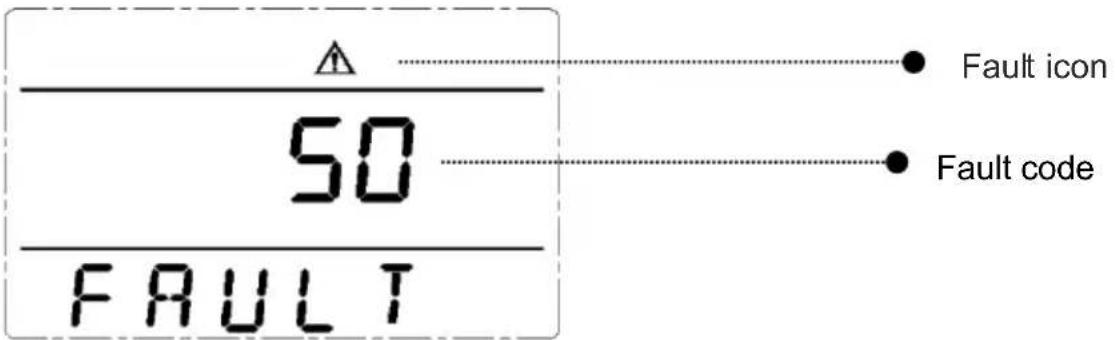
When the system works in fault mode, the LCD displays as below:
| Problem | Possible Cause | Solution |
| Fault icon display, audible buzzer alarm continually, the fault code is 00-14 | Bus voltage fault | Test the bus bar voltage or contact the supplier. |
| Fault icon display, audible buzzer alarm continually, the fault code is15-24 | Soft start fault | Check the soft start circuit, especially the input fuse or contact the supplier directly. |
| Fault icon display, audible buzzer alarm continually, the fault code is 25-39 | Inverter voltage fault | Contact the supplier. |
| Fault icon display, audible buzzer alarm continually, the fault code is 40-44 | Over heat | Be sure that the UPS are not overloaded, and the fan vent is not obstructed, as well as the indoor temperature is not high.Leave alone the UPS 10 minutes for cooling, and restart it. If the problem persists, contact the supplier. |
| Fault icon display, audible buzzer alarm continually, the fault code is 45-49 | Output short | Turn off the UPS and disconnect all the loads. Be sure there is no any fault or internal short circuit of the loads.And then restart the UPS. If the problem persists, contact the supplier. |
| Fault icon display, audible buzzer alarm continually, the fault code is 50-54 | Overload | Check the load level and disconnect the non-critical equipments, recount the total capacity of your load and reduce the load to the UPS.Check whether the load equipments has fault or not. |
| Fault icon display, audible buzzer alarm continually, the fault code is 55-59 | Bus short | Contact the supplier. |
| Fault icon display, audible buzzer alarm continually, the fault code is 60-64 | Shutdown fault | Check the first button of the LCD panel is pressed and cannot be bounced |
| Fault icon display, audible buzzer alarm continually, fan icon in the LCD flickers | Fan fault | Check whether the fans are connected and fixed well or not, and if fans are not broken. If all seems fine, contact the supplier. |
| UPS fail to start when operate ‘On’ key | Pressing time too short | Press the power key more than 2 seconds to start the UPS. |
| The input connection is not ready or UPS internal battery disconnect | Connect the input well, if the battery voltage is too low, disconnect the input and start the UPS with no-load. | |
| UPS internal system fault | Contact the supplier. | |
| Back up time become short | Battery undercharge | Keep the UPS battery recharging more than 3 hours |
| UPS overload | Check the load level and disconnect the non-critical equipments, | |
| Battery maturing, capacity descend | Replace with new batteries, contact the supplier to get the new batteries and spare parts. | |
| UPS doesn’t have any power going through even mains power on | UPS input breaker disconnected | Reset the circuit breaker by manual. |
Note:
When the output is short-circuited, the action of UPS protection will show up. Before turning off the UPS, make sure to disconnect the entire loads and cut off the mains power supply, otherwise it will make the AC input short circuit.
8 Software Download & Installation
(Only for the model with communication port)
Please follow steps below to download and install monitoring software :
- Go to the website https://www.idbkmonitor.com
- Click UPSSmartView software icon and then choose your required OS to download the software
- Follow the on-screen instructions to install the software
GENERAL INFORMATION
This product has been manufactured by or on behalf of Gembird Europe B.V.. Inquiries to the EU Importer or related to product compliance in Europe should be sent to: Gembird Europe B.V., Wittevrouwen 56, 1358 CD, Almere, The Netherlands. www.gmb.nl
Warranty conditions: www.gmb.nl/warranty
Product support: www.gmb.nl/service and/or helpdesk@gembird.nl
SAFETY
(ENG) To ensure safe handling of the product, follow the safety advice on: (DE/AT) Hinweise zum sicheren Gebrauch der Produkte finden Sie auf: (NL/BE) Voor een veilig gebruik van het product volgt u deze algemene veiligheidsaanwijzingen op: (ES) Para garantizar una manipulación segura de los dispositivos, siga las advertencias de seguridad disponibles en: (CZ) Abyste zajistili bezpečnou manipulaci s výrobkem, dodržujte bezpečnostní pokyny na: (FR/BE) Pour garantir une manipulation sûre des appareils, suivez les consignes de sécurité sur: (IT) Per garantire una manipolazione sicura del prodotto, seguire i consigli di sicurezza su: (PT) Para garantir o manuseio seguro do produto, siga as recomendações de segurança em: (PL) Aby obchodzić się bezpiecznie z produktami, należy przestrzegać wskazówek dotyczących bezpieczeństwa: (RO) Pentru asigurarea unei manipulări în condiții de siguranță a produsului, urmați recomandările de securitate de pe: (SK) Na zaistenie bezpečnej manipulácie so zariadeniami sa riad’te bezpečnostnými pokynmi na: (SL) Za zagotavljanje varnega ravnanja z napravami, upoštevajte varnostna navodila, ki jih najdete na: (HR) Da biste osigurali sigurno rukovanje uređajima, pratite sigurnosne savjete na web-mjestu: (HU) A készülékek biztonságos kezelésének érdekében kövesse a biztonsági tanácsokat (BG) За да осигурите безопасна работа на устройствата, следвайте съветите за безопасност по-долу: www.gmb.nl/safety
DECLARATION OF CONFORMITY
(ENG) Hereby, Gembird Europe B.V., declares that this equipment is in compliance with Directive LVD (2014/35/EU), EMC (2014/30/EU), RoHS (2011/65/EU). The full text of the EU declaration of conformity is available at the following internet address: www.gmb.nl/certificates (DE/AT) Hiermit erklärt Gembird Europe B.V., dass diese Funkanlage der Richtlinie LVD (2014/35/EU), EMC (2014/30/EU), RoHS (2011/65/EU) entspricht. Der vollständige Text der EU Konformitätserklärung ist unter der folgenden Internetadresse verfügbar: www.gmb.nl/certificates (NL/BE) Hierbij verklaart Gembird Europe B.V. dat deze radioapparatuur conform is met Richtlijn LVD (2014/35/EU), EMC (2014/30/EU), RoHS (2011/65/EU). De volledige tekst van de EU-conformiteitsverklaring kan worden geraadpleegd op het volgende internetadres: www.gmb.nl/certificates (ES) Por la presente, Gembird Europe B.V. declara que este equipo es conforme con la LVD (2014/35/EU), EMC (2014/30/EU), RoHS (2011/65/EU). El texto completo de la declaración UE de conformidad está disponible en la
dirección de Internet siguiente: www.gmb.nl/certificates (CZ) Gembird Europe B.V. potvrzuje, że toto rádiové zařízení je v souladu se směrnící LVD (2014/35/EU), EMC (2014/30/EU), RoHS (2011/65/EU). Úplné znění EU prohlášení o shodě je k dispozici na následující internetové adrese: www.gmb.nl/certificates (FR/BE) Le soussigné, Gembird Europe B.V., déclare que cet équipement est conforme à la Directive LVD (2014/35/EU), EMC (2014/30/EU), RoHS (2011/65/EU). Le texte complet de la déclaration UE de conformité est disponible à l'adresse internet suivante: www.gmb.nl/certificates (IT) Con la presente, Gembird Europe B.V. dichiara che questo apparecchio è conforme alla Direttiva LVD (2014/35/EU), EMC (2014/30/EU), RoHS (2011/65/EU). Il testo completo della dichiarazione di conformità UE è disponibile al seguente indirizzo Internet: www.gmb.nl/certificates (PT) A Gembird Europe B.V. certifica que este equipamento de rádio está em conformidade com a Diretiva LVD (2014/35/EU), EMC (2014/30/EU), RoHS (2011/65/EU). O texto completo da Declaração de Conformidade da UE está disponível no seguinte endereço da Internet: www.gmb.nl/certificates (PL) Gembird Europe B.V. zaświadcza, że to urządzenie radiowe jest zgodne z Dyrektywą LVD (2014/35/EU), EMC (2014/30/EU), RoHS (2011/65/EU). Pełny tekst Deklaracji Zgodności UE jest dostępny pod następującym adresem internetowym: www.gmb.nl/certificates (RO) Gembird Europe B.V. certifică că acest echipament radio respectă Directiva LVD (2014/35/EU), EMC (2014/30/EU), RoHS (2011/65/EU). Textul integral al Declarației de conformitate UE este disponibil la următoarea adresă de internet: www.gmb.nl/certificates (SK) Gembird Europe B.V. potvrdzuje, że toto rádiové zariadenie je v súlade so smernicou LVD (2014/35/EU), EMC (2014/30/EU), RoHS (2011/65/EU). Úplné znenie vyhlásenia o zhode EÚ je k dispozícii na tejto internetovej adrese: www.gmb.nl/certificates (SL) Gembird Europe B.V. potrjuje, da je ta radijska oprema v skladu z Direktivo LVD (2014/35/EU), EMC (2014/30/EU), RoHS (2011/65/EU). Celotno besedilo izjave EU o skladnosti je na voljo na naslednjem spletnem naslovu: www.gmb.nl/certificates (HR) Gembird Europe B.V. potvrđuje da je ova radijska oprema u skladu s Direktivom LVD (2014/35/EU), EMC (2014/30/EU), RoHS (2011/65/EU). Potpuni tekst EU Izjave o sukladnosti dostupan je na sljedećoj internet adresi: www.gmb.nl/certificates (HU) A Gembird europe B.V. tanúsítja, hogy ez a rádióberendezés megfelel a LVD (2014/35/EU), EMC (2014/30/EU), RoHS (2011/65/EU) irányelvnek. Az EU megfelelőségi nyilatkozat teljes szövege a következő internetes címen érhető el: www.gmb.nl/certificates (GR) Dia tou paróvtoç, η Gembird Europe B.V., δηλώνει ότι αυτός ο εξοπλισμός συμμορφώνεται με την Οδηγία LVD (2014/35/EU), EMC (2014/30/EU), RoHS (2011/65/EU). Το πλήρες κείμενο της δήλωσης συμμόρφωσης ΕΕ διατίθεται στην ακόλουθη διεύθυνση Διαδικτύου: www.gmb.nl/certificates (BG) Gembird Europe B.V. удостоверява, че това радио оборудване отговаря на Директива LVD (2014/35/EU), EMC (2014/30/EU), RoHS (2011/65/EU). Пълният текст на ЕС декларацията за съответствие е достъпен на следния интернет адрес: www.gmb.nl/certificates
WASTE DISPOSAL

(ENG) Waste disposal: The symbol of the crossed-out wheeled bin means that this appliance must not be disposed of with household waste at the end of its useful life. The appliance must be disposed of in specially set-up collection points, recycling yards or disposal companies. Retailers of electrical appliances with a sales area of at least 400 m 2
for electrical appliances and grocers with an area of 800 m² , which offer electrical equipment several times a year, are obliged to take back electrical equipment. Return and disposal are free of charge for you. When you purchase a new device, you have the right to return a corresponding old device free of charge. Please delete all personal data before returning the appliance. Before returning, please remove the batteries or re-chargeable batteries that are not enclosed by the old device, as well as lamps that can be removed without destruction, and dispose them to a separate collection. (DE/AT) Entsorgungshinweise: Das Symbol der durchgestrichenen Mülltonne bedeutet, dass dieses Gerät am End eder Nutzungszeit nicht über den Haushaltsmüll entsorgt werden darf. Das Gerät ist bei eingerichteten Sammelstellen, Wertstoffhöfen oder Entsorgungsbetrieben abzugeben. Händler von Elektrogeräten mit einer Verkaufsfläche von mind. 400 m² für Elektrogeräte und ebensmittelhändler mit einer Fläche von 800 m², die mehrfach im Jahr Elektrogeräte anbieten sind verpflichtet Elektrogeräte zurückzunehmen. Rückgabe und Entsorgung sind für Sie kostenfrei. Beim Kauf eines Neugerätes haben Sie das Recht, ein entsprechendes Altgerät unentgeltlich zurückzugeben. Bitte löschen Sie vor der Rückgabe alle personenbezogenen Daten. Bitte entnehmen Sie vor der Rückgabe Batterien oder Akkumulatoren, die nicht vom Altgerät umschlossen sind, sowie Lampen, die zerstörungsfrei entnommen werden können und führen diese einer separaten Sammlung zu. (NL) Afvalverwijdering: Het symbool van de doorgekruiste afvalbak betekent dat dit apparaat aan het einde van zijn levensduur niet bij het huisvuil mag worden gegooid. Het apparaat moet worden afgevoerd naar speciaal daarvoor ingerichte inzamelpunten, recyclingbedrijven of afvalverwerkingsbedrijven. Detailhandelaren in elektrische apparaten met een verkoopoppervlakte van ten minste 400 m² voor elektrische apparaten en kruideniers met een oppervlakte van 800 m² die meerdere keren per jaar elektrische apparaten aanbieden, zijn verplicht elektrische apparaten terug te nemen. Retourneren en afvoeren is voor u gratis. Bij aanschaf van een nieuw apparaat heeft u het recht om een bijbehorend oud apparaat kosteloos te retourneren. Wis alle persoonlijke gegevens voordat u het apparaat retourneert. Verwijder voor het retourneren batterijen of oplaadbare batterijen die niet bij het oude apparaat zijn ingesloten, evenals lampen die zonder vernietiging kunnen worden verwijderd, en lever deze in bij een gescheiden inzamelpunt. (FR/BE) Traitement des déchets: Le symbole de la poubelle barrée d'une croix signifie que cet appareil ne doit pas être jeté avec les ordures ménagères en fin de vie. L'appareil doit être déposé dans des points de collecte spécialement aménagés, des parcs de recyclage ou des entreprises d'élimination. Revendeurs d'appareils électroménagers disposant d'une surface de vente d'au moins 400 m² pour appareils électroménagers et épiciers d'une superficie de 800 m², qui proposent du matériel électrique plusieurs fois par an, sont dans l'obligation de reprendre le matériel électrique. Le retour et l'élimination sont gratuits pour vous. Lorsque vous achetez un nouvel appareil, vous avez le droit de retourner gratuitement un ancien appareil correspondant. Veuillez supprimer toutes les données personnelles avant de retourner l'appareil. Avant de retourner, veuillez retirer les piles ou les piles rechargeables qui ne sont pas enfermées dans l'ancien appareil, ainsi que les lampes qui peuvent être retirées sans destruction, et les jeter dans une collecte séparée. (PL) Utylizacja odpadów: Symbol przekreślonego kosza na śmieci na kółkach oznacza, że tego urządzenia nie wolno wyrzucać wraz z odpadami domowymi po zakończeniu jego okresu użytkowania. Urządzenie należy zutylizować w specjalnie do tego wyznaczonych punktach zbiórki, punktach recyklingu lub firmach zajmujących się utylizacją odpadów. Sprzedawcy sprzętu elektrycznego o powierzchni sprzedaży co najmniej 400 m² sprzętu elektrycznego oraz sklepy spożywcze o powierzchni 800 m², które oferują sprzęt elektryczny kilka razy w roku, są zobowiązane do odbioru sprzętu elektrycznego. Zwrot i utylizacja są dla Państwa bezpłatne. Kupując nowe urządzenie, masz prawo do bezpłatnego zwrotu odpowiedniego starego urządzenia. Przed zwróceniem urządzenia należy usunąć wszystkie dane osobowe. Przed zwrotem należy wyjąć baterie lub akumulatorki, które nie są dołączone do starego urządzenia, a także lampki, które można wyjąć bez zniszczenia i przekazać je do osobnej zbiórki. (CZ) Likvidace odpadu: Symbol přeškrtnutého kontejneru na kolečkách znamená, že tento spotřebič nesmí být na konci své životnosti likvidován s domovním odpadem. Spotřebič musí být zlívidován ve speciálně zřízených sběrných místech, recyklačních dvorech nebo společnostech pro likvidaci odpadu. Povinností zpětného odběru elektrozařízení jsou maloobchodníci s elektrospotřebiči s prodejní plochou minimálně 400 m² u elektrospotřebičů a potraviny s plochou 800 m², kteří nabízejí elektrozařízení několikráť ročně. Vrácení a likvidace jsou pro vás zdarma. Pří nákupu nového zařízení máte právo zdarma vrátit odpovídající staré zařízení. Před vrácením spotřebiče vymažte všechna osobní data. Před vrácením vyjměte baterie nebo dobijecí baterie, které nejsou přiloženy ke starému zařízení, stejně jako lampy, které lze vyjmout bez zničení, a odevzdejte je do odděleného sběru. (SK) Likvidácia odpadu: Symbol prečiarknutého odpadkového koša na kolieskach znamená, že tento spotrebič sa po skončení životnosti nesmie likvidovat’ s domovým odpadom. Spotrebič sa musí likvidovat’ na špeciálne zriadených zberných miestach, v recyklačných dvoroch alebo v spoločnostiach na likvidáciu odpadu. Maloobchod s elektrospotrebičmi s predajnou plochou najmenej 400 m² pre elektrospotrebiče a potraviny s plochou 800 m², ktorí ponúkajú elektrozariadenia niekoľkokrát do roka, sú povinní prevziat’ elektrozariadenia. Vrátenie a likvidácia sú pre vás bezplatné. Pri kúpe nového zariadenia máte právo bezplatne vrátiť zodpovedajúce staré zariadenie. Pred vrátením spotrebiča vymažte všetky osobné údaje. Pred vrátením vyberte batérie alebo nabíjateľné batérie, ktoré nie sú pribalené k starému zariadeniu, ako aj lampy, ktoré je možné vybrat’ bez zničenia, a odovzdajte ich na separovaný zber. (ES) Deposito de basura: El símbolo del contenedor con ruedas tachado significa que este aparato no debe desecharse con la basura doméstica al final de su vida útil. El aparato debe desecharse en puntos de recogida, vertederos de reciclaje o empresas de eliminación de residuos especialmente habilitados. Minoristas de electrodomésticos con una superficie de venta de al menos 400 m² de electrodomésticos y ultramarinos con una superficie de 800 m², que ofrecen equipos eléctricos varias veces al año, están obligados a retirar equipos eléctricos. La devolución y la eliminación son gratuitas para usted. Cuando compra un dispositivo nuevo, tiene derecho a devolver el dispositivo antiguo correspondiente de forma gratuita. Elimine todos los datos personales antes de devolver el aparato. Antes de devolverlo, retire las baterías o las baterías recargables que no estén incluidas en el dispositivo antiguo, así como las lámparas que se puedan quitar sin destruirlas, y deséchelas en un lugar de recolección separado.
(PT) Eliminação de resíduos: O símbolo do caixote do lixo com uma cruz significa que este aparelho não deve ser eliminado juntamente com o lixo doméstico no final da sua vida útil. O aparelho deve ser descartado em pontos de coleta especialmente estabelecidos, pontos de reciclagem ou empresas de descarte. Os retalhistas de electrodomésticos com uma área de venda de pelo menos 400 m² para electrodomésticos e mercearias com uma área de 800 m², que oferecem material eléctrico várias vezes por ano, são obrigados a aceitar a devolução do material eléctrico. A devolução e eliminação são gratuitas para si. Ao comprar um novo dispositivo, você tem o direito de devolver gratuitamente um dispositivo antigo correspondente. Apague todos os dados pessoais antes de devolver o aparelho. Antes de devolver, remova as baterias ou baterias recarregáveis que não estão incluídas no dispositivo antigo, bem como as lâmpadas que podem ser removidas sem destruição e descarte-as em uma coleta seletiva. (IT) Smaltimento rifiuti: Il simbolo del bidone su ruote barrato significa che questo apparecchio non deve essere smaltito insieme ai rifiuti domestici al termine della sua vita utile. L'apparecchio deve essere smaltito in punti di raccolta appositamente predisposti, centri di riciclaggio o ditte di smaltimento. Rivenditori di elettrodomestici con una superficie di vendita di almeno 400 m² per elettrodomestici e alimentary con una superficie di 800 m², che offrono apparecchiature elettriche più volte all'anno, sono obbligate a ritirare le apparecchiature elettriche. La restituzione e lo smaltimento sono gratuity per te. Quando acquisti un nuovo dispositivo, hai il diritto di restituire gratuitamente un vecchio dispositivo corrispondente. Si prega di cancellare tutti i dati personali prima di restituire l'apparecchio. Prima della restituzione, rimuovere le batterie o le batterie ricaricabili non incluse nel Vecchio dispositivo, nonché le lampade che possono essere rimosse senza distruzione, e smaltirle in una raccolta separata. (HR) Odlaganje smeća: Simbol prekrižene kante za smeće na kotačićima znači da se ovaj uređaj ne smije odlagati s kućnim otpadom na kraju njegovog životnog vijeka. Uređaj se mora odložiti na posebno postavljenim sabirnim mjestima, reciklažnim dvorištima ili tvrtkama za zbrinjavanje. Trgovci na malo električnim uređajima s prodajnom površinom od najmanje 400 m² za električne uređaje i trgovine mješovitom robom s površinom od 800 m², koji nude električnu opremu nekoliko puta godišnje, dužni su preuzeti električnu opremu. Povrat i zbrinjavanje su za vas besplatni. Kada kupite novi uređaj, imate pravo vratiti odgovarajući stari uređaj bez naknade. Prije vraćanja uređaja izbrišite sve osobne podatke. Prije povrata uklonite baterije ili punjive baterije koje nisu priložene starom uređaju, kao i svjetiljke koje se mogu izvaditi bez uništenja, te ih odložite u zasebno prikupljanje (SI) Odlaganje odpadkov: Simbol prečrtanega smetnjaka na kolesih pomeni, da tega aparata po koncu njegove življenjske dobe ne smete zavreči med gospodinjske odpadke. Napravo je treba oddati na posebej postavljenih zbirnih mestih, reciklažnih mestih ali v podjetjih za odstranjevanje odpadkov. Trgovci na drobno z električnimi aparati s prodajno površino najmanj 400 m² za električne aparate in živilske trgovine s površino 800 m², ki ponujajo električno opremo večkrat letno, so dolžni prevzeti električno opremo. Vračilo in odlaganje sta za vas brezplačna. Ob nakupu nove naprave imate pravico do brezplačnega vračila pripadajoče stare naprave. Pred vračilom aparata izbrišite vse osebne podatke. Prosimo, da pred vračilom odstranite baterije ali polnilne baterije, ki niso priložene stari napravi, ter svetilke, ki jih je mogoče odstraniti brez uničenja, in jih odvrzite na ločeno zbiralisče. (HU) Hulladékkezelés: Az áthúzott, kerekes szemeteskuka szimbóluma azt jelenti, hogy a készüléket hasznos élettartama végén nem szabad a háztartási hulladékkal együtt kidobni. A készüléket speciálisan kialakított gyűjtőhelyeken, újrahasznosító telepeken vagy ártalmatlanitó cégekben kell leadni. Elektromos készülékek kiskereskedői legalább 400 m²-es elektromos készülékek és élelmiszerboltok értékesítési területével 800 m² alapterületű, évente többször kínáló elektromos berendezéseket kötelesek visszavenni. A visszaküldés és a selejtezés ingyenes az Ön számára. Új készülék vásárlásakor jogában áll a megfelelő régi készüléket ingyenesen visszaküldeni. Kérjük, a készülék visszaküldése előtt töröljon minden személyes adatot. Kérjük, hogy visszaküldés előtt távolítsa el az elemeket vagy újratölthető elemeket, amelyeket nem zárt be a régi készülék, valamint a roncsolás nélkül eltávolítható lámpákat, és helyezze el a szelektív gyűjtőbe. (RO) Eliminarea deșeurilor: Simbolul cosului de gunoi tăiat cu roți înseamnă că acest aparat nu trebuie aruncat împreună cu deșeurile menajere la sfârșitul duratei sale de viață. Aparatul trebuie aruncat în puncte de colectare special amenajate, curți de reciclare sau companii de eliminare. Comercianții cu amănuntul de aparate electrice cu o suprafață de vânzare de cel puțin 400 m² pentru electrocasnice și băcănii cu o suprafață de 800 m², care oferă echipamente electrice de mai multe ori pe an, sunt obligați să recupereze echipamentele electrice. Returnarea și eliminarea sunt gratuite pentru dvs. Când achiziționați un dispozitiv nou, aveți dreptul de a returna gratuit un dispozitiv vechi corespunzător. Vă rugăm să ştergeți toate datele personale înainte de a returna aparatul. Înainte de a returna, vă rugăm să scoateți bateriile sau bateriile reîncărcabile care nu sunt incluse în vechiul dispozitiv, precum și lämpile care pot fi îndepărtate fără distrugere și aruncați-le într-o colectare separată. (GR) Απόρριψη απορριμμάτων: Το σύμβολο του διαγραμμένου κάδου απορριμμάτων σημαίνεi ôti autň η συσκευή δεν πρέτει να απορρίπτεται μαζí με τα οικιακά απορρίμματα στο τέλος της ωφέλιμης ζωῆς της. Η συσκευή πρέτει να απορρίπτεται σε ειδικά διαμορφωμένα σημεία συλλογής, ναυτηγεία ανακύκλωσης ή εταιρείες απόρριψης. Οι έμποροι ηλεκτρικών συσκευών με επιφάνεια πώλησης τουλάχιστον 400 m² για ηλεκτρικές συσκευές και τα παντοπωλεία επιφάνειας 800 m², που προσφέρουν ηλεκτρικό εξοπλισμό πολλές φορές το χρόνο, υποχρεούνται να πάρουν πίσω τον ηλεκτρικό εξοπλισμό. Η επιστροφή και η διάθεση είναι δωρεάν για εσάς. Όταν αγοράζετε μια νέα συσκευή, έχετε το δικαίωμα να επιστρέψετε μια αντίστοιχη παλία συσκευή χωρίς χρέωση. Διγαράψτε όλα τα προσωπικά δεδομένα πριν επιστρέψετε τη συσκευή. Πριν επιστρέψετε, αφαιρέστε τις μπαταρίες ή τις επαναφορτιζόμενες μπαταρίες που δεν περικλείονται από την παλία συσκευή, καθώς και τις λάμπες που μπορούν να αφαιρεθούν χωρίς να καταστραφούν και πετάξτε τις σε ξεχωριστή συλλογή. (BG) Изхвърляне на отпадци: Символът на зачеркнатия кош за боклук на колела означава, че този уред не трябва да се изхвърля заедно с битовите отпадъци в края на полезния му живот. Уредът трябва да се изхвърли в специално създадени пунктове за събиране, площадки за рециклиране или фирми за изхвърляне. Търговците на дребно с електроуреди с търговска площ най-малко 400 m² а електроуреди и бакалиите с площ 800 m², които предлагат електрически уреди няколко пъти в годината, са длъжни да приемат обратно електрическо оборудване. Връщането и изхвърлянето са безплатни за Вас. Когато закупите ново устройство, имате право да върнете безплатно съответното старо устройство. Моля, изтрийте всички лични данни, преди да върнете уреда. Преди да върнете, моля, извадете батериите или презареждаемите батерии, които не са включени в старото устройство, както и лампите, които могат да бъдат премахнати без унищожаване, и ги изхвърлете в отделно събиране.

- Table of Contents
- Safety Information
- UPS safety information
- CAUTION
- Battery safety information
- Product Overview
- Rear panel features
- Note:
- Installation
- Unpacking inspection
- Installation information
- Installation and output connection
- Network Functions
- Communication port
- >RS232 port:
- >USB port:
- EPO port (optional)
- Intelligent card (optional)
- Operation
- Button operation
- Display interface
- UPS On/Off operation
- UPS Settings
- • Output voltage setting
- ● Low voltage of battery setting
- Parameters inquiring operation
- Operation mode
- Fault Messages
- Example:
- Troubleshooting
- Software Download & Installation
- GENERAL INFORMATION
- SAFETY
- DECLARATION OF CONFORMITY
- WASTE DISPOSAL
Brand : EnerGenie
Model : EG-UPSO-1000
Category : Inverter