
GM750 - Computer Mouse Mad Dog - Free user manual and instructions
Find the device manual for free GM750 Mad Dog in PDF.


| Product Type | Computer Mouse |
| Brand | Mad Dog |
| Model | GM750 |
| Connection Type | Wired USB |
| Sensor Type | Optical with adjustable DPI (800-3200) |
| Number of Buttons | 6 programmable buttons |
| Scroll Wheel | Yes, with click function |
| Cable Length | 1.5 meters |
| Dimensions (L x W x H) | 125 mm x 70 mm x 40 mm |
| Weight | 150 grams |
| Power Source | USB powered (no batteries required) |
| Compatible Operating Systems | Windows, macOS, Linux |
| Main Features | Ergonomic design, RGB lighting, programmable buttons, adjustable DPI |
| Cleaning Instructions | Wipe with a soft dry cloth; avoid liquids |
| Safety Precautions | None specific; use as intended |
| Spare Parts Availability | Not available; product is not repairable |
| Warranty | 1 year limited warranty |
Frequently Asked Questions - GM750 Mad Dog
User questions about GM750 Mad Dog
0 question about this device. Answer the ones you know or ask your own.
Ask a new question about this device
Download the instructions for your Computer Mouse in PDF format for free! Find your manual GM750 - Mad Dog and take your electronic device back in hand. On this page are published all the documents necessary for the use of your device. GM750 by Mad Dog.
USER MANUAL GM750 Mad Dog
Operating Manual & Warranty Terms
*Denotes the colour of the device
natural_image
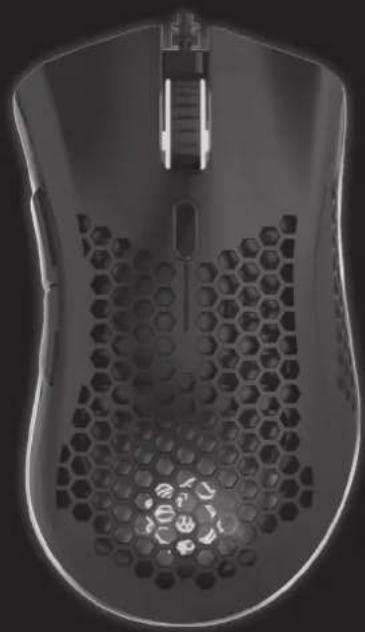
Top-down view of a black computer mouse with hexagonal mesh pattern (no text or symbols visible)WARUNKI BEZPIECZEŃSTWA I ZAGROŻENIA
INSTALACJA
SAFETY CONDITIONS AND HAZARDS
- Do not tamper with the interior of the device, attempt to repair or modify it yourself.
- The device is not a toy, it should be stored away from children.
- Do not use the device near sources of heat.
- Do not immerse the device in water nor in other liquids.
- Protect the device from excessive sunlight, moisture, do not use it in rooms with increased dustiness, air pollution.
- Do not wrap the power cord around the device.
BUTTON DESCRIPTION
- Left
- Right
- Middle/Scroll
- Front
- Rear
- DPI
- RGB Switch
- LED RGB backlight

INSTALLATION
- Connect the USB connector to the USB port of your computer. The computer will automatically detect the device and select the drivers.
- The software can be downloaded via the QR code or at http://maddog.pl/sterowniki/sterowniki-i-instrukcje

SPECIFICATION
- Sensor: Pixart 3325
- Buttons: 7
- Left and right switches: Huano
- DPI levels: 6: 800, 1600, 2400, 3200, 4000, 5000, ≥ 10000 DPI using software
- Max. acceleration: 20 G
- Sensor speed: 100 IPS
- Number of backlight modes: 12
- Software: Yes
- Cable length: 1.7 m
- Profile: praworęczny
- Backlight: LED RGB
PACKAGE CONTENTS
- GM750* Mouse
- User manual and warranty conditions
- PC or USB device
- Windows, Mac (all versions until 2021)
REQUIREMENTS
CHANGING DPI
To change the resolution, press the DPI button. Each change will be signaled by a change in the colour of the backlight of logo and the scroll wheel. The values and the colours assigned to them can be changed using the software.
CHANGING THE BACKLIGHT MODE
Press the RGB switch on the bottom of the mouse. Each press will change the RGB LED backlight mode.
The settings of the colour and resolution parameters can be changed using the software.
NOTES FOR USE
- The product should only be used as intended
- Do not expose the device to moisture, dust and other contaminants that may affect the correct operation of the device
- Avoid abrupt changes in ambient temperature. After changing environment, wait about 30 minutes before connecting the device to the computer.
CLEANING
- Blow dust from the inside of the mouse
- Wipe the housing with a lightly dampened cloth
PLEASE NOTE! DO NOT IMMERSE THE DEVICE IN WATER. DO NOT USE WATER OR CHEMICALS FOR CLEANING.
TROUBLESHOOTING
| Problem Possible cause Solution | ||
| The device does not start. | Incorrectly connected plug to the computer connector. | Connect the plug to the connector on the computer correctly. |
| The computer did not download the device driver. | Connect the cable plug to the connector on the computer and wait for the computer to download the device driver. | |
| The mouse cursor moves very fast or very slowly. | Too high or too low DPI resolution set. Press the DPI button | to change the resolution settings. |
| Mouse cursor does not move. | The optical hole at the bottom of the mouse is dirty. Clean the underside of the mouse. | |
| The texture of the surface on which the mouse works is too smooth and prevents proper operation. | Change the working surface of the mouse or use a mouse pad. | |
ECO-FRIENDLY AND ENVIRONMENTALLY FRIENDLY DISPOSAL
This device is marked, in accordance with Directive 2012/19/EU of the European Parliament and of the Council of 4 July 2012 on waste electrical and electronic equipment (WEEE), with the symbol of a crossed-out waste container:

Do not dispose of the device marked with this symbol together with household waste.
For disposal return the device to your local waste treatment and disposal facility or contact your local authorities.
YOU CAN HELP PROTECT THE ENVIRONMENT!
Proper handling of waste electrical and electronic equipment contributes to avoiding harmful consequences for human health and the environment resulting from the presence of hazardous components and improper storage and processing of such equipment.
WARRANTY CONDITIONS FOR THE MOUSE
- ART-DOM Sp. z o.o. with its registered o ice in Łódz (92-402) at ul. Zakładowa 90/92 National Court Register Number 0000354059 (Guarantor) guarantees that the purchased device is free from physical defects. The warranty covers only defects resulting from the causes inherent in the item sold (manufacturing defects).
- A disclosed defect will be removed at the Guarantor's expense within 14 days from the date of reporting the damage to the authorized service or point of sale.
- In exceptional cases, e.g. the need to import spare parts from their manufacturer, the repair period may be extended up to 30 days.
- The warranty period for the user is 24 months from the date of delivery of the goods.
-
The goods are intended for use only in the conditions of an individual household.
-
The present warranty does not cover:
a. damage caused by using the device in a manner inconsistent with the user manual,
b. mechanical, chemical or thermal damage,
c. repairs and modifications made by companies or persons that were not authorized to do so by the manufacturer,
d. parts that are easy to use or consumables such as: batteries, bulbs, fuses, filters, knobs, shelves, accessories,
e. installation, maintenance, inspection, cleaning, unlocking, removal of contaminants and instruction.
- The Guarantor will select the mode of defect removal at its own discretion. Removal of a confirmed defect of the device will take place through warranty repair or replacement of the device. The Guarantor may perform repairs when the buyer requests replacement or the Guarantor may perform replacements when the buyer requests repair, if bringing the goods (device) into conformity in accordance with the granted warranty in the manner selected by the buyer is impossible or would require excessive costs 20 at the part of Guarantor. In particularly justified cases, if both repair and replacement are impossible or would require excessive costs for the Guarantor, the Guarantor may refuse to bring the goods into compliance with the granted warranty and propose another way to settle the warranty claim.
- The exchange of goods is made at the point of sale at which the goods were purchased (replacement or refund) or an authorized service point, if it o ers such service (replacement). The returned device must be complete, without mechanical damage. Failure to comply with these conditions may result in failure to accept the warranty claim.
- In the event of non-compliance of the goods with the sales contract, the buyer is entitled by law to legal protection measures on the part and at the expense of the seller, and the warranty does not act these legal protection measures.
- The warranty is valid in Poland.
- The condition for the warranty repair or replacement of the device is the presentation of proof of purchase and the use of the goods in accordance with the information contained in the user manual.
CAUTION!
Damage or removal of the rating plate from the device may result in warranty being deemed void.


- WARUNKI BEZPIECZEŃSTWA I ZAGROŻENIA
- INSTALACJA
- SAFETY CONDITIONS AND HAZARDS
- PACKAGE CONTENTS
- REQUIREMENTS
- CHANGING DPI
- CHANGING THE BACKLIGHT MODE
- NOTES FOR USE
- CLEANING
- TROUBLESHOOTING
- ECO-FRIENDLY AND ENVIRONMENTALLY FRIENDLY DISPOSAL
- YOU CAN HELP PROTECT THE ENVIRONMENT!
- WARRANTY CONDITIONS FOR THE MOUSE
- CAUTION!
Brand : Mad Dog
Model : GM750
Category : Computer Mouse