
TL-ANT5830MD - TV Antenna TP-LINK - Free user manual and instructions
Find the device manual for free TL-ANT5830MD TP-LINK in PDF.


| Product Type | Outdoor Dish Antenna for Wireless Base Stations |
| Brand | TP-Link |
| Model | TL-ANT5830MD |
| Frequency Range | 5.0 - 6.0 GHz |
| Gain | 30 dBi |
| VSWR | 1.8 Max |
| Beamwidth (3 dB) | 6° (both H and V) |
| Front-to-Back Ratio | 34 dB Min |
| Polarization | Horizontal & Vertical (Dual Linear) |
| Impedance | 50 Ω |
| Connector | RP-SMA (male pins) |
| Antenna Diameter | 600 mm |
| Weight | 6.0 kg |
| Rated Wind Velocity | 241 km/h |
| Mounting Type | Pole Mount (1.5 to 4.0 inch diameter) |
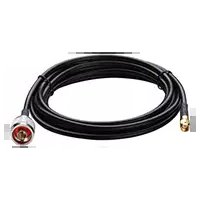
| Package Contents | Dish Reflector, Antenna Feed, RF Cables, M10x35 Carriage Bolts (3), M10x150 Carriage Bolts (4), Washers, Nuts, Pole-mount Clamps, Protective Shroud |
| Safety | Keep away from power lines; avoid installation in rain or thunderstorms; use qualified technician if unsure. |
| Compatible Base Stations | TP-Link WBS510 (5GHz) or similar outdoor base station with RP-SMA connectors |
| Maximum Distance | Up to several kilometers in point-to-point links (dependent on environment) |
| Maintenance | Periodically check for loose bolts and clean dish with a soft, dry cloth; avoid abrasive cleaners. |
Frequently Asked Questions - TL-ANT5830MD TP-LINK
User questions about TL-ANT5830MD TP-LINK
0 question about this device. Answer the ones you know or ask your own.
Ask a new question about this device
Download the instructions for your TV Antenna in PDF format for free! Find your manual TL-ANT5830MD - TP-LINK and take your electronic device back in hand. On this page are published all the documents necessary for the use of your device. TL-ANT5830MD by TP-LINK.
USER MANUAL TL-ANT5830MD TP-LINK
Installation Requirements 3
Hardware Overview 3
Hardware Installation 4
Introduction
The TL-ANT2424MD, 2.4GHz 15dBi 2x2 MIMO Dish Antenna, can be used with the outdoor wireless Base Station WBS210 to achieve a stable long-distance point-to-point signal transmission.
The TL-ANT5830MD, 5GHz 19dBi 2x2 MIMO Dish Antenna, can be used with the outdoor wireless Base Station WBS510 to achieve a stable long-distance point-to-point signal transmission.
Specifications
Electrical Specifications TL-ANT2424MD TL-ANT5830MD
| Frequency Range | 2.3~2.7 GHz | 5.0 - 6.0 GHz |
| Gain | 24 dBi | 30 dBi |
| VSWR | 1.8 Max | 1.8 Max |
| HPOL Beamwidth (3 dB) | 6° | 6° |
| VPOL Beamwidth (3 dB) | 6° | 6° |
| Elevation Beamwidth (3 dB) | 6° | 6° |
| F/B Ratio | 32 dB Min | 34 dB Min |
| Polarization | Horizontal & Vertical | Horizontal & Vertical |
| Impedance | 50 Ω | 50 Ω |
| Connector | RP-SMA | RP-SMA |
Mechanical Specifications
| Antenna Dimension | 600 mm |
| Weight | 6.0 Kg |
| Rated Wind Velocity | 241 Km/h |
| Mounting | Pole Mount |
Safety Notice
Heed all warnings:
- Mount the antenna at a safe location, far away from power lines, lamp posts, and other electrical cables.
- Do not mount the antenna in the rain or thunderstorm.
- Avoid using this product during an electrical storm. There may be a remote risk of electric shock from lightning.
- For your own safety, please seek a qualified service technician for assistance.
Package Contents
The package contents of the TL-ANT5830MD are shown below. The TL-ANT2424MD comes with the Antenna Feed and RF Cables pre-attached.
M10x35 Carriage Bolt Assemblies (Qty. 3)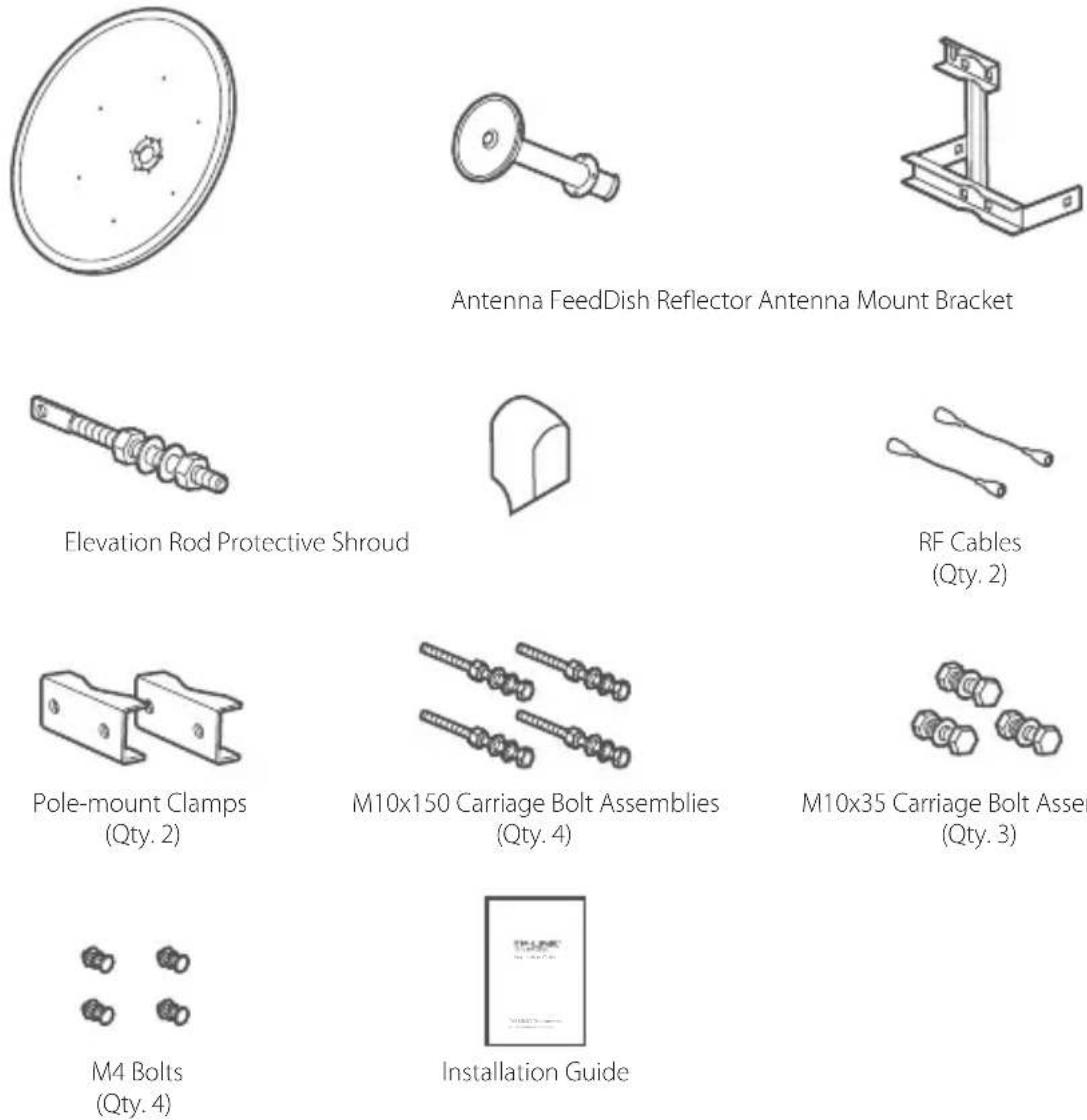
Installation Requirements
• Outdoor Wireless Base Station (sold separately) • Phillips Screwdriver - Wrenches
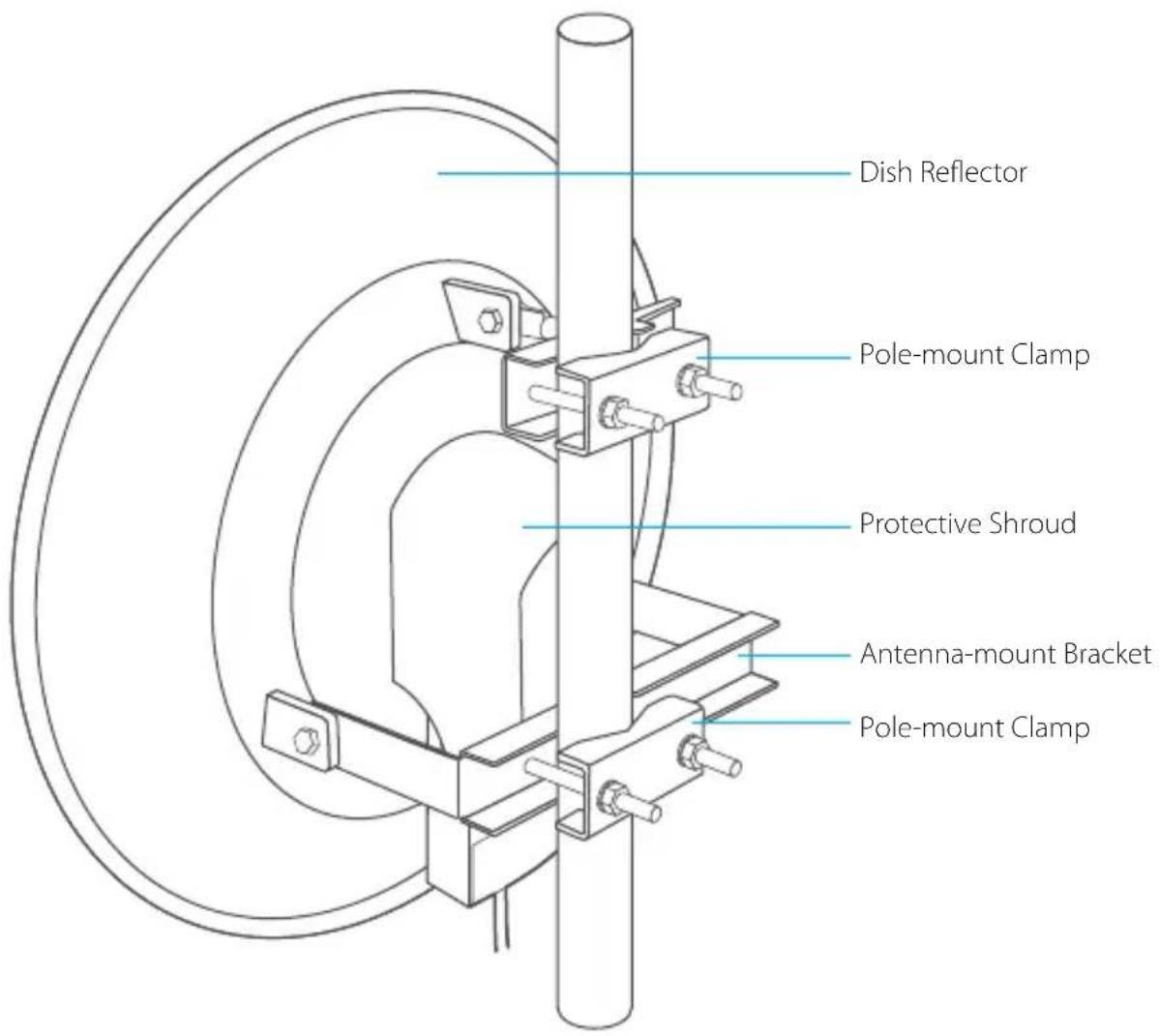
Hardware Overview
Hardware Installation
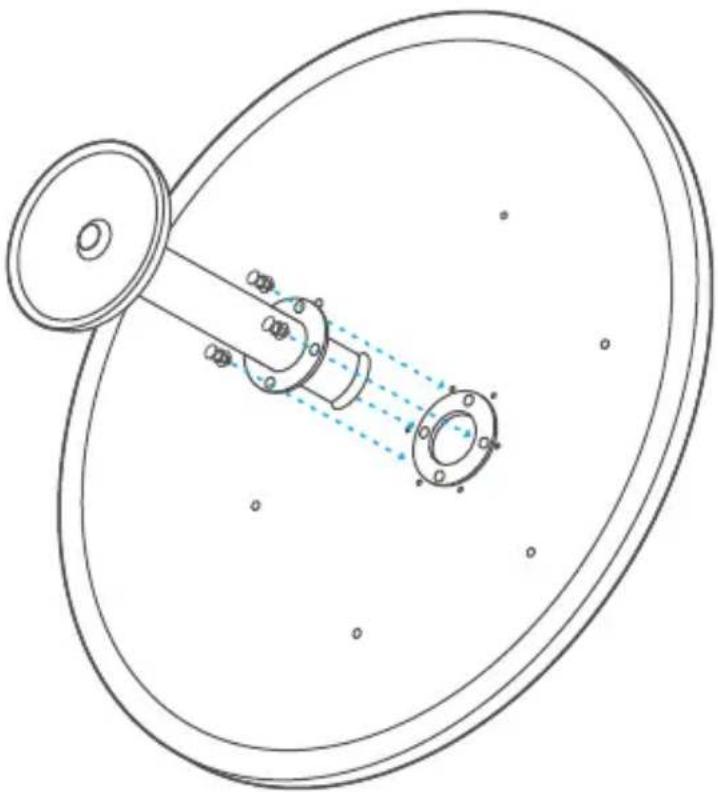
- Secure the Antenna Feed to the Dish Reflector using the four M4 Bolts and a Phillips screwdriver.
Note: Do not handle the Dish Reflector by the Antenna Feed once the feed is installed.
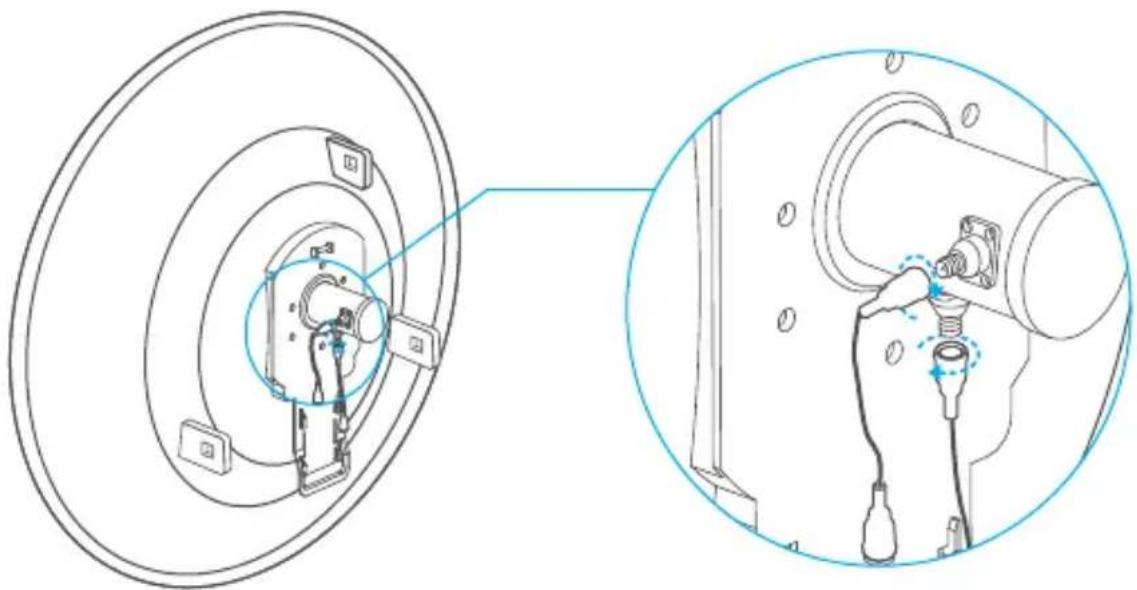
- Connect the RF Cables to the RF Connectors on the Antenna Feed. Note: TL-ANT 2424MD doesn't require this step, please go directly to step 3.
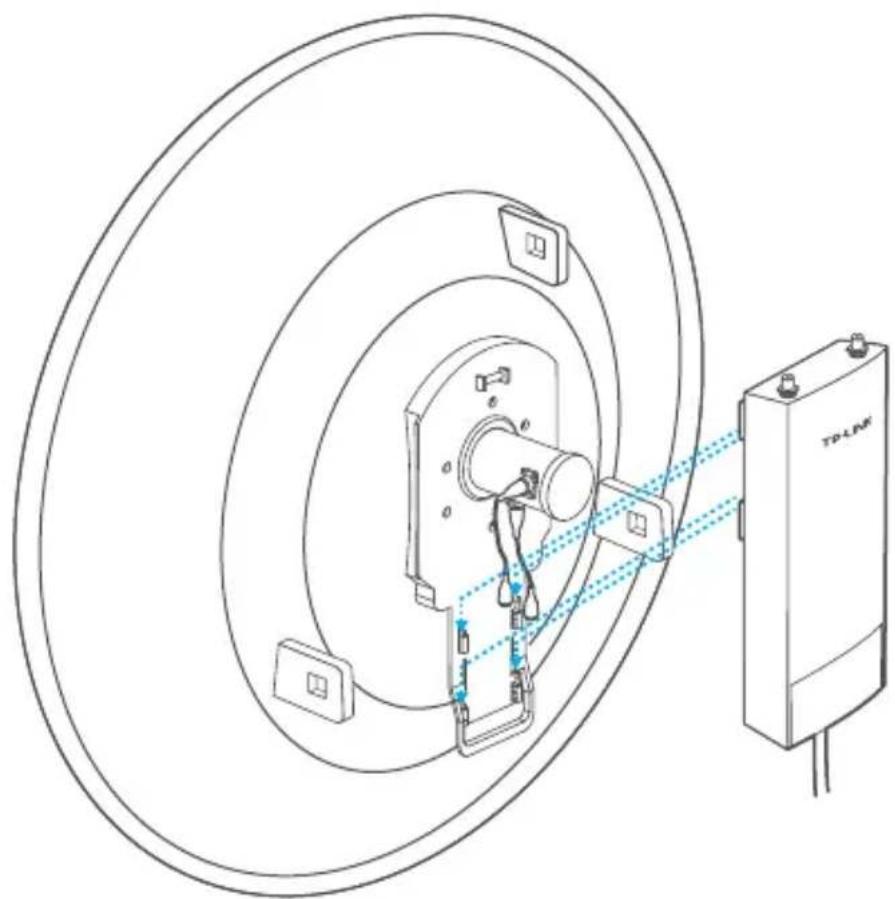
- Attach the Base Station to the Dish Reflector as follows:
a. Align the mounting tabs on the back of the Base Station with the four mounting slots on the Base Station mounting bracket.
b. Slide the Base Station down until it locks into place.
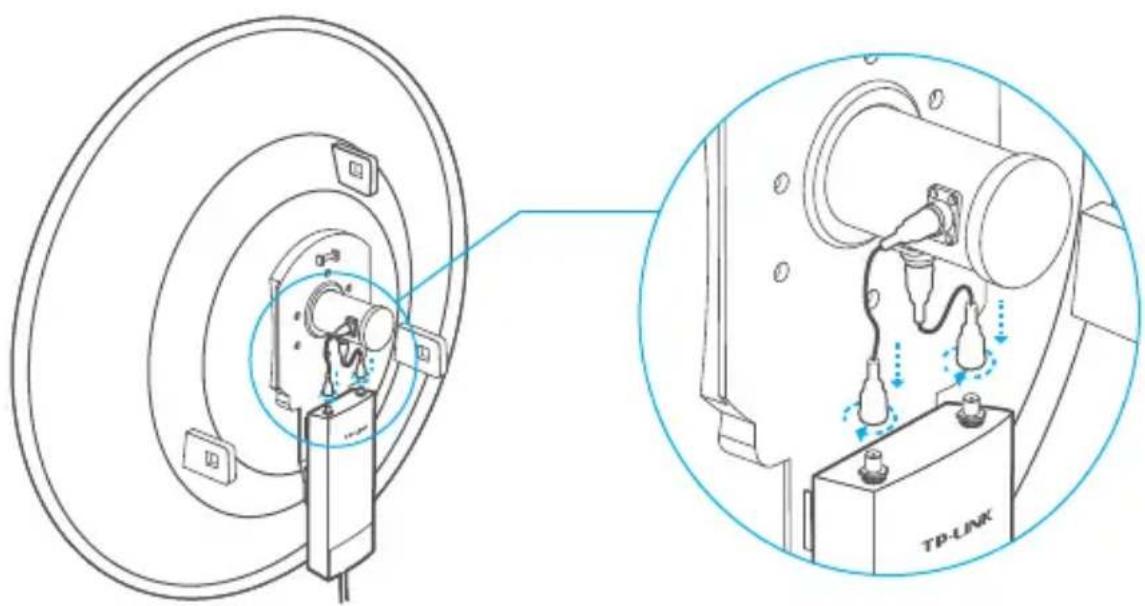
- Connect the other ends of the RF Cables to the Base Station.
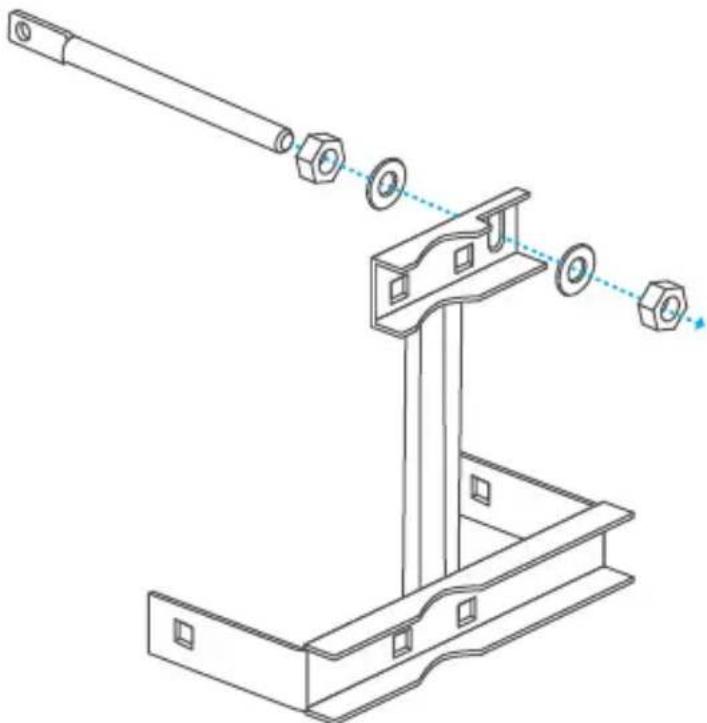
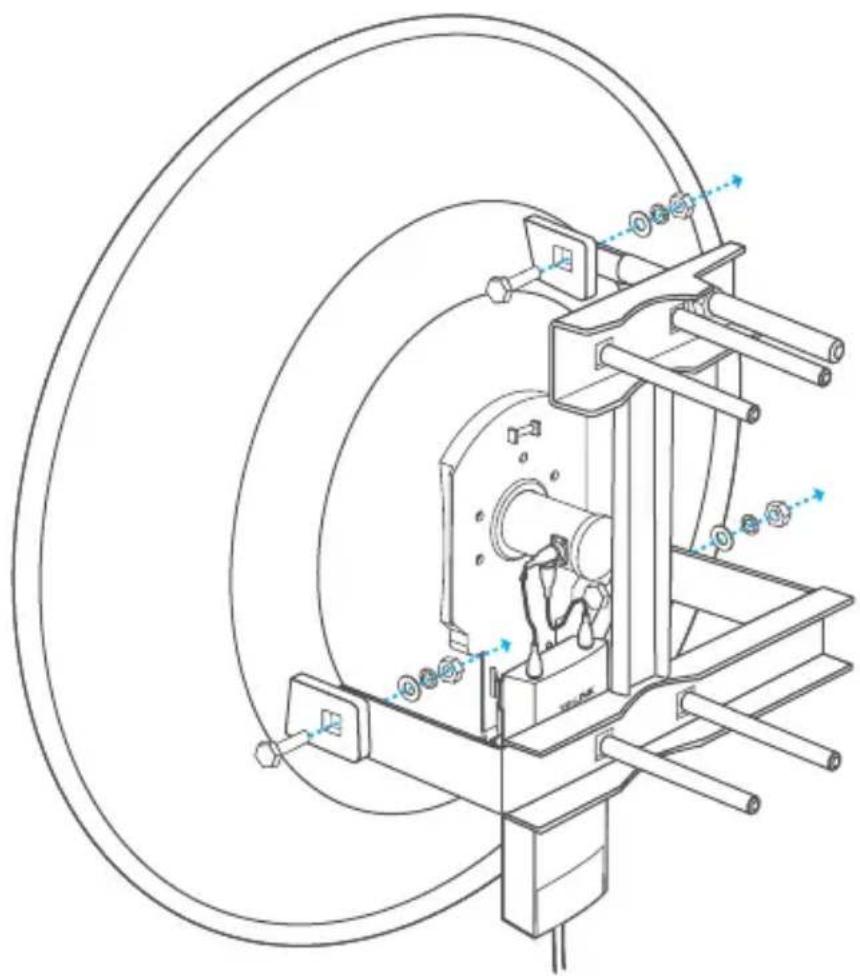
- Attach the Elevation Rod to the Antenna-mount Bracket using the flat washers and nuts as shown below.
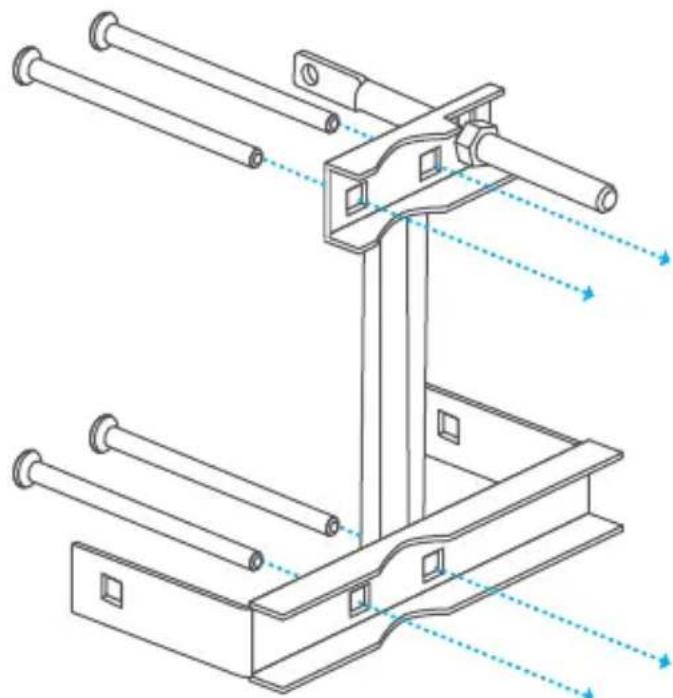
- Attach the M10x150 Carriage Bolt Assemblies to the Antenna-mount Bracket:
a. Remove the flat washer, spring washer, and nut that are threaded on each M10x150 Carriage Bolt Assembly. Set them aside as they will be used to secure the antenna to a pole in step 8.
b. Insert the four M10x150 Carriage Bolts into the Antenna-mount Bracket.
- Attach the Dish Reflector to the Antenna-mount Bracket:
a. Secure one M10x35 Carriage Bolt Assembly to attach the Dish Reflector to the Elevation Rod.
b. Secure two M10x35 Carriage Bolt Assemblies to attach the Dish Reflector to the lower section of the Antenna-mount bracket.
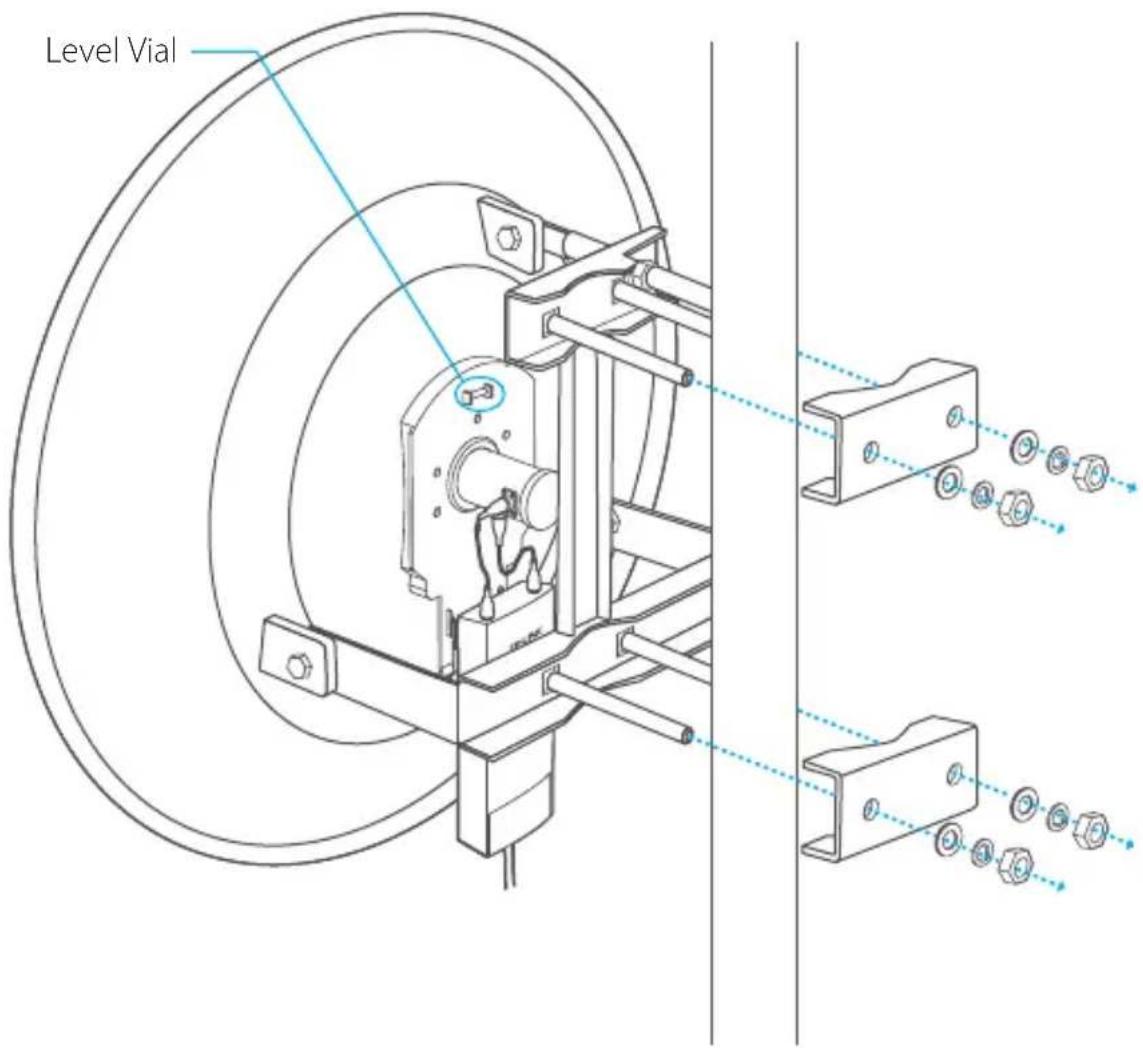
- Mount the antenna assembly to the pole using the two Pole-mount Clamps and the four sets of flat washers, spring washers and nuts of the M10x150 Carriage Bolt Assemblies.
Note:
- Pole diameter ranges from 1.5 in to 4.0 in.
- Do not over-tighten these bolts and nuts to allow angle adjustment later.
- In step 8 to 9, use the Level Vital to ensure proper alignment.
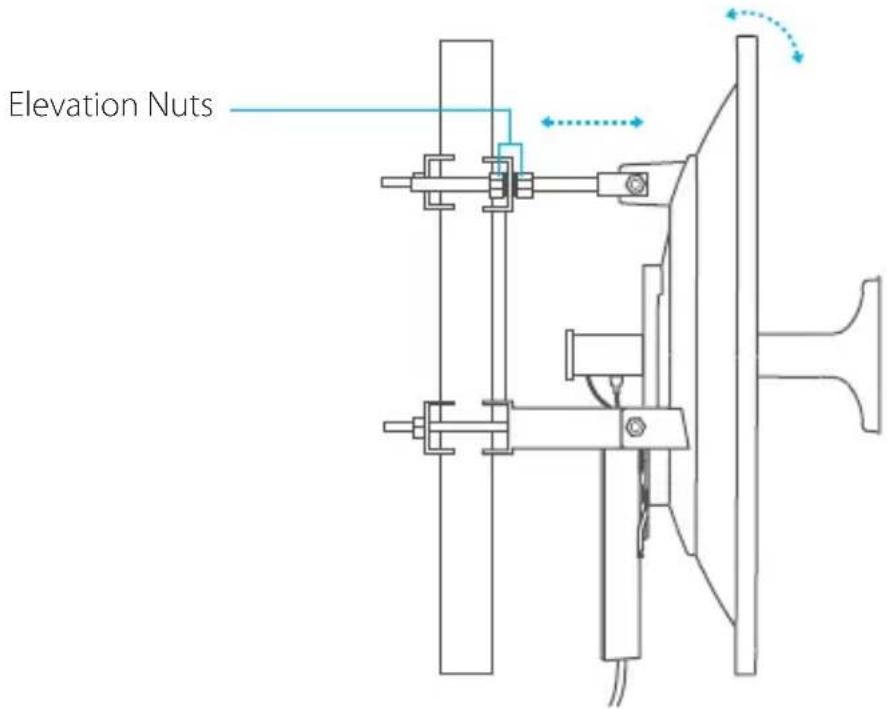
- Adjust the antenna azimuth and elevation angles with the front facing the intended signal receiving devices to achieve maximum signal strength:
a. To adjust azimuth, loosen the four nuts on the Pole-mount Clamps slightly to pivot the antenna, then tighten the nuts. b. To adjust the elevation angle, tighten or loosen the Elevation Nuts on the Elevation Rod to the desired tilt.
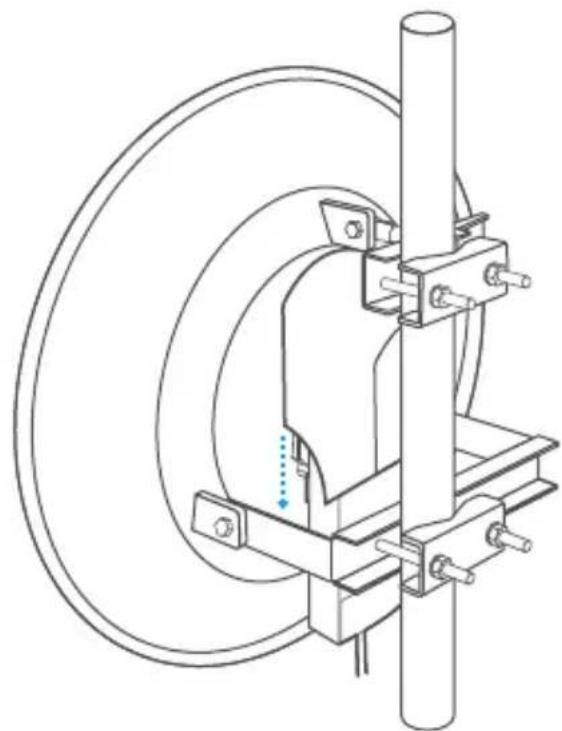
- Slide the Protective Shroud down over the Base Station until it locks into place.
COPYRIGHT & TRADEMARKS
Specifications are subject to change without notice.
TP-LINK is a registered trademark of TP-LINK TECHNOLOGIES CO., LTD. Other brands and product names are trademarks or registered trademarks of their respective holders. No part of the specifications may be reproduced in any form or by any means or used to make any derivative such as translation, transformation, or adaptation without permission from TP-LINK TECHNOLOGIES CO., LTD. Copyright © 2015 TP-LINK TECHNOLOGIES CO., LTD. All rights reserved.
Website: http://www.tp-link.com
Tel: +86 755 26504400
E-mail: support@tp-link.com


Brand : TP-LINK
Model : TL-ANT5830MD
Category : TV Antenna