
SWT05BP - Smartwatch Manta - Free user manual and instructions
Find the device manual for free SWT05BP Manta in PDF.


| Product Type | Smartwatch |
| Brand | Manta |
| Model | SWT05BP |
| Connectivity | Bluetooth (via Da Fit app) |
| Battery | Rechargeable lithium-ion; 2 hours full charge via magnetic charger (5V/500mA) |
| Display | Touch screen (color) |
| Sensors | Heart rate, blood pressure, SpO2, accelerometer |
| Water Resistance | Not specified; avoid steam, hot water, sauna |
| Compatibility | iOS 9.0+ and Android 4.4+ |
| Weight | Approx. 50 g |
| Dimensions | Approx. 45 x 38 x 10 mm |
| Main Functions | Pedometer, sleep monitor, heart rate, blood pressure, SpO2, sports modes (walking, running, cycling, skipping, badminton, basketball, football, swimming), notifications, weather, music control, breathe training, remote shutter, stopwatch |
| Charging Time | Approx. 2 hours |
| Standby Time | Approx. 7 days (typical) |
| Maintenance | Keep away from hot water, steam, sauna; do not use fast charger; clean with dry cloth |
| Safety | Not a medical device; measurements for reference only; do not charge with metal objects |
| Certification | RED Directive 2014/53/EU |
| Manufacturer | Manta S.A., ul. Matuszewska 14, 03-876 Warsaw, Poland |
Frequently Asked Questions - SWT05BP Manta
User questions about SWT05BP Manta
0 question about this device. Answer the ones you know or ask your own.
Ask a new question about this device
Download the instructions for your Smartwatch in PDF format for free! Find your manual SWT05BP - Manta and take your electronic device back in hand. On this page are published all the documents necessary for the use of your device. SWT05BP by Manta.
USER MANUAL SWT05BP Manta
EN - User's Manual 12
natural_image
3D rendered image of a metallic mechanical component with a central hole and side ports (no text or symbols visible)TWORZENIE POŁĄCZENIA ZE SMARTWATCHEM
Scan the QR code given in the right side to download and install the APP to the phone
Or Search "Da Fit" Apps from phone Google store or from Manta web page, then download it and install the same to you phone. (supports IOS9.0&above and Android 4.4 &above, notfit all mobile phone models, please refer to the actualone)
The watch works with an external Application for which Manta is not responsible.

WATCH CHARGING AND ACTIVATED
Initially when you use for first time please make sure the battery is fully charged, it takes 2 hours to be fully charged. Use the magnetic charger to attract the metal contacts on the back of watch (as shown on the right), and connect the other end of charger to USB charging Head or computer USB interface (please use 5V / 500mA charging head, the two charging thimbles on the magnetic charger end cannot be attached to metal objects, in case short-circuit&fire happens, do not charge with fast charging device.

natural_image
3D rendered image of a metallic mechanical component with a central hole and side ports (no text or symbols visible)CONNECT SMART WATCH
(Connect the smartwatch with the phone directly in the application)
-
Switch watch on: long press the side button for 3-5 seconds
-
Please turn on the phone's Bluetooth and location service and make sure watch is not bind to other devices
Launch dafit on your mobile phone → Edit your personal information → Enter the device interface (middle bottom icon) → Click "ADD DEVICE" → Then select your SWT05BP model from the list → Device has been properly connected → To be sure, you can check your MAC address; you can use it to identify your device in the list of available devices.
Each time you open the App, the watch will automatically connect to the phone. After right-slide of the main interface of watch to enter the MAC address interface, the Bluetooth icon will appear, indicating that Bluetooth is connected. If there is no Bluetooth icon, Bluetooth is not connected.
EN
www.manta.com.pl
NOTE:
1: When using GPS under sports mode, please turn on location services for phone and device, the watch does not have GPS function, you can open the GPS function in the app.
2: The data of step, sleep, heart rate, blood pressure, and blood oxygen saturation of the watch will be synchronized to the APP. The relevant data can be synchronized by pulling down the corresponding page. More detailed information analysis and data recording can be viewed from the APP.
3: Before you start monitoring, you need to put a smartwatch on your hand
FEATURES
1.Main interface / dial
Built-in dial switch: Left slide on the main interface of the dial to enter the function menu, select the switch dial, open and slide to select the dial, click on the selected one. Switch the customised dial through the APP: App's device page dial selection → dial's choice → Click on the dial edit → to select the picture → tick in the upper right corner. Set more dials through APP: APP device page → dial selection → find more dials → click on your favorite dial picture → click to download now → Please do not leave the page during download


EN
www.manta.com.pl
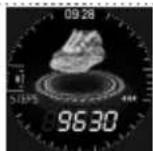
2. Pedometer/Distance/Calorie Burnt
The watch can record the number of steps taken every day, the walking step data can be synchronized to the APP, the walking steps distance, calories and other data details can be viewed from the APP (the number of steps, distance, calories, etc, recorded in the watch end of the day) The datas will be cleared at 00:00 every day)
3. SleepMonitor
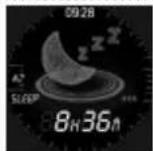
User wear the watch to sleep can detect the length of sleep, as well as deep sleep and light sleep state, adjust your sleeping time according to the data's reference, improve your body's health index. The defaulted sleep monitoring time is from 22:00 pm to 8:00 am, the sleeping data result of last night will be displayed after 8:00 am, data can be synchronized to the APP, the sleep data detailed information analysis and data record can be viewed from the APP.
4. Heart Rate
Slide to the heart rate function interface, the heart rate will start automatically after 2 seconds (you can also click the heart rate icon to stop/start during the measurement), the test data will be displayed when the measurement is completed, the heart rate monitoring data can be synchronized to the APP, and the detailed HR information analysis and The data record can be viewed from the APP (Please utilize the correct posture when measuring, the measurement results are for reference only, can not be used as medical data)

5. Sports Mode
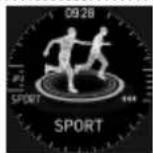
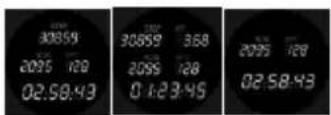
Click the sport mode icon to enter the multi-sport mode: walking, running, cycling, skipping, badminton, basketball, football and swimming. Slide up and click to enter monitoring, and right-click on the sports mode interface: pause / stop, sport mode data can be synchronized to the APP, sport mode monitoring detailed information analysis and data records can be viewed from the APP
EN
www.manta.com.pl

6. Blood Pressure
Slide to the blood pressure function interface, the blood pressure will automatically start measuring after 2 seconds (the blood pressure icon can also be stopped/started during the measurement), the test data will be displayed when measurement is completed, the blood pressure monitoring data can be synchronized to the APP, monitoring detailed information analysis and data record can be viewed from the APP side (Please sit in correct posture when measuring, the measurement result is for reference only, can not be used as medical data)

7. SPO _2
Enter SPO₂ Menu, after 2 seconds will be monitoring automatically ( Or Click SPO2 Icon On/Off ) ,When monitoring is complete it will display data. Data can be synchronized to APP, SPO₂ Analysis data and details can view by App ( Please wearing in your hands, then start monitoring , result only for reference , cannot be used as medical data

8.Breathe Training
Click breathe icon, start training, the instruction to be Breathe in/out (Usually breathe training help to relax emotions, reduce psychological stress, and improve lung function)


EN
www.manta.com.pl
9. Weather report
In weather interface, will be display today and tomorrow's weather remark: Weather display must work with App

10. Music Control
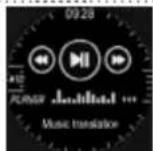
After connecting to App, turn on your mobile phone player manually. In the watch you can control last song, Next song or Play and pause (The app must run in the background – if your phone automatically closes the app, it will stop working due to power-saving settings)
11. Message Notification
At Main page, slide down touch will display notification page, when new message is received, Watch will vibrate and displays the message. Watch will display latest three messages, and automatically overwrites the first stored message when the later message is received. Including SMS and other messages.

12. Other Menu
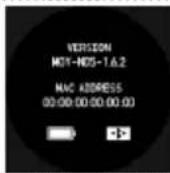
Right slide screen will display the interface, you can check version info, BluetoothMACaddress, battery percentage display and Bluetooth connection status
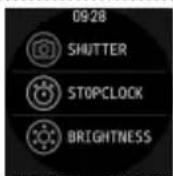
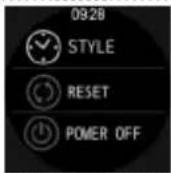
After dragging to the left in the main interface, pages of other functions will be displayed: remote shutter, stopwatch, display brightness settings, dial style selection, reset and turning off the watch.
EN
www.manta.com.pl
13. Why the watch can't receive the message notification?
SinceAndroid mobile phone background will automatically "clean up" the Appwhich not commonly used, it will cause the watchconnection to drop and no longer push the message.
-
Make sure turn on message push in DAFIT setting
-
Make sure the message can be displayed in mobile phone's notificationbar, messagenotification is pushed by reading the phone notification bar, the watch can't get notification if the message push closed in mobile phone setting.
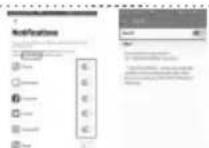
Note: Find notification settings in phone settings, turn-on What Sapp, Facebook, phone, SMS and other notification switch (Depending on different area or software version, some functions may not support notification)
14. Why the watch can't auto wake on while I lift up the wrist
- Make Sure the Quick View Function had selected from your apps.

- Use the right Position and Angle to make watch Auto Wake up easily.
Quick View Sensor to wake up screen display just lift up the wrist to turn on display without phrasing any key Free your hands do gestures only lift the wrist to check watch anytime
Method 1: Raise your hand from the vertical position to the normal watch posture and the display will turn on, when the surface angle is 30-85 degree
Method 2: The display stays off when watch is away from your face and when turned toward your face at 30-80 degree the watch display will turn on.

EN
www.manta.com.pl
15. Android phone setting
Find and open accessibility features in phone settings or open Dafit Notifications find message push, choose the message notification as rightpicture. At the same time, click on "Accessibility" in this "Message Push Interface" find Dafit and turn it on.
16. Getting to know your Device
It is forbidden to throw this product into the fire to avoid explosion. The battery life varies according to the environment and usage mode.
17. Why does the blood pressure data is different from the Sphygmomanometer?
The difference between the smartwatch data and sphygmomanometer is determined by a variety of factors. The measurement site of the sphygmomanometer is in the radial artery, and the measurement site of the watch is the two main branches of the arteriole. Normally, the difference value between aortic blood pressure measurement and micro arterial measurement is 3\~40. Because of the blood flows in the artery in the direction of the centrifuge, if you use the smart watch and sphygmomanometer to measure at the same time the sphygmomanometer band make your elbow-under pressure. The blood pressure cannot flow smoothly to the lower branch of the artery-and increased vascular tension, which will make the difference larger.
18. Why can't wear the smart watch to take a bath&hot springs&sauna?
The bath water temperature is relatively high, it will produce a lot of water vapor, and the water vapor is gas phase. Its molecular radius is small, it is easy to infiltrate from the shell gap of the watch, and when the temperature drops, it will recondense into a liquid phase. Water droplets can easily cause short circuit inside the watch, damage the circuit board and damage watch itself.
EN
www.manta.com.pl
19. Application
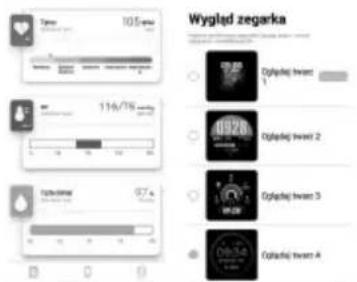
With the DAFIT application you can:
- Monitor your health data like heart rate, blood pressure, blood oxygenation
- Monitor your sport data like distance traveled and calories burned.
- Monitor and track your sleep quality
- Change the appearance of the watch face
This product is not a medical device. Smartwatch and related applications should not be used to diagnose, treat, cure or prevent ailments and diseases. Before you suddenly change your exercise and sleep habits, consult a specialist to avoid serious health effects.
Measurement results may slightly differ from measurements made on professional devices
Our company reserves the right to modify and improve the functions described in this manual without prior notice. At the same time, we reserve the right to constantly update the product. All content applies to the actual product.

MANTA
Correct Disposal of this product.
This marking indicates that this product should not be disposed with other household wastes throughout the EU. To prevent possible harm to the environment or human health from uncontrolled waste disposal, recycle it responsibly to promote the sustainable reuse of material resources. To return your used device, please use the return and collection systems or contact the retailer where the product was purchased. They can take this
The product and accessories may slightly differ from those presented on the packaging.
EN All tips, instructions, certificates and additional information on MANTA equipment are available on www.manta.com.pl
"MANTA" is a registered trademark of MANTA S.A. All rights reserved. Copying and reproduction is strictly prohibited. All brand and product names listed are trademarks and registered trademarks of their respective holders and are recognized as such in this document. They were used for information purposes only. Specification is subject to change without notice.


Manta S.A. hereby declares that the SWT05BP device complies with the RED Directive 2014/53/EU. The full text of the declaration of conformity is available at www.manta.com.pl
ES
www.manta.com.pl
natural_image
3D rendered image of a metallic mechanical component with a central hole and side ports (no text or symbols visible)natural_image
3D rendered image of a metallic mechanical component with a central hole and side ports (no text or symbols visible)CRIAR UMA CONEXÃO COM O SMARTWATCH
natural_image
3D rendered image of a metallic kitchen or appliance with a central bowl and side handles (no text or symbols visible)POVEZIVANJE PAMETNOG SATA
natural_image
3D rendered image of a metallic kitchen or appliance with a central bowl and side handles (no text or symbols visible)VZPOSTAVLJANJE POVEZAVE S PAMETNO URO
-
Pametno uro aktivirate tako, da pritisnete in zadržite pritisk na stranski gumb 3-5 sekund
-
Nato aktivirajte povezavo Bluetooth in storitev lociranja telefona ter se prepričajte, da pametna ura ni povezana z drugimi napravami.
natural_image
3D rendered image of a metallic kitchen or appliance with a central bowl and side handles (no text or symbols visible)natural_image
3D rendered image of a metallic kitchen pot with a central lid and side handles (no text or symbols visible)natural_image
3D rendered image of a metallic kitchen or appliance with a central circular opening and side handles (no text or symbols visible)CRÉATION D'UNE CONNEXION AVEC LA MONTRE CONNECTÉE
from Monday to Friday. 9.00-17.00
The manufacturer reserves the right to make changes to product specifications without notice.
Home: www.manta.com.pl
Home support: www.manta.info.pl



ZESKANUJ KOD QR, A DOWIESZ SIĘ WIĘCEJ O PRODUKCIE.
SCAN QR CODE, TO FIND MORE ABOUT THE PRODUCT

Producent/Producer
Manta S.A.
ul. Matuszewska 14, 03-876 Warsaw, Poland www.manta.com.pl
Made in P.R.C.
FOR MANTA
EUROPE
- TWORZENIE POŁĄCZENIA ZE SMARTWATCHEM
- WATCH CHARGING AND ACTIVATED
- CONNECT SMART WATCH
- EN
- NOTE:
- FEATURES
- 1.Main interface / dial
- Pedometer/Distance/Calorie Burnt
- SleepMonitor
- Heart Rate
- Sports Mode
- Blood Pressure
- SPO _2
- 8.Breathe Training
- Weather report
- Music Control
- Message Notification
- Other Menu
- Why the watch can't receive the message notification?
- Why the watch can't auto wake on while I lift up the wrist
- Android phone setting
- Getting to know your Device
- Why does the blood pressure data is different from the Sphygmomanometer?
- Why can't wear the smart watch to take a bath&hot springs&sauna?
- Application
- MANTA
- ES
- CRIAR UMA CONEXÃO COM O SMARTWATCH
- POVEZIVANJE PAMETNOG SATA
- VZPOSTAVLJANJE POVEZAVE S PAMETNO URO
- CRÉATION D'UNE CONNEXION AVEC LA MONTRE CONNECTÉE
Brand : Manta
Model : SWT05BP
Category : Smartwatch