
KM-2U - Microphone Kurzweil - Free user manual and instructions
Find the device manual for free KM-2U Kurzweil in PDF.


| Product Type | Condenser USB Microphone |
| Brand | Kurzweil |
| Model | KM-2U |
| Capsule | 34mm gold-plated diaphragm |
| Polar Patterns | Cardioid, Omni-directional, Bi-directional (selectable) |
| Frequency Response | 20Hz - 20kHz |
| Sensitivity | -34dB ± 2dB (0dB=1V/Pa at 1kHz) |
| Equivalent Noise Level | <16dB SPL (A-weighted) |
| Distortion | <0.5% THD |
| Max Input SPL | 132dB (at 1kHz, <1% THD) |
| Signal-to-Noise Ratio | 100dB (at 116dB SPL, A-weighted) |
| Low Cut Filter | -10dB at 100Hz |
| -10dB Pad | Yes (switchable) |
| Headphone Jack | 3.5mm (1/8 inch) with volume control |
| Headphone Output Power | 105mW (32 ohm) |
| Sampling Rate | Up to 192kHz |
| Bit Depth | 24-bit |
| Interface | USB 2.0 (High Speed/Full Speed) |
| Power Supply | USB bus power |
| Compatibility | Windows XP/Vista/7/8/10, Mac OS |
| Plug-and-Play | Yes, no driver required |
| Mute Button | Yes |
| Gain Control | Yes |
| Included Accessories | Mounting ring, USB cable, pouch, manual, sticker |
| Warranty | 24 months |
Frequently Asked Questions - KM-2U Kurzweil
User questions about KM-2U Kurzweil
0 question about this device. Answer the ones you know or ask your own.
Ask a new question about this device
Download the instructions for your Microphone in PDF format for free! Find your manual KM-2U - Kurzweil and take your electronic device back in hand. On this page are published all the documents necessary for the use of your device. KM-2U by Kurzweil.
USER MANUAL KM-2U Kurzweil
Important Safety Instructions
- Read the instruction manual carefully and completely before u product.
- Always include the instruction manual when passing the product third parties.
- Do not use the product if defective or damaged.
Power Requirements and Compatibility
The KURZWEIL KM-2U receives power supply from the computer's or instrument's USB port. It can be used immediately as soon as the microphone is connected to the device. If it is not a powered USB port, a separate powered USB hub will be required. The KURZWEIL KM-2U supports "plug and play" and is compatible with both Windows and Mac computers.
Preventing Malfunctions and Damage to the Product
- Always keep the product dry and do not expose it to extreme temperatures (hairdryer, heater, extended exposure to sunlight, etc.) to avoid damage to the microphone capsule and electronics.
- Use only attachments, accessories, and spare recommended by KURZWEIL.
- Clean the product only with a soft, dry cloth.
Intended use/Liability
These microphones have been designed for home and studio use with high-quality audio systems.
It is considered improper use when the product is used for any application not named in the corresponding product documentation.
KURZWEIL does not accept liability for damage arising from improper use of this product and its attachments/accessories.
How to Use the Product
Windows:
- Plug the included USB cable into the bottom of the microphone then connect to an unused USB port of the computer. If the connection is successful, you can see the blue LED on the top of the microphone light up.
Note that some Windows laptop computers may not provide enough USB current to properly power the microphone. In such a case a powered USB hub will be needed between the computer and microphone.
-
The microphone connects automatically without needing to install a separate driver. It is recommended to click Control Panel -> Sound -> Recording tab then select and save Kurzweil KM-2U as the default recording device.
-
If you want to use the KM-2U built-in headphone jack for monitoring, click the Play tab in Control Panel -> Sound then select and save Kurzweil KM-2U as the default headphone or playback device.
Macintosh:
-
Plug the included USB cable into the bottom of the microphone then connect to an unused USB port of the computer. If the connection is successful, you can see the blue LED on the top of the microphone light up.
-
The microphone connects automatically without needing to install a separate driver. It is recommended to click Application -> Utilities -> Audio MIDI Settings. Then select "View Audio Devices" and right-click the KURZWEIL USB MC1 on the left.
-
If you want to use the KM-2U built-in headphone jack for monitoring, click Application -> Utilities -> Audio MIDI Settings. Then select "View Audio Devices" and right-click the KURZWEIL USB MC2 on the left. Finally select "Use this device for sound output."
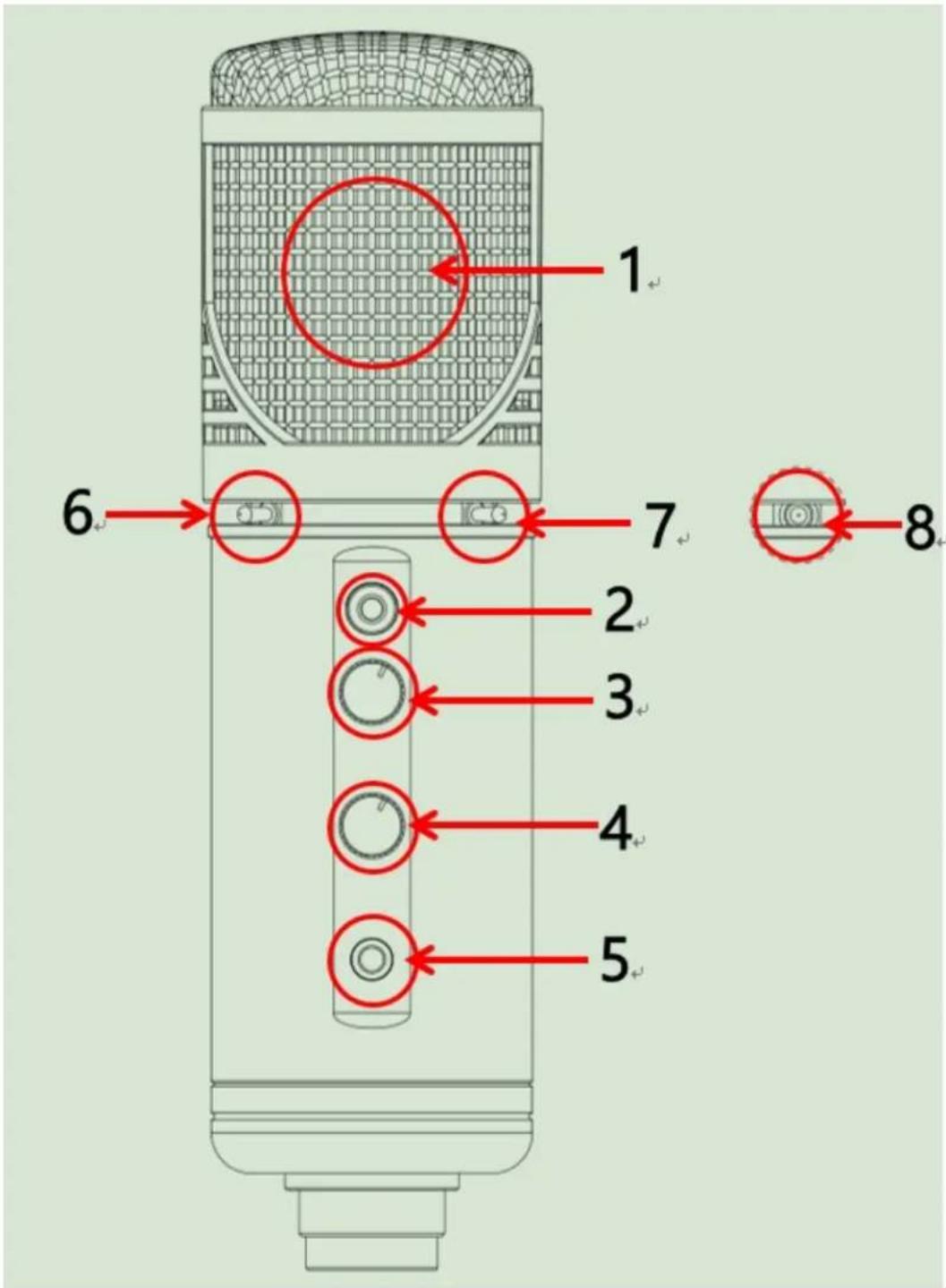
- Capsule: Huge 34mm (1-3/8 inch) gold plated diaphragm
- Mute button: You can mute the microphone input. The red light will turn off indicating that the microphone is muted. Press again to restore microphone operation.
- Gain Control knob: Allows you to control the sensitivity of the microphone.
- Headphone Volume Knob: Allows you to control the headphone jack volume.
Note that only the headphone volume is affected.
-
3.5mm (1/8 inch) Headphone Jack: This is convenient for monitoring using headphones. Depending on the software in use, you may either monitor your own voice or playback of previously recorded tracks.
-
Low cut switch: Low cut mode is activated when the switch is pressed in. Frequencies below 100Hz, such as wind noise and "breath pops," will be reduced without significantly affecting voice frequencies.
-
-10 dB Switch: When pressed in, this will reduce the recording input level by 10 decibels. For instance, if you were recording a loud signal reaching 50dB, you could use this switch to reduce the recorded level to 40 dB and reduce or eliminate distortion or clipping.
-
Directional Pattern switch: three directional settings are available: Cardioid , Omni-directional , and Bi-directional .
Package Contents
1 KM-2U Microphone unit
1 Mounting Ring
1 USB cable (USB A Type plug to B Type plug)
1 Microphone Pouch
1 User's Manual
1 KURZWEIL Sticker
Features
- USB2.0 High Speed / Full Speed mode compatible
- Selectable pickup pattern: Cardioid, Omni-directional, Bi-directional
- ZERO latency monitoring of microphone signal
- Sampling accuracy up to 24 bits and sampling frequency up to 192 KHz
- Windows XP, Vista, Win7 / 8 / 10 and Mac compatible. Plug-and-Play
- Compatible with most recording software and ASIO audio drivers
Specifications
USB 2.0 High Speed and Full Speed compatible
24Bit A/D and D/A high speed conversion, up to 192kHz recording quality
Internal custom audio processing chip
Compatible with the latest USB audio devices
Sampling accuracy up to 24bits. Supports 44.1K, 48K, 96K, and 192K sample rate
Pure gold plated 34mm (1-3/8 inch) pressure-gradient diaphragm
Selectable polar pattern: Omni, Cardioid, Bidirectional
Supports ASIO audio drivers
Frequency Response: 20Hz-20KHz
Sensitivity: -34dB±2dB (reference 0dB=1V/Pa at 1KHz)
Equivalent noise level less than 16dB SPL (A-weighted)
Distortion: less than 0.5% THD
Max.Input SPL:132dB (at 1KHz for less than 1% THD)
SNR:100dB (at 116dB SPL and 1KHz, A-weighted)
Low Cut function: -10dB at 100Hz
Headphone jack maximum output power:105mW (32 Ohm headphones)
Warranty
KURZWEIL honors a warranty of 24 months on this product.
KURZWEIL is not responsible for and this limited Warranty does not cover any damage arising from a failure to operate the product within its intended uses or failure to follow the owner's manual and safety instructions relating to the product's use and installation. This limited Warranty only covers product issues caused by defects in material or workmanship during ordinary consumer use.

Brand : Kurzweil
Model : KM-2U
Category : Microphone