
POWERCUBE 100Pro - Power bank AGFAPHOTO - Free user manual and instructions
Find the device manual for free POWERCUBE 100Pro AGFAPHOTO in PDF.


| Product Type | Portable Power Station (Power Bank) |
| Brand | AgfaPhoto |
| Model | POWERCUBE 100Pro |
| Battery Capacity | 88.8 Wh (Lithium-Ion) |
| Battery Lifecycles | >500 cycles |
| Dimensions (L x W x H) | 165 x 80 x 117 mm (6.49 x 3.14 x 4.60 in) |
| Net Weight | 1.04 kg (2.29 lb) |
| AC Output | 1x 230 V / 50 Hz, 80 W continuous (120 W peak) |
| USB Output #1 | 2x USB 5 V, 2.4 A (total 4.8 A max) |
| USB Output #2 (QC 3.0) | 2x USB 5-12 V, 2 A (total 5 V, 3.4 A, 18 W max) |
| Type-C Output (PD 3.0) | 1x 5 V/3 A, 9 V/2 A, 12 V/1.5 A (18 W max) |
| DC Output | 1x 5.5 mm DC5521 12-16.8 V, 10 A (13 A max) |
| DC Input | 1x 3.5 mm DC35135 15-24 V, 1.2 A max |
| LED Light | 5 W ultrabright, ~17 hours runtime |
| Protections | Overcharge, overdischarge, overcurrent, overpower, short-circuit |
| Certifications | CE, FCC, UN38.3 |
| Operating Temperature | -10°C to +40°C (14°F to 104°F) |
| Storage Temperature | -10°C to 45°C (14°F to 113°F) |
| Maintenance | Clean with damp cloth; store in dry dust-free place; fully charge every 3 months if not used |
| Safety Instructions | Do not disassemble, expose to heat/water, or use damaged cables. Keep away from children and pets. |
| Spare Parts & Repairability | No user-serviceable parts. Contact customer service for repairs. Warranty: 2 years (with proof of purchase). |
| General Information | Can power AC devices up to 80W (120W peak), USB devices, and DC 12V appliances. Not suitable for medical equipment or AC motor devices. |
Frequently Asked Questions - POWERCUBE 100Pro AGFAPHOTO
User questions about POWERCUBE 100Pro AGFAPHOTO
0 question about this device. Answer the ones you know or ask your own.
Ask a new question about this device
Download the instructions for your Power bank in PDF format for free! Find your manual POWERCUBE 100Pro - AGFAPHOTO and take your electronic device back in hand. On this page are published all the documents necessary for the use of your device. POWERCUBE 100Pro by AGFAPHOTO.
USER MANUAL POWERCUBE 100Pro AGFAPHOTO
INHALTSVERZEICHNIS
natural_image
Line drawing of a rectangular device with rounded corners and a central screen (no text or symbols)1

natural_image
Line drawing of a mechanical tool or connector with threaded end and shaft (no text or symbols)
natural_image
Pure electrical circuit lines without any symbols
AGFAPHOTO
H. Output #1: 2x USB 5 V, 2.4 A (Total 4.8 A max.)
I. Output #2: 2x USB 5-12 V, 2 A (Total 5 V, 3.4 A, 18 W max.) | QualcommQuickCharge™ 3.0
J. Output #3: 1x Type-C 5 V, 3 A / 9 V, 2 A / 12 V, 1,5 AD 3.0 (18 W max.)
K. Output #4: 1x 5.5mm DC5521 12-16.8 V, 10 A (13 A max.)
L. Output #5: 1x AC 230 V / 50 Hz 80 W (120 W max.)
LED Lampe (5W) \~17 h

natural_image
Simple line drawing of a laptop computer with no text or symbolsEingangsleistung 3.5mm DC35135 15V\~25V/1.2A max.
natural_image
Line drawing of a portable electronic device with ports and a power plug (no text or symbols)Lampen, elektrische Lüfter, TVs, etc.
natural_image
Symbol of a trash bin with crossed lines indicating no waste or discharge (no text or labels)| No. Item Quantity | ||
| 1 AgfaPhoto POWERCUBE 100Pro 1 | ||
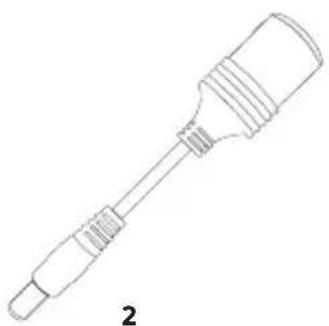
| 2 5.5mm DC5521 to Cigarette Lighter adapter 1 | ||
| 3 AC charger 1 | ||
| 4 Instruction manual 1 | ||

natural_image
Line drawing of a rectangular device with rounded corners and a central screen (no text or symbols)1
natural_image
Line drawing of a mechanical tool or connector with threaded end and flange (no text or symbols)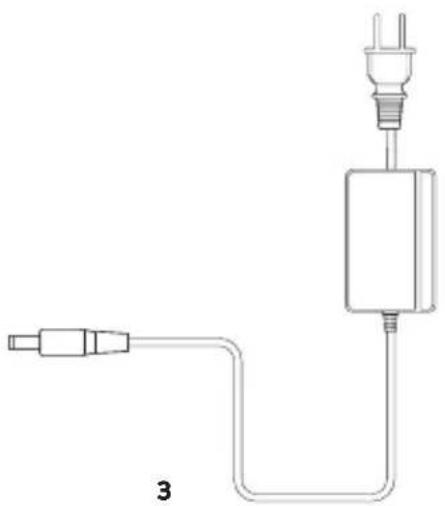
natural_image
Pure electrical circuit lines without any symbols
AGFAPHOTO
User Manual
POWERCUBE
100Pro
4
2. INTRODUCTION
Congratulations on purchasing the "AgfaPhoto POWERCUBE 100Pro" mobile socket. With 88.8 Wh of stored energy, you can supply electronic devices with power anytime and anywhere, be it when camping, at an outdoor photo shoot, in your motorhome, in the event of an emergency or a power failure.
Note the following points while reading through this instruction manual:
Contact us should you have any questions relating to the product.
Disclaimer
other accidents, intentional misconduct on the part of the customer, abuse or other abnormal conditions.
warranty terms and conditions are beyond our responsibility.
instruction manual.
our website: www.portable-power-stations.com.
electronic devices with a maximum power consumption of 80W continuous, 120W peak. Our product is not suitable to be used with equipment that relates to one's own personal safety or which relies heavily on electricity, such as medical devices, equipment for nuclear facilities, the manufacture of air and spacecraft, etc. We therefore assume no liability for accidents involving personal safety, fires or machine failures caused by using our product with the aforementioned devices.
2. SAFETY INSTRUCTIONS
Observe these instructions to ensure safe usage.
Explanation of symbols
 | This symbol together withDANGER means | Noncompliance may very likely lead to serious injury or death. |
 | This symbol together withWARNING means | Noncompliance may lead to serious injury or death. |
 | This symbol together withCAUTION means | Noncompliance may lead to injuries and/or property damage. |
 | This symbol together withATTENTION means | Noncompliance may damage the unit. |
to complications, hospitalization or permanent treatment.
atment.

This device complies with part 15 of the FCC Rules. Operation is subject to the following two conditions: (1) This device may not cause harmful interference, and (2) this device must accept any interference received, including interference that may cause undesired operation.
DANGER

Do NOT disassemble, repair or modify the unit or the battery.
Doing so may result in electric shock, fire, etc.
Do NOT place the unit close to or in a fire or expose it to heat. Keep out of direct sunlight.
Doing so may result in fire or injuries.
Do NOT charge, use or store the unit in a bathroom or in an area exposed to rain or moisture.
Doing so may result in electric shock, fire, etc.
Only use the output socket to power external devices. Never connect the output to mains power under any circumstances.
Connecting to the mains may lead to electric shock, injuries or fire.
Do NOT touch the unit or the plug-in points if your hands are wet.
Doing so may result in electric shock.
Do NOT connect any metallic objects to the AC input or output.
Doing so may result in electric shock, fire, etc.
Do NOT rub your eyes if fluid from inside the unit should get in your eyes.
If this should occur, flush eyes with water and seek medical attention immediately.
This can lead to blindness.
Do NOT dispose the unit together with household waste.
Follow the local law to dispose the unit.
Do NOT use any inappropriate power cords.
Doing so may result in electric shock, fire, etc.
Do NOT operate the unit above the specified input voltage.
Doing so may result in electric shock, fire, etc.
Do NOT use the unit if it is not functioning correctly.
Doing so may result in electric shock, fire, damage to the unit, etc.
Do NOT move the unit if it is recharging or in use.
Doing so may result in electric shock, damage to the unit or other injuries.
WARNING

Use and store the unit only in a clean and dry environment. Do not use and store in dusty and wet environment.
Failure to do so may result in a short circuit, smoke or fire if metal dust or small metallic parts come in contact with the connections.
Check the unit prior to every use. Do not use the unit if it is damaged, broken.
If you notice that the unit has any damage or cracks, is broken, or has other abnormalities, do NOT continue to use the unit and contact your dealer or our customer service center.
Do not use the unit if the power cord is damaged or broken.
Keep the unit away from children. Do NOT let children use the power supply unit.
Doing so may result in an accident or injuries. This unit must not be used by children. The unit and its connection cables must be kept out of reach of children. Children must not play with the unit.
This unit may only be used by persons with reduced physical, sensory or mental capabilities or lack of experience and knowledge if they are monitored or have been instructed in how to safely use the unit and understand the resulting risks.
Keep this product away from pets.
Do NOT use or store the unit in an area or environment with high temperature.
Doing so may cause the unit to deform or overheat.
Should fluid from inside of the unit come in contact with your skin or clothing, wash the affected areas with tap water.
Contact with the fluid may result in injuries.
In a storm, unplug the power cord from the socket.
A storm may result in an overcurrent coming from the socket, resulting in overheating, fire or other accidents.
Do NOT charge the unit via power supply systems that operate outside of 100-240V.
That may otherwise result in overheating, fire, etc.
Do NOT place the unit on its side or upside down while in use or storage.
Doing so may result in leakage or cause the unit to overheat leading to other accidents.
CAUTION

If rust, peculiar odors, overheating or other abnormal circumstances are observed, stop using the unit immediately and contact the dealer or our customer service center.
The unit complies with all legal requirements for transport of dangerous goods.
The capacity of the lithium battery pack in the unit exceeds 80 Wh.
Based on international standards: If this unit is to be sent by airplane, it must be transported in accordance with IATA standard packaging. IATA instructions and labelling requirements and the relevant declarations must be completed.
Make sure that the unit is properly secured when transporting it in a motor vehicle.
Failure to do so may result in damage to the unit, electric shock, overheating, fire and other accidents.
Only charge and use the unit within an ambient temperature of -10 to 40 °C (14 - 104 °F).
Operating the unit above or below this temperature range may result in overheating or reduced performance.
Switch the unit off immediately if it has accidentally fallen, was dropped or was exposed to vibrations.
To prevent accidents, please contact the dealer or our customer service center to have the unit checked and repaired.
Carefully read the instructions for the electric devices that you intend to connect to your power supply unit.
Make sure that the device you are connecting is switched off before you connect it.
A device starting up suddenly may lead to accidents or injuries.
If the protective function is activated and the output of the device is switched off, disconnect the electric devices from the power output. Switch the unit off in case of non-use/storage in order to prevent electric shock and the battery from discharging unnecessarily, etc.
4. TRANSPORTATION
- Carry the unit with both hands.

ATTENTION

Keep the unit away from other objects when moving.

ATTENTION

Take extra care to ensure that the unit is never allowed to fall to the ground.
- Placing the unit on a stable surface.

ATTENTION

Place the unit on a stable surface. By doing so, it is easier to read the indicators.
- Transporting the device.

DANGER

The unit should not be subjected to any impact or vibrations.
Otherwise there is a risk of fire.
Keep the unit's original packaging and use it when you need to transport the unit.
5. GET TO KNOW YOUR AgfaPhoto POWERCUBE 100Pro
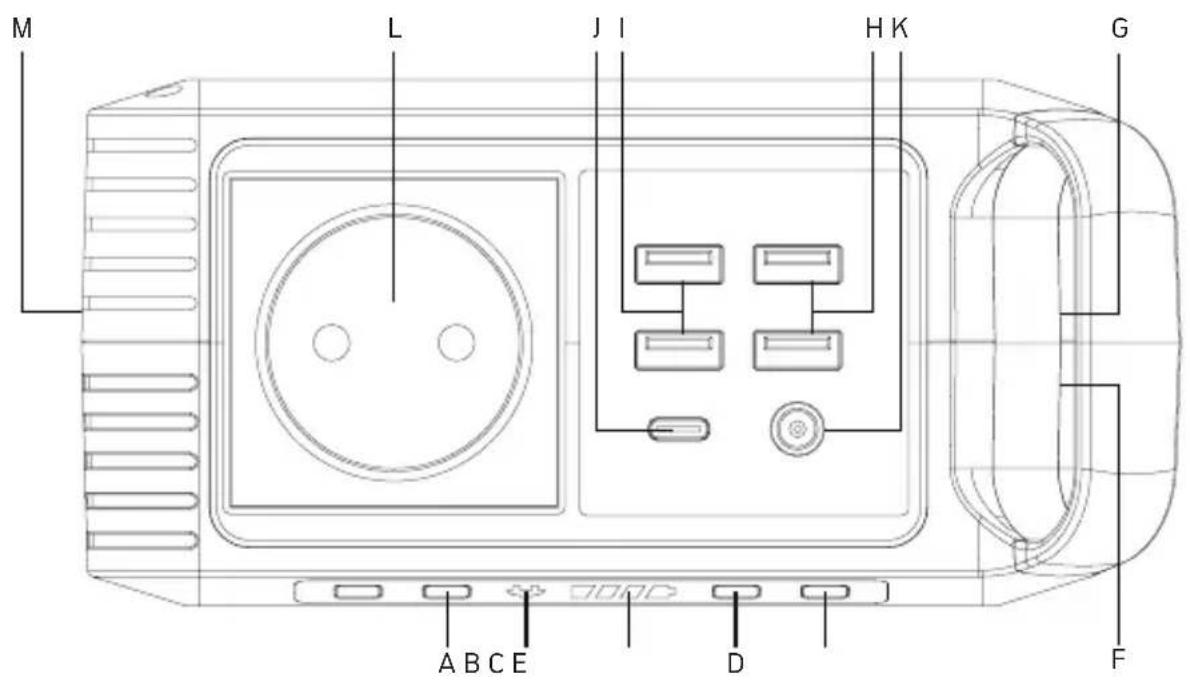
Button and connector explanations
A. AC Output On/Off Button
B. AC Indicator
C. Battery-Indicator
D. Power On/Off Button
E. LED Lightpanel On/Off Button
F. Cooling vents
G. Input: 1x 3.5mm DC35135 Input 15\~24 V, 1.2 A max.
H. Output #1: 2x USB 5 V, 2.4 A (Total 4.8 A max.)
I. Output #2: 2x USB 5-12 V, 2 A [Total 5 V, 3.4 A, 18 W max.] | QualcommQuickCharge™ 3.0
J. Output #3: 1x Type-C 5 V, 3 A / 9 V, 2 A / 12 V, 1,5 AD 3.0 (18 W max.)
K. Output #4: 1x 5.5mm DC5521 12-16.8 V, 10 A (13 A max.)
L. Output #5: 1x AC 230 V / 50 Hz 80 W (120 W max.)
M. Ultrabright LED Lightpanel
6. CHARGING
Before use or storage, plug your AgfaPhoto POWERCUBE 100Pro into the wall until it is fully charged. If the display shows less than 20% capacity, plug it into a power source, like an AC outlet or a solar panel as soon as possible.

Only charge the unit when the ambient temperature is between -10 and +40 °C (14 - 104 °F).
6.1. WHAT IT CAN POWER

LED Light (5W) \~17 hrs

Cellphone (5.5Wh) \~16 recharges

Camera batteries (7.5 Wh) \~12 recharges
natural_image
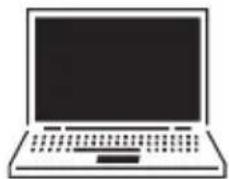
Simple line drawing of a laptop computer with no text or symbols12" Notebook (85 Wh) \~1 recharge
6.2. BATTERY INDICATOR
The battery indicator shows the total charge remaining in your AgfaPhoto POWERCUBE 100Pro.


Charging time may vary depending on the ambient temperature involving the solar charger. End the charging process by switching off the unit and pulling the plug out of the socket.
6.3. CHARGING VIA MAINS POWER SUPPLY
Using the included AC Wall Charger, plug the unit into any wall outlet to charge the unit. You will know the unit is charging when the blue LED battery indicators are blinking. The unit is fully charged when all battery indicators stop blinking and remain solid. After the unit is fully charged, please remove the AC wall charger in time.
6.4 CHARGING VIA SOLAR PANEL

3.5mm DC35135 15V\~25V/1.2A max.
- Place your solar panel where it will get as much direct sunlight as possible.
- Plug the output of the solar panel into the input of the unit to start charging.
You will know the unit is charging when the blue LED battery indicator lights up and flashes.
The unit is fully charged when all battery indicators stop flashing and remain solid.
7. TECHNICAL SPECIFICATIONS
General Informations
| Net. Weight 1.04kg (2.29 lb$) |
| Working temperatures -10°C - +40°C (14°F - 104°F) |
| Dimensions (LxWxH) 165 x 80 x 117 mm (6.49 x 3.14 x 4.60 inch) |
| Certificates CE, FCC, UN38.3 |
Battery
| Cell type Lithium-Ion | |
| Output | Capacity 80W continuous, 120W peak | 88.8 Wh | |
| Lifecycles >500 | |
| Management system | Overcharge Protection, OverDischarge Protection, OverCurrent Protection, OverPower Protection, Short-Circuit Protection |
Ports
| Input | 1x 3.5mm DC35135 15~24V, 1.2A max. | |
| Output | 2x USB 5 V, 2.4 A (Total 4.8 A max.) | |
| Output| 2x USB (QC 3.0) 5-12 V, 2 | A (Total 5 V, 3.4 A, 18 W max.) |
| Output | 1x Type-C (PD 3.0) 5 V, 3 A | / 9 V, 2 A / 12 V, 1.5 A (18 W max.) |
| Output | 1x 5.5mm DC5521 | 12-16.8 V, 10A (13A max.) |
| Output | 1x AC | 230V/50Hz 80W (120W max.) |
8. USING THE AgfaPhoto POWERCUBE 100Pro
How to provide power for AC appliances with AgfaPhoto POWERCUBE 100Pro?
Connect the power cable plug of the electrical appliance to the AC outlet of the product, switch on the power button and the unit will start providing power to your appliances.

WARNING

AC outlets, AC voltage and frequencies are different in different countries. Please carefully check whether the product specifications are consistent with the appliance specifications before use.
Limited Appliance Wattage <80W.

natural_image
Line drawing of a handheld device with control panel and power plug (no text or symbols)Lamps, Electric Fans, TVs, etc.
AC will shutdown when it's short circuited or power overloaded. Remove the device and the unit will recover from short-circuit or overpower protection in a few seconds. Repress the AC output button to switch on AC output again.
How to provide power for Type-C or USB devices with AgfaPhoto POWERCUBE 100Pro?
Connect the cable of your device to the Type-C or one of the 4 USB port of the AgfaPhoto POWERCUBE 100Pro. You can even use different ports simultaneously.


NOTE

Some smart devices, such as bluetooth headphones and LED lights require a very small input current to charge, which could be less than 150mA. Powercube 100Pro can charge these kind of smart devices without turning on the AC outlet. Press the power button for 3-5 seconds and the USB output ports and the battery indicators will turn on and start charging your USB devices.
After your devices are fully charged, please switch off the Powercube 100Pro.
8. USING THE AgfaPhoto POWERCUBE 100Pro

This product supports Qualcomm QuickCharge™ 3.0 output. It supports 5V-12V / 2A max output for smart devices which also support Qualcomm QuickCharge™ 3.0.
The actual output voltage and current depends on the actual smart devices. It can be obtained by consulting the smart device manufacturer.
How to provide power for DC 12V appliances (such as head lamp, fans) with AgfaPhoto POWERCUBE 100Pro?
Plug your appliances to the DC output port and press power switch button to gain power.


Please make sure whether your DC 12V appliance supports charging with 5.5mm DC header interface (the diameter of the DC Port of the product is 5.5 mm).
Otherwise it is unable to connect with the DC output, but you can buy the corresponding adapter and connect your appliance with it.

The DC output voltage range is between 12V\~16.8V, maximum output current is 10.8A. DC output voltage drops or increase while battery capacity drops or increase due to chemical characteristics of the battery. If your appliance is not built-in input voltage stabilizing function, it may shutdown when input voltage is too low or too high. If your 12V devices can not work due to input voltage is too high, please read the device manual or consult the device manufacturer to get the input voltage range of your device.
Best-use
indicator.
CUBE 100Pro can drop quickly and you will not be able to extract the entire 88.8Wh of energy.
you will be able to extract close to the full 88.8Wh from AgfaPhoto POWERCUBE 100Pro. If you're experiencing shorter times, you can check the device's power requirement.
Appropriate temperature usage
temperature is between -10 - 40°C. Outside this temperature range, the system automatically stops charging but will restart once the temperature is back inside the acceptable range.
temperature is between -10 - 40 °C. Outside this temperature range the system automatically stops charging your device but will restart once the temperature is back inside the acceptable range.

ATTENTION

Make sure that the electronic device you are powering works properly prior to use. The max. power consumption for electronic devices is 80W continuous and 120W peak. Due to the different types of electric devices, it is possible that they may not operate even if their power consumption is less than 80W.
9. TROUBLESHOOTING
If your devices are not recharging as they should using AgfaPhoto POWERCUBE 100Pro follow these steps:
- Ensure the device has been switched on and the battery indicator is showing a remaining charge.
- Check the battery indicator. If it is at 20% or below, recharge your AgfaPhoto POWERCUBE 100Pro.
- Verify your device is suitable for use with the AgfaPhoto POWERCUBE 100Pro.
a. All AgfaPhoto POWERCUBE 100Pro output ports have their own max. power. Check the AgfaPhoto POWERCUBE 100Pro's technical specifications to ensure your device is compatible.
b. Some devices with rechargeable batteries, like laptops and tablets, may draw more power when in use. In these cases, power down your device and recharge it.
What should I do if the unit gets wet?
Immediately turn off the unit and wait until you are certain that it is completely dry before turning it back on. If you are unsure about when it is safe to turn it back on, please contact after sales service.
10. FREQUENTLY ASKED QUESTIONS (FAQ)
1. What type of battery is in my AgfaPhoto POWERCUBE 100Pro?
AgfaPhoto POWERCUBE 100Pro contains a 88.8Wh lithium ion battery pack. Lithium ion batteries are much smaller and lighter than normal lead-acid batteries and also can be cycled many more times.
2. How do I know If my AgfaPhoto POWERCUBE 100Pro is charged?
To check the charge level of your AgfaPhoto POWERCUBE 100Pro, refer to the battery indicator. The number of bars you see indicates the remaining power. AgfaPhoto POWERCUBE 100Pro can be used until it is empty but we recommend to recharge when the level is at one bar.
3. Can I charge the AgfaPhoto POWERCUBE 100Pro while supplying power at the same time?
Yes. All outputs support simultaneous charging and discharging. Please note, however, that this only makes sense with a remaining battery capacity of more than 10%. Please also be aware, that if the battery voltage is less than 13V, the inverter will shut down due to battery cell protection.
4. Can I take my AgfaPhoto POWERCUBE 100Pro on a plane?
Yes, it is possible to carry the AgfaPhoto POWERCUBE 100Pro in your hand luggage. But please always check the individual restrictions of your airline and your country. However, keeping the AgfaPhoto POWERCUBE 100Pro in the checked baggage is not permitted for safety reasons as it contains lithium ion batteries.

ATTENTION

The unit provides Modified Sine Wave output, and can be compatible to AC electric appliances that work with sinusoidal waveform (power <80W).
However, anything that uses an AC motor isn't going to work to full capacity on a modified sine wave, such as an electrical fan. It will even make the electric appliance arouse some noise.
Appliances like refrigerators, microwaves, and compressors that use AC motors and some delicate medical equipment should use a product with a pure sine wave inverter.
This product is only used for emergency, it cannot replace the normal alternating current, for long-term use, please adapts the power station specification required by electrical appliances.
AgfaPhoto POWERCUBE 100Pro is not suitable for use with a device with an electric motor.
11. STORAGE AND DOWNTIME MAINTENANCE
1. Charging to maximum capacity
Fully charge the power supply unit prior to long-term storage. Charge the power supply unit at least once every three months and store the power supply unit only in a dry and dust-free environment which is out of reach of children. Suitable storage temperature: -10 to 40°C (14 - 104 °F). Keep out of direct sunlight. Make sure that the unit rests on a stable surface.
2. System shutdown
If the system shuts down automatically because of lower battery capacity, please recharge it.
3. Cleaning
Wipe away any dirt using a damp cloth.

ATTENTION

Gasoline, thinner, kerosene, petroleum, etc. have the characteristics of solvents. Do not use.
4. Failure
Failure to maintain your AgfaPhoto POWERCUBE 100Pro by following these steps can result in battery damage which will void the product warranty.
12. SERVICE LIFE OF LITHIUM ION BATTERIES
Charge, supply current between -10 and 40°C (14 - 104 °F). Store between -10 and 45°C (14 - 113 °F).
Using the battery at temperatures outside the lower and upper limits reduces the battery's running time.
Do not connect a continuous load of more than 80 W.
The unit's output stops automatically in case of overloading, since it reduces the running time of the battery.
Do not continue to charge the battery after it has charged completely.
Pay attention to the indicated capacity. Do not charge the battery once it has been fully charged or the charging process has been concluded. Otherwise the service life of the lithium battery may be reduced.
Switch off the unit if it is not being used.
Unnecessary power consumption also reduces the running time of the lithium battery.
Fully charge the battery prior to placing it in storage.
Fully charge the power supply unit prior to lengthy periods of non-use for storage and recharge the unit at least once a year. After prolonged storage, it may be necessary to charge and discharge the battery several times in order to reach full capacity.
13. DISPOSAL AND RECYCLING

Lithium ion battery
As soon as the end of the battery's service life is reached, the entire lithium ion battery can be recycled. Do not open or disassemble the unit.

natural_image
Simple line drawing of a trash bin with crossed lines indicating no waste or discharge (no text or symbols)Electric device
Old electric devices may not be disposed together with normal household waste. According to the directive 2012/19/EU, the device must be disposed of in a controlled manner at the end of its service life. The recyclable materials contained in the unit shall be sent to recycling to reduce the burden on the environment.
This unit contains lithium ion batteries. These are hazardous materials and are subject to specific transport and handling regulations. Lithium ion batteries may ignite or explode if handled incorrectly.
For the safe disposal of the unit, contact a collection point or your local municipality for more information and indicate that the unit contains lithium batteries.
Package
The product package consists of recyclable materials. Dispose of these in an environmentally friendly manner and sort the materials in the provided collection systems.
REPAIR TERMS AND CONDITIONS
- In the case of device failure which can be attributed to poor workmanship, please take the original sales receipt with purchase date (invoice, etc.) to the retail store. In case of normal use, the power supply unit will be repaired or replaced free of charge within the two year warranty period. In addition to that, the customer must bear any shipping charges that may occur.
- Note that we do not assume any liability for consequential damages (foreseeable damages, psychological damages, etc.).
14. CUSTOMER SERVICE
Contact distributor for technical support/customer service
| EUROPE [GBT GmbH] | ||
| An Gut Nazareth 18A52353 DürenGermany | Telephone:+49 (0) 2421 / 20 85 60 | E-Mail:info@gbt-international.com |


- INHALTSVERZEICHNIS
- AGFAPHOTO
- INTRODUCTION
- Note the following points while reading through this instruction manual:
- Disclaimer
- SAFETY INSTRUCTIONS
- DANGER
- WARNING
- CAUTION
- The unit complies with all legal requirements for transport of dangerous goods.
- Make sure that the unit is properly secured when transporting it in a motor vehicle.
- Only charge and use the unit within an ambient temperature of -10 to 40 °C (14 - 104 °F).
- Switch the unit off immediately if it has accidentally fallen, was dropped or was exposed to vibrations.
- Carefully read the instructions for the electric devices that you intend to connect to your power supply unit.
- Make sure that the device you are connecting is switched off before you connect it.
- TRANSPORTATION
- ATTENTION
- GET TO KNOW YOUR AgfaPhoto POWERCUBE 100Pro
- Button and connector explanations
- CHARGING
- WHAT IT CAN POWER
- BATTERY INDICATOR
- CHARGING VIA MAINS POWER SUPPLY
- CHARGING VIA SOLAR PANEL
- TECHNICAL SPECIFICATIONS
- USING THE AgfaPhoto POWERCUBE 100Pro
- How to provide power for Type-C or USB devices with AgfaPhoto POWERCUBE 100Pro?
- NOTE
- How to provide power for DC 12V appliances (such as head lamp, fans) with AgfaPhoto POWERCUBE 100Pro?
- Best-use
- Appropriate temperature usage
- TROUBLESHOOTING
- If your devices are not recharging as they should using AgfaPhoto POWERCUBE 100Pro follow these steps:
- What should I do if the unit gets wet?
- FREQUENTLY ASKED QUESTIONS (FAQ)
- What type of battery is in my AgfaPhoto POWERCUBE 100Pro?
- How do I know If my AgfaPhoto POWERCUBE 100Pro is charged?
- Can I charge the AgfaPhoto POWERCUBE 100Pro while supplying power at the same time?
- Can I take my AgfaPhoto POWERCUBE 100Pro on a plane?
- STORAGE AND DOWNTIME MAINTENANCE
- Charging to maximum capacity
- System shutdown
- Cleaning
- Failure
- SERVICE LIFE OF LITHIUM ION BATTERIES
- DISPOSAL AND RECYCLING
- Lithium ion battery
- Electric device
- Package
- REPAIR TERMS AND CONDITIONS
- CUSTOMER SERVICE
Brand : AGFAPHOTO
Model : POWERCUBE 100Pro
Category : Power bank