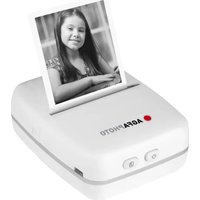
Realipix Pocket P - Printer AGFAPHOTO - Free user manual and instructions
Find the device manual for free Realipix Pocket P AGFAPHOTO in PDF.


Pick your language and provide your email: we'll send you a specifically translated version.
| Product Type | Portable Photo Printer |
| Brand | AgfaPhoto |
| Model | Realipix Pocket P |
| Dimensions | 12 x 8 x 2 cm |
| Weight | 200 g |
| Power Supply | Rechargeable lithium-ion battery |
| Print Technology | ZINK (Zero Ink) |
| Print Resolution | 313 x 400 dpi |
| Paper Size | 2 x 3 inches (5 x 7.6 cm) |
| Connectivity | Bluetooth, NFC |
| Main Features | Wireless printing, mobile app, collage, effects |
| Care and Cleaning | Clean the exterior with a soft, dry cloth |
| Safety | Do not expose to moisture, use only the supplied charger |
| Spare Parts and Repairability | Paper and charger available, repair by an authorized professional |
| General Information | Inkless printing, compatible with iOS and Android |
Frequently Asked Questions - Realipix Pocket P AGFAPHOTO
How to connect the printer to my smartphone?
Enable Bluetooth on your smartphone and the printer. Open the Realipix app and follow the pairing instructions. You can also use the NFC function by bringing your phone close.
What type of paper should I use?
Use ZINK paper in 2x3 inch (5x7.6 cm) size specially designed for inkless printers, available under the AgfaPhoto reference.
How long does the battery last?
The built-in lithium-ion battery provides about 20 prints per full charge. Recharge via the supplied micro-USB cable.
Can I print photos from a computer?
No, the Realipix Pocket P printer is designed for mobile use only via Bluetooth with smartphones and tablets.
How to clean the printer?
Turn off the device and unplug it. Use a soft, slightly damp cloth (no chemicals) to clean the casing. Clean the rollers with a cotton swab if necessary.
What to do if the printer does not turn on?
Check that the battery is charged (plug into mains for 30 min). If the problem persists, try a different charging cable. Contact customer service if nothing works.
Are the prints water-resistant?
ZINK prints are resistant to fingerprints and light moisture, but are not fully waterproof. Avoid prolonged exposure to water.
How to add filters or frames to my photos?
Use the Realipix app. Import or take a photo, then use the built-in editing tools to add filters, frames, text, and collages before printing.
Where to buy replacement paper?
ZINK paper is available on the official AgfaPhoto website, at authorized dealers, and on major online platforms. Check compatibility with your model.
Is the printer compatible with all smartphones?
It is compatible with most Android (version 5.0+) and iOS (version 8.0+) smartphones. Download the Realipix app from Google Play Store or the App Store.
User questions about Realipix Pocket P AGFAPHOTO
0 question about this device. Answer the ones you know or ask your own.
Ask a new question about this device
No questions yet. Be the first to ask one.
Download the instructions for your Printer in PDF format for free! Find your manual Realipix Pocket P - AGFAPHOTO and take your electronic device back in hand. On this page are published all the documents necessary for the use of your device. Realipix Pocket P by AGFAPHOTO.
USER MANUAL Realipix Pocket P AGFAPHOTO



Manual assistant
Powered by Anthropic
Waiting for your message
Product information
Brand : AGFAPHOTO
Model : Realipix Pocket P
Category : Printer