
Realipix Moments - Printer AGFAPHOTO - Free user manual and instructions
Find the device manual for free Realipix Moments AGFAPHOTO in PDF.


| Product Type | Portable Photo Printer |
| Brand | AgfaPhoto |
| Model | Realipix Moments |
| Print Technology | ZINK (Zero Ink) Technology |
| Print Resolution | Up to 313 x 600 dpi |
| Print Size | 2” x 3” (5 x 7.6 cm) |
| Dimensions (W x H x D) | Approx. 118 x 75 x 24 mm (4.6 x 3.0 x 0.9 in) |
| Weight | Approx. 220 g (0.49 lb) with paper pack |
| Power Supply | Built-in rechargeable Li-ion battery (via micro-USB) |
| Connectivity | Bluetooth 4.0, NFC |
| Paper Capacity | 10 sheets ZINK paper pack included |
| Supported Paper Types | ZINK Photo Paper (adhesive-backed available) |
| Print Speed | Approx. 60 seconds per print |
| Compatible Apps | AgfaPhoto Realipix app (iOS, Android) |
| Battery Life | Print up to 20 photos per charge |
| Operating Temperature | 5°C to 40°C (41°F to 104°F) |
| Storage Temperature | -10°C to 50°C (14°F to 122°F) |
| Maintenance | Clean exterior with a soft, dry cloth; avoid liquids |
| Safety | Do not disassemble; avoid exposure to water; charge only with supplied cable |
| Spare Parts & Repairability | Contact AgfaPhoto support; paper packs available separately; device not user-serviceable |
| General Information | Designed for instant printing of memories; supports editing and filters via app |
Frequently Asked Questions - Realipix Moments AGFAPHOTO
User questions about Realipix Moments AGFAPHOTO
0 question about this device. Answer the ones you know or ask your own.
Ask a new question about this device
Download the instructions for your Printer in PDF format for free! Find your manual Realipix Moments - AGFAPHOTO and take your electronic device back in hand. On this page are published all the documents necessary for the use of your device. Realipix Moments by AGFAPHOTO.
USER MANUAL Realipix Moments AGFAPHOTO
natural_image
Product photo of a AGFAPHOTO printer with two children lying on the screen, placed beside a green plant (no text or symbols visible)English
Inserting Paper Cassette

1. Open the cassette cover.

2. Insert the paper facing the shiny side up. You can insert up to 20 sheets. Inserting over 21 sheets may cause a malfunction. Avoid touching the coated paper with your hands as it may affect the photo quality.

3. Open the printer's cassette cover.

4. Insert the cassette until it clicks into place.
Installing Realipix Moments

Choose the right place to put the Realpix Moments.
Place the printer on a table or other flat, stable surface.
Do not place the printer on an unstable or tilted surface
- Leave a minimum of 5 cm (2 in.) of open space around the printer.
- Leave a minimum of 20 cm (8 in) in front of the printer.
- Make sure the power cord is not interfering with the area where the paper comes in and out.
- Avoid using the printer in dusty areas. It may damage the printer or cause a malfunction.
Inserting cartridge
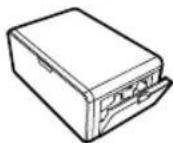
1. Open the cartridge cover.

2. Insert the cartridge using the arrow specified until you hear the clicking sound.

3. Press down and pull out the lever to exchange used cartridges.
For accessories available for sale, photo paper is provided for the amount of ink cartridge and print number.
- When inserting the cartridge, do not touch the ink sheet with your hand.
- Do not reuse used cartridges. This may cause a product malfunction.
APP Download

Android
1) Go to the PLAY STORE in the device.
2) Search for "Agfaphoto Realpix"
3) Install the application.
iOS
1) Go to the APP STORE in the device.
2) Search for "Agfaphoto Realpix"
3) Install the application.
Agfaphoto Realipix

MAC Address

Go to BLUETOOTH setting in your smart phone and find "AGFA-Realipix-XXXX". Printer name (XXXX) are variable 4 words.
APP Printing
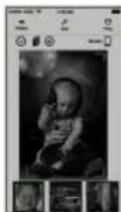
Choose a photo. To start printing push the print button in the App.
* You can find your printer Model No. on the label at the bottom of printer.
Power and LED status indicators
| Status | LED |
| Power on | Red LED blinking for 10 seconds then White LED |
| Power off (2 seconds) | None |
| Printing | White LED blinking |
| Firmware Update | Red LED blinking |
| No cartridge/Removing cartridge | Red LED blinking for 10 seconds then Yellow LED |
| No cassette/Removing cassette | Red LED blinking for 10 seconds then Yellow LED |
| No Paper | Red LED blinking for 10 seconds then Yellow LED |
| Error (Paper jam, etc) | Red LED blinking for 10 seconds then Yellow LED |
| Loading / Cooling | White LED |
Troubleshoot
| Indication | Solution |
| Paper jam | - Turn the printer off and on. The printer will automatically eject the paper. If problem is not solved, please contact Customer Support |
| Low resolution | - The resolution of the original photo may affect print quality. We recommend photo with 1280x2448 pixels and above. |
| Printer not printing | - Turn the printer off and on.- Check if the cartridge is inserted properly.- The printer will not print once it reaches a certain temperature. This is not a malfunction. Please wait until the printer cools down. |
Safety Precautions
Denotes the possibility of serious injury or death
- Use only recommended power sources.
- Do not attempt to disassemble, alter, or apply heat to the product.
- Avoid dropping or subjecting the product to severe impacts.
- Do not touch the interior of the product if it has been dropped otherwise damaged.
- Do not use, place, or store the product in the following places.
- Places with direct sunlight, places with a temperature higher than 40 (104), places with high humidity or dust, and places with strong vibrations.
- Stop using the product immediately if it emits smoke, a strange smell, or otherwise behaves abnormally.
- Do not use organic solvents such as alcohol, benzene, or thinner to clean the product.
- Do not let the product come into contact with water or other liquids.
- Do not allow liquids or foreign objects to enter the product.
- Do not handle the power cord with wet hands.
- Keep out of reach of children.
- Keep the printer in a safe area to avoid people from tripping over the power cord.
- Please keep you away at least 20cm distance from printer when printing.
Français
FCC (Federal Communications Commission)

This device complies with part 15 of the FCC Rules.
Operation is subject to the following two conditions:
(1) This device may not cause harmful interference, and
(2) This device must accept any interference received,
including interference that may cause undesired operation.
Notice of compliance for the European Union
Products bearing the CE mark comply with the applicable European directives and associated harmonised European standards.
Caution: Any changes or modifications to the equipment not expressly approved by the party responsible for compliance could void user's authority to operate the equipment.
This appliance and its antenna must not be co-located or operation in conjunction with any other antenna or transmitter.
A minimum separation distance of 20cm must be maintained between the antenna and the person for this appliance to satisfy the RF exposure requirements.
Portuguese
1 year limited warranty
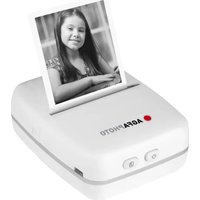

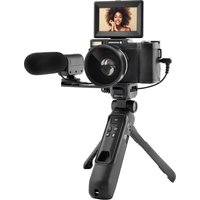

Brand : AGFAPHOTO
Model : Realipix Moments
Category : Printer