
FN-114201.3 - Fan Emerio - Free user manual and instructions
Find the device manual for free FN-114201.3 Emerio in PDF.


| Product Type | Desk Fan |
| Brand | Emerio |
| Model | FN-114201.3 |
| Power Supply | 220-240 V ~ 50/60 Hz |
| Power Consumption | 25 W |
| Speed Settings | 2 (Low, High) plus Off |
| Oscillation | Yes (push/pull knob) |
| Number of Blades | 3 |
| Fan Guard | Removable front and rear guards with clamping ring |
| Control Type | Push buttons (0: Off, 1: Low, 2: High) |
| Assembly Required | Yes (rear guard, blade, front guard, clamping ring) |
| Usage | Indoor use only |
| Cleaning Method | Wipe with damp cloth, dry carefully; clean grille with dry brush or vacuum |
| Safety Features | Motor shaft cover; guards prevent finger access |
| Warranty | 2 years |
| Disposal | Follow WEEE Directive 2012/19/EU |
| Power Cord | Fixed cord; replace only by qualified person if damaged |
| Minimum Age for Use | 8 years and above with supervision |
Frequently Asked Questions - FN-114201.3 Emerio
User questions about FN-114201.3 Emerio
0 question about this device. Answer the ones you know or ask your own.
Ask a new question about this device
Download the instructions for your Fan in PDF format for free! Find your manual FN-114201.3 - Emerio and take your electronic device back in hand. On this page are published all the documents necessary for the use of your device. FN-114201.3 by Emerio.
USER MANUAL FN-114201.3 Emerio
natural_image
Black electric fan with mesh grille and three blades, mounted on a stand (no visible text or symbols)Desk fan (EN)
Instruction manual – English ...... - 2 -
- This appliance can be used by children aged from 8 years and above and persons with reduced physical, sensory or mental capabilities or lack of experience and knowledge if they have been given supervision or instruction concerning use of the appliance in a safe way and understand the hazards involved.
- Children shall not play with the appliance.
- Cleaning and user maintenance shall not be made by children without supervision.
- If the supply cord is damaged, it must be replaced by the manufacturer, its service agent or similarly qualified persons in order to avoid a hazard.
- Incorrect operation and improper handling can lead to faults on the device and injuries to the user.
- In the event of improper use or incorrect handling, no liability can be accepted for any damage that may occur.
- Before you put the plug into the socket, please check that the type of current and mains voltage correspond to the instructions on the nameplate on the underside of the appliance.
- Do not immerse the unit or mains plug in water or other liquids. There is danger to life due to electric shock! However, if this should occur, remove the mains plug immediately and then have the unit checked by an expert before using it again.
- Do not operate the device if the mains cable or the mains plug show signs of damage, if the device has fallen on the floor or has been otherwise damaged. In such cases take the device to a specialist for checking and repair, if necessary.
-
Never remove the mains plug from the socket by pulling on the mains cable, or with wet hands.
-
Ensure that the mains cable does not hang over sharp edges or allow it to become trapped.
- Keep the appliance away from damp, and protect from splashes.
- Keep the appliance away from hot objects (e.g. hotplates) and open flames.
- Keep the appliance and its cord out of reach of children less than 8 years.
- Use the appliance on a flat, dry and heat resistance surface.
- Never leave the device unattended during use.
- Do not store or operate the appliance in the open air.
- Keep the appliance in a dry place, inaccessible to children (in its packaging).
- Never put fingers or any other objects through the fan guards when the fan is running.
- Never operate the product without the fan guards in place, as serious personal injury may result.
- The appliance must be assembled completely before use.
- Watch out for long hair! It can be caught in the fan owing to the air turbulence.
- Do not point the air flow to the people for a long time.
- Ensure that the fan is switched off from the supply mains before removing the guard.
PARTS DESCRIPTION
- Clamping ring
- Front fan guard
- Fan blade
- Guard fastening screw
- Rear fan guard
- Motor shaft
- Oscillation knob
- Speed buttons
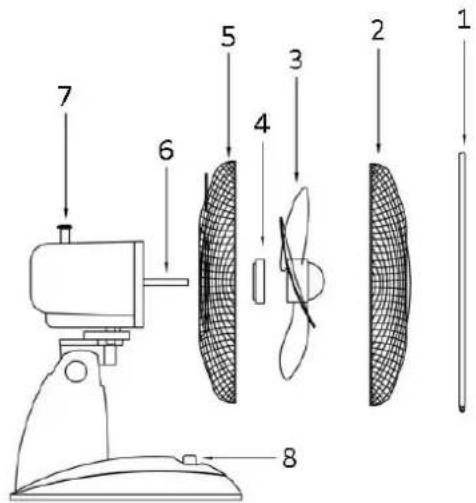
ASSEMBLING INSTRUCTION
- Rotate the guard fastening screw out of the motor shaft.
- Put the rear fan guard on the motor shaft and screw together with the guard fastening screw.
- Push the fan blade onto the motor shaft ensuring the blade fits firmly.
- Put the front fan guard against the rear fan guard and fix with the clamping ring. Make sure the clamping ring is set properly at the rim of the fan guards.
- Tighten the screw on the clamping ring.
OPERATING INSTRUCTIONS
- Plug the power cord into a suitable socket.
- Oscillation: to make the fan head oscillate, push down the oscillation knob. To stop the fan head from oscillating, pull up the oscillation knob.
- The fan is switched on using the push buttons on the control panel, i.e. 0: Off, 1 = low speed, 2 = high speed.
CAUTION: Press only one of the speed control button at a time. Permanent damage to the switch housing may result if two or more of the buttons are pressed simultaneously.
CLEANING
- Before servicing the fan and after each occasion of use, switch off the appliance and unplug the mains cable from the socket.
- Never immerse the appliance in water (danger of short-circuit). To clean the appliance, only wipe it down with a damp cloth and then dry it carefully. Always take out the mains plug first.
- Take care that excessive dust does not build up in the air-intake and air-outlet grille, and clean it occasionally using a dry brush or vacuum cleaner.
TECHNICAL DATA
Supply voltage: 220-240V \~ 50/60Hz
Power consumption: 25W
GUARANTEE AND CUSTOMER SERVICE
Before delivery our devices are subjected to rigorous quality control. If, despite all care, damage has occurred during production or transportation, please return the device to your dealer. In addition to statutory legal rights, the purchaser has an option to claim under the terms of the following guarantee:
For the purchased device we provide 2 years guarantee, commencing from the day of sale. If you have a defective product, you can directly go back to the point of purchase.
Defects which arise due to improper handling of the device and malfunctions due to interventions and repairs by third parties or the fitting of non-original parts are not covered by this guarantee. Always keep your receipt, without the receipt you can't claim any form of warranty. Damage caused by not following the instruction manual, will lead to a void of warranty, if this results in consequential damages then we will not be liable. Neither can we hold responsible for material damage or personal injury caused by improper use or if the instruction manual are not properly executed. Damage to accessories does not mean free replacement of the whole appliance. In such case please contact our service department. Broken glass or breakage of plastic parts is always subject to a charge. Defects to consumables or parts subjected to wearing, as well as cleaning, maintenance or the replacement of said parts are not covered by the warranty and are to be paid.
ENVIRONMENT FRIENDLY DISPOSAL
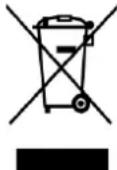
Recycling – European Directive 2012/19/EU
This marking indicates that this product should not be disposed with other household wastes. To prevent possible harm to the environment or human health from uncontrolled waste disposal, recycle it responsibly to promote the sustainable reuse of material resources. To return your used
device, please use the return and collection systems or contact the retailer where the product was purchased. They can take this product for environmental safe recycling.
MONTAGEANLEITUNG
MONTERINGSINSTRUKTION
INSTRUCTIES VOOR DE MONTAGE
KOKOAMISOHJEET
Brand : Emerio
Model : FN-114201.3
Category : Fan